"6ac84fdb0bd06614"{"id":"1000926","slug":"player-electricity-system","title":"Player Electricity System","category":"Gameplay Features","engine":"5.3+","assetVersion":"","engineVersion":"Engine Version: 5.3+","tag":"Gameplay Features","accent":"blue","visual":"city","summary":"Multiplayer electricity system for Unreal with 17 devices, snapping/non-snapping cable placement, device stats, and a customizable power info panel.","platform":"Unreal Engine","publishedAt":"2026-08-08T05:30:11.296Z","updatedAt":"2026-08-08T05:30:11.296Z","sourceNotes":[],"fileContents":[],"compatibility":["Unreal Engine","Engine Version: 5.3+"],"featuredImage":{"alt":"Player Electricity System","src":"/wp-content/uploads/published/2026/08/66f20ad90c0b-482f52d2-e85d-4762-9833-86d8a5b94442-9dc0b04e2b.webp"},"hasDownloadLink":true,"downloads":0,"terms":[{"taxonomy":"category","slug":"gameplay-features","name":"Gameplay Features"}],"galleryImages":[{"src":"/wp-content/uploads/published/2026/08/403e0a2545a5-35de08da-b624-483a-ab8d-5c5b92f48ec8-2793b5c230.webp","alt":"Player Electricity System"},{"src":"/wp-content/uploads/published/2026/08/49187dc144fa-af3b4d7e-00c2-403b-a7b3-969728b9be81-b1c7f5e181.webp","alt":"Player Electricity System"},{"src":"/wp-content/uploads/published/2026/08/c70cbf590dd7-aff62109-663b-40f5-a706-6e69688067dc-2bd45690e5.webp","alt":"Player Electricity System"},{"src":"/wp-content/uploads/published/2026/08/c41e1388b097-5d2aee19-7e4c-4fab-b3b0-213775626a84-e5b452237d.webp","alt":"Player Electricity System"},{"src":"/wp-content/uploads/published/2026/08/34ee73fe5650-7db33443-9f11-4d94-8ff0-c0599484319c-a7533689cc.webp","alt":"Player Electricity System"},{"src":"/wp-content/uploads/published/2026/08/e33094452e02-a4e95ec8-e946-4dca-982c-ed98f4a49d2c-bbd0b6286f.webp","alt":"Player Electricity System"},{"src":"/wp-content/uploads/published/2026/08/cd05afd8620b-3216084e-c785-4401-83db-f47b98d55073-5e9138caa1.webp","alt":"Player Electricity System"},{"src":"/wp-content/uploads/published/2026/08/31a0e7ae339e-25881c23-1f5a-4277-831d-3dbe1a91803e-0893de17eb.webp","alt":"Player Electricity System"},{"src":"/wp-content/uploads/published/2026/08/8d1cf8bda630-2a2caa0a-0532-4245-aa74-a4d6c8331f20-bb583f90f2.webp","alt":"Player Electricity System"},{"src":"/wp-content/uploads/published/2026/08/793f1d6d0627-ba1c78dc-0e5d-4a24-ad15-e8a8036cedf3-893eb46644.webp","alt":"Player Electricity System"}],"accessPanel":{"kind":"resource","title":"Download this resource","eyebrow":"Free Download","message":"Log in or create a free account to start your download.","fileName":"PlayerElectricitySystem.7z","safetyNote":"Resources are manually reviewed before listing to improve quality and reduce obvious risks.","actionLabel":"Download Free","resourceType":"Resource archive"},"contentHtml":"\u003cp\u003ePutting electricity into a Multiplayer project is rarely just about placing a generator and flipping a switch. It means dealing with Replication, placement rules, cable networks, and making sure each connected device knows what it is supposed to do. The \u003cem\u003ePlayer Electricity System\u003c/em\u003e is structured through that exact problem, offering a Multiplayer electricity system with 17 electrical devices, a placement system that supports snapping and non-snapping layouts, and device stats that bring power flow into view.\u003c/p\u003e\n\n\u003cp\u003eThe feature set is aimed at survival, build, and Replicated projects. It includes Multiplayer support, a Placement Menu, ownership, repair, pickup, and delete device actions, plus a \u003ccode\u003eSave System\u003c/code\u003e. There is also a Resource Respawn System and a 1st-Person/3rd-Person Camera Pair, which makes it easier to inspect and interact with the objects being placed.\u003c/p\u003e\n\n\u003ch2\u003e17 Devices Across Power, Switching, and Storage\u003c/h2\u003e\n\n\u003cp\u003eFor generation, the devices are a wind turbine, a generator, and a solar panel. For switching, there is a standard switch, a pressure plate, and a laser detector. For energy storage, the package provides a car battery, a large battery, and a medium battery. A flamethrower trap sits on the defensive side, using electricity to trigger damage.\u003c/p\u003e\n\n\u003cp\u003eThat is not the whole list, but the categories show the system's range. It can handle input, output, storage, and traps without pulling in separate asset packs. The power splitter and combiners add a way to branch circuits or merge multiple power sources into 1 line, so the layout is not limited to 1 single chain of devices.\u003c/p\u003e\n\n\u003ch3\u003ePower Splitter and Combiners\u003c/h3\u003e\n\n\u003cp\u003eWhen 1 generator needs to feed several lights or when several generators should feed a large battery, the splitter and combiners are the connection points. They let players distribute power to multiple branches or combine several inputs into 1 output, which reduces the number of direct lines you need to manage.\u003c/p\u003e\n\n\u003ch2\u003eSnapping, Cables, and Directional Flow: Placement in Practice\u003c/h2\u003e\n\n\u003cp\u003ePlacement is handled through a dedicated Placement Menu. Devices can be placed in snapping mode for clean alignment or in non-snapping mode for free positioning. \u003ccode\u003eSocket\u003c/code\u003e and non-socket placement adds another layer: certain devices can attach to predefined \u003ccode\u003eSockets\u003c/code\u003e, while others are placed directly on the world. Cables work the same way, with snapping and non-snapping placement available.\u003c/p\u003e\n\n\u003cp\u003eThe directional power system uses explicit Power Input and Output \u003ccode\u003eSockets\u003c/code\u003e. This is a practical detail, because it removes the guesswork from orienting connections. Instead of rotating a device and hoping the wire attaches to the correct side, the input and output \u003ccode\u003eSockets\u003c/code\u003e make it clear where power enters and where it exits.\u003c/p\u003e\n\n\u003ch2\u003eOwnership, Repair, and the Save System\u003c/h2\u003e\n\n\u003cp\u003eMultiplayer placement becomes messy when every player can modify every object. The \u003cem\u003ePlayer Electricity System\u003c/em\u003e includes ownership, which ties a device to the player who placed it. That player can repair, pick up, or delete the device. These actions are part of the core feature list, not an afterthought.\u003c/p\u003e\n\n\u003cp\u003eThe included \u003ccode\u003eSave System\u003c/code\u003e is there for keeping the build state, with a notable limitation: it does not support \u003ccode\u003eWorld Composition\u003c/code\u003e. That is worth checking early if the target project relies on that streaming method. A Resource Respawn System is also part of the package, and the 1st-Person/3rd-Person Camera Pair gives players a way to view and manage their builds from either perspective.\u003c/p\u003e\n\n\u003ch2\u003eDevice Stats, the Power Info Panel, and Unreal Widget Customization\u003c/h2\u003e\n\n\u003cp\u003eEach device has a set of stats: health, generated power, required power, stored power, battery input, and battery output. These show up in a power info panel User Interface (UI) that is designed to be clean and easy to read. Because it is built using Unreal Engine's \u003ccode\u003eWidget\u003c/code\u003e system, the panel can be customized without rebuilding it from scratch.\u003c/p\u003e\n\n\u003cp\u003eFor developers, the code base is commented and tooltips are included alongside documentation. That makes it possible to trace how the stats are calculated and how the panel picks up its values. The destruction effect is also present, so devices are not just abstract entities; when they break, that failure is visible in the world.\u003c/p\u003e\n\n\u003ch2\u003eWhere the \u003cem\u003ePlayer Electricity System\u003c/em\u003e Fits\u003c/h2\u003e\n\n\u003cp\u003eThe natural home for this system is a Multiplayer survival or building game where players need to place generators, run cables, and keep a power network alive. It is compatible with \u003cem\u003eSurvival Game Kit V2\u003c/em\u003e (\u003cem\u003eSGK V2\u003c/em\u003e), which makes it a direct extension for projects already using that kit. For projects not tied to a kit, the 17 included devices and the placement workflow still provide a working electricity base without building 1 from scratch.\u003c/p\u003e\n\n\u003cp\u003eDevelopers who want to understand or alter the behavior will find the commented code, tooltips, and documentation useful. The Multiplayer support and the ownership/save/repair loop make it a practical option for online sessions instead of 1-player-only utility.\u003c/p\u003e\n\n\u003ch2\u003eExplore Similar Assets\u003c/h2\u003e\n\u003cul\u003e\n\u003cli\u003e\u003ca href=\"https://3dcghub.com/player-farming-system/\" title=\"Player Farming System\"\u003ePlayer Farming System\u003c/a\u003e\u003c/li\u003e\n\u003cli\u003e\u003ca href=\"https://3dcghub.com/mgt-multiplayer-gravity-template/\" title=\"MGT Multiplayer Gravity Template\"\u003eMGT Multiplayer Gravity Template\u003c/a\u003e\u003c/li\u003e\n\u003cli\u003e\u003ca href=\"https://3dcghub.com/simple-screen-damage-indicator/\" title=\"Simple Screen Damage Indicator\"\u003eSimple Screen Damage Indicator\u003c/a\u003e\u003c/li\u003e\n\u003cli\u003e\u003ca href=\"https://3dcghub.com/multiplayer-xp-system/\" title=\"Multiplayer XP System\"\u003eMultiplayer XP System\u003c/a\u003e\u003c/li\u003e\n\u003cli\u003e\u003ca href=\"https://3dcghub.com/multiplayer-object-throwing-system/\" title=\"Multiplayer Object Throwing System\"\u003eMultiplayer Object Throwing System\u003c/a\u003e\u003c/li\u003e\n\u003c/ul\u003e","contentTextLength":5089,"navigation":{"current":334,"total":3181,"previous":{"id":"1000927","slug":"post-apocalyptic-melee-weapons-vol-1-post-apocalyptic-apo-survival-weapon","title":"Post Apocalyptic Melee Weapons VOL.1 ( Post Apocalyptic Apo Survival Weapon )","category":"Weapons \u0026 Combat","platform":"Unreal Engine","updatedAt":"2026-08-09T15:18:38.769Z"},"next":{"id":"1000925","slug":"planet-generator-planets-creator","title":"Planet Generator / Planets Creator","category":"Procedural Systems","platform":"Unreal Engine","updatedAt":"2026-08-08T05:23:41.932Z"}},"relatedResources":[{"id":"1000865","slug":"player-farming-system","title":"Player Farming System","category":"Gameplay Features","engine":"5.3+","assetVersion":"","engineVersion":"Engine Version: 5.3+","tag":"Gameplay Features","accent":"blue","visual":"mech","summary":"Multiplayer farming Blueprint with plant stats, growth stages, sickness, socket placement, 7 plants, 3 tools, 3 planters, Survival Game Kit V2.","platform":"Unreal Engine","publishedAt":"2026-08-05T06:42:26.659Z","updatedAt":"2026-08-05T06:42:26.659Z","sourceNotes":[],"fileContents":[],"compatibility":["Unreal Engine","Engine Version: 5.3+"],"featuredImage":{"alt":"Player Farming System","src":"/wp-content/uploads/published/2026/08/41a79560e065-b4125912-9555-45fb-b37f-36aeb529a75e-d4ec89e558.webp"},"hasDownloadLink":true,"downloads":1},{"id":"1000238","slug":"mgt-multiplayer-gravity-template","title":"MGT Multiplayer Gravity Template","category":"Gameplay Features","engine":"5.3+","assetVersion":"","engineVersion":"Engine Version: 5.3+","tag":"Gameplay Features","accent":"blue","visual":"mech","summary":"A dynamic gravity system for Unreal Engine utilizing the native character movement component to support full multiplayer replication for players, objects, and A","platform":"Unreal Engine","publishedAt":"2026-06-30T18:11:03.499Z","updatedAt":"2026-06-30T18:11:03.499Z","sourceNotes":[],"fileContents":[],"compatibility":["Unreal Engine","Engine Version: 5.3+"],"featuredImage":{"alt":"MGT Multiplayer Gravity Template","src":"/wp-content/uploads/published/2026/06/3e9b12a8f9cc-951e39e8-6c7b-4772-975c-e63141c701c5-5cf67fa1da.webp"},"hasDownloadLink":true,"downloads":0},{"id":"1000775","slug":"simple-screen-damage-indicator","title":"Simple Screen Damage Indicator","category":"Gameplay Features","engine":"5.4+","assetVersion":"","engineVersion":"Engine Version: 5.4+","tag":"Gameplay Features","accent":"blue","visual":"mech","summary":"A 100% Blueprint visual feedback system displaying a blood splatter overlay on hazard damage. Built for single-player prototyping with local multiplayer UI rend","platform":"Unreal Engine","publishedAt":"2026-07-28T18:07:04.744Z","updatedAt":"2026-07-28T18:07:04.744Z","sourceNotes":[],"fileContents":[],"compatibility":["Unreal Engine","Engine Version: 5.4+"],"featuredImage":{"alt":"Simple Screen Damage Indicator","src":"/wp-content/uploads/published/2026/07/5369eff53b58-641db878-ef1c-4892-ab16-112ae9023f3c-f070c8732a.webp"},"hasDownloadLink":true,"downloads":1}]}
Gameplay Features
Player Electricity System
Multiplayer electricity system for Unreal with 17 devices, snapping/non-snapping cable placement, device stats, and a customizable power info panel.
Putting electricity into a Multiplayer project is rarely just about placing a generator and flipping a switch. It means dealing with Replication, placement rules, cable networks, and making sure each connected device knows what it is supposed to do. The Player Electricity System is structured through that exact problem, offering a Multiplayer electricity system with 17 electrical devices, a placement system that supports snapping and non-snapping layouts, and device stats that bring power flow into view.
The feature set is aimed at survival, build, and Replicated projects. It includes Multiplayer support, a Placement Menu, ownership, repair, pickup, and delete device actions, plus a Save System. There is also a Resource Respawn System and a 1st-Person/3rd-Person Camera Pair, which makes it easier to inspect and interact with the objects being placed.
17 Devices Across Power, Switching, and Storage
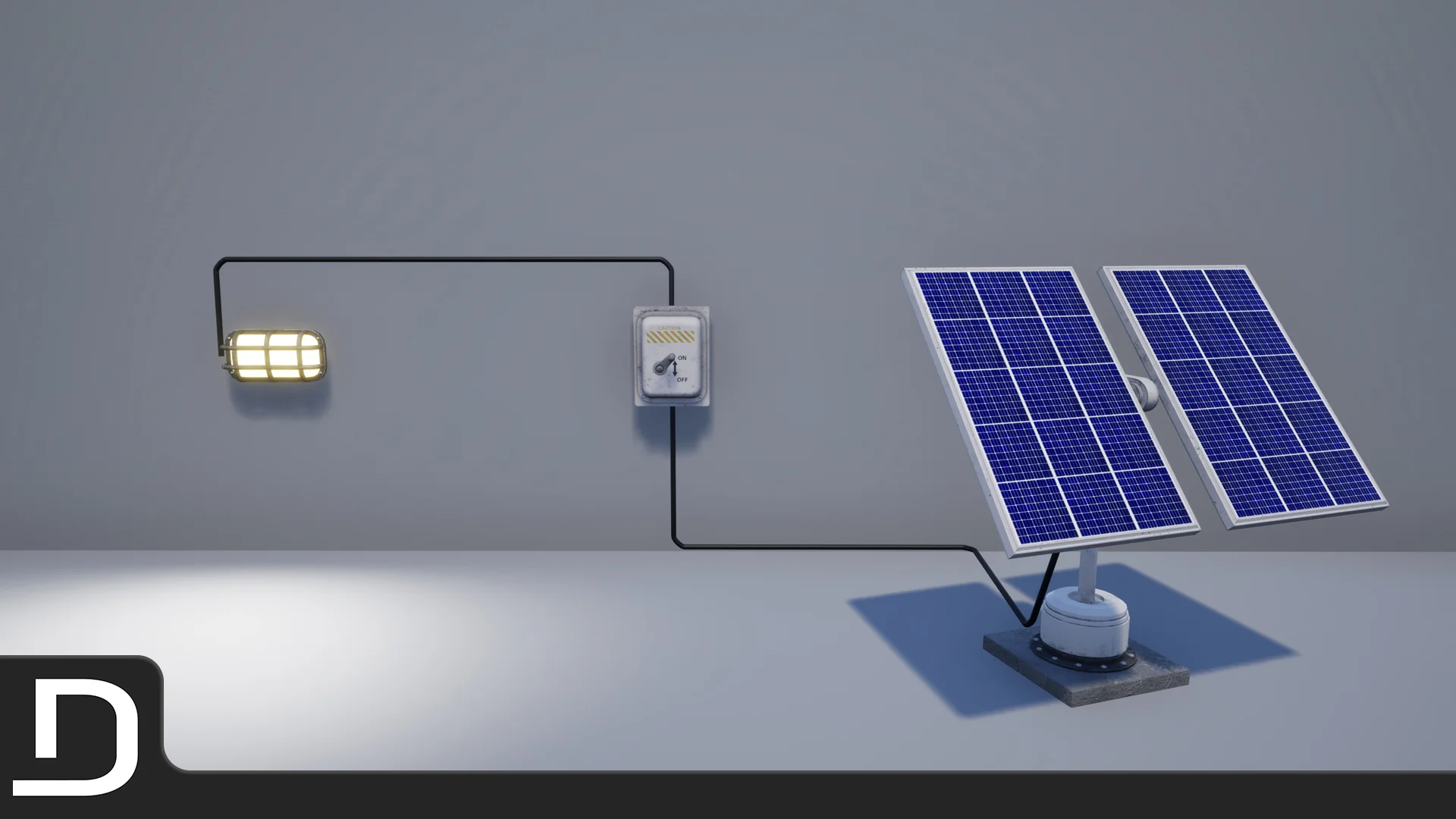
For generation, the devices are a wind turbine, a generator, and a solar panel. For switching, there is a standard switch, a pressure plate, and a laser detector. For energy storage, the package provides a car battery, a large battery, and a medium battery. A flamethrower trap sits on the defensive side, using electricity to trigger damage.
That is not the whole list, but the categories show the system's range. It can handle input, output, storage, and traps without pulling in separate asset packs. The power splitter and combiners add a way to branch circuits or merge multiple power sources into 1 line, so the layout is not limited to 1 single chain of devices.
Power Splitter and Combiners
When 1 generator needs to feed several lights or when several generators should feed a large battery, the splitter and combiners are the connection points. They let players distribute power to multiple branches or combine several inputs into 1 output, which reduces the number of direct lines you need to manage.
Snapping, Cables, and Directional Flow: Placement in Practice
Placement is handled through a dedicated Placement Menu. Devices can be placed in snapping mode for clean alignment or in non-snapping mode for free positioning. Socket and non-socket placement adds another layer: certain devices can attach to predefined Sockets, while others are placed directly on the world. Cables work the same way, with snapping and non-snapping placement available.
The directional power system uses explicit Power Input and Output Sockets. This is a practical detail, because it removes the guesswork from orienting connections. Instead of rotating a device and hoping the wire attaches to the correct side, the input and output Sockets make it clear where power enters and where it exits.
Ownership, Repair, and the Save System
Multiplayer placement becomes messy when every player can modify every object. The Player Electricity System includes ownership, which ties a device to the player who placed it. That player can repair, pick up, or delete the device. These actions are part of the core feature list, not an afterthought.
The included Save System is there for keeping the build state, with a notable limitation: it does not support World Composition. That is worth checking early if the target project relies on that streaming method. A Resource Respawn System is also part of the package, and the 1st-Person/3rd-Person Camera Pair gives players a way to view and manage their builds from either perspective.
Device Stats, the Power Info Panel, and Unreal Widget Customization
Each device has a set of stats: health, generated power, required power, stored power, battery input, and battery output. These show up in a power info panel User Interface (UI) that is designed to be clean and easy to read. Because it is built using Unreal Engine's Widget system, the panel can be customized without rebuilding it from scratch.
For developers, the code base is commented and tooltips are included alongside documentation. That makes it possible to trace how the stats are calculated and how the panel picks up its values. The destruction effect is also present, so devices are not just abstract entities; when they break, that failure is visible in the world.
Where the Player Electricity System Fits
The natural home for this system is a Multiplayer survival or building game where players need to place generators, run cables, and keep a power network alive. It is compatible with Survival Game Kit V2 (SGK V2), which makes it a direct extension for projects already using that kit. For projects not tied to a kit, the 17 included devices and the placement workflow still provide a working electricity base without building 1 from scratch.
Developers who want to understand or alter the behavior will find the commented code, tooltips, and documentation useful. The Multiplayer support and the ownership/save/repair loop make it a practical option for online sessions instead of 1-player-only utility.
 Gameplay Features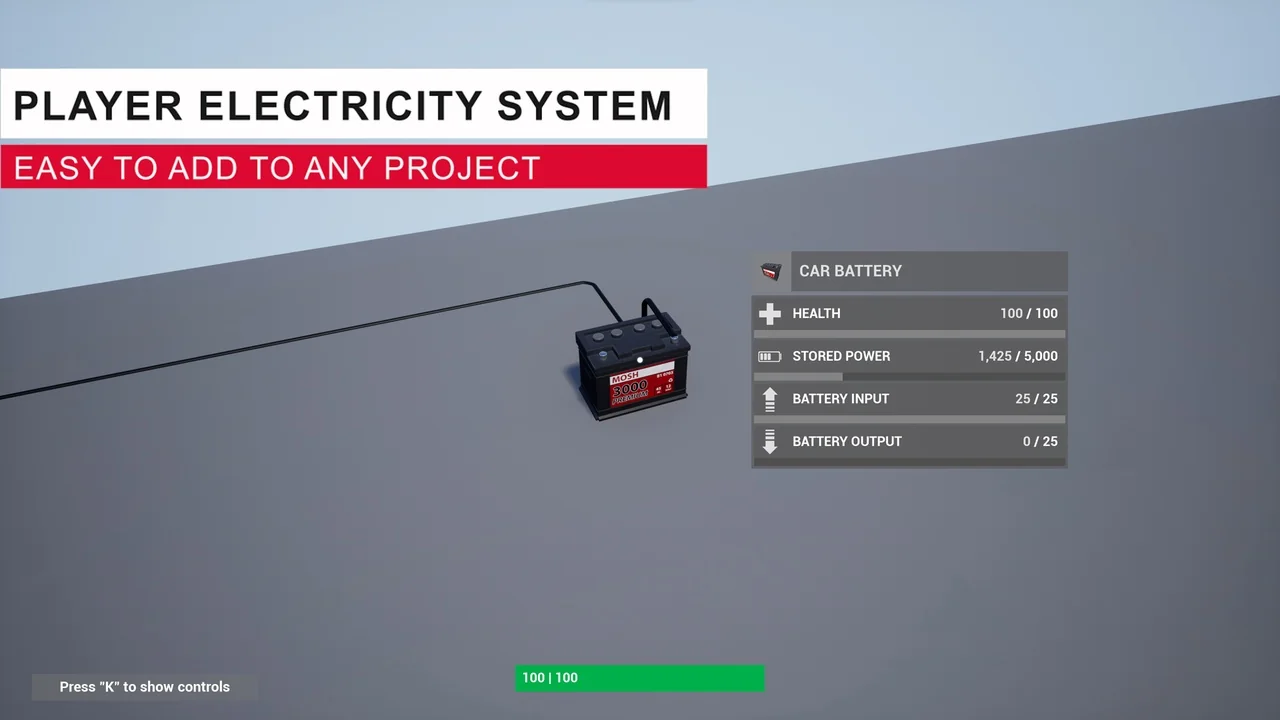
 Gameplay Features
 Gameplay Features
 Gameplay Features