"6f9bd6df1f44a86f"{"id":"1000854","slug":"multiplayer-traps-pack","title":"Multiplayer Traps Pack","category":"Gameplay Features","engine":"4.26+,5.0+","assetVersion":"","engineVersion":"Engine Version: 4.26+,5.0+","tag":"Gameplay Features","accent":"blue","visual":"mech","summary":"Blueprint multiplayer traps: spike plates, spinning saws, flamethrowers, swinging maces. Animation-free, no event tick, per-trap settings, mesh-swappable.","platform":"Unreal Engine","indexPolicy":"index","publishedAt":"2026-08-04T16:58:03.710Z","updatedAt":"2026-08-04T16:58:03.710Z","sourceNotes":[],"fileContents":[],"compatibility":["Unreal Engine","Engine Version: 4.26+,5.0+"],"featuredImage":{"alt":"Multiplayer Traps Pack","src":"/wp-content/uploads/published/2026/08/baa4c8cf0c46-aa3aeac9-d975-4dac-a312-19c77e90c7e5-c3127b0699.webp"},"hasDownloadLink":true,"downloads":3,"terms":[{"taxonomy":"category","slug":"gameplay-features","name":"Gameplay Features"}],"galleryImages":[{"src":"/wp-content/uploads/published/2026/08/06cf58ba22cf-2876d12b-f09c-48f1-81f7-14465ccf36a9-eb2415e84f.webp","alt":"Multiplayer Traps Pack"},{"src":"/wp-content/uploads/published/2026/08/0ebb628a6bc4-16c4a0d0-0da4-4e8a-a7e3-40cef08b8f78-458c8fce9b.webp","alt":"Multiplayer Traps Pack"},{"src":"/wp-content/uploads/published/2026/08/2c070ba14b99-ec121e74-7a22-4b4e-b394-79e2408f9012-4544dd48c4.webp","alt":"Multiplayer Traps Pack"},{"src":"/wp-content/uploads/published/2026/08/17695bf9c9c0-79bfc125-5f8b-47d4-b50f-3f3988e3d7ef-6dd34100a7.webp","alt":"Multiplayer Traps Pack"},{"src":"/wp-content/uploads/published/2026/08/b453b8259e3d-d100abf4-8180-4c3c-8697-ee3d0236d701-502fd85c9b.webp","alt":"Multiplayer Traps Pack"},{"src":"/wp-content/uploads/published/2026/08/73f68c4e113e-61e3fdaf-923b-4acc-829c-7172ef0cdd2f-3d3170a17e.webp","alt":"Multiplayer Traps Pack"},{"src":"/wp-content/uploads/published/2026/08/7ba1dde9c772-da40d50f-5c89-4cb4-a771-4bbbb2dcf1f9-f2454021d5.webp","alt":"Multiplayer Traps Pack"},{"src":"/wp-content/uploads/published/2026/08/10022b753b30-ca8d42f0-e551-4ebc-bd96-7854e00d1c09-671b0214b5.webp","alt":"Multiplayer Traps Pack"},{"src":"/wp-content/uploads/published/2026/08/d380756b2dca-43f8618d-ffd3-41f3-8b8f-0bb16dc4e808-42402da528.webp","alt":"Multiplayer Traps Pack"},{"src":"/wp-content/uploads/published/2026/08/cbe5deebeb33-46e8f760-455e-4f8e-a4c2-156afad9ce43-2c31b8a105.webp","alt":"Multiplayer Traps Pack"}],"accessPanel":{"kind":"resource","title":"Download this resource","eyebrow":"Free Download","message":"Log in or create a free account to start your download.","fileName":"Content.7z","safetyNote":"Resources are manually reviewed before listing to improve quality and reduce obvious risks.","actionLabel":"Download Free","resourceType":"Resource archive"},"contentHtml":"\u003cp\u003eDungeon corridors, adventure gauntlets, puzzle rooms where a wrong step costs a run—these are the scenes this pack is built to populate. It collects 6 hazard systems: a spike trap triggered by a pressure plate, spinning moving logs, spinning flamethrowers, swinging axe, mace, and hammer traps, and 2 spinning moving blade traps. Everything is Multiplayer-oriented and drops straight into a Level.\u003c/p\u003e\n\n\u003ch2\u003e6 Trap Setups for Dungeon and Obstacle Scenes\u003c/h2\u003e\n\n\u003cp\u003eThe trap list breaks cleanly into floor-level pressure hazards and room-scale moving threats. The Spike Trap Pressure Plate reads as a classic dungeon floor hazard: something waits under a plate, and stepping on it brings the trap up. The Spinning Moving Log Traps add a rotating mass that can sweep across a corridor or platform. Spinning Flamethrower Traps cover an area with rotating fire. Swinging Axe, Mace, and Hammer Traps supply the pendulum-style threats that players need to time. The Spinning Moving Saw Blade Trap and the Spinning Moving Blade Trap handle moving-edge hazards, with the blade able to travel while it spins.\u003c/p\u003e\n\n\u003cp\u003eGrouped together, they cover the standard geometry of a Multiplayer obstacle course: ground triggers, rotating hazards, area denial, swing timing, and blade sweeps. A Level Designer can chain them into a single gauntlet—a pressure plate forces players through a path patrolled by a spinning log, while a flamethrower covers a side route and swinging maces guard the exit. The tag list reinforces that intent: \u003cem\u003eAdventure\u003c/em\u003e, \u003cem\u003ePuzzle\u003c/em\u003e, \u003cem\u003eDungeon\u003c/em\u003e, \u003cem\u003eObstacle\u003c/em\u003e, and \u003cem\u003eMultiplayer\u003c/em\u003e all point toward scenario design rather than decoration. Every trap is a functional hazard first, and placement in a Level decides whether it acts as a gate, a timed threat, or part of a puzzle sequence.\u003c/p\u003e\n\n\u003ch2\u003eBlueprint Movement with No Event Tick and No Animation Files\u003c/h2\u003e\n\n\u003cp\u003eThe movement approach matters before any placement work begins. The pack uses no Skeletal Meshes and no animations. All movement is handled in Blueprints, and the Blueprint logic does not rely on \u003ccode\u003eEvent Tick\u003c/code\u003e. Everything is editable from the trap asset itself.\u003c/p\u003e\n\n\u003cp\u003eSince there are no animation files, the traps are not tied to an animation timeline. Motion comes from Blueprint-controlled values, so the same logic that moves a default Mesh keeps working if the visuals change. The no-\u003ccode\u003eEvent Tick\u003c/code\u003e setup keeps the movement straightforward to follow inside the Blueprint, which fits a project where designers may need to adjust hazards without digging through complex per-frame logic.\u003c/p\u003e\n\n\u003ch2\u003eTrap Tuning from the Details Panel\u003c/h2\u003e\n\n\u003cp\u003eMost adjustments never require opening a Blueprint Graph. Each trap exposes its settings in the Details Panel, with values for \u003ccode\u003eDamage\u003c/code\u003e, \u003ccode\u003eEnd Locations\u003c/code\u003e, \u003ccode\u003eSpin Speed\u003c/code\u003e, \u003ccode\u003eMove Speed\u003c/code\u003e, \u003ccode\u003eEase In\u003c/code\u003e, \u003ccode\u003eEase Out\u003c/code\u003e, \u003ccode\u003eSound Effects\u003c/code\u003e, and \u003ccode\u003eDamage Intervals\u003c/code\u003e.\u003c/p\u003e\n\n\u003cp\u003eThose parameters map directly to how a hazard feels in play. \u003ccode\u003eSpin Speed\u003c/code\u003e and \u003ccode\u003eMove Speed\u003c/code\u003e set how fast a saw blade travels or how quickly a log rotates past a doorway. \u003ccode\u003eEase In\u003c/code\u003e and \u003ccode\u003eEase Out\u003c/code\u003e shape the acceleration curve, which can make a swinging axe feel heavy or snappy. \u003ccode\u003eEnd Locations\u003c/code\u003e define where a moving trap finishes its travel, so a blade can be set to sweep a specific hallway segment. \u003ccode\u003eDamage\u003c/code\u003e and \u003ccode\u003eDamage Intervals\u003c/code\u003e control how punishing an obstacle is and how often it re-applies the hit while a player stays inside the hazard. \u003ccode\u003eSound Effects\u003c/code\u003e tie the trigger, swing, or spin to the right feedback.\u003c/p\u003e\n\n\u003cp\u003eBecause everything lives in the Details Panel, iteration is quick: drop the trap, change a number, and test. The per-trap setup also means different instances of the same trap can behave differently within 1 Level.\u003c/p\u003e\n\n\u003ch2\u003eSwapping Meshes Without Losing Functionality\u003c/h2\u003e\n\n\u003cp\u003eThe visual layer is replaceable. The pack supports swapping the included Static Meshes for your own Static Meshes or Skeletal Meshes, and each trap keeps full functionality. No retargeting or rebuild of the movement logic is required because there are no animation assets tied to the traps.\u003c/p\u003e\n\n\u003cp\u003eThe documentation video walks through how easily the traps can be edited in this way. A team that needs a different art style can restyle the entire hazard set without reworking any behavior.\u003c/p\u003e\n\n\u003ch2\u003eMultiplayer-Ready Integration with the \u003cem\u003eMultiplayer Zombie Survival Template\u003c/em\u003e\u003c/h2\u003e\n\n\u003cp\u003eThe pack is designed to work with the \u003cem\u003eMultiplayer Zombie Survival Template\u003c/em\u003e. For teams on that template, the traps can be added directly and then tuned per trap. Tutorials cover the 2 setup steps most likely to come up: adding the pack to the \u003cem\u003eMultiplayer Zombie Survival Template\u003c/em\u003e, and setting up damage to your character.\u003c/p\u003e\n\n\u003cp\u003eThe damage setup is the key integration point, since the trap values only matter once damage is routed through the character's existing health setup. A separate documentation video shows the general editing workflow, including how easily trap behavior can be adjusted.\u003c/p\u003e\n\n\u003cp\u003eFor a Multiplayer map that needs adjustable hazards, the important details sit on the surface. No animation files to manage, no Skeletal Mesh dependencies, no \u003ccode\u003eEvent Tick\u003c/code\u003e to work around, and a Details Panel that exposes the numbers shaping gameplay. Teams on the \u003cem\u003eMultiplayer Zombie Survival Template\u003c/em\u003e can treat the pack as a direct add-on. Teams building their own Multiplayer Levels can use the same traps as a starting point, swapping meshes and tuning values until the hazards fit their own art direction and difficulty curve.\u003c/p\u003e\n\n\u003ch2\u003eRelated Resources Worth Checking\u003c/h2\u003e\n\u003cul\u003e\n\u003cli\u003e\u003ca href=\"https://3dcghub.com/multiplayer-xp-system/\" rel=\"noopener noreferrer\"\u003eMultiplayer XP System\u003c/a\u003e\u003c/li\u003e\n\u003cli\u003e\u003ca href=\"https://3dcghub.com/riding-system-in-blueprints-multiplayer/\" rel=\"noopener noreferrer\"\u003eRiding System in Blueprints (Multiplayer)\u003c/a\u003e\u003c/li\u003e\n\u003cli\u003e\u003ca href=\"https://3dcghub.com/smart-ai/\" rel=\"noopener noreferrer\"\u003eSmart AI\u003c/a\u003e\u003c/li\u003e\n\u003cli\u003e\u003ca href=\"https://3dcghub.com/dynamic-flight-with-blueprints/\" rel=\"noopener noreferrer\"\u003eDynamic Flight with Blueprints\u003c/a\u003e\u003c/li\u003e\n\u003cli\u003e\u003ca href=\"https://3dcghub.com/replicated-building-system/\" rel=\"noopener noreferrer\"\u003eReplicated Building System\u003c/a\u003e\u003c/li\u003e\n\u003c/ul\u003e","contentTextLength":5463,"navigation":{"current":1510,"total":4218,"previous":{"id":"1000855","slug":"natural-pcg-tools","title":"Natural PCG Tools","category":"Procedural Systems","platform":"Unreal Engine","updatedAt":"2026-08-04T17:03:37.725Z"},"next":{"id":"1000853","slug":"multiplayer-ready-wallrunning-third-person-template","title":"Multiplayer ready wallrunning Third person Template","category":"Characters \u0026 Creatures","platform":"Unreal Engine","updatedAt":"2026-08-04T16:50:53.294Z"}},"relatedResources":[{"id":"1002228","slug":"target-lock-system","title":"Target Lock System","category":"Gameplay Features","engine":"4.26+,5.0+","assetVersion":"","engineVersion":"Engine Version: 4.26+,5.0+","tag":"Gameplay Features","accent":"blue","visual":"mech","summary":"Explore the Blueprint-based Target Lock System for Unreal Engine, featuring multiplayer replication, Souls-like targeting logic, and a basic damage setup.","platform":"Unreal Engine","indexPolicy":"index","publishedAt":"2026-10-29T15:27:07.100Z","updatedAt":"2026-10-29T15:27:07.100Z","sourceNotes":[],"fileContents":[],"compatibility":["Unreal Engine","Engine Version: 4.26+,5.0+"],"featuredImage":{"alt":"Target Lock System","src":"/wp-content/uploads/published/2026/10/5649fa496f95-c155a574-3d0b-4c3a-8a6d-9a6e0ce45b2c-8bf36d7b80.webp"},"hasDownloadLink":true,"downloads":0},{"id":"1001938","slug":"advanced-multiplayer-lobby-system-v2","title":"Advanced Multiplayer Lobby System V2","category":"Gameplay Features","engine":"4.26+,5.0+","assetVersion":"","engineVersion":"Engine Version: 4.26+,5.0+","tag":"Gameplay Features","accent":"blue","visual":"mech","summary":"Explore Advanced Multiplayer Lobby System V2, featuring customizable player pods, Steam Subsystem integration, replicated chat, and modular Actor Components.","platform":"Unreal Engine","indexPolicy":"index","publishedAt":"2026-10-24T11:14:17.405Z","updatedAt":"2026-10-24T11:14:17.405Z","sourceNotes":[],"fileContents":[],"compatibility":["Unreal Engine","Engine Version: 4.26+,5.0+"],"featuredImage":{"alt":"Advanced Multiplayer Lobby System V2","src":"/wp-content/uploads/published/2026/10/bb90ebda1d38-fcf74666-81cc-481a-8f29-e136d71e0b58-08afe87973.webp"},"hasDownloadLink":true,"downloads":0},{"id":"1000922","slug":"open-world-ai-multiplayer-spawn-system","title":"Open World AI Multiplayer Spawn System","category":"Gameplay Features","engine":"4.26+,5.0+","assetVersion":"","engineVersion":"Engine Version: 4.26+,5.0+","tag":"Gameplay Features","accent":"blue","visual":"mech","summary":"A server-side Blueprint spawn system for open-world multiplayer games, with roaming, stationary, and path AI, friendly or zombie variants.","platform":"Unreal Engine","indexPolicy":"index","publishedAt":"2026-08-08T05:05:40.195Z","updatedAt":"2026-08-08T05:05:40.195Z","sourceNotes":[],"fileContents":[],"compatibility":["Unreal Engine","Engine Version: 4.26+,5.0+"],"featuredImage":{"alt":"Open World AI Multiplayer Spawn System","src":"/wp-content/uploads/published/2026/08/c4917032d21c-cb7e3ead-ba0b-445c-8608-4fe8a4722c7e-d50d7d81fc.webp"},"hasDownloadLink":true,"downloads":2}]}
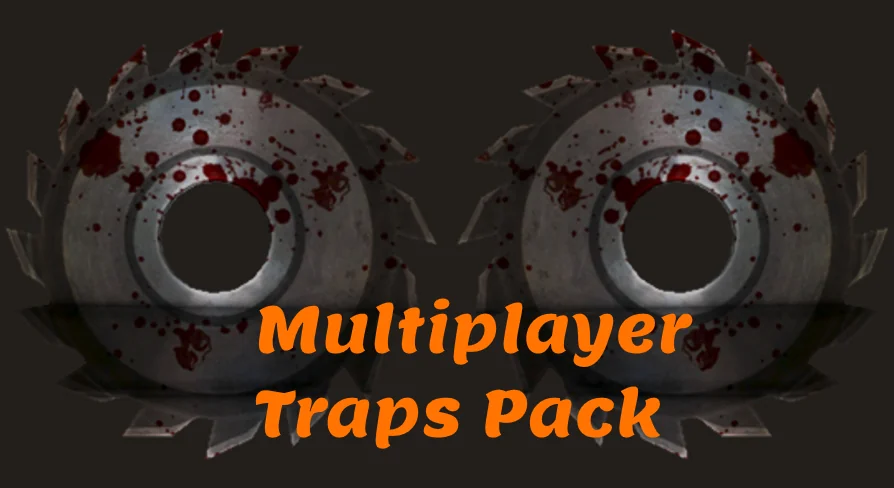
Dungeon corridors, adventure gauntlets, puzzle rooms where a wrong step costs a run—these are the scenes this pack is built to populate. It collects 6 hazard systems: a spike trap triggered by a pressure plate, spinning moving logs, spinning flamethrowers, swinging axe, mace, and hammer traps, and 2 spinning moving blade traps. Everything is Multiplayer-oriented and drops straight into a Level.
6 Trap Setups for Dungeon and Obstacle Scenes
The trap list breaks cleanly into floor-level pressure hazards and room-scale moving threats. The Spike Trap Pressure Plate reads as a classic dungeon floor hazard: something waits under a plate, and stepping on it brings the trap up. The Spinning Moving Log Traps add a rotating mass that can sweep across a corridor or platform. Spinning Flamethrower Traps cover an area with rotating fire. Swinging Axe, Mace, and Hammer Traps supply the pendulum-style threats that players need to time. The Spinning Moving Saw Blade Trap and the Spinning Moving Blade Trap handle moving-edge hazards, with the blade able to travel while it spins.
Grouped together, they cover the standard geometry of a Multiplayer obstacle course: ground triggers, rotating hazards, area denial, swing timing, and blade sweeps. A Level Designer can chain them into a single gauntlet—a pressure plate forces players through a path patrolled by a spinning log, while a flamethrower covers a side route and swinging maces guard the exit. The tag list reinforces that intent: Adventure, Puzzle, Dungeon, Obstacle, and Multiplayer all point toward scenario design rather than decoration. Every trap is a functional hazard first, and placement in a Level decides whether it acts as a gate, a timed threat, or part of a puzzle sequence.
Blueprint Movement with No Event Tick and No Animation Files
The movement approach matters before any placement work begins. The pack uses no Skeletal Meshes and no animations. All movement is handled in Blueprints, and the Blueprint logic does not rely on Event Tick. Everything is editable from the trap asset itself.
Since there are no animation files, the traps are not tied to an animation timeline. Motion comes from Blueprint-controlled values, so the same logic that moves a default Mesh keeps working if the visuals change. The no-Event Tick setup keeps the movement straightforward to follow inside the Blueprint, which fits a project where designers may need to adjust hazards without digging through complex per-frame logic.
Trap Tuning from the Details Panel
Most adjustments never require opening a Blueprint Graph. Each trap exposes its settings in the Details Panel, with values for Damage, End Locations, Spin Speed, Move Speed, Ease In, Ease Out, Sound Effects, and Damage Intervals.
Those parameters map directly to how a hazard feels in play. Spin Speed and Move Speed set how fast a saw blade travels or how quickly a log rotates past a doorway. Ease In and Ease Out shape the acceleration curve, which can make a swinging axe feel heavy or snappy. End Locations define where a moving trap finishes its travel, so a blade can be set to sweep a specific hallway segment. Damage and Damage Intervals control how punishing an obstacle is and how often it re-applies the hit while a player stays inside the hazard. Sound Effects tie the trigger, swing, or spin to the right feedback.
Because everything lives in the Details Panel, iteration is quick: drop the trap, change a number, and test. The per-trap setup also means different instances of the same trap can behave differently within 1 Level.
Swapping Meshes Without Losing Functionality
The visual layer is replaceable. The pack supports swapping the included Static Meshes for your own Static Meshes or Skeletal Meshes, and each trap keeps full functionality. No retargeting or rebuild of the movement logic is required because there are no animation assets tied to the traps.
The documentation video walks through how easily the traps can be edited in this way. A team that needs a different art style can restyle the entire hazard set without reworking any behavior.
Multiplayer-Ready Integration with the Multiplayer Zombie Survival Template
The pack is designed to work with the Multiplayer Zombie Survival Template. For teams on that template, the traps can be added directly and then tuned per trap. Tutorials cover the 2 setup steps most likely to come up: adding the pack to the Multiplayer Zombie Survival Template, and setting up damage to your character.
The damage setup is the key integration point, since the trap values only matter once damage is routed through the character's existing health setup. A separate documentation video shows the general editing workflow, including how easily trap behavior can be adjusted.
For a Multiplayer map that needs adjustable hazards, the important details sit on the surface. No animation files to manage, no Skeletal Mesh dependencies, no Event Tick to work around, and a Details Panel that exposes the numbers shaping gameplay. Teams on the Multiplayer Zombie Survival Template can treat the pack as a direct add-on. Teams building their own Multiplayer Levels can use the same traps as a starting point, swapping meshes and tuning values until the hazards fit their own art direction and difficulty curve.
 Gameplay Features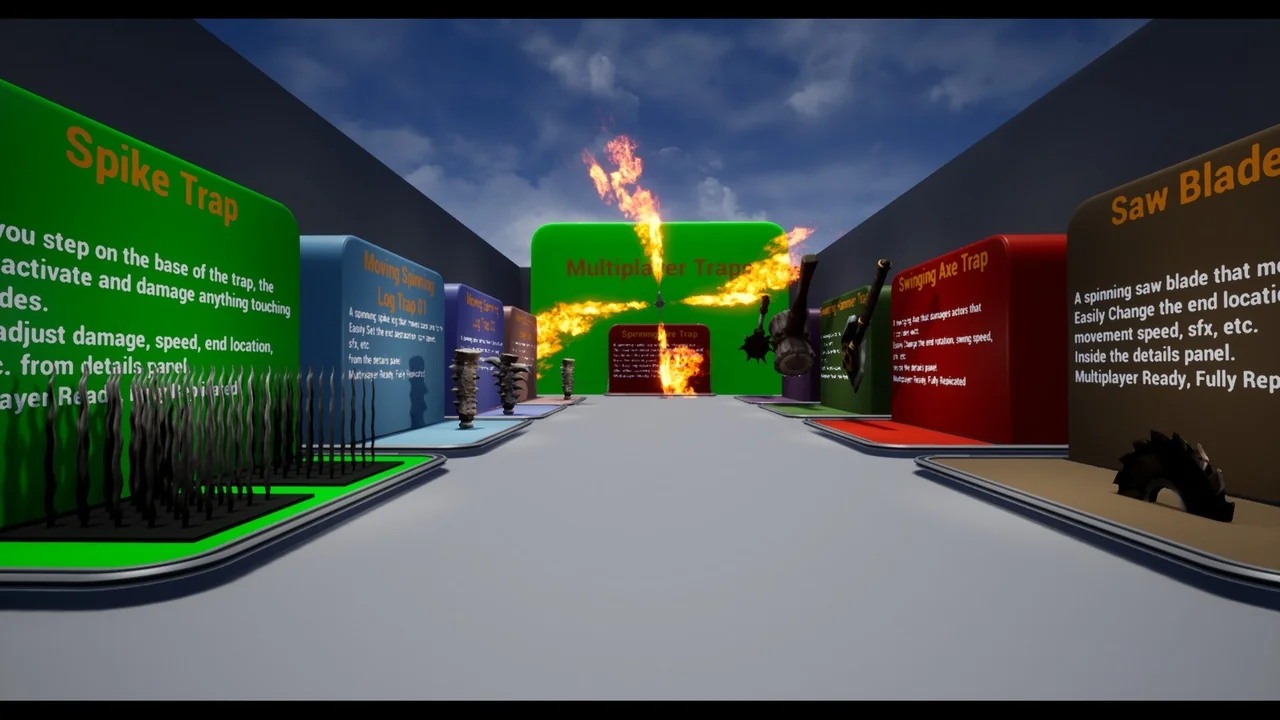
 Gameplay Features
 Gameplay Features
 Gameplay Features