"e2bfa951a54f5cbd"{"id":"1002155","slug":"pro-hud-pack-horror-skin","title":"Pro HUD Pack: Horror Skin","category":"UI Kits / HUDs","engine":"4.24+,5.0+","assetVersion":"","engineVersion":"Engine Version: 4.24+,5.0+","tag":"UI Kits / HUDs","accent":"blue","visual":"mech","summary":"Pro HUD Pack: Horror Skin provides navigational compass tools, minimaps, task alerts, and runtime HUD nodes tailored for horror and wargame interfaces.","platform":"Unreal Engine","publishedAt":"2026-10-29T09:59:23.096Z","updatedAt":"2026-10-29T09:59:23.096Z","sourceNotes":[],"fileContents":[],"compatibility":["Unreal Engine","Engine Version: 4.24+,5.0+"],"featuredImage":{"alt":"Pro HUD Pack: Horror Skin","src":"/wp-content/uploads/published/2026/10/2a99ef34b46b-984148b6-ffe2-475d-ba56-5890c73bd792-62e4a00883.webp"},"hasDownloadLink":true,"downloads":0,"terms":[{"taxonomy":"category","slug":"ui-kits-huds","name":"UI Kits / HUDs"}],"galleryImages":[{"src":"/wp-content/uploads/published/2026/10/7f4401b29c58-65ac7a5e-02af-401a-addc-8a4384a1598d-47394e3167.webp","alt":"Pro HUD Pack: Horror Skin"},{"src":"/wp-content/uploads/published/2026/10/94dfbf35c7b0-b73a4085-7bf1-4d16-8965-83a4898780fe-0238164c00.webp","alt":"Pro HUD Pack: Horror Skin"},{"src":"/wp-content/uploads/published/2026/10/b9d8c0243ca7-8d6647b1-6181-463c-8d43-ff09cbce0d24-8841fb3dfc.webp","alt":"Pro HUD Pack: Horror Skin"},{"src":"/wp-content/uploads/published/2026/10/94ab4a36769b-b869e28e-516f-4bfc-b5a6-8a77199c2aad-6982417f08.webp","alt":"Pro HUD Pack: Horror Skin"},{"src":"/wp-content/uploads/published/2026/10/64c45b4b545d-abfd1df3-00b5-4ce6-8838-7ca9daeb5522-08fa566121.webp","alt":"Pro HUD Pack: Horror Skin"},{"src":"/wp-content/uploads/published/2026/10/7259a75f2341-3fb596dc-8977-4129-9e91-0210bceea533-16eb27f69c.webp","alt":"Pro HUD Pack: Horror Skin"},{"src":"/wp-content/uploads/published/2026/10/424452c860e1-039e6032-f515-401e-bf27-4a608130d84d-62324fec78.webp","alt":"Pro HUD Pack: Horror Skin"},{"src":"/wp-content/uploads/published/2026/10/1778e91b6db7-03089fd5-c72d-4614-8c16-ecedac0625e2-7c803ffdf3.webp","alt":"Pro HUD Pack: Horror Skin"},{"src":"/wp-content/uploads/published/2026/10/c01d4ad8e732-d7fb008c-07ed-48de-970f-e695570beb23-c0016d68cd.webp","alt":"Pro HUD Pack: Horror Skin"},{"src":"/wp-content/uploads/published/2026/10/1ad173df0140-a836da13-b553-4637-b0a8-c57de9a172ac-3e8e2ffa4c.webp","alt":"Pro HUD Pack: Horror Skin"}],"accessPanel":{"kind":"resource","title":"Download this resource","eyebrow":"Free Download","message":"Log in or create a free account to start your download.","fileName":"Content.7z","safetyNote":"Resources are manually reviewed before listing to improve quality and reduce obvious risks.","actionLabel":"Download Free","resourceType":"Resource archive"},"contentHtml":"\u003ch2\u003eEstablishing the Communication Bridge in Interface Workflows\u003c/h2\u003e\u003cp\u003eInterface design regularly confronts the challenge of passing vital state information to the player without breaking immersion or obscuring play space. A functional heads-up display operates as a communication bridge between core gameplay mechanics and the user experience, establishing how clearly momentary developments are perceived.\u003c/p\u003e\u003cp\u003ePro HUD Pack: Horror Skin focuses on resolving this interface barrier by providing an integrated set of easy-to-use communication tools. Instead of wiring distinct notification boxes, compass elements, and condition alerts independently from scratch, the package supplies a cohesive visual layer built to translate active game states into legible on-screen elements. This allows creators to anchor critical alerts and orientation markers into their viewport cleanly, maintaining a positive player experience throughout demanding sequences.\u003c/p\u003e\u003ch2\u003eNavigational Systems: Spatial Orientation via Compass and Minimap\u003c/h2\u003e\u003cp\u003eWayfinding forms the foundation of player orientation, especially in environments where objective tracking and location scouting are central to survival.\u003c/p\u003e\u003cp\u003eTo support directional awareness, the package provides dedicated navigational tools including both a compass and a minimap. These elements provide direct feedback whenever a player character has to find a place or maintain bearings across a designated area. By routing location data into established navigational components, the system enables projects to deliver consistent directional cues, keeping players aligned with their goals without requiring them to pull away from active gameplay into static map menus.\u003c/p\u003e\u003ch2\u003eNotification Systems for Loot, Tasks, and Character Status\u003c/h2\u003e\u003cp\u003eReal-time game logic requires swift visual alerts to inform players when circumstances change, inventories update, or character conditions fluctuate.\u003c/p\u003e\u003cp\u003eThe notification features in this pack handle multiple specific gameplay scenarios. When a player loots an item, the interface delivers clear feedback detailing the event. Similar alert structures activate when a player gets a task, making objective assignments, progress milestones, and task updates immediately distinct. The system also visually accommodates character progression and status alterations, displaying explicit notification when a character becomes stronger or weaker through buffs, debuffs, or environmental pressures. Grouping these events into clear visual notifications ensures that critical gameplay interactions are transmitted without confusion.\u003c/p\u003e\u003ch2\u003eRuntime Configuration with Blueprint HUD Nodes and Style Guide Presets\u003c/h2\u003e\u003cp\u003eBalancing visual continuity across menus and active heads-up displays requires flexible layout rules and responsive logic.\u003c/p\u003e\u003cp\u003eConstructed around Blueprint user interface architecture, the system provides numerous preset options alongside a dedicated style guide option to help maintain design cohesion across main screens and sub-menus. Developers can adjust parameters and behavior at runtime via HUD nodes, allowing interface components to react dynamically to gameplay events. Learning and integrating these setups is supported through an available demo build, tutorials, and documentation, which explain how the presets and runtime nodes interact with existing character and game frameworks.\u003c/p\u003e\u003ch2\u003eDeploying the Horror Skin across Wargame and Survival Pipelines\u003c/h2\u003e\u003cp\u003eVisual tone defines interface effectiveness, especially in tense genres like horror and wargames where visual elements must match a dark, threatening environment.\u003c/p\u003e\u003cp\u003eAs an interface skin made for compatibility with the Pro HUD Pack, this release establishes a ready foundation for dark menus, wargame screens, and atmospheric horror titles. The asset package fits directly into production phases where core gameplay needs to be tied to immediate visual feedback, providing the necessary compass, minimap, and notification structures to support survival mechanics, exploration tasks, and volatile character states.\u003c/p\u003e\n\n\u003ch2\u003eRelated Resources Worth Checking\u003c/h2\u003e\n\u003cul\u003e\n\u003cli\u003e\u003ca href=\"https://3dcghub.com/advanced-hud-style-12/\" title=\"Advanced HUD-Style 12\"\u003eAdvanced HUD-Style 12\u003c/a\u003e\u003c/li\u003e\n\u003cli\u003e\u003ca href=\"https://3dcghub.com/pro-hud-navigation-tools-only/\" title=\"Pro HUD: Navigation Tools Only\"\u003ePro HUD: Navigation Tools Only\u003c/a\u003e\u003c/li\u003e\n\u003cli\u003e\u003ca href=\"https://3dcghub.com/gui-simple-round-2/\" title=\"GUI - Simple Round\"\u003eGUI - Simple Round\u003c/a\u003e\u003c/li\u003e\n\u003cli\u003e\u003ca href=\"https://3dcghub.com/gui-mono-round-2/\" title=\"GUI - Mono Round\"\u003eGUI - Mono Round\u003c/a\u003e\u003c/li\u003e\n\u003cli\u003e\u003ca href=\"https://3dcghub.com/cyberpunk-rpg-ui/\" title=\"Cyberpunk RPG UI\"\u003eCyberpunk RPG UI\u003c/a\u003e\u003c/li\u003e\n\u003c/ul\u003e","contentTextLength":4127,"navigation":{"current":78,"total":4158,"previous":{"id":"1002156","slug":"procedural-recoil-system","title":"Procedural Recoil System","category":"Game Mechanics","platform":"Unreal Engine","updatedAt":"2026-10-29T10:00:10.900Z"},"next":{"id":"1002154","slug":"primitive-tools","title":"Primitive tools","category":"Weapons \u0026 Combat","platform":"Unreal Engine","updatedAt":"2026-10-29T09:58:01.822Z"}},"relatedResources":[{"id":"1001858","slug":"advanced-hud-style-12","title":"Advanced HUD-Style 12","category":"UI Kits / HUDs","engine":"4.26+,5.0+","assetVersion":"","engineVersion":"Engine Version: 4.26+,5.0+","tag":"UI Kits / HUDs","accent":"blue","visual":"mech","summary":"An Action RPG interface system featuring level streaming across four maps, persistent settings, minimap pointers, and enhanced input updates.","platform":"Unreal Engine","publishedAt":"2026-10-22T10:52:37.375Z","updatedAt":"2026-10-22T10:52:37.375Z","sourceNotes":[],"fileContents":[],"compatibility":["Unreal Engine","Engine Version: 4.26+,5.0+"],"featuredImage":{"alt":"Advanced HUD-Style 12","src":"/wp-content/uploads/published/2026/10/6a724464fb23-fe0f8c74-09d6-42a7-acb0-add7cb7a8849-e91320c35a.webp"},"hasDownloadLink":true,"downloads":0},{"id":"1000870","slug":"pro-hud-navigation-tools-only","title":"Pro HUD: Navigation Tools Only","category":"UI Kits / HUDs","engine":"4.27,5.0+","assetVersion":"","engineVersion":"Engine Version: 4.27,5.0+","tag":"UI Kits / HUDs","accent":"blue","visual":"mech","summary":"Pro HUD: Navigation Tools Only provides easy-to-use HUD elements for navigation. Presets, a style guide, and runtime HUD nodes help guide players to objectives.","platform":"Unreal Engine","publishedAt":"2026-08-05T07:01:27.966Z","updatedAt":"2026-08-05T07:01:27.966Z","sourceNotes":[],"fileContents":[],"compatibility":["Unreal Engine","Engine Version: 4.27,5.0+"],"featuredImage":{"alt":"Pro HUD: Navigation Tools Only","src":"/wp-content/uploads/published/2026/08/fcc104e40615-be7b0a56-e52b-4af2-a9b4-3701ffaab3c5-7117c706ba.webp"},"hasDownloadLink":true,"downloads":0},{"id":"1000190","slug":"gui-simple-round-2","title":"GUI - Simple Round","category":"UI Kits / HUDs","engine":"4.26+,5.0+","assetVersion":"","engineVersion":"Engine Version: 4.26+,5.0+","tag":"UI Kits / HUDs","accent":"blue","visual":"mech","summary":"GUI - Simple Round is a UI graphics pack with 1280x800 artwork, 467 PNG sources, 288 button icons, and 13 PSD files for menu and HUD production.","platform":"Unreal Engine","publishedAt":"2026-06-22T16:07:55.150Z","updatedAt":"2026-06-22T16:07:55.150Z","sourceNotes":[],"fileContents":[],"compatibility":["Unreal Engine","Engine Version: 4.26+,5.0+"],"featuredImage":{"alt":"GUI - Simple Round","src":"/wp-content/uploads/published/2026/06/ee6bec8b27c7-27292e13-678b-4e0d-9dac-0be0580c5e54-0c44dcf7b5.webp"},"hasDownloadLink":true,"downloads":0}]}
UI Kits / HUDs
Pro HUD Pack: Horror Skin
Pro HUD Pack: Horror Skin provides navigational compass tools, minimaps, task alerts, and runtime HUD nodes tailored for horror and wargame interfaces.
Establishing the Communication Bridge in Interface Workflows
Interface design regularly confronts the challenge of passing vital state information to the player without breaking immersion or obscuring play space. A functional heads-up display operates as a communication bridge between core gameplay mechanics and the user experience, establishing how clearly momentary developments are perceived.
Pro HUD Pack: Horror Skin focuses on resolving this interface barrier by providing an integrated set of easy-to-use communication tools. Instead of wiring distinct notification boxes, compass elements, and condition alerts independently from scratch, the package supplies a cohesive visual layer built to translate active game states into legible on-screen elements. This allows creators to anchor critical alerts and orientation markers into their viewport cleanly, maintaining a positive player experience throughout demanding sequences.
Navigational Systems: Spatial Orientation via Compass and Minimap
Wayfinding forms the foundation of player orientation, especially in environments where objective tracking and location scouting are central to survival.
To support directional awareness, the package provides dedicated navigational tools including both a compass and a minimap. These elements provide direct feedback whenever a player character has to find a place or maintain bearings across a designated area. By routing location data into established navigational components, the system enables projects to deliver consistent directional cues, keeping players aligned with their goals without requiring them to pull away from active gameplay into static map menus.
Notification Systems for Loot, Tasks, and Character Status
Real-time game logic requires swift visual alerts to inform players when circumstances change, inventories update, or character conditions fluctuate.
The notification features in this pack handle multiple specific gameplay scenarios. When a player loots an item, the interface delivers clear feedback detailing the event. Similar alert structures activate when a player gets a task, making objective assignments, progress milestones, and task updates immediately distinct. The system also visually accommodates character progression and status alterations, displaying explicit notification when a character becomes stronger or weaker through buffs, debuffs, or environmental pressures. Grouping these events into clear visual notifications ensures that critical gameplay interactions are transmitted without confusion.
Runtime Configuration with Blueprint HUD Nodes and Style Guide Presets
Balancing visual continuity across menus and active heads-up displays requires flexible layout rules and responsive logic.
Constructed around Blueprint user interface architecture, the system provides numerous preset options alongside a dedicated style guide option to help maintain design cohesion across main screens and sub-menus. Developers can adjust parameters and behavior at runtime via HUD nodes, allowing interface components to react dynamically to gameplay events. Learning and integrating these setups is supported through an available demo build, tutorials, and documentation, which explain how the presets and runtime nodes interact with existing character and game frameworks.
Deploying the Horror Skin across Wargame and Survival Pipelines
Visual tone defines interface effectiveness, especially in tense genres like horror and wargames where visual elements must match a dark, threatening environment.
As an interface skin made for compatibility with the Pro HUD Pack, this release establishes a ready foundation for dark menus, wargame screens, and atmospheric horror titles. The asset package fits directly into production phases where core gameplay needs to be tied to immediate visual feedback, providing the necessary compass, minimap, and notification structures to support survival mechanics, exploration tasks, and volatile character states.
 UI Kits / HUDs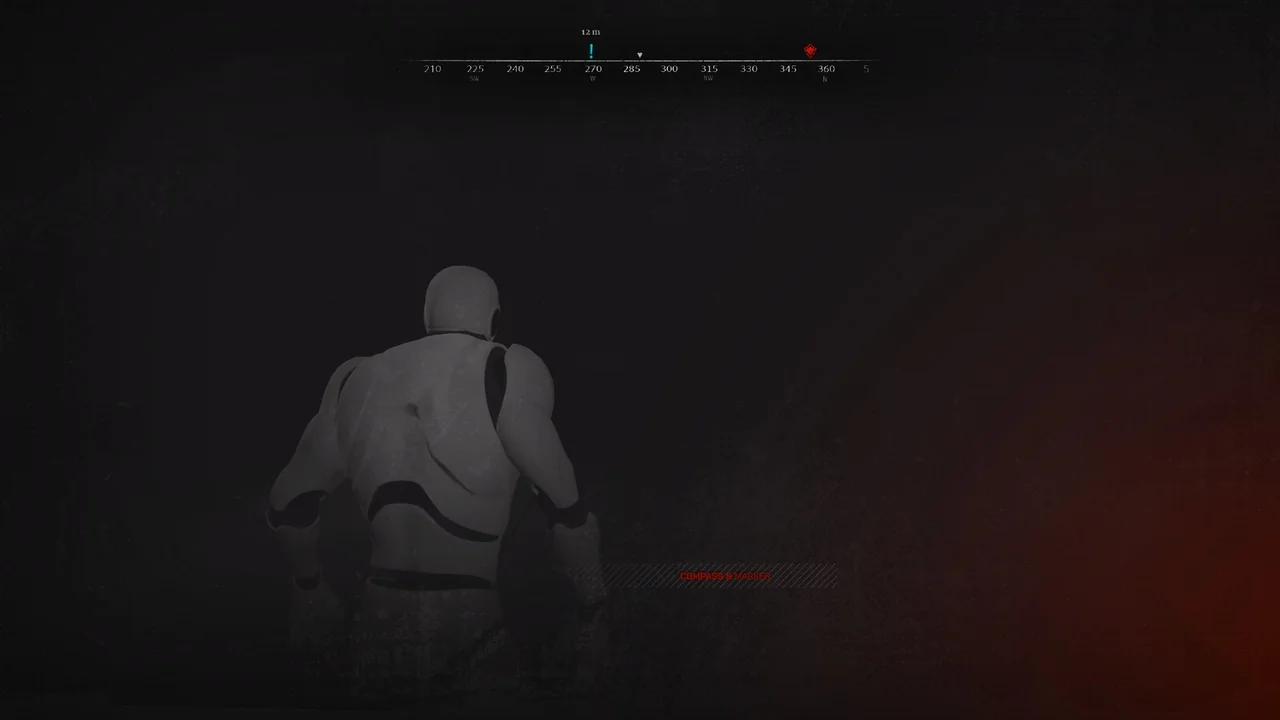
 UI Kits / HUDs
 UI Kits / HUDs
 UI Kits / HUDs