"7066dd76da796369"{"id":"1000141","slug":"virtual-joystick-minimalist-pack","title":"Virtual Joystick Minimalist Pack","category":"UI Kits / HUDs","engine":"4.26+,5.0+","assetVersion":"","engineVersion":"Engine Version: 4.26+,5.0+","tag":"UI Kits / HUDs","accent":"blue","visual":"mech","summary":"A minimalist virtual joystick pack for mobile projects with 50 backgrounds, 20 thumb images, four example setups, and a touch-look blueprint.","platform":"Unreal Engine","publishedAt":"2026-06-12T16:49:41.086Z","updatedAt":"2026-06-12T16:49:41.086Z","sourceNotes":[],"fileContents":[],"compatibility":["Unreal Engine","Engine Version: 4.26+,5.0+"],"featuredImage":{"alt":"Virtual Joystick Minimalist Pack","src":"/wp-content/uploads/published/2026/06/c8873ffa5627-5aa5ffae-ffb4-4aa9-b4bf-fea71ded069c-c63c8c8ccd.webp"},"hasDownloadLink":true,"downloads":1,"terms":[{"taxonomy":"category","slug":"ui-kits-huds","name":"UI Kits / HUDs"}],"galleryImages":[{"src":"/wp-content/uploads/published/2026/06/8e4c84ffce92-65713c81-6e02-412c-8ee9-e22f80cee780-878b087d1b.webp","alt":"Virtual Joystick Minimalist Pack"},{"src":"/wp-content/uploads/published/2026/06/ed4afdde05e8-8e35de3e-d36c-4440-b429-73a330a82666-768d582c53.webp","alt":"Virtual Joystick Minimalist Pack"},{"src":"/wp-content/uploads/published/2026/06/8040ef135d5d-73c78a85-5376-4854-b9cf-79621686c863-0af7b84971.webp","alt":"Virtual Joystick Minimalist Pack"},{"src":"/wp-content/uploads/published/2026/06/3921c3653727-b90eb6de-ce0d-483e-8f23-8e3343fbd8b3-ea3da6ecae.webp","alt":"Virtual Joystick Minimalist Pack"}],"accessPanel":{"kind":"resource","title":"Download this resource","eyebrow":"Free Download","message":"Log in or create a free account to start your download.","fileName":"Content.7z","safetyNote":"Resources are manually reviewed before listing to improve quality and reduce obvious risks.","actionLabel":"Download Free","resourceType":"Resource archive"},"contentHtml":"\u003cp\u003eOn a mobile screen, movement controls have to do two jobs at once: they need to stay visible enough to guide input, and they also need to avoid taking over the look of the game. \u003cstrong\u003eVirtual Joystick Minimalist Pack\u003c/strong\u003e Approaches that balance with a ready-to-use virtual joystick setup for mobile game projects, driven by a minimalist design that can sit inside different visual directions without forcing a heavy interface style onto them.\u003c/p\u003e\n\u003cp\u003eThe pack is structured around variety inside a simple control shape. It includes 50 background images and 20 thumb images, which creates 1000 possible combinations. That range gives artists and developers room to shape a joystick that feels aligned with a game’s design, style, or theme instead of settling for a single fixed look. In use, the pack is not just one joystick graphic repeated across projects. It is a set of interchangeable parts that lets teams choose how subtle, prominent, or visually matched the on-screen control should feel.\u003c/p\u003e \u003ch2\u003eMinimalist virtual joystick behavior on mobile screens\u003c/h2\u003e\n\u003cp\u003eThe strongest identity here is not complexity but restraint. A minimalist joystick can be useful when a game already has a lot happening on screen, or when the team wants controls to read clearly without competing with characters, environments, or effects. Because this pack is ready to use in mobile game projects, it fits directly into the part of development where usability and visual consistency often meet.\u003c/p\u003e\n\u003cp\u003eThat matters most in genres that rely on constant movement input. The pack is presented as a strong fit for FPS and Third Person Perspective games, both of which place continuous pressure on movement controls. In those kinds of projects, the virtual joystick is not a decorative UI piece. It becomes part of how the player reads space, turns, repositions, and keeps pace with the action. A minimalist treatment can support that by keeping the control legible while still leaving room for the game itself to stay visually dominant.\u003c/p\u003e\n\u003cp\u003eFor teams shaping a mobile interface, the main creative advantage is flexibility within a narrow, focused asset type. Instead of changing the function of the joystick, the pack changes how that function appears. That makes it easier to test different visual directions while keeping the control role familiar to players.\u003c/p\u003e \u003ch2\u003e50 backgrounds and 20 thumb images create 1000 combinations\u003c/h2\u003e\n\u003cp\u003eThe pack’s biggest practical strength is the combination count. With 50 background images and 20 thumb images, there are 1000 possible combinations available for building a virtual joystick that fits a project’s style or theme. That number is large enough to support experimentation without moving away from a consistent control concept.\u003c/p\u003e\n\u003cp\u003eFor artists, this opens up a straightforward way to tune the feel of the interface. A background image changes the visual base of the joystick, while the thumb image alters the moving focal point the player interacts with. Even though both elements serve the same control purpose, switching either one can shift the overall read of the UI. Some combinations may feel more neutral, while others may stand out more strongly against the rest of the screen. The pack gives room to make those choices deliberately.\u003c/p\u003e\n\u003cp\u003eFor developers, the value of those combinations is not abstract variety but easier adaptation across different mobile projects or different visual states inside one project. A team might want one look that blends closely with a subdued interface style, and another that fits a more distinct theme. Since the pack explicitly supports matching game design, style, or theme, its image combinations function as a practical customization layer rather than an unrelated extras folder.\u003c/p\u003e\n\u003cp\u003eThat also makes the resource useful at different points in production. Early interface testing can begin with one of the included options, while later polish can focus on choosing combinations that better suit the final presentation. The control remains recognizable as a joystick, but its presentation can be tuned with much more nuance than a single fixed asset would allow.\u003c/p\u003e \u003ch2\u003eFour common virtual joystick examples for mobile games\u003c/h2\u003e\n\u003cp\u003eBeyond the image library, the pack includes four commonly used virtual joystick examples set up for mobile games. This is an important detail because it means the resource does not stop at raw visual elements. It also offers examples of how those joystick arrangements can appear in practice.\u003c/p\u003e\n\u003cp\u003eExample setups can help in two different ways. First, they give developers a starting point that is already oriented toward common mobile joystick use. Second, they let teams compare control presentation more quickly, since a setup can be evaluated in the context of actual play rather than only as separate images. For a mobile project, that distinction matters. A joystick may look suitable as a static element and still need adjustment once it is used in motion-heavy gameplay. Example configurations bring the pack closer to real implementation.\u003c/p\u003e\n\u003cp\u003eThe phrase “common used” points toward familiar mobile control patterns rather than unusual interface experiments. That makes the pack especially relevant for projects that want a clear and conventional movement solution. In FPS and Third Person Perspective games, familiarity in controls can be a real strength because it reduces friction. Players should spend their attention on movement, aiming, positioning, and reading the game world rather than decoding an unfamiliar joystick layout.\u003c/p\u003e \u003ch2\u003ePlayer Controller Blueprint for touch and move to look around\u003c/h2\u003e\n\u003cp\u003eOne of the more practical inclusions is an extra asset: a \u003cstrong\u003ePlayer Controller Blueprint\u003c/strong\u003e That supports touch and move to look around on the right side of the screen. It is specifically noted that this does not conflict with the virtual joystick. That detail makes the pack feel more complete for mobile control workflows, because movement and camera look often need to coexist without overlapping or interfering with each other.\u003c/p\u003e\n\u003cp\u003eIn use, this separates responsibilities across the screen in a way that suits common mobile play patterns. The virtual joystick can handle movement while the right side supports looking around through touch and move input. Since the blueprint is described as non-conflicting with the joystick, the pack addresses a coordination problem that often matters more than any single graphic choice: input systems need to work together cleanly.\u003c/p\u003e\n\u003cp\u003eFor FPS games, that right-side look control is especially relevant. Looking around is central to how the player tracks space and reacts to threats. For Third Person Perspective games, camera movement is still an important part of navigation and awareness. Including a Player Controller Blueprint alongside joystick visuals keeps the pack anchored in actual mobile control behavior rather than only in interface styling.\u003c/p\u003e\n\u003cp\u003eCreatively, this also helps teams keep a consistent feel across control elements. The joystick visuals and the touch-look behavior can be considered together, allowing the interface to function as a connected mobile control scheme instead of a set of unrelated parts.\u003c/p\u003e \u003ch2\u003eWhere Virtual Joystick Minimalist Pack fits best\u003c/h2\u003e\n\u003cp\u003eThe clearest fit is mobile projects that need a ready-to-use virtual joystick with room for visual customization. The pack’s tags reinforce that direction through joystick, mobile, user, Android, and interface. Those labels place it firmly inside mobile UI work rather than general-purpose art content.\u003c/p\u003e\n\u003cp\u003eIts best use is in FPS and Third Person Perspective games, where movement input and looking around are constant, visible parts of play. The included four example joystick setups and the extra Player Controller Blueprint make it easier to treat the asset as part of a working control scheme, not just a style exercise. At the same time, the 50 background images and 20 thumb images provide enough variation to keep the minimalist approach from feeling locked to one visual identity.\u003c/p\u003e\n\u003cp\u003eFor teams evaluating mobile interface resources, the strongest takeaway is straightforward: this pack combines a minimalist visual direction, 1000 joystick image combinations, four mobile joystick examples, and a right-side touch-look Player Controller Blueprint that does not conflict with the joystick.\u003c/p\u003e\n\n\u003ch2\u003eMore From The Same Workflow\u003c/h2\u003e\n\u003cul\u003e\n\u003cli\u003e\u003ca href=\"https://3dcghub.com/cyberpunk-rpg-ui/\" title=\"Cyberpunk RPG UI\"\u003eCyberpunk RPG UI\u003c/a\u003e\u003c/li\u003e\n\u003cli\u003e\u003ca href=\"https://3dcghub.com/easy-game-ui-ultimate/\" title=\"Easy Game UI Ultimate\"\u003eEasy Game UI Ultimate\u003c/a\u003e\u003c/li\u003e\n\u003cli\u003eHyper Menu and Gamepad System v4 [CommonUI]\u003c/li\u003e\n\u003cli\u003e\u003ca href=\"https://3dcghub.com/ultimate-joystick/\" title=\"Ultimate Joystick\"\u003eUltimate Joystick\u003c/a\u003e\u003c/li\u003e\n\u003cli\u003e\u003ca href=\"https://3dcghub.com/ultimate-touch-components/\" title=\"Ultimate Touch Components\"\u003eUltimate Touch Components\u003c/a\u003e\u003c/li\u003e\n\u003c/ul\u003e","contentTextLength":8358,"navigation":{"current":2026,"total":4016,"previous":{"id":"1000142","slug":"waterstamp-water-decals","title":"Waterstamp - Water Decals","category":"Water","platform":"Unreal Engine","updatedAt":"2026-06-12T16:55:21.280Z"},"next":{"id":"1000140","slug":"unreal-engine-5-and-blender-3d-product-visualization","title":"Unreal Engine 5 and Blender 3D: Product Visualization","category":"Unreal Engine","platform":"Unreal Engine","updatedAt":"2026-06-12T16:44:10.221Z"}},"relatedResources":[{"id":"1001936","slug":"advanced-credits","title":"Advanced Credits","category":"UI Kits / HUDs","engine":"4.26+,5.0+","assetVersion":"","engineVersion":"Engine Version: 4.26+,5.0+","tag":"UI Kits / HUDs","accent":"blue","visual":"mech","summary":"Advanced Credits provides a customizable closing credits system featuring 3D widget VR support, title styling, audio fading, and sequence end events.","platform":"Unreal Engine","publishedAt":"2026-10-24T11:13:05.800Z","updatedAt":"2026-10-24T11:13:05.800Z","sourceNotes":[],"fileContents":[],"compatibility":["Unreal Engine","Engine Version: 4.26+,5.0+"],"featuredImage":{"alt":"Advanced Credits","src":"/wp-content/uploads/published/2026/10/6e75a1d5818d-a56d4a50-2a3e-4e79-8d17-0fc329c763a2-b7b42a1076.webp"},"hasDownloadLink":true,"downloads":0},{"id":"1001858","slug":"advanced-hud-style-12","title":"Advanced HUD-Style 12","category":"UI Kits / HUDs","engine":"4.26+,5.0+","assetVersion":"","engineVersion":"Engine Version: 4.26+,5.0+","tag":"UI Kits / HUDs","accent":"blue","visual":"mech","summary":"An Action RPG interface system featuring level streaming across four maps, persistent settings, minimap pointers, and enhanced input updates.","platform":"Unreal Engine","publishedAt":"2026-10-22T10:52:37.375Z","updatedAt":"2026-10-22T10:52:37.375Z","sourceNotes":[],"fileContents":[],"compatibility":["Unreal Engine","Engine Version: 4.26+,5.0+"],"featuredImage":{"alt":"Advanced HUD-Style 12","src":"/wp-content/uploads/published/2026/10/6a724464fb23-fe0f8c74-09d6-42a7-acb0-add7cb7a8849-e91320c35a.webp"},"hasDownloadLink":true,"downloads":0},{"id":"1000870","slug":"pro-hud-navigation-tools-only","title":"Pro HUD: Navigation Tools Only","category":"UI Kits / HUDs","engine":"4.27,5.0+","assetVersion":"","engineVersion":"Engine Version: 4.27,5.0+","tag":"UI Kits / HUDs","accent":"blue","visual":"mech","summary":"Pro HUD: Navigation Tools Only provides easy-to-use HUD elements for navigation. Presets, a style guide, and runtime HUD nodes help guide players to objectives.","platform":"Unreal Engine","publishedAt":"2026-08-05T07:01:27.966Z","updatedAt":"2026-08-05T07:01:27.966Z","sourceNotes":[],"fileContents":[],"compatibility":["Unreal Engine","Engine Version: 4.27,5.0+"],"featuredImage":{"alt":"Pro HUD: Navigation Tools Only","src":"/wp-content/uploads/published/2026/08/fcc104e40615-be7b0a56-e52b-4af2-a9b4-3701ffaab3c5-7117c706ba.webp"},"hasDownloadLink":true,"downloads":0}]}
UI Kits / HUDs
Virtual Joystick Minimalist Pack
A minimalist virtual joystick pack for mobile projects with 50 backgrounds, 20 thumb images, four example setups, and a touch-look blueprint.
On a mobile screen, movement controls have to do two jobs at once: they need to stay visible enough to guide input, and they also need to avoid taking over the look of the game. Virtual Joystick Minimalist Pack Approaches that balance with a ready-to-use virtual joystick setup for mobile game projects, driven by a minimalist design that can sit inside different visual directions without forcing a heavy interface style onto them.
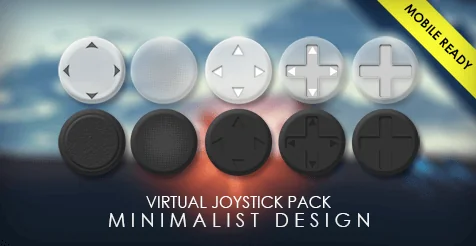
The pack is structured around variety inside a simple control shape. It includes 50 background images and 20 thumb images, which creates 1000 possible combinations. That range gives artists and developers room to shape a joystick that feels aligned with a game’s design, style, or theme instead of settling for a single fixed look. In use, the pack is not just one joystick graphic repeated across projects. It is a set of interchangeable parts that lets teams choose how subtle, prominent, or visually matched the on-screen control should feel.
Minimalist virtual joystick behavior on mobile screens
The strongest identity here is not complexity but restraint. A minimalist joystick can be useful when a game already has a lot happening on screen, or when the team wants controls to read clearly without competing with characters, environments, or effects. Because this pack is ready to use in mobile game projects, it fits directly into the part of development where usability and visual consistency often meet.
That matters most in genres that rely on constant movement input. The pack is presented as a strong fit for FPS and Third Person Perspective games, both of which place continuous pressure on movement controls. In those kinds of projects, the virtual joystick is not a decorative UI piece. It becomes part of how the player reads space, turns, repositions, and keeps pace with the action. A minimalist treatment can support that by keeping the control legible while still leaving room for the game itself to stay visually dominant.
For teams shaping a mobile interface, the main creative advantage is flexibility within a narrow, focused asset type. Instead of changing the function of the joystick, the pack changes how that function appears. That makes it easier to test different visual directions while keeping the control role familiar to players.
50 backgrounds and 20 thumb images create 1000 combinations
The pack’s biggest practical strength is the combination count. With 50 background images and 20 thumb images, there are 1000 possible combinations available for building a virtual joystick that fits a project’s style or theme. That number is large enough to support experimentation without moving away from a consistent control concept.
For artists, this opens up a straightforward way to tune the feel of the interface. A background image changes the visual base of the joystick, while the thumb image alters the moving focal point the player interacts with. Even though both elements serve the same control purpose, switching either one can shift the overall read of the UI. Some combinations may feel more neutral, while others may stand out more strongly against the rest of the screen. The pack gives room to make those choices deliberately.
For developers, the value of those combinations is not abstract variety but easier adaptation across different mobile projects or different visual states inside one project. A team might want one look that blends closely with a subdued interface style, and another that fits a more distinct theme. Since the pack explicitly supports matching game design, style, or theme, its image combinations function as a practical customization layer rather than an unrelated extras folder.
That also makes the resource useful at different points in production. Early interface testing can begin with one of the included options, while later polish can focus on choosing combinations that better suit the final presentation. The control remains recognizable as a joystick, but its presentation can be tuned with much more nuance than a single fixed asset would allow.
Four common virtual joystick examples for mobile games
Beyond the image library, the pack includes four commonly used virtual joystick examples set up for mobile games. This is an important detail because it means the resource does not stop at raw visual elements. It also offers examples of how those joystick arrangements can appear in practice.
Example setups can help in two different ways. First, they give developers a starting point that is already oriented toward common mobile joystick use. Second, they let teams compare control presentation more quickly, since a setup can be evaluated in the context of actual play rather than only as separate images. For a mobile project, that distinction matters. A joystick may look suitable as a static element and still need adjustment once it is used in motion-heavy gameplay. Example configurations bring the pack closer to real implementation.
The phrase “common used” points toward familiar mobile control patterns rather than unusual interface experiments. That makes the pack especially relevant for projects that want a clear and conventional movement solution. In FPS and Third Person Perspective games, familiarity in controls can be a real strength because it reduces friction. Players should spend their attention on movement, aiming, positioning, and reading the game world rather than decoding an unfamiliar joystick layout.
Player Controller Blueprint for touch and move to look around
One of the more practical inclusions is an extra asset: a Player Controller Blueprint That supports touch and move to look around on the right side of the screen. It is specifically noted that this does not conflict with the virtual joystick. That detail makes the pack feel more complete for mobile control workflows, because movement and camera look often need to coexist without overlapping or interfering with each other.
In use, this separates responsibilities across the screen in a way that suits common mobile play patterns. The virtual joystick can handle movement while the right side supports looking around through touch and move input. Since the blueprint is described as non-conflicting with the joystick, the pack addresses a coordination problem that often matters more than any single graphic choice: input systems need to work together cleanly.
For FPS games, that right-side look control is especially relevant. Looking around is central to how the player tracks space and reacts to threats. For Third Person Perspective games, camera movement is still an important part of navigation and awareness. Including a Player Controller Blueprint alongside joystick visuals keeps the pack anchored in actual mobile control behavior rather than only in interface styling.
Creatively, this also helps teams keep a consistent feel across control elements. The joystick visuals and the touch-look behavior can be considered together, allowing the interface to function as a connected mobile control scheme instead of a set of unrelated parts.
Where Virtual Joystick Minimalist Pack fits best
The clearest fit is mobile projects that need a ready-to-use virtual joystick with room for visual customization. The pack’s tags reinforce that direction through joystick, mobile, user, Android, and interface. Those labels place it firmly inside mobile UI work rather than general-purpose art content.
Its best use is in FPS and Third Person Perspective games, where movement input and looking around are constant, visible parts of play. The included four example joystick setups and the extra Player Controller Blueprint make it easier to treat the asset as part of a working control scheme, not just a style exercise. At the same time, the 50 background images and 20 thumb images provide enough variation to keep the minimalist approach from feeling locked to one visual identity.
For teams evaluating mobile interface resources, the strongest takeaway is straightforward: this pack combines a minimalist visual direction, 1000 joystick image combinations, four mobile joystick examples, and a right-side touch-look Player Controller Blueprint that does not conflict with the joystick.
 UI Kits / HUDs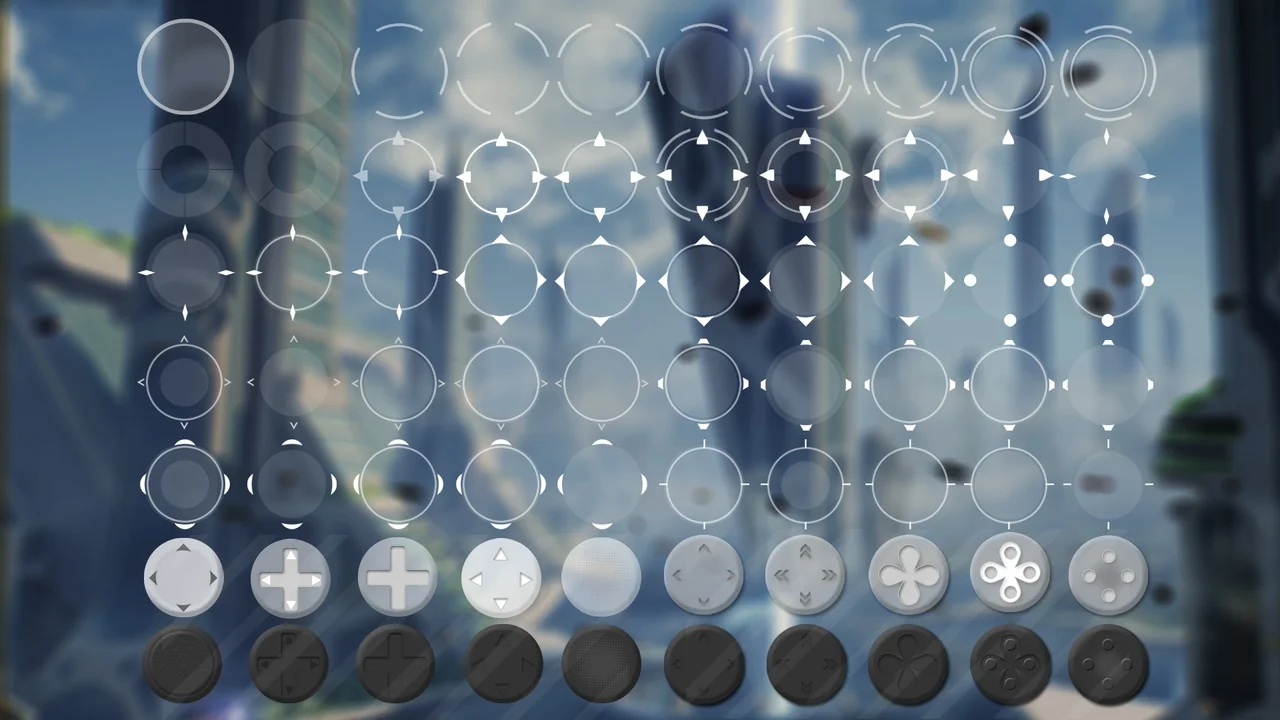
 UI Kits / HUDs
 UI Kits / HUDs
 UI Kits / HUDs