"7066dd76da796369"{"id":"1000139","slug":"ultimate-touch-components","title":"Ultimate Touch Components","category":"Engine Tools","engine":"5.1+","assetVersion":"","engineVersion":"Engine Version: 5.1+","tag":"Engine Tools","accent":"blue","visual":"mech","summary":"Ultimate Touch Components brings customizable touch gestures, virtual joysticks, and example setups to Unreal Engine projects across mobile and touchscreen plat","platform":"Unreal Engine","publishedAt":"2026-06-12T16:37:57.847Z","updatedAt":"2026-06-12T16:37:57.847Z","sourceNotes":[],"fileContents":[],"compatibility":["Unreal Engine","Engine Version: 5.1+"],"featuredImage":{"alt":"Ultimate Touch Components","src":"/wp-content/uploads/published/2026/06/1526a1e8c94b-9a37230b-cc64-4b3c-8331-d1b6a72e6d09-366a359533.webp"},"hasDownloadLink":true,"downloads":1,"terms":[{"taxonomy":"category","slug":"engine-tools","name":"Engine Tools"}],"galleryImages":[{"src":"/wp-content/uploads/published/2026/06/73fb504b0fcc-664ecdb8-5151-4181-80b8-c9db493dc51c-b6a3d3f241.webp","alt":"Ultimate Touch Components"},{"src":"/wp-content/uploads/published/2026/06/6485c81e7e96-a091a2f8-84fa-4787-98fd-5720a5dca4f8-b26305561d.webp","alt":"Ultimate Touch Components"},{"src":"/wp-content/uploads/published/2026/06/ae858728ae08-d5dda815-7259-459b-8ffd-bf2c70ddbe38-a5ee2fd878.webp","alt":"Ultimate Touch Components"},{"src":"/wp-content/uploads/published/2026/06/58ab1f6da909-e671d5d5-e967-4666-82d5-d32ab6c99a78-931e701a27.webp","alt":"Ultimate Touch Components"},{"src":"/wp-content/uploads/published/2026/06/a16855753123-6976525b-bf53-4b83-914b-c308c9c1a38d-5c4b79524b.webp","alt":"Ultimate Touch Components"}],"accessPanel":{"kind":"resource","title":"Download this resource","eyebrow":"Free Download","message":"Log in or create a free account to start your download.","fileName":"UltimateTouchComponents.7z","safetyNote":"Resources are manually reviewed before listing to improve quality and reduce obvious risks.","actionLabel":"Download Free","resourceType":"Resource archive"},"contentHtml":"\u003cp\u003eA player taps, drags, swipes, pinches, or steers a virtual stick on screen, and the control layer needs to respond cleanly without fighting the rest of the project. Ultimate Touch Components targets exactly that part of Unreal Engine development, giving teams a touch input system that can be integrated into existing Characters, Pawns, Cameras, and Actors while leaving gameplay logic in place.\u003c/p\u003e\n\u003cp\u003eThe package has a long-running production angle behind it. It first gained traction on the Unreal Engine Marketplace and is now available on Fab, where it continues to receive new features and improvements while keeping the same production-ready foundation. That background matters here because the asset is not framed as a small prototype-only utility. It is presented as something that can support both fast testing and full project implementation across mobile devices, tablets, touchscreen PCs, and hybrid platforms.\u003c/p\u003e \u003ch2\u003eUltimate Touch Components in an existing Unreal Engine workflow\u003c/h2\u003e\n\u003cp\u003eOne of the clearest practical points is how the system fits into a project that already has gameplay behavior in place. The focus is not on rebuilding character logic from scratch. Instead, Ultimate Touch Components is meant to add advanced touch gestures, virtual joysticks, and other interactive controls to existing gameplay-facing classes. That makes it useful for teams moving a project toward touchscreen support, as well as for developers who want to prototype input behavior early and then keep the same framework when production work expands.\u003c/p\u003e\n\u003cp\u003eCustomization is a major part of that workflow. Behavior, appearance, interaction areas, priorities, and responsiveness can all be adjusted. Those controls affect more than visual polish. They shape how touch elements behave under real input conditions, especially on projects where multiple controls share the screen or where different gameplay states require different response patterns. A system like this becomes more practical when it can be tuned instead of treated as a fixed overlay, and that is central to how Ultimate Touch Components is positioned.\u003c/p\u003e\n\u003cp\u003eThe package also includes 18 ready-to-use examples based on common gameplay scenarios. That gives developers a direct path into implementation: migrate the examples that match the project, then adapt them rather than constructing every input setup from zero. For teams evaluating setup time, those example assets are one of the strongest concrete details attached to the resource.\u003c/p\u003e \u003ch2\u003eTouch gestures, swipe controls, and multi-touch behavior\u003c/h2\u003e\n\u003cp\u003eThe gesture coverage is broad enough to handle both basic mobile interaction and more involved touchscreen schemes. Standard touch gestures include single tap, double tap, two-finger tap, and two-finger double tap. There is also support for tap and drag, along with tap and rotate. That gives the system a usable base for games or tools that need direct screen interaction rather than only joystick-driven movement.\u003c/p\u003e\n\u003cp\u003eSwipe handling goes further into movement and camera-style control. Directional swipe, omnidirectional swipe, and eight-directional swipe are all included, along with swipe-to-move. For projects that rely on drag-based control rather than fixed buttons, the package also supports drag-to-look, drag-to-move, and drag-to-pan. Those distinctions matter because they separate simple gesture recognition from gameplay-oriented input behavior. A top-down game, strategy camera, or touch-based character controller can each lean on a different part of the same system.\u003c/p\u003e\n\u003cp\u003eMulti-touch support extends that range again with pinch to zoom, pinch to rotate, and pinch to pan. Combined zoom, pan, and rotation support is also part of the feature set. That combination is especially relevant for camera-heavy scenes, map interaction, strategy interfaces, and touch-driven navigation where players need to manipulate the view with more than one gesture at a time.\u003c/p\u003e\n\u003cp\u003eTaken together, these features show that the package is not limited to one input pattern. It supports direct taps for immediate actions, drag and swipe input for continuous control, and multi-touch gestures for camera or scene manipulation. The range is wide without being vague, since each supported action is clearly named.\u003c/p\u003e \u003ch2\u003eVirtual joysticks, touch pads, and control layering\u003c/h2\u003e\n\u003cp\u003eUltimate Touch Components also covers the on-screen control side of mobile input with multiple virtual joystick styles. Fixed joysticks and floating joysticks are both included, giving developers a choice between a control that stays anchored in place and one that appears based on touch position. Single-axis sliders are available as well, alongside touch pads and multiple behavior presets.\u003c/p\u003e\n\u003cp\u003eThat spread opens up several practical uses. A character movement setup may rely on a floating joystick, while a vehicle input scheme might benefit from a single-axis slider. A free-look camera or touch-based aiming system could lean on a touch pad instead. Because these are presented as parts of one broader framework, the package reads less like a single controller widget and more like a toolkit for assembling different interaction models inside the same project.\u003c/p\u003e\n\u003cp\u003eThe interface layer is also adjustable. Animated UMG joystick skins and custom background widgets are included, which gives developers room to shape how controls sit inside the screen layout. Configurable input areas, referred to as bounds, make it possible to define where certain controls are active. That becomes useful when a game needs separate left and right interaction zones, or when touch inputs should be restricted to specific parts of the display.\u003c/p\u003e\n\u003cp\u003eAnother important detail is the component priority system for overlapping controls. On touch interfaces, overlapping or adjacent input zones can easily lead to ambiguity. A priority system helps sort out which control should respond first when multiple components compete for the same area or gesture. That is a practical feature, not just a convenience one, because it affects whether a control scheme remains reliable as more screen elements are added.\u003c/p\u003e \u003ch2\u003eScreen changes, orientation support, and multiplayer considerations\u003c/h2\u003e\n\u003cp\u003eTouch input often becomes harder to manage as device conditions change. Ultimate Touch Components addresses some of those shifting conditions directly. It includes automatic adaptation to screen resolution changes, which helps the control layer keep pace when display size or resolution differs between devices. Orientation change support for portrait and landscape is also built in, so the system is not locked to a single layout direction.\u003c/p\u003e\n\u003cp\u003eCross-component compatibility is another part of the package, reinforcing the idea that the individual control pieces are meant to work together rather than as isolated widgets. Debug visualization tools are included as well, which adds a useful implementation layer for teams that need to inspect or tune how touch regions and behaviors are functioning during setup.\u003c/p\u003e\n\u003cp\u003eMultiplayer and networking support are explicitly listed too. That does not define a specific networking model, but it does show that the touch system is intended to function in projects that go beyond purely local single-player use. For developers weighing whether a mobile or touchscreen control framework can live inside a larger game structure, that support is one of the more meaningful compatibility notes available.\u003c/p\u003e \u003ch2\u003e18 practical example setups and migration-friendly assets\u003c/h2\u003e\n\u003cp\u003eThe included content makes the package easier to evaluate as a working system rather than a bare set of components. Alongside the complete touch input framework, Ultimate Touch Components includes gesture recognition components, multiple virtual joystick types, 18 practical example setups, and migration-friendly example assets.\u003c/p\u003e\n\u003cp\u003eThat last point is especially tied to implementation. The examples are not just there for reference. They are meant to be migrated into a project so developers can start from a scenario that already demonstrates a common use case. This shortens the path between installation and actual in-scene testing. For solo developers, it reduces the amount of repetitive setup needed before input can be evaluated. For larger teams, it gives a clearer starting point for standardizing controls across different gameplay systems.\u003c/p\u003e\n\u003cp\u003eThe example-driven approach also matches the asset’s stated range of use. Action games, RTS projects, top-down strategy, racing games, simulations, and mobile-first experiences all appear within the intended scope. That list does not mean every project will use the same control arrangement. It shows that the package is flexible enough to support very different touch patterns, from fast directional movement to camera pan, zoom, or gesture-heavy interaction.\u003c/p\u003e \u003ch2\u003eWhere Ultimate Touch Components fits best\u003c/h2\u003e\n\u003cp\u003eUltimate Touch Components is strongest when a project needs touchscreen input to become part of an existing Unreal Engine workflow without forcing a rewrite of core gameplay systems. Its value is in the combination of gesture coverage, joystick variety, control customization, and example-driven setup. The package supports taps, swipes, drag actions, pinch interactions, fixed and floating sticks, sliders, and touch pads, then backs those systems with configurable bounds, overlapping-control priorities, orientation handling, resolution adaptation, and debug tools.\u003c/p\u003e\n\u003cp\u003eFor teams evaluating it on practical terms, the clearest takeaway is simple: this is a touch input framework with enough range to move from prototyping into production, and enough included examples to make the first implementation pass much faster than building every control pattern from scratch.\u003c/p\u003e\n\n\u003ch2\u003eRelated Resources Worth Checking\u003c/h2\u003e\n\u003cul\u003e\n\u003cli\u003e\u003ca href=\"https://3dcghub.com/ultimate-river-tool/\" title=\"Ultimate River Tool\"\u003eUltimate River Tool\u003c/a\u003e\u003c/li\u003e\n\u003cli\u003e\u003ca href=\"https://3dcghub.com/ultimate-level-art-tool-ulat-tools-plugin-plugins/\" title=\"Ultimate Level Art Tool - ULAT ( Tools / Plugin / Plugins )\"\u003eUltimate Level Art Tool - ULAT ( Tools / Plugin / Plugins )\u003c/a\u003e\u003c/li\u003e\n\u003cli\u003e\u003ca href=\"https://3dcghub.com/skinned-decal-component/\" title=\"Skinned Decal Component\"\u003eSkinned Decal Component\u003c/a\u003e\u003c/li\u003e\n\u003cli\u003e\u003ca href=\"https://3dcghub.com/ultimate-engine-copilot-formerly-ultimate-blueprint-generator/\" title=\"Ultimate Engine CoPilot (formerly Ultimate Blueprint Generator)\"\u003eUltimate Engine CoPilot (formerly Ultimate Blueprint Generator)\u003c/a\u003e\u003c/li\u003e\n\u003cli\u003e\u003ca href=\"https://3dcghub.com/acf-u-ascent-combat-framework-ultimate-v4-c-complete-action-rpg-creator/\" title=\"(ACF U) Ascent Combat Framework Ultimate V4- C++ Complete Action RPG Creator\"\u003e(ACF U) Ascent Combat Framework Ultimate V4- C++ Complete Action RPG Creator\u003c/a\u003e\u003c/li\u003e\n\u003c/ul\u003e","contentTextLength":9905,"navigation":{"current":2028,"total":4016,"previous":{"id":"1000140","slug":"unreal-engine-5-and-blender-3d-product-visualization","title":"Unreal Engine 5 and Blender 3D: Product Visualization","category":"Unreal Engine","platform":"Unreal Engine","updatedAt":"2026-06-12T16:44:10.221Z"},"next":{"id":"1000138","slug":"unreal-engine-5-product-animation-visualization","title":"Unreal Engine 5: Product Animation / Visualization","category":"Unreal Engine","platform":"Unreal Engine","updatedAt":"2026-06-12T16:14:45.512Z"}},"relatedResources":[{"id":"1001306","slug":"ultimate-interaction-manager","title":"Ultimate Interaction Manager","category":"Gameplay Features","engine":"5.0+","assetVersion":"","engineVersion":"Engine Version: 5.0+","tag":"Gameplay Features","accent":"blue","visual":"mech","summary":"An in-depth look at Ultimate Interaction Manager, covering its component architecture, server replication, dynamic widget pool markers, and UE 5.7 status.","platform":"Unreal Engine","publishedAt":"2026-10-02T06:20:16.462Z","updatedAt":"2026-10-02T06:20:16.462Z","sourceNotes":[],"fileContents":[],"compatibility":["Unreal Engine","Engine Version: 5.0+"],"featuredImage":{"alt":"Ultimate Interaction Manager","src":"/wp-content/uploads/published/2026/10/eb0c915dbe73-3ff46653-0438-44e1-99c8-609e83960f18-3cca55c0f0.webp"},"hasDownloadLink":true,"downloads":0},{"id":"11595","slug":"ultimate-river-tool","title":"Ultimate River Tool","category":"Procedural Systems","engine":"4.26+,5.0+","assetVersion":"Engine version: 4.26+,5.0+","engineVersion":"4.16","tag":"Procedural Systems","accent":"blue","visual":"audio","summary":"The Ultimate River Tool is a powerful component for Unreal Engine 4 designed to simplify the creation of realistic rivers. It features automatic flow-map UV warping and includes a variety of high-resolution forest assets.","platform":"Unreal Engine","publishedAt":"2026-03-05T17:56:24.000Z","updatedAt":"2026-04-19T15:48:09.000Z","sourceNotes":[],"fileContents":[],"compatibility":["Unreal Engine","Engine version: 4.26+,5.0+"],"featuredImage":{"alt":"Ultimate River Tool","src":"https://3dcghub.com/wp-content/uploads/2026/03/69683c65-339f-4f0a-b404-5892c0ef8924.webp"},"hasDownloadLink":true,"downloads":1},{"id":"1001370","slug":"ultimate-lighting-and-camera-tool-ulct","title":"Ultimate Lighting and Camera Tool ( ULCT )","category":"Engine Tools","engine":"5.5","assetVersion":"Asset Version: 1.2","engineVersion":"Engine Version: 5.5","tag":"Engine Tools","accent":"blue","visual":"mech","summary":"Explore the Ultimate Lighting and Camera Tool for Unreal Engine, featuring fast light spawning, IES profiles, lightmap management, and camera controls.","platform":"Unreal Engine","publishedAt":"2026-10-04T10:38:22.592Z","updatedAt":"2026-10-04T10:38:22.592Z","sourceNotes":[],"fileContents":[],"compatibility":["Unreal Engine","Asset Version: 1.2","Engine Version: 5.5"],"featuredImage":{"alt":"Ultimate Lighting and Camera Tool ( ULCT )","src":"/wp-content/uploads/published/2026/10/51d1307f17f1-9eeee845-4199-41b6-a2cf-09b76328ed34-ca87139e07.webp"},"hasDownloadLink":true,"downloads":0}]}
Engine Tools
Ultimate Touch Components
Ultimate Touch Components brings customizable touch gestures, virtual joysticks, and example setups to Unreal Engine projects across mobile and touchscreen plat
Category:Unreal Engine,Engine ToolsPlatform: Unreal EngineEngine Version: 5.1+Published: Jun 12, 2026
Engine Tools
Resource overview
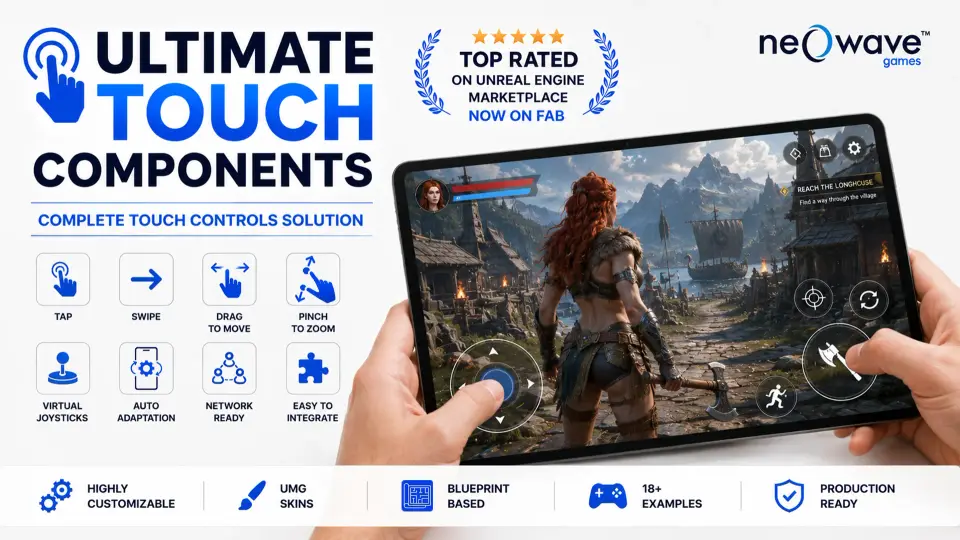
A player taps, drags, swipes, pinches, or steers a virtual stick on screen, and the control layer needs to respond cleanly without fighting the rest of the project. Ultimate Touch Components targets exactly that part of Unreal Engine development, giving teams a touch input system that can be integrated into existing Characters, Pawns, Cameras, and Actors while leaving gameplay logic in place.
The package has a long-running production angle behind it. It first gained traction on the Unreal Engine Marketplace and is now available on Fab, where it continues to receive new features and improvements while keeping the same production-ready foundation. That background matters here because the asset is not framed as a small prototype-only utility. It is presented as something that can support both fast testing and full project implementation across mobile devices, tablets, touchscreen PCs, and hybrid platforms.
Ultimate Touch Components in an existing Unreal Engine workflow
One of the clearest practical points is how the system fits into a project that already has gameplay behavior in place. The focus is not on rebuilding character logic from scratch. Instead, Ultimate Touch Components is meant to add advanced touch gestures, virtual joysticks, and other interactive controls to existing gameplay-facing classes. That makes it useful for teams moving a project toward touchscreen support, as well as for developers who want to prototype input behavior early and then keep the same framework when production work expands.
Customization is a major part of that workflow. Behavior, appearance, interaction areas, priorities, and responsiveness can all be adjusted. Those controls affect more than visual polish. They shape how touch elements behave under real input conditions, especially on projects where multiple controls share the screen or where different gameplay states require different response patterns. A system like this becomes more practical when it can be tuned instead of treated as a fixed overlay, and that is central to how Ultimate Touch Components is positioned.
The package also includes 18 ready-to-use examples based on common gameplay scenarios. That gives developers a direct path into implementation: migrate the examples that match the project, then adapt them rather than constructing every input setup from zero. For teams evaluating setup time, those example assets are one of the strongest concrete details attached to the resource.
Touch gestures, swipe controls, and multi-touch behavior
The gesture coverage is broad enough to handle both basic mobile interaction and more involved touchscreen schemes. Standard touch gestures include single tap, double tap, two-finger tap, and two-finger double tap. There is also support for tap and drag, along with tap and rotate. That gives the system a usable base for games or tools that need direct screen interaction rather than only joystick-driven movement.
Swipe handling goes further into movement and camera-style control. Directional swipe, omnidirectional swipe, and eight-directional swipe are all included, along with swipe-to-move. For projects that rely on drag-based control rather than fixed buttons, the package also supports drag-to-look, drag-to-move, and drag-to-pan. Those distinctions matter because they separate simple gesture recognition from gameplay-oriented input behavior. A top-down game, strategy camera, or touch-based character controller can each lean on a different part of the same system.
Multi-touch support extends that range again with pinch to zoom, pinch to rotate, and pinch to pan. Combined zoom, pan, and rotation support is also part of the feature set. That combination is especially relevant for camera-heavy scenes, map interaction, strategy interfaces, and touch-driven navigation where players need to manipulate the view with more than one gesture at a time.
Taken together, these features show that the package is not limited to one input pattern. It supports direct taps for immediate actions, drag and swipe input for continuous control, and multi-touch gestures for camera or scene manipulation. The range is wide without being vague, since each supported action is clearly named.
Virtual joysticks, touch pads, and control layering
Ultimate Touch Components also covers the on-screen control side of mobile input with multiple virtual joystick styles. Fixed joysticks and floating joysticks are both included, giving developers a choice between a control that stays anchored in place and one that appears based on touch position. Single-axis sliders are available as well, alongside touch pads and multiple behavior presets.
That spread opens up several practical uses. A character movement setup may rely on a floating joystick, while a vehicle input scheme might benefit from a single-axis slider. A free-look camera or touch-based aiming system could lean on a touch pad instead. Because these are presented as parts of one broader framework, the package reads less like a single controller widget and more like a toolkit for assembling different interaction models inside the same project.
The interface layer is also adjustable. Animated UMG joystick skins and custom background widgets are included, which gives developers room to shape how controls sit inside the screen layout. Configurable input areas, referred to as bounds, make it possible to define where certain controls are active. That becomes useful when a game needs separate left and right interaction zones, or when touch inputs should be restricted to specific parts of the display.
Another important detail is the component priority system for overlapping controls. On touch interfaces, overlapping or adjacent input zones can easily lead to ambiguity. A priority system helps sort out which control should respond first when multiple components compete for the same area or gesture. That is a practical feature, not just a convenience one, because it affects whether a control scheme remains reliable as more screen elements are added.
Screen changes, orientation support, and multiplayer considerations
Touch input often becomes harder to manage as device conditions change. Ultimate Touch Components addresses some of those shifting conditions directly. It includes automatic adaptation to screen resolution changes, which helps the control layer keep pace when display size or resolution differs between devices. Orientation change support for portrait and landscape is also built in, so the system is not locked to a single layout direction.
Cross-component compatibility is another part of the package, reinforcing the idea that the individual control pieces are meant to work together rather than as isolated widgets. Debug visualization tools are included as well, which adds a useful implementation layer for teams that need to inspect or tune how touch regions and behaviors are functioning during setup.
Multiplayer and networking support are explicitly listed too. That does not define a specific networking model, but it does show that the touch system is intended to function in projects that go beyond purely local single-player use. For developers weighing whether a mobile or touchscreen control framework can live inside a larger game structure, that support is one of the more meaningful compatibility notes available.
18 practical example setups and migration-friendly assets
The included content makes the package easier to evaluate as a working system rather than a bare set of components. Alongside the complete touch input framework, Ultimate Touch Components includes gesture recognition components, multiple virtual joystick types, 18 practical example setups, and migration-friendly example assets.
That last point is especially tied to implementation. The examples are not just there for reference. They are meant to be migrated into a project so developers can start from a scenario that already demonstrates a common use case. This shortens the path between installation and actual in-scene testing. For solo developers, it reduces the amount of repetitive setup needed before input can be evaluated. For larger teams, it gives a clearer starting point for standardizing controls across different gameplay systems.
The example-driven approach also matches the asset’s stated range of use. Action games, RTS projects, top-down strategy, racing games, simulations, and mobile-first experiences all appear within the intended scope. That list does not mean every project will use the same control arrangement. It shows that the package is flexible enough to support very different touch patterns, from fast directional movement to camera pan, zoom, or gesture-heavy interaction.
Where Ultimate Touch Components fits best
Ultimate Touch Components is strongest when a project needs touchscreen input to become part of an existing Unreal Engine workflow without forcing a rewrite of core gameplay systems. Its value is in the combination of gesture coverage, joystick variety, control customization, and example-driven setup. The package supports taps, swipes, drag actions, pinch interactions, fixed and floating sticks, sliders, and touch pads, then backs those systems with configurable bounds, overlapping-control priorities, orientation handling, resolution adaptation, and debug tools.
For teams evaluating it on practical terms, the clearest takeaway is simple: this is a touch input framework with enough range to move from prototyping into production, and enough included examples to make the first implementation pass much faster than building every control pattern from scratch.
 Engine Tools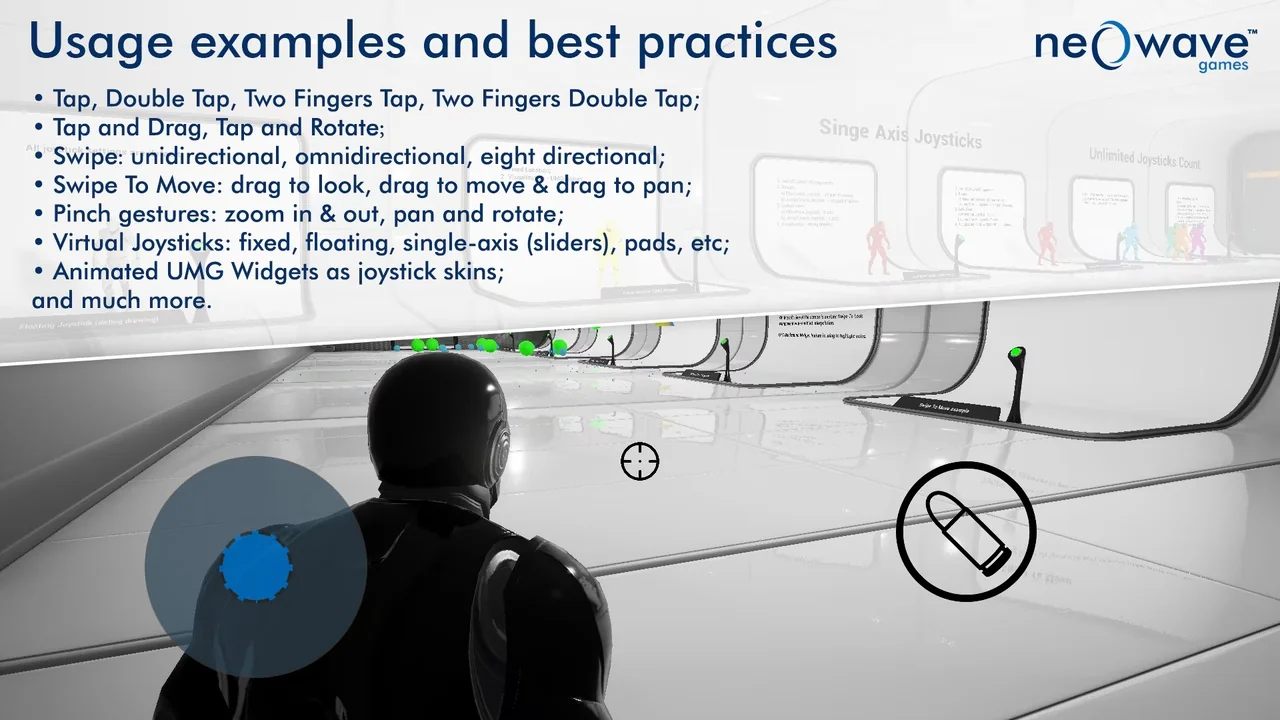
 Gameplay Features
 Procedural Systems
 Engine Tools