"7066dd76da796369"{"id":"1000138","slug":"unreal-engine-5-product-animation-visualization","title":"Unreal Engine 5: Product Animation / Visualization","category":"Unreal Engine","engine":"File Content: video + English subtitles","assetVersion":"Video Language: English","engineVersion":"File Content: video + English subtitles","tag":"Unreal Engine","accent":"blue","visual":"animation","summary":"A 2h 31m Unreal Engine 5 course that teaches product visualization, lighting, camera animation, and rendering through headphone and watch projects.","platform":"Unreal Engine","publishedAt":"2026-06-12T16:14:45.512Z","updatedAt":"2026-06-12T16:14:45.512Z","sourceNotes":[],"fileContents":[],"compatibility":["Unreal Engine","Video Language: English","File Content: video + English subtitles"],"featuredImage":{"alt":"Unreal Engine 5: Product Animation / Visualization","src":"/wp-content/uploads/published/2026/06/c2a458054fba-5275980-abe6-2-ec9abab2a7.webp"},"hasDownloadLink":true,"downloads":0,"terms":[{"taxonomy":"category","slug":"tutoriallibrary-unrealengine","name":"Unreal Engine"}],"galleryImages":[],"accessPanel":{"kind":"resource","title":"Download this resource","eyebrow":"Free Download","message":"Log in or create a free account to start your download.","fileName":"Unreal Engine 5 Product Animation Visualization.7z","safetyNote":"Resources are manually reviewed before listing to improve quality and reduce obvious risks.","actionLabel":"Download Free","resourceType":"Resource archive"},"contentHtml":"\u003cp\u003e\u003cstrong\u003eUnreal Engine 5: Product Animation / Visualization\u003c/strong\u003e Focuses on four core areas inside a single learning path: product visualization, lighting, camera animation, and rendering. Instead of separating those topics into isolated technical lessons, it teaches the basics of Unreal Engine 5 by making product animations, using a project-based approach that keeps the work tied to finished commercial-style pieces.\u003c/p\u003e\n\u003cp\u003eThat setup gives the course a clear direction from the start. The material begins with an introduction, then moves into two distinct project segments: a headphones commercial animation and a watch commercial animation. Across a total workload of 2 hours and 31 minutes, the structure stays close to practical scene work, with each major Unreal Engine 5 topic framed through actual product presentation.\u003c/p\u003e \u003ch2\u003eProduct Animation in Unreal Engine 5\u003c/h2\u003e\n\u003cp\u003eThe central idea is straightforward: learn Unreal Engine 5 by building product animations. This helps because the course is not simply about moving through interface basics in the abstract. It places product visualization at the center, so the software is approached through the specific demands of showing an object clearly, attractively, and with enough control to support a commercial animation workflow.\u003c/p\u003e\n\u003cp\u003eProduct visualization is listed as one of the main learning outcomes, and it is taught with a project-based approach. In practice, that means the basics are introduced through making work rather than studying disconnected features. For artists who want to understand Unreal Engine 5 in a way that immediately connects to presentation and motion, that framing keeps the learning process anchored to visible results.\u003c/p\u003e\n\u003cp\u003eThe course level is marked as all levels, which places the material in an accessible position. At the same time, the emphasis stays on basics, so the purpose is clear: it is a starting point for using Unreal Engine 5 in product-oriented animation work, not a broad survey of every possible tool in the engine.\u003c/p\u003e \u003ch2\u003eHeadphones Commercial Animation as the first project path\u003c/h2\u003e\n\u003cp\u003eAfter the introduction, the curriculum moves into \u003cstrong\u003eHeadphones Commercial Animation\u003c/strong\u003e. This first major project gives the course its initial implementation track. Because the wider learning outcomes include product visualization, lighting, camera animation, and rendering, the headphones project functions as one of the main spaces where those basics are put into use.\u003c/p\u003e\n\u003cp\u003eUsing a commercial animation subject like headphones keeps the work focused on object presentation. That choice fits the course title closely. Product animation depends on how an object is framed, lit, and moved through the camera, and the course is arranged so those fundamentals are learned while producing a specific piece rather than just discussing the ideas around it.\u003c/p\u003e\n\u003cp\u003eThe headphones section also reflects the course’s creative angle. A product animation is not just a technical exercise in moving a camera or placing lights. It is a form of visualization where the object itself has to carry attention. By grounding early lessons in a headphones commercial animation, the course ties Unreal Engine 5 basics to a recognizably presentation-driven result.\u003c/p\u003e\n\u003cp\u003eThis is where the project-based approach becomes especially important. Instead of treating product visualization as a separate discipline from animation, the course connects them. The object is visualized through motion, through shot setup, and through rendering choices that support a finished commercial piece.\u003c/p\u003e \u003ch2\u003eLighting, Camera Animation, and Rendering inside the project workflow\u003c/h2\u003e\n\u003cp\u003eThree of the listed learning outcomes define how the course handles implementation inside Unreal Engine 5: lighting, camera animation, and rendering. Each is taught at the basics level and each is explicitly tied to a project-based approach.\u003c/p\u003e\n\u003cp\u003eLighting is one of the key practical areas in any product-focused scene, and here it is part of the same learning route as the animation work. Since the course is based on making product animations, lighting is not presented as a detached technical category. It belongs to the look of the product visualization and to the clarity of the final commercial-style result.\u003c/p\u003e\n\u003cp\u003eCamera animation forms another major part of the workflow. In product animation, the camera often defines how the viewer experiences the object, and this course includes that as one of its core basics. The emphasis on camera animation suggests that the work is not limited to still product presentation. It moves into timed motion and shot construction, which fits both the course title and the commercial animation projects in the curriculum.\u003c/p\u003e\n\u003cp\u003eRendering completes the chain. The course lists rendering as a distinct learning outcome, again taught through projects. That keeps the training close to completion rather than stopping at scene assembly. Product visualization, lighting, camera animation, and rendering are presented as connected stages in a single Unreal Engine 5 workflow, which gives the course a coherent path from setup to finished output.\u003c/p\u003e\n\u003cp\u003eSeen together, these four areas create a compact production loop. The product is visualized, the scene is lit, the camera is animated, and this gives rendered. The course does not spread beyond those fundamentals. It stays concentrated on the pieces needed to make product animations in Unreal Engine 5.\u003c/p\u003e \u003ch2\u003eWatch Commercial Animation broadens the same Unreal Engine 5 method\u003c/h2\u003e\n\u003cp\u003eThe second major project in the curriculum is \u003cstrong\u003eWatch Commercial Animation\u003c/strong\u003e. Placing a watch project after the headphones animation gives the course another practical context for the same set of basics. Rather than introducing a completely different subject area, it reinforces the product animation focus with a new object-centered commercial piece.\u003c/p\u003e\n\u003cp\u003eThat progression is useful in its own right. Moving from one product type to another keeps the learning process from being tied to only a single example. The headphones project establishes the method, while the watch project gives a second setting for applying product visualization, lighting, camera animation, and rendering inside Unreal Engine 5.\u003c/p\u003e\n\u003cp\u003eThe watch project also strengthens the course’s creative usage angle. Product animation changes with the object being presented, even when the same core tools are involved. By including both headphones and a watch in the curriculum, the course shows that the underlying Unreal Engine 5 basics can be approached through more than one commercial animation subject.\u003c/p\u003e\n\u003cp\u003eThis matters for artists who want to learn through direct making. The repeated project-based structure means the course is not only naming key areas of Unreal Engine 5. It is arranging them around finished animation tasks, first with headphones and then with a watch, so the learner stays inside an applied workflow from one section to the next.\u003c/p\u003e \u003ch2\u003eWho this course fits and how the 2h 31m structure reads\u003c/h2\u003e\n\u003cp\u003eThe target audience is clearly defined: artists wanting to learn Unreal Engine 5 with a project-based approach. That audience description matches the rest of the course closely. Nothing in the structure suggests a purely technical reference course or a broad engine survey. It is aimed at artists who want to enter Unreal Engine 5 by making product animations.\u003c/p\u003e\n\u003cp\u003eThe all-levels label supports that same reading. Since the course teaches the basics, it can serve as an entry point while still staying useful for learners who prefer practical projects over generalized software walkthroughs. The total workload of 2 hours and 31 minutes also gives the course a compact shape. It is long enough to move from introduction into two project sections, while still remaining focused on fundamentals rather than extending into a much wider curriculum.\u003c/p\u003e\n\u003cp\u003eThe course was published on April 18, 2023, and the instructor is Nafay Sheikh. Within the material that is outlined, the role of the instruction is straightforward: guide artists through Unreal Engine 5 basics by way of concrete product animation exercises instead of unrelated feature demonstrations.\u003c/p\u003e\n\u003cp\u003eAs a practical takeaway, this course is set up for artists who want a concise Unreal Engine 5 learning path anchored in making product commercials. Its structure keeps the work close to headphones and watch animation projects while covering the basics of product visualization, lighting, camera animation, and rendering.\u003c/p\u003e\n\n\u003ch2\u003eExplore Similar Assets\u003c/h2\u003e\n\u003cul\u003e\n\u003cli\u003e\u003ca href=\"https://3dcghub.com/unreal-engine-5-5-the-ultimate-cinematic-masterclass/\" title=\"Unreal Engine 5.5 - The Ultimate Cinematic Masterclass\"\u003eUnreal Engine 5.5 - The Ultimate Cinematic Masterclass\u003c/a\u003e\u003c/li\u003e\n\u003cli\u003e\u003ca href=\"https://3dcghub.com/master-unreal-engine-5-advanced-door-systems-blueprints/\" title=\"Master Unreal Engine 5 Advanced Door Systems Blueprints\"\u003eMaster Unreal Engine 5 Advanced Door Systems Blueprints\u003c/a\u003e\u003c/li\u003e\n\u003cli\u003e\u003ca href=\"https://3dcghub.com/make-a-2d-platformer-in-unreal-engine-5-c/\" title=\"Make a 2D platformer in Unreal engine 5 C++\"\u003eMake a 2D platformer in Unreal engine 5 C++\u003c/a\u003e\u003c/li\u003e\n\u003cli\u003e\u003ca href=\"https://3dcghub.com/unreal-engine-5-for-beginners-create-your-first-game/\" title=\"Unreal Engine 5 for Beginners - Create your first game\"\u003eUnreal Engine 5 for Beginners - Create your first game\u003c/a\u003e\u003c/li\u003e\n\u003cli\u003e\u003ca href=\"https://3dcghub.com/the-ultimate-guide-to-unreal-engine-5-for-complete-beginners/\" title=\"The Ultimate Guide to Unreal Engine 5 For Complete Beginners\"\u003eThe Ultimate Guide to Unreal Engine 5 For Complete Beginners\u003c/a\u003e\u003c/li\u003e\n\u003c/ul\u003e","contentTextLength":8607,"navigation":{"current":2029,"total":4016,"previous":{"id":"1000139","slug":"ultimate-touch-components","title":"Ultimate Touch Components","category":"Engine Tools","platform":"Unreal Engine","updatedAt":"2026-06-12T16:37:57.847Z"},"next":{"id":"1000137","slug":"side-scroller-shooter-kit-v1-1","title":"Side Scroller Shooter Kit v1.1","category":"Shooter","platform":"Unreal Engine","updatedAt":"2026-06-12T08:11:24.509Z"}},"relatedResources":[{"id":"1000140","slug":"unreal-engine-5-and-blender-3d-product-visualization","title":"Unreal Engine 5 and Blender 3D: Product Visualization","category":"Unreal Engine","engine":"File Content: video + English subtitles","assetVersion":"Video Language: English","engineVersion":"File Content: video + English subtitles","tag":"Unreal Engine","accent":"blue","visual":"mech","summary":"A beginner course focused on product renders in Unreal Engine 5, covering lighting, camera animation, and rendering through two guided scenes.","platform":"Unreal Engine","publishedAt":"2026-06-12T16:44:10.221Z","updatedAt":"2026-06-12T16:44:10.221Z","sourceNotes":[],"fileContents":[],"compatibility":["Blender","Video Language: English","File Content: video + English subtitles"],"featuredImage":{"alt":"Unreal Engine 5 and Blender 3D: Product Visualization","src":"/wp-content/uploads/published/2026/06/c9b33c477a4a-4935566-6467-bf4ff3433e.webp"},"hasDownloadLink":true,"downloads":0},{"id":"1000744","slug":"how-to-create-a-movie-in-unreal-engine-5-beginners-edition","title":"How to create a movie in Unreal Engine 5 Beginners Edition","category":"Unreal Engine","engine":"File Content: video + English subtitles","assetVersion":"Video Language: English","engineVersion":"File Content: video + English subtitles","tag":"Unreal Engine","accent":"blue","visual":"mech","summary":"A beginner-level UE5 course on creating CG animation, migrating projects, importing motion capture, and working with MetaHumans.","platform":"Unreal Engine","publishedAt":"2026-07-27T12:07:40.122Z","updatedAt":"2026-07-27T12:07:40.122Z","sourceNotes":[],"fileContents":[],"compatibility":["Unreal Engine","Video Language: English","File Content: video + English subtitles"],"featuredImage":{"alt":"How to create a movie in Unreal Engine 5 Beginners Edition","src":"/wp-content/uploads/published/2026/07/a207ba37646d-4192342-4b9b-11-973394dbfe.webp"},"hasDownloadLink":true,"downloads":4},{"id":"1000751","slug":"unreal-engine-5-motion-design","title":"Unreal Engine 5 : Motion Design","category":"Unreal Engine","engine":"File Content: video + English subtitles","assetVersion":"Video Language: English","engineVersion":"File Content: video + English subtitles","tag":"Unreal Engine","accent":"blue","visual":"mech","summary":"A 5.5-hour course covering real-time motion graphics in Unreal Engine 5.4, including cloner tools, splines, typography, and logo animation for beginners.","platform":"Unreal Engine","publishedAt":"2026-07-27T14:03:08.078Z","updatedAt":"2026-07-27T14:03:08.078Z","sourceNotes":[],"fileContents":[],"compatibility":["Unreal Engine","Video Language: English","File Content: video + English subtitles"],"featuredImage":{"alt":"Unreal Engine 5 : Motion Design","src":"/wp-content/uploads/published/2026/07/8686c1689baf-5885848-9034-4-aa0051a79b.webp"},"hasDownloadLink":true,"downloads":2}]}
A 2h 31m Unreal Engine 5 course that teaches product visualization, lighting, camera animation, and rendering through headphone and watch projects.
Category:Unreal EnginePlatform: Unreal EngineVideo Language: EnglishFile Content: video + English subtitlesPublished: Jun 12, 2026
Unreal Engine
Resource overview
Unreal Engine 5: Product Animation / Visualization Focuses on four core areas inside a single learning path: product visualization, lighting, camera animation, and rendering. Instead of separating those topics into isolated technical lessons, it teaches the basics of Unreal Engine 5 by making product animations, using a project-based approach that keeps the work tied to finished commercial-style pieces.
That setup gives the course a clear direction from the start. The material begins with an introduction, then moves into two distinct project segments: a headphones commercial animation and a watch commercial animation. Across a total workload of 2 hours and 31 minutes, the structure stays close to practical scene work, with each major Unreal Engine 5 topic framed through actual product presentation.
Product Animation in Unreal Engine 5
The central idea is straightforward: learn Unreal Engine 5 by building product animations. This helps because the course is not simply about moving through interface basics in the abstract. It places product visualization at the center, so the software is approached through the specific demands of showing an object clearly, attractively, and with enough control to support a commercial animation workflow.
Product visualization is listed as one of the main learning outcomes, and it is taught with a project-based approach. In practice, that means the basics are introduced through making work rather than studying disconnected features. For artists who want to understand Unreal Engine 5 in a way that immediately connects to presentation and motion, that framing keeps the learning process anchored to visible results.
The course level is marked as all levels, which places the material in an accessible position. At the same time, the emphasis stays on basics, so the purpose is clear: it is a starting point for using Unreal Engine 5 in product-oriented animation work, not a broad survey of every possible tool in the engine.
Headphones Commercial Animation as the first project path
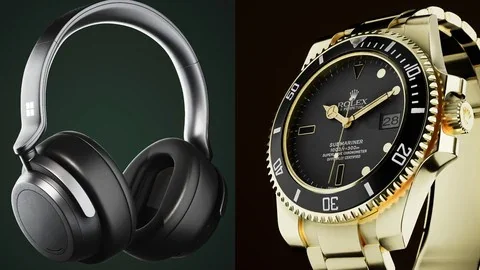
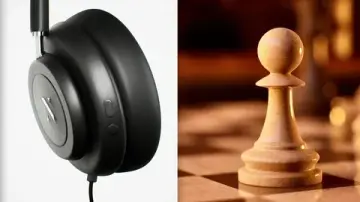
After the introduction, the curriculum moves into Headphones Commercial Animation. This first major project gives the course its initial implementation track. Because the wider learning outcomes include product visualization, lighting, camera animation, and rendering, the headphones project functions as one of the main spaces where those basics are put into use.
Using a commercial animation subject like headphones keeps the work focused on object presentation. That choice fits the course title closely. Product animation depends on how an object is framed, lit, and moved through the camera, and the course is arranged so those fundamentals are learned while producing a specific piece rather than just discussing the ideas around it.
The headphones section also reflects the course’s creative angle. A product animation is not just a technical exercise in moving a camera or placing lights. It is a form of visualization where the object itself has to carry attention. By grounding early lessons in a headphones commercial animation, the course ties Unreal Engine 5 basics to a recognizably presentation-driven result.
This is where the project-based approach becomes especially important. Instead of treating product visualization as a separate discipline from animation, the course connects them. The object is visualized through motion, through shot setup, and through rendering choices that support a finished commercial piece.
Lighting, Camera Animation, and Rendering inside the project workflow
Three of the listed learning outcomes define how the course handles implementation inside Unreal Engine 5: lighting, camera animation, and rendering. Each is taught at the basics level and each is explicitly tied to a project-based approach.
Lighting is one of the key practical areas in any product-focused scene, and here it is part of the same learning route as the animation work. Since the course is based on making product animations, lighting is not presented as a detached technical category. It belongs to the look of the product visualization and to the clarity of the final commercial-style result.
Camera animation forms another major part of the workflow. In product animation, the camera often defines how the viewer experiences the object, and this course includes that as one of its core basics. The emphasis on camera animation suggests that the work is not limited to still product presentation. It moves into timed motion and shot construction, which fits both the course title and the commercial animation projects in the curriculum.
Rendering completes the chain. The course lists rendering as a distinct learning outcome, again taught through projects. That keeps the training close to completion rather than stopping at scene assembly. Product visualization, lighting, camera animation, and rendering are presented as connected stages in a single Unreal Engine 5 workflow, which gives the course a coherent path from setup to finished output.
Seen together, these four areas create a compact production loop. The product is visualized, the scene is lit, the camera is animated, and this gives rendered. The course does not spread beyond those fundamentals. It stays concentrated on the pieces needed to make product animations in Unreal Engine 5.
Watch Commercial Animation broadens the same Unreal Engine 5 method
The second major project in the curriculum is Watch Commercial Animation. Placing a watch project after the headphones animation gives the course another practical context for the same set of basics. Rather than introducing a completely different subject area, it reinforces the product animation focus with a new object-centered commercial piece.
That progression is useful in its own right. Moving from one product type to another keeps the learning process from being tied to only a single example. The headphones project establishes the method, while the watch project gives a second setting for applying product visualization, lighting, camera animation, and rendering inside Unreal Engine 5.
The watch project also strengthens the course’s creative usage angle. Product animation changes with the object being presented, even when the same core tools are involved. By including both headphones and a watch in the curriculum, the course shows that the underlying Unreal Engine 5 basics can be approached through more than one commercial animation subject.
This matters for artists who want to learn through direct making. The repeated project-based structure means the course is not only naming key areas of Unreal Engine 5. It is arranging them around finished animation tasks, first with headphones and then with a watch, so the learner stays inside an applied workflow from one section to the next.
Who this course fits and how the 2h 31m structure reads
The target audience is clearly defined: artists wanting to learn Unreal Engine 5 with a project-based approach. That audience description matches the rest of the course closely. Nothing in the structure suggests a purely technical reference course or a broad engine survey. It is aimed at artists who want to enter Unreal Engine 5 by making product animations.
The all-levels label supports that same reading. Since the course teaches the basics, it can serve as an entry point while still staying useful for learners who prefer practical projects over generalized software walkthroughs. The total workload of 2 hours and 31 minutes also gives the course a compact shape. It is long enough to move from introduction into two project sections, while still remaining focused on fundamentals rather than extending into a much wider curriculum.
The course was published on April 18, 2023, and the instructor is Nafay Sheikh. Within the material that is outlined, the role of the instruction is straightforward: guide artists through Unreal Engine 5 basics by way of concrete product animation exercises instead of unrelated feature demonstrations.
As a practical takeaway, this course is set up for artists who want a concise Unreal Engine 5 learning path anchored in making product commercials. Its structure keeps the work close to headphones and watch animation projects while covering the basics of product visualization, lighting, camera animation, and rendering.
 Unreal Engine
 Unreal Engine
 Unreal Engine
 Unreal Engine