"5b4ce208cf88fb5e"{"id":"1000140","slug":"unreal-engine-5-and-blender-3d-product-visualization","title":"Unreal Engine 5 and Blender 3D: Product Visualization","category":"Unreal Engine","engine":"File Content: video + English subtitles","assetVersion":"Video Language: English","engineVersion":"File Content: video + English subtitles","tag":"Unreal Engine","accent":"blue","visual":"mech","summary":"A beginner course focused on product renders in Unreal Engine 5, covering lighting, camera animation, and rendering through two guided scenes.","platform":"Unreal Engine","publishedAt":"2026-06-12T16:44:10.221Z","updatedAt":"2026-06-12T16:44:10.221Z","sourceNotes":[],"fileContents":[],"compatibility":["Blender","Video Language: English","File Content: video + English subtitles"],"featuredImage":{"alt":"Unreal Engine 5 and Blender 3D: Product Visualization","src":"/wp-content/uploads/published/2026/06/c9b33c477a4a-4935566-6467-bf4ff3433e.webp"},"hasDownloadLink":true,"downloads":0,"terms":[{"taxonomy":"category","slug":"tutoriallibrary-unrealengine","name":"Unreal Engine"}],"galleryImages":[],"accessPanel":{"kind":"resource","title":"Download this resource","eyebrow":"Free Download","message":"Log in or create a free account to start your download.","fileName":"Unreal Engine 5 and Blender 3D Product Visualization.7z","safetyNote":"Resources are manually reviewed before listing to improve quality and reduce obvious risks.","actionLabel":"Download Free","resourceType":"Resource archive"},"contentHtml":"\u003cp\u003eProduct renders become the center of the learning process here. Instead of approaching Unreal Engine 5 through isolated menus or broad theory, this course uses finished visual scenes as the route into the software. The focus stays on making images and motion for products, which gives each part of the training a practical place in a real visualization workflow.\u003c/p\u003e \u003cp\u003e\u003cstrong\u003eUnreal Engine 5 and Blender 3D: Product Visualization\u003c/strong\u003e Is a beginner-level course with a workload of 2 hours and 38 minutes, published on October 20, 2022. It is taught by the developer Nafay Sheikh and aimed at artists who want to learn Unreal Engine 5 with a project-based approach. That framing matters because the course is not presented as a broad survey of every part of the engine. It stays close to product visualization tasks and uses that narrower scope to introduce core fundamentals.\u003c/p\u003e \u003ch2\u003eLearning Unreal Engine 5 through Product Renders\u003c/h2\u003e\n\u003cp\u003eThe strongest defining trait of the course is its decision to teach the basics of Unreal Engine 5 by making product renders. That puts the learner in a production-oriented mindset from the start. Rather than separating technical topics from visual outcomes, the course connects them directly to the act of presenting an object clearly and attractively in a rendered scene.\u003c/p\u003e \u003cp\u003eThe material covers four main areas: using product visualization in Unreal Engine 5, lighting, camera animation, and rendering. Each of these is taught with a project-based approach. For a beginner, that means the course appears structured around doing, not just watching. Product visualization becomes the thread that ties the lessons together, so the learner is introduced to core engine behavior in a context where scene appearance is always the immediate concern.\u003c/p\u003e \u003cp\u003eIn a real production workflow, those four topics sit close to one another. Product visualization needs scene setup, controlled lighting, deliberate camera movement when animation is involved, and final rendering decisions that turn the scene into a presentable output. This course fits into that chain at the foundational level. It is not framed as advanced specialization. It serves artists who want a clear first pass through the essentials while staying anchored to a recognizable end result.\u003c/p\u003e \u003ch2\u003eLighting, Camera Animation, and Rendering in Unreal Engine 5\u003c/h2\u003e\n\u003cp\u003eThe course places lighting among the basics, which is especially important in product-focused work. Lighting is one of the primary tools for shaping how a product reads in a render. In this training, it is taught as part of the same project-based structure as the rest of the course, so it is treated as something applied inside scenes rather than discussed in isolation.\u003c/p\u003e \u003cp\u003eCamera animation is also included in the core learning goals. That gives the course a broader reach than a still-render-only overview. Product visualization often benefits from motion that reveals form, surface, and silhouette over time, and the inclusion of camera animation signals that the learner is not only looking at static setup. The course introduces the basics of this process within Unreal Engine 5, again through guided project work.\u003c/p\u003e \u003cp\u003eRendering completes the sequence. Once a scene has been assembled and lit, and once a camera path or camera presentation is in place, rendering is the final stage that turns those choices into a finished output. The course treats rendering as a beginner topic rather than a separate advanced discipline, which helps position it as a practical entry point for artists who want to see a full scene move from setup to final result.\u003c/p\u003e \u003cp\u003eTaken together, these topics reflect a compact but coherent workflow inside Unreal Engine 5. A learner starts with the product visualization context, works through how the scene is lit, learns how the camera can present the subject, and reaches rendering as the final step. For teams or individuals evaluating where this course fits, that sequence makes it useful as a foundational pass across several connected stages rather than a narrow single-tool lesson.\u003c/p\u003e \u003ch2\u003eScene 01: Chess Render\u003c/h2\u003e\n\u003cp\u003eThe curriculum begins with an introduction and then moves into \u003cstrong\u003eScene 01: Chess Render\u003c/strong\u003e. Even from the title alone, this gives the course a concrete visual exercise instead of a generic practice file. A chess render suggests a controlled product-style scene where object presentation is central. That makes it a suitable training ground for the fundamentals the course promises to teach.\u003c/p\u003e \u003cp\u003eFor a beginner, this kind of scene is helpful because it keeps attention on image construction. The learner is not dealing with a large environment or a complex narrative sequence. The work is concentrated on how an object or group of objects is framed and presented. In the context of this course, that aligns directly with learning the basics of product visualization, lighting, and rendering in Unreal Engine 5.\u003c/p\u003e \u003cp\u003eThe chess render also helps establish the project-based rhythm of the course. Instead of describing product rendering in abstract terms, the material moves into a named scene that can carry those lessons. That scene-based structure is one of the clearest ways the course fits production reality: artists usually learn fastest when a task has a defined visual target.\u003c/p\u003e \u003ch2\u003eScene 02: Headphones Animation\u003c/h2\u003e\n\u003cp\u003eThe second major project, \u003cstrong\u003eScene 02: Headphones Animation\u003c/strong\u003e, shifts the course from a render-focused setup into motion. This is where the inclusion of camera animation becomes especially relevant. A headphones animation naturally supports the idea that product visualization in Unreal Engine 5 can move beyond still images into animated presentation.\u003c/p\u003e \u003cp\u003eThat makes the curriculum progression easy to read. After the introduction and the first scene, the second scene gives the learner another product context with a stronger animation angle. The course does not present camera animation as a detached topic. It places it inside a named project, where movement serves the presentation of the subject.\u003c/p\u003e \u003cp\u003eIn practical workflow terms, this is where the course broadens its usefulness. Artists learning Unreal Engine 5 for product work often need more than a single polished frame. They may need motion that highlights form or gives a more dynamic view of the object. By including a headphones animation as a curriculum component, the course shows that its beginner scope still reaches into animated presentation rather than stopping at static imagery.\u003c/p\u003e \u003ch2\u003eWhere this beginner course fits for artists\u003c/h2\u003e\n\u003cp\u003eThe target audience is clearly defined: artists wanting to learn Unreal Engine 5 with a project-based approach. That makes the course easiest to place within a larger learning path. It is not aimed at users already looking for deep specialization. It is a starting point for artists who want to enter Unreal Engine 5 through practical scene work and visible results.\u003c/p\u003e \u003cp\u003eThe course workload of 2 hours and 38 minutes supports that role. It is long enough to cover multiple connected topics and two named scenes, but still compact in scope. This makes it suitable as an early-stage training resource when someone needs a guided first experience with Unreal Engine 5 product visualization rather than an extended curriculum.\u003c/p\u003e \u003cp\u003eThe presence of two scene-based exercises also gives the course a clear place in production learning. One project centers on a chess render. The other centers on a headphones animation. Together, they create a small but focused bridge between foundational engine use and the kind of presentation tasks artists may need to handle in visualization work.\u003c/p\u003e \u003cp\u003eFor teams reviewing training options or for individual artists deciding where to begin, the strongest takeaway is simple: this course teaches Unreal Engine 5 basics through product renders, lighting, camera animation, and rendering, using a beginner-friendly, project-based structure anchored by a chess render and a headphones animation.\u003c/p\u003e\n\n\u003ch2\u003eContinue Browsing Similar Packs\u003c/h2\u003e\n\u003cul\u003e\n\u003cli\u003e\u003ca href=\"https://3dcghub.com/unreal-engine-5-product-animation-visualization/\" title=\"Unreal Engine 5: Product Animation / Visualization\"\u003eUnreal Engine 5: Product Animation / Visualization\u003c/a\u003e\u003c/li\u003e\n\u003cli\u003e\u003ca href=\"https://3dcghub.com/complete-modular-environments-in-unreal-engine/\" title=\"Complete Modular Environments in Unreal Engine\"\u003eComplete Modular Environments in Unreal Engine\u003c/a\u003e\u003c/li\u003e\n\u003cli\u003e\u003ca href=\"https://3dcghub.com/animated-render-border/\" title=\"Animated Render Border\"\u003eAnimated Render Border\u003c/a\u003e\u003c/li\u003e\n\u003cli\u003e\u003ca href=\"https://3dcghub.com/sakuga-toon-shader-cycles-eevee/\" title=\"Sakuga Toon Shader Cycles \u0026amp; Eevee\"\u003eSakuga Toon Shader Cycles \u0026amp; Eevee\u003c/a\u003e\u003c/li\u003e\n\u003cli\u003e\u003ca href=\"https://3dcghub.com/unreal-engine-5-5-the-ultimate-cinematic-masterclass/\" title=\"Unreal Engine 5.5 - The Ultimate Cinematic Masterclass\"\u003eUnreal Engine 5.5 - The Ultimate Cinematic Masterclass\u003c/a\u003e\u003c/li\u003e\n\u003c/ul\u003e","contentTextLength":8075,"navigation":{"current":1070,"total":3107,"previous":{"id":"1000141","slug":"virtual-joystick-minimalist-pack","title":"Virtual Joystick Minimalist Pack","category":"UI Kits / HUDs","platform":"Unreal Engine","updatedAt":"2026-06-12T16:49:41.086Z"},"next":{"id":"1000139","slug":"ultimate-touch-components","title":"Ultimate Touch Components","category":"Engine Tools","platform":"Unreal Engine","updatedAt":"2026-06-12T16:37:57.847Z"}},"relatedResources":[{"id":"1000138","slug":"unreal-engine-5-product-animation-visualization","title":"Unreal Engine 5: Product Animation / Visualization","category":"Unreal Engine","engine":"File Content: video + English subtitles","assetVersion":"Video Language: English","engineVersion":"File Content: video + English subtitles","tag":"Unreal Engine","accent":"blue","visual":"animation","summary":"A 2h 31m Unreal Engine 5 course that teaches product visualization, lighting, camera animation, and rendering through headphone and watch projects.","platform":"Unreal Engine","publishedAt":"2026-06-12T16:14:45.512Z","updatedAt":"2026-06-12T16:14:45.512Z","sourceNotes":[],"fileContents":[],"compatibility":["Unreal Engine","Video Language: English","File Content: video + English subtitles"],"featuredImage":{"alt":"Unreal Engine 5: Product Animation / Visualization","src":"/wp-content/uploads/published/2026/06/c2a458054fba-5275980-abe6-2-ec9abab2a7.webp"},"hasDownloadLink":true,"downloads":0},{"id":"1000746","slug":"product-rendering-in-unreal-engine-5-6-beginner-s-guide","title":"Product Rendering in Unreal Engine 5.6 | Beginner’s Guide","category":"Unreal Engine","engine":"File Content: video + English subtitles","assetVersion":"Video Language: English","engineVersion":"File Content: video + English subtitles","tag":"Unreal Engine","accent":"blue","visual":"mech","summary":"Build a product-rendering workflow in Unreal Engine 5.6 and DaVinci Resolve. Master studio lighting, reference matching, CGI integration, and color grading.","platform":"Unreal Engine","publishedAt":"2026-07-27T12:20:50.298Z","updatedAt":"2026-07-27T12:20:50.298Z","sourceNotes":[],"fileContents":[],"compatibility":["Unreal Engine","Video Language: English","File Content: video + English subtitles"],"featuredImage":{"alt":"Product Rendering in Unreal Engine 5.6 | Beginner’s Guide","src":"/wp-content/uploads/published/2026/07/28b6ff840a87-6935627-b546-2-e512e0113d.webp"},"hasDownloadLink":true,"downloads":0},{"id":"1000208","slug":"character-creation-for-unreal-engine","title":"Character creation for Unreal Engine","category":"Unreal Engine","engine":"File Content: video + English subtitles","assetVersion":"Video Language: English","engineVersion":"File Content: video + English subtitles","tag":"Unreal Engine","accent":"blue","visual":"character","summary":"A complete 7.5-hour pipeline covering AI model generation with Hunyuan 3D, Blender sculpting, Substance Painter texturing, and Unreal Engine integration.","platform":"Unreal Engine","publishedAt":"2026-06-24T14:26:38.594Z","updatedAt":"2026-06-24T14:26:38.594Z","sourceNotes":[],"fileContents":[],"compatibility":["Unreal Engine","Video Language: English","File Content: video + English subtitles"],"featuredImage":{"alt":"Character creation for Unreal Engine","src":"/wp-content/uploads/published/2026/06/86e5e5573fdf-6672309-8c7a-492ea80359.webp"},"hasDownloadLink":true,"downloads":2}]}
Unreal Engine
Unreal Engine 5 and Blender 3D: Product Visualization
A beginner course focused on product renders in Unreal Engine 5, covering lighting, camera animation, and rendering through two guided scenes.
Category:Unreal Engine, Unreal EnginePlatform: Unreal EngineVideo Language: EnglishFile Content: video + English subtitlesPublished: Jun 12, 2026
Unreal Engine
Resource overview
Product renders become the center of the learning process here. Instead of approaching Unreal Engine 5 through isolated menus or broad theory, this course uses finished visual scenes as the route into the software. The focus stays on making images and motion for products, which gives each part of the training a practical place in a real visualization workflow.
Unreal Engine 5 and Blender 3D: Product Visualization Is a beginner-level course with a workload of 2 hours and 38 minutes, published on October 20, 2022. It is taught by the developer Nafay Sheikh and aimed at artists who want to learn Unreal Engine 5 with a project-based approach. That framing matters because the course is not presented as a broad survey of every part of the engine. It stays close to product visualization tasks and uses that narrower scope to introduce core fundamentals.
Learning Unreal Engine 5 through Product Renders
The strongest defining trait of the course is its decision to teach the basics of Unreal Engine 5 by making product renders. That puts the learner in a production-oriented mindset from the start. Rather than separating technical topics from visual outcomes, the course connects them directly to the act of presenting an object clearly and attractively in a rendered scene.
The material covers four main areas: using product visualization in Unreal Engine 5, lighting, camera animation, and rendering. Each of these is taught with a project-based approach. For a beginner, that means the course appears structured around doing, not just watching. Product visualization becomes the thread that ties the lessons together, so the learner is introduced to core engine behavior in a context where scene appearance is always the immediate concern.
In a real production workflow, those four topics sit close to one another. Product visualization needs scene setup, controlled lighting, deliberate camera movement when animation is involved, and final rendering decisions that turn the scene into a presentable output. This course fits into that chain at the foundational level. It is not framed as advanced specialization. It serves artists who want a clear first pass through the essentials while staying anchored to a recognizable end result.
Lighting, Camera Animation, and Rendering in Unreal Engine 5
The course places lighting among the basics, which is especially important in product-focused work. Lighting is one of the primary tools for shaping how a product reads in a render. In this training, it is taught as part of the same project-based structure as the rest of the course, so it is treated as something applied inside scenes rather than discussed in isolation.
Camera animation is also included in the core learning goals. That gives the course a broader reach than a still-render-only overview. Product visualization often benefits from motion that reveals form, surface, and silhouette over time, and the inclusion of camera animation signals that the learner is not only looking at static setup. The course introduces the basics of this process within Unreal Engine 5, again through guided project work.
Rendering completes the sequence. Once a scene has been assembled and lit, and once a camera path or camera presentation is in place, rendering is the final stage that turns those choices into a finished output. The course treats rendering as a beginner topic rather than a separate advanced discipline, which helps position it as a practical entry point for artists who want to see a full scene move from setup to final result.
Taken together, these topics reflect a compact but coherent workflow inside Unreal Engine 5. A learner starts with the product visualization context, works through how the scene is lit, learns how the camera can present the subject, and reaches rendering as the final step. For teams or individuals evaluating where this course fits, that sequence makes it useful as a foundational pass across several connected stages rather than a narrow single-tool lesson.
Scene 01: Chess Render
The curriculum begins with an introduction and then moves into Scene 01: Chess Render. Even from the title alone, this gives the course a concrete visual exercise instead of a generic practice file. A chess render suggests a controlled product-style scene where object presentation is central. That makes it a suitable training ground for the fundamentals the course promises to teach.
For a beginner, this kind of scene is helpful because it keeps attention on image construction. The learner is not dealing with a large environment or a complex narrative sequence. The work is concentrated on how an object or group of objects is framed and presented. In the context of this course, that aligns directly with learning the basics of product visualization, lighting, and rendering in Unreal Engine 5.
The chess render also helps establish the project-based rhythm of the course. Instead of describing product rendering in abstract terms, the material moves into a named scene that can carry those lessons. That scene-based structure is one of the clearest ways the course fits production reality: artists usually learn fastest when a task has a defined visual target.
Scene 02: Headphones Animation
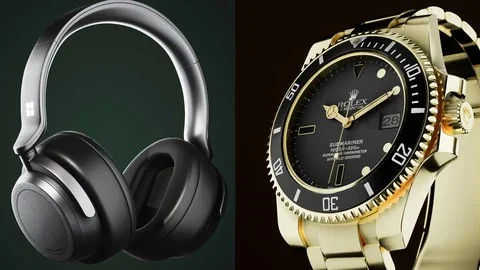
The second major project, Scene 02: Headphones Animation, shifts the course from a render-focused setup into motion. This is where the inclusion of camera animation becomes especially relevant. A headphones animation naturally supports the idea that product visualization in Unreal Engine 5 can move beyond still images into animated presentation.
That makes the curriculum progression easy to read. After the introduction and the first scene, the second scene gives the learner another product context with a stronger animation angle. The course does not present camera animation as a detached topic. It places it inside a named project, where movement serves the presentation of the subject.
In practical workflow terms, this is where the course broadens its usefulness. Artists learning Unreal Engine 5 for product work often need more than a single polished frame. They may need motion that highlights form or gives a more dynamic view of the object. By including a headphones animation as a curriculum component, the course shows that its beginner scope still reaches into animated presentation rather than stopping at static imagery.
Where this beginner course fits for artists
The target audience is clearly defined: artists wanting to learn Unreal Engine 5 with a project-based approach. That makes the course easiest to place within a larger learning path. It is not aimed at users already looking for deep specialization. It is a starting point for artists who want to enter Unreal Engine 5 through practical scene work and visible results.
The course workload of 2 hours and 38 minutes supports that role. It is long enough to cover multiple connected topics and two named scenes, but still compact in scope. This makes it suitable as an early-stage training resource when someone needs a guided first experience with Unreal Engine 5 product visualization rather than an extended curriculum.
The presence of two scene-based exercises also gives the course a clear place in production learning. One project centers on a chess render. The other centers on a headphones animation. Together, they create a small but focused bridge between foundational engine use and the kind of presentation tasks artists may need to handle in visualization work.
For teams reviewing training options or for individual artists deciding where to begin, the strongest takeaway is simple: this course teaches Unreal Engine 5 basics through product renders, lighting, camera animation, and rendering, using a beginner-friendly, project-based structure anchored by a chess render and a headphones animation.
 Unreal Engine
 Unreal Engine
 Unreal Engine
 Unreal Engine