"7aa4acc705f0d80b"{"id":"1000090","slug":"complete-modular-environments-in-unreal-engine","title":"Complete Modular Environments in Unreal Engine","category":"Unreal Engine","engine":"File Content: video + English subtitles","assetVersion":"Video Language: English","engineVersion":"File Content: video + English subtitles","tag":"Unreal Engine","accent":"blue","visual":"city","summary":"An intermediate course on modular environment creation across Unreal Engine, Blender, Zbrush, Substance Painter, and Substance Designer.","platform":"Unreal Engine","publishedAt":"2026-06-07T11:09:53.926Z","updatedAt":"2026-06-07T11:09:53.926Z","sourceNotes":[],"fileContents":[],"compatibility":["Unreal Engine","Video Language: English","File Content: video + English subtitles"],"featuredImage":{"alt":"Complete Modular Environments in Unreal Engine","src":"/wp-content/uploads/published/2026/06/3e5498d86af6-4784282-c015-3-67e3e29214.webp"},"hasDownloadLink":true,"downloads":2,"terms":[{"taxonomy":"category","slug":"tutoriallibrary-unrealengine","name":"Unreal Engine"}],"galleryImages":[],"accessPanel":{"kind":"resource","title":"Access this resource","eyebrow":"Free Download","message":"Log in or create a free account to start your download.","fileName":"Complete Modular Environments in Unreal Engine.7z","safetyNote":"Resources are manually reviewed before listing to improve quality and reduce obvious risks.","actionLabel":"Download Free","resourceType":"Resource archive"},"contentHtml":"\u003cp\u003eEnvironment artists working on game scenes often need more than a single tool or a single stage of production. A modular environment workflow has to move from planning and blockout into asset creation, then into materials and lighting that hold the scene together. Complete Modular Environments in Unreal Engine is focused on that full process, combining Unreal Engine with Blender, Zbrush, Substance Painter, and Substance Designer to cover how modular environments are made and refined.\u003c/p\u003e\n\u003cp\u003eThe course is aimed at students who already know something about environment art and want to learn new techniques. That intermediate positioning matters. The material is not framed as a first exposure to 3D art or game scene production. Instead, it moves through the practical stages of building an environment with a stronger focus on implementation: making modular environments, creating tiling geometry and material work, building AAA props, and handling lighting for game environments.\u003c/p\u003e \u003ch2\u003eWhere modular environments become useful\u003c/h2\u003e\n\u003cp\u003eModular environment work is especially relevant when a scene needs repeatable structure, controlled variation, and a workflow that can scale across a larger space. This course addresses that kind of production setup directly. Its core goal is to teach how to make modular environments, which places the emphasis on parts that can be developed and used together rather than on one-off assets in isolation.\u003c/p\u003e\n\u003cp\u003eThat approach naturally connects to tiling geometry and material creation, both of which are part of the learning path here. Tiling elements are a practical fit for environment production because they help establish surfaces and repeated forms that support a larger scene. In the same workflow, props bring in the focal detail that stops a modular environment from feeling too uniform. Lighting then becomes the stage where all of those decisions are read as a finished game environment rather than a loose collection of models and materials.\u003c/p\u003e\n\u003cp\u003eBy covering Unreal Engine alongside Blender, Zbrush, Substance Painter, and Substance Designer, the course places modular environment art in a multi-application pipeline instead of limiting it to engine assembly alone. The package then offers a training path that treats scene creation as a connected process from asset work through environment presentation.\u003c/p\u003e \u003ch2\u003eThe Blockout and the shift into AAA art\u003c/h2\u003e\n\u003cp\u003eThe curriculum gives a clear picture of how that process is staged. After the introduction, the course moves into \u003cem\u003eThe Blockout\u003c/em\u003e, which is where environment structure starts to take shape. A blockout phase is a practical foundation for modular work because it establishes layout and the larger forms before detail is pushed further. In a course about complete environments, that placement makes the blockout more than a preliminary exercise. It acts as the setup for the later art passes.\u003c/p\u003e\n\u003cp\u003eFrom there, the training continues into two separate chapters dedicated to creating AAA art: \u003cem\u003eCreating AAA Art _ First Iteration\u003c/em\u003e And \u003cem\u003eCreating AAA Art _ Second Iteration\u003c/em\u003e. The split into first and second iteration suggests a workflow that does not stop after an initial pass. Instead, the course structure gives room for development and refinement across multiple stages, which fits the broader idea of environment production as an evolving process.\u003c/p\u003e\n\u003cp\u003eThat also lines up with one of the stated learning outcomes: creating AAA props. Props are often where environment scenes gain specificity and visual focus, and placing AAA art creation across two iterations indicates sustained attention not just one quick module. The course does not isolate props from the environment workflow either. They sit inside a broader sequence that begins with blockout and continues into materials and lighting, keeping scene creation connected from start to finish.\u003c/p\u003e \u003ch2\u003eTiling geometry, material work, and lighting for game environments\u003c/h2\u003e\n\u003cp\u003eOne of the strongest practical threads in the course is the combination of tiling geometry, material creation, and lighting. These are not treated as separate concerns scattered across unrelated lessons. They are named directly as part of what students will learn and also appear together in the curriculum chapter \u003cem\u003eMaterial Creation And Lighting\u003c/em\u003e.\u003c/p\u003e\n\u003cp\u003eTiling geometry and material work are central to modular environment building because they help define how surfaces repeat, how spaces stay visually consistent, and how larger scenes can be assembled from reusable elements. The inclusion of Substance Painter and Substance Designer in the toolset underlines the course’s attention to the material side of environment art. At the same time, Unreal Engine anchors the final scene context where those materials and environment pieces come together.\u003c/p\u003e\n\u003cp\u003eLighting for game environments is another explicit learning goal, and its place later in the course suggests that it is handled after the main environment and art passes are underway. That sequence keeps lighting tied to implementation rather than treating it as an abstract standalone topic. In a modular scene, lighting has to support both the structure of the environment and the readability of the props and material work. The course structure reflects that by bringing material creation and lighting into the same chapter.\u003c/p\u003e\n\u003cp\u003eThis makes the training especially useful for artists who want to see how environment production moves from repeated structural elements into a more complete visual result. Geometry, materials, props, and lighting are presented as parts of the same scene-building chain.\u003c/p\u003e \u003ch2\u003eUnreal Engine with Blender, Zbrush, Substance Painter, and Substance Designer\u003c/h2\u003e\n\u003cp\u003eComplete Modular Environments in Unreal Engine is not limited to a single software perspective. The course description places Unreal Engine, Blender, Zbrush, Substance Painter, and Substance Designer together in the main workflow. That combination is important because it frames environment creation as a cross-application practice rather than a narrow engine-only exercise.\u003c/p\u003e\n\u003cp\u003eUnreal Engine is the destination for the environment work named in the course title, while the surrounding applications support the broader art pipeline. Blender and Zbrush sit naturally within a modeling and sculpting context, and Substance Painter and Substance Designer reinforce the material creation side that the course calls out directly. Even without adding extra claims about specific outputs or technical features, the listed toolset shows that the course is shaped by a production pipeline with multiple stages and specialized roles.\u003c/p\u003e\n\u003cp\u003eFor students who already have some background in environment art, that kind of setup can be more useful than a simplified single-tool walkthrough. It matches the reality that modular environment creation often involves moving between applications as assets, surfaces, and scene presentation are developed together. The course appears to lean into that reality by teaching the environment workflow across the named software rather than reducing everything to a single package.\u003c/p\u003e \u003ch2\u003eHow the 38-hour course is structured for intermediate environment artists\u003c/h2\u003e\n\u003cp\u003eThe course runs for 38 hours and 39 minutes and is marked as intermediate. That length gives it room to cover the full sequence laid out in the curriculum: introduction, blockout, first iteration of AAA art, second iteration of AAA art, material creation and lighting, and conclusion. Instead of presenting modular environment work as a short topic, it is handled as an extended training path.\u003c/p\u003e\n\u003cp\u003eThe target audience is clearly defined as students who already know something about environment art and want to learn more new techniques. That makes the course best suited to learners who are past the earliest stage and are looking to develop stronger process awareness across environment production. The emphasis is less on broad beginner orientation and more on pushing forward through practical methods in modular scene building, prop creation, materials, and lighting.\u003c/p\u003e\n\u003cp\u003ePublished on Jun 28, 2023 and provided by Nexttut Education Pvt.Ltd., the course stands as a focused environment art program rather than a broad generalist survey. Its content is specific: modular environments, tiling geometry and material creation, lighting for game environments, and AAA props. The benefit of that focus is clarity. Students interested in those exact parts of the pipeline can see how the training is arranged and where each topic enters the process.\u003c/p\u003e\n\u003cp\u003eFor artists who already understand the basics of environment art and want a longer, structured pass through modular production in Unreal Engine and its supporting tools, this course is most relevant when the goal is to connect blockout, iteration, materials, props, and lighting into one continuous workflow.\u003c/p\u003e\n\n\u003ch2\u003eContinue Browsing Similar Packs\u003c/h2\u003e\n\u003cul\u003e\n\u003cli\u003e\u003ca href=\"https://3dcghub.com/unreal-engine-5-c-advanced-action-rpg/\" title=\"Unreal Engine 5 C++: Advanced Action RPG\"\u003eUnreal Engine 5 C++: Advanced Action RPG\u003c/a\u003e\u003c/li\u003e\n\u003cli\u003e\u003ca href=\"https://3dcghub.com/introduction-to-materials-in-unreal-engine-5/\" title=\"Introduction to Materials in Unreal Engine 5\"\u003eIntroduction to Materials in Unreal Engine 5\u003c/a\u003e\u003c/li\u003e\n\u003cli\u003e\u003ca href=\"https://3dcghub.com/embergen-volumetric-unreal-engine-5/\" title=\"EmberGen Volumetric \u0026amp; Unreal Engine 5\"\u003eEmberGen Volumetric \u0026amp; Unreal Engine 5\u003c/a\u003e\u003c/li\u003e\n\u003cli\u003e\u003ca href=\"https://3dcghub.com/mastering-environment-design-with-unreal-engine-5/\" title=\"Mastering Environment Design with Unreal Engine 5\"\u003eMastering Environment Design with Unreal Engine 5\u003c/a\u003e\u003c/li\u003e\n\u003cli\u003e\u003ca href=\"https://3dcghub.com/niagara-beginners-to-advanced-in-unreal-engine-5/\" title=\"Niagara Beginners to advanced in Unreal Engine 5\"\u003eNiagara Beginners to advanced in Unreal Engine 5\u003c/a\u003e\u003c/li\u003e\n\u003c/ul\u003e","contentTextLength":8962,"navigation":{"current":1980,"total":3925,"previous":{"id":"1000091","slug":"rino-s-diner-environment-rinos-diner-american-american-interior-diner-usa","title":"Rino's Diner Environment ( Rinos Diner American American Interior Diner USA )","category":"Interior","platform":"Unreal Engine","updatedAt":"2026-06-07T11:14:10.600Z"},"next":{"id":"1000089","slug":"retropunk-saloon-environment-post-apocalyptic-bar-post-apo-abandoned-saloon","title":"Retropunk Saloon Environment ( Post Apocalyptic Bar Post apo Abandoned Saloon )","category":"Desert","platform":"Unreal Engine","updatedAt":"2026-06-06T18:19:17.471Z"}},"relatedResources":[{"id":"1000185","slug":"unreal-engine-5-c-advanced-frontend-ui-programming","title":"Unreal Engine 5 C++: Advanced Frontend UI Programming","category":"Unreal Engine","engine":"File Content: video + English subtitles","assetVersion":"Video Language: English","engineVersion":"File Content: video + English subtitles","tag":"Unreal Engine","accent":"blue","visual":"mech","summary":"Build a modular AAA frontend interface in Unreal Engine 5 using C++ and Common UI, featuring widget stacks, input remapping, and dynamic settings panels.","platform":"Unreal Engine","publishedAt":"2026-06-22T04:36:47.167Z","updatedAt":"2026-10-03T14:08:44.356Z","sourceNotes":[],"fileContents":[],"compatibility":["Unreal Engine","Video Language: English","File Content: video + English subtitles"],"featuredImage":{"alt":"Unreal Engine 5 C++: Advanced Frontend UI Programming","src":"/wp-content/uploads/published/2026/06/12faf3fde540-6261861-cd99-2-1eb445cf78.webp"},"hasDownloadLink":true,"downloads":0},{"id":"1000181","slug":"unreal-engine-5-blender-environment-design-for-beginners","title":"Unreal Engine 5 + Blender Environment Design For Beginners","category":"Unreal Engine","engine":"File Content: video + English subtitles","assetVersion":"Video Language: English","engineVersion":"File Content: video + English subtitles","tag":"Unreal Engine","accent":"blue","visual":"city","summary":"A beginner course focused on creating a factory interior with Blender and Unreal Engine 5, covering modular modeling, materials, lighting, and level assembly.","platform":"Unreal Engine","publishedAt":"2026-06-21T04:53:10.052Z","updatedAt":"2026-10-03T14:08:40.296Z","sourceNotes":[],"fileContents":[],"compatibility":["Blender","Video Language: English","File Content: video + English subtitles"],"featuredImage":{"alt":"Unreal Engine 5 + Blender Environment Design For Beginners","src":"/wp-content/uploads/published/2026/06/629c97a3fbc5-6468489-877c-9382f24713.webp"},"hasDownloadLink":true,"downloads":0},{"id":"1000074","slug":"mastering-c-for-unreal-engine-beginner-to-pro","title":"Mastering C++ for Unreal Engine (Beginner to Pro)","category":"Unreal Engine","engine":"File Content: video + English subtitles","assetVersion":"Video Language: English","engineVersion":"File Content: video + English subtitles","tag":"Unreal Engine","accent":"blue","visual":"mech","summary":"A 2h 38m Unreal Engine course covering C++ fundamentals, Blueprint vs. C++, inheritance, polymorphism, and portfolio-focused learning.","platform":"Unreal Engine","publishedAt":"2026-06-03T19:10:43.171Z","updatedAt":"2026-10-03T14:08:34.462Z","sourceNotes":[],"fileContents":[],"compatibility":["Unreal Engine","Video Language: English","File Content: video + English subtitles"],"featuredImage":{"alt":"Mastering C++ for Unreal Engine (Beginner to Pro)","src":"/wp-content/uploads/published/2026/06/ae0733ebb4c3-5628295-27dd-3-6f9cb8e8dd.webp"},"hasDownloadLink":true,"downloads":0}]}
Unreal Engine
Complete Modular Environments in Unreal Engine
An intermediate course on modular environment creation across Unreal Engine, Blender, Zbrush, Substance Painter, and Substance Designer.
Category:Unreal EnginePlatform: Unreal EngineVideo Language: EnglishFile Content: video + English subtitlesPublished: Jun 7, 2026
Unreal Engine
Resource overview
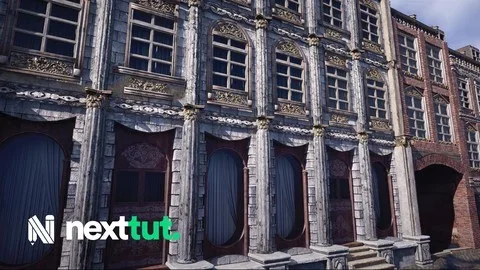
Environment artists working on game scenes often need more than a single tool or a single stage of production. A modular environment workflow has to move from planning and blockout into asset creation, then into materials and lighting that hold the scene together. Complete Modular Environments in Unreal Engine is focused on that full process, combining Unreal Engine with Blender, Zbrush, Substance Painter, and Substance Designer to cover how modular environments are made and refined.
The course is aimed at students who already know something about environment art and want to learn new techniques. That intermediate positioning matters. The material is not framed as a first exposure to 3D art or game scene production. Instead, it moves through the practical stages of building an environment with a stronger focus on implementation: making modular environments, creating tiling geometry and material work, building AAA props, and handling lighting for game environments.
Where modular environments become useful
Modular environment work is especially relevant when a scene needs repeatable structure, controlled variation, and a workflow that can scale across a larger space. This course addresses that kind of production setup directly. Its core goal is to teach how to make modular environments, which places the emphasis on parts that can be developed and used together rather than on one-off assets in isolation.
That approach naturally connects to tiling geometry and material creation, both of which are part of the learning path here. Tiling elements are a practical fit for environment production because they help establish surfaces and repeated forms that support a larger scene. In the same workflow, props bring in the focal detail that stops a modular environment from feeling too uniform. Lighting then becomes the stage where all of those decisions are read as a finished game environment rather than a loose collection of models and materials.
By covering Unreal Engine alongside Blender, Zbrush, Substance Painter, and Substance Designer, the course places modular environment art in a multi-application pipeline instead of limiting it to engine assembly alone. The package then offers a training path that treats scene creation as a connected process from asset work through environment presentation.
The Blockout and the shift into AAA art
The curriculum gives a clear picture of how that process is staged. After the introduction, the course moves into The Blockout, which is where environment structure starts to take shape. A blockout phase is a practical foundation for modular work because it establishes layout and the larger forms before detail is pushed further. In a course about complete environments, that placement makes the blockout more than a preliminary exercise. It acts as the setup for the later art passes.
From there, the training continues into two separate chapters dedicated to creating AAA art: Creating AAA Art _ First Iteration And Creating AAA Art _ Second Iteration. The split into first and second iteration suggests a workflow that does not stop after an initial pass. Instead, the course structure gives room for development and refinement across multiple stages, which fits the broader idea of environment production as an evolving process.
That also lines up with one of the stated learning outcomes: creating AAA props. Props are often where environment scenes gain specificity and visual focus, and placing AAA art creation across two iterations indicates sustained attention not just one quick module. The course does not isolate props from the environment workflow either. They sit inside a broader sequence that begins with blockout and continues into materials and lighting, keeping scene creation connected from start to finish.
Tiling geometry, material work, and lighting for game environments
One of the strongest practical threads in the course is the combination of tiling geometry, material creation, and lighting. These are not treated as separate concerns scattered across unrelated lessons. They are named directly as part of what students will learn and also appear together in the curriculum chapter Material Creation And Lighting.
Tiling geometry and material work are central to modular environment building because they help define how surfaces repeat, how spaces stay visually consistent, and how larger scenes can be assembled from reusable elements. The inclusion of Substance Painter and Substance Designer in the toolset underlines the course’s attention to the material side of environment art. At the same time, Unreal Engine anchors the final scene context where those materials and environment pieces come together.
Lighting for game environments is another explicit learning goal, and its place later in the course suggests that it is handled after the main environment and art passes are underway. That sequence keeps lighting tied to implementation rather than treating it as an abstract standalone topic. In a modular scene, lighting has to support both the structure of the environment and the readability of the props and material work. The course structure reflects that by bringing material creation and lighting into the same chapter.
This makes the training especially useful for artists who want to see how environment production moves from repeated structural elements into a more complete visual result. Geometry, materials, props, and lighting are presented as parts of the same scene-building chain.
Unreal Engine with Blender, Zbrush, Substance Painter, and Substance Designer
Complete Modular Environments in Unreal Engine is not limited to a single software perspective. The course description places Unreal Engine, Blender, Zbrush, Substance Painter, and Substance Designer together in the main workflow. That combination is important because it frames environment creation as a cross-application practice rather than a narrow engine-only exercise.
Unreal Engine is the destination for the environment work named in the course title, while the surrounding applications support the broader art pipeline. Blender and Zbrush sit naturally within a modeling and sculpting context, and Substance Painter and Substance Designer reinforce the material creation side that the course calls out directly. Even without adding extra claims about specific outputs or technical features, the listed toolset shows that the course is shaped by a production pipeline with multiple stages and specialized roles.
For students who already have some background in environment art, that kind of setup can be more useful than a simplified single-tool walkthrough. It matches the reality that modular environment creation often involves moving between applications as assets, surfaces, and scene presentation are developed together. The course appears to lean into that reality by teaching the environment workflow across the named software rather than reducing everything to a single package.
How the 38-hour course is structured for intermediate environment artists
The course runs for 38 hours and 39 minutes and is marked as intermediate. That length gives it room to cover the full sequence laid out in the curriculum: introduction, blockout, first iteration of AAA art, second iteration of AAA art, material creation and lighting, and conclusion. Instead of presenting modular environment work as a short topic, it is handled as an extended training path.
The target audience is clearly defined as students who already know something about environment art and want to learn more new techniques. That makes the course best suited to learners who are past the earliest stage and are looking to develop stronger process awareness across environment production. The emphasis is less on broad beginner orientation and more on pushing forward through practical methods in modular scene building, prop creation, materials, and lighting.
Published on Jun 28, 2023 and provided by Nexttut Education Pvt.Ltd., the course stands as a focused environment art program rather than a broad generalist survey. Its content is specific: modular environments, tiling geometry and material creation, lighting for game environments, and AAA props. The benefit of that focus is clarity. Students interested in those exact parts of the pipeline can see how the training is arranged and where each topic enters the process.
For artists who already understand the basics of environment art and want a longer, structured pass through modular production in Unreal Engine and its supporting tools, this course is most relevant when the goal is to connect blockout, iteration, materials, props, and lighting into one continuous workflow.
 Unreal Engine
 Unreal Engine
 Unreal Engine
 Unreal Engine