"c68a05d5e51405b3"{"id":"1000694","slug":"unreal-5-niagara-advanced-niagara","title":"Unreal 5 Niagara - Advanced Niagara","category":"Unreal Engine","engine":"File Content: video + English subtitles","assetVersion":"Video Language: English","engineVersion":"File Content: video + English subtitles","tag":"Unreal Engine","accent":"blue","visual":"mech","summary":"Expert-level Unreal Engine 5 Niagara course covering data interfaces, SDFs, mesh distance fields, RVTs, flowmaps, collision avoidance, and custom scratch pad mo","platform":"Unreal Engine","publishedAt":"2026-07-23T12:15:10.822Z","updatedAt":"2026-07-23T12:15:10.822Z","sourceNotes":[],"fileContents":[],"compatibility":["Unreal Engine","Video Language: English","File Content: video + English subtitles"],"featuredImage":{"alt":"Unreal 5 Niagara - Advanced Niagara","src":"/wp-content/uploads/published/2026/07/4ce6f3af25ae-5722436-4737-2-48dba3abb0.webp"},"hasDownloadLink":true,"downloads":0,"terms":[{"taxonomy":"category","slug":"tutoriallibrary-unrealengine","name":"Unreal Engine"}],"galleryImages":[],"accessPanel":{"kind":"video-resource","title":"Download this video resource","eyebrow":"Free Download","message":"Log in or create a free account to start your download.","fileName":"Unreal 5 Niagara - Advanced Niagara.7z","safetyNote":"Resources are manually reviewed before listing to improve quality and reduce obvious risks.","actionLabel":"Download Free","resourceType":"Video download"},"contentHtml":"\u003cp\u003eUnreal 5 Niagara - Advanced Niagara operates as a thorough educational resource structured through expanding a developer's capabilities inside Unreal Engine 5's Niagara particle system. The curriculum zeroes in on advanced techniques rather than foundational concepts, pushing into the specifics of data interfaces, distance fields, and custom module creation. At seven hours and thirteen minutes of total workload, the material asks its audience to engage with the deeper mechanical layers of particle simulation in real-time environments.\u003c/p\u003e\n\n\n\u003ch2\u003eData Interfaces and Read Targets in Advanced Niagara\u003c/h2\u003e\n\u003cp\u003eA central pillar of the curriculum involves setting up data interfaces within Niagara. The instruction covers how to read from several distinct system inputs: Collisions, Runtime Virtual Textures (RVTs), Render Targets, Signed Distance Fields (SDFs), and Mesh Distance Fields (MDFs). Each of these interfaces serves a specific function in pumping external scene data back into a particle emitter, allowing simulations to react to surrounding geometry and texture information rather than existing in isolation.\u003c/p\u003e\n\n\n\u003cp\u003eBy pulling collision data directly into Niagara, a developer can create particle behaviors that respond accurately to physical barriers in the environment. Reading from render targets opens possibilities for texture-driven particle placement and dynamic visual effects that shift based on what the camera renders. Incorporating SDFs and mesh distance fields allows for precise spatial awareness. A particle system can use a distance field to understand how close it is to complex mesh shapes, enabling interactions that would be computationally expensive to calculate through standard mesh-to-mesh collision detection alone.\u003c/p\u003e\n\n\u003ch2\u003eProcessing Flows and Avoiding Collisions\u003c/h2\u003e\n\u003cp\u003eBeyond pulling raw data into the particle system, the course emphasizes processing that information into functional output forms. Flowmaps stand out as a primary example. Creating a flowmap involves translating simulation or velocity data into a texture format that can drive the direction and flow of other visual elements. This approach finds practical application in water rendering, smoke direction, and environmental wind effects, where broad physical movement needs to be visually represented across a surface.\u003c/p\u003e\n\n\u003cp\u003eCollision avoidance represents another processing method taught in the curriculum. In dense particle simulations, individual particles often intersect or clump unnaturally. Implementing collision avoidance logic forces particles to distribute themselves more naturally, pushing apart when they get too close. This behavior proves essential when creating flocking patterns, atmospheric phenomena, or any effect where volumetric spacing must be maintained to sell the realism of the simulation in a real-time game project.\u003c/p\u003e\n\n\n\u003ch2\u003eExtending Abilities Through Scratch Pad Modules\u003c/h2\u003e\n\u003cp\u003eThe course acknowledges that standard Niagara modules may not cover every specialized requirement. For this reason, a significant portion of the training deals with the Scratch Pad. The Scratch Pad serves as the internal logic environment where a developer can build custom modules from the ground up. Learning to construct these custom modules allows for the extension of Niagara's native abilities beyond its default state.\u003c/p\u003e\n\n\u003cp\u003eBuilding a custom module means defining input parameters, writing the math or logic that processes those parameters, and outputting the result to the particle system. This workflow translates to complete control over particle behavior. Instead of relying on pre-built logic blocks, a creator can dictate exactly how a particle interprets velocity, color, position, or external data. The curriculum treats this capacity as a core skill for anyone working at an expert level with Niagara.\u003c/p\u003e\n\n\u003ch2\u003eCurriculum Focus: From Rain to Distance Fields\u003c/h2\u003e\n\u003cp\u003eThe specific modules taught follow a logical progression through increasingly technical concepts. The course begins with a general introduction to the advanced workflow before moving into rain interactions. This section likely asks the student to consider how falling water particles hit surfaces, react to those surfaces, and create secondary effects like splashes or ripples. It provides a tangible, visual ground for understanding the data interface concepts that follow.\u003c/p\u003e\n\n\u003cp\u003eAdvanced Sampling broadens the scope of how Niagara gathers and uses information from the scene. The subsequent sections on Signed Distance Fields (SDFs) and Mesh Distance Fields (MDFs) dive into the geometry-aware behaviors mentioned earlier. By dedicating specific sections to both SDFs and MDFs, the curriculum ensures students understand the distinction between the two and how each can be utilized to drive particle logic in a real-time rendering pipeline.\u003c/p\u003e\n\n\n\u003ch2\u003eReal-Time Game Project Fit\u003c/h2\u003e\n\n\u003cp\u003eUnreal 5 Niagara - Advanced Niagara targets anyone looking to expand their abilities using particle effects in real-time game projects. The skills taught translate directly to scenarios where effects must interact dynamically with the game world. Rain that splashes correctly against varied terrain, fire that avoids spreading through solid walls via distance field calculations, and smoke that follows the directional flow of a custom flowmap all represent the type of work this course prepares a developer to handle.\u003c/p\u003e\n\n\n\u003cp\u003ePublished on December 21, 2023, the course material aligns with Unreal Engine 5's current toolset. The expert-level designation indicates that the curriculum skips basic emitter setup and moves straight into the structural logic that governs complex particle behavior. A developer stepping into this material is expected to already understand standard particle system operations and is now looking to push those systems to their operational limits.\u003c/p\u003e\n\n\u003cp\u003eThe seven-hour workload provides enough runway to explore these concepts in depth without rushing through the logic required to implement them. Thomas Harle structures the content to move from observable phenomena like rain to the invisible data structures that make those phenomena possible. By the end of the curriculum, a student should possess the capability to read scene data, process it into useful forms, and write custom modules that fill any gaps in Niagara's default functionality.\u003c/p\u003e\n\n\u003ch2\u003eContinue Browsing Similar Packs\u003c/h2\u003e\n\u003cul\u003e\n\u003cli\u003e\u003ca href=\"https://3dcghub.com/unreal-engine-5-all-in-one-ue5-master-blueprint/\" title=\"Unreal Engine 5 : All in one UE5 master Blueprint\"\u003eUnreal Engine 5 : All in one UE5 master Blueprint\u003c/a\u003e\u003c/li\u003e\n\u003cli\u003e\u003ca href=\"https://3dcghub.com/unreal-engine-5-crowd-creation-in-the-niagara-and-blueprint/\" title=\"Unreal Engine 5: Crowd creation in the Niagara and Blueprint\"\u003eUnreal Engine 5: Crowd creation in the Niagara and Blueprint\u003c/a\u003e\u003c/li\u003e\n\u003cli\u003e\u003ca href=\"https://3dcghub.com/niagara-beginners-to-advanced-in-unreal-engine-5/\" title=\"Niagara Beginners to advanced in Unreal Engine 5\"\u003eNiagara Beginners to advanced in Unreal Engine 5\u003c/a\u003e\u003c/li\u003e\n\u003cli\u003e\u003ca href=\"https://3dcghub.com/unreal-engine-5-one-course-solution-for-niagara-vfx/\" title=\"Unreal Engine 5: One Course Solution For Niagara VFX\"\u003eUnreal Engine 5: One Course Solution For Niagara VFX\u003c/a\u003e\u003c/li\u003e\n\u003cli\u003e\u003ca href=\"https://3dcghub.com/unreal-engine-5-the-complete-automotive-cinematic-course/\" title=\"Unreal Engine 5 - The Complete Automotive Cinematic Course\"\u003eUnreal Engine 5 - The Complete Automotive Cinematic Course\u003c/a\u003e\u003c/li\u003e\n\u003c/ul\u003e","contentTextLength":6544,"navigation":{"current":1310,"total":3860,"previous":{"id":"1000695","slug":"unreal-engine-5-create-a-top-down-2d-survivors-style-game","title":"Unreal Engine 5: Create a top-down 2D survivors style game","category":"Unreal Engine","platform":"Unreal Engine","updatedAt":"2026-07-23T12:33:28.920Z"},"next":{"id":"1000693","slug":"temperature-and-radiation-system-replicated-with-day-and-night","title":"Temperature and Radiation System (Replicated - With day and night)","category":"Procedural Systems","platform":"Unreal Engine","updatedAt":"2026-07-23T11:04:08.438Z"}},"relatedResources":[{"id":"1000791","slug":"unreal-engine-5-chaos-destruction-complete-course","title":"Unreal Engine 5 - Chaos Destruction Complete Course!","category":"Unreal Engine","engine":"File Content: video + English subtitles","assetVersion":"Video Language: English","engineVersion":"File Content: video + English subtitles","tag":"Unreal Engine","accent":"blue","visual":"mech","summary":"A complete UE5 Chaos Destruction course covering fracturing, clusters, fields, Niagara VFX, and FPS shooter mechanics. 5h 29m of training for all levels.","platform":"Unreal Engine","publishedAt":"2026-07-30T12:53:39.502Z","updatedAt":"2026-07-30T12:53:39.502Z","sourceNotes":[],"fileContents":[],"compatibility":["Unreal Engine","Video Language: English","File Content: video + English subtitles"],"featuredImage":{"alt":"Unreal Engine 5 - Chaos Destruction Complete Course!","src":"/wp-content/uploads/published/2026/07/b1ccb61cc408-6517179-31bb-3-f9563adc43.webp"},"hasDownloadLink":true,"downloads":4},{"id":"1000596","slug":"unreal-engine-5-all-in-one-ue5-master-blueprint","title":"Unreal Engine 5 : All in one UE5 master Blueprint","category":"Unreal Engine","engine":"File Content: video + English subtitles","assetVersion":"Video Language: English","engineVersion":"File Content: video + English subtitles","tag":"Unreal Engine","accent":"blue","visual":"mech","summary":"A beginner-level Unreal Engine 5 course covering Niagara, Control Rig, AI, animation, materials, landscape, and Blueprints across 42 hours of structured learnin","platform":"Unreal Engine","publishedAt":"2026-07-17T17:35:41.823Z","updatedAt":"2026-07-17T17:35:41.823Z","sourceNotes":[],"fileContents":[],"compatibility":["Unreal Engine","Video Language: English","File Content: video + English subtitles"],"featuredImage":{"alt":"Unreal Engine 5 : All in one UE5 master Blueprint","src":"/wp-content/uploads/published/2026/07/6c6d072cba24-4953792-d34a-5-60c376937e.webp"},"hasDownloadLink":true,"downloads":1},{"id":"1000517","slug":"unreal-engine-5-crowd-creation-in-the-niagara-and-blueprint","title":"Unreal Engine 5: Crowd creation in the Niagara and Blueprint","category":"Unreal Engine","engine":"File Content: video + English subtitles","assetVersion":"Video Language: English","engineVersion":"File Content: video + English subtitles","tag":"Unreal Engine","accent":"blue","visual":"mech","summary":"A course covering vertex animation shaders, character retargeting, aim offsets, and Blueprint integration to build customizable crowds using Niagara in Unreal E","platform":"Unreal Engine","publishedAt":"2026-07-14T08:37:52.185Z","updatedAt":"2026-07-14T08:37:52.185Z","sourceNotes":[],"fileContents":[],"compatibility":["Unreal Engine","Video Language: English","File Content: video + English subtitles"],"featuredImage":{"alt":"Unreal Engine 5: Crowd creation in the Niagara and Blueprint","src":"/wp-content/uploads/published/2026/07/e592fc2aed15-6123673-1b32-3-a8544671f8.webp"},"hasDownloadLink":true,"downloads":0}]}
Unreal Engine
Unreal 5 Niagara - Advanced Niagara
Expert-level Unreal Engine 5 Niagara course covering data interfaces, SDFs, mesh distance fields, RVTs, flowmaps, collision avoidance, and custom scratch pad mo
Category:Unreal EnginePlatform: Unreal EngineVideo Language: EnglishFile Content: video + English subtitlesPublished: Jul 23, 2026
Unreal Engine
Resource overview
Unreal 5 Niagara - Advanced Niagara operates as a thorough educational resource structured through expanding a developer's capabilities inside Unreal Engine 5's Niagara particle system. The curriculum zeroes in on advanced techniques rather than foundational concepts, pushing into the specifics of data interfaces, distance fields, and custom module creation. At seven hours and thirteen minutes of total workload, the material asks its audience to engage with the deeper mechanical layers of particle simulation in real-time environments.
Data Interfaces and Read Targets in Advanced Niagara
A central pillar of the curriculum involves setting up data interfaces within Niagara. The instruction covers how to read from several distinct system inputs: Collisions, Runtime Virtual Textures (RVTs), Render Targets, Signed Distance Fields (SDFs), and Mesh Distance Fields (MDFs). Each of these interfaces serves a specific function in pumping external scene data back into a particle emitter, allowing simulations to react to surrounding geometry and texture information rather than existing in isolation.
By pulling collision data directly into Niagara, a developer can create particle behaviors that respond accurately to physical barriers in the environment. Reading from render targets opens possibilities for texture-driven particle placement and dynamic visual effects that shift based on what the camera renders. Incorporating SDFs and mesh distance fields allows for precise spatial awareness. A particle system can use a distance field to understand how close it is to complex mesh shapes, enabling interactions that would be computationally expensive to calculate through standard mesh-to-mesh collision detection alone.
Processing Flows and Avoiding Collisions
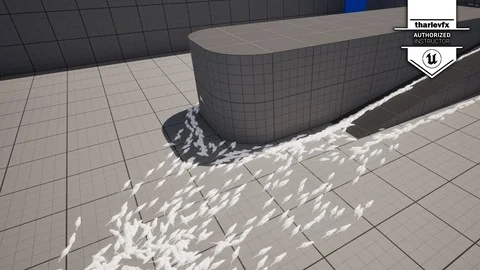
Beyond pulling raw data into the particle system, the course emphasizes processing that information into functional output forms. Flowmaps stand out as a primary example. Creating a flowmap involves translating simulation or velocity data into a texture format that can drive the direction and flow of other visual elements. This approach finds practical application in water rendering, smoke direction, and environmental wind effects, where broad physical movement needs to be visually represented across a surface.
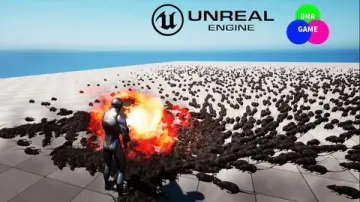
Collision avoidance represents another processing method taught in the curriculum. In dense particle simulations, individual particles often intersect or clump unnaturally. Implementing collision avoidance logic forces particles to distribute themselves more naturally, pushing apart when they get too close. This behavior proves essential when creating flocking patterns, atmospheric phenomena, or any effect where volumetric spacing must be maintained to sell the realism of the simulation in a real-time game project.
Extending Abilities Through Scratch Pad Modules
The course acknowledges that standard Niagara modules may not cover every specialized requirement. For this reason, a significant portion of the training deals with the Scratch Pad. The Scratch Pad serves as the internal logic environment where a developer can build custom modules from the ground up. Learning to construct these custom modules allows for the extension of Niagara's native abilities beyond its default state.
Building a custom module means defining input parameters, writing the math or logic that processes those parameters, and outputting the result to the particle system. This workflow translates to complete control over particle behavior. Instead of relying on pre-built logic blocks, a creator can dictate exactly how a particle interprets velocity, color, position, or external data. The curriculum treats this capacity as a core skill for anyone working at an expert level with Niagara.
Curriculum Focus: From Rain to Distance Fields
The specific modules taught follow a logical progression through increasingly technical concepts. The course begins with a general introduction to the advanced workflow before moving into rain interactions. This section likely asks the student to consider how falling water particles hit surfaces, react to those surfaces, and create secondary effects like splashes or ripples. It provides a tangible, visual ground for understanding the data interface concepts that follow.
Advanced Sampling broadens the scope of how Niagara gathers and uses information from the scene. The subsequent sections on Signed Distance Fields (SDFs) and Mesh Distance Fields (MDFs) dive into the geometry-aware behaviors mentioned earlier. By dedicating specific sections to both SDFs and MDFs, the curriculum ensures students understand the distinction between the two and how each can be utilized to drive particle logic in a real-time rendering pipeline.
Real-Time Game Project Fit
Unreal 5 Niagara - Advanced Niagara targets anyone looking to expand their abilities using particle effects in real-time game projects. The skills taught translate directly to scenarios where effects must interact dynamically with the game world. Rain that splashes correctly against varied terrain, fire that avoids spreading through solid walls via distance field calculations, and smoke that follows the directional flow of a custom flowmap all represent the type of work this course prepares a developer to handle.
Published on December 21, 2023, the course material aligns with Unreal Engine 5's current toolset. The expert-level designation indicates that the curriculum skips basic emitter setup and moves straight into the structural logic that governs complex particle behavior. A developer stepping into this material is expected to already understand standard particle system operations and is now looking to push those systems to their operational limits.
The seven-hour workload provides enough runway to explore these concepts in depth without rushing through the logic required to implement them. Thomas Harle structures the content to move from observable phenomena like rain to the invisible data structures that make those phenomena possible. By the end of the curriculum, a student should possess the capability to read scene data, process it into useful forms, and write custom modules that fill any gaps in Niagara's default functionality.
 Unreal Engine
 Unreal Engine
 Unreal Engine
 Unreal Engine