"7e6fc58c410f2894"{"id":"1000517","slug":"unreal-engine-5-crowd-creation-in-the-niagara-and-blueprint","title":"Unreal Engine 5: Crowd creation in the Niagara and Blueprint","category":"Unreal Engine","engine":"File Content: video + English subtitles","assetVersion":"Video Language: English","engineVersion":"File Content: video + English subtitles","tag":"Unreal Engine","accent":"blue","visual":"mech","summary":"A course covering vertex animation shaders, character retargeting, aim offsets, and Blueprint integration to build customizable crowds using Niagara in Unreal E","platform":"Unreal Engine","publishedAt":"2026-07-14T08:37:52.185Z","updatedAt":"2026-07-14T08:37:52.185Z","sourceNotes":[],"fileContents":[],"compatibility":["Unreal Engine","Video Language: English","File Content: video + English subtitles"],"featuredImage":{"alt":"Unreal Engine 5: Crowd creation in the Niagara and Blueprint","src":"/wp-content/uploads/published/2026/07/e592fc2aed15-6123673-1b32-3-a8544671f8.webp"},"hasDownloadLink":true,"downloads":0,"terms":[{"taxonomy":"category","slug":"tutoriallibrary-unrealengine","name":"Unreal Engine"}],"galleryImages":[],"accessPanel":{"kind":"video-resource","title":"Download this video resource","eyebrow":"Free Download","message":"Log in or create a free account to start your download.","fileName":"Unreal Engine 5 Crowd creation in the Niagara and Blueprint.7z","safetyNote":"Resources are manually reviewed before listing to improve quality and reduce obvious risks.","actionLabel":"Download Free","resourceType":"Video download"},"contentHtml":"\u003cp\u003ePopulating a game environment with large groups of characters often demands a balance between visual fidelity and performance. When a scene requires a bustling street, a crowded arena, or a background filled with active entities, relying on individually placed, fully simulated characters can quickly consume system resources. A practical approach to this problem relies on particle systems. \u003cstrong\u003eUnreal Engine 5: Crowd creation in the Niagara and Blueprint\u003c/strong\u003e Is a training resource that tackles this specific challenge. It teaches developers how to generate crowds using the Niagara particle system, combined with Blueprint logic, to create efficient and customizable background characters without overwhelming the game engine.\u003c/p\u003e \u003ch2\u003eThe Niagara System and Blueprint Integration\u003c/h2\u003e \u003cp\u003eThe training begins by establishing fundamental knowledge of the Niagara system in Unreal Engine 5. As the next-generation particle editor for the engine, Niagara controls the visual effects and particle behaviors required to instance and manage multiple characters simultaneously. The course material outlines the basic mechanics of this system, providing the foundational knowledge needed to manipulate particles effectively.\u003c/p\u003e \u003cp\u003eFrom there, the instruction moves into integrating Blueprint logic within the Niagara framework. Blueprints drive the visual scripting in Unreal Engine, allowing creators to build gameplay mechanics and interactive systems. By combining Blueprints with Niagara, the course demonstrates how to bind particle behavior to programmatic rules. This integration is what allows the particle-based crowd to follow paths, react to the environment, and operate as a cohesive group rather than a disconnected set of visual effects.\u003c/p\u003e \u003ch3\u003eVertex Animation Shaders for Crowd Rendering\u003c/h3\u003e \u003cp\u003eA central focus of the workflow is the creation of a vertex animation shader in Unreal Engine 5. Rendering large crowds through a particle system requires an alternative to traditional skeletal animation calculations, which are resource-intensive when multiplied across hundreds of characters. Moving the animation logic to the vertex shader allows the GPU to process the movement of crowd members efficiently. The training walks through the specific steps to create and implement this shader, providing the technical means to animate large numbers of characters within the Niagara system while maintaining performance.\u003c/p\u003e \u003cp\u003eUnderstanding this shader workflow is necessary for getting the most out of a particle-based crowd. The vertex animation handles the movement cycles—such as walking, idling, or simple gestures—directly on the instanced meshes, bypassing the heavy computational load of calculating bone transforms for every individual character on the CPU.\u003c/p\u003e \u003ch2\u003eCharacter Customization, Retargeting, and Aim Offsets\u003c/h2\u003e \u003cp\u003eBeyond the mechanics of moving a crowd through shaders, the training also addresses how to customize the characters populating the scene. A crowd made of identical, synchronized figures easily breaks immersion. To prevent this, the course covers character customization techniques available within Unreal Engine 5.\u003c/p\u003e \u003cp\u003eThe curriculum includes instruction on retargeting, a process used in Unreal Engine to transfer animations between different skeletal meshes. This ensures that the vertex animations driving the crowd can be applied to various character models without requiring bespoke animations for each one. The training also covers aim offsets, which are systems used to blend animations based on directional input. By adjusting an aim offset, creators can make characters look in different directions or track targets independently of their primary walking direction, adding deeper variety to a crowd's behavior.\u003c/p\u003e \u003ch3\u003eCustomizing the Crowd Directly in Niagara\u003c/h3\u003e \u003cp\u003eThe training ties the character preparation directly back to the particle system. Once the characters are customized and the animations are properly retargeted, the course explains how to create and customize the crowd inside Niagara itself. This phase of the workflow involves setting up the parameters that control the randomization of the characters, their distribution within the particle emitter, and the assignment of vertex animations to the instanced meshes.\u003c/p\u003e \u003cp\u003eBy handling this customization directly in the Niagara system, developers gain direct control over how the crowd spawns, moves, and visually presents itself in the scene. The instruction covers the specific tools and modules needed to manage the crowd's behavior after the initial characters and shaders have been prepared.\u003c/p\u003e \u003ch2\u003eWho Benefits from this Workflow\u003c/h2\u003e \u003cp\u003ePublished on August 17, 2024, this 2-hour and 7-minute training is structured for an all-levels audience. It is specifically aimed at game developers, animators, and 3D designers who want to learn how to work with particles in Unreal Engine 5. The guided curriculum moves from the basic knowledge of the Niagara system into the practical creation of a crowd, building upward in complexity.\u003c/p\u003e \u003cp\u003eFor animators and 3D designers, the focus on vertex animation shaders and retargeting provides a lightweight method to render their character assets in large numbers without degrading performance. Game developers benefit directly from the Blueprint integration, gaining a method to script crowd behavior that can be tied into gameplay events and scene logic. Anyone needing to populate an Unreal Engine 5 environment efficiently will find the combination of Niagara and Blueprint a solid workflow for large-scale background character creation.\u003c/p\u003e\n\n\u003ch2\u003eMore From The Same Workflow\u003c/h2\u003e\n\u003cul\u003e\n\u003cli\u003e\u003ca href=\"https://3dcghub.com/unreal-engine-5-one-course-solution-for-niagara-vfx/\" title=\"Unreal Engine 5: One Course Solution For Niagara VFX\"\u003eUnreal Engine 5: One Course Solution For Niagara VFX\u003c/a\u003e\u003c/li\u003e\n\u003cli\u003e\u003ca href=\"https://3dcghub.com/unreal-engine-5-blueprints-game-developer-masterclass/\" title=\"Unreal Engine 5 - Blueprints Game Developer Masterclass\"\u003eUnreal Engine 5 - Blueprints Game Developer Masterclass\u003c/a\u003e\u003c/li\u003e\n\u003cli\u003e\u003ca href=\"https://3dcghub.com/unreal-engine-5-for-absolute-beginners-build-subway-surfers/\" title=\"Unreal Engine 5 for Absolute Beginners: Build Subway Surfers\"\u003eUnreal Engine 5 for Absolute Beginners: Build Subway Surfers\u003c/a\u003e\u003c/li\u003e\n\u003cli\u003e\u003ca href=\"https://3dcghub.com/butterflies-collection-bp-niagara-ai/\" title=\"Butterflies Collection (BP, Niagara + AI)\"\u003eButterflies Collection (BP, Niagara + AI)\u003c/a\u003e\u003c/li\u003e\n\u003cli\u003e\u003ca href=\"https://3dcghub.com/shield-fx-responsive/\" title=\"Shield FX Responsive\"\u003eShield FX Responsive\u003c/a\u003e\u003c/li\u003e\n\u003c/ul\u003e","contentTextLength":5750,"navigation":{"current":1241,"total":3618,"previous":{"id":"1000518","slug":"unreal-engine-5-visual-novel-and-narrative-game-design","title":"Unreal Engine 5 Visual Novel and Narrative Game Design","category":"Unreal Engine","platform":"Unreal Engine","updatedAt":"2026-07-14T11:05:10.698Z"},"next":{"id":"1000516","slug":"unreal-engine-5-advanced-lobby-system","title":"Unreal Engine 5: Advanced Lobby System","category":"Unreal Engine","platform":"Unreal Engine","updatedAt":"2026-07-14T07:48:05.673Z"}},"relatedResources":[{"id":"1000596","slug":"unreal-engine-5-all-in-one-ue5-master-blueprint","title":"Unreal Engine 5 : All in one UE5 master Blueprint","category":"Unreal Engine","engine":"File Content: video + English subtitles","assetVersion":"Video Language: English","engineVersion":"File Content: video + English subtitles","tag":"Unreal Engine","accent":"blue","visual":"mech","summary":"A beginner-level Unreal Engine 5 course covering Niagara, Control Rig, AI, animation, materials, landscape, and Blueprints across 42 hours of structured learnin","platform":"Unreal Engine","publishedAt":"2026-07-17T17:35:41.823Z","updatedAt":"2026-07-17T17:35:41.823Z","sourceNotes":[],"fileContents":[],"compatibility":["Unreal Engine","Video Language: English","File Content: video + English subtitles"],"featuredImage":{"alt":"Unreal Engine 5 : All in one UE5 master Blueprint","src":"/wp-content/uploads/published/2026/07/6c6d072cba24-4953792-d34a-5-60c376937e.webp"},"hasDownloadLink":true,"downloads":1},{"id":"24557","slug":"unreal-engine-5-one-course-solution-for-niagara-vfx","title":"Unreal Engine 5: One Course Solution For Niagara VFX","category":"Unreal Engine","engine":"Video language: English","assetVersion":"Video language: English","engineVersion":"File content: video + supporting files + English subtitles","tag":"Unreal Engine","accent":"blue","visual":"luts","summary":"This course moves through Niagara in a practical order, starting with basic usage and continuing into custom modules and blueprint-driven behavior. It also covers VFX materials, noise texture baking in Unreal, and examples such as rain, waterfalls, lightnin...","platform":"Unreal Engine","publishedAt":"2026-04-15T13:06:55.000Z","updatedAt":"2026-04-20T06:12:45.000Z","sourceNotes":[],"fileContents":[],"compatibility":["Unreal Engine","Video language: English","File content: video + supporting files + English subtitles"],"featuredImage":{"alt":"Unreal Engine 5: One Course Solution For Niagara VFX","src":"https://3dcghub.com/wp-content/uploads/2026/04/233a8c785bc3_4915192_86f5_8.webp"},"hasDownloadLink":true,"downloads":1},{"id":"1000178","slug":"unreal-engine-5-blueprints-game-developer-masterclass","title":"Unreal Engine 5 - Blueprints Game Developer Masterclass","category":"Unreal Engine","engine":"File Content: video + English subtitles","assetVersion":"Video Language: English","engineVersion":"File Content: video + English subtitles","tag":"Unreal Engine","accent":"blue","visual":"mech","summary":"A 14h 28m Unreal Engine course focused on Blueprints, gameplay logic, FPS character setup, UI, materials, and complete game creation.","platform":"Unreal Engine","publishedAt":"2026-06-20T07:37:16.401Z","updatedAt":"2026-06-20T07:37:16.401Z","sourceNotes":[],"fileContents":[],"compatibility":["Unreal Engine","Video Language: English","File Content: video + English subtitles"],"featuredImage":{"alt":"Unreal Engine 5 - Blueprints Game Developer Masterclass","src":"/wp-content/uploads/published/2026/06/71070a1b9e4a-4856352-728a-6-9312b9b506.webp"},"hasDownloadLink":true,"downloads":0}]}
Unreal Engine
Unreal Engine 5: Crowd creation in the Niagara and Blueprint
A course covering vertex animation shaders, character retargeting, aim offsets, and Blueprint integration to build customizable crowds using Niagara in Unreal E
Category:Unreal EnginePlatform: Unreal EngineVideo Language: EnglishFile Content: video + English subtitlesPublished: Jul 14, 2026
Unreal Engine
Resource overview
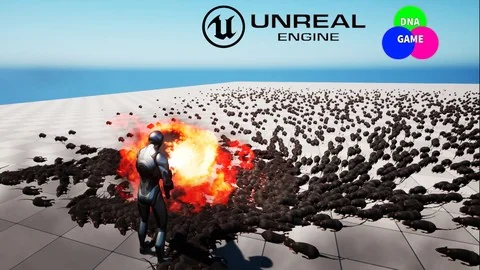
Populating a game environment with large groups of characters often demands a balance between visual fidelity and performance. When a scene requires a bustling street, a crowded arena, or a background filled with active entities, relying on individually placed, fully simulated characters can quickly consume system resources. A practical approach to this problem relies on particle systems. Unreal Engine 5: Crowd creation in the Niagara and Blueprint Is a training resource that tackles this specific challenge. It teaches developers how to generate crowds using the Niagara particle system, combined with Blueprint logic, to create efficient and customizable background characters without overwhelming the game engine.
The Niagara System and Blueprint Integration
The training begins by establishing fundamental knowledge of the Niagara system in Unreal Engine 5. As the next-generation particle editor for the engine, Niagara controls the visual effects and particle behaviors required to instance and manage multiple characters simultaneously. The course material outlines the basic mechanics of this system, providing the foundational knowledge needed to manipulate particles effectively.
From there, the instruction moves into integrating Blueprint logic within the Niagara framework. Blueprints drive the visual scripting in Unreal Engine, allowing creators to build gameplay mechanics and interactive systems. By combining Blueprints with Niagara, the course demonstrates how to bind particle behavior to programmatic rules. This integration is what allows the particle-based crowd to follow paths, react to the environment, and operate as a cohesive group rather than a disconnected set of visual effects.
Vertex Animation Shaders for Crowd Rendering
A central focus of the workflow is the creation of a vertex animation shader in Unreal Engine 5. Rendering large crowds through a particle system requires an alternative to traditional skeletal animation calculations, which are resource-intensive when multiplied across hundreds of characters. Moving the animation logic to the vertex shader allows the GPU to process the movement of crowd members efficiently. The training walks through the specific steps to create and implement this shader, providing the technical means to animate large numbers of characters within the Niagara system while maintaining performance.
Understanding this shader workflow is necessary for getting the most out of a particle-based crowd. The vertex animation handles the movement cycles—such as walking, idling, or simple gestures—directly on the instanced meshes, bypassing the heavy computational load of calculating bone transforms for every individual character on the CPU.
Character Customization, Retargeting, and Aim Offsets
Beyond the mechanics of moving a crowd through shaders, the training also addresses how to customize the characters populating the scene. A crowd made of identical, synchronized figures easily breaks immersion. To prevent this, the course covers character customization techniques available within Unreal Engine 5.
The curriculum includes instruction on retargeting, a process used in Unreal Engine to transfer animations between different skeletal meshes. This ensures that the vertex animations driving the crowd can be applied to various character models without requiring bespoke animations for each one. The training also covers aim offsets, which are systems used to blend animations based on directional input. By adjusting an aim offset, creators can make characters look in different directions or track targets independently of their primary walking direction, adding deeper variety to a crowd's behavior.
Customizing the Crowd Directly in Niagara
The training ties the character preparation directly back to the particle system. Once the characters are customized and the animations are properly retargeted, the course explains how to create and customize the crowd inside Niagara itself. This phase of the workflow involves setting up the parameters that control the randomization of the characters, their distribution within the particle emitter, and the assignment of vertex animations to the instanced meshes.
By handling this customization directly in the Niagara system, developers gain direct control over how the crowd spawns, moves, and visually presents itself in the scene. The instruction covers the specific tools and modules needed to manage the crowd's behavior after the initial characters and shaders have been prepared.
Who Benefits from this Workflow
Published on August 17, 2024, this 2-hour and 7-minute training is structured for an all-levels audience. It is specifically aimed at game developers, animators, and 3D designers who want to learn how to work with particles in Unreal Engine 5. The guided curriculum moves from the basic knowledge of the Niagara system into the practical creation of a crowd, building upward in complexity.
For animators and 3D designers, the focus on vertex animation shaders and retargeting provides a lightweight method to render their character assets in large numbers without degrading performance. Game developers benefit directly from the Blueprint integration, gaining a method to script crowd behavior that can be tied into gameplay events and scene logic. Anyone needing to populate an Unreal Engine 5 environment efficiently will find the combination of Niagara and Blueprint a solid workflow for large-scale background character creation.
 Unreal Engine
 Unreal Engine
 Unreal Engine
 Unreal Engine