"031373f479d9561a"{"id":"1000237","slug":"unreal-engine-5-for-absolute-beginners-build-subway-surfers","title":"Unreal Engine 5 for Absolute Beginners: Build Subway Surfers","category":"Unreal Engine","engine":"File Content: video + English subtitles","assetVersion":"Video Language: English","engineVersion":"File Content: video + English subtitles","tag":"Unreal Engine","accent":"blue","visual":"luts","summary":"Learn to build a complete endless runner game in Unreal Engine 5.4, covering Blueprint scripting, character movement, environment design, and UI creation.","platform":"Unreal Engine","publishedAt":"2026-06-29T10:37:54.187Z","updatedAt":"2026-06-29T10:37:54.187Z","sourceNotes":[],"fileContents":[],"compatibility":["Unreal Engine","Video Language: English","File Content: video + English subtitles"],"featuredImage":{"alt":"Unreal Engine 5 for Absolute Beginners: Build Subway Surfers","src":"/wp-content/uploads/published/2026/06/41db8a69840b-5970888-4aa8-4-42bda36ae9.webp"},"hasDownloadLink":true,"downloads":0,"terms":[{"taxonomy":"category","slug":"tutoriallibrary-unrealengine","name":"Unreal Engine"}],"galleryImages":[],"accessPanel":{"kind":"video-resource","title":"Download this video resource","eyebrow":"Free Download","message":"Log in or create a free account to start your download.","fileName":"Unreal Engine 5 for Absolute Beginners Build Subway Surfers.7z","safetyNote":"Resources are manually reviewed before listing to improve quality and reduce obvious risks.","actionLabel":"Download Free","resourceType":"Video download"},"contentHtml":"\u003ch2\u003eUnreal Engine 5.4 Curriculum and Workload\u003c/h2\u003e\n\u003cp\u003eThe structural foundation of Unreal Engine 5 for Absolute Beginners: Build Subway Surfers is divided into four distinct modules: an introduction to the workflow, Unreal Engine basics, the fundamentals of Blueprint scripting, and the practical construction of a Subway Surfers-style project. Totaling 6 hours and 49 minutes of course workload, the curriculum is specifically designed to guide users through the toolsets of Unreal Engine 5.4. By breaking the game development process into these sequential sections, the material provides a clear, linear path from opening the software for the very first time to finalizing a complete, playable 3D game project from scratch.\u003c/p\u003e\n\u003ch2\u003eMastering Navigation and Engine Basics\u003c/h2\u003e\n\u003cp\u003eUnderstanding the engine's core interface is the initial focus of the training. New developers spend time mastering Unreal Engine basics, which encompass moving through the 3D viewport, understanding the layout of the engine's built-in UI, and setting up foundational lighting systems. Grasping these fundamental elements ensures that creators can maneuver through the workspace efficiently and locate necessary tools without frustration. Establishing basic lighting and scene navigation prepares the groundwork for all subsequent development tasks, allowing users to visually evaluate their levels and assets accurately as they begin to construct their digital environments.\u003c/p\u003e\n\u003ch2\u003eBlueprint Scripting Logic and Character Classes\u003c/h2\u003e\n\u003cp\u003eOnce the workspace navigation is firmly established, the curriculum transitions directly into the logic and functionalities of Blueprint Scripting. Blueprint serves as Unreal Engine’s powerful visual scripting system, empowering developers to construct complex game logic without needing to write traditional text-based code. Students delve deep into how this visual logic operates, learning to connect various nodes to drive specific actions, trigger events, and manage game states. Understanding this scripting logic is a critical phase for aspiring game developers, as it forms the underlying architecture and interactive backbone for all the mechanics introduced later in the project.\u003c/p\u003e\n\u003cp\u003eArmed with a foundational understanding of scripting logic, developers begin the process of crafting character classes. These classes serve as the primary framework for the player's in-game avatar, dictating exactly how the entity exists, behaves, and interacts within the engine environment.\u003c/p\u003e\n\u003ch2\u003eImplementing Movement and Interactive Mechanics\u003c/h2\u003e\n\u003cp\u003eFollowing the initial creation of the character class, the training shifts focus toward implementing specific character movement. Because the chosen project mimics the continuous forward-motion mechanics of Subway Surfers, this movement is paired carefully with various interactive mechanics. These mechanics allow the character to navigate the world dynamically, respond instantly to player inputs, and engage seamlessly with the surrounding track as the speed of the game dictates.\u003c/p\u003e\n\u003ch2\u003eCrafting Maps with Materials and Textures\u003c/h2\u003e\n\u003cp\u003eBeyond programming the character itself, constructing the physical game world is a major component of the curriculum. Creators are tasked with crafting maps that will host the fast-paced gameplay. To elevate these maps from basic geometric blockouts to fully immersive environments, the course covers the detailed application of materials and textures. Applying these visual properties to 3D surfaces gives the environment its distinct aesthetic look and feel. This process transforms blank geometry into a cohesive, vibrant setting that encourages the runner to traverse the track.\u003c/p\u003e\n\u003ch2\u003eTackling Obstacles and Incorporating Collectibles\u003c/h2\u003e\n\u003cp\u003ePopulating these newly crafted maps requires the careful implementation of interactive gameplay elements. Developers learn how to tackle obstacles that the player must actively dodge or jump over during a run. Alongside these hazardous elements, the curriculum thoroughly covers incorporating collectibles into the game space. Balancing the strategic placement of both obstacles and collectibles creates the primary interaction loop of the game. It requires the player to utilize the previously programmed character movement mechanics to weave through the environment successfully, avoiding penalties while maximizing their score.\u003c/p\u003e\n\u003ch2\u003eSound Design Principles and End-Screen UI\u003c/h2\u003e\n\u003cp\u003eTo polish the interactive experience and provide necessary feedback to the user, the course introduces sound design principles aimed at enhancing gameplay. Integrating audio ensures that specific player actions—such as gathering a collectible item, executing a jump, or colliding with an obstacle—are accompanied by appropriate and satisfying sound cues. This auditory layer adds significant depth to the mechanics, making the interactive elements feel much more responsive, weighty, and engaging for the player navigating the course.\u003c/p\u003e\n\u003cp\u003eThe final stages of the development project focus on wrapping up the continuous gameplay loop with a functional, user-friendly interface. Developers are guided through the process of designing a polished UI tailored specifically for a seamless end-screen experience. This ensures that when a gameplay session inevitably concludes, the transition from active, fast-paced play to the final results screen is smooth. A well-designed end-screen provides players with immediate closure, displaying their performance metrics in a way that is visually consistent with the rest of the project's art direction.\u003c/p\u003e\n\u003ch2\u003eBuilding a Complete Game from Scratch\u003c/h2\u003e\n\u003cp\u003ePublished on June 06, 2024, this beginner-level resource is strictly targeted at aspiring game developers and individuals with absolutely no prior experience in game development. It is structured for students looking to delve into Blueprint scripting logic, enthusiasts keen on creating their own games entirely from scratch, and anyone seeking to steadily enhance their skills in 3D game design. By combining engine navigation, visual scripting, asset implementation, and UI design, the comprehensive workload provides a complete starting point for exploring the broader world of game development within Unreal Engine 5.\u003c/p\u003e\n\n\u003ch2\u003eExplore Similar Assets\u003c/h2\u003e\n\u003cul\u003e\n\u003cli\u003e\u003ca href=\"https://3dcghub.com/unreal-cinematic-mastery-from-beginner-to-cinematic-creator/\" title=\"Unreal Cinematic Mastery –From Beginner to Cinematic Creator\"\u003eUnreal Cinematic Mastery –From Beginner to Cinematic Creator\u003c/a\u003e\u003c/li\u003e\n\u003cli\u003e\u003ca href=\"https://3dcghub.com/unreal-engine-5-c-make-your-own-action-combat-game/\" title=\"Unreal Engine 5 C++: Make Your Own Action Combat Game\"\u003eUnreal Engine 5 C++: Make Your Own Action Combat Game\u003c/a\u003e\u003c/li\u003e\n\u003cli\u003e\u003ca href=\"https://3dcghub.com/unreal-engine-5-for-beginners-create-your-first-game/\" title=\"Unreal Engine 5 for Beginners - Create your first game\"\u003eUnreal Engine 5 for Beginners - Create your first game\u003c/a\u003e\u003c/li\u003e\n\u003cli\u003e\u003ca href=\"https://3dcghub.com/niagara-beginners-to-advanced-in-unreal-engine-5/\" title=\"Niagara Beginners to advanced in Unreal Engine 5\"\u003eNiagara Beginners to advanced in Unreal Engine 5\u003c/a\u003e\u003c/li\u003e\n\u003cli\u003e\u003ca href=\"https://3dcghub.com/the-ultimate-guide-to-unreal-engine-5-for-complete-beginners/\" title=\"The Ultimate Guide to Unreal Engine 5 For Complete Beginners\"\u003eThe Ultimate Guide to Unreal Engine 5 For Complete Beginners\u003c/a\u003e\u003c/li\u003e\n\u003c/ul\u003e","contentTextLength":6438,"navigation":{"current":1112,"total":3223,"previous":{"id":"1000238","slug":"mgt-multiplayer-gravity-template","title":"MGT Multiplayer Gravity Template","category":"Gameplay Features","platform":"Unreal Engine","updatedAt":"2026-06-30T18:11:03.499Z"},"next":{"id":"1000236","slug":"sci-fi-robot","title":"Sci Fi Robot","category":"Characters \u0026 Creatures","platform":"Unreal Engine","updatedAt":"2026-06-28T11:32:47.315Z"}},"relatedResources":[{"id":"1000114","slug":"unreal-cinematic-mastery-from-beginner-to-cinematic-creator","title":"Unreal Cinematic Mastery –From Beginner to Cinematic Creator","category":"Unreal Engine","engine":"File Content: video + English subtitles","assetVersion":"Video Language: English","engineVersion":"File Content: video + English subtitles","tag":"Unreal Engine","accent":"blue","visual":"mech","summary":"Master real-time filmmaking in Unreal Engine 5.5. Learn to build, light, animate Metahumans, and render complete cinematics from scratch using Sequencer.","platform":"Unreal Engine","publishedAt":"2026-06-09T13:31:58.758Z","updatedAt":"2026-06-09T13:31:58.758Z","sourceNotes":[],"fileContents":[],"compatibility":["Unreal Engine","Video Language: English","File Content: video + English subtitles"],"featuredImage":{"alt":"Unreal Cinematic Mastery –From Beginner to Cinematic Creator","src":"/wp-content/uploads/published/2026/06/4099fecec65e-6484765-a32a-2a5034ad08.webp"},"hasDownloadLink":true,"downloads":1},{"id":"24568","slug":"unreal-engine-5-for-beginners-create-your-first-game","title":"Unreal Engine 5 for Beginners - Create your first game","category":"Unreal Engine","engine":"Video language: English","assetVersion":"Video language: English","engineVersion":"File content: video + supporting files + English subtitles","tag":"Unreal Engine","accent":"blue","visual":"city","summary":"This beginner course walks through Unreal Engine 5 basics, then moves into Blueprints, character animation, UI widgets, and the steps needed to create a real 3D game. It is aimed at beginner game developers who want a practical starting point.","platform":"Unreal Engine","publishedAt":"2026-04-15T13:30:22.000Z","updatedAt":"2026-04-20T06:12:44.000Z","sourceNotes":[],"fileContents":[],"compatibility":["Unreal Engine","Video language: English","File content: video + supporting files + English subtitles"],"featuredImage":{"alt":"Unreal Engine 5 for Beginners - Create your first game","src":"https://3dcghub.com/wp-content/uploads/2026/04/d35b769681b1_5098972_a916_5.webp"},"hasDownloadLink":true,"downloads":0},{"id":"24572","slug":"unreal-engine-5-c-make-your-own-action-combat-game","title":"Unreal Engine 5 C++: Make Your Own Action Combat Game","category":"Unreal Engine","engine":"Video language: English","assetVersion":"Video language: English","engineVersion":"File content: video + supporting files + English subtitles","tag":"Unreal Engine","accent":"blue","visual":"mech","summary":"This Unreal Engine 5 C++ course walks through a combat-game build from setup and character movement to lock-on, player combat, stats, and enemy behaviour. It also covers interfaces, design patterns, and debugging practices for a cleaner C++ workflow.","platform":"Unreal Engine","publishedAt":"2026-04-15T13:39:57.000Z","updatedAt":"2026-04-20T06:12:44.000Z","sourceNotes":[],"fileContents":[],"compatibility":["Unreal Engine","Video language: English","File content: video + supporting files + English subtitles"],"featuredImage":{"alt":"Unreal Engine 5 C++: Make Your Own Action Combat Game","src":"https://3dcghub.com/wp-content/uploads/2026/04/1832d3b2ca64_6079077_9a3c.webp"},"hasDownloadLink":true,"downloads":0}]}
Unreal Engine
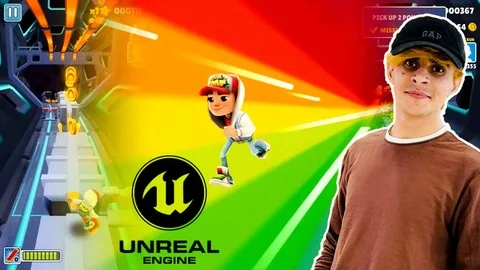
Unreal Engine 5 for Absolute Beginners: Build Subway Surfers
Learn to build a complete endless runner game in Unreal Engine 5.4, covering Blueprint scripting, character movement, environment design, and UI creation.
Category:Unreal EnginePlatform: Unreal EngineVideo Language: EnglishFile Content: video + English subtitlesPublished: Jun 29, 2026
Unreal Engine
Resource overview
Unreal Engine 5.4 Curriculum and Workload
The structural foundation of Unreal Engine 5 for Absolute Beginners: Build Subway Surfers is divided into four distinct modules: an introduction to the workflow, Unreal Engine basics, the fundamentals of Blueprint scripting, and the practical construction of a Subway Surfers-style project. Totaling 6 hours and 49 minutes of course workload, the curriculum is specifically designed to guide users through the toolsets of Unreal Engine 5.4. By breaking the game development process into these sequential sections, the material provides a clear, linear path from opening the software for the very first time to finalizing a complete, playable 3D game project from scratch.
Mastering Navigation and Engine Basics
Understanding the engine's core interface is the initial focus of the training. New developers spend time mastering Unreal Engine basics, which encompass moving through the 3D viewport, understanding the layout of the engine's built-in UI, and setting up foundational lighting systems. Grasping these fundamental elements ensures that creators can maneuver through the workspace efficiently and locate necessary tools without frustration. Establishing basic lighting and scene navigation prepares the groundwork for all subsequent development tasks, allowing users to visually evaluate their levels and assets accurately as they begin to construct their digital environments.
Blueprint Scripting Logic and Character Classes
Once the workspace navigation is firmly established, the curriculum transitions directly into the logic and functionalities of Blueprint Scripting. Blueprint serves as Unreal Engine’s powerful visual scripting system, empowering developers to construct complex game logic without needing to write traditional text-based code. Students delve deep into how this visual logic operates, learning to connect various nodes to drive specific actions, trigger events, and manage game states. Understanding this scripting logic is a critical phase for aspiring game developers, as it forms the underlying architecture and interactive backbone for all the mechanics introduced later in the project.
Armed with a foundational understanding of scripting logic, developers begin the process of crafting character classes. These classes serve as the primary framework for the player's in-game avatar, dictating exactly how the entity exists, behaves, and interacts within the engine environment.
Implementing Movement and Interactive Mechanics
Following the initial creation of the character class, the training shifts focus toward implementing specific character movement. Because the chosen project mimics the continuous forward-motion mechanics of Subway Surfers, this movement is paired carefully with various interactive mechanics. These mechanics allow the character to navigate the world dynamically, respond instantly to player inputs, and engage seamlessly with the surrounding track as the speed of the game dictates.
Crafting Maps with Materials and Textures
Beyond programming the character itself, constructing the physical game world is a major component of the curriculum. Creators are tasked with crafting maps that will host the fast-paced gameplay. To elevate these maps from basic geometric blockouts to fully immersive environments, the course covers the detailed application of materials and textures. Applying these visual properties to 3D surfaces gives the environment its distinct aesthetic look and feel. This process transforms blank geometry into a cohesive, vibrant setting that encourages the runner to traverse the track.
Tackling Obstacles and Incorporating Collectibles
Populating these newly crafted maps requires the careful implementation of interactive gameplay elements. Developers learn how to tackle obstacles that the player must actively dodge or jump over during a run. Alongside these hazardous elements, the curriculum thoroughly covers incorporating collectibles into the game space. Balancing the strategic placement of both obstacles and collectibles creates the primary interaction loop of the game. It requires the player to utilize the previously programmed character movement mechanics to weave through the environment successfully, avoiding penalties while maximizing their score.
Sound Design Principles and End-Screen UI
To polish the interactive experience and provide necessary feedback to the user, the course introduces sound design principles aimed at enhancing gameplay. Integrating audio ensures that specific player actions—such as gathering a collectible item, executing a jump, or colliding with an obstacle—are accompanied by appropriate and satisfying sound cues. This auditory layer adds significant depth to the mechanics, making the interactive elements feel much more responsive, weighty, and engaging for the player navigating the course.
The final stages of the development project focus on wrapping up the continuous gameplay loop with a functional, user-friendly interface. Developers are guided through the process of designing a polished UI tailored specifically for a seamless end-screen experience. This ensures that when a gameplay session inevitably concludes, the transition from active, fast-paced play to the final results screen is smooth. A well-designed end-screen provides players with immediate closure, displaying their performance metrics in a way that is visually consistent with the rest of the project's art direction.
Building a Complete Game from Scratch
Published on June 06, 2024, this beginner-level resource is strictly targeted at aspiring game developers and individuals with absolutely no prior experience in game development. It is structured for students looking to delve into Blueprint scripting logic, enthusiasts keen on creating their own games entirely from scratch, and anyone seeking to steadily enhance their skills in 3D game design. By combining engine navigation, visual scripting, asset implementation, and UI design, the comprehensive workload provides a complete starting point for exploring the broader world of game development within Unreal Engine 5.
 Unreal Engine
 Unreal Engine
 Unreal Engine
 Unreal Engine