"6ac84fdb0bd06614"{"id":"1000178","slug":"unreal-engine-5-blueprints-game-developer-masterclass","title":"Unreal Engine 5 - Blueprints Game Developer Masterclass","category":"Unreal Engine","engine":"File Content: video + English subtitles","assetVersion":"Video Language: English","engineVersion":"File Content: video + English subtitles","tag":"Unreal Engine","accent":"blue","visual":"mech","summary":"A 14h 28m Unreal Engine course focused on Blueprints, gameplay logic, FPS character setup, UI, materials, and complete game creation.","platform":"Unreal Engine","publishedAt":"2026-06-20T07:37:16.401Z","updatedAt":"2026-06-20T07:37:16.401Z","sourceNotes":[],"fileContents":[],"compatibility":["Unreal Engine","Video Language: English","File Content: video + English subtitles"],"featuredImage":{"alt":"Unreal Engine 5 - Blueprints Game Developer Masterclass","src":"/wp-content/uploads/published/2026/06/71070a1b9e4a-4856352-728a-6-9312b9b506.webp"},"hasDownloadLink":true,"downloads":0,"terms":[{"taxonomy":"category","slug":"tutoriallibrary-unrealengine","name":"Unreal Engine"}],"galleryImages":[],"accessPanel":{"kind":"video-resource","title":"Download this video resource","eyebrow":"Free Download","message":"Log in or create a free account to start your download.","fileName":"Unreal Engine 5 - Blueprints Game Developer Masterclass.7z","safetyNote":"Resources are manually reviewed before listing to improve quality and reduce obvious risks.","actionLabel":"Download Free","resourceType":"Video download"},"contentHtml":"\u003cp\u003e\u003cstrong\u003eUnreal Engine 5 - Blueprints Game Developer Masterclass\u003c/strong\u003e Is a course focused on one clear goal: learning Blueprints well enough to create games without any coding knowledge. It presents Blueprints as the working foundation for gameplay logic, system setup, and project building, while also framing the course as a path toward creating a first AAA game and finishing a complete game by the end.\u003c/p\u003e \u003cp\u003eThe course runs for 14 hours and 28 minutes, was published on January 6, 2023, and is marked for all levels. Ivan Yosifov is the instructor. The material is aimed at people who want to start game development in Unreal Engine, especially those who want to avoid traditional coding, as well as learners who have struggled with programming before and want a more visual way into game creation.\u003c/p\u003e \u003ch2\u003eBlueprints without coding\u003c/h2\u003e\n\u003cp\u003eThe central promise here is direct and practical: learn to program using Blueprints without needing to write code. That focus shapes the entire course. Instead of treating Blueprints as a side tool, the lessons position the system as the main way to create logic, connect gameplay behavior, and build usable game mechanics inside Unreal Engine.\u003c/p\u003e \u003cp\u003eThat approach matters most for complete beginners and for people who already know they want to make games but do not want to begin with a text-based programming language. Blueprints give those learners a visual scripting route, and the course is structured through understanding how to use that route to produce real results. It does not stop at a surface explanation of what Blueprints are. The curriculum specifically includes variables, arrays, flow control, functions, events, macros, enumerators, classes, actors, and Blueprint communication, which means the lessons move through the actual components that make a Blueprint workflow function.\u003c/p\u003e \u003cp\u003eFor someone entering Unreal Engine for the first time, that structure makes the learning path easier to read. Variables and arrays cover stored data. Flow control introduces how logic branches and moves. Functions, events, and macros open up reusable actions and event-driven behavior. Enumerators, classes, and actors push the work toward clearer project structure. Blueprint communication then deals with one of the most important parts of any larger Unreal project: getting systems to talk to each other cleanly.\u003c/p\u003e \u003ch2\u003eUnreal Engine Fundamentals, Variables, Arrays, and Flow Control\u003c/h2\u003e\n\u003cp\u003eThe curriculum starts with an introduction and Unreal Engine fundamentals, then moves into the basic logic pieces that support everything else. That sequence gives the course a strong practical shape. It begins with engine familiarity, then builds toward interaction and game behavior rather than assuming learners already understand Unreal terminology or layout.\u003c/p\u003e \u003cp\u003eVariables, arrays, and flow control are not treated as isolated theory topics. In a Blueprint course, these are the parts that let a game remember information, group related values, and decide what happens next. They are essential for anyone trying to move beyond simple experiments and into making a functioning project. Since the course also promises a complete game by the end, these lessons are best understood as the groundwork for later systems rather than detached fundamentals.\u003c/p\u003e \u003cp\u003eThe same applies to functions, events, and macros. These subjects are often where Blueprint work starts to feel like real gameplay scripting rather than disconnected exercises. Events drive reactions. Functions help organize repeated logic. Macros can streamline recurring visual scripting patterns. Combined with the section on Blueprint communication, they point toward a course that does more than teach individual nodes. It teaches how separate pieces of a game project can connect into a larger whole.\u003c/p\u003e \u003ch2\u003eCreate First Person Character and gameplay setup\u003c/h2\u003e\n\u003cp\u003eOne of the most concrete parts of the course is the setup of an FPS human-controlled character. That gives the material a very practical anchor. Instead of staying inside abstract scripting examples, it includes a recognizable gameplay framework that many new Unreal users want to build sooner or later: a controllable first-person character inside a playable environment.\u003c/p\u003e \u003cp\u003eThis part of the training is useful in two ways. First, it gives beginners a clear project milestone. A working first-person character is one of those steps that makes an engine feel usable rather than overwhelming. Second, it turns the earlier Blueprint lessons into action. Character behavior depends on logic, control, event handling, and communication, so the FPS setup ties together several of the systems introduced earlier in the course.\u003c/p\u003e \u003cp\u003eThe curriculum also includes how to control time in Unreal Engine and how to control Unreal Engine space. Those topics expand the course beyond character movement alone. Time control can shape pacing and moment-to-moment behavior, while space control suggests work with positioning or scene interaction inside the engine. Alongside the first-person character setup, these lessons push the course toward actual gameplay construction rather than just interface familiarity.\u003c/p\u003e \u003ch2\u003eFunctions, Events and Macros meet UI/UX, Color \u0026amp; Materials\u003c/h2\u003e\n\u003cp\u003eAnother strong point is the way the curriculum reaches beyond gameplay logic into visual and interface-related work. Color and materials in Unreal Engine appear as dedicated topics, as do UI/UX and the Unreal interface. That broadens the course from pure scripting instruction into a more rounded beginner game-development path.\u003c/p\u003e \u003cp\u003eFor a learner making a first project, these additions are important. Blueprints may control how a game behaves, but a complete game also needs visual readability and user interaction. UI/UX introduces the practical side of how players receive information and navigate systems. Color and materials add another production layer by addressing how game elements look inside Unreal Engine. The Unreal interface section supports all of this by helping learners become more comfortable with the engine environment itself.\u003c/p\u003e \u003cp\u003eNone of these topics are presented as disconnected extras. They fit the larger promise of making a complete game. If the course only covered logic nodes, it would be a narrower scripting class. By including interface work, materials, and character setup, it points toward a project workflow where learners are not only creating behavior but also shaping presentation and usability inside Unreal Engine.\u003c/p\u003e \u003ch2\u003eWhere this Blueprints masterclass fits\u003c/h2\u003e\n\u003cp\u003eThe audience description is unusually broad, but it remains specific about the kinds of learners who will benefit. Complete Blueprints and Unreal Engine beginners are a direct fit, especially those with no prior experience. The same goes for individuals who want to develop games but do not want to write code. For that group, the course offers a visual entry point into game creation and a structured path from basics to a completed project.\u003c/p\u003e \u003cp\u003eThere is also room here for learners who have tried coding before but could not make progress. Blueprints can be easier to approach for students who struggle with syntax-heavy programming, and this course is set up to help them continue building logic skills in a different format. Developers who want to learn how to use Unreal Engine are included too, as are people with experience in other engines such as Unity. That suggests the course is not limited to first-time game makers; it can also serve as a transition path for creators moving into Unreal Engine from another workflow.\u003c/p\u003e \u003cp\u003eProgrammers who want to solidify their Blueprint scripting skills are part of the intended audience as well. That is a useful distinction. The course is not only for non-programmers. It also has value for developers who already understand logic but want to become more fluent in Unreal's Blueprint system. Experienced developers looking to brush up on their skills, along with artists who want to create their own projects and games, fit naturally into that same group.\u003c/p\u003e \u003ch2\u003eFrom indie game development journey to a complete game\u003c/h2\u003e\n\u003cp\u003eThe course repeatedly points toward making an actual game rather than only studying isolated techniques. It encourages learners to start an indie game development journey without knowing how to code, and it states that a complete game can be made by the end. That end point gives the curriculum its practical shape. The lessons are arranged as pieces of a production path: engine fundamentals, Blueprint logic, communication between systems, character setup, time and space control, materials, UI/UX, and interface familiarity.\u003c/p\u003e \u003cp\u003eFor anyone trying to decide whether this is a basic orientation course or a more project-driven class, those details make the answer fairly clear. It teaches fundamentals, but always in service of building toward something playable and more complete. It is especially well set up for beginners who want a visual scripting route into Unreal Engine, for Unity users shifting to a new engine, for artists who want to make their own games, and for developers who want stronger Blueprint habits. The strongest fit is anyone who wants to move from learning nodes and systems into assembling a finished Unreal Engine game workflow.\u003c/p\u003e\n\n\u003ch2\u003eMore From The Same Workflow\u003c/h2\u003e\n\u003cul\u003e\n\u003cli\u003e\u003ca href=\"https://3dcghub.com/unreal-engine-5-for-beginners-create-your-first-game/\" title=\"Unreal Engine 5 for Beginners - Create your first game\"\u003eUnreal Engine 5 for Beginners - Create your first game\u003c/a\u003e\u003c/li\u003e\n\u003cli\u003e\u003ca href=\"https://3dcghub.com/make-a-2d-action-platformer-in-unreal-engine-5/\" title=\"Make a 2D Action Platformer in Unreal Engine 5\"\u003eMake a 2D Action Platformer in Unreal Engine 5\u003c/a\u003e\u003c/li\u003e\n\u003cli\u003e\u003ca href=\"https://3dcghub.com/unreal-engine-5-5-the-ultimate-cinematic-masterclass/\" title=\"Unreal Engine 5.5 - The Ultimate Cinematic Masterclass\"\u003eUnreal Engine 5.5 - The Ultimate Cinematic Masterclass\u003c/a\u003e\u003c/li\u003e\n\u003cli\u003e\u003ca href=\"https://3dcghub.com/the-ultimate-guide-to-unreal-engine-5-for-complete-beginners/\" title=\"The Ultimate Guide to Unreal Engine 5 For Complete Beginners\"\u003eThe Ultimate Guide to Unreal Engine 5 For Complete Beginners\u003c/a\u003e\u003c/li\u003e\n\u003cli\u003e\u003ca href=\"https://3dcghub.com/unreal-engine-5-one-course-solution-for-niagara-vfx/\" title=\"Unreal Engine 5: One Course Solution For Niagara VFX\"\u003eUnreal Engine 5: One Course Solution For Niagara VFX\u003c/a\u003e\u003c/li\u003e\n\u003c/ul\u003e","contentTextLength":9431,"navigation":{"current":1104,"total":3181,"previous":{"id":"1000179","slug":"whooshes-and-impacts-2","title":"Whooshes \u0026 Impacts 2","category":"Sound Effects","platform":"Unreal Engine","updatedAt":"2026-06-20T08:06:38.294Z"},"next":{"id":"1000177","slug":"victorian-vol-1-furniture-nanite-and-low-poly","title":"Victorian VOL.1 - Furniture (Nanite and Low Poly)","category":"Furniture \u0026 Fixtures","platform":"Unreal Engine","updatedAt":"2026-06-20T07:26:46.484Z"}},"relatedResources":[{"id":"24568","slug":"unreal-engine-5-for-beginners-create-your-first-game","title":"Unreal Engine 5 for Beginners - Create your first game","category":"Unreal Engine","engine":"Video language: English","assetVersion":"Video language: English","engineVersion":"File content: video + supporting files + English subtitles","tag":"Unreal Engine","accent":"blue","visual":"city","summary":"This beginner course walks through Unreal Engine 5 basics, then moves into Blueprints, character animation, UI widgets, and the steps needed to create a real 3D game. It is aimed at beginner game developers who want a practical starting point.","platform":"Unreal Engine","publishedAt":"2026-04-15T13:30:22.000Z","updatedAt":"2026-04-20T06:12:44.000Z","sourceNotes":[],"fileContents":[],"compatibility":["Unreal Engine","Video language: English","File content: video + supporting files + English subtitles"],"featuredImage":{"alt":"Unreal Engine 5 for Beginners - Create your first game","src":"https://3dcghub.com/wp-content/uploads/2026/04/d35b769681b1_5098972_a916_5.webp"},"hasDownloadLink":true,"downloads":0},{"id":"1000556","slug":"master-unreal-engine-5-build-any-game-with-blueprint-and-c","title":"Master Unreal Engine 5: Build Any Game with Blueprint \u0026 C++","category":"Unreal Engine","engine":"File Content: video + English subtitles","assetVersion":"Video Language: English","engineVersion":"File Content: video + English subtitles","tag":"Unreal Engine","accent":"blue","visual":"mech","summary":"Build any game in Unreal Engine 5 using Blueprint and C++. Learn multiplayer networking, UMG UI, materials, modeling tools, and packaging across 13 hours.","platform":"Unreal Engine","publishedAt":"2026-07-15T16:49:38.751Z","updatedAt":"2026-07-15T16:49:38.751Z","sourceNotes":[],"fileContents":[],"compatibility":["Unreal Engine","Video Language: English","File Content: video + English subtitles"],"featuredImage":{"alt":"Master Unreal Engine 5: Build Any Game with Blueprint \u0026 C++","src":"/wp-content/uploads/published/2026/07/167dd95e84d7-6120743-8adb-4-ba02c71b99.webp"},"hasDownloadLink":true,"downloads":1},{"id":"1000517","slug":"unreal-engine-5-crowd-creation-in-the-niagara-and-blueprint","title":"Unreal Engine 5: Crowd creation in the Niagara and Blueprint","category":"Unreal Engine","engine":"File Content: video + English subtitles","assetVersion":"Video Language: English","engineVersion":"File Content: video + English subtitles","tag":"Unreal Engine","accent":"blue","visual":"mech","summary":"A course covering vertex animation shaders, character retargeting, aim offsets, and Blueprint integration to build customizable crowds using Niagara in Unreal E","platform":"Unreal Engine","publishedAt":"2026-07-14T08:37:52.185Z","updatedAt":"2026-07-14T08:37:52.185Z","sourceNotes":[],"fileContents":[],"compatibility":["Unreal Engine","Video Language: English","File Content: video + English subtitles"],"featuredImage":{"alt":"Unreal Engine 5: Crowd creation in the Niagara and Blueprint","src":"/wp-content/uploads/published/2026/07/e592fc2aed15-6123673-1b32-3-a8544671f8.webp"},"hasDownloadLink":true,"downloads":0}]}
Unreal Engine
Unreal Engine 5 - Blueprints Game Developer Masterclass
A 14h 28m Unreal Engine course focused on Blueprints, gameplay logic, FPS character setup, UI, materials, and complete game creation.
Category:Unreal Engine, Unreal EnginePlatform: Unreal EngineVideo Language: EnglishFile Content: video + English subtitlesPublished: Jun 20, 2026
Unreal Engine
Resource overview
Unreal Engine 5 - Blueprints Game Developer Masterclass Is a course focused on one clear goal: learning Blueprints well enough to create games without any coding knowledge. It presents Blueprints as the working foundation for gameplay logic, system setup, and project building, while also framing the course as a path toward creating a first AAA game and finishing a complete game by the end.
The course runs for 14 hours and 28 minutes, was published on January 6, 2023, and is marked for all levels. Ivan Yosifov is the instructor. The material is aimed at people who want to start game development in Unreal Engine, especially those who want to avoid traditional coding, as well as learners who have struggled with programming before and want a more visual way into game creation.
Blueprints without coding
The central promise here is direct and practical: learn to program using Blueprints without needing to write code. That focus shapes the entire course. Instead of treating Blueprints as a side tool, the lessons position the system as the main way to create logic, connect gameplay behavior, and build usable game mechanics inside Unreal Engine.
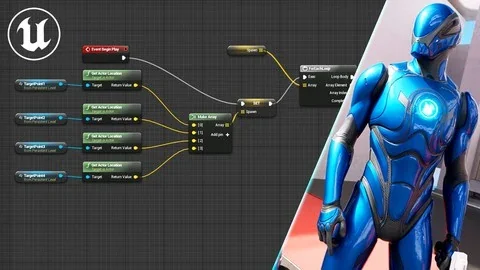
That approach matters most for complete beginners and for people who already know they want to make games but do not want to begin with a text-based programming language. Blueprints give those learners a visual scripting route, and the course is structured through understanding how to use that route to produce real results. It does not stop at a surface explanation of what Blueprints are. The curriculum specifically includes variables, arrays, flow control, functions, events, macros, enumerators, classes, actors, and Blueprint communication, which means the lessons move through the actual components that make a Blueprint workflow function.
For someone entering Unreal Engine for the first time, that structure makes the learning path easier to read. Variables and arrays cover stored data. Flow control introduces how logic branches and moves. Functions, events, and macros open up reusable actions and event-driven behavior. Enumerators, classes, and actors push the work toward clearer project structure. Blueprint communication then deals with one of the most important parts of any larger Unreal project: getting systems to talk to each other cleanly.
Unreal Engine Fundamentals, Variables, Arrays, and Flow Control
The curriculum starts with an introduction and Unreal Engine fundamentals, then moves into the basic logic pieces that support everything else. That sequence gives the course a strong practical shape. It begins with engine familiarity, then builds toward interaction and game behavior rather than assuming learners already understand Unreal terminology or layout.
Variables, arrays, and flow control are not treated as isolated theory topics. In a Blueprint course, these are the parts that let a game remember information, group related values, and decide what happens next. They are essential for anyone trying to move beyond simple experiments and into making a functioning project. Since the course also promises a complete game by the end, these lessons are best understood as the groundwork for later systems rather than detached fundamentals.
The same applies to functions, events, and macros. These subjects are often where Blueprint work starts to feel like real gameplay scripting rather than disconnected exercises. Events drive reactions. Functions help organize repeated logic. Macros can streamline recurring visual scripting patterns. Combined with the section on Blueprint communication, they point toward a course that does more than teach individual nodes. It teaches how separate pieces of a game project can connect into a larger whole.
Create First Person Character and gameplay setup
One of the most concrete parts of the course is the setup of an FPS human-controlled character. That gives the material a very practical anchor. Instead of staying inside abstract scripting examples, it includes a recognizable gameplay framework that many new Unreal users want to build sooner or later: a controllable first-person character inside a playable environment.
This part of the training is useful in two ways. First, it gives beginners a clear project milestone. A working first-person character is one of those steps that makes an engine feel usable rather than overwhelming. Second, it turns the earlier Blueprint lessons into action. Character behavior depends on logic, control, event handling, and communication, so the FPS setup ties together several of the systems introduced earlier in the course.
The curriculum also includes how to control time in Unreal Engine and how to control Unreal Engine space. Those topics expand the course beyond character movement alone. Time control can shape pacing and moment-to-moment behavior, while space control suggests work with positioning or scene interaction inside the engine. Alongside the first-person character setup, these lessons push the course toward actual gameplay construction rather than just interface familiarity.
Functions, Events and Macros meet UI/UX, Color & Materials
Another strong point is the way the curriculum reaches beyond gameplay logic into visual and interface-related work. Color and materials in Unreal Engine appear as dedicated topics, as do UI/UX and the Unreal interface. That broadens the course from pure scripting instruction into a more rounded beginner game-development path.
For a learner making a first project, these additions are important. Blueprints may control how a game behaves, but a complete game also needs visual readability and user interaction. UI/UX introduces the practical side of how players receive information and navigate systems. Color and materials add another production layer by addressing how game elements look inside Unreal Engine. The Unreal interface section supports all of this by helping learners become more comfortable with the engine environment itself.
None of these topics are presented as disconnected extras. They fit the larger promise of making a complete game. If the course only covered logic nodes, it would be a narrower scripting class. By including interface work, materials, and character setup, it points toward a project workflow where learners are not only creating behavior but also shaping presentation and usability inside Unreal Engine.
Where this Blueprints masterclass fits
The audience description is unusually broad, but it remains specific about the kinds of learners who will benefit. Complete Blueprints and Unreal Engine beginners are a direct fit, especially those with no prior experience. The same goes for individuals who want to develop games but do not want to write code. For that group, the course offers a visual entry point into game creation and a structured path from basics to a completed project.
There is also room here for learners who have tried coding before but could not make progress. Blueprints can be easier to approach for students who struggle with syntax-heavy programming, and this course is set up to help them continue building logic skills in a different format. Developers who want to learn how to use Unreal Engine are included too, as are people with experience in other engines such as Unity. That suggests the course is not limited to first-time game makers; it can also serve as a transition path for creators moving into Unreal Engine from another workflow.
Programmers who want to solidify their Blueprint scripting skills are part of the intended audience as well. That is a useful distinction. The course is not only for non-programmers. It also has value for developers who already understand logic but want to become more fluent in Unreal's Blueprint system. Experienced developers looking to brush up on their skills, along with artists who want to create their own projects and games, fit naturally into that same group.
From indie game development journey to a complete game
The course repeatedly points toward making an actual game rather than only studying isolated techniques. It encourages learners to start an indie game development journey without knowing how to code, and it states that a complete game can be made by the end. That end point gives the curriculum its practical shape. The lessons are arranged as pieces of a production path: engine fundamentals, Blueprint logic, communication between systems, character setup, time and space control, materials, UI/UX, and interface familiarity.
For anyone trying to decide whether this is a basic orientation course or a more project-driven class, those details make the answer fairly clear. It teaches fundamentals, but always in service of building toward something playable and more complete. It is especially well set up for beginners who want a visual scripting route into Unreal Engine, for Unity users shifting to a new engine, for artists who want to make their own games, and for developers who want stronger Blueprint habits. The strongest fit is anyone who wants to move from learning nodes and systems into assembling a finished Unreal Engine game workflow.
 Unreal Engine
 Unreal Engine
 Unreal Engine
 Unreal Engine