"031373f479d9561a"{"id":"1000251","slug":"unreal-engine-5-the-complete-automotive-cinematic-course","title":"Unreal Engine 5 - The Complete Automotive Cinematic Course","category":"Unreal Engine","engine":"File Content: video + English subtitles","assetVersion":"Video Language: English","engineVersion":"File Content: video + English subtitles","tag":"Unreal Engine","accent":"blue","visual":"mech","summary":"A comprehensive 7.5-hour curriculum detailing the workflow for creating photo-realistic automotive cinematics using Unreal Engine 5, Sequencer, and Niagara.","platform":"Unreal Engine","publishedAt":"2026-06-30T21:27:39.957Z","updatedAt":"2026-06-30T21:27:39.957Z","sourceNotes":[],"fileContents":[],"compatibility":["Unreal Engine","Video Language: English","File Content: video + English subtitles"],"featuredImage":{"alt":"Unreal Engine 5 - The Complete Automotive Cinematic Course","src":"/wp-content/uploads/published/2026/06/41c957b5fe31-5981764-16a5-2-7db92226dc.webp"},"hasDownloadLink":true,"downloads":0,"terms":[{"taxonomy":"category","slug":"tutoriallibrary-unrealengine","name":"Unreal Engine"}],"galleryImages":[],"accessPanel":{"kind":"video-resource","title":"Download this video resource","eyebrow":"Free Download","message":"Log in or create a free account to start your download.","fileName":"Unreal Engine 5 The Complete Automotive Cinematic Course.7z","safetyNote":"Resources are manually reviewed before listing to improve quality and reduce obvious risks.","actionLabel":"Download Free","resourceType":"Video download"},"contentHtml":"\u003cp\u003eProducing high-end automotive visual content requires a specific combination of environment design, precise vehicle control, and advanced camera work. \u003cstrong\u003eUnreal Engine 5 - The Complete Automotive Cinematic Course\u003c/strong\u003e Focuses entirely on the pipeline for generating photo-realistic automotive cinematics from scratch. Spanning nearly seven and a half hours of structured curriculum, the material breaks down the entire sequence of events required to place a digital vehicle into a believable environment and capture it with professional cinematic techniques. Relying heavily on Unreal Engine 5's native systems, particularly Sequencer, the workflow demonstrates how to manage everything from the initial empty project file to the final composited render.\u003c/p\u003e \u003ch2\u003eMastering Fundamentals and Project Preparation\u003c/h2\u003e\n\u003cp\u003eBefore a vehicle can be animated or a camera pathway established, the digital workspace must be properly configured. The curriculum begins by establishing Unreal Engine fundamentals, ensuring that the underlying project preparation is handled correctly. This phase involves understanding how to structure an automotive project, organize incoming assets, and set up the engine parameters required for high-fidelity rendering. By laying a solid technical groundwork, creators can navigate the complex interface and manage heavy vehicular assets without encountering organizational bottlenecks later in the production process.\u003c/p\u003e \u003ch2\u003eAutomotive Rigging and Animation Mechanics\u003c/h2\u003e\n\u003cp\u003eA static 3D vehicle model must be translated into an animatable asset before it can perform in a cinematic sequence. The curriculum dedicates a significant portion of the workflow to automotive rigging and animation. Car rigging is a distinct technical challenge within 3D production, requiring specific logic for wheel rotation, steering angles, and suspension movement. By establishing the correct underlying control systems, the vehicle is prepared to respond naturally to the virtual road. Establishing this technical foundation ensures that subsequent animation phases operate smoothly. When the rigging is handled correctly, wheels turn in accurate relation to the vehicle's speed, allowing creators to focus entirely on the artistic direction and pacing of the scene rather than troubleshooting foundational movement errors.\u003c/p\u003e \u003ch2\u003eBuilding the Level and Shader Development\u003c/h2\u003e\n\u003cp\u003eAn automotive cinematic relies just as much on the surrounding environment as it does on the vehicle itself. The workflow tackles level building as a core component of the production pipeline, guiding users through the process of constructing the stage where the automotive action will take place. This involves laying out the physical space, positioning environmental assets, and establishing the terrain for the vehicle to traverse.\u003c/p\u003e\n\u003cp\u003eCoupled directly with level design is material creation and shader development. Photo-realism in automotive rendering hinges entirely on how surfaces react to light. Developing accurate shaders for high-gloss car paint, reflective glass, textured rubber tires, and the surrounding asphalt is critical to selling the final image. The instruction details how to construct these materials within Unreal Engine 5, ensuring that reflections, surface roughness, and metallic properties behave realistically under various environmental lighting scenarios.\u003c/p\u003e \u003ch2\u003eDirecting the Action with Sequencer and Cinematic Cameras\u003c/h2\u003e\n\u003cp\u003eThe core of the cinematic process happens within Unreal Engine's Sequencer. Once the environments are built and the assets are rigged, the material transitions into active scene creation. By introducing Sequencer and cinematic camera settings, the workflow mimics a real-world film set. Users establish camera tracks, adjust focal lengths, manage depth of field, and control complex camera movements designed to highlight the vehicle's design and motion.\u003c/p\u003e\n\u003cp\u003eCreating the scenes involves blocking out the vehicle's animation path and choreographing the digital cameras to follow, track, or frame that movement effectively. This segment of the curriculum emphasizes the importance of timing, composition, and digital cinematography in translating a rigged 3D car into a dynamic, photo-realistic visual sequence.\u003c/p\u003e \u003ch2\u003eImplementing Niagara Drift Smoke FX\u003c/h2\u003e\n\u003cp\u003eTo elevate the realism and intensity of an automotive scene, dynamic visual effects are often required to ground the vehicle in its environment. The curriculum specifically explores Unreal Engine's Niagara visual effects system, focusing on how to make Drift Smoke FX. When a rigged vehicle is animated to slide or drift across a surface, the absence of tire smoke breaks the illusion of physical interaction between the rubber and the road.\u003c/p\u003e\n\u003cp\u003eBy utilizing Niagara, creators generate particle systems that emit smoke based on the vehicle's movement and friction. This section breaks down the technical execution of tying dynamic particle generation directly to the automotive animation, ensuring the smoke behaves naturally, dissipates at the correct rate, and interacts properly with the scene's complex lighting setup.\u003c/p\u003e \u003ch2\u003eRender Settings and After Effects Compositing\u003c/h2\u003e\n\u003cp\u003eThe final stages of the pipeline move away from scene construction and focus on the final output. Understanding render settings in Unreal Engine 5 is necessary to extract the highest possible image quality from the real-time engine. This involves configuring rendering passes, sampling rates, and output formats to generate clean, professional-grade image sequences.\u003c/p\u003e\n\u003cp\u003eHowever, the raw render from Unreal Engine is rarely the finished product. The workflow concludes with post-processing and visual enhancements, specifically focusing on After Effects compositing. By bringing the rendered sequences into Adobe After Effects, users apply final color grading, adjust scene contrast, integrate optical effects, and fine-tune the overall visual aesthetic. This multi-software approach ensures the final output possesses a polished, cinematic quality.\u003c/p\u003e \u003ch2\u003eFit for Automotive Visualization Projects\u003c/h2\u003e\n\u003cp\u003eDesigned as a comprehensive 7-hour and 27-minute pipeline, this curriculum accommodates a wide range of users, from complete beginners to those actively looking to expand their existing skill sets in virtual production. Because the material covers the entire journey—from initial project setup and car rigging to Niagara smoke effects and final After Effects compositing—it serves as a complete blueprint for producing high-tier automotive visual content. Whether the goal is creating commercial car advertisements, cinematic portfolio pieces, or dynamic vehicle sequences for larger projects, the workflow provides the necessary technical and artistic foundation to navigate Unreal Engine 5's advanced cinematic capabilities.\u003c/p\u003e\n\n\u003ch2\u003eExplore Similar Assets\u003c/h2\u003e\n\u003cul\u003e\n\u003cli\u003e\u003ca href=\"https://3dcghub.com/unreal-engine-5-5-the-ultimate-cinematic-masterclass/\" title=\"Unreal Engine 5.5 - The Ultimate Cinematic Masterclass\"\u003eUnreal Engine 5.5 - The Ultimate Cinematic Masterclass\u003c/a\u003e\u003c/li\u003e\n\u003cli\u003e\u003ca href=\"https://3dcghub.com/unreal-engine-5-cinematics-for-beginners-your-first-scene/\" title=\"Unreal Engine 5: Cinematics for Beginners – Your First Scene\"\u003eUnreal Engine 5: Cinematics for Beginners – Your First Scene\u003c/a\u003e\u003c/li\u003e\n\u003cli\u003e\u003ca href=\"https://3dcghub.com/introduction-to-materials-in-unreal-engine-5/\" title=\"Introduction to Materials in Unreal Engine 5\"\u003eIntroduction to Materials in Unreal Engine 5\u003c/a\u003e\u003c/li\u003e\n\u003cli\u003e\u003ca href=\"https://3dcghub.com/unreal-shader-megascans-assets/\" title=\"Unreal Shader : Megascans Assets\"\u003eUnreal Shader : Megascans Assets\u003c/a\u003e\u003c/li\u003e\n\u003cli\u003e\u003ca href=\"https://3dcghub.com/unreal-engine-5-blueprints-game-developer-masterclass/\" title=\"Unreal Engine 5 - Blueprints Game Developer Masterclass\"\u003eUnreal Engine 5 - Blueprints Game Developer Masterclass\u003c/a\u003e\u003c/li\u003e\n\u003c/ul\u003e","contentTextLength":6972,"navigation":{"current":1098,"total":3223,"previous":{"id":"1000253","slug":"subway-environment","title":"Subway Environment","category":"Cities","platform":"Unreal Engine","updatedAt":"2026-06-30T21:49:55.516Z"},"next":{"id":"1000250","slug":"polygon-prototype-pack","title":"POLYGON - Prototype Pack","category":"Tools, Objects \u0026 Decor","platform":"Unreal Engine","updatedAt":"2026-06-30T21:05:29.647Z"}},"relatedResources":[{"id":"1000741","slug":"real-time-automotive-rendering-1001","title":"Real-Time Automotive Rendering 1001","category":"Unreal Engine","engine":"File Content: video + English subtitles","assetVersion":"Video Language: English","engineVersion":"File Content: video + English subtitles","tag":"Unreal Engine","accent":"blue","visual":"mech","summary":"A beginner-friendly Unreal Engine course covering automotive cinematic creation: asset prep in Maya, shader setup, exterior and studio lighting, and camera rend","platform":"Unreal Engine","publishedAt":"2026-07-27T11:52:00.768Z","updatedAt":"2026-07-27T11:52:00.768Z","sourceNotes":[],"fileContents":[],"compatibility":["Unreal Engine","Video Language: English","File Content: video + English subtitles"],"featuredImage":{"alt":"Real-Time Automotive Rendering 1001","src":"/wp-content/uploads/published/2026/07/e10d685964d4-rtat1001-0002-porsche-shot-chateu-1-0005-2048x811-da382017e6.webp"},"hasDownloadLink":true,"downloads":1},{"id":"1000620","slug":"environment-art-in-unreal-engine-and-blender","title":"Environment Art in Unreal Engine \u0026 Blender","category":"Unreal Engine","engine":"File Content: video + English subtitles","assetVersion":"Video Language: English","engineVersion":"File Content: video + English subtitles","tag":"Unreal Engine","accent":"blue","visual":"city","summary":"Learn terrain, procedural landscape materials, foliage, PCG, and cinematic lighting across Blender and Unreal Engine through a 12-hour hands-on course.","platform":"Unreal Engine","publishedAt":"2026-07-21T08:02:27.443Z","updatedAt":"2026-07-21T08:02:27.443Z","sourceNotes":[],"fileContents":[],"compatibility":["Blender","Video Language: English","File Content: video + English subtitles"],"featuredImage":{"alt":"Environment Art in Unreal Engine \u0026 Blender","src":"/wp-content/uploads/published/2026/07/dee7455e91d9-6182543-f329-49ae08d4cf.webp"},"hasDownloadLink":true,"downloads":1},{"id":"1000187","slug":"unreal-engine-5-cinematics-for-beginners-your-first-scene","title":"Unreal Engine 5: Cinematics for Beginners – Your First Scene","category":"Unreal Engine","engine":"File Content: video + English subtitles","assetVersion":"Video Language: English","engineVersion":"File Content: video + English subtitles","tag":"Unreal Engine","accent":"blue","visual":"mech","summary":"A 6h 14m Unreal Engine 5 course focused on Sequencer, Niagara VFX, cinematography, asset setup, and finishing a first cinematic scene.","platform":"Unreal Engine","publishedAt":"2026-06-22T05:42:46.521Z","updatedAt":"2026-06-22T05:42:46.521Z","sourceNotes":[],"fileContents":[],"compatibility":["Unreal Engine","Video Language: English","File Content: video + English subtitles"],"featuredImage":{"alt":"Unreal Engine 5: Cinematics for Beginners – Your First Scene","src":"/wp-content/uploads/published/2026/06/c963a6e14936-5575526-dc17-16-55cfce9062.webp"},"hasDownloadLink":true,"downloads":1}]}
Unreal Engine
Unreal Engine 5 - The Complete Automotive Cinematic Course
A comprehensive 7.5-hour curriculum detailing the workflow for creating photo-realistic automotive cinematics using Unreal Engine 5, Sequencer, and Niagara.
Category:Unreal EnginePlatform: Unreal EngineVideo Language: EnglishFile Content: video + English subtitlesPublished: Jun 30, 2026
Unreal Engine
Resource overview
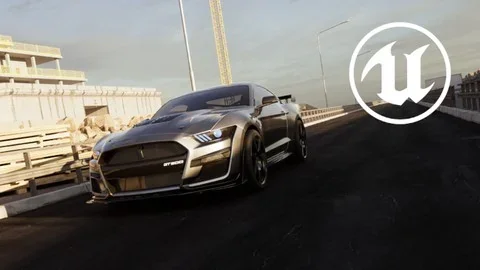
Producing high-end automotive visual content requires a specific combination of environment design, precise vehicle control, and advanced camera work. Unreal Engine 5 - The Complete Automotive Cinematic Course Focuses entirely on the pipeline for generating photo-realistic automotive cinematics from scratch. Spanning nearly seven and a half hours of structured curriculum, the material breaks down the entire sequence of events required to place a digital vehicle into a believable environment and capture it with professional cinematic techniques. Relying heavily on Unreal Engine 5's native systems, particularly Sequencer, the workflow demonstrates how to manage everything from the initial empty project file to the final composited render.
Mastering Fundamentals and Project Preparation
Before a vehicle can be animated or a camera pathway established, the digital workspace must be properly configured. The curriculum begins by establishing Unreal Engine fundamentals, ensuring that the underlying project preparation is handled correctly. This phase involves understanding how to structure an automotive project, organize incoming assets, and set up the engine parameters required for high-fidelity rendering. By laying a solid technical groundwork, creators can navigate the complex interface and manage heavy vehicular assets without encountering organizational bottlenecks later in the production process.
Automotive Rigging and Animation Mechanics
A static 3D vehicle model must be translated into an animatable asset before it can perform in a cinematic sequence. The curriculum dedicates a significant portion of the workflow to automotive rigging and animation. Car rigging is a distinct technical challenge within 3D production, requiring specific logic for wheel rotation, steering angles, and suspension movement. By establishing the correct underlying control systems, the vehicle is prepared to respond naturally to the virtual road. Establishing this technical foundation ensures that subsequent animation phases operate smoothly. When the rigging is handled correctly, wheels turn in accurate relation to the vehicle's speed, allowing creators to focus entirely on the artistic direction and pacing of the scene rather than troubleshooting foundational movement errors.
Building the Level and Shader Development
An automotive cinematic relies just as much on the surrounding environment as it does on the vehicle itself. The workflow tackles level building as a core component of the production pipeline, guiding users through the process of constructing the stage where the automotive action will take place. This involves laying out the physical space, positioning environmental assets, and establishing the terrain for the vehicle to traverse.
Coupled directly with level design is material creation and shader development. Photo-realism in automotive rendering hinges entirely on how surfaces react to light. Developing accurate shaders for high-gloss car paint, reflective glass, textured rubber tires, and the surrounding asphalt is critical to selling the final image. The instruction details how to construct these materials within Unreal Engine 5, ensuring that reflections, surface roughness, and metallic properties behave realistically under various environmental lighting scenarios.
Directing the Action with Sequencer and Cinematic Cameras
The core of the cinematic process happens within Unreal Engine's Sequencer. Once the environments are built and the assets are rigged, the material transitions into active scene creation. By introducing Sequencer and cinematic camera settings, the workflow mimics a real-world film set. Users establish camera tracks, adjust focal lengths, manage depth of field, and control complex camera movements designed to highlight the vehicle's design and motion.
Creating the scenes involves blocking out the vehicle's animation path and choreographing the digital cameras to follow, track, or frame that movement effectively. This segment of the curriculum emphasizes the importance of timing, composition, and digital cinematography in translating a rigged 3D car into a dynamic, photo-realistic visual sequence.
Implementing Niagara Drift Smoke FX
To elevate the realism and intensity of an automotive scene, dynamic visual effects are often required to ground the vehicle in its environment. The curriculum specifically explores Unreal Engine's Niagara visual effects system, focusing on how to make Drift Smoke FX. When a rigged vehicle is animated to slide or drift across a surface, the absence of tire smoke breaks the illusion of physical interaction between the rubber and the road.
By utilizing Niagara, creators generate particle systems that emit smoke based on the vehicle's movement and friction. This section breaks down the technical execution of tying dynamic particle generation directly to the automotive animation, ensuring the smoke behaves naturally, dissipates at the correct rate, and interacts properly with the scene's complex lighting setup.
Render Settings and After Effects Compositing
The final stages of the pipeline move away from scene construction and focus on the final output. Understanding render settings in Unreal Engine 5 is necessary to extract the highest possible image quality from the real-time engine. This involves configuring rendering passes, sampling rates, and output formats to generate clean, professional-grade image sequences.
However, the raw render from Unreal Engine is rarely the finished product. The workflow concludes with post-processing and visual enhancements, specifically focusing on After Effects compositing. By bringing the rendered sequences into Adobe After Effects, users apply final color grading, adjust scene contrast, integrate optical effects, and fine-tune the overall visual aesthetic. This multi-software approach ensures the final output possesses a polished, cinematic quality.
Fit for Automotive Visualization Projects
Designed as a comprehensive 7-hour and 27-minute pipeline, this curriculum accommodates a wide range of users, from complete beginners to those actively looking to expand their existing skill sets in virtual production. Because the material covers the entire journey—from initial project setup and car rigging to Niagara smoke effects and final After Effects compositing—it serves as a complete blueprint for producing high-tier automotive visual content. Whether the goal is creating commercial car advertisements, cinematic portfolio pieces, or dynamic vehicle sequences for larger projects, the workflow provides the necessary technical and artistic foundation to navigate Unreal Engine 5's advanced cinematic capabilities.
 Unreal Engine
 Unreal Engine
 Unreal Engine
 Unreal Engine