Unreal Engine 5 + Blender Environment Design For Beginners
A beginner course focused on creating a factory interior with Blender and Unreal Engine 5, covering modular modeling, materials, lighting, and level assembly.
 Unreal Engine
Resource overview
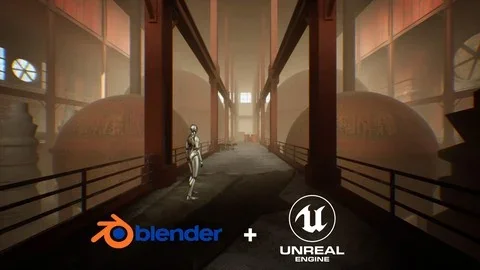
Unreal Engine 5 + Blender Environment Design For Beginners Is a beginner-focused course that walks through the creation of a factory interior environment using Blender and Unreal Engine 5. Its scope is clear from the start: the environment is meant to be ready for first-person and third-person projects, which places the course in a practical game-development context rather than in abstract software demos.
The course workload is 6 hours and 17 minutes, and the material is structured around a complete environment pipeline. Instead of isolating one tool or one narrow task, it connects design thinking, modeling, asset transfer, level building, materials, lighting, and post-process work into a single learning path. That makes it easier to see how environment art decisions move from concept to playable space.
Factory interior environment from concept to playable scene
The central project is a beautiful factory interior environment. That single scene choice gives the course a consistent throughline. Every stage of the training supports the same end result: developing an environment that can function inside a game project where the player may experience the space from either a first-person or third-person view.
That matters in a very practical way. A scene intended for those perspectives needs more than individual props or isolated models. It needs layout thinking, reusable pieces, visual cohesion, and enough attention to materials and lighting for the environment to read well in motion. The course addresses that by teaching students to think like an architect and develop a big-picture plan for environment design before moving deeper into production tasks.
Rather than treating environment art as a collection of disconnected tricks, the training frames it as a complete build process. The factory interior becomes the place where learners apply design principles, shape modular assets, move those assets into Unreal Engine 5, and turn them into a finished level.
Blender basics, modeling tools, and modular assets
Blender is used for the early and core asset-production stages. The course includes Blender basics and modeling tools, which keeps the material accessible for newcomers who do not already have a strong background in 3D work. It then moves into modeling assets and UV mapping, building a foundation that supports the rest of the environment process.
A major focus here is modular asset creation. Modeling modular assets in Blender is one of the course’s defining topics, and it plays a direct role in how the factory interior is assembled later in Unreal Engine 5. Modular work is a practical approach for environment design because it allows a scene to be constructed from repeatable parts instead of depending on one-off pieces for every wall, structural element, or interior section.
For beginners, this is a useful way to learn because modular assets connect creative decisions with production discipline. Students are not only learning how to model forms in Blender; they are also learning how to prepare pieces that can be placed and reused inside a larger environment. That creates a bridge between standalone modeling exercises and real environment construction.
The inclusion of UV mapping further supports this workflow. It fits naturally between asset creation and later material work in Unreal Engine 5, helping students understand that environment art is built through linked stages rather than isolated software features.
Import and export between Blender and Unreal Engine 5
One of the most production-relevant parts of the course is the transfer process between the two applications. Importing and exporting files from Blender to Unreal Engine 5 is covered directly, which gives the training a clear place in an actual game-art workflow.
That step is often where beginners start to see how separate tools become part of one pipeline. Blender handles modeling and asset preparation, while Unreal Engine 5 becomes the environment assembly and presentation space. By including both ends of that handoff, the course does more than teach software basics. It shows how assets move from creation into implementation.
The Unreal Engine side begins with Unreal Engine 5 basics and then continues into placing assets in the level. This creates a natural progression: first make the pieces, then bring them into the engine, then use them to form the environment. Because the training stays tied to one factory interior project, the engine work remains grounded in scene construction rather than drifting into unrelated editor features.
For learners who want to understand where environment design fits inside a broader project, this section is especially important. It demonstrates that environment art is not finished when the model is complete. The level-building stage is where scale, arrangement, repetition, and spatial readability begin to define how the scene actually works.
Using modular assets in Unreal and building the level
After asset transfer, the course turns to using modular assets in Unreal and creating the environment. This is where the earlier Blender work becomes a functioning scene. Instead of leaving assets as individual objects, the process moves toward level construction, with the modular parts forming the structure of the factory interior.
This section sits at the heart of the course’s production value. Environment design for games is not just about making appealing objects. It is also about arranging those objects into a coherent space that supports player movement and visual logic. Since the environment is intended for first-person and third-person projects, the level-building stage becomes the point where all those decisions meet.
The course also includes design principles, ideas, and concepts near the front of the curriculum, which helps explain why this level-assembly stage matters. Learners are not simply dropping assets into a scene. They are connecting planning, architectural thinking, and modular construction into an environment that has an intentional overall form.
That makes the course relevant to more than one kind of beginner. Someone entering 3D art can use it to understand environment structure. Someone coming from programming can use it to approach the artistic side of production. An aspiring game developer or indie creator can use it to see how a game-ready environment is pieced together from reusable components.
Materials, lighting, and post-process effects in Unreal Engine 5
Visual finish is handled through material basics, lighting basics, and post-process effects in Unreal Engine 5. These subjects round out the environment workflow by shifting attention from geometry and placement to surface response, scene readability, and overall atmosphere.
Material basics give learners a starting point for defining how the factory interior surfaces appear once the models are inside the engine. Lighting basics then shape how the environment is seen as a whole. For an interior scene, lighting is not a minor extra; it is one of the main factors that determines mood, depth, and clarity across the space.
Post-process effects extend that visual pass further. Their presence in the curriculum indicates that the course does not stop once assets are modeled and placed. It continues through the stage where a level begins to feel more complete as an environment rather than as a rough arrangement of parts.
Taken together, these Unreal Engine 5 topics show where scene polish fits in the workflow. The order is important: first establish the environment through modular modeling and level placement, then develop the look of that environment through materials, lighting, and post-process treatment. For a beginner course, that sequence keeps the artistic finishing work connected to the underlying structure of the scene.
Where this beginner course fits in a real environment workflow
This course is aimed at beginners in 3D and Unreal Engine who want to learn environment design, but the audience description is broader than that. It also speaks to aspiring game developers, indie game creators, students, hobbyists, and programmers who want to learn the artistic side of projects. That range makes sense because the training covers both creative planning and hands-on implementation.
In a real production workflow, the course sits at the point where environment design becomes understandable as a repeatable process. It starts with ideas, concepts, and design principles. It moves into Blender for modeling, modular asset creation, and UV mapping. It then shifts into Unreal Engine 5 for importing assets, placing them in the level, and shaping the environment with materials, lighting, and post-process effects.
That progression is especially useful for anyone who wants to understand how a scene is assembled from start to finish without jumping between unrelated examples. The factory interior project keeps the learning path focused, while the first-person and third-person target gives the scene a clear game-development use case.
Published on March 19, 2025, and taught by the developer, the course is set up as an entry-level path through a full environment build. The practical takeaway is straightforward: it is meant to help beginners move from early design thinking to a completed factory interior scene that can sit inside a first-person or third-person game project.
Explore Similar Assets
Download this video resource
Log in or create a free account to start your download.
Resources are manually reviewed before listing to improve quality and reduce obvious risks.
Related resources
 Unreal Engine
Unreal Engine 5 Blueprints & Blender: Learn Game Development
Unreal Engine
 Unreal Engine
Unreal Engine 5: The Complete Beginner’s Course
Unreal Engine
 Unreal Engine
Unreal Engine 5 : Motion Design
Unreal Engine