"6ac84fdb0bd06614"{"id":"1000183","slug":"unreal-engine-5-blueprints-and-blender-learn-game-development","title":"Unreal Engine 5 Blueprints \u0026 Blender: Learn Game Development","category":"Unreal Engine","engine":"File Content: video + English subtitles","assetVersion":"Video Language: English","engineVersion":"File Content: video + English subtitles","tag":"Unreal Engine","accent":"blue","visual":"mech","summary":"A beginner-focused course that walks through making a first game from scratch with Unreal Engine 5, Blueprints, Blender, HUDs, materials, and more.","platform":"Unreal Engine","publishedAt":"2026-06-21T07:06:07.043Z","updatedAt":"2026-06-21T07:06:07.043Z","sourceNotes":[],"fileContents":[],"compatibility":["Blender","Video Language: English","File Content: video + English subtitles"],"featuredImage":{"alt":"Unreal Engine 5 Blueprints \u0026 Blender: Learn Game Development","src":"/wp-content/uploads/published/2026/06/a12be9accb3a-5347078-7d72-8-0bf942ddb7.webp"},"hasDownloadLink":true,"downloads":0,"terms":[{"taxonomy":"category","slug":"tutoriallibrary-unrealengine","name":"Unreal Engine"}],"galleryImages":[],"accessPanel":{"kind":"video-resource","title":"Download this video resource","eyebrow":"Free Download","message":"Log in or create a free account to start your download.","fileName":"Unreal Engine 5 Blueprints \u0026 Blender Learn Game Development.7z","safetyNote":"Resources are manually reviewed before listing to improve quality and reduce obvious risks.","actionLabel":"Download Free","resourceType":"Video download"},"contentHtml":"\u003cp\u003eThe course starts where many new projects actually begin: with the process of making a game from scratch rather than isolating one tool or one discipline. Unreal Engine 5 and Blender are treated as connected parts of the same workflow, so the learning path moves from creating art to exporting it into Unreal Engine, then using Blueprints to turn that content into working game systems. For anyone trying to understand how a playable project comes together, that setup matters more than a disconnected collection of software tutorials.\u003c/p\u003e\n\u003cp\u003eIts scope is broad enough to cover several major production steps in one place. The focus is not only on learning a game engine interface or basic modeling tasks, but on seeing how game art, mechanics, environments, characters, enemies, user interface work, and materials all support the same result: a finished first game. That makes the course easy to place within a real workflow. It sits at the stage where a developer is still learning the full pipeline and needs to understand how separate tasks connect.\u003c/p\u003e \u003ch2\u003eFrom Blender export to Unreal Engine 5\u003c/h2\u003e\n\u003cp\u003eOne of the clearest practical threads here is the movement from Blender into Unreal Engine 5. The course covers creating game art with Blender and exporting it to Unreal Engine, which gives it a direct place in the production chain. Instead of treating art creation and engine work as unrelated skills, it ties them together in sequence. That is often where beginners need the most help, because the challenge is not only making an object or scene but getting it into the game project and using it there.\u003c/p\u003e\n\u003cp\u003eThe inclusion of environment creation gives that workflow more structure. Learning to make your own game environment means the Blender-to-Unreal process is not just theoretical. It connects asset creation to a larger scene that can support gameplay. In production terms, that puts the course in the early world-building phase, where a developer needs visual context for mechanics, player movement, enemies, and interface feedback.\u003c/p\u003e\n\u003cp\u003eBecause the course is framed around making a first game from scratch, the Blender segment is part of a bigger implementation path. It feeds directly into the engine side rather than standing alone as a modeling exercise. That makes it useful for learners who do not want to split art and gameplay into separate study tracks.\u003c/p\u003e \u003ch2\u003eBlueprints as the gameplay layer\u003c/h2\u003e\n\u003cp\u003eBlueprints are central to the course. The learning goals explicitly include using Blueprints to make game mechanics, which places Unreal Engine 5's visual scripting system at the heart of the project. For a beginner-level course, that is an important choice. It means gameplay logic is approached through a system that is accessible while still being capable of handling real interaction and behavior.\u003c/p\u003e\n\u003cp\u003eThe course also covers common Blueprint practices, which broadens the value beyond simply getting something to work once. There is a difference between learning a feature and learning how to work with it repeatedly across a project. Common practices point toward habits and structure, not just one-off examples. In a production workflow, that is the difference between experimentation and building a game that can keep growing without becoming confusing.\u003c/p\u003e\n\u003cp\u003eThat emphasis becomes more useful when paired with the goal of developing strong problem solving skills. Game development rarely moves in a straight line, especially when mechanics, UI, enemies, and art all need to interact. A course that teaches Blueprints alongside problem solving is not just helping someone reproduce steps. It is helping them work through the kinds of issues that appear once a project becomes more complex.\u003c/p\u003e\n\u003cp\u003eFor learners moving up from simple tutorials, this is where the course likely fits best. It remains beginner level, but it does not stay narrowly focused on the absolute basics. The Blueprint material is part of a wider process that asks the learner to connect systems rather than only complete isolated exercises.\u003c/p\u003e \u003ch2\u003eCreating your own character, enemies, and game environment\u003c/h2\u003e\n\u003cp\u003eThe content goes beyond generic level setup by including the creation of a game character and enemies. That gives the project a clearer gameplay structure. A world is not being built just to exist as a backdrop; it is being populated with the elements that define play. Character creation establishes the player's presence in the game, while enemy creation introduces opposition and interaction. Together, those topics move the course closer to a complete playable loop.\u003c/p\u003e\n\u003cp\u003eEnvironment work supports that loop from another angle. Making your own game environment gives characters and enemies a space to operate in, while also grounding the visual identity of the project. For a first game, this is often where many moving parts meet: art assets, level layout, mechanics, and presentation all become visible in the same scene.\u003c/p\u003e\n\u003cp\u003eWhat stands out is the way these topics connect rather than compete for attention. Blender covers art creation, Unreal Engine 5 handles implementation, Blueprints drive mechanics, and the environment, character, and enemies provide the content needed to make those systems meaningful. The course therefore fits into a practical learning path for people who want to see how a small game is assembled from multiple disciplines instead of studying each piece in isolation.\u003c/p\u003e \u003ch2\u003eHUD widgets and dynamic adjustable materials\u003c/h2\u003e\n\u003cp\u003eThe course also reaches into parts of development that are easy to postpone but hard to ignore in a finished game. It includes making complex HUDs with widgets, which brings user interface work into the same project pipeline as gameplay and art. A HUD is not just decorative. It is the layer that communicates game information to the player, so including widget-based interface work gives the project a more complete shape.\u003c/p\u003e\n\u003cp\u003eThis matters because a first game often feels unfinished when it has mechanics but no strong interface. By covering complex HUDs, the course acknowledges that the player experience is shaped not only by what happens in the world but by how that information is presented on screen. In Unreal Engine 5 terms, widgets are part of that production-ready step where raw functionality starts becoming a game people can read and interact with clearly.\u003c/p\u003e\n\u003cp\u003eDynamic adjustable materials add another technical layer. Materials influence how game art appears once it is inside Unreal Engine, and the fact that they are dynamic and adjustable points to flexibility inside the project rather than fixed presentation. Within a real workflow, this sits between pure art creation and final in-engine look development. It gives learners exposure to the idea that visual assets are not finished the moment they are modeled or imported. They continue to be shaped inside the engine.\u003c/p\u003e\n\u003cp\u003eTaken together, widgets and materials broaden the course beyond a simple prototype path. They push it toward the stage where systems need to look readable, responsive, and integrated. That makes the training more useful for someone who wants a first project to feel assembled rather than fragmented.\u003c/p\u003e \u003ch2\u003eHow the 9h 1m course fits a beginner workflow\u003c/h2\u003e\n\u003cp\u003eWith a total workload of 9 hours and 1 minute, the course is substantial enough to cover multiple parts of a game project without becoming an open-ended curriculum. It is published at a beginner level, and the target audience includes beginner or intermediate game developers looking to improve their skills. That positioning is specific. It is not only for someone who has never opened the tools before, but also for someone who has some familiarity and needs a more connected project to sharpen their process.\u003c/p\u003e\n\u003cp\u003eThe curriculum includes a game showcase and a section on creating the game, with project files included. The showcase gives learners a view of the finished direction, while the project creation portion is where the main build process takes place. Project files matter here because they support the practical side of the learning experience. When a course spans gameplay, art, environment work, enemies, HUDs, and materials, having the project materials included helps keep the focus on building and understanding the whole pipeline.\u003c/p\u003e\n\u003cp\u003eVictor Deno is listed as the instructor and provider, which gives the course a single guiding voice across all of these topics. That consistency can be useful in a course that crosses between tools and disciplines, since the workflow remains unified instead of shifting between separate teaching styles for each area.\u003c/p\u003e\n\u003cp\u003eAs a practical takeaway, this course fits best when the goal is to move from disconnected practice into a first complete game workflow. It gives learners a path through Blender art creation, Unreal Engine 5 implementation, Blueprint mechanics, characters and enemies, environment work, HUD widgets, and dynamic materials, all within a beginner-friendly structure that still leaves room for skill improvement.\u003c/p\u003e\n\n\u003ch2\u003eContinue Browsing Similar Packs\u003c/h2\u003e\n\u003cul\u003e\n\u003cli\u003e\u003ca href=\"https://3dcghub.com/unreal-engine-5-blender-environment-design-for-beginners/\" title=\"Unreal Engine 5 + Blender Environment Design For Beginners\"\u003eUnreal Engine 5 + Blender Environment Design For Beginners\u003c/a\u003e\u003c/li\u003e\n\u003cli\u003e\u003ca href=\"https://3dcghub.com/the-ultimate-guide-to-unreal-engine-5-for-complete-beginners/\" title=\"The Ultimate Guide to Unreal Engine 5 For Complete Beginners\"\u003eThe Ultimate Guide to Unreal Engine 5 For Complete Beginners\u003c/a\u003e\u003c/li\u003e\n\u003cli\u003e\u003ca href=\"https://3dcghub.com/unreal-engine-5-and-blender-3d-product-visualization/\" title=\"Unreal Engine 5 and Blender 3D: Product Visualization\"\u003eUnreal Engine 5 and Blender 3D: Product Visualization\u003c/a\u003e\u003c/li\u003e\n\u003cli\u003e\u003ca href=\"https://3dcghub.com/unreal-engine-5-one-course-solution-for-niagara-vfx/\" title=\"Unreal Engine 5: One Course Solution For Niagara VFX\"\u003eUnreal Engine 5: One Course Solution For Niagara VFX\u003c/a\u003e\u003c/li\u003e\n\u003cli\u003e\u003ca href=\"https://3dcghub.com/unreal-engine-5-blueprints-game-developer-masterclass/\" title=\"Unreal Engine 5 - Blueprints Game Developer Masterclass\"\u003eUnreal Engine 5 - Blueprints Game Developer Masterclass\u003c/a\u003e\u003c/li\u003e\n\u003c/ul\u003e","contentTextLength":9194,"navigation":{"current":1099,"total":3181,"previous":{"id":"1000185","slug":"unreal-engine-5-c-advanced-frontend-ui-programming","title":"Unreal Engine 5 C++: Advanced Frontend UI Programming","category":"Unreal Engine","platform":"Unreal Engine","updatedAt":"2026-06-22T04:36:47.167Z"},"next":{"id":"1000182","slug":"unreal-engine-5-blueprint-rapid-prototyping-for-beginners","title":"Unreal Engine 5 Blueprint: Rapid Prototyping for Beginners!","category":"Unreal Engine","platform":"Unreal Engine","updatedAt":"2026-06-21T04:55:51.652Z"}},"relatedResources":[{"id":"1000556","slug":"master-unreal-engine-5-build-any-game-with-blueprint-and-c","title":"Master Unreal Engine 5: Build Any Game with Blueprint \u0026 C++","category":"Unreal Engine","engine":"File Content: video + English subtitles","assetVersion":"Video Language: English","engineVersion":"File Content: video + English subtitles","tag":"Unreal Engine","accent":"blue","visual":"mech","summary":"Build any game in Unreal Engine 5 using Blueprint and C++. Learn multiplayer networking, UMG UI, materials, modeling tools, and packaging across 13 hours.","platform":"Unreal Engine","publishedAt":"2026-07-15T16:49:38.751Z","updatedAt":"2026-07-15T16:49:38.751Z","sourceNotes":[],"fileContents":[],"compatibility":["Unreal Engine","Video Language: English","File Content: video + English subtitles"],"featuredImage":{"alt":"Master Unreal Engine 5: Build Any Game with Blueprint \u0026 C++","src":"/wp-content/uploads/published/2026/07/167dd95e84d7-6120743-8adb-4-ba02c71b99.webp"},"hasDownloadLink":true,"downloads":1},{"id":"1000620","slug":"environment-art-in-unreal-engine-and-blender","title":"Environment Art in Unreal Engine \u0026 Blender","category":"Unreal Engine","engine":"File Content: video + English subtitles","assetVersion":"Video Language: English","engineVersion":"File Content: video + English subtitles","tag":"Unreal Engine","accent":"blue","visual":"city","summary":"Learn terrain, procedural landscape materials, foliage, PCG, and cinematic lighting across Blender and Unreal Engine through a 12-hour hands-on course.","platform":"Unreal Engine","publishedAt":"2026-07-21T08:02:27.443Z","updatedAt":"2026-07-21T08:02:27.443Z","sourceNotes":[],"fileContents":[],"compatibility":["Blender","Video Language: English","File Content: video + English subtitles"],"featuredImage":{"alt":"Environment Art in Unreal Engine \u0026 Blender","src":"/wp-content/uploads/published/2026/07/dee7455e91d9-6182543-f329-49ae08d4cf.webp"},"hasDownloadLink":true,"downloads":0},{"id":"1000222","slug":"creating-a-stylized-environment-in-unreal-engine-5","title":"Creating a Stylized Environment in Unreal Engine 5","category":"Unreal Engine","engine":"File Content: video + English subtitles","assetVersion":"Video Language: English","engineVersion":"File Content: video + English subtitles","tag":"Unreal Engine","accent":"blue","visual":"city","summary":"Learn the complete pipeline for building stylized scenes by bridging custom Blender modeling with Unreal Engine 5 materials, landscape sculpting, and foliage to","platform":"Unreal Engine","publishedAt":"2026-06-26T18:47:07.036Z","updatedAt":"2026-06-26T18:47:07.036Z","sourceNotes":[],"fileContents":[],"compatibility":["Unreal Engine","Video Language: English","File Content: video + English subtitles"],"featuredImage":{"alt":"Creating a Stylized Environment in Unreal Engine 5","src":"/wp-content/uploads/published/2026/06/ec9c5219c0ba-5654654-0f33-3-ae985f56f4.webp"},"hasDownloadLink":true,"downloads":0}]}
Unreal Engine
Unreal Engine 5 Blueprints & Blender: Learn Game Development
A beginner-focused course that walks through making a first game from scratch with Unreal Engine 5, Blueprints, Blender, HUDs, materials, and more.
Category:Unreal Engine, Unreal EnginePlatform: Unreal EngineVideo Language: EnglishFile Content: video + English subtitlesPublished: Jun 21, 2026
Unreal Engine
Resource overview
The course starts where many new projects actually begin: with the process of making a game from scratch rather than isolating one tool or one discipline. Unreal Engine 5 and Blender are treated as connected parts of the same workflow, so the learning path moves from creating art to exporting it into Unreal Engine, then using Blueprints to turn that content into working game systems. For anyone trying to understand how a playable project comes together, that setup matters more than a disconnected collection of software tutorials.
Its scope is broad enough to cover several major production steps in one place. The focus is not only on learning a game engine interface or basic modeling tasks, but on seeing how game art, mechanics, environments, characters, enemies, user interface work, and materials all support the same result: a finished first game. That makes the course easy to place within a real workflow. It sits at the stage where a developer is still learning the full pipeline and needs to understand how separate tasks connect.
From Blender export to Unreal Engine 5
One of the clearest practical threads here is the movement from Blender into Unreal Engine 5. The course covers creating game art with Blender and exporting it to Unreal Engine, which gives it a direct place in the production chain. Instead of treating art creation and engine work as unrelated skills, it ties them together in sequence. That is often where beginners need the most help, because the challenge is not only making an object or scene but getting it into the game project and using it there.
The inclusion of environment creation gives that workflow more structure. Learning to make your own game environment means the Blender-to-Unreal process is not just theoretical. It connects asset creation to a larger scene that can support gameplay. In production terms, that puts the course in the early world-building phase, where a developer needs visual context for mechanics, player movement, enemies, and interface feedback.
Because the course is framed around making a first game from scratch, the Blender segment is part of a bigger implementation path. It feeds directly into the engine side rather than standing alone as a modeling exercise. That makes it useful for learners who do not want to split art and gameplay into separate study tracks.
Blueprints as the gameplay layer
Blueprints are central to the course. The learning goals explicitly include using Blueprints to make game mechanics, which places Unreal Engine 5's visual scripting system at the heart of the project. For a beginner-level course, that is an important choice. It means gameplay logic is approached through a system that is accessible while still being capable of handling real interaction and behavior.
The course also covers common Blueprint practices, which broadens the value beyond simply getting something to work once. There is a difference between learning a feature and learning how to work with it repeatedly across a project. Common practices point toward habits and structure, not just one-off examples. In a production workflow, that is the difference between experimentation and building a game that can keep growing without becoming confusing.
That emphasis becomes more useful when paired with the goal of developing strong problem solving skills. Game development rarely moves in a straight line, especially when mechanics, UI, enemies, and art all need to interact. A course that teaches Blueprints alongside problem solving is not just helping someone reproduce steps. It is helping them work through the kinds of issues that appear once a project becomes more complex.
For learners moving up from simple tutorials, this is where the course likely fits best. It remains beginner level, but it does not stay narrowly focused on the absolute basics. The Blueprint material is part of a wider process that asks the learner to connect systems rather than only complete isolated exercises.
Creating your own character, enemies, and game environment
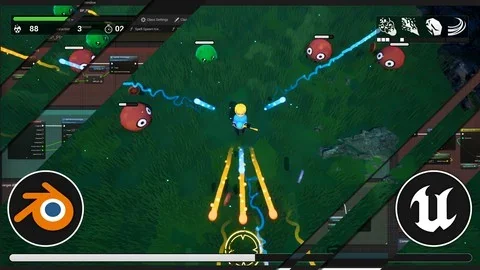
The content goes beyond generic level setup by including the creation of a game character and enemies. That gives the project a clearer gameplay structure. A world is not being built just to exist as a backdrop; it is being populated with the elements that define play. Character creation establishes the player's presence in the game, while enemy creation introduces opposition and interaction. Together, those topics move the course closer to a complete playable loop.
Environment work supports that loop from another angle. Making your own game environment gives characters and enemies a space to operate in, while also grounding the visual identity of the project. For a first game, this is often where many moving parts meet: art assets, level layout, mechanics, and presentation all become visible in the same scene.
What stands out is the way these topics connect rather than compete for attention. Blender covers art creation, Unreal Engine 5 handles implementation, Blueprints drive mechanics, and the environment, character, and enemies provide the content needed to make those systems meaningful. The course therefore fits into a practical learning path for people who want to see how a small game is assembled from multiple disciplines instead of studying each piece in isolation.
HUD widgets and dynamic adjustable materials
The course also reaches into parts of development that are easy to postpone but hard to ignore in a finished game. It includes making complex HUDs with widgets, which brings user interface work into the same project pipeline as gameplay and art. A HUD is not just decorative. It is the layer that communicates game information to the player, so including widget-based interface work gives the project a more complete shape.
This matters because a first game often feels unfinished when it has mechanics but no strong interface. By covering complex HUDs, the course acknowledges that the player experience is shaped not only by what happens in the world but by how that information is presented on screen. In Unreal Engine 5 terms, widgets are part of that production-ready step where raw functionality starts becoming a game people can read and interact with clearly.
Dynamic adjustable materials add another technical layer. Materials influence how game art appears once it is inside Unreal Engine, and the fact that they are dynamic and adjustable points to flexibility inside the project rather than fixed presentation. Within a real workflow, this sits between pure art creation and final in-engine look development. It gives learners exposure to the idea that visual assets are not finished the moment they are modeled or imported. They continue to be shaped inside the engine.
Taken together, widgets and materials broaden the course beyond a simple prototype path. They push it toward the stage where systems need to look readable, responsive, and integrated. That makes the training more useful for someone who wants a first project to feel assembled rather than fragmented.
How the 9h 1m course fits a beginner workflow
With a total workload of 9 hours and 1 minute, the course is substantial enough to cover multiple parts of a game project without becoming an open-ended curriculum. It is published at a beginner level, and the target audience includes beginner or intermediate game developers looking to improve their skills. That positioning is specific. It is not only for someone who has never opened the tools before, but also for someone who has some familiarity and needs a more connected project to sharpen their process.
The curriculum includes a game showcase and a section on creating the game, with project files included. The showcase gives learners a view of the finished direction, while the project creation portion is where the main build process takes place. Project files matter here because they support the practical side of the learning experience. When a course spans gameplay, art, environment work, enemies, HUDs, and materials, having the project materials included helps keep the focus on building and understanding the whole pipeline.
Victor Deno is listed as the instructor and provider, which gives the course a single guiding voice across all of these topics. That consistency can be useful in a course that crosses between tools and disciplines, since the workflow remains unified instead of shifting between separate teaching styles for each area.
As a practical takeaway, this course fits best when the goal is to move from disconnected practice into a first complete game workflow. It gives learners a path through Blender art creation, Unreal Engine 5 implementation, Blueprint mechanics, characters and enemies, environment work, HUD widgets, and dynamic materials, all within a beginner-friendly structure that still leaves room for skill improvement.
 Unreal Engine
 Unreal Engine
 Unreal Engine
 Unreal Engine