"7066dd76da796369"{"id":"14623","slug":"skinned-decal-component","title":"Skinned Decal Component","category":"Engine Tools","engine":"2.3 - 3.0","assetVersion":"Engine version: 4.26 - 5.6","engineVersion":"Asset Version:2.3 - 3.0","tag":"Engine Tools","accent":"blue","visual":"character","summary":"Enhance your character rendering with the Skinned Decal Component, a lightweight tool designed to project decals that deform perfectly with skeletal meshes and morph targets.","platform":"Unreal Engine","publishedAt":"2026-03-11T18:41:59.000Z","updatedAt":"2026-06-20T04:53:55.480Z","sourceNotes":[],"fileContents":[],"compatibility":["Unreal Engine","Engine version: 4.26 - 5.6","Asset Version:2.3 - 3.0"],"featuredImage":{"alt":"Skinned Decal Component","src":"https://3dcghub.com/wp-content/uploads/2026/03/fb675630-276b-4dc3-85a6-b52b12e7aaad.webp"},"hasDownloadLink":true,"downloads":1,"terms":[{"taxonomy":"category","slug":"engine-tools-tools-and-plugins","name":"Engine Tools"},{"taxonomy":"post_tag","slug":"characters","name":"Characters"},{"taxonomy":"post_tag","slug":"plugins","name":"Plugins"},{"taxonomy":"post_tag","slug":"textures","name":"Textures"},{"taxonomy":"post_tag","slug":"tools","name":"Tools"},{"taxonomy":"post_tag","slug":"unreal-engine-5","name":"Unreal Engine 5"},{"taxonomy":"post_tag","slug":"weapons","name":"Weapons"}],"galleryImages":[{"src":"https://3dcghub.com/wp-content/uploads/2026/03/8a4982bd5109_28ec1195-24fa-4b9e-9343-37ddc74223a6.webp","alt":"Skinned Decal Component"},{"src":"https://3dcghub.com/wp-content/uploads/2026/03/fe7162f18893_1281d9f6-55fd-4d22-9aaa-a8c8c79de26f.webp","alt":"Skinned Decal Component"},{"src":"https://3dcghub.com/wp-content/uploads/2026/03/f2b7e17f3a00_c67cdcf8-f923-4177-90ca-25365598156b.webp","alt":"Skinned Decal Component"},{"src":"https://3dcghub.com/wp-content/uploads/2026/03/09813b6550e3_7a83d2bc-2938-4068-ac71-f128d0c353fb.webp","alt":"Skinned Decal Component"},{"src":"https://3dcghub.com/wp-content/uploads/2026/03/36b0d3220216_e1ccb75a-d5c3-4738-8508-0cc69fca3149.webp","alt":"Skinned Decal Component"},{"src":"https://3dcghub.com/wp-content/uploads/2026/03/a4ac3eca1015_adb6b74b-9c79-4091-bc1e-8577b75f3979.webp","alt":"Skinned Decal Component"},{"src":"https://3dcghub.com/wp-content/uploads/2026/03/9d41b341449f_915596bb-f599-498b-8744-8d65634599ca.webp","alt":"Skinned Decal Component"},{"src":"https://3dcghub.com/wp-content/uploads/2026/03/d7e0eb3503b3_ac19c809-08cf-4cc1-8192-f529c75d25b3.webp","alt":"Skinned Decal Component"},{"src":"https://3dcghub.com/wp-content/uploads/2026/03/a60dfda116ec_729f12c5-dffa-4d96-8527-ccb429c0d257.webp","alt":"Skinned Decal Component"},{"src":"https://3dcghub.com/wp-content/uploads/2026/03/a86cc160f568_0a79d518-a008-4f27-8dc0-080c7dfb9f05.webp","alt":"Skinned Decal Component"}],"accessPanel":{"kind":"resource","title":"Download this resource","eyebrow":"Free Download","message":"Log in or create a free account to start your download.","fileName":"Skinned Decal Component.7z","safetyNote":"Resources are manually reviewed before listing to improve quality and reduce obvious risks.","actionLabel":"Download Free","resourceType":"Resource archive"},"contentHtml":"\u003ch2\u003eAdvanced Decal Projection for Skeletal Meshes\u003c/h2\u003e\n\u003cp\u003eSkinned Decal Component is a robust solution designed to project decals onto skeletal meshes. Unlike standard deferred decals that may float over moving parts, this component ensures textures follow Bone Deformations and Morph Targets accurately. This creates a seamless look for wounds, bullet holes, or gore on animated characters. The developer has designed this tool as a no-compromise solution with a unique technical approach.\u003c/p\u003e\n\n\u003cp\u003eMany developers struggle with floating decals in Unreal Engine. Traditional Render Target solutions often introduce more problems than they solve. However, the Skinned Decal Component provides a fast and easy way to handle these complex projections. It offers a unique workflow that prioritizes both visual fidelity and system performance.\u003c/p\u003e\n\n\u003ch2\u003eKey Benefits of UV Independence\u003c/h2\u003e\n\u003cp\u003eOne of the most significant features of this tool is that it is UV independent. You can use skeletal meshes with overlapping UVs or even non-unwrapped meshes. Consequently, you do not need to edit your existing models to make the decals work. This saves a significant amount of production time for technical artists.\u003c/p\u003e\n\n\u003cp\u003eOn top of that, the workflow is much simpler than other marketplace alternatives. Most solutions require extensive mesh preparation. This component removes those barriers entirely. Therefore, you can focus on gameplay and visual effects rather than fixing UV maps.\u003c/p\u003e\n\n\u003ch2\u003eUltra Lightweight and Optimized Performance\u003c/h2\u003e\n\u003cp\u003eThe Skinned Decal Component is built to be faster than competing solutions. It uses an ultra-lightweight method to handle data. Instead of baking pixels on spawn, it only stores Transformation, ID, Size, and Time data. This approach prevents the performance heavy-lifting associated with multiple Texture Render Targets.\u003c/p\u003e\n\n\u003cp\u003eBeyond that, other marketplace solutions often use three or more Render Targets to function. This can lead to significant memory overhead. This plugin avoids those issues by sampling each decal individually. This ensures your game maintains a high frame rate even with many decals active.\u003c/p\u003e\n\n\u003ch2\u003eIndividual Sampling and Real-Time Editing\u003c/h2\u003e\n\u003cp\u003eBecause the system samples each decal individually, you gain total control over every instance. You can edit, move, modify, or remove specific decals after they have spawned. Consequently, modifying one decal will not affect any others on the mesh. This individual control is essential for dynamic gameplay scenarios.\u003c/p\u003e\n\n\u003cp\u003eOn top of that, the plugin supports advanced visual effects. Since version 2, the Skinned Decal Component supports Animated Flipbook Textures. This allows for moving or pulsing decals on characters. You can also utilize fade-over-time effects for individual decals, which helps manage visual clutter during intense combat.\u003c/p\u003e\n\n\u003ch2\u003eSupport for Modular Characters and Blueprints\u003c/h2\u003e\n\u003cp\u003eThe developer has ensured that the plugin works with modular character setups. You can use it across characters comprised of multiple Skeletal Meshes simultaneously. This flexibility is vital for modern RPGs and shooters that feature customizable gear or armor pieces.\u003c/p\u003e\n\n\u003cp\u003eFinally, it is important to note that this is a code plugin. While all functions are exposed to Blueprints, users should have basic Unreal Engine knowledge. All core logic is accessible, allowing for deep integration into your project's existing systems. However, please note that particle effects and specific weapon models are not included with the plugin.\u003c/p\u003e\n\n\u003ch2\u003eClosing Notes\u003c/h2\u003e\n\u003cp\u003eThe Skinned Decal Component offers a high-performance alternative to traditional decal systems. By focusing on UV independence and lightweight data storage, it provides a professional-grade tool for character effects. Whether you need realistic wounds or animated textures, this component delivers a reliable and efficient solution for skeletal mesh decoration.\u003c/p\u003e\n\n\u003ch2\u003eContinue Browsing Similar Packs\u003c/h2\u003e\n\u003cul\u003e\n\u003cli\u003e\u003ca href=\"https://3dcghub.com/extile-plus-ultimate-non-tiling-material-toolkit-for-unreal-engine-environments/\" title=\"EXTILE PLUS -Ultimate Non-Tiling Material Toolkit for Unreal Engine Environments\"\u003eEXTILE PLUS -Ultimate Non-Tiling Material Toolkit for Unreal Engine Environments\u003c/a\u003e\u003c/li\u003e\n\u003cli\u003e\u003ca href=\"https://3dcghub.com/ultimate-template-unrealengine-2d-dialogue-inventory-system-save/\" title=\"ULTIMATE Template UnrealEngine || 2D + Dialogue + Inventory system + Save | |\"\u003eULTIMATE Template UnrealEngine || 2D + Dialogue + Inventory system + Save | |\u003c/a\u003e\u003c/li\u003e\n\u003cli\u003e\u003ca href=\"https://3dcghub.com/daz-to-unreal/\" title=\"Daz To Unreal\"\u003eDaz To Unreal\u003c/a\u003e\u003c/li\u003e\n\u003cli\u003e\u003ca href=\"https://3dcghub.com/blueprint-generator-ai-kibibyte-labs-engine-assistant/\" title=\"Blueprint Generator Ai – Kibibyte Labs (Engine Assistant)\"\u003eBlueprint Generator Ai – Kibibyte Labs (Engine Assistant)\u003c/a\u003e\u003c/li\u003e\n\u003cli\u003e\u003ca href=\"https://3dcghub.com/sci-fi-environment-engine-room/\" title=\"Sci-fi Environment Engine Room\"\u003eSci-fi Environment Engine Room\u003c/a\u003e\u003c/li\u003e\n\u003c/ul\u003e","contentTextLength":4147,"navigation":{"current":1992,"total":4016,"previous":{"id":"1000174","slug":"make-short-films-in-unreal-engine-5-with-metahumans","title":"Make Short Films in Unreal Engine 5 with Metahumans","category":"Unreal Engine","platform":"Unreal Engine","updatedAt":"2026-06-20T05:25:11.411Z"},"next":{"id":"1000173","slug":"detectiveoffice","title":"DetectiveOffice","category":"Interior","platform":"Unreal Engine","updatedAt":"2026-06-20T04:18:09.703Z"}},"relatedResources":[{"id":"14545","slug":"runtime-vertex-paint-detection-plugin","title":"Runtime Vertex Paint \u0026 Detection Plugin","category":"Engine Tools","engine":"4.27,5.0 - 5.5,5.7","assetVersion":"Engine version: 4.27,5.0 - 5.5,5.7","engineVersion":"Asset Version:1.05 - 1.31.4","tag":"Engine Tools","accent":"blue","visual":"mech","summary":"Enhance your project with the Runtime Vertex Paint \u0026 Detection Plugin, a powerful tool for modifying vertex colors on static, skeletal, and dynamic meshes during runtime. It supports multi-threading and advanced detection for immersive gameplay mechanics.","platform":"Unreal Engine","publishedAt":"2026-03-11T18:24:12.000Z","updatedAt":"2026-04-19T15:45:44.000Z","sourceNotes":[],"fileContents":[],"compatibility":["Unreal Engine","Engine version: 4.27,5.0 - 5.5,5.7","Asset Version: 1.05 - 1.31.4"],"featuredImage":{"alt":"Runtime Vertex Paint \u0026 Detection Plugin","src":"https://3dcghub.com/wp-content/uploads/2026/03/c46e2bac-87de-40a2-8df4-bbe3d8633179.webp"},"hasDownloadLink":true,"downloads":2},{"id":"13961","slug":"edge-decal-tools-1-2","title":"Edge Decal Tools 1.2","category":"Engine Tools","engine":"5.6 - 5.7","assetVersion":"Engine version: 5.6 - 5.7","engineVersion":"Asset Version:1.2","tag":"Engine Tools","accent":"blue","visual":"character","summary":"Transform your environment detailing workflow with Edge Decal Tools 1.2. This script-based solution automates placement on complex geometry, ensuring high performance without the need for splines.","platform":"Unreal Engine","publishedAt":"2026-03-11T10:47:18.000Z","updatedAt":"2026-04-19T15:46:19.000Z","sourceNotes":[],"fileContents":[],"compatibility":["Unreal Engine","Engine version: 5.6 - 5.7","Asset Version: 1.2"],"featuredImage":{"alt":"Edge Decal Tools 1.2","src":"https://3dcghub.com/wp-content/uploads/2026/03/1e4e1085-5e0d-49f5-b659-ba804caa0bea.webp"},"hasDownloadLink":true,"downloads":0},{"id":"14293","slug":"npc-optimizator-automatic-optimize-npc-for-you-game","title":"NPC Optimizator - automatic optimize NPC for you game","category":"Engine Tools","engine":"4.25 - 5.7","assetVersion":"Version: 1.5.7 - 1.6.6","engineVersion":"Engine version: 4.25 - 5.7","tag":"Engine Tools","accent":"blue","visual":"luts","summary":"Boost your game's performance with NPC Optimizator, a flexible plugin designed to handle large numbers of NPCs automatically. Learn how to balance quality and speed using customizable optimization components.","platform":"Unreal Engine","publishedAt":"2026-03-11T17:23:11.000Z","updatedAt":"2026-09-29T09:33:30.254Z","sourceNotes":[],"fileContents":[],"compatibility":["Unreal Engine","Version: 1.5.7 - 1.6.6","Engine version: 4.25 - 5.7"],"featuredImage":{"alt":"NPC Optimizator - automatic optimize NPC for you game","src":"https://3dcghub.com/wp-content/uploads/2026/03/c3aeaac7-93f3-4396-abb7-320b16f85363.webp"},"hasDownloadLink":true,"downloads":0}]}
Engine Tools
Skinned Decal Component
Enhance your character rendering with the Skinned Decal Component, a lightweight tool designed to project decals that deform perfectly with skeletal meshes and morph targets.
Category:Unreal Engine,Engine ToolsPlatform: Unreal EngineEngine version: 4.26 - 5.6Asset Version: 2.3 - 3.0Published: Mar 11, 2026Updated: Jun 20, 2026
Engine Tools
Resource overview
Advanced Decal Projection for Skeletal Meshes
Skinned Decal Component is a robust solution designed to project decals onto skeletal meshes. Unlike standard deferred decals that may float over moving parts, this component ensures textures follow Bone Deformations and Morph Targets accurately. This creates a seamless look for wounds, bullet holes, or gore on animated characters. The developer has designed this tool as a no-compromise solution with a unique technical approach.
Many developers struggle with floating decals in Unreal Engine. Traditional Render Target solutions often introduce more problems than they solve. However, the Skinned Decal Component provides a fast and easy way to handle these complex projections. It offers a unique workflow that prioritizes both visual fidelity and system performance.
Key Benefits of UV Independence
One of the most significant features of this tool is that it is UV independent. You can use skeletal meshes with overlapping UVs or even non-unwrapped meshes. Consequently, you do not need to edit your existing models to make the decals work. This saves a significant amount of production time for technical artists.
On top of that, the workflow is much simpler than other marketplace alternatives. Most solutions require extensive mesh preparation. This component removes those barriers entirely. Therefore, you can focus on gameplay and visual effects rather than fixing UV maps.
Ultra Lightweight and Optimized Performance
The Skinned Decal Component is built to be faster than competing solutions. It uses an ultra-lightweight method to handle data. Instead of baking pixels on spawn, it only stores Transformation, ID, Size, and Time data. This approach prevents the performance heavy-lifting associated with multiple Texture Render Targets.
Beyond that, other marketplace solutions often use three or more Render Targets to function. This can lead to significant memory overhead. This plugin avoids those issues by sampling each decal individually. This ensures your game maintains a high frame rate even with many decals active.
Individual Sampling and Real-Time Editing
Because the system samples each decal individually, you gain total control over every instance. You can edit, move, modify, or remove specific decals after they have spawned. Consequently, modifying one decal will not affect any others on the mesh. This individual control is essential for dynamic gameplay scenarios.
On top of that, the plugin supports advanced visual effects. Since version 2, the Skinned Decal Component supports Animated Flipbook Textures. This allows for moving or pulsing decals on characters. You can also utilize fade-over-time effects for individual decals, which helps manage visual clutter during intense combat.
Support for Modular Characters and Blueprints
The developer has ensured that the plugin works with modular character setups. You can use it across characters comprised of multiple Skeletal Meshes simultaneously. This flexibility is vital for modern RPGs and shooters that feature customizable gear or armor pieces.
Finally, it is important to note that this is a code plugin. While all functions are exposed to Blueprints, users should have basic Unreal Engine knowledge. All core logic is accessible, allowing for deep integration into your project's existing systems. However, please note that particle effects and specific weapon models are not included with the plugin.
Closing Notes
The Skinned Decal Component offers a high-performance alternative to traditional decal systems. By focusing on UV independence and lightweight data storage, it provides a professional-grade tool for character effects. Whether you need realistic wounds or animated textures, this component delivers a reliable and efficient solution for skeletal mesh decoration.
 Engine Tools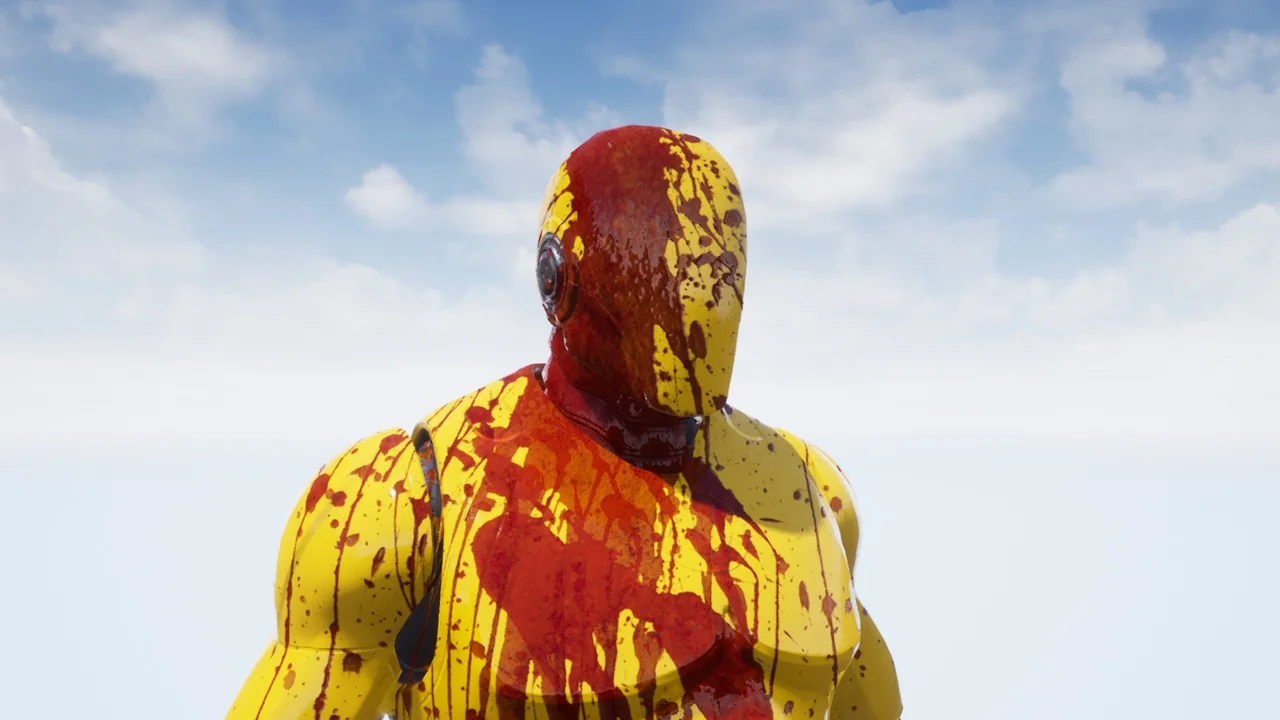
 Engine Tools
 Engine Tools
 Engine Tools