"ddd0e3fb95b0aec2"{"id":"1001549","slug":"rts-rpg-unit-template-massai-multiplayer-gameplay-ability-system","title":"RTS/RPG Unit Template - MassAI - Multiplayer - Gameplay Ability System","category":"Game Mechanics","engine":"5.5","assetVersion":"Asset Version: 5.0.1","engineVersion":"Engine Version: 5.5","tag":"Game Mechanics","accent":"blue","visual":"mech","summary":"Explore the RTSUnitTemplate framework for Unreal Engine 5.7+, pairing MassAI, Character classes, GAS attributes, and responsive multiplayer replication.","platform":"Unreal Engine","publishedAt":"2026-10-10T03:11:48.672Z","updatedAt":"2026-10-10T03:11:48.672Z","sourceNotes":[],"fileContents":[],"compatibility":["Unreal Engine","Asset Version: 5.0.1","Engine Version: 5.5"],"featuredImage":{"alt":"RTS/RPG Unit Template - MassAI - Multiplayer - Gameplay Ability System","src":"/wp-content/uploads/published/2026/10/2c9885371932-8a9e3208-607e-4e16-a97e-3d31e7e9c132-917c5503ec.webp"},"hasDownloadLink":true,"downloads":0,"terms":[{"taxonomy":"category","slug":"game-mechanics-tools-and-plugins","name":"Game Mechanics"}],"galleryImages":[{"src":"/wp-content/uploads/published/2026/10/5423873a3eb3-1f7b0a93-4933-49c9-b844-60608446c936-ed0798bf73.webp","alt":"RTS/RPG Unit Template - MassAI - Multiplayer - Gameplay Ability System"},{"src":"/wp-content/uploads/published/2026/10/c4338f3cffaf-d3d0adb8-b6d4-47a1-90ed-5a0013176934-595fc00dad.webp","alt":"RTS/RPG Unit Template - MassAI - Multiplayer - Gameplay Ability System"},{"src":"/wp-content/uploads/published/2026/10/ed6304205a90-3d1127e7-c359-4061-91c5-6af717a71953-fa50b1be8b.webp","alt":"RTS/RPG Unit Template - MassAI - Multiplayer - Gameplay Ability System"},{"src":"/wp-content/uploads/published/2026/10/514e5e89a1c8-9f3aca48-7d72-44e1-b89d-aad7716f04cf-6c219a41b8.webp","alt":"RTS/RPG Unit Template - MassAI - Multiplayer - Gameplay Ability System"},{"src":"/wp-content/uploads/published/2026/10/2b862dd9aa19-87f8c29a-8c1e-4b20-9c7b-8746c7e244d5-916785b839.webp","alt":"RTS/RPG Unit Template - MassAI - Multiplayer - Gameplay Ability System"},{"src":"/wp-content/uploads/published/2026/10/22b4f135c17e-46ea23aa-859a-491a-b415-c76637aeff51-56302ef7de.webp","alt":"RTS/RPG Unit Template - MassAI - Multiplayer - Gameplay Ability System"},{"src":"/wp-content/uploads/published/2026/10/6337c5c749d0-df9c8863-1c48-4bca-8e12-6838227a24f3-16ea8800a6.webp","alt":"RTS/RPG Unit Template - MassAI - Multiplayer - Gameplay Ability System"},{"src":"/wp-content/uploads/published/2026/10/0bc927b61c7a-f6f99dac-d909-44c1-be4c-70685c9e93ce-af8f6e4a0a.webp","alt":"RTS/RPG Unit Template - MassAI - Multiplayer - Gameplay Ability System"},{"src":"/wp-content/uploads/published/2026/10/51221a292f8d-5303a098-dad2-4236-a2de-d46f7eccd308-4e4d81a4d2.webp","alt":"RTS/RPG Unit Template - MassAI - Multiplayer - Gameplay Ability System"}],"accessPanel":{"kind":"resource","title":"Download this resource","eyebrow":"Free Download","message":"Log in or create a free account to start your download.","fileName":"RTSRPG Unit Template - MassAI - Multiplayer - Gameplay Ability System.7z","safetyNote":"Resources are manually reviewed before listing to improve quality and reduce obvious risks.","actionLabel":"Download Free","resourceType":"Resource archive"},"contentHtml":"\u003ch2\u003eSetting Up the Hybrid Mass/Character Pipeline\u003c/h2\u003e\u003cp\u003eWorking with high unit counts in strategy titles usually forces a compromise between deep character mechanics and raw rendering performance. RTSUnitTemplate resolves this balance through a hybrid architecture combining Unreal Engine's MassAI with standard Character classes and the Gameplay Ability System. This dual pipeline allows games to field up to 250 Skeletal Meshes alongside more than 600 Instanced Static Meshes running concurrently at 60 frames per second.\u003c/p\u003e\u003cp\u003eImplementation starts from a Blueprint-first workflow anchored in modular C++ foundations. All underlying C++ classes serve as parent templates for Blueprints, ensuring developers can swap 3D skeletal meshes, static assets, animation sequences, and sound effects without refactoring base code. Unit initialization relies on a data-driven Spawnsystem GameMode that reads parameters directly from DataTables, allowing teams to balance combat statistics, initial resources, and unit classes from tabular configurations.\u003c/p\u003e\u003ch2\u003eMass Replication, Prediction, and Network Routing in Multiplayer\u003c/h2\u003e\u003cp\u003eMultiplayer synchronization is engineered directly into the core framework rather than adapted after the fact. The template implements a custom mass replication pipeline powered by client-side navigation, client prediction, and authoritative server reconciliation. Commands execute immediately on the client interface to eliminate perceptible latency, while the server reconciliation model resolves discrepancies behind the scenes to maintain world state integrity in high-ping network environments.\u003c/p\u003e\u003cp\u003eSession networking is configured to connect with Epic Online Services (EOS) sessions, providing immediate multiplayer matchmaking and room creation hooks. Unit orders—including move commands, attack designations, and complex formation changes—route through this architecture to keep dense unit battles synchronized across distributed players without overwhelming game-thread bandwidth.\u003c/p\u003e\u003ch2\u003eCamera Controls, Viewport Optimization, and Texture-Based Fog of War\u003c/h2\u003e\u003cp\u003eNavigating large-scale battlegrounds requires dedicated view controls. The modular RTS camera system incorporates a comprehensive suite of viewport interactions, all mapped to customizable hotkey bindings. Supported camera maneuvers include:\u003c/p\u003e\u003cul\u003e\u003cli\u003eEdge panning and directional keyboard panning across terrain\u003c/li\u003e\u003cli\u003eSmooth rotational controls and multi-stage focal zooming\u003c/li\u003e\u003cli\u003eFast-zoom out functionality for broad battlefield overviews\u003c/li\u003e\u003cli\u003eFocus lock-to-unit tracking for tracking individual entities across the map\u003c/li\u003e\u003cli\u003eThird-person camera mode for immediate ground-level perspectives\u003c/li\u003e\u003c/ul\u003e\u003cp\u003eVisual fidelity at high density depends on strict resource preservation. The template uses a visibility culling system that monitors the viewport and dynamically hides user interface widgets, skeletal meshes, and active projectiles belonging to units outside the player's active camera frustum.\u003c/p\u003e\u003cp\u003eBattlefield reconnaissance relies on a reworked, texture-based Fog of War system. Moving away from heavy per-frame volume sampling, this texture approach calculates line of sight, active vision radii, and shrouded terrain rapidly. It maintains low computing overhead even while handling sprawling terrain layouts populated by hundreds of moving entities.\u003c/p\u003e\u003ch2\u003eCombat Logic, Gameplay Ability System Attributes, and Squad Subsystems\u003c/h2\u003e\u003cp\u003eCombat and character progression operate entirely through the Gameplay Ability System. Core properties—such as Health, Range, Attack Damage, Speed, and Sight—are configured as GAS attributes. Talent trees, unit capabilities, and status changes are managed through data-driven gameplay tags, giving technical designers the ability to expand abilities and interactions inside Blueprints without writing custom C++ logic.\u003c/p\u003e\u003cp\u003eMass-Based AOE (EffectArea) logic pairs MassAI entity tracking with GAS execution, allowing wide-area attacks, healing zones, and aura effects to process en masse. The inventory architecture connects with this mechanic through a native item drop and pickup system that applies or clears Gameplay Effects whenever units interact with world items.\u003c/p\u003e\u003cp\u003ePathfinding and spatial awareness use native engine navigation in conjunction with ZoneGraph and customized AI controllers. Tick rates adapt dynamically based on movement context to prevent units from clumping together during bottleneck navigation. Ground and flying units are supported natively, each calculating paths through relevant navmesh and spatial volumes.\u003c/p\u003e\u003cp\u003eTarget acquisition operates through an advanced detection system that avoids common top-down navigation pitfalls:\u003c/p\u003e\u003cul\u003e\u003cli\u003eTrue 2D X/Y range calculations discard vertical Z-axis offsets, maintaining consistent firing ranges regardless of uneven terrain elevation.\u003c/li\u003e\u003cli\u003eDistance-to-capsule evaluations measure true proximity rather than central actor origins.\u003c/li\u003e\u003cli\u003eFirst-hit detection ensures that any unit sustaining fire from beyond its standard sight radius immediately turns to identify and engage the attacker.\u003c/li\u003e\u003c/ul\u003e\u003cp\u003eTeam structures operate under an AlliedTeamsMask controlled by a dedicated PlayerTeamSubsystem. Command issuing supports single-unit selection, group assignments tracked via SquadID, and drag-and-drop spawn platform deployment. Units and production buildings feature configurable waypoints and rally points, allowing newly deployed forces to automatically path into guard duties or front-line battle lines. Field actions include melee charges, ranged projectile attacks with attached impact visual effects, automated focus-firing, patrols, chases, and dynamic repair orders.\u003c/p\u003e\u003ch2\u003eBase Construction, Resource Gathering, and Campaign Flow\u003c/h2\u003e\u003cp\u003eStrategy campaigns rely heavily on base development and resource management. RTSUnitTemplate incorporates an economy framework that manages resource extraction, storage structures, and worker assignment. A dedicated worker distribution graphical interface gives players exact oversight over labor allocation across harvesting nodes and supply pipelines.\u003c/p\u003e\u003cp\u003eStructural construction uses a ConstructionUnit system. Players designate work zones and drop building footprints, prompting assigned builder units to traverse to the construction site, raise the building through its construction phases, and establish active structures. Once erected, production buildings can spawn reinforcements directly into assigned rally vectors.\u003c/p\u003e\u003cp\u003eCampaign staging and progression are handled through specific utility actors:\u003c/p\u003e\u003cul\u003e\u003cli\u003eLevelSwitcher Actor provides built-in level streaming, moving units and mission variables between strategic sectors smoothly.\u003c/li\u003e\u003cli\u003eStoryActor and StoryWidget tools facilitate narrative beats, character dialogue, mission briefs, and cinematic sequences.\u003c/li\u003e\u003cli\u003eActor-based Save/Load system captures runtime variables, team structures, and map states, connecting to ready-to-use menu widgets for instant state restoration.\u003c/li\u003e\u003c/ul\u003e\u003ch2\u003eProduction Readiness and Framework Support\u003c/h2\u003e\u003cp\u003eMade for Unreal Engine 5.7 and subsequent engine updates, the RTSUnitTemplate plugin comes ready for production use, removing the necessity of building low-level strategy architecture from scratch. Technical documentation is accessible via an official wiki, accompanied by a public GitHub repository, complete video tutorial playlists, and direct support through dedicated community channels and email communication.\u003c/p\u003e\n\n\u003ch2\u003eRelated Resources Worth Checking\u003c/h2\u003e\n\u003cul\u003e\n\u003cli\u003e\u003ca href=\"https://3dcghub.com/formation-system-v2/\" title=\"Formation System v2\"\u003eFormation System v2\u003c/a\u003e\u003c/li\u003e\n\u003cli\u003e\u003ca href=\"https://3dcghub.com/mgt-multiplayer-gravity-template/\" title=\"MGT Multiplayer Gravity Template\"\u003eMGT Multiplayer Gravity Template\u003c/a\u003e\u003c/li\u003e\n\u003cli\u003e\u003ca href=\"https://3dcghub.com/action-camera-manager-2/\" title=\"Action Camera Manager\"\u003eAction Camera Manager\u003c/a\u003e\u003c/li\u003e\n\u003cli\u003e\u003ca href=\"https://3dcghub.com/universal-shooting-game-template-and-framework/\" title=\"Universal Shooting Game Template and Framework\"\u003eUniversal Shooting Game Template and Framework\u003c/a\u003e\u003c/li\u003e\n\u003cli\u003e\u003ca href=\"https://3dcghub.com/the-flashlight-toolkit/\" title=\"The Flashlight Toolkit\"\u003eThe Flashlight Toolkit\u003c/a\u003e\u003c/li\u003e\n\u003c/ul\u003e","contentTextLength":7439,"navigation":{"current":25,"total":3511,"previous":{"id":"1001550","slug":"school-gym","title":"School gym","category":"Buildings \u0026 Architecture","platform":"Unreal Engine","updatedAt":"2026-10-10T03:16:01.943Z"},"next":{"id":"1001548","slug":"qr-code-generator","title":"QR Code Generator","category":"Engine Tools","platform":"Unreal Engine","updatedAt":"2026-10-10T03:10:42.792Z"}},"relatedResources":[{"id":"14880","slug":"formation-system-v2","title":"Formation System v2","category":"Game Mechanics","engine":"5.3","assetVersion":"Engine version: 5.3","engineVersion":"Asset Version:2.0","tag":"Game Mechanics","accent":"blue","visual":"audio","summary":"Organize your AI characters with Formation System v2. This Unreal Engine tool supports multiplayer, RTS-style movements, and customizable formation spreads.","platform":"Unreal Engine","publishedAt":"2026-03-11T19:56:18.000Z","updatedAt":"2026-04-19T15:45:39.000Z","sourceNotes":[],"fileContents":[],"compatibility":["Unreal Engine","Engine version: 5.3","Asset Version: 2.0"],"featuredImage":{"alt":"Formation System v2","src":"https://3dcghub.com/wp-content/uploads/2026/03/154c81e9-0147-495e-8723-a32ce680f854.webp"},"hasDownloadLink":true,"downloads":0},{"id":"1000238","slug":"mgt-multiplayer-gravity-template","title":"MGT Multiplayer Gravity Template","category":"Gameplay Features","engine":"5.3+","assetVersion":"","engineVersion":"Engine Version: 5.3+","tag":"Gameplay Features","accent":"blue","visual":"mech","summary":"A dynamic gravity system for Unreal Engine utilizing the native character movement component to support full multiplayer replication for players, objects, and A","platform":"Unreal Engine","publishedAt":"2026-06-30T18:11:03.499Z","updatedAt":"2026-06-30T18:11:03.499Z","sourceNotes":[],"fileContents":[],"compatibility":["Unreal Engine","Engine Version: 5.3+"],"featuredImage":{"alt":"MGT Multiplayer Gravity Template","src":"/wp-content/uploads/published/2026/06/3e9b12a8f9cc-951e39e8-6c7b-4772-975c-e63141c701c5-5cf67fa1da.webp"},"hasDownloadLink":true,"downloads":0},{"id":"1001316","slug":"action-camera-manager-2","title":"Action Camera Manager","category":"Gameplay Features","engine":"5.1 - 5.6","assetVersion":"Asset Version: 2.12 - 2.17","engineVersion":"Engine Version: 5.1 - 5.6","tag":"Gameplay Features","accent":"blue","visual":"mech","summary":"An in-depth look at Action Camera Manager, detailing its 2D, 2D_Fix, and 3D modes, multiplayer server replication, and character component setup.","platform":"Unreal Engine","publishedAt":"2026-10-02T09:07:50.866Z","updatedAt":"2026-10-02T09:07:50.866Z","sourceNotes":[],"fileContents":[],"compatibility":["Unreal Engine","Asset Version: 2.12 - 2.17","Engine Version: 5.1 - 5.6"],"featuredImage":{"alt":"Action Camera Manager","src":"/wp-content/uploads/published/2026/10/59253223dc30-1b4cbc9a-a2ab-4e3a-adbe-e7eda0fb618d-2380f3f785.webp"},"hasDownloadLink":true,"downloads":0}]}
Game Mechanics
RTS/RPG Unit Template - MassAI - Multiplayer - Gameplay Ability System
Explore the RTSUnitTemplate framework for Unreal Engine 5.7+, pairing MassAI, Character classes, GAS attributes, and responsive multiplayer replication.
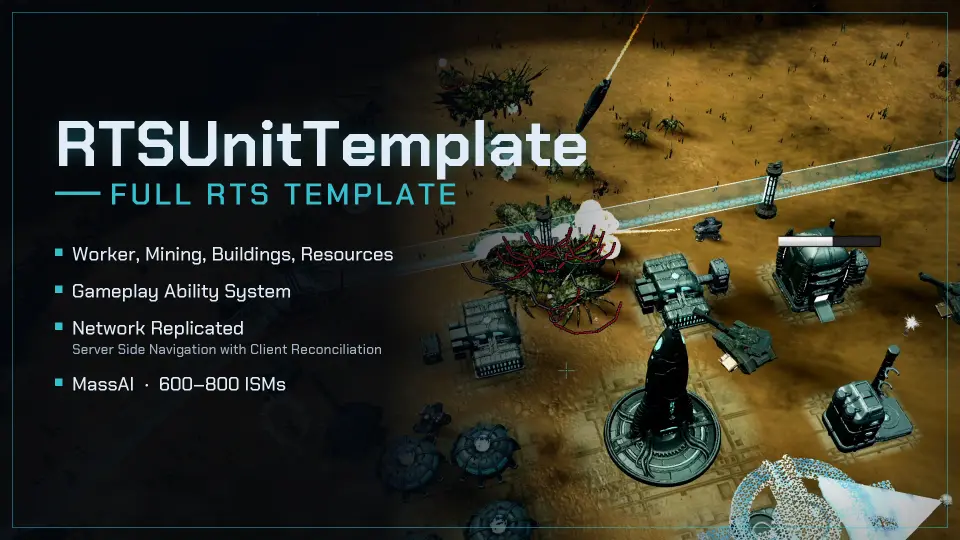
Working with high unit counts in strategy titles usually forces a compromise between deep character mechanics and raw rendering performance. RTSUnitTemplate resolves this balance through a hybrid architecture combining Unreal Engine's MassAI with standard Character classes and the Gameplay Ability System. This dual pipeline allows games to field up to 250 Skeletal Meshes alongside more than 600 Instanced Static Meshes running concurrently at 60 frames per second.
Implementation starts from a Blueprint-first workflow anchored in modular C++ foundations. All underlying C++ classes serve as parent templates for Blueprints, ensuring developers can swap 3D skeletal meshes, static assets, animation sequences, and sound effects without refactoring base code. Unit initialization relies on a data-driven Spawnsystem GameMode that reads parameters directly from DataTables, allowing teams to balance combat statistics, initial resources, and unit classes from tabular configurations.
Mass Replication, Prediction, and Network Routing in Multiplayer
Multiplayer synchronization is engineered directly into the core framework rather than adapted after the fact. The template implements a custom mass replication pipeline powered by client-side navigation, client prediction, and authoritative server reconciliation. Commands execute immediately on the client interface to eliminate perceptible latency, while the server reconciliation model resolves discrepancies behind the scenes to maintain world state integrity in high-ping network environments.
Session networking is configured to connect with Epic Online Services (EOS) sessions, providing immediate multiplayer matchmaking and room creation hooks. Unit orders—including move commands, attack designations, and complex formation changes—route through this architecture to keep dense unit battles synchronized across distributed players without overwhelming game-thread bandwidth.
Camera Controls, Viewport Optimization, and Texture-Based Fog of War
Navigating large-scale battlegrounds requires dedicated view controls. The modular RTS camera system incorporates a comprehensive suite of viewport interactions, all mapped to customizable hotkey bindings. Supported camera maneuvers include:
Edge panning and directional keyboard panning across terrain
Smooth rotational controls and multi-stage focal zooming
Fast-zoom out functionality for broad battlefield overviews
Focus lock-to-unit tracking for tracking individual entities across the map
Third-person camera mode for immediate ground-level perspectives
Visual fidelity at high density depends on strict resource preservation. The template uses a visibility culling system that monitors the viewport and dynamically hides user interface widgets, skeletal meshes, and active projectiles belonging to units outside the player's active camera frustum.
Battlefield reconnaissance relies on a reworked, texture-based Fog of War system. Moving away from heavy per-frame volume sampling, this texture approach calculates line of sight, active vision radii, and shrouded terrain rapidly. It maintains low computing overhead even while handling sprawling terrain layouts populated by hundreds of moving entities.
Combat Logic, Gameplay Ability System Attributes, and Squad Subsystems
Combat and character progression operate entirely through the Gameplay Ability System. Core properties—such as Health, Range, Attack Damage, Speed, and Sight—are configured as GAS attributes. Talent trees, unit capabilities, and status changes are managed through data-driven gameplay tags, giving technical designers the ability to expand abilities and interactions inside Blueprints without writing custom C++ logic.
Mass-Based AOE (EffectArea) logic pairs MassAI entity tracking with GAS execution, allowing wide-area attacks, healing zones, and aura effects to process en masse. The inventory architecture connects with this mechanic through a native item drop and pickup system that applies or clears Gameplay Effects whenever units interact with world items.
Pathfinding and spatial awareness use native engine navigation in conjunction with ZoneGraph and customized AI controllers. Tick rates adapt dynamically based on movement context to prevent units from clumping together during bottleneck navigation. Ground and flying units are supported natively, each calculating paths through relevant navmesh and spatial volumes.
Target acquisition operates through an advanced detection system that avoids common top-down navigation pitfalls:
True 2D X/Y range calculations discard vertical Z-axis offsets, maintaining consistent firing ranges regardless of uneven terrain elevation.
Distance-to-capsule evaluations measure true proximity rather than central actor origins.
First-hit detection ensures that any unit sustaining fire from beyond its standard sight radius immediately turns to identify and engage the attacker.
Team structures operate under an AlliedTeamsMask controlled by a dedicated PlayerTeamSubsystem. Command issuing supports single-unit selection, group assignments tracked via SquadID, and drag-and-drop spawn platform deployment. Units and production buildings feature configurable waypoints and rally points, allowing newly deployed forces to automatically path into guard duties or front-line battle lines. Field actions include melee charges, ranged projectile attacks with attached impact visual effects, automated focus-firing, patrols, chases, and dynamic repair orders.
Base Construction, Resource Gathering, and Campaign Flow
Strategy campaigns rely heavily on base development and resource management. RTSUnitTemplate incorporates an economy framework that manages resource extraction, storage structures, and worker assignment. A dedicated worker distribution graphical interface gives players exact oversight over labor allocation across harvesting nodes and supply pipelines.
Structural construction uses a ConstructionUnit system. Players designate work zones and drop building footprints, prompting assigned builder units to traverse to the construction site, raise the building through its construction phases, and establish active structures. Once erected, production buildings can spawn reinforcements directly into assigned rally vectors.
Campaign staging and progression are handled through specific utility actors:
LevelSwitcher Actor provides built-in level streaming, moving units and mission variables between strategic sectors smoothly.
StoryActor and StoryWidget tools facilitate narrative beats, character dialogue, mission briefs, and cinematic sequences.
Actor-based Save/Load system captures runtime variables, team structures, and map states, connecting to ready-to-use menu widgets for instant state restoration.
Production Readiness and Framework Support
Made for Unreal Engine 5.7 and subsequent engine updates, the RTSUnitTemplate plugin comes ready for production use, removing the necessity of building low-level strategy architecture from scratch. Technical documentation is accessible via an official wiki, accompanied by a public GitHub repository, complete video tutorial playlists, and direct support through dedicated community channels and email communication.
 Game Mechanics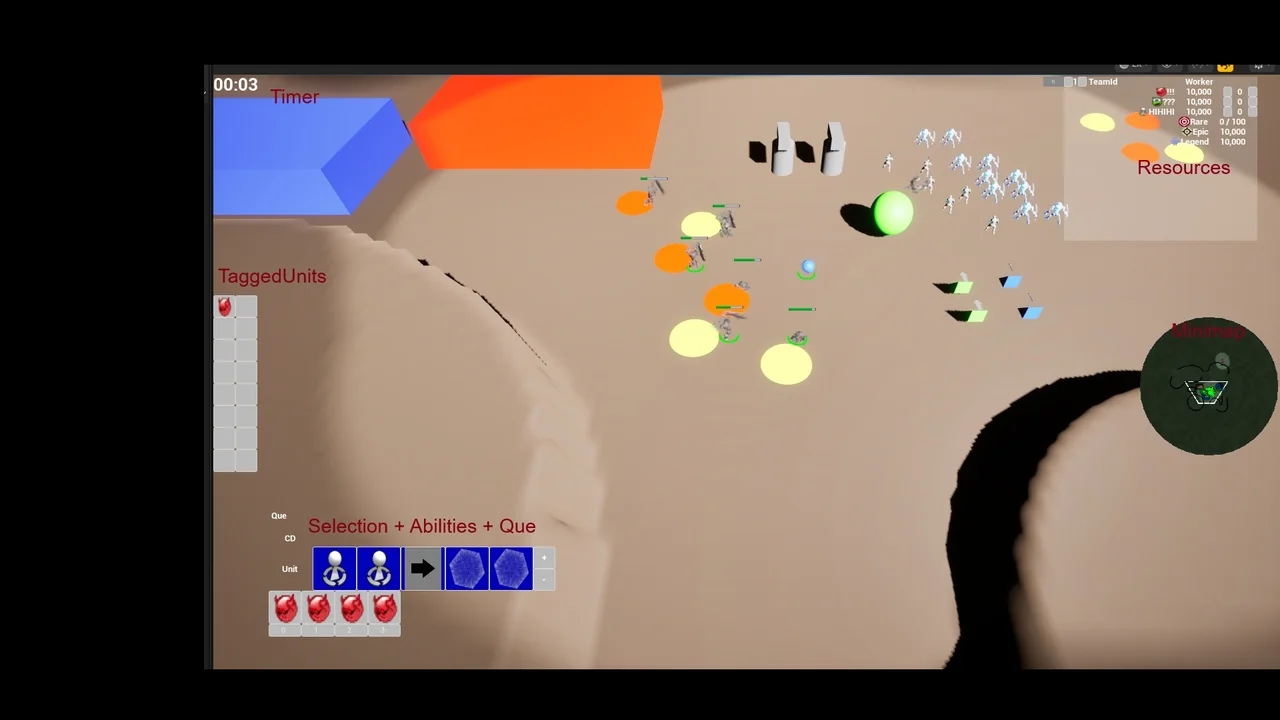
 Game Mechanics
 Gameplay Features
 Gameplay Features