"aafcb75a8b7343f5"{"id":"1001548","slug":"qr-code-generator","title":"QR Code Generator","category":"Engine Tools","engine":"5.5","assetVersion":"Asset Version: 1.0.54","engineVersion":"Engine Version: 5.5","tag":"Engine Tools","accent":"blue","visual":"mech","summary":"Generate scannable QR codes from text in both editor and runtime environments, featuring color customization, inversion, and mobile camera support.","platform":"Unreal Engine","publishedAt":"2026-10-10T03:10:42.792Z","updatedAt":"2026-10-10T03:10:42.792Z","sourceNotes":[],"fileContents":[],"compatibility":["Unreal Engine","Asset Version: 1.0.54","Engine Version: 5.5"],"featuredImage":{"alt":"QR Code Generator","src":"/wp-content/uploads/published/2026/10/a81e3f55cfa0-6e100732-c5e0-46ff-961e-721b2431634d-31a059b03a.webp"},"hasDownloadLink":true,"downloads":0,"terms":[{"taxonomy":"category","slug":"engine-tools-tools-and-plugins","name":"Engine Tools"}],"galleryImages":[{"src":"/wp-content/uploads/published/2026/10/cae93b977d08-812aa649-2655-4e4e-9a1f-214fd7af72d5-45c67756c7.webp","alt":"QR Code Generator"},{"src":"/wp-content/uploads/published/2026/10/9a95e74d0d55-317fffed-63a8-4ee2-a729-e10d3815ab2d-b15d202d23.webp","alt":"QR Code Generator"}],"accessPanel":{"kind":"resource","title":"Download this resource","eyebrow":"Free Download","message":"Log in or create a free account to start your download.","fileName":"QR Code Generator.7z","safetyNote":"Resources are manually reviewed before listing to improve quality and reduce obvious risks.","actionLabel":"Download Free","resourceType":"Resource archive"},"contentHtml":"\u003cp\u003eVirtual displays, diagnostic tools, and diegetic interfaces often need a bridge between the software environment and an external mobile device. QR Code Generator resolves that need by turning any arbitrary text string into a clean, machine-readable quick response code. The resulting matrix renders directly within the software environment so that physical smartphone cameras can lock onto the pattern and parse the embedded data.\u003c/p\u003e \u003ch2\u003eBridging Virtual Displays to Smartphone Scanners\u003c/h2\u003e\n\u003cp\u003eQuick response codes function by translating linear text characters into two-dimensional grid patterns. The primary utility of QR Code Generator lies in its ability to take any supplied text payload and construct a standards-compliant matrix on demand. Because the output is formatted specifically to be scanned using a phone, the resulting graphics must maintain structural clarity, square proportions, and clean separation between modular blocks.\u003c/p\u003e \u003cp\u003eSmartphone cameras and barcode scanner utilities rely on specific positioning marks and clear optical separation to decode text data quickly. When an interactive project displays a generated code, players or testers can point their actual smartphone camera at the computer monitor or television screen. The mobile device immediately recognizes the optical pattern, extracts the encoded text payload, and triggers the phone's native handling, whether that involves opening links, copying strings, or reading system keys.\u003c/p\u003e \u003cp\u003eThis physical-to-virtual connection changes how information moves outside the running application. Rather than requiring users to manually type complex strings, serial keys, or debug logs shown on a virtual monitor, the optical handshake handles data delivery in a fraction of a second. The generator makes that conversion automatic by managing the geometry of the code based entirely on the target string provided to the system.\u003c/p\u003e \u003ch2\u003eGenerating QR Code Output Across Editor and Runtime Environments\u003c/h2\u003e\n\u003cp\u003eProduction pipelines require flexibility in when and where procedural graphics are generated. QR Code Generator operates across two distinct operational stages: inside the editor during development, and dynamically at runtime while the application executes.\u003c/p\u003e \u003cp\u003eWorking within the editor enables static authoring and design validation without launching a full play session. Developers can input text values directly within their authoring layout to produce static codes for environmental props, menu textures, or fixed user interface elements. This editor-level workflow allows immediate visual feedback, letting creators verify the placement, scale, and readability of the code against surrounding art assets before committing builds.\u003c/p\u003e \u003cp\u003eRuntime generation handles entirely different requirements driven by dynamic data. Because the plugin processes text at runtime, the generated QR code does not need to be predetermined or pre-baked into static texture files. When the application runs, gameplay logic, user preferences, session identifiers, or network states can feed fresh text into the generator. The system takes that live string and updates the generated code on the fly. External smartphone scanners can then read session-specific information that did not exist prior to launching the application.\u003c/p\u003e \u003cp\u003eOperating effectively in both spaces prevents redundant tooling. Instead of relying on external graphic software to export static image files during development and missing out on live data during gameplay, teams can rely on a single utility that spans development inspection and live software execution.\u003c/p\u003e \u003ch2\u003eCustomizing QR Code Color Palettes and Inversion States\u003c/h2\u003e\n\u003cp\u003eStandard quick response codes typically rely on high-contrast black modules laid over a pure white backdrop. While functionally reliable, rigid color schemes frequently clash with the aesthetic direction of custom user interfaces, dark-mode dashboards, or stylized game levels. QR Code Generator addresses visual integration by providing color customization options alongside a dedicated inversion toggle.\u003c/p\u003e \u003cp\u003eCustom color selection lets developers shift away from default monochromatic schemes to match project branding, atmospheric lighting, or specialized display surfaces. Tinting the primary modules and the surrounding field ensures that the code looks intentional within its surrounding graphic framework rather than like an unstyled diagnostic overlay.\u003c/p\u003e \u003cp\u003eAlongside color selection, the plugin allows users to invert the generated QR code. Inverting swaps the relationship between the background field and the active data modules, producing light-on-dark patterns instead of traditional dark-on-light arrangements. This inversion capability is particularly relevant for modern digital screens, glowing monitors, and futuristic terminal interfaces where white backgrounds would disrupt the scene's contrast balance.\u003c/p\u003e \u003cp\u003eMaintaining scanner legibility remains critical whenever colors are customized or inverted. Mobile phone camera algorithms depend on sufficient tonal contrast between the foreground blocks and background space. By giving creators precise control over palette choices and polarity, the generator makes it possible to maintain the necessary optical contrast ratio while adhering to the scene's visual language.\u003c/p\u003e \u003ch2\u003eOperating System Simulator Plugin Compatibility and Use Cases\u003c/h2\u003e\n\u003cp\u003eThe utility is structured to work alongside the Operating System Simulator Plugin, establishing direct relevance for projects featuring simulated desktop environments, interactive computer terminals, and in-game mobile operating systems. Within an OS simulation framework, digital monitors often act as windows to fictional networks, diagnostic screens, and interactive apps that benefit from authentic external connectivity.\u003c/p\u003e \u003cp\u003eIn simulated operating systems, presenting a code on an in-engine desktop monitor lets creators simulate authentic digital workflows. A simulated banking app, terminal window, or diagnostic prompt can display an inverted, stylized code that users scan with their real-world phones to access out-of-game clues, auxiliary websites, or supplementary lore. Because the plugin handles live text at runtime, these in-game computer screens can generate unique codes based on individual player choices or system states inside the simulated OS.\u003c/p\u003e \u003ch2\u003eSupport Infrastructure and Verification\u003c/h2\u003e\n\u003cp\u003eImplementation troubleshooting, feedback, and technical support for QR Code Generator are centered around the developer's dedicated Discord server. Users seeking technical assistance or implementation advice can access this community space directly, though user verification is required to participate in the support channels. This verification workflow ensures a structured support environment for developers deploying the plugin in active projects.\u003c/p\u003e \u003ch2\u003ePractical Implementation Summary\u003c/h2\u003e\n\u003cp\u003eQR Code Generator provides a practical solution for developers who need flexible, scannable data matrices without relying on offline asset generation pipelines. The combination of runtime calculation, in-editor drafting, color styling, and inversion controls delivers the visual and technical flexibility needed for custom user interfaces, hardware simulations, and interactive screen designs.\u003c/p\u003e\n\n\u003ch2\u003eRelated Resources Worth Checking\u003c/h2\u003e\n\u003cul\u003e\n\u003cli\u003e\u003ca href=\"https://3dcghub.com/zxing-for-unreal/\" title=\"ZXing For Unreal\"\u003eZXing For Unreal\u003c/a\u003e\u003c/li\u003e\n\u003cli\u003e\u003ca href=\"https://3dcghub.com/simple-tree-generator/\" title=\"Simple Tree Generator\"\u003eSimple Tree Generator\u003c/a\u003e\u003c/li\u003e\n\u003cli\u003e\u003ca href=\"https://3dcghub.com/blueprint-generator-ai-kibibyte-labs-engine-assistant/\" title=\"AI Engine Assistant - Kibibyte Labs (Blueprint Generator \u0026amp; More!)\"\u003eAI Engine Assistant - Kibibyte Labs (Blueprint Generator \u0026amp; More!)\u003c/a\u003e\u003c/li\u003e\n\u003cli\u003e\u003ca href=\"https://3dcghub.com/c-generator/\" title=\"C++ Generator\"\u003eC++ Generator\u003c/a\u003e\u003c/li\u003e\n\u003cli\u003e\u003ca href=\"https://3dcghub.com/procedural-terrain-generator-v2/\" title=\"Procedural Terrain Generator v2\"\u003eProcedural Terrain Generator v2\u003c/a\u003e\u003c/li\u003e\n\u003c/ul\u003e","contentTextLength":7360,"navigation":{"current":27,"total":3512,"previous":{"id":"1001549","slug":"rts-rpg-unit-template-massai-multiplayer-gameplay-ability-system","title":"RTS/RPG Unit Template - MassAI - Multiplayer - Gameplay Ability System","category":"Game Mechanics","platform":"Unreal Engine","updatedAt":"2026-10-10T03:11:48.672Z"},"next":{"id":"1001547","slug":"qa-office-and-security-room","title":"QA Office and Security Room","category":"Cities","platform":"Unreal Engine","updatedAt":"2026-10-10T03:10:24.551Z"}},"relatedResources":[{"id":"14851","slug":"zxing-for-unreal","title":"ZXing For Unreal","category":"Engine Tools","engine":"5.1,5.3 - 5.4","assetVersion":"Engine version: 5.1,5.3 - 5.4","engineVersion":"Asset Version:2.0","tag":"Engine Tools","accent":"blue","visual":"luts","summary":"A specialized plugin for Unreal Engine that enables the reading and decoding of barcodes and QR codes from texture assets and render targets.","platform":"Unreal Engine","publishedAt":"2026-03-11T19:37:11.000Z","updatedAt":"2026-04-19T15:45:39.000Z","sourceNotes":[],"fileContents":[],"compatibility":["Unreal Engine","Engine version: 5.1,5.3 - 5.4","Asset Version: 2.0"],"featuredImage":{"alt":"ZXing For Unreal","src":"https://3dcghub.com/wp-content/uploads/2026/03/5abf3548-b6d7-465e-916e-58114352f366.webp"},"hasDownloadLink":true,"downloads":0},{"id":"14610","slug":"simple-tree-generator","title":"Simple Tree Generator","category":"Engine Tools","engine":"5.6 - 5.8","assetVersion":"Asset Version: 1.1","engineVersion":"Engine version: 5.6 - 5.8","tag":"Engine Tools","accent":"blue","visual":"audio","summary":"Simple Tree Generator is a powerful tool designed specifically for Unreal Engine 5. It enables developers to procedurally create diverse trees and bushes with just a few clicks.","platform":"Unreal Engine","publishedAt":"2026-03-11T18:36:43.000Z","updatedAt":"2026-09-17T02:13:52.813Z","sourceNotes":[],"fileContents":[],"compatibility":["Unreal Engine","Asset Version: 1.1","Engine version: 5.6 - 5.8"],"featuredImage":{"alt":"Simple Tree Generator","src":"https://3dcghub.com/wp-content/uploads/2026/03/4e3b784d-7198-46b5-a343-a73957e40875.webp"},"hasDownloadLink":true,"downloads":0},{"id":"13760","slug":"blueprint-generator-ai-kibibyte-labs-engine-assistant","title":"AI Engine Assistant - Kibibyte Labs (Blueprint Generator \u0026 More!)","category":"Engine Tools","engine":"0.1.4","assetVersion":"Engine version: 5.2 - 5.7","engineVersion":"Asset Version: 0.1.4","tag":"Engine Tools","accent":"blue","visual":"character","summary":"Blueprint Generator Ai - Kibibyte Labs (Engine Assistant) is a powerful tool designed to transform natural language into functional Unreal Engine Blueprints. It offers a suite of modules for generating logic, explaining complex nodes, and optimizing the dev...","platform":"Unreal Engine","publishedAt":"2026-03-11T09:58:02.000Z","updatedAt":"2026-07-09T21:24:04.089Z","sourceNotes":[],"fileContents":[],"compatibility":["Unreal Engine","Engine version: 5.2 - 5.7","Asset Version: 0.1.4"],"featuredImage":{"alt":"Blueprint Generator Ai - Kibibyte Labs (Engine Assistant)","src":"https://3dcghub.com/wp-content/uploads/2026/03/ff365004-07a8-4633-90ac-7c9a038cc81d.webp"},"hasDownloadLink":true,"downloads":2}]}
Engine Tools
QR Code Generator
Generate scannable QR codes from text in both editor and runtime environments, featuring color customization, inversion, and mobile camera support.
Virtual displays, diagnostic tools, and diegetic interfaces often need a bridge between the software environment and an external mobile device. QR Code Generator resolves that need by turning any arbitrary text string into a clean, machine-readable quick response code. The resulting matrix renders directly within the software environment so that physical smartphone cameras can lock onto the pattern and parse the embedded data.
Bridging Virtual Displays to Smartphone Scanners
Quick response codes function by translating linear text characters into two-dimensional grid patterns. The primary utility of QR Code Generator lies in its ability to take any supplied text payload and construct a standards-compliant matrix on demand. Because the output is formatted specifically to be scanned using a phone, the resulting graphics must maintain structural clarity, square proportions, and clean separation between modular blocks.
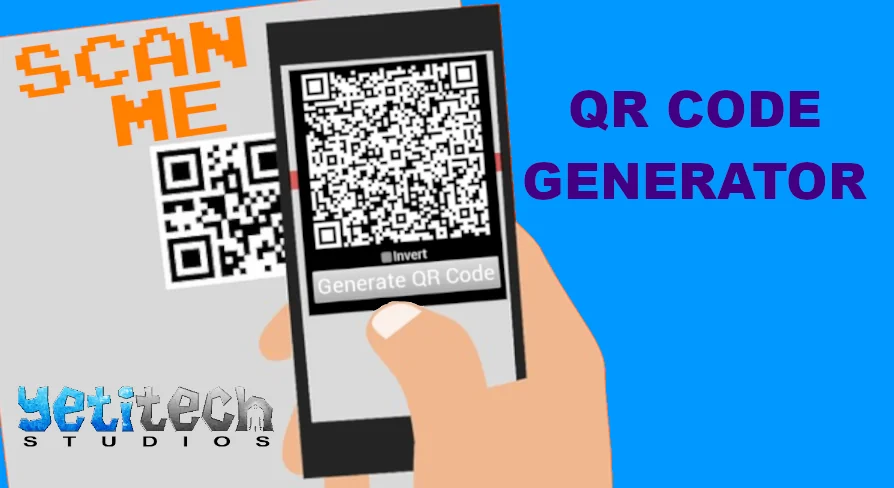
Smartphone cameras and barcode scanner utilities rely on specific positioning marks and clear optical separation to decode text data quickly. When an interactive project displays a generated code, players or testers can point their actual smartphone camera at the computer monitor or television screen. The mobile device immediately recognizes the optical pattern, extracts the encoded text payload, and triggers the phone's native handling, whether that involves opening links, copying strings, or reading system keys.
This physical-to-virtual connection changes how information moves outside the running application. Rather than requiring users to manually type complex strings, serial keys, or debug logs shown on a virtual monitor, the optical handshake handles data delivery in a fraction of a second. The generator makes that conversion automatic by managing the geometry of the code based entirely on the target string provided to the system.
Generating QR Code Output Across Editor and Runtime Environments
Production pipelines require flexibility in when and where procedural graphics are generated. QR Code Generator operates across two distinct operational stages: inside the editor during development, and dynamically at runtime while the application executes.
Working within the editor enables static authoring and design validation without launching a full play session. Developers can input text values directly within their authoring layout to produce static codes for environmental props, menu textures, or fixed user interface elements. This editor-level workflow allows immediate visual feedback, letting creators verify the placement, scale, and readability of the code against surrounding art assets before committing builds.
Runtime generation handles entirely different requirements driven by dynamic data. Because the plugin processes text at runtime, the generated QR code does not need to be predetermined or pre-baked into static texture files. When the application runs, gameplay logic, user preferences, session identifiers, or network states can feed fresh text into the generator. The system takes that live string and updates the generated code on the fly. External smartphone scanners can then read session-specific information that did not exist prior to launching the application.
Operating effectively in both spaces prevents redundant tooling. Instead of relying on external graphic software to export static image files during development and missing out on live data during gameplay, teams can rely on a single utility that spans development inspection and live software execution.
Customizing QR Code Color Palettes and Inversion States
Standard quick response codes typically rely on high-contrast black modules laid over a pure white backdrop. While functionally reliable, rigid color schemes frequently clash with the aesthetic direction of custom user interfaces, dark-mode dashboards, or stylized game levels. QR Code Generator addresses visual integration by providing color customization options alongside a dedicated inversion toggle.
Custom color selection lets developers shift away from default monochromatic schemes to match project branding, atmospheric lighting, or specialized display surfaces. Tinting the primary modules and the surrounding field ensures that the code looks intentional within its surrounding graphic framework rather than like an unstyled diagnostic overlay.
Alongside color selection, the plugin allows users to invert the generated QR code. Inverting swaps the relationship between the background field and the active data modules, producing light-on-dark patterns instead of traditional dark-on-light arrangements. This inversion capability is particularly relevant for modern digital screens, glowing monitors, and futuristic terminal interfaces where white backgrounds would disrupt the scene's contrast balance.
Maintaining scanner legibility remains critical whenever colors are customized or inverted. Mobile phone camera algorithms depend on sufficient tonal contrast between the foreground blocks and background space. By giving creators precise control over palette choices and polarity, the generator makes it possible to maintain the necessary optical contrast ratio while adhering to the scene's visual language.
Operating System Simulator Plugin Compatibility and Use Cases
The utility is structured to work alongside the Operating System Simulator Plugin, establishing direct relevance for projects featuring simulated desktop environments, interactive computer terminals, and in-game mobile operating systems. Within an OS simulation framework, digital monitors often act as windows to fictional networks, diagnostic screens, and interactive apps that benefit from authentic external connectivity.
In simulated operating systems, presenting a code on an in-engine desktop monitor lets creators simulate authentic digital workflows. A simulated banking app, terminal window, or diagnostic prompt can display an inverted, stylized code that users scan with their real-world phones to access out-of-game clues, auxiliary websites, or supplementary lore. Because the plugin handles live text at runtime, these in-game computer screens can generate unique codes based on individual player choices or system states inside the simulated OS.
Support Infrastructure and Verification
Implementation troubleshooting, feedback, and technical support for QR Code Generator are centered around the developer's dedicated Discord server. Users seeking technical assistance or implementation advice can access this community space directly, though user verification is required to participate in the support channels. This verification workflow ensures a structured support environment for developers deploying the plugin in active projects.
Practical Implementation Summary
QR Code Generator provides a practical solution for developers who need flexible, scannable data matrices without relying on offline asset generation pipelines. The combination of runtime calculation, in-editor drafting, color styling, and inversion controls delivers the visual and technical flexibility needed for custom user interfaces, hardware simulations, and interactive screen designs.
 Engine Tools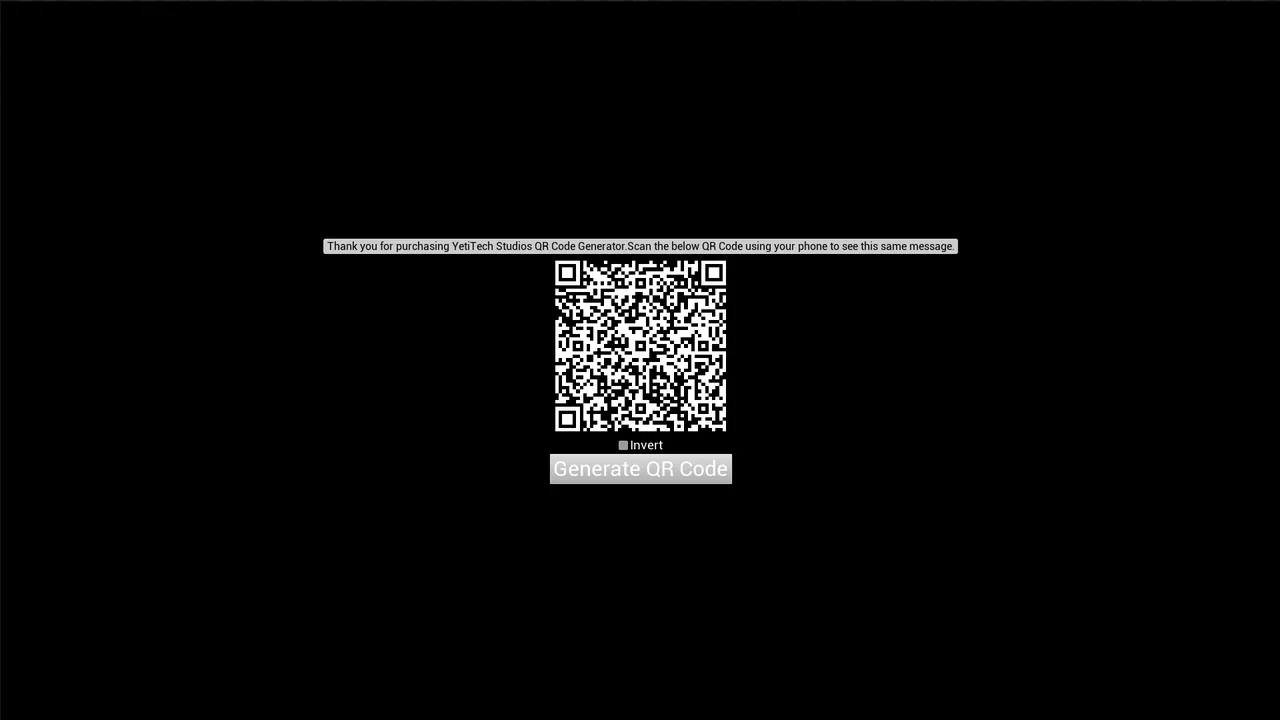
 Engine Tools
 Engine Tools
 Engine Tools