"e9c335e082208b17"{"id":"1002881","slug":"content-pack-generator","title":"Content Pack Generator","category":"Engine Tools","engine":"5.0 - 5.5","assetVersion":"Asset Version: 1.0 - 1.4","engineVersion":"Engine Version: 5.0 - 5.5","tag":"Engine Tools","accent":"blue","visual":"mech","summary":"Content Pack Generator enables Unreal Engine developers to convert project folders into native feature and content packs accessible directly in the editor.","platform":"Unreal Engine","indexPolicy":"index","publishedAt":"2026-11-21T01:43:25.890Z","updatedAt":"2026-11-21T01:43:25.890Z","sourceNotes":[],"fileContents":[],"compatibility":["Unreal Engine","Asset Version: 1.0 - 1.4","Engine Version: 5.0 - 5.5"],"featuredImage":{"alt":"Content Pack Generator","src":"/wp-content/uploads/published/2026/11/42b60992c81b-bd2c4f1f-1a90-413f-8ad2-bf6c77604a13-4b1157f7dc.webp"},"fileSizeBytes":49777629,"hasDownloadLink":true,"downloads":0,"terms":[{"taxonomy":"category","slug":"engine-tools-tools-and-plugins","name":"Engine Tools"}],"galleryImages":[{"src":"/wp-content/uploads/published/2026/11/9e431de1bb72-1ddc8c15-d036-4090-ae68-47cea38b8617-5e4bb0085e.webp","alt":"Content Pack Generator"},{"src":"/wp-content/uploads/published/2026/11/25b0ffaa50ed-0f5d347a-c14a-41a6-83df-0eac18fd0c31-8a551360db.webp","alt":"Content Pack Generator"},{"src":"/wp-content/uploads/published/2026/11/8364e1253b31-9ac86c76-ed5e-4b84-a6f3-a65fcdaa3cab-7f307f48a5.webp","alt":"Content Pack Generator"},{"src":"/wp-content/uploads/published/2026/11/a8eb74f9b363-a6b53205-0e8e-4844-987c-1df41f85130e-2cade987dc.webp","alt":"Content Pack Generator"},{"src":"/wp-content/uploads/published/2026/11/866ce5721a34-0c358c58-23b3-48c6-9b1d-1254e28f8643-59c143ac0a.webp","alt":"Content Pack Generator"}],"contentHtml":"\u003ch2\u003eModular Content Management with Content Pack Generator\u003c/h2\u003e\u003cp\u003eUnreal Engine projects frequently accumulate expansive collections of assets, spanning complex environments, gameplay mechanics, materials, visual effects, and interface elements. As developers build modular systems or reusable frameworks across multiple production runs, isolating these elements into clean, portable bundles often presents an organizational hurdle. The Content Pack Generator plugin addresses this pipeline challenge directly within the Unreal editor. Operating as an editor utility, it converts designated folders into fully realized content packs and feature packs, bridging the gap between raw project directories and structured engine assets.\u003c/p\u003e\u003cp\u003eRather than relying on manual file migration routines or external packaging scripts, this plugin operates within the Unreal editor framework to streamline setup. The tool focuses entirely on turning project directories into modular units that fit directly into the engine's native packaging standards. By transforming existing folders into reusable packs, production teams and solo developers can prepare foundational templates, environment kits, or logic setups that can be integrated into separate production environments on demand. The ability to generate these modular packages directly inside the editor keeps asset management contained within a unified workspace.\u003c/p\u003e\u003ch2\u003eGenerating Custom Packs from Selected Folders\u003c/h2\u003e\u003cp\u003eThe core mechanic of Content Pack Generator relies on explicit folder targeting. A developer selects a specific folder containing the relevant assets, blueprints, or environment data within the project hierarchy. Once targeted, the generator processes the selected directory and compiles it into an independent pack format under that path. This folder-based selection mechanism establishes clear boundaries for asset bundling, ensuring that only the desired elements are incorporated into the resulting pack.\u003c/p\u003e\u003cp\u003eCreators maintain total control over what is packaged by simply organizing their project hierarchy beforehand. Whether a folder contains a self-contained gameplay feature, an environment prop collection, or an entire scene framework, the generator encapsulates that isolated folder structure into a standalone feature pack. The streamlined workflow minimizes the administrative friction of preparing assets for distribution or reuse, allowing developers to execute pack creation directly from their active work environment in seconds. Because the generator functions under the folder selected by the user, the organization remains intuitive and directly tied to the project's existing folder tree. This ensures that custom setup structures, template collections, and feature modules retain their intended organization without requiring secondary reconfiguration after packaging.\u003c/p\u003e\u003ch2\u003eStarter Content Parity in the Unreal Editor\u003c/h2\u003e\u003cp\u003eA central technical strength of the generated packs is their functional parity with default engine assets. Unreal Engine ships with Starter Content—a familiar collection of foundational materials, audio, particle effects, and geometry built into the editor installation. Content Pack Generator produces packages that conform to this exact operational standard, behaving in the same way as the Starter Content that comes pre-installed with the engine.\u003c/p\u003e\u003cp\u003eBecause the resulting feature packs share the exact structural format of Starter Content, they eliminate the idiosyncratic setup routines common to third-party assets. The output does not require manual relocation of asset files or reconfiguration of asset root paths after transfer. Instead, the engine treats the generated pack with the same native compatibility it extends to its own pre-installed asset libraries. This alignment provides a predictable, standardized foundation for teams that need consistent template deployment across multiple production branches. When a pack matches the architecture of the engine's default Starter Content, it inherits all the conveniences of the native feature pack system, ensuring that project dependencies and relative path structures remain intact.\u003c/p\u003e\u003ch2\u003eIntegration Workflow Using the Add Features and Content Pack Button\u003c/h2\u003e\u003cp\u003eThe primary operational utility of a feature pack becomes evident when importing it into another workspace. In standard Unreal Engine workflows, adding pre-packaged components typically involves navigating to the Add Content options inside the Content Browser and opening the native Add Features or Content Pack dialog. Packs assembled with Content Pack Generator are engineered to interface directly with this native engine modal.\u003c/p\u003e\u003cp\u003eWhen working in any existing project, developers open the standard Add Features or Content Pack window and locate their custom pack listed alongside standard engine content. By simply clicking the Add Features/Content Pack button in the Unreal editor, the entire folder structure and all encapsulated elements are introduced into the active project. This single-click mechanism bypasses traditional manual migration menus, eliminating errors related to broken cross-references or missing folder paths. For developers building modular kits or multi-project frameworks, this native integration ensures that asset delivery is completely frictionless across every active project workspace. The user simply opens any target project, accesses the editor's built-in feature dialog, and imports the pack with the same ease as adding standard first-person, third-person, or starter content packs.\u003c/p\u003e\u003ch2\u003eTemplate Setup and Pipeline Utility for the Generator Tool\u003c/h2\u003e\u003cp\u003eAs reflected by its core classifications—spanning Editor, Template, Setup, Pack, Tool, Generator, and Feature—the plugin serves as a dedicated utility built to optimize asset management pipelines. By handling the conversion of folder trees into native feature bundles, it relieves technical artists and gameplay programmers from repetitive import-export overhead.\u003c/p\u003e\u003cp\u003eThe tool functions as an editor template generator that standardizes how setups and features are handled across development lifecycles. When a team establishes a reliable template—such as a custom camera rig, a core user interface kit, or a standard lighting setup—packaging that folder with Content Pack Generator ensures it can be deployed into any future project without manual copy-pasting. The plugin operates directly in the editor environment, turning what would otherwise be a complex packaging procedure into a straightforward setup task. As a generator tool, it enables studios and independent creators to build their own internal library of feature packs, modular templates, and asset kits that match the engine's built-in distribution format.\u003c/p\u003e\u003ch2\u003eSupport Channels and Feature Request Tracking\u003c/h2\u003e\u003cp\u003eTo assist developers with implementation, troubleshooting, and workflow integration, support and feature requests for Content Pack Generator are organized through a dedicated Discord server. Users who encounter questions regarding setup, pack generation, or integration within the Unreal editor can connect directly through this support channel.\u003c/p\u003e\u003cp\u003eThe Discord community also serves as a platform for submitting feature requests, allowing developers to communicate directly with the creator about future improvements and workflow adaptations. This ongoing feedback loop helps maintain the utility of the tool across various development pipelines. Whether developers are packaging complex feature sets or streamlining everyday project templates, having a dedicated avenue for technical support and feature suggestions ensures that the plugin continues to meet the practical demands of Unreal Engine creators.\u003c/p\u003e\n\n\u003ch2\u003eExplore Similar Assets\u003c/h2\u003e\n\u003cul\u003e\n\u003cli\u003e\u003ca href=\"https://3dcghub.com/qr-code-generator/\" rel=\"noopener noreferrer\"\u003eQR Code Generator\u003c/a\u003e\u003c/li\u003e\n\u003cli\u003e\u003ca href=\"https://3dcghub.com/simple-tree-generator/\" rel=\"noopener noreferrer\"\u003eSimple Tree Generator\u003c/a\u003e\u003c/li\u003e\n\u003cli\u003e\u003ca href=\"https://3dcghub.com/blueprint-generator-ai-kibibyte-labs-engine-assistant/\" rel=\"noopener noreferrer\"\u003eAI Engine Assistant - Kibibyte Labs (Blueprint Generator \u0026amp; More!)\u003c/a\u003e\u003c/li\u003e\n\u003cli\u003e\u003ca href=\"https://3dcghub.com/chunkcore-chunk-downloader/\" rel=\"noopener noreferrer\"\u003eChunkCore (Chunk Downloader)\u003c/a\u003e\u003c/li\u003e\n\u003cli\u003e\u003ca href=\"https://3dcghub.com/chunk-downloader-nodes/\" rel=\"noopener noreferrer\"\u003eChunk Downloader Nodes\u003c/a\u003e\u003c/li\u003e\n\u003c/ul\u003e","contentTextLength":7814,"navigation":{"current":54,"total":4839,"previous":{"id":"1002882","slug":"global-event-handler","title":"Global Event Handler","category":"Engine Tools","platform":"Unreal Engine","updatedAt":"2026-11-21T01:46:41.164Z"},"next":{"id":"1002880","slug":"boss-ai-toolkit","title":"Boss AI Toolkit","category":"Gameplay Features","platform":"Unreal Engine","updatedAt":"2026-11-21T01:42:35.865Z"}},"relatedResources":[{"id":"1001548","slug":"qr-code-generator","title":"QR Code Generator","category":"Engine Tools","engine":"5.5","assetVersion":"Asset Version: 1.0.54","engineVersion":"Engine Version: 5.5","tag":"Engine Tools","accent":"blue","visual":"mech","summary":"Generate scannable QR codes from text in both editor and runtime environments, featuring color customization, inversion, and mobile camera support.","platform":"Unreal Engine","indexPolicy":"index","publishedAt":"2026-10-10T03:10:42.792Z","updatedAt":"2026-10-10T03:10:42.792Z","sourceNotes":[],"fileContents":[],"compatibility":["Unreal Engine","Asset Version: 1.0.54","Engine Version: 5.5"],"featuredImage":{"alt":"QR Code Generator","src":"/wp-content/uploads/published/2026/10/a81e3f55cfa0-6e100732-c5e0-46ff-961e-721b2431634d-31a059b03a.webp"},"fileSizeBytes":9496917,"hasDownloadLink":true,"downloads":0},{"id":"14610","slug":"simple-tree-generator","title":"Simple Tree Generator","category":"Engine Tools","engine":"5.6 - 5.8","assetVersion":"Asset Version: 1.1","engineVersion":"Engine version: 5.6 - 5.8","tag":"Engine Tools","accent":"blue","visual":"audio","summary":"Simple Tree Generator is a powerful tool designed specifically for Unreal Engine 5. It enables developers to procedurally create diverse trees and bushes with just a few clicks.","platform":"Unreal Engine","indexPolicy":"noindex","publishedAt":"2026-03-11T18:36:43.000Z","updatedAt":"2026-09-17T02:13:52.813Z","sourceNotes":[],"fileContents":[],"compatibility":["Unreal Engine","Asset Version: 1.1","Engine version: 5.6 - 5.8"],"featuredImage":{"alt":"Simple Tree Generator","src":"https://3dcghub.com/wp-content/uploads/2026/03/4e3b784d-7198-46b5-a343-a73957e40875.webp"},"fileSizeBytes":96462553,"hasDownloadLink":true,"downloads":0},{"id":"13760","slug":"blueprint-generator-ai-kibibyte-labs-engine-assistant","title":"AI Engine Assistant - Kibibyte Labs (Blueprint Generator \u0026 More!)","category":"Engine Tools","engine":"0.1.4","assetVersion":"Engine version: 5.2 - 5.7","engineVersion":"Asset Version: 0.1.4","tag":"Engine Tools","accent":"blue","visual":"character","summary":"Blueprint Generator Ai - Kibibyte Labs (Engine Assistant) is a powerful tool designed to transform natural language into functional Unreal Engine Blueprints. It offers a suite of modules for generating logic, explaining complex nodes, and optimizing the dev...","platform":"Unreal Engine","indexPolicy":"index","publishedAt":"2026-03-11T09:58:02.000Z","updatedAt":"2026-07-09T21:24:04.089Z","sourceNotes":[],"fileContents":[],"compatibility":["Unreal Engine","Engine version: 5.2 - 5.7","Asset Version: 0.1.4"],"featuredImage":{"alt":"Blueprint Generator Ai - Kibibyte Labs (Engine Assistant)","src":"https://3dcghub.com/wp-content/uploads/2026/03/ff365004-07a8-4633-90ac-7c9a038cc81d.webp"},"fileSizeBytes":298720585,"hasDownloadLink":true,"downloads":2}]}
Resource screenshots
1 / 5
Join our channel
Follow 3DCGHUB on Telegram for new resource drops, migration updates, and community notices.
Content Pack Generator enables Unreal Engine developers to convert project folders into native feature and content packs accessible directly in the editor.
Modular Content Management with Content Pack Generator
Unreal Engine projects frequently accumulate expansive collections of assets, spanning complex environments, gameplay mechanics, materials, visual effects, and interface elements. As developers build modular systems or reusable frameworks across multiple production runs, isolating these elements into clean, portable bundles often presents an organizational hurdle. The Content Pack Generator plugin addresses this pipeline challenge directly within the Unreal editor. Operating as an editor utility, it converts designated folders into fully realized content packs and feature packs, bridging the gap between raw project directories and structured engine assets.
Rather than relying on manual file migration routines or external packaging scripts, this plugin operates within the Unreal editor framework to streamline setup. The tool focuses entirely on turning project directories into modular units that fit directly into the engine's native packaging standards. By transforming existing folders into reusable packs, production teams and solo developers can prepare foundational templates, environment kits, or logic setups that can be integrated into separate production environments on demand. The ability to generate these modular packages directly inside the editor keeps asset management contained within a unified workspace.
Generating Custom Packs from Selected Folders
The core mechanic of Content Pack Generator relies on explicit folder targeting. A developer selects a specific folder containing the relevant assets, blueprints, or environment data within the project hierarchy. Once targeted, the generator processes the selected directory and compiles it into an independent pack format under that path. This folder-based selection mechanism establishes clear boundaries for asset bundling, ensuring that only the desired elements are incorporated into the resulting pack.
Creators maintain total control over what is packaged by simply organizing their project hierarchy beforehand. Whether a folder contains a self-contained gameplay feature, an environment prop collection, or an entire scene framework, the generator encapsulates that isolated folder structure into a standalone feature pack. The streamlined workflow minimizes the administrative friction of preparing assets for distribution or reuse, allowing developers to execute pack creation directly from their active work environment in seconds. Because the generator functions under the folder selected by the user, the organization remains intuitive and directly tied to the project's existing folder tree. This ensures that custom setup structures, template collections, and feature modules retain their intended organization without requiring secondary reconfiguration after packaging.
Starter Content Parity in the Unreal Editor
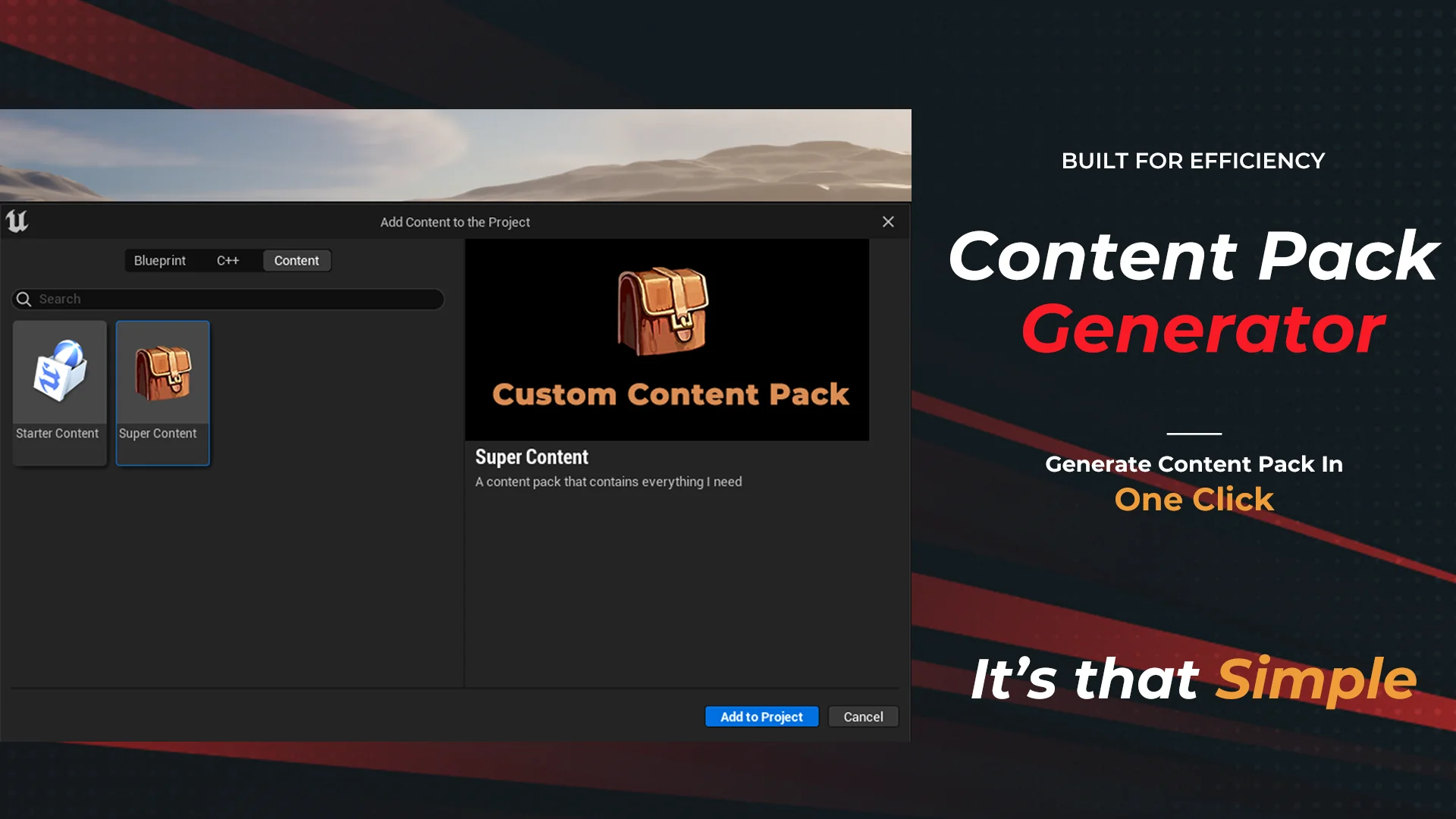
A central technical strength of the generated packs is their functional parity with default engine assets. Unreal Engine ships with Starter Content—a familiar collection of foundational materials, audio, particle effects, and geometry built into the editor installation. Content Pack Generator produces packages that conform to this exact operational standard, behaving in the same way as the Starter Content that comes pre-installed with the engine.
Because the resulting feature packs share the exact structural format of Starter Content, they eliminate the idiosyncratic setup routines common to third-party assets. The output does not require manual relocation of asset files or reconfiguration of asset root paths after transfer. Instead, the engine treats the generated pack with the same native compatibility it extends to its own pre-installed asset libraries. This alignment provides a predictable, standardized foundation for teams that need consistent template deployment across multiple production branches. When a pack matches the architecture of the engine's default Starter Content, it inherits all the conveniences of the native feature pack system, ensuring that project dependencies and relative path structures remain intact.
Integration Workflow Using the Add Features and Content Pack Button
The primary operational utility of a feature pack becomes evident when importing it into another workspace. In standard Unreal Engine workflows, adding pre-packaged components typically involves navigating to the Add Content options inside the Content Browser and opening the native Add Features or Content Pack dialog. Packs assembled with Content Pack Generator are engineered to interface directly with this native engine modal.
When working in any existing project, developers open the standard Add Features or Content Pack window and locate their custom pack listed alongside standard engine content. By simply clicking the Add Features/Content Pack button in the Unreal editor, the entire folder structure and all encapsulated elements are introduced into the active project. This single-click mechanism bypasses traditional manual migration menus, eliminating errors related to broken cross-references or missing folder paths. For developers building modular kits or multi-project frameworks, this native integration ensures that asset delivery is completely frictionless across every active project workspace. The user simply opens any target project, accesses the editor's built-in feature dialog, and imports the pack with the same ease as adding standard first-person, third-person, or starter content packs.
Template Setup and Pipeline Utility for the Generator Tool
As reflected by its core classifications—spanning Editor, Template, Setup, Pack, Tool, Generator, and Feature—the plugin serves as a dedicated utility built to optimize asset management pipelines. By handling the conversion of folder trees into native feature bundles, it relieves technical artists and gameplay programmers from repetitive import-export overhead.
The tool functions as an editor template generator that standardizes how setups and features are handled across development lifecycles. When a team establishes a reliable template—such as a custom camera rig, a core user interface kit, or a standard lighting setup—packaging that folder with Content Pack Generator ensures it can be deployed into any future project without manual copy-pasting. The plugin operates directly in the editor environment, turning what would otherwise be a complex packaging procedure into a straightforward setup task. As a generator tool, it enables studios and independent creators to build their own internal library of feature packs, modular templates, and asset kits that match the engine's built-in distribution format.
Support Channels and Feature Request Tracking
To assist developers with implementation, troubleshooting, and workflow integration, support and feature requests for Content Pack Generator are organized through a dedicated Discord server. Users who encounter questions regarding setup, pack generation, or integration within the Unreal editor can connect directly through this support channel.
The Discord community also serves as a platform for submitting feature requests, allowing developers to communicate directly with the creator about future improvements and workflow adaptations. This ongoing feedback loop helps maintain the utility of the tool across various development pipelines. Whether developers are packaging complex feature sets or streamlining everyday project templates, having a dedicated avenue for technical support and feature suggestions ensures that the plugin continues to meet the practical demands of Unreal Engine creators.
 Engine Tools
 Engine Tools
 Engine Tools