"7e6fc58c410f2894"{"id":"1001040","slug":"advanced-hover-vehicle-system","title":"Advanced Hover Vehicle System","category":"Game Mechanics","engine":"5.3","assetVersion":"Asset Version: 1.0","engineVersion":"Engine Version: 5.3","tag":"Game Mechanics","accent":"blue","visual":"mech","summary":"A framerate-independent hover vehicle system with planetary, directional, and flying gravity modes. Hover, fly, or surf on a simple StaticMesh with no code setu","platform":"Unreal Engine","publishedAt":"2026-08-27T10:28:28.025Z","updatedAt":"2026-08-27T10:28:28.025Z","sourceNotes":[],"fileContents":[],"compatibility":["Unreal Engine","Asset Version: 1.0","Engine Version: 5.3"],"featuredImage":{"alt":"Advanced Hover Vehicle System","src":"/wp-content/uploads/published/2026/08/81b0e53283d7-380b07d3-c011-4b22-a44c-124e2cbee48e-5a24c46d97.webp"},"hasDownloadLink":true,"downloads":0,"terms":[{"taxonomy":"category","slug":"game-mechanics-tools-and-plugins","name":"Game Mechanics"}],"galleryImages":[{"src":"/wp-content/uploads/published/2026/08/3967125c6aa7-15e1a4aa-1a83-47f7-adf8-58cafcfc3414-18baadc574.webp","alt":"Advanced Hover Vehicle System"},{"src":"/wp-content/uploads/published/2026/08/d3fccdd03c0c-eaf5467c-4da0-4aa7-ae32-1920fa1e7c90-f9372bb1cd.webp","alt":"Advanced Hover Vehicle System"},{"src":"/wp-content/uploads/published/2026/08/cd40b50f024a-1947ce0c-ead4-4c0e-ad82-b57eca0e7c98-3f9ae2ef97.webp","alt":"Advanced Hover Vehicle System"},{"src":"/wp-content/uploads/published/2026/08/7b41c254c3cc-d6841c1f-be5e-4a7f-8c48-786313cef63e-8ddd125b8e.webp","alt":"Advanced Hover Vehicle System"},{"src":"/wp-content/uploads/published/2026/08/db80576c60fe-b393b1ac-f9e3-4e11-9df0-b60560b34dc4-16e26b7ce1.webp","alt":"Advanced Hover Vehicle System"},{"src":"/wp-content/uploads/published/2026/08/110fca664279-c4838f3b-efb2-4ad7-a9b8-f1ebd1e8476e-d970df1775.webp","alt":"Advanced Hover Vehicle System"},{"src":"/wp-content/uploads/published/2026/08/625874d9d47e-9fd03482-d61e-4b69-b357-b6670011dc9a-ede7c003c4.webp","alt":"Advanced Hover Vehicle System"},{"src":"/wp-content/uploads/published/2026/08/9a05c55c8e1f-4df38144-3e1f-4a09-b0ea-8a3a49b52fc2-73bb9085af.webp","alt":"Advanced Hover Vehicle System"},{"src":"/wp-content/uploads/published/2026/08/b69da20267de-6b0cb05b-35f3-417f-89d0-981a56a0431f-565f149fa3.webp","alt":"Advanced Hover Vehicle System"}],"accessPanel":{"kind":"resource","title":"Download this resource","eyebrow":"Free Download","message":"Log in or create a free account to start your download.","fileName":"v1.0.7z","safetyNote":"Resources are manually reviewed before listing to improve quality and reduce obvious risks.","actionLabel":"Download Free","resourceType":"Resource archive"},"contentHtml":"\u003cp\u003eAdding a hover vehicle to a game often turns into a project of its own. The vehicle floats, but tuning how it reacts to gravity, surfaces, and collisions takes time. The Advanced Hover Vehicle System is built to skip that phase by delivering a gravity system that supports planetary, directional, and flying modes, all wrapped in a framerate-independent package that drops in without a code-heavy setup.\u003c/p\u003e \u003ch2\u003eA Setup That Skips the Coding Step\u003c/h2\u003e\n\u003cp\u003eThe foundation is two ultra-clean C++ classes, already handled and optimized. The intended workflow is seamless integration: a few clicks and the system is ready to go. No complex setup, no requirement to touch C++ source, and no problem for developers who don't write code.\u003c/p\u003e\n\u003cp\u003eAt the visual level, the system runs on a simple StaticMesh. That means you can test with a placeholder block or drop it onto a high-poly hovercar model; the movement logic doesn't care about mesh complexity. The system also supports the Enhanced Input System, so hooking up controller, keyboard, or custom input mappings stays consistent with modern Unreal projects.\u003c/p\u003e \u003ch2\u003eGravity Modes, Surfing, and Surface Sticking\u003c/h2\u003e\n\u003cp\u003eThe core feature set centers on three gravity modes: Planetary, Directional, and Flying. Planetary gravity allows the vehicle to stick to surfaces, so it can trace a curved space station floor or hug a rolling landscape. Directional gravity provides a fixed up vector for standard maps, while Flying mode frees the vehicle for true three-dimensional movement.\u003c/p\u003e\n\u003cp\u003eOn top of that, the system offers distinct movement styles. Flying and Hovering are available, and there's also an \"only surfing mode\" that behaves like a car or hoverboard with flying disabled. This is particularly useful for levels that want hover vehicles but also want to keep them bound to the ground plane. Combined with physics-based movement and super-smooth handling, the vehicle feels connected to the world rather than floating in a rigid way.\u003c/p\u003e \u003ch2\u003eWhat the Two C++ Classes Handle Under the Hood\u003c/h2\u003e\n\u003cp\u003eWhile you won't need to open the code, it's still useful to know what's going on. The system uses two C++ classes that separate the heavy lifting from the gameplay logic. It's framerate independent, so performance dips don't change how the vehicle accelerates or turns. That independence comes from a separated Tick function called SideTick, which keeps the hover physics out of the main tick.\u003c/p\u003e\n\u003cp\u003eThe asset is also light at 44 kilobytes, which is small enough to leave in a project without worrying about bloat. Collision-wise, it comes with clean simulated physics collisions for both vehicle-to-vehicle and vehicle-to-environment cases. That means two hover vehicles can bump into each other, and the vehicle can collide with walls, floors, and props, without relying on ad-hoc collision hacks.\u003c/p\u003e \u003ch2\u003eTuning the Physics, Visuals, and Feel\u003c/h2\u003e\n\u003cp\u003eAlthough the C++ classes are ready to use, the system is fully customizable. Every detail can be tailored to a game's unique physics, visuals, and feel. That's a different promise from a fixed hover controller. Whether you need a heavy, slower craft for a delivery game or a snappy, drifting racer, the adjustable parameters are meant to be tuned.\u003c/p\u003e\n\u003cp\u003eThe \"100% customizable\" label also extends to how the vehicle feels in different scenarios. Because the system supports planetary gravity, you can set up a hover vehicle that travels along the interior of a sphere, or one that flies freely in zero-g. The same underlying vehicle can be adjusted for a grounded surfboard-style mode or a full-flying spacecraft.\u003c/p\u003e \u003ch2\u003eCompatibility and the Range of Vehicles It Can Power\u003c/h2\u003e\n\u003cp\u003eFor productions that already have conventional vehicles, the system is compatible with Advanced Cars And Bikes System - Vehicle Physics - Traffic AI - Drift Police. That opens the door to mixed fleets: wheeled cars and bikes running normal physics while hover vehicles use the gravity system in the same project.\u003c/p\u003e\n\u003cp\u003eThe design space covers a wide range of vehicle types: Vehicle, Car, Flying, Drivable, Hover, Futuristic, Floating, UFO, Space, Cyber, Mechanic, Fly, Gravity, Jump, Jet, Spacecraft, Bike, Driving, Elevation, Aircraft, Jumping, Spacestation, Cyberpunk, Spaceship. So beyond the usual hovercar, this can fit UFOs, space bikes, aircraft, and even jumping vehicles. Anyone building a cyberpunk street setting, a space station, or a sci-fi drivable-world has a reason to look at the system.\u003c/p\u003e\n\u003cp\u003eThe developer also provides a playable demo, a quick how-to video, a 0 to 100 guide, and a separate video covering new features for 2026. Those resources make it realistic to evaluate the hover feel and integration flow before deciding whether the asset fits your production.\u003c/p\u003e\n\n\u003ch2\u003eContinue Browsing Similar Packs\u003c/h2\u003e\n\u003cul\u003e\n\u003cli\u003e\u003ca href=\"https://3dcghub.com/hoverbike-system/\" title=\"Hoverbike System\"\u003eHoverbike System\u003c/a\u003e\u003c/li\u003e\n\u003cli\u003e\u003ca href=\"https://3dcghub.com/replicated-modular-vehicle-v2/\" title=\"Replicated Modular Vehicle V2\"\u003eReplicated Modular Vehicle V2\u003c/a\u003e\u003c/li\u003e\n\u003cli\u003e\u003ca href=\"https://3dcghub.com/rkva-rigless-kinematic-vehicle-animation/\" title=\"RKVA Rigless Kinematic Vehicle Animation\"\u003eRKVA Rigless Kinematic Vehicle Animation\u003c/a\u003e\u003c/li\u003e\n\u003cli\u003e\u003ca href=\"https://3dcghub.com/race-system/\" title=\"Race System\"\u003eRace System\u003c/a\u003e\u003c/li\u003e\n\u003cli\u003e\u003ca href=\"https://3dcghub.com/fgear-vehicle-physics/\" title=\"FGear Vehicle Physics\"\u003eFGear Vehicle Physics\u003c/a\u003e\u003c/li\u003e\n\u003c/ul\u003e","contentTextLength":4810,"navigation":{"current":691,"total":3618,"previous":{"id":"1001041","slug":"advanced-locomotion-component-v2-4","title":"Advanced Locomotion Component v2.4","category":"Gameplay Features","platform":"Unreal Engine","updatedAt":"2026-08-27T10:43:05.017Z"},"next":{"id":"1001039","slug":"abandoned-swimming-pool-environment-abandoned-building-pool-apocalyptic-swim-2","title":"Abandoned Swimming Pool Environment ( Abandoned Building Pool Apocalyptic Swim )","category":"Interior","platform":"Unreal Engine","updatedAt":"2026-08-27T10:24:56.371Z"}},"relatedResources":[{"id":"5131","slug":"hoverbike-system","title":"Hoverbike System","category":"Vehicles \u0026 Transportation","engine":"4.26+,5.0+","assetVersion":"Engine version: 4.26+,5.0+","engineVersion":"4.12","tag":"Vehicles","accent":"blue","visual":"city","summary":"Build futuristic racing games with the Hoverbike System for Unreal Engine. Includes advanced physics, modular materials, and a custom rider Blueprint framework.","platform":"Unreal Engine","publishedAt":"2026-02-14T17:49:31.000Z","updatedAt":"2026-04-19T15:57:01.000Z","sourceNotes":[],"fileContents":[],"compatibility":["Unreal Engine"],"featuredImage":{"alt":"Hoverbike System","src":"https://3dcghub.com/wp-content/uploads/2026/02/c6aeffca-45e5-4c56-add9-9b3ec46b75b6.webp"},"hasDownloadLink":true,"downloads":0},{"id":"25115","slug":"replicated-modular-vehicle-v2","title":"Replicated Modular Vehicle V2","category":"Game Mechanics","engine":"5.0+","assetVersion":"Engine version: 5.0+","engineVersion":"","tag":"Game Mechanics","accent":"blue","visual":"luts","summary":"Replicated Modular Vehicle V2 brings a Blueprint-only vehicle system to multiplayer Unreal Engine projects. It includes five game-ready vehicle models, modular placement options, and example blueprints for both 2-seater and 4-seater setups.","platform":"Unreal Engine","publishedAt":"2026-04-19T06:08:54.000Z","updatedAt":"2026-04-20T06:12:32.000Z","sourceNotes":[],"fileContents":[],"compatibility":["Unreal Engine","Engine version: 5.0+"],"featuredImage":{"alt":"Replicated Modular Vehicle V2","src":"https://3dcghub.com/wp-content/uploads/2026/04/be84efcf1880_96c4bb56-ed09-4e2c-8675-750650ec87e5.webp"},"hasDownloadLink":true,"downloads":1},{"id":"1000666","slug":"rkva-rigless-kinematic-vehicle-animation","title":"RKVA Rigless Kinematic Vehicle Animation","category":"Animations","engine":"5.6","assetVersion":"Asset Version: 1.0.5b","engineVersion":"Engine Version: 5.6","tag":"Animations","accent":"blue","visual":"animation","summary":"A fully procedural, modular vehicle animation system using spline-based distance keyframing. Build cars, trucks, and bikes from static meshes with no rigging re","platform":"Unreal Engine","publishedAt":"2026-07-22T07:06:32.349Z","updatedAt":"2026-07-22T07:06:32.349Z","sourceNotes":[],"fileContents":[],"compatibility":["Unreal Engine","Asset Version: 1.0.5b","Engine Version: 5.6"],"featuredImage":{"alt":"RKVA Rigless Kinematic Vehicle Animation","src":"/wp-content/uploads/published/2026/07/a8d2547b5401-f5c2039a-f122-4a76-8e78-89e7a923f29d-08adddf779.webp"},"hasDownloadLink":true,"downloads":1}]}
Game Mechanics
Advanced Hover Vehicle System
A framerate-independent hover vehicle system with planetary, directional, and flying gravity modes. Hover, fly, or surf on a simple StaticMesh with no code setu
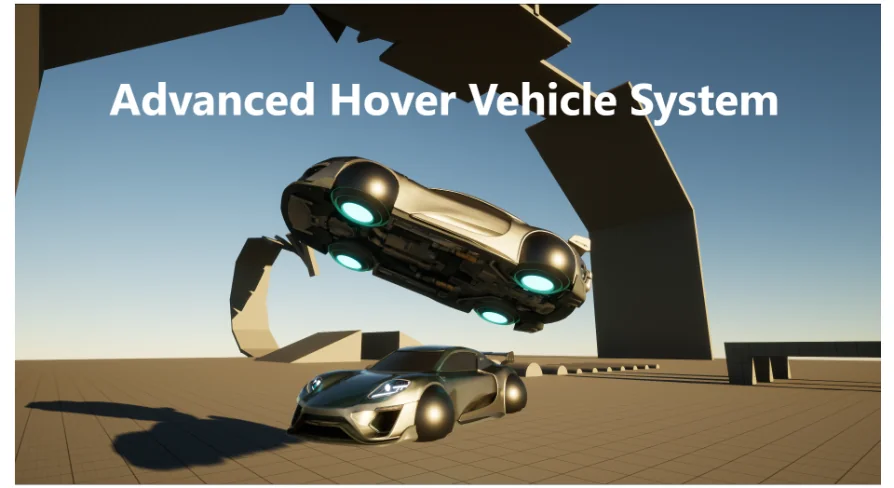
Adding a hover vehicle to a game often turns into a project of its own. The vehicle floats, but tuning how it reacts to gravity, surfaces, and collisions takes time. The Advanced Hover Vehicle System is built to skip that phase by delivering a gravity system that supports planetary, directional, and flying modes, all wrapped in a framerate-independent package that drops in without a code-heavy setup.
A Setup That Skips the Coding Step
The foundation is two ultra-clean C++ classes, already handled and optimized. The intended workflow is seamless integration: a few clicks and the system is ready to go. No complex setup, no requirement to touch C++ source, and no problem for developers who don't write code.
At the visual level, the system runs on a simple StaticMesh. That means you can test with a placeholder block or drop it onto a high-poly hovercar model; the movement logic doesn't care about mesh complexity. The system also supports the Enhanced Input System, so hooking up controller, keyboard, or custom input mappings stays consistent with modern Unreal projects.
Gravity Modes, Surfing, and Surface Sticking
The core feature set centers on three gravity modes: Planetary, Directional, and Flying. Planetary gravity allows the vehicle to stick to surfaces, so it can trace a curved space station floor or hug a rolling landscape. Directional gravity provides a fixed up vector for standard maps, while Flying mode frees the vehicle for true three-dimensional movement.
On top of that, the system offers distinct movement styles. Flying and Hovering are available, and there's also an "only surfing mode" that behaves like a car or hoverboard with flying disabled. This is particularly useful for levels that want hover vehicles but also want to keep them bound to the ground plane. Combined with physics-based movement and super-smooth handling, the vehicle feels connected to the world rather than floating in a rigid way.
What the Two C++ Classes Handle Under the Hood
While you won't need to open the code, it's still useful to know what's going on. The system uses two C++ classes that separate the heavy lifting from the gameplay logic. It's framerate independent, so performance dips don't change how the vehicle accelerates or turns. That independence comes from a separated Tick function called SideTick, which keeps the hover physics out of the main tick.
The asset is also light at 44 kilobytes, which is small enough to leave in a project without worrying about bloat. Collision-wise, it comes with clean simulated physics collisions for both vehicle-to-vehicle and vehicle-to-environment cases. That means two hover vehicles can bump into each other, and the vehicle can collide with walls, floors, and props, without relying on ad-hoc collision hacks.
Tuning the Physics, Visuals, and Feel
Although the C++ classes are ready to use, the system is fully customizable. Every detail can be tailored to a game's unique physics, visuals, and feel. That's a different promise from a fixed hover controller. Whether you need a heavy, slower craft for a delivery game or a snappy, drifting racer, the adjustable parameters are meant to be tuned.
The "100% customizable" label also extends to how the vehicle feels in different scenarios. Because the system supports planetary gravity, you can set up a hover vehicle that travels along the interior of a sphere, or one that flies freely in zero-g. The same underlying vehicle can be adjusted for a grounded surfboard-style mode or a full-flying spacecraft.
Compatibility and the Range of Vehicles It Can Power
For productions that already have conventional vehicles, the system is compatible with Advanced Cars And Bikes System - Vehicle Physics - Traffic AI - Drift Police. That opens the door to mixed fleets: wheeled cars and bikes running normal physics while hover vehicles use the gravity system in the same project.
The design space covers a wide range of vehicle types: Vehicle, Car, Flying, Drivable, Hover, Futuristic, Floating, UFO, Space, Cyber, Mechanic, Fly, Gravity, Jump, Jet, Spacecraft, Bike, Driving, Elevation, Aircraft, Jumping, Spacestation, Cyberpunk, Spaceship. So beyond the usual hovercar, this can fit UFOs, space bikes, aircraft, and even jumping vehicles. Anyone building a cyberpunk street setting, a space station, or a sci-fi drivable-world has a reason to look at the system.
The developer also provides a playable demo, a quick how-to video, a 0 to 100 guide, and a separate video covering new features for 2026. Those resources make it realistic to evaluate the hover feel and integration flow before deciding whether the asset fits your production.
 Game Mechanics
 Vehicles
 Game Mechanics
 Animations