"7e6fc58c410f2894"{"id":"1001041","slug":"advanced-locomotion-component-v2-4","title":"Advanced Locomotion Component v2.4","category":"Gameplay Features","engine":"5.3+","assetVersion":"Asset Version: 2.4","engineVersion":"Engine Version: 5.3+","tag":"Gameplay Features","accent":"blue","visual":"animation","summary":"Advanced Locomotion Component v2.4 replaces complex ABP editing with DataTable-driven animation config, adds UE5 features like Distance Matching and Pose Warpin","platform":"Unreal Engine","publishedAt":"2026-08-27T10:43:05.017Z","updatedAt":"2026-08-27T10:43:05.017Z","sourceNotes":[],"fileContents":[],"compatibility":["Unreal Engine","Asset Version: 2.4","Engine Version: 5.3+"],"featuredImage":{"alt":"Advanced Locomotion Component v2.4","src":"/wp-content/uploads/published/2026/08/43450a572549-4a5891bf-a976-4a63-93e2-5f1d81294a8a-74689cbc73.webp"},"hasDownloadLink":true,"downloads":6,"terms":[{"taxonomy":"category","slug":"gameplay-features","name":"Gameplay Features"}],"galleryImages":[{"src":"/wp-content/uploads/published/2026/08/1fcf6d3f8aaa-f4ca0500-0871-4abc-b887-e7f380ab5c93-6e2dc94728.webp","alt":"Advanced Locomotion Component v2.4"},{"src":"/wp-content/uploads/published/2026/08/4512219f70f7-8452a018-daf3-4bba-9370-0001b1525db5-53c3166f9e.webp","alt":"Advanced Locomotion Component v2.4"},{"src":"/wp-content/uploads/published/2026/08/e8c08e117b7d-0564ef8d-7369-411f-b579-c86b40e09c5e-9dd2a982a2.webp","alt":"Advanced Locomotion Component v2.4"},{"src":"/wp-content/uploads/published/2026/08/c53ecce3d69a-ab48aa03-f556-4c1a-b3ec-8c0a01f1c378-a704dad035.webp","alt":"Advanced Locomotion Component v2.4"},{"src":"/wp-content/uploads/published/2026/08/e3b7f3b0e47a-174ba121-b51e-4bf8-a4cf-f27b1e037953-4fe8ee4d8f.webp","alt":"Advanced Locomotion Component v2.4"},{"src":"/wp-content/uploads/published/2026/08/4f53cbb59075-39385808-13f2-40d1-9e9b-d6f2884e9ae1-9380e45c50.webp","alt":"Advanced Locomotion Component v2.4"},{"src":"/wp-content/uploads/published/2026/08/2ee3f6d77613-2c1dbefc-223a-4d03-9970-a78d774c9c93-d2528fae7a.webp","alt":"Advanced Locomotion Component v2.4"},{"src":"/wp-content/uploads/published/2026/08/613936e179f3-917b55dd-4d31-44b6-9190-c780d735c250-74b1ee07fa.webp","alt":"Advanced Locomotion Component v2.4"},{"src":"/wp-content/uploads/published/2026/08/2a8acfaec290-dc1314a5-7173-4e70-a999-3019e6a3ca01-88ee7cbbfc.webp","alt":"Advanced Locomotion Component v2.4"},{"src":"/wp-content/uploads/published/2026/08/ad9213af1b00-1665ad7e-09c1-4268-96b3-673f6884ef11-c1aaf099ae.webp","alt":"Advanced Locomotion Component v2.4"}],"accessPanel":{"kind":"resource","title":"Download this resource","eyebrow":"Free Download","message":"Log in or create a free account to start your download.","fileName":"Advanced Locomotion Component v2.4.7z","safetyNote":"Resources are manually reviewed before listing to improve quality and reduce obvious risks.","actionLabel":"Download Free","resourceType":"Resource archive"},"contentHtml":"\u003cp\u003eWhen a character needs to move with believable weight and responsiveness, the Animation Blueprint often becomes the bottleneck. Advanced Locomotion Component v2.4 takes a different route: it shifts the animation configuration out of the ABP and into a DataTable, so the setup effort goes into defining values rather than wiring nodes. For developers who have spent hours inside layered blend spaces and state machines, this change of pace matters.\u003c/p\u003e \u003ch2\u003eConfiguring Locomotion Without Tearing Apart the ABP\u003c/h2\u003e\n\u003cp\u003eThe core promise of Advanced Locomotion Component v2.4 is that you do not need to touch the inherited Animation Blueprint structure. Instead, you configure animations in a DataTable, including movement speed values and other parameters. This makes the system data-driven: adjust a row in a table instead of debugging a node graph.\u003c/p\u003e\n\u003cp\u003eThe component supports both UE4 and UE5 skeletons, so it isn't locked to one engine generation. That flexibility means teams working in either engine can adopt the same setup convention, and characters can be moved between projects without rebuilding the locomotion logic.\u003c/p\u003e \u003ch2\u003eUE5 Features Baked Into the Motion\u003c/h2\u003e\n\u003cp\u003eUnder the hood, the component makes use of several newer UE5 animation techniques. Distance Matching aligns animation phases with forward motion, which removes foot sliding. Pose Warping adjusts the character's pose to match target locations, often useful for combat or interaction. The system also works with ABP Templates, Blend Masks, and LinkedAnimGraphs, so it takes advantage of the modern animation graph architecture rather than fighting it.\u003c/p\u003e\n\u003cp\u003eThese features are not bolted on as afterthoughts. They are integral to how the component handles locomotion, and they help the final motion stay tight even in dynamic gameplay situations.\u003c/p\u003e \u003ch2\u003eOverlay System: Overriding Poses Without New Animation Sets\u003c/h2\u003e\n\u003cp\u003eOne of the standout capabilities is the Overlay System. It lets you override each pose in the existing animation set, using BlendProfile to control the blend weight of each bone. This means you can create new poses with only a few extra animations, because the system blends the overlay on top of the base locomotion. Instead of building a full new animation set for every stance or weapon state, you can adjust the posture bone-by-bone.\u003c/p\u003e\n\u003cp\u003eFor gameplay that needs different upper-body poses while the legs run the same cycle, this approach saves both disk space and animation production time. It also keeps the transition between poses smooth, since weight control happens at the bone level.\u003c/p\u003e \u003ch2\u003eComponent-Based Setup and Proven Animation Compatibility\u003c/h2\u003e\n\u003cp\u003eIntegration is straight to the point: there is no parent class to inherit from. You add the component to your character blueprint and it is done. That simplicity lowers the entry barrier, although the component itself is not meant for absolute beginners.\u003c/p\u003e\n\u003cp\u003eIt has been tested to work well with Kubold, WeaponMaster, and Paragon animations. The developer notes that after verification, integrating WeaponMaster Animations only takes about a minute. There are also specific tutorials for running Ghost Samurai Bow, Protector, and TwinSword animations over the component. For Kubold users, there is a Sword \u0026 Shield demo and tutorial as well.\u003c/p\u003e \u003ch2\u003eKnown Integrations and Demo Footage\u003c/h2\u003e\n\u003cp\u003eAdvanced Locomotion Component v2.4 has been integrated into several existing frameworks. It has a deeper integration with Easy Survival RPG v4 (ESRPG), and it also has a basic integration with Tempest Combat Framework (TCF). A riding system is available with its own showcase and playable demo. These integrations show the component can be dropped into an existing combat or survival project without rewriting its core systems.\u003c/p\u003e\n\u003cp\u003eThe distribution includes playable demos for Bow + Protector + TwinSword, plus a separate ESRPG integration demo using a Metahuman. Community showcases include a link to the Steam page for Athos, letting you see the component in action within a public game title. Video previews and tutorials are scattered throughout the documentation, and free sample content is provided for the aspects that are not included in the full asset.\u003c/p\u003e \u003ch2\u003eBefore You Start: Version, Beginner Level, and What's Not Included\u003c/h2\u003e\n\u003cp\u003eThis is not an asset for someone just learning Unreal Engine. The official note says \"Not suitable for beginners\" directly. Also, the latest version only supports UE 5.2 and above, so users on earlier engine versions need to account for that.\u003c/p\u003e\n\u003cp\u003eArt assets are not included. That means you bring your own character models and animations. Some content seen in the showcase videos is not part of the asset, although a free sample is made available. WeaponMaster Animsets specifically are not included, even though the integration is known to work well. If you want the full sword-and-shield or twin-blade looks from the previews, you need those animation packs separately.\u003c/p\u003e \u003cp\u003eFor a developer who wants to prototype a combat or survival system without building locomotion from scratch, Advanced Locomotion Component v2.4 offers a solid starting point. The data-driven setup, combined with UE5's newest animation features, shortens the path from character blueprint to believable movement. The tested animation integrations and playable demos give concrete references, so you can see exactly what your project is getting before you wire it in.\u003c/p\u003e\n\n\u003ch2\u003eRelated Resources Worth Checking\u003c/h2\u003e\n\u003cul\u003e\n\u003cli\u003e\u003ca href=\"https://3dcghub.com/advanced-riding-locomotion-system-riding-system/\" title=\"Advanced Riding Locomotion System (Riding System)\"\u003eAdvanced Riding Locomotion System (Riding System)\u003c/a\u003e\u003c/li\u003e\n\u003cli\u003e\u003ca href=\"https://3dcghub.com/generic-movement-system-a-powerful-movement-control-and-locomotion-system/\" title=\"Generic Movement System - A powerful movement control and locomotion system\"\u003eGeneric Movement System - A powerful movement control and locomotion system\u003c/a\u003e\u003c/li\u003e\n\u003cli\u003e\u003ca href=\"https://3dcghub.com/basic-locomotion-system-replicated/\" title=\"Basic Locomotion System (REPLICATED)\"\u003eBasic Locomotion System (REPLICATED)\u003c/a\u003e\u003c/li\u003e\n\u003cli\u003e\u003ca href=\"https://3dcghub.com/customizable-bodycam-component/\" title=\"Customizable Bodycam Component\"\u003eCustomizable Bodycam Component\u003c/a\u003e\u003c/li\u003e\n\u003cli\u003e\u003ca href=\"https://3dcghub.com/swim-component-150-animations-blueprints/\" title=\"Swim Component : 150 Animations + Blueprints\"\u003eSwim Component : 150 Animations + Blueprints\u003c/a\u003e\u003c/li\u003e\n\u003c/ul\u003e","contentTextLength":5590,"navigation":{"current":690,"total":3618,"previous":{"id":"1001037","slug":"35-ar-vr-southeastern-us-plants-and-ecosystems","title":"35 AR VR Southeastern US Plants and Ecosystems","category":"Forest \u0026 Jungle","platform":"Unreal Engine","updatedAt":"2026-08-27T11:07:01.455Z"},"next":{"id":"1001040","slug":"advanced-hover-vehicle-system","title":"Advanced Hover Vehicle System","category":"Game Mechanics","platform":"Unreal Engine","updatedAt":"2026-08-27T10:28:28.025Z"}},"relatedResources":[{"id":"1000782","slug":"advanced-riding-locomotion-system-riding-system","title":"Advanced Riding Locomotion System (Riding System)","category":"Gameplay Features","engine":"5.1+","assetVersion":"Asset Version: 1.5.1","engineVersion":"Engine Version: 5.1+","tag":"Gameplay Features","accent":"blue","visual":"animation","summary":"A component-based riding framework for Unreal Engine handling ground and flight movement, mounting, and swim behavior through configurable blendspaces.","platform":"Unreal Engine","publishedAt":"2026-07-30T11:16:41.169Z","updatedAt":"2026-07-30T11:16:41.169Z","sourceNotes":[],"fileContents":[],"compatibility":["Unreal Engine","Asset Version: 1.5.1","Engine Version: 5.1+"],"featuredImage":{"alt":"Advanced Riding Locomotion System (Riding System)","src":"/wp-content/uploads/published/2026/07/07d9cf825a90-2f012bd6-b859-487a-95c5-a43988a83daa-7e44e48f0f.webp"},"hasDownloadLink":true,"downloads":2},{"id":"1000831","slug":"generic-movement-system-a-powerful-movement-control-and-locomotion-system","title":"Generic Movement System - A powerful movement control and locomotion system","category":"Gameplay Features","engine":"5.6","assetVersion":"Asset Version: 1.4","engineVersion":"Engine Version: 5.6","tag":"Gameplay Features","accent":"blue","visual":"animation","summary":"A modular Unreal Engine movement and locomotion framework utilizing components, Animation Blueprint Templates, and data assets for flexible, network-synchronize","platform":"Unreal Engine","publishedAt":"2026-08-03T12:42:58.679Z","updatedAt":"2026-08-03T12:42:58.679Z","sourceNotes":[],"fileContents":[],"compatibility":["Unreal Engine","Asset Version: 1.4","Engine Version: 5.6"],"featuredImage":{"alt":"Generic Movement System - A powerful movement control and locomotion system","src":"/wp-content/uploads/published/2026/08/ab5b72fb8ee3-ede99ba3-5604-482c-a348-e5623ee74ff9-2698172b92.webp"},"hasDownloadLink":true,"downloads":5},{"id":"1001117","slug":"open-world-locomotion-system","title":"Open World Locomotion System","category":"Gameplay Features","engine":"5.5+","assetVersion":"","engineVersion":"Engine Version: 5.5+","tag":"Gameplay Features","accent":"blue","visual":"animation","summary":"Unreal Engine asset providing a modular traversal system—dynamic climbing, ledge and ladder movement, vaulting, ground states, gliding, skydiving, and swimming.","platform":"Unreal Engine","publishedAt":"2026-09-07T12:46:04.945Z","updatedAt":"2026-09-07T12:46:04.945Z","sourceNotes":[],"fileContents":[],"compatibility":["Unreal Engine","Engine Version: 5.5+"],"featuredImage":{"alt":"Open World Locomotion System","src":"/wp-content/uploads/published/2026/09/07540a2a5f5f-0da0244c-d992-45ec-8019-81f190296c97-48c7de02be.webp"},"hasDownloadLink":true,"downloads":2}]}
Gameplay Features
Advanced Locomotion Component v2.4
Advanced Locomotion Component v2.4 replaces complex ABP editing with DataTable-driven animation config, adds UE5 features like Distance Matching and Pose Warpin
When a character needs to move with believable weight and responsiveness, the Animation Blueprint often becomes the bottleneck. Advanced Locomotion Component v2.4 takes a different route: it shifts the animation configuration out of the ABP and into a DataTable, so the setup effort goes into defining values rather than wiring nodes. For developers who have spent hours inside layered blend spaces and state machines, this change of pace matters.
Configuring Locomotion Without Tearing Apart the ABP
The core promise of Advanced Locomotion Component v2.4 is that you do not need to touch the inherited Animation Blueprint structure. Instead, you configure animations in a DataTable, including movement speed values and other parameters. This makes the system data-driven: adjust a row in a table instead of debugging a node graph.
The component supports both UE4 and UE5 skeletons, so it isn't locked to one engine generation. That flexibility means teams working in either engine can adopt the same setup convention, and characters can be moved between projects without rebuilding the locomotion logic.
UE5 Features Baked Into the Motion
Under the hood, the component makes use of several newer UE5 animation techniques. Distance Matching aligns animation phases with forward motion, which removes foot sliding. Pose Warping adjusts the character's pose to match target locations, often useful for combat or interaction. The system also works with ABP Templates, Blend Masks, and LinkedAnimGraphs, so it takes advantage of the modern animation graph architecture rather than fighting it.
These features are not bolted on as afterthoughts. They are integral to how the component handles locomotion, and they help the final motion stay tight even in dynamic gameplay situations.
Overlay System: Overriding Poses Without New Animation Sets
One of the standout capabilities is the Overlay System. It lets you override each pose in the existing animation set, using BlendProfile to control the blend weight of each bone. This means you can create new poses with only a few extra animations, because the system blends the overlay on top of the base locomotion. Instead of building a full new animation set for every stance or weapon state, you can adjust the posture bone-by-bone.
For gameplay that needs different upper-body poses while the legs run the same cycle, this approach saves both disk space and animation production time. It also keeps the transition between poses smooth, since weight control happens at the bone level.
Component-Based Setup and Proven Animation Compatibility
Integration is straight to the point: there is no parent class to inherit from. You add the component to your character blueprint and it is done. That simplicity lowers the entry barrier, although the component itself is not meant for absolute beginners.
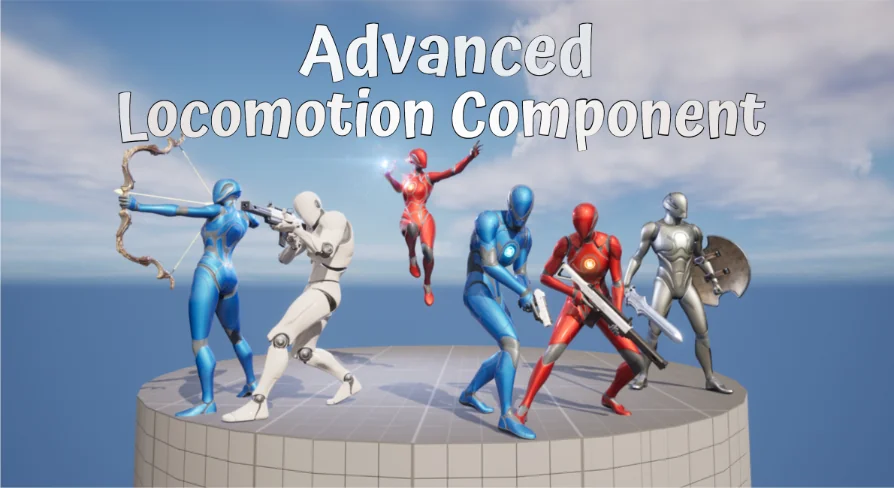
It has been tested to work well with Kubold, WeaponMaster, and Paragon animations. The developer notes that after verification, integrating WeaponMaster Animations only takes about a minute. There are also specific tutorials for running Ghost Samurai Bow, Protector, and TwinSword animations over the component. For Kubold users, there is a Sword & Shield demo and tutorial as well.
Known Integrations and Demo Footage
Advanced Locomotion Component v2.4 has been integrated into several existing frameworks. It has a deeper integration with Easy Survival RPG v4 (ESRPG), and it also has a basic integration with Tempest Combat Framework (TCF). A riding system is available with its own showcase and playable demo. These integrations show the component can be dropped into an existing combat or survival project without rewriting its core systems.
The distribution includes playable demos for Bow + Protector + TwinSword, plus a separate ESRPG integration demo using a Metahuman. Community showcases include a link to the Steam page for Athos, letting you see the component in action within a public game title. Video previews and tutorials are scattered throughout the documentation, and free sample content is provided for the aspects that are not included in the full asset.
Before You Start: Version, Beginner Level, and What's Not Included
This is not an asset for someone just learning Unreal Engine. The official note says "Not suitable for beginners" directly. Also, the latest version only supports UE 5.2 and above, so users on earlier engine versions need to account for that.
Art assets are not included. That means you bring your own character models and animations. Some content seen in the showcase videos is not part of the asset, although a free sample is made available. WeaponMaster Animsets specifically are not included, even though the integration is known to work well. If you want the full sword-and-shield or twin-blade looks from the previews, you need those animation packs separately.
For a developer who wants to prototype a combat or survival system without building locomotion from scratch, Advanced Locomotion Component v2.4 offers a solid starting point. The data-driven setup, combined with UE5's newest animation features, shortens the path from character blueprint to believable movement. The tested animation integrations and playable demos give concrete references, so you can see exactly what your project is getting before you wire it in.
 Gameplay Features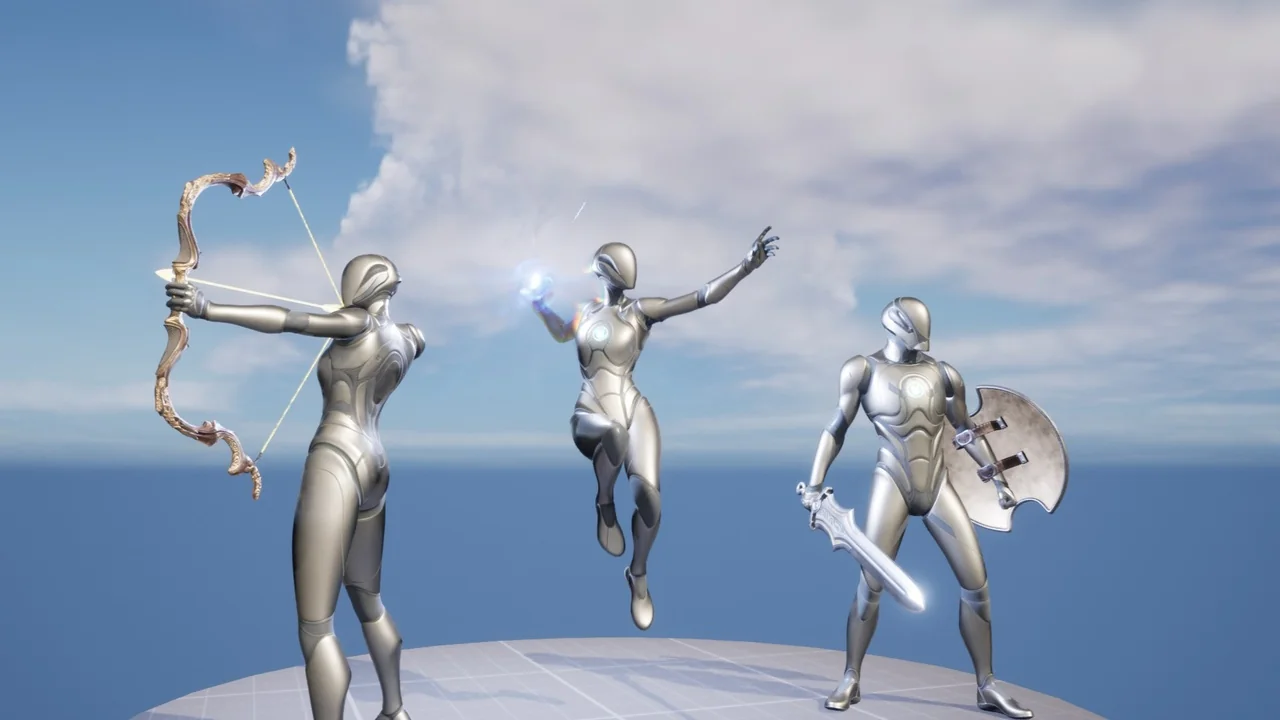
 Gameplay Features
 Gameplay Features
 Gameplay Features