"7066dd76da796369"{"id":"1000746","slug":"product-rendering-in-unreal-engine-5-6-beginner-s-guide","title":"Product Rendering in Unreal Engine 5.6 | Beginner’s Guide","category":"Unreal Engine","engine":"File Content: video + English subtitles","assetVersion":"Video Language: English","engineVersion":"File Content: video + English subtitles","tag":"Unreal Engine","accent":"blue","visual":"mech","summary":"Build a product-rendering workflow in Unreal Engine 5.6 and DaVinci Resolve. Master studio lighting, reference matching, CGI integration, and color grading.","platform":"Unreal Engine","publishedAt":"2026-07-27T12:20:50.298Z","updatedAt":"2026-07-27T12:20:50.298Z","sourceNotes":[],"fileContents":[],"compatibility":["Unreal Engine","Video Language: English","File Content: video + English subtitles"],"featuredImage":{"alt":"Product Rendering in Unreal Engine 5.6 | Beginner’s Guide","src":"/wp-content/uploads/published/2026/07/28b6ff840a87-6935627-b546-2-e512e0113d.webp"},"hasDownloadLink":true,"downloads":2,"terms":[{"taxonomy":"category","slug":"tutoriallibrary-unrealengine","name":"Unreal Engine"}],"galleryImages":[],"accessPanel":{"kind":"video-resource","title":"Download this video resource","eyebrow":"Free Download","message":"Log in or create a free account to start your download.","fileName":"Product Rendering in Unreal Engine 5.6 Beginner’s Guide.7z","safetyNote":"Resources are manually reviewed before listing to improve quality and reduce obvious risks.","actionLabel":"Download Free","resourceType":"Video download"},"contentHtml":"\u003cp\u003eReal-time rendering pipelines excel when a digital product convincingly mimics the behavior of light interacting with physical surfaces. Achieving that specific reaction requires a careful translation of real-world photography setups into a digital environment. Artists can learn to construct this translation by building a complete rendering workflow inside Unreal Engine 5.6, treating the real-time engine as a virtual photography studio where materials, Lighting Actors, and camera settings meticulously shape the final image.\u003c/p\u003e\n\n\u003ch2\u003eTranslating Studio Photography into Unreal Engine 5.6\u003c/h2\u003e\n\u003cp\u003eThe process begins with preparing the hero assets. Before any lighting is applied, the models and UVs require adjustment in \u003cem\u003eMaya\u003c/em\u003e or \u003cem\u003eBlender\u003c/em\u003e to ensure they respond correctly to digital light. By optimizing the materials specifically for realistic results within the engine, artists create a surface foundation that supports high-fidelity reflections and textures.\u003c/p\u003e\n\n\u003cp\u003eFrom there, the workflow shifts to building the lighting environment. Instead of relying on arbitrary digital light placements, the approach studies real photography techniques and accurately replicates them inside Unreal Engine. This methodology teaches artists to construct professional studio lighting setups that behave identically to their physical counterparts, anchoring the digital product in a believable space.\u003c/p\u003e\n\n\u003ch3\u003eCamera Matching and Visual Storytelling\u003c/h3\u003e\n\u003cp\u003eA digital render gains commercial viability when it aligns perfectly with a predetermined creative vision. A significant portion of this process involves matching a product reference image with high precision. Artists must align multiple visual variables to achieve this:\u003c/p\u003e\n\n\u003cul\u003e\n \u003cli\u003eCamera angle and perspective\u003c/li\u003e\n \u003cli\u003eContrast, hue, and saturation levels\u003c/li\u003e\n \u003cli\u003eExposure settings\u003c/li\u003e\n \u003cli\u003eOverall mood and atmosphere\u003c/li\u003e\n\u003c/ul\u003e\n\n\u003cp\u003eBeyond technical matching, the workflow pushes artists to develop creative and commercially viable product compositions. This focuses on integrating brand colors, clarifying the core message, and refining the visual storytelling. The render must not only look photorealistic but also communicate the specific commercial intent behind the product.\u003c/p\u003e\n\n\u003ch2\u003eIntegrating CGI Elements with Live-Action Footage\u003c/h2\u003e\n\u003cp\u003eMoving beyond isolated studio renders, the workflow addresses the complex task of compositing. Integrating CGI with live-action images demands a strict matching process to ensure the digital product resides naturally within the filmed environment. Artists must align the perspective of the 3D camera with the live footage, matching the existing lighting conditions and replicating the physical reflections on the product's surface.\u003c/p\u003e\n\n\u003cp\u003eDepth of Field plays a critical role in selling this integration. By carefully adjusting the focus falloff to match the optical characteristics of the physical camera used to capture the live-action plate, the boundary between the digital and the real blurs convincingly.\u003c/p\u003e\n\n\u003ch3\u003eGenerating Photorealistic Droplets Inside Unreal Engine\u003c/h3\u003e\n\u003cp\u003eFine surface details often elevate a render from good to photorealistic. The course covers the creation of photorealistic droplets directly within Unreal Engine. Importantly, this technique bypasses the need for external simulation tools, allowing artists to craft believable micro-details and surface moisture using only native engine tools.\u003c/p\u003e\n\n\u003ch2\u003ePost-Production and Color Grading in DaVinci Resolve\u003c/h2\u003e\n\u003cp\u003eThe rendering process extends beyond the export from Unreal Engine. \u003cem\u003eDaVinci Resolve\u003c/em\u003e acts as the final staging ground for the product visuals. Artists utilize the software for specific Post-Production tasks, including color correction and broad Color Grading. The workflow incorporates film-emulation techniques to apply a cohesive, stylized finish to the real-time renders, giving the digital product a cinematic quality.\u003c/p\u003e\n\n\u003cp\u003eTogether, the Unreal Engine render and the \u003cem\u003eDaVinci Resolve\u003c/em\u003e grade form a comprehensive pipeline. A structured \u003cem\u003e7UP\u003c/em\u003e case study demonstrates how these tools function together, guiding beginners through a practical implementation of the software ecosystem.\u003c/p\u003e\n\n\u003ch2\u003eAdapting the Workflow for Different Backgrounds\u003c/h2\u003e\n\u003cp\u003eSpanning 5 hours and 23 minutes, the material scales effectively across various skill levels. Beginner to intermediate 3D artists can absorb the professional product-rendering workflows without feeling overwhelmed by the technical density. Unreal Engine beginners looking to build a strong foundation in lighting, materials, cameras, and cinematic rendering will find a structured entry point.\u003c/p\u003e\n\n\u003cp\u003eThe material also serves artists transitioning from traditional offline rendering engines. Those arriving from \u003cem\u003eBlender\u003c/em\u003e, \u003cem\u003eMaya\u003c/em\u003e, \u003cem\u003eV-Ray\u003c/em\u003e, or \u003cem\u003eCorona\u003c/em\u003e can explore real-time rendering to speed up their production pipelines. The workflow provides graphic designers, motion designers, and content creators with the skills to add high-quality 3D product visuals to their portfolios, grounding their work in real-world commercial practices.\u003c/p\u003e\n\n\u003cp\u003eFor teams evaluating this resource, the strongest takeaway is the ability to shoot digital products in a real-time engine and finish them in a professional grading suite. By merging Unreal Engine 5.6 studio lighting with \u003cem\u003eDaVinci Resolve\u003c/em\u003e film emulation, artists can produce portfolio-ready, photorealistic product compositions entirely outside of traditional offline rendering paradigms.\u003c/p\u003e\n\n\u003ch2\u003eRelated Resources Worth Checking\u003c/h2\u003e\n\u003cul\u003e\n\u003cli\u003e\u003ca href=\"https://3dcghub.com/the-ultimate-guide-to-unreal-engine-5-for-complete-beginners/\" title=\"The Ultimate Guide to Unreal Engine 5 For Complete Beginners\"\u003eThe Ultimate Guide to Unreal Engine 5 For Complete Beginners\u003c/a\u003e\u003c/li\u003e\n\u003cli\u003e\u003ca href=\"https://3dcghub.com/real-time-automotive-rendering-1001/\" title=\"Real-Time Automotive Rendering 1001\"\u003eReal-Time Automotive Rendering 1001\u003c/a\u003e\u003c/li\u003e\n\u003cli\u003e\u003ca href=\"https://3dcghub.com/unreal-engine-5-interactive-blueprints/\" title=\"Unreal Engine 5 Interactive Blueprints\"\u003eUnreal Engine 5 Interactive Blueprints\u003c/a\u003e\u003c/li\u003e\n\u003cli\u003e\u003ca href=\"https://3dcghub.com/unreal-engine-5-product-animation-visualization/\" title=\"Unreal Engine 5: Product Animation / Visualization\"\u003eUnreal Engine 5: Product Animation / Visualization\u003c/a\u003e\u003c/li\u003e\n\u003cli\u003e\u003ca href=\"https://3dcghub.com/unreal-engine-5-and-blender-3d-product-visualization/\" title=\"Unreal Engine 5 and Blender 3D: Product Visualization\"\u003eUnreal Engine 5 and Blender 3D: Product Visualization\u003c/a\u003e\u003c/li\u003e\n\u003c/ul\u003e","contentTextLength":5552,"navigation":{"current":1418,"total":4016,"previous":{"id":"1000747","slug":"ultimate-lighting-essentials-in-unreal-engine-5-5","title":"Ultimate Lighting Essentials in Unreal Engine 5.5","category":"Unreal Engine","platform":"Unreal Engine","updatedAt":"2026-07-27T12:35:56.415Z"},"next":{"id":"1000745","slug":"how-to-publish-a-game-on-steam-unreal-engine-5","title":"How to Publish a Game on Steam - Unreal Engine 5","category":"Unreal Engine","platform":"Unreal Engine","updatedAt":"2026-07-27T12:12:54.656Z"}},"relatedResources":[{"id":"1000910","slug":"unreal-blueprints-create-games-with-visual-scripting-in-unreal-5-6","title":"Unreal Blueprints: Create Games with Visual Scripting in Unreal 5.6","category":"Unreal Engine","engine":"File Content: video + English subtitles","assetVersion":"Video Language: English","engineVersion":"File Content: video + English subtitles","tag":"Unreal Engine","accent":"blue","visual":"mech","summary":"Build three complete games—Marble Run, Crystal Caverns, and Mars Marine—using Unreal 5.6's Blueprint visual scripting. A beginner-friendly course from GameDev.t","platform":"Unreal Engine","publishedAt":"2026-08-06T13:20:33.760Z","updatedAt":"2026-08-06T13:20:33.760Z","sourceNotes":[],"fileContents":[],"compatibility":["Unreal Engine","Video Language: English","File Content: video + English subtitles"],"featuredImage":{"alt":"Unreal Blueprints: Create Games with Visual Scripting in Unreal 5.6","src":"/wp-content/uploads/published/2026/08/8a135189a0df-ragzbmpcjb5j-2f97113de1.webp"},"hasDownloadLink":true,"downloads":3},{"id":"1000741","slug":"real-time-automotive-rendering-1001","title":"Real-Time Automotive Rendering 1001","category":"Unreal Engine","engine":"File Content: video + English subtitles","assetVersion":"Video Language: English","engineVersion":"File Content: video + English subtitles","tag":"Unreal Engine","accent":"blue","visual":"mech","summary":"A beginner-friendly Unreal Engine course covering automotive cinematic creation: asset prep in Maya, shader setup, exterior and studio lighting, and camera rend","platform":"Unreal Engine","publishedAt":"2026-07-27T11:52:00.768Z","updatedAt":"2026-07-27T11:52:00.768Z","sourceNotes":[],"fileContents":[],"compatibility":["Unreal Engine","Video Language: English","File Content: video + English subtitles"],"featuredImage":{"alt":"Real-Time Automotive Rendering 1001","src":"/wp-content/uploads/published/2026/07/e10d685964d4-rtat1001-0002-porsche-shot-chateu-1-0005-2048x811-da382017e6.webp"},"hasDownloadLink":true,"downloads":1},{"id":"1000414","slug":"unreal-engine-5-interactive-blueprints","title":"Unreal Engine 5 Interactive Blueprints","category":"Unreal Engine","engine":"File Content: video + English subtitles","assetVersion":"Video Language: English","engineVersion":"File Content: video + English subtitles","tag":"Unreal Engine","accent":"blue","visual":"mech","summary":"A beginner guide to building interactive architectural visualizations in Unreal Engine 5, covering Blueprint logic, collisions, doors, and material changes.","platform":"Unreal Engine","publishedAt":"2026-07-08T16:03:08.814Z","updatedAt":"2026-07-08T16:03:08.814Z","sourceNotes":[],"fileContents":[],"compatibility":["Unreal Engine","Video Language: English","File Content: video + English subtitles"],"featuredImage":{"alt":"Unreal Engine 5 Interactive Blueprints","src":"/wp-content/uploads/published/2026/07/109390a5b183-5934828-bed9-2-285b4b81b0.webp"},"hasDownloadLink":true,"downloads":1}]}
Unreal Engine
Product Rendering in Unreal Engine 5.6 | Beginner’s Guide
Build a product-rendering workflow in Unreal Engine 5.6 and DaVinci Resolve. Master studio lighting, reference matching, CGI integration, and color grading.
Category:Unreal EnginePlatform: Unreal EngineVideo Language: EnglishFile Content: video + English subtitlesPublished: Jul 27, 2026
Unreal Engine
Resource overview
Real-time rendering pipelines excel when a digital product convincingly mimics the behavior of light interacting with physical surfaces. Achieving that specific reaction requires a careful translation of real-world photography setups into a digital environment. Artists can learn to construct this translation by building a complete rendering workflow inside Unreal Engine 5.6, treating the real-time engine as a virtual photography studio where materials, Lighting Actors, and camera settings meticulously shape the final image.
Translating Studio Photography into Unreal Engine 5.6
The process begins with preparing the hero assets. Before any lighting is applied, the models and UVs require adjustment in Maya or Blender to ensure they respond correctly to digital light. By optimizing the materials specifically for realistic results within the engine, artists create a surface foundation that supports high-fidelity reflections and textures.
From there, the workflow shifts to building the lighting environment. Instead of relying on arbitrary digital light placements, the approach studies real photography techniques and accurately replicates them inside Unreal Engine. This methodology teaches artists to construct professional studio lighting setups that behave identically to their physical counterparts, anchoring the digital product in a believable space.
Camera Matching and Visual Storytelling
A digital render gains commercial viability when it aligns perfectly with a predetermined creative vision. A significant portion of this process involves matching a product reference image with high precision. Artists must align multiple visual variables to achieve this:
Camera angle and perspective
Contrast, hue, and saturation levels
Exposure settings
Overall mood and atmosphere
Beyond technical matching, the workflow pushes artists to develop creative and commercially viable product compositions. This focuses on integrating brand colors, clarifying the core message, and refining the visual storytelling. The render must not only look photorealistic but also communicate the specific commercial intent behind the product.
Integrating CGI Elements with Live-Action Footage
Moving beyond isolated studio renders, the workflow addresses the complex task of compositing. Integrating CGI with live-action images demands a strict matching process to ensure the digital product resides naturally within the filmed environment. Artists must align the perspective of the 3D camera with the live footage, matching the existing lighting conditions and replicating the physical reflections on the product's surface.
Depth of Field plays a critical role in selling this integration. By carefully adjusting the focus falloff to match the optical characteristics of the physical camera used to capture the live-action plate, the boundary between the digital and the real blurs convincingly.
Fine surface details often elevate a render from good to photorealistic. The course covers the creation of photorealistic droplets directly within Unreal Engine. Importantly, this technique bypasses the need for external simulation tools, allowing artists to craft believable micro-details and surface moisture using only native engine tools.
Post-Production and Color Grading in DaVinci Resolve
The rendering process extends beyond the export from Unreal Engine. DaVinci Resolve acts as the final staging ground for the product visuals. Artists utilize the software for specific Post-Production tasks, including color correction and broad Color Grading. The workflow incorporates film-emulation techniques to apply a cohesive, stylized finish to the real-time renders, giving the digital product a cinematic quality.
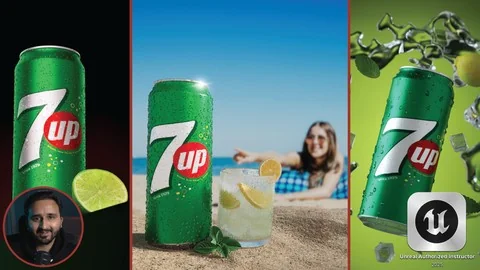
Together, the Unreal Engine render and the DaVinci Resolve grade form a comprehensive pipeline. A structured 7UP case study demonstrates how these tools function together, guiding beginners through a practical implementation of the software ecosystem.
Adapting the Workflow for Different Backgrounds
Spanning 5 hours and 23 minutes, the material scales effectively across various skill levels. Beginner to intermediate 3D artists can absorb the professional product-rendering workflows without feeling overwhelmed by the technical density. Unreal Engine beginners looking to build a strong foundation in lighting, materials, cameras, and cinematic rendering will find a structured entry point.
The material also serves artists transitioning from traditional offline rendering engines. Those arriving from Blender, Maya, V-Ray, or Corona can explore real-time rendering to speed up their production pipelines. The workflow provides graphic designers, motion designers, and content creators with the skills to add high-quality 3D product visuals to their portfolios, grounding their work in real-world commercial practices.
For teams evaluating this resource, the strongest takeaway is the ability to shoot digital products in a real-time engine and finish them in a professional grading suite. By merging Unreal Engine 5.6 studio lighting with DaVinci Resolve film emulation, artists can produce portfolio-ready, photorealistic product compositions entirely outside of traditional offline rendering paradigms.
 Unreal Engine
 Unreal Engine
 Unreal Engine
 Unreal Engine