"1f00f67f9253451b"{"id":"1001273","slug":"clarus-viewer-engine-helpers","title":"Clarus Viewer Engine Helpers","category":"Game Mechanics","engine":"5.3","assetVersion":"Asset Version: 1.0","engineVersion":"Engine Version: 5.3","tag":"Game Mechanics","accent":"blue","visual":"mech","summary":"Examine Clarus Viewer Engine Helpers, an Unreal Engine 5 plugin providing Blueprint and C++ utilities for actor spawning, configs, and server level loading.","platform":"Unreal Engine","publishedAt":"2026-09-30T06:01:27.282Z","updatedAt":"2026-09-30T06:01:27.282Z","sourceNotes":[],"fileContents":[],"compatibility":["Unreal Engine","Asset Version: 1.0","Engine Version: 5.3"],"featuredImage":{"alt":"Clarus Viewer Engine Helpers","src":"/wp-content/uploads/published/2026/09/68f2cb931307-6c4325b4-495f-4aeb-95fe-350c6a3d6413-e1e5a7a8aa.webp"},"hasDownloadLink":true,"downloads":0,"terms":[{"taxonomy":"category","slug":"game-mechanics-tools-and-plugins","name":"Game Mechanics"}],"galleryImages":[],"accessPanel":{"kind":"resource","title":"Download this resource","eyebrow":"Free Download","message":"Log in or create a free account to start your download.","fileName":"Clarus Viewer Engine Helpers.7z","safetyNote":"Resources are manually reviewed before listing to improve quality and reduce obvious risks.","actionLabel":"Download Free","resourceType":"Resource archive"},"contentHtml":"\u003cp\u003eComplex Unreal Engine 5 architectures frequently run into boundary issues between different class types and network boundaries. Dedicated logic handlers, custom data objects, and UI frameworks often reside in non-actor classes that lack direct, built-in access to world context methods. At the same time, network systems require strict execution authority when handling transitions between maps. Clarus Viewer Engine Helpers targets these specific friction points by delivering a targeted suite of utility functions directly into both the Blueprint visual scripting environment and native C++.\u003c/p\u003e \u003ch2\u003eSpawning Actors from Non-Actor Blueprints\u003c/h2\u003e\n\u003cp\u003eIn standard Unreal Engine development, spawning an actor requires an explicit reference to the current world context. Actor classes possess this context natively, making calls to spawn secondary entities straightforward. Non-actor Blueprints, including standalone objects derived from basic object structures, do not carry that ambient world context. This technical limitation typically forces technical designers to build convoluted pass-through references, relaying commands through player controllers, game modes, or dedicated world actors simply to bring a new entity into the scene.\u003c/p\u003e \u003cp\u003eClarus Viewer Engine Helpers resolves this structural friction by providing helper functions specifically engineered to spawn actors directly from non-actor Blueprints. These utilities are accessible within both Blueprints and C++, ensuring that projects maintaining a hybrid codebase do not have to duplicate resolution patterns across languages.\u003c/p\u003e \u003cp\u003eBy abstracting the retrieval and routing of the relevant world context, the plugin allows non-actor utility components, state managers, and data objects to initiate actor instantiation cleanly. This eliminates the necessity of littering project code with manual context-gathering boilerplate, keeping object-oriented code modular and self-contained.\u003c/p\u003e \u003ch2\u003eManaging Config Files in Blueprint and C++ Workflows\u003c/h2\u003e\n\u003cp\u003eProject settings, runtime preferences, and system parameters rely heavily on configuration files to persist values across sessions and initialize software states without hardcoded values. While Unreal Engine maintains an extensive internal config hierarchy, manipulating configuration parameters purely through visual scripting can be restrictive without dedicated helper libraries.\u003c/p\u003e \u003cp\u003eThe plugin equips developers with functions to manage Config files across both Blueprint and C++ workflows. Exposing configuration management routines to Blueprints opens up direct read and write pathways for technical artists and designers who build runtime interfaces, diagnostic tools, or project setup menus without needing to compile native code for every setting alteration.\u003c/p\u003e \u003cp\u003eTeams leveraging native code retain identical functional access in C++, preserving parity across the entire development team. By centralizing config access routines into straightforward helper calls, configuration updates can be executed systematically, helping manage everything from display setups to specialized runtime switches cleanly.\u003c/p\u003e \u003ch2\u003eServer-Side Level Loading for Multiplayer Sessions\u003c/h2\u003e\n\u003cp\u003eNetworked environments demand absolute precision regarding which machine dictates map changes and level transitions. In multiplayer configurations, leaving level loading logic open to ambiguity can lead to synchronization errors, desynchronized players, or corrupted match states. Authoritative server execution is essential to cleanly transition players between distinct environments or stream in new segments of an active experience.\u003c/p\u003e \u003cp\u003eIncluded in Clarus Viewer Engine Helpers is a specialized C++ function dedicated to loading levels on the server side for multiplayer projects. Because this utility executes strictly on the native layer, it provides a stable, authoritative baseline for managing network map transitions without relying on brittle client-side signals.\u003c/p\u003e \u003cp\u003eThis implementation ensures that level transition commands originate directly from the authoritative server, enabling connected clients to travel seamlessly under proper host synchronization. Projects with dedicated server setups or listen-server architectures can incorporate this function directly into their core networking and session management routines.\u003c/p\u003e \u003ch2\u003eUtility Integration Alongside Clarus Viewer Base\u003c/h2\u003e\n\u003cp\u003eClarus Viewer Engine Helpers operates as a core utility plugin tagged for configuration, actor management, component handling, and spawning workflows. It is designed to work in conjunction with Clarus Viewer Base, augmenting that foundational layer with low-level operational tools that bridge gaps between base engine frameworks and custom application logic.\u003c/p\u003e \u003cp\u003eRather than attempting to serve as an all-in-one framework that dictates project structure, the plugin functions as a practical toolkit. It slots directly into Unreal Engine 5 projects where developers need to overcome specific operational bottlenecks, such as instantiating game objects from isolated logic layers or managing external text configurations from within visual scripts.\u003c/p\u003e \u003cp\u003eThe shared availability of these tools across both C++ and Blueprints ensures that teams do not run into interoperability barriers. Programmers can write performant native backend systems that take advantage of the server-side level loader, while technical designers use the spawning and configuration helpers to build responsive, data-driven interfaces and modular toolsets.\u003c/p\u003e \u003ch2\u003ePractical Implementation and Target Roles\u003c/h2\u003e\n\u003cp\u003eTechnical designers who spend significant time constructing data systems, interface controllers, or logic handlers out of basic UObject classes benefit immediately from the plugin's actor-spawning capabilities. Instead of relying on workarounds to pull actors into the world from non-actor classes, they can rely on the provided helper library to handle context resolution transparently.\u003c/p\u003e \u003cp\u003eNetwork engineers and gameplay programmers working on multiplayer titles benefit from the focused server-side level loading utility, which isolates map changes to server authority. Paired with straightforward configuration file handlers that operate seamlessly across C++ and Blueprints, Clarus Viewer Engine Helpers delivers a compact, purposeful set of tools tailored for technical development teams working within the Clarus Viewer Base ecosystem.\u003c/p\u003e\n\n\u003ch2\u003eContinue Browsing Similar Packs\u003c/h2\u003e\n\u003cul\u003e\n\u003cli\u003e\u003ca href=\"https://3dcghub.com/operating-system-simulator-plugin/\" title=\"Operating System Simulator Plugin\"\u003eOperating System Simulator Plugin\u003c/a\u003e\u003c/li\u003e\n\u003cli\u003e\u003ca href=\"https://3dcghub.com/advanced-hover-vehicle-system/\" title=\"Advanced Hover Vehicle System\"\u003eAdvanced Hover Vehicle System\u003c/a\u003e\u003c/li\u003e\n\u003cli\u003e\u003ca href=\"https://3dcghub.com/acf-u-ascent-combat-framework-ultimate-v4-c-complete-action-rpg-creator/\" title=\"(ACF U) Ascent Combat Framework Ultimate V4- C++ Complete Action RPG Creator\"\u003e(ACF U) Ascent Combat Framework Ultimate V4- C++ Complete Action RPG Creator\u003c/a\u003e\u003c/li\u003e\n\u003cli\u003e\u003ca href=\"https://3dcghub.com/bacon-combo-graph/\" title=\"Bacon Combo Graph\"\u003eBacon Combo Graph\u003c/a\u003e\u003c/li\u003e\n\u003cli\u003e\u003ca href=\"https://3dcghub.com/smart-shooting-npc-and-player-projectile-target-prediction-and-ballistic-system/\" title=\"Smart Shooting - NPC \u0026amp; Player Projectile Target Prediction \u0026amp; Ballistic System\"\u003eSmart Shooting - NPC \u0026amp; Player Projectile Target Prediction \u0026amp; Ballistic System\u003c/a\u003e\u003c/li\u003e\n\u003c/ul\u003e","contentTextLength":6587,"navigation":{"current":8,"total":3222,"previous":{"id":"1001274","slug":"action-camera-manager","title":"Action Camera Manager","category":"Gameplay Features","platform":"Unreal Engine","updatedAt":"2026-09-30T06:03:55.393Z"},"next":{"id":"1001272","slug":"unicode-handler","title":"Unicode Handler","category":"Engine Tools","platform":"Unreal Engine","updatedAt":"2026-09-30T05:59:50.499Z"}},"relatedResources":[{"id":"1001160","slug":"operating-system-simulator-plugin","title":"Operating System Simulator Plugin","category":"Game Mechanics","engine":"5.3","assetVersion":"Asset Version: 3.0.1","engineVersion":"Engine Version: 5.3","tag":"Game Mechanics","accent":"blue","visual":"mech","summary":"Simulate desktop and mobile operating systems with Blueprints, C++, native apps, CCTV feeds, and experimental viewport windows inside Unreal Engine.","platform":"Unreal Engine","publishedAt":"2026-09-11T02:34:11.844Z","updatedAt":"2026-09-11T02:34:11.844Z","sourceNotes":[],"fileContents":[],"compatibility":["Unreal Engine","Asset Version: 3.0.1","Engine Version: 5.3"],"featuredImage":{"alt":"Operating System Simulator Plugin","src":"/wp-content/uploads/published/2026/09/48fe9cde20fd-61677092-f2be-4ddb-b637-8db0cfdb0db7-e8b15e2036.webp"},"hasDownloadLink":true,"downloads":0},{"id":"1001040","slug":"advanced-hover-vehicle-system","title":"Advanced Hover Vehicle System","category":"Game Mechanics","engine":"5.3","assetVersion":"Asset Version: 1.0","engineVersion":"Engine Version: 5.3","tag":"Game Mechanics","accent":"blue","visual":"mech","summary":"A framerate-independent hover vehicle system with planetary, directional, and flying gravity modes. Hover, fly, or surf on a simple StaticMesh with no code setu","platform":"Unreal Engine","publishedAt":"2026-08-27T10:28:28.025Z","updatedAt":"2026-08-27T10:28:28.025Z","sourceNotes":[],"fileContents":[],"compatibility":["Unreal Engine","Asset Version: 1.0","Engine Version: 5.3"],"featuredImage":{"alt":"Advanced Hover Vehicle System","src":"/wp-content/uploads/published/2026/08/81b0e53283d7-380b07d3-c011-4b22-a44c-124e2cbee48e-5a24c46d97.webp"},"hasDownloadLink":true,"downloads":0},{"id":"28545","slug":"acf-u-ascent-combat-framework-ultimate-v4-c-complete-action-rpg-creator","title":"(ACF U) Ascent Combat Framework Ultimate V4- C++ Complete Action RPG Creator","category":"Game Mechanics","engine":"5.7","assetVersion":"Engine version: 5.7","engineVersion":"Asset Version:4.2.4","tag":"Game Mechanics","accent":"blue","visual":"luts","summary":"Ascent Combat Framework Ultimate brings combat, progression, UI, questing, dialogue, riding, and world systems into one extendable C++ framework for Unreal. It pairs production-oriented architecture with a ready-to-go sample project and broad Blueprint supp...","platform":"Unreal Engine","publishedAt":"2026-05-17T12:50:27.000Z","updatedAt":"2026-05-17T12:50:28.000Z","sourceNotes":[],"fileContents":[],"compatibility":["Unreal Engine","Engine version: 5.7","Asset Version: 4.2.4"],"featuredImage":{"alt":"(ACF U) Ascent Combat Framework Ultimate V4- C++ Complete Action RPG Creator","src":"https://3dcghub.com/wp-content/uploads/2026/05/db863b590c9f_97457578-1381-47fc-a623-73e693c9ec32.webp"},"hasDownloadLink":true,"downloads":8}]}
Game Mechanics
Clarus Viewer Engine Helpers
Examine Clarus Viewer Engine Helpers, an Unreal Engine 5 plugin providing Blueprint and C++ utilities for actor spawning, configs, and server level loading.
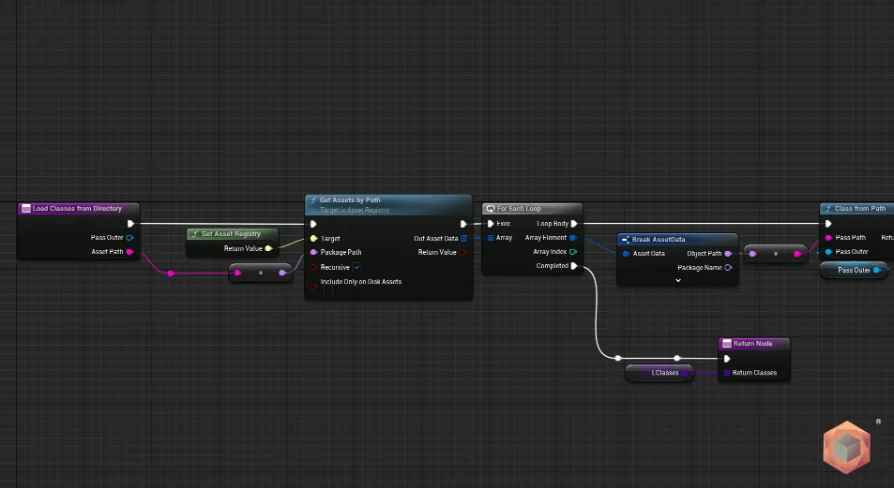
Complex Unreal Engine 5 architectures frequently run into boundary issues between different class types and network boundaries. Dedicated logic handlers, custom data objects, and UI frameworks often reside in non-actor classes that lack direct, built-in access to world context methods. At the same time, network systems require strict execution authority when handling transitions between maps. Clarus Viewer Engine Helpers targets these specific friction points by delivering a targeted suite of utility functions directly into both the Blueprint visual scripting environment and native C++.
Spawning Actors from Non-Actor Blueprints
In standard Unreal Engine development, spawning an actor requires an explicit reference to the current world context. Actor classes possess this context natively, making calls to spawn secondary entities straightforward. Non-actor Blueprints, including standalone objects derived from basic object structures, do not carry that ambient world context. This technical limitation typically forces technical designers to build convoluted pass-through references, relaying commands through player controllers, game modes, or dedicated world actors simply to bring a new entity into the scene.
Clarus Viewer Engine Helpers resolves this structural friction by providing helper functions specifically engineered to spawn actors directly from non-actor Blueprints. These utilities are accessible within both Blueprints and C++, ensuring that projects maintaining a hybrid codebase do not have to duplicate resolution patterns across languages.
By abstracting the retrieval and routing of the relevant world context, the plugin allows non-actor utility components, state managers, and data objects to initiate actor instantiation cleanly. This eliminates the necessity of littering project code with manual context-gathering boilerplate, keeping object-oriented code modular and self-contained.
Managing Config Files in Blueprint and C++ Workflows
Project settings, runtime preferences, and system parameters rely heavily on configuration files to persist values across sessions and initialize software states without hardcoded values. While Unreal Engine maintains an extensive internal config hierarchy, manipulating configuration parameters purely through visual scripting can be restrictive without dedicated helper libraries.
The plugin equips developers with functions to manage Config files across both Blueprint and C++ workflows. Exposing configuration management routines to Blueprints opens up direct read and write pathways for technical artists and designers who build runtime interfaces, diagnostic tools, or project setup menus without needing to compile native code for every setting alteration.
Teams leveraging native code retain identical functional access in C++, preserving parity across the entire development team. By centralizing config access routines into straightforward helper calls, configuration updates can be executed systematically, helping manage everything from display setups to specialized runtime switches cleanly.
Server-Side Level Loading for Multiplayer Sessions
Networked environments demand absolute precision regarding which machine dictates map changes and level transitions. In multiplayer configurations, leaving level loading logic open to ambiguity can lead to synchronization errors, desynchronized players, or corrupted match states. Authoritative server execution is essential to cleanly transition players between distinct environments or stream in new segments of an active experience.
Included in Clarus Viewer Engine Helpers is a specialized C++ function dedicated to loading levels on the server side for multiplayer projects. Because this utility executes strictly on the native layer, it provides a stable, authoritative baseline for managing network map transitions without relying on brittle client-side signals.
This implementation ensures that level transition commands originate directly from the authoritative server, enabling connected clients to travel seamlessly under proper host synchronization. Projects with dedicated server setups or listen-server architectures can incorporate this function directly into their core networking and session management routines.
Utility Integration Alongside Clarus Viewer Base
Clarus Viewer Engine Helpers operates as a core utility plugin tagged for configuration, actor management, component handling, and spawning workflows. It is designed to work in conjunction with Clarus Viewer Base, augmenting that foundational layer with low-level operational tools that bridge gaps between base engine frameworks and custom application logic.
Rather than attempting to serve as an all-in-one framework that dictates project structure, the plugin functions as a practical toolkit. It slots directly into Unreal Engine 5 projects where developers need to overcome specific operational bottlenecks, such as instantiating game objects from isolated logic layers or managing external text configurations from within visual scripts.
The shared availability of these tools across both C++ and Blueprints ensures that teams do not run into interoperability barriers. Programmers can write performant native backend systems that take advantage of the server-side level loader, while technical designers use the spawning and configuration helpers to build responsive, data-driven interfaces and modular toolsets.
Practical Implementation and Target Roles
Technical designers who spend significant time constructing data systems, interface controllers, or logic handlers out of basic UObject classes benefit immediately from the plugin's actor-spawning capabilities. Instead of relying on workarounds to pull actors into the world from non-actor classes, they can rely on the provided helper library to handle context resolution transparently.
Network engineers and gameplay programmers working on multiplayer titles benefit from the focused server-side level loading utility, which isolates map changes to server authority. Paired with straightforward configuration file handlers that operate seamlessly across C++ and Blueprints, Clarus Viewer Engine Helpers delivers a compact, purposeful set of tools tailored for technical development teams working within the Clarus Viewer Base ecosystem.
 Game Mechanics
 Game Mechanics
 Game Mechanics
 Game Mechanics