"4481da9c895ef786"{"id":"1001319","slug":"clarus-viewer-asset-support","title":"Clarus Viewer Asset Support","category":"Engine Tools","engine":"5.3","assetVersion":"Asset Version: 1.0","engineVersion":"Engine Version: 5.3","tag":"Engine Tools","accent":"blue","visual":"mech","summary":"Clarus Viewer Asset Support is an Unreal Engine 5 code utility plugin designed to discover classes from project directories and spawn actors dynamically at runt","platform":"Unreal Engine","publishedAt":"2026-10-02T09:40:18.315Z","updatedAt":"2026-10-02T09:40:18.315Z","sourceNotes":[],"fileContents":[],"compatibility":["Unreal Engine","Asset Version: 1.0","Engine Version: 5.3"],"featuredImage":{"alt":"Clarus Viewer Asset Support","src":"/wp-content/uploads/published/2026/10/a794613ae275-2d0a8e2f-d5dc-4e49-ae26-d4898b8a28f9-0ded70fcc3.webp"},"hasDownloadLink":true,"downloads":0,"terms":[{"taxonomy":"category","slug":"engine-tools-tools-and-plugins","name":"Engine Tools"}],"galleryImages":[{"src":"/wp-content/uploads/published/2026/10/cb3968b26b42-d0f00e34-959b-4f24-8c37-64b27321c300-57f9b8cf9a.webp","alt":"Clarus Viewer Asset Support"}],"accessPanel":{"kind":"resource","title":"Download this resource","eyebrow":"Free Download","message":"Log in or create a free account to start your download.","fileName":"Clarus Viewer Asset Support.7z","safetyNote":"Resources are manually reviewed before listing to improve quality and reduce obvious risks.","actionLabel":"Download Free","resourceType":"Resource archive"},"contentHtml":"\u003ch2\u003eHandling Dynamic Content in Interactive Runtime Viewers\u003c/h2\u003e\u003cp\u003eInteractive presentations, technical model showcases, and visualization environments often face a common structural bottleneck during setup: handling an evolving collection of display objects without rebuilding core project levels. When content libraries expand or shift, manually wiring every single object into fixed scene maps or static reference arrays introduces friction. Project maintainers must constantly adjust hard references, test scene transitions, and recompile logic to accommodate simple asset revisions.\u003c/p\u003e\u003cp\u003eClarus Viewer Asset Support addresses this exact operational hurdle. Operating as an Unreal Engine 5 utility plugin, it establishes a pipeline for loading assets dynamically during runtime. Instead of relying entirely on static references configured prior to packaging, the tool focuses on locating classes dynamically and bringing actors into the active environment right when the application initiates execution.\u003c/p\u003e\u003cp\u003eBy removing the requirement for hardcoded level placements, scenes remain clean, modular, and responsive to file-level changes. Interactive applications that rely on modular viewports can point directly toward designated project locations, retrieve target objects, and maintain clean separation between the visual framework and the specific assets being inspected.\u003c/p\u003e\u003ch2\u003eDirectory-Based Class Discovery in Unreal Engine 5\u003c/h2\u003e\u003cp\u003eThe core mechanic of Clarus Viewer Asset Support centers on automated class discovery mapped across a given project directory. Rather than forcing developers to assemble long, explicit arrays of asset paths, the system inspects directory paths directly to locate relevant classes. This approach creates an organized workflow where adding new project items involves placing them into the designated folder structure rather than updating gameplay framework lists.\u003c/p\u003e\u003cp\u003eScanning a project folder at runtime shifts the maintenance burden away from manual data entry. In standard static workflows, every new actor subclass must be cataloged inside a data table, an array property, or placed directly in the persistent level editor. When multiple team members add or update assets, conflicts over shared level files or central registry assets become routine. Searching across a target directory allows projects to compartmentalize new content naturally.\u003c/p\u003e\u003cp\u003eThis directory-focused logic also makes iterative testing significantly more direct. When a technical artist or developer creates a new class variant, that item becomes visible to the runtime loading mechanism simply by existing within the designated path. The plugin searches the target project folder, identifies the classes contained within it, and prepares those assets for immediate use by the host program.\u003c/p\u003e\u003ch2\u003eFiltering Actor Types and Spawning at Program Start\u003c/h2\u003e\u003cp\u003eDiscovering classes inside a directory is only the first stage of dynamic scene setup; those classes must also correspond to the exact object categories required by the application. Clarus Viewer Asset Support allows projects to target a specific type of actor during the discovery phase. This type-based filtering ensures that general helper objects, internal utilities, or unrelated scene elements residing in the project hierarchy are not mistakenly treated as display candidates.\u003c/p\u003e\u003cp\u003eOnce the plugin finds the relevant classes matching the requested actor type, it spawns them as needed at the start of the program. Executing this process right at application launch provides a reliable baseline for the interactive session. The active scene initializes its required actors cleanly, ensuring that dynamic objects are fully realized in the world before user interaction begins.\u003c/p\u003e\u003cp\u003eSpawning actors on demand at program launch introduces notable runtime benefits:\u003c/p\u003e\u003cul\u003e\u003cli\u003eEliminates the need to hand-place dozens of individual actor instances across staging levels.\u003c/li\u003e\u003cli\u003eEnsures that only valid, matched actor classes are instantiated into the active scene.\u003c/li\u003e\u003cli\u003eMaintains consistent spatial and logical initialization timing right when the session opens.\u003c/li\u003e\u003cli\u003eAllows project directories to dictate runtime presence without persistent level re-saves.\u003c/li\u003e\u003c/ul\u003e\u003cp\u003eBy coordinating class discovery with selective startup spawning, the plugin automates the heavy lifting of project staging. The viewport or environment populates reliably based on whatever assets meet the directory and actor type criteria.\u003c/p\u003e\u003ch2\u003ePairing with Clarus Viewer Base in Runtime Environments\u003c/h2\u003e\u003cp\u003eClarus Viewer Asset Support is engineered to integrate with Clarus Viewer Base, functioning as a dedicated companion code plugin. Clarus Viewer Base provides the viewing foundation, while Clarus Viewer Asset Support supplies the dynamic runtime loading and class management logic needed to feed content into that viewer framework.\u003c/p\u003e\u003cp\u003eTreating dynamic asset support as a distinct utility plugin provides clean architectural boundaries within an Unreal Engine 5 project. Code utilities built for specific runtime tasks reduce unnecessary coupling across complex systems. Instead of embedding custom asset discovery scripts directly into general gameplay logic or hardcoding viewer widgets, developers can leverage this focused plugin to govern how assets enter the scene.\u003c/p\u003e\u003cp\u003eBecause it is categorized under utility code and runtime plugins, the system focuses strictly on execution efficiency. Unreal Engine 5 handles complex asset streaming and actor lifecycles under the hood; having a specialized utility to scan directories, verify actor types, and spawn instances ensures that dynamic runtime behavior remains predictable across successive program launches.\u003c/p\u003e\u003ch2\u003eProjects and Teams Benefiting Most from Dynamic Asset Spawning\u003c/h2\u003e\u003cp\u003eTeams building visual review suites, technical configurators, and asset evaluation tools stand to gain the most utility from Clarus Viewer Asset Support. In production setups where 3D models or functional actors are reviewed on a recurring basis, spending engineering hours wiring individual items into interactive inspection rooms is inefficient. Setting up an automated ingest point where a project directory automatically informs what spawns at program start saves substantial setup time.\u003c/p\u003e\u003cp\u003eIndependent technical creators building standalone viewers around the Clarus Viewer Base ecosystem can maintain an agile structure. Because the plugin manages the runtime discovery of specified actor classes, developers do not need to architect custom runtime file-parsing code or manage complex manual registration tables. Assets organized into designated project folders simply populate the environment on startup, keeping the visual pipeline fast, organized, and structurally clean.\u003c/p\u003e\n\n\u003ch2\u003eContinue Browsing Similar Packs\u003c/h2\u003e\n\u003cul\u003e\n\u003cli\u003e\u003ca href=\"https://3dcghub.com/pdf-viewer/\" title=\"PDF Viewer\"\u003ePDF Viewer\u003c/a\u003e\u003c/li\u003e\n\u003cli\u003e\u003ca href=\"https://3dcghub.com/clarus-viewer-engine-helpers/\" title=\"Clarus Viewer Engine Helpers\"\u003eClarus Viewer Engine Helpers\u003c/a\u003e\u003c/li\u003e\n\u003cli\u003e\u003ca href=\"https://3dcghub.com/log-viewer/\" title=\"Log Viewer\"\u003eLog Viewer\u003c/a\u003e\u003c/li\u003e\n\u003cli\u003e\u003ca href=\"https://3dcghub.com/externaltextureplugin/\" title=\"ExternalTexturePlugin\"\u003eExternalTexturePlugin\u003c/a\u003e\u003c/li\u003e\n\u003cli\u003e\u003ca href=\"https://3dcghub.com/easy-pose/\" title=\"Easy Pose\"\u003eEasy Pose\u003c/a\u003e\u003c/li\u003e\n\u003c/ul\u003e","contentTextLength":6744,"navigation":{"current":21,"total":3269,"previous":{"id":"1001320","slug":"clarus-viewer-base","title":"Clarus Viewer Base","category":"Engine Tools","platform":"Unreal Engine","updatedAt":"2026-10-02T09:43:29.741Z"},"next":{"id":"1001316","slug":"action-camera-manager-2","title":"Action Camera Manager","category":"Gameplay Features","platform":"Unreal Engine","updatedAt":"2026-10-02T09:07:50.866Z"}},"relatedResources":[{"id":"1001320","slug":"clarus-viewer-base","title":"Clarus Viewer Base","category":"Engine Tools","engine":"5.3","assetVersion":"Asset Version: 1.0","engineVersion":"Engine Version: 5.3","tag":"Engine Tools","accent":"blue","visual":"mech","summary":"An Unreal Engine VR cursor template plugin providing desktop-style interaction, multi-state controller events, and OpenXR integration for immersive tools.","platform":"Unreal Engine","publishedAt":"2026-10-02T09:43:29.741Z","updatedAt":"2026-10-02T09:43:29.741Z","sourceNotes":[],"fileContents":[],"compatibility":["Unreal Engine","Asset Version: 1.0","Engine Version: 5.3"],"featuredImage":{"alt":"Clarus Viewer Base","src":"/wp-content/uploads/published/2026/10/e1036c203ffa-be885b04-3a0b-4a55-b5f7-fc40627788e8-14fba6f564.webp"},"hasDownloadLink":true,"downloads":0},{"id":"14345","slug":"pdf-viewer","title":"PDF Viewer","category":"Engine Tools","engine":"5.0 - 5.3","assetVersion":"Engine version: 5.0 - 5.3","engineVersion":"5.0","tag":"Engine Tools","accent":"blue","visual":"mech","summary":"Integrate high-quality PDF documents into your Unreal Engine projects with ease. This plugin supports multiple platforms and offers both Blueprint and C++ compatibility for seamless workflow integration.","platform":"Unreal Engine","publishedAt":"2026-03-11T17:44:03.000Z","updatedAt":"2026-04-19T15:45:48.000Z","sourceNotes":[],"fileContents":[],"compatibility":["Unreal Engine","Engine version: 5.0 - 5.3"],"featuredImage":{"alt":"PDF Viewer","src":"https://3dcghub.com/wp-content/uploads/2026/03/089b9684-3e82-4832-b142-372a0d91ddd0.webp"},"hasDownloadLink":true,"downloads":0},{"id":"1001273","slug":"clarus-viewer-engine-helpers","title":"Clarus Viewer Engine Helpers","category":"Game Mechanics","engine":"5.3","assetVersion":"Asset Version: 1.0","engineVersion":"Engine Version: 5.3","tag":"Game Mechanics","accent":"blue","visual":"mech","summary":"Examine Clarus Viewer Engine Helpers, an Unreal Engine 5 plugin providing Blueprint and C++ utilities for actor spawning, configs, and server level loading.","platform":"Unreal Engine","publishedAt":"2026-09-30T06:01:27.282Z","updatedAt":"2026-09-30T06:01:27.282Z","sourceNotes":[],"fileContents":[],"compatibility":["Unreal Engine","Asset Version: 1.0","Engine Version: 5.3"],"featuredImage":{"alt":"Clarus Viewer Engine Helpers","src":"/wp-content/uploads/published/2026/09/68f2cb931307-6c4325b4-495f-4aeb-95fe-350c6a3d6413-e1e5a7a8aa.webp"},"hasDownloadLink":true,"downloads":0}]}
Engine Tools
Clarus Viewer Asset Support
Clarus Viewer Asset Support is an Unreal Engine 5 code utility plugin designed to discover classes from project directories and spawn actors dynamically at runt
Handling Dynamic Content in Interactive Runtime Viewers
Interactive presentations, technical model showcases, and visualization environments often face a common structural bottleneck during setup: handling an evolving collection of display objects without rebuilding core project levels. When content libraries expand or shift, manually wiring every single object into fixed scene maps or static reference arrays introduces friction. Project maintainers must constantly adjust hard references, test scene transitions, and recompile logic to accommodate simple asset revisions.
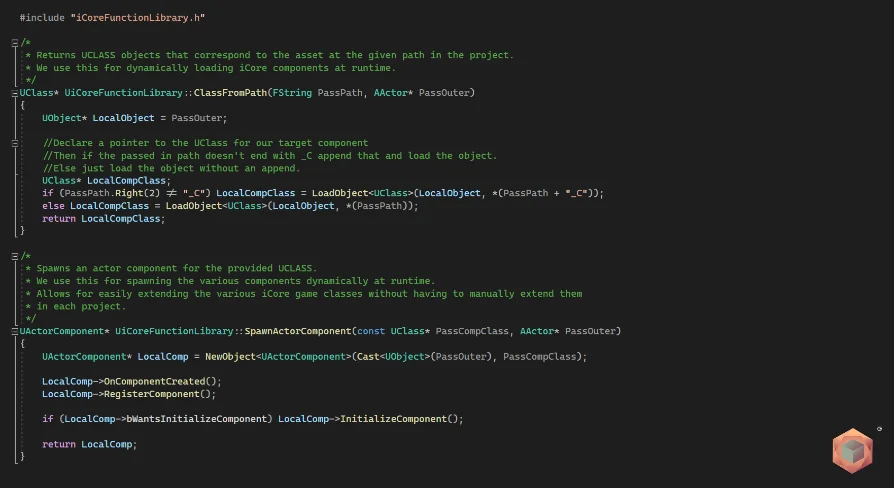
Clarus Viewer Asset Support addresses this exact operational hurdle. Operating as an Unreal Engine 5 utility plugin, it establishes a pipeline for loading assets dynamically during runtime. Instead of relying entirely on static references configured prior to packaging, the tool focuses on locating classes dynamically and bringing actors into the active environment right when the application initiates execution.
By removing the requirement for hardcoded level placements, scenes remain clean, modular, and responsive to file-level changes. Interactive applications that rely on modular viewports can point directly toward designated project locations, retrieve target objects, and maintain clean separation between the visual framework and the specific assets being inspected.
Directory-Based Class Discovery in Unreal Engine 5
The core mechanic of Clarus Viewer Asset Support centers on automated class discovery mapped across a given project directory. Rather than forcing developers to assemble long, explicit arrays of asset paths, the system inspects directory paths directly to locate relevant classes. This approach creates an organized workflow where adding new project items involves placing them into the designated folder structure rather than updating gameplay framework lists.
Scanning a project folder at runtime shifts the maintenance burden away from manual data entry. In standard static workflows, every new actor subclass must be cataloged inside a data table, an array property, or placed directly in the persistent level editor. When multiple team members add or update assets, conflicts over shared level files or central registry assets become routine. Searching across a target directory allows projects to compartmentalize new content naturally.
This directory-focused logic also makes iterative testing significantly more direct. When a technical artist or developer creates a new class variant, that item becomes visible to the runtime loading mechanism simply by existing within the designated path. The plugin searches the target project folder, identifies the classes contained within it, and prepares those assets for immediate use by the host program.
Filtering Actor Types and Spawning at Program Start
Discovering classes inside a directory is only the first stage of dynamic scene setup; those classes must also correspond to the exact object categories required by the application. Clarus Viewer Asset Support allows projects to target a specific type of actor during the discovery phase. This type-based filtering ensures that general helper objects, internal utilities, or unrelated scene elements residing in the project hierarchy are not mistakenly treated as display candidates.
Once the plugin finds the relevant classes matching the requested actor type, it spawns them as needed at the start of the program. Executing this process right at application launch provides a reliable baseline for the interactive session. The active scene initializes its required actors cleanly, ensuring that dynamic objects are fully realized in the world before user interaction begins.
Spawning actors on demand at program launch introduces notable runtime benefits:
Eliminates the need to hand-place dozens of individual actor instances across staging levels.
Ensures that only valid, matched actor classes are instantiated into the active scene.
Maintains consistent spatial and logical initialization timing right when the session opens.
Allows project directories to dictate runtime presence without persistent level re-saves.
By coordinating class discovery with selective startup spawning, the plugin automates the heavy lifting of project staging. The viewport or environment populates reliably based on whatever assets meet the directory and actor type criteria.
Pairing with Clarus Viewer Base in Runtime Environments
Clarus Viewer Asset Support is engineered to integrate with Clarus Viewer Base, functioning as a dedicated companion code plugin. Clarus Viewer Base provides the viewing foundation, while Clarus Viewer Asset Support supplies the dynamic runtime loading and class management logic needed to feed content into that viewer framework.
Treating dynamic asset support as a distinct utility plugin provides clean architectural boundaries within an Unreal Engine 5 project. Code utilities built for specific runtime tasks reduce unnecessary coupling across complex systems. Instead of embedding custom asset discovery scripts directly into general gameplay logic or hardcoding viewer widgets, developers can leverage this focused plugin to govern how assets enter the scene.
Because it is categorized under utility code and runtime plugins, the system focuses strictly on execution efficiency. Unreal Engine 5 handles complex asset streaming and actor lifecycles under the hood; having a specialized utility to scan directories, verify actor types, and spawn instances ensures that dynamic runtime behavior remains predictable across successive program launches.
Projects and Teams Benefiting Most from Dynamic Asset Spawning
Teams building visual review suites, technical configurators, and asset evaluation tools stand to gain the most utility from Clarus Viewer Asset Support. In production setups where 3D models or functional actors are reviewed on a recurring basis, spending engineering hours wiring individual items into interactive inspection rooms is inefficient. Setting up an automated ingest point where a project directory automatically informs what spawns at program start saves substantial setup time.
Independent technical creators building standalone viewers around the Clarus Viewer Base ecosystem can maintain an agile structure. Because the plugin manages the runtime discovery of specified actor classes, developers do not need to architect custom runtime file-parsing code or manage complex manual registration tables. Assets organized into designated project folders simply populate the environment on startup, keeping the visual pipeline fast, organized, and structurally clean.
 Engine Tools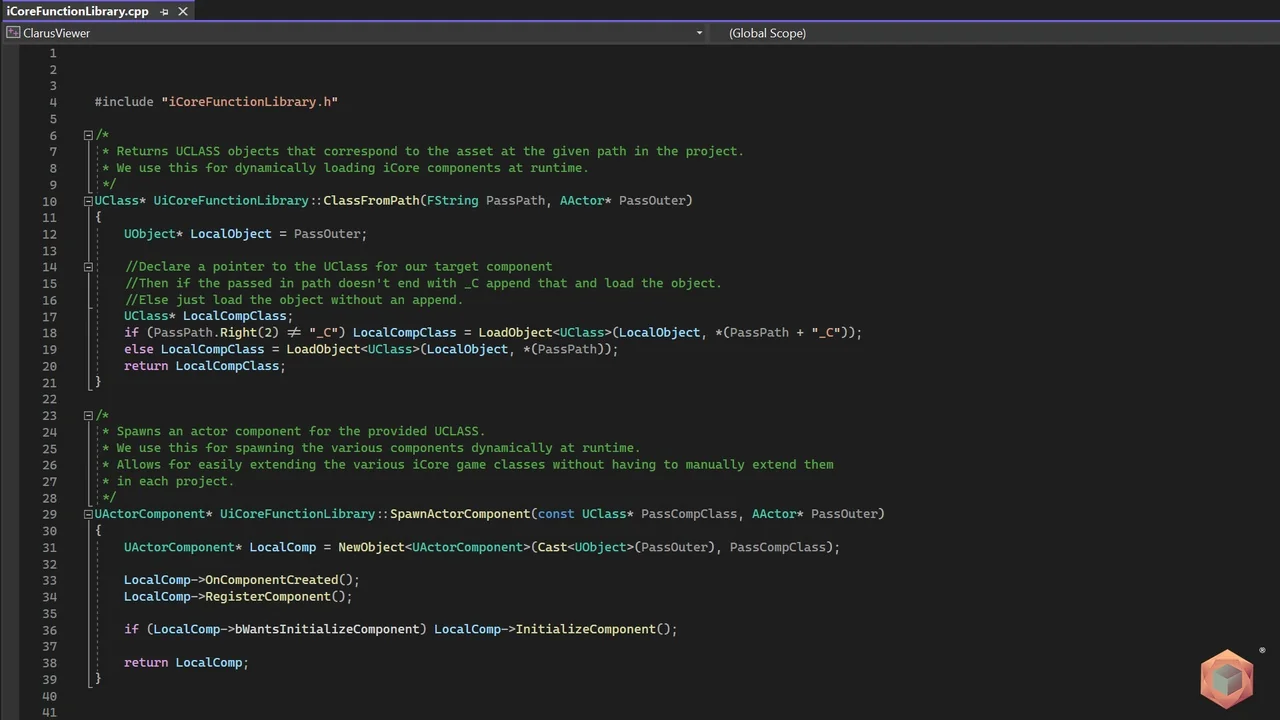
 Engine Tools
 Engine Tools
 Game Mechanics