"7066dd76da796369"{"id":"14345","slug":"pdf-viewer","title":"PDF Viewer","category":"Engine Tools","engine":"5.0 - 5.3","assetVersion":"Engine version: 5.0 - 5.3","engineVersion":"5.0","tag":"Engine Tools","accent":"blue","visual":"mech","summary":"Integrate high-quality PDF documents into your Unreal Engine projects with ease. This plugin supports multiple platforms and offers both Blueprint and C++ compatibility for seamless workflow integration.","platform":"Unreal Engine","publishedAt":"2026-03-11T17:44:03.000Z","updatedAt":"2026-04-19T15:45:48.000Z","sourceNotes":[],"fileContents":[],"compatibility":["Unreal Engine","Engine version: 5.0 - 5.3"],"featuredImage":{"alt":"PDF Viewer","src":"https://3dcghub.com/wp-content/uploads/2026/03/089b9684-3e82-4832-b142-372a0d91ddd0.webp"},"hasDownloadLink":true,"downloads":0,"terms":[{"taxonomy":"category","slug":"engine-tools-tools-and-plugins","name":"Engine Tools"},{"taxonomy":"post_tag","slug":"blueprint","name":"Blueprint"},{"taxonomy":"post_tag","slug":"cross-platform-pdf","name":"Cross-platform PDF"},{"taxonomy":"post_tag","slug":"plugins","name":"Plugins"},{"taxonomy":"post_tag","slug":"tools","name":"Tools"},{"taxonomy":"post_tag","slug":"unreal-engine-5","name":"Unreal Engine 5"},{"taxonomy":"post_tag","slug":"utilities","name":"Utilities"}],"galleryImages":[{"src":"https://3dcghub.com/wp-content/uploads/2026/03/a2a51f0905b7_d428d6be-b95c-4cdd-b918-15ffec3ef991.webp","alt":"PDF Viewer"},{"src":"https://3dcghub.com/wp-content/uploads/2026/03/6ee8d19e132e_49ed3eb9-b449-49a5-b1f8-8ada85c54185.webp","alt":"PDF Viewer"},{"src":"https://3dcghub.com/wp-content/uploads/2026/03/b702e1d0143c_4dbebead-dd16-4ed6-b351-01954fa50378.webp","alt":"PDF Viewer"},{"src":"https://3dcghub.com/wp-content/uploads/2026/03/5af3b4739fa6_ea05b8d7-1252-4fcf-b766-9c0fbffd98c7.webp","alt":"PDF Viewer"},{"src":"https://3dcghub.com/wp-content/uploads/2026/03/8d9637e64266_51c5a366-4900-4adb-a90c-a0ae49d3fa1b.webp","alt":"PDF Viewer"},{"src":"https://3dcghub.com/wp-content/uploads/2026/03/635246867ec3_f423089a-a0ec-43f2-a3bf-e3d52be96133.webp","alt":"PDF Viewer"},{"src":"https://3dcghub.com/wp-content/uploads/2026/03/4fa4c8fca96e_4aa4d180-336e-4b7f-a79c-6f21cfb88f45.webp","alt":"PDF Viewer"},{"src":"https://3dcghub.com/wp-content/uploads/2026/03/6b54c1847d12_94f4eccd-3705-4a00-8a4d-631e68f2a4bc.webp","alt":"PDF Viewer"},{"src":"https://3dcghub.com/wp-content/uploads/2026/03/8d05ff0ea93f_af99d520-e3cb-478d-be83-46f8c2989d91.webp","alt":"PDF Viewer"},{"src":"https://3dcghub.com/wp-content/uploads/2026/03/2ef26043b22d_54c97ee5-dc6a-44f8-b14c-2a02b686e70d.webp","alt":"PDF Viewer"},{"src":"https://3dcghub.com/wp-content/uploads/2026/03/c39f7db5dcc4_6a5a6ecb-d5e9-4b52-8738-a2b0a9bad918.webp","alt":"PDF Viewer"}],"accessPanel":{"kind":"resource","title":"Access this resource","eyebrow":"Free Download","message":"Log in or create a free account to start your download.","fileName":"PDFViewer 5.0 - 5.3.7z","safetyNote":"All resources are 100% manually reviewed to eliminate all risks.","actionLabel":"Download Free","resourceType":"Resource archive"},"contentHtml":"\u003ch2\u003eSeamless PDF Integration for Unreal Engine\u003c/h2\u003e\n\u003cp\u003eThe PDF Viewer plugin for Unreal Engine provides a comprehensive solution for developers who need to display documents within their projects. Whether you want to create immersive in-game manuals or incorporate real-world references, this tool offers the necessary functionality. Moreover, it eliminates the need for convoluted workarounds that often complicate the development process.\u003c/p\u003e\n\n\u003cp\u003eBecause of that, the plugin ensures that importing PDFs into your project is a straightforward task. The developer has designed this tool to be accessible for various project types. Therefore, you can focus on creating content rather than managing technical hurdles related to document rendering.\u003c/p\u003e\n\n\u003ch2\u003eVersatile Loading and Data Support\u003c/h2\u003e\n\u003cp\u003eA key advantage of the PDF Viewer is its flexible data handling. Specifically, users can load PDF content from external files or directly from the internet. This capability allows for dynamic updates and real-time document fetching within your application. Furthermore, the plugin supports loading PDFs from binary sources, which gives developers full control over their content management.\u003c/p\u003e\n\n\u003cp\u003eTo assist with the setup process, the creator provides a demo video and detailed documentation. These resources help developers get started quickly. As a result, you can implement document viewing features with minimal downtime.\u003c/p\u003e\n\n\u003ch2\u003eOptimized Performance with Async APIs\u003c/h2\u003e\n\u003cp\u003ePerformance is a critical factor in any Unreal Engine project. Because of this, the plugin includes both asynchronous and synchronous API options. Choosing the asynchronous API allows for smooth PDF loading without compromising the application's frame rate. Alternatively, the synchronous API is available for situations where immediate data processing is required.\u003c/p\u003e\n\n\u003cp\u003eBy prioritizing responsiveness, the PDF Viewer ensures a high-quality user experience. Players or users will not encounter unexpected stutters while the system processes document data. Thus, the plugin remains an efficient choice for performance-heavy applications.\u003c/p\u003e\n\n\u003ch2\u003eCross-Platform Compatibility and Features\u003c/h2\u003e\n\u003cp\u003eThe plugin is designed to work across a wide range of operating systems. Currently, it supports the following platforms:\u003c/p\u003e\n\u003cul\u003e\n \u003cli\u003eWindows\u003c/li\u003e\n \u003cli\u003eMacOS\u003c/li\u003e\n \u003cli\u003eLinux\u003c/li\u003e\n \u003cli\u003eAndroid\u003c/li\u003e\n \u003cli\u003eiOS\u003c/li\u003e\n\u003c/ul\u003e\n\n\u003cp\u003eIn addition to document viewing, the plugin offers high-quality image extraction. This feature allows you to retrieve images from PDFs and incorporate them directly into your Unreal Engine projects. Such versatility makes it a valuable asset for UI design and texture management.\u003c/p\u003e\n\n\u003ch2\u003eBlueprint and C++ Integration\u003c/h2\u003e\n\u003cp\u003eThe PDF Viewer is built to be accessible to all developers, regardless of their coding preference. It fully integrates with both C++ and Blueprints. Therefore, seasoned C++ developers can utilize the plugin's underlying logic, while others can enjoy the visual simplicity of the Blueprint system. This dual support ensures that the tool fits seamlessly into any existing workflow.\u003c/p\u003e\n\n\u003cp\u003eIn practice, this plugin provides a robust and flexible way to handle documents in Unreal Engine. With its cross-platform support and performance-oriented API, it remains a top choice for developers needing reliable PDF integration.\u003c/p\u003e\n\n\u003ch2\u003eRelated Resources Worth Checking\u003c/h2\u003e\n\u003cul\u003e\n\u003cli\u003e\u003ca href=\"https://3dcghub.com/extile-plus-ultimate-non-tiling-material-toolkit-for-unreal-engine-environments/\" title=\"EXTILE PLUS -Ultimate Non-Tiling Material Toolkit for Unreal Engine Environments\"\u003eEXTILE PLUS -Ultimate Non-Tiling Material Toolkit for Unreal Engine Environments\u003c/a\u003e\u003c/li\u003e\n\u003cli\u003e\u003ca href=\"https://3dcghub.com/ultimate-template-unrealengine-2d-dialogue-inventory-system-save/\" title=\"ULTIMATE Template UnrealEngine || 2D + Dialogue + Inventory system + Save | |\"\u003eULTIMATE Template UnrealEngine || 2D + Dialogue + Inventory system + Save | |\u003c/a\u003e\u003c/li\u003e\n\u003cli\u003e\u003ca href=\"https://3dcghub.com/daz-to-unreal/\" title=\"Daz To Unreal\"\u003eDaz To Unreal\u003c/a\u003e\u003c/li\u003e\n\u003cli\u003e\u003ca href=\"https://3dcghub.com/blueprint-generator-ai-kibibyte-labs-engine-assistant/\" title=\"Blueprint Generator Ai – Kibibyte Labs (Engine Assistant)\"\u003eBlueprint Generator Ai – Kibibyte Labs (Engine Assistant)\u003c/a\u003e\u003c/li\u003e\n\u003cli\u003e\u003ca href=\"https://3dcghub.com/sci-fi-environment-engine-room/\" title=\"Sci-fi Environment Engine Room\"\u003eSci-fi Environment Engine Room\u003c/a\u003e\u003c/li\u003e\n\u003c/ul\u003e","contentTextLength":3498,"navigation":{"current":3387,"total":4016,"previous":{"id":"14282","slug":"narrative-tales-node-based-quests-and-dialogue","title":"Narrative Tales - Node Based Quests and Dialogue","category":"Engine Tools","platform":"Unreal Engine","updatedAt":"2026-04-19T15:45:49.000Z"},"next":{"id":"14331","slug":"pbl-database","title":"PBL Database","category":"Engine Tools","platform":"Unreal Engine","updatedAt":"2026-04-19T15:45:48.000Z"}},"relatedResources":[{"id":"1002058","slug":"html-menus-and-pdf-viewer-browser-plugin","title":"HTML Menus and PDF viewer Browser Plugin","category":"Engine Tools","engine":"4.18","assetVersion":"Asset Version: 1.0","engineVersion":"Engine Version: 4.18","tag":"Engine Tools","accent":"blue","visual":"mech","summary":"Build user interfaces, inventory systems, and documents in Unreal Engine using HTML, CSS, JavaScript, and an integrated PDF viewer.","platform":"Unreal Engine","publishedAt":"2026-10-26T15:15:33.420Z","updatedAt":"2026-10-26T15:15:33.420Z","sourceNotes":[],"fileContents":[],"compatibility":["Unreal Engine","Asset Version: 1.0","Engine Version: 4.18"],"featuredImage":{"alt":"HTML Menus and PDF viewer Browser Plugin","src":"/wp-content/uploads/published/2026/10/b545cf92850e-8780ee77-0abf-44d3-b495-291f47de066e-8a6e53dd1a.webp"},"hasDownloadLink":true,"downloads":0},{"id":"13982","slug":"externaltextureplugin","title":"ExternalTexturePlugin","category":"Engine Tools","engine":"5.0 - 5.8","assetVersion":"Asset Version:1.0.1 - 1.0.2","engineVersion":"Engine version: 5.0 - 5.8","tag":"Engine Tools","accent":"blue","visual":"luts","summary":"The ExternalTexturePlugin provides a seamless way to integrate local and network-based images into your project at runtime using Blueprints. It supports standard formats like JPG, PNG, TGA, and BMP.","platform":"Unreal Engine","publishedAt":"2026-03-11T10:54:44.000Z","updatedAt":"2026-09-29T09:03:01.541Z","sourceNotes":[],"fileContents":[],"compatibility":["Unreal Engine","Asset Version:1.0.1 - 1.0.2","Engine version: 5.0 - 5.8"],"featuredImage":{"alt":"ExternalTexturePlugin","src":"https://3dcghub.com/wp-content/uploads/2026/03/cf5764e9-fff8-49cf-b24b-274e326c864f.webp"},"hasDownloadLink":true,"downloads":1},{"id":"14379","slug":"quick-merge-skeletal-mesh","title":"Quick Merge Skeletal Mesh","category":"Engine Tools","engine":"5.4 - 5.8","assetVersion":"Asset Version:1.0","engineVersion":"Engine version: 5.4 - 5.8","tag":"Engine Tools","accent":"blue","visual":"character","summary":"Streamline your Unreal Engine 5 workflow by combining multiple skeletal meshes into a single asset. This tool ensures efficient asset management while maintaining skeleton consistency across your project.","platform":"Unreal Engine","publishedAt":"2026-03-11T17:51:53.000Z","updatedAt":"2026-09-07T14:11:56.503Z","sourceNotes":[],"fileContents":[],"compatibility":["Unreal Engine","Asset Version:1.0","Engine version: 5.4 - 5.8"],"featuredImage":{"alt":"Quick Merge Skeletal Mesh","src":"https://3dcghub.com/wp-content/uploads/2026/03/8b1e8a33-5fdf-4566-af9c-54f93949ddf6.webp"},"hasDownloadLink":true,"downloads":2}]}
Engine Tools
PDF Viewer
Integrate high-quality PDF documents into your Unreal Engine projects with ease. This plugin supports multiple platforms and offers both Blueprint and C++ compatibility for seamless workflow integration.
The PDF Viewer plugin for Unreal Engine provides a comprehensive solution for developers who need to display documents within their projects. Whether you want to create immersive in-game manuals or incorporate real-world references, this tool offers the necessary functionality. Moreover, it eliminates the need for convoluted workarounds that often complicate the development process.
Because of that, the plugin ensures that importing PDFs into your project is a straightforward task. The developer has designed this tool to be accessible for various project types. Therefore, you can focus on creating content rather than managing technical hurdles related to document rendering.
Versatile Loading and Data Support
A key advantage of the PDF Viewer is its flexible data handling. Specifically, users can load PDF content from external files or directly from the internet. This capability allows for dynamic updates and real-time document fetching within your application. Furthermore, the plugin supports loading PDFs from binary sources, which gives developers full control over their content management.
To assist with the setup process, the creator provides a demo video and detailed documentation. These resources help developers get started quickly. As a result, you can implement document viewing features with minimal downtime.
Optimized Performance with Async APIs
Performance is a critical factor in any Unreal Engine project. Because of this, the plugin includes both asynchronous and synchronous API options. Choosing the asynchronous API allows for smooth PDF loading without compromising the application's frame rate. Alternatively, the synchronous API is available for situations where immediate data processing is required.
By prioritizing responsiveness, the PDF Viewer ensures a high-quality user experience. Players or users will not encounter unexpected stutters while the system processes document data. Thus, the plugin remains an efficient choice for performance-heavy applications.
Cross-Platform Compatibility and Features
The plugin is designed to work across a wide range of operating systems. Currently, it supports the following platforms:
Windows
MacOS
Linux
Android
iOS
In addition to document viewing, the plugin offers high-quality image extraction. This feature allows you to retrieve images from PDFs and incorporate them directly into your Unreal Engine projects. Such versatility makes it a valuable asset for UI design and texture management.
Blueprint and C++ Integration
The PDF Viewer is built to be accessible to all developers, regardless of their coding preference. It fully integrates with both C++ and Blueprints. Therefore, seasoned C++ developers can utilize the plugin's underlying logic, while others can enjoy the visual simplicity of the Blueprint system. This dual support ensures that the tool fits seamlessly into any existing workflow.
In practice, this plugin provides a robust and flexible way to handle documents in Unreal Engine. With its cross-platform support and performance-oriented API, it remains a top choice for developers needing reliable PDF integration.
 Engine Tools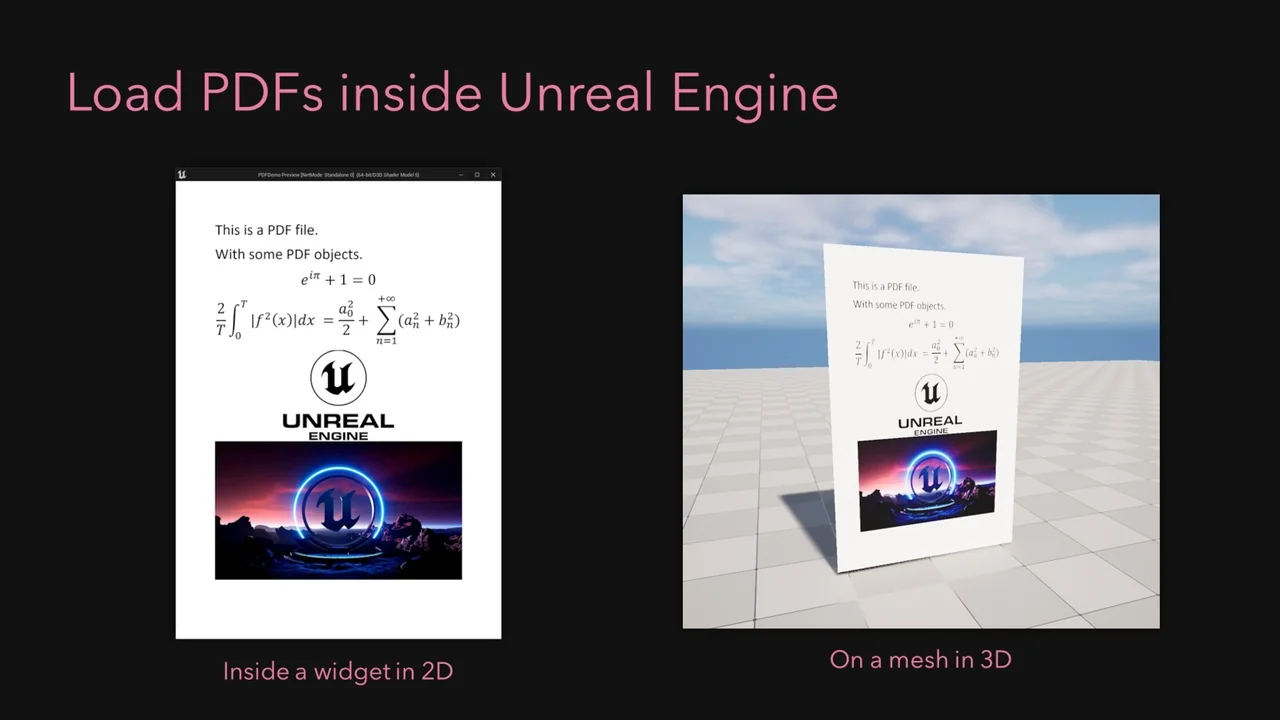
 Engine Tools
 Engine Tools
 Engine Tools