"7066dd76da796369"{"id":"1000726","slug":"basic-interaction-widgets-and-notes","title":"Basic Interaction, Widgets \u0026 Notes","category":"Gameplay Features","engine":"5.0+","assetVersion":"","engineVersion":"Engine Version: 5.0+","tag":"Gameplay Features","accent":"blue","visual":"mech","summary":"A blueprint-based Unreal Engine interaction system with press and hold widgets, example actors, and network replication for gameplay scenes.","platform":"Unreal Engine","publishedAt":"2026-07-26T15:33:40.078Z","updatedAt":"2026-07-26T15:33:40.078Z","sourceNotes":[],"fileContents":[],"compatibility":["Unreal Engine","Engine Version: 5.0+"],"featuredImage":{"alt":"Basic Interaction, Widgets \u0026 Notes","src":"/wp-content/uploads/published/2026/07/a7232b4177d4-876727ec-4e15-4101-936f-eea050f73e2e-c57e0b2af6.webp"},"hasDownloadLink":true,"downloads":0,"terms":[{"taxonomy":"category","slug":"gameplay-features","name":"Gameplay Features"}],"galleryImages":[{"src":"/wp-content/uploads/published/2026/07/96c0afa4293e-0801616c-d512-463a-9db8-37ecde451b2e-1f26d2ab4b.webp","alt":"Basic Interaction, Widgets \u0026 Notes"},{"src":"/wp-content/uploads/published/2026/07/fb6746003e22-c73c7a96-a4f6-4fe9-ae9e-7c789a3e4f63-eea7c18b3c.webp","alt":"Basic Interaction, Widgets \u0026 Notes"},{"src":"/wp-content/uploads/published/2026/07/77ac223fee60-4f086784-e0e0-4aac-84e5-d10f44bb6318-7e6421ee9a.webp","alt":"Basic Interaction, Widgets \u0026 Notes"},{"src":"/wp-content/uploads/published/2026/07/361ddea92f72-e61b8f69-ad2f-4f3d-b76b-bb68b6cececd-523b4eb545.webp","alt":"Basic Interaction, Widgets \u0026 Notes"},{"src":"/wp-content/uploads/published/2026/07/a56cbf9c3730-40987a85-c8ab-4b59-af33-64b772e3f48d-a78a621fbc.webp","alt":"Basic Interaction, Widgets \u0026 Notes"},{"src":"/wp-content/uploads/published/2026/07/d4242a1cf651-15468c42-c54f-4aa0-8da1-ae468ef1a378-dbffb0a8f6.webp","alt":"Basic Interaction, Widgets \u0026 Notes"},{"src":"/wp-content/uploads/published/2026/07/030dc79181e9-4e859bce-0365-4278-8cf9-14ae665894f8-3ed5bf7b02.webp","alt":"Basic Interaction, Widgets \u0026 Notes"},{"src":"/wp-content/uploads/published/2026/07/cc9687f7aa69-a7501f14-81bf-4f3b-b55f-65f3eb1b3bf5-20c034c3ae.webp","alt":"Basic Interaction, Widgets \u0026 Notes"}],"accessPanel":{"kind":"resource","title":"Download this resource","eyebrow":"Free Download","message":"Log in or create a free account to start your download.","fileName":"Content.7z","safetyNote":"Resources are manually reviewed before listing to improve quality and reduce obvious risks.","actionLabel":"Download Free","resourceType":"Resource archive"},"contentHtml":"\u003ch2\u003eScenes Structured Through Touchable Objects\u003c/h2\u003e\n\u003cp\u003eRooms in games often need more than static props to feel inhabited. A pendant lamp should switch on when touched, a door should swing open at the player's command, scattered notes should deliver text or audio logs, and ammo or key items should lift into the character's hands. Basic Interaction, Widgets \u0026amp; Notes supplies the mechanical backbone for exactly those moments, giving developers a component-driven way to turn ordinary level geometry into responsive gameplay objects without writing custom C++ classes for each one.\u003c/p\u003e\n\n\u003cp\u003eThe package frames interaction as a modular component rather than a monolithic system. Because everything lives inside Blueprints, a technical artist or level designer can open the logic, read the node graph, and see exactly how a press or hold event routes into a lamp's light toggle or a door's Timeline. This transparency matters when a project needs subtle adjustments—holding a widget longer before a pickup registers, or changing the moment a note begins playback—and the asset keeps that workflow accessible by avoiding compiled code dependencies.\u003c/p\u003e\n\n\u003ch2\u003eTwo Interaction Widgets: Square and Radial\u003c/h2\u003e\n\u003cp\u003eVisual feedback is handled through two widget styles: square and radial. Rather than settling on a single HUD indicator, developers can match the widget shape to the aesthetic of the scene. A square widget might suit a military bunker with angular interfaces, while a radial prompt could sit more naturally on a magical artifact or an organic sci-fi console. Both styles are built to display the two input modes the system recognizes—press and hold—so the player gets immediate on-screen confirmation of what kind of interaction is available before committing to it.\u003c/p\u003e\n\n\u003cp\u003ePairing press and hold inputs with two distinct widget geometries creates room for design nuance. A quick press could toggle a ceiling lamp, whereas holding the same prompt on a heavy vault door might simulate the effort required to drag it open. Because the widgets are already wired to the interaction component, a creator can drop an Actor into the level, assign the desired widget style, and let the asset handle the indicator display logic rather than building that feedback loop from scratch each time.\u003c/p\u003e\n\n\u003ch2\u003eExample Actors That Anchor a Room\u003c/h2\u003e\n\u003cp\u003eThe inclusion of example Actors is what turns Basic Interaction, Widgets \u0026amp; Notes from a raw framework into something a developer can prototype with immediately. Lamps demonstrate toggle behavior. Doors show state changes through animation or transformation. Pickup items establish the foundation for inventory or objective collection. Text and audio notes round out the set, covering the environmental storytelling needs that many single-player and horror projects rely on—journals left on desks, voice logs beside fallen characters, instructions scrawled on walls.\u003c/p\u003e\n\n\u003cp\u003eEach example doubles as a learning template. A designer who wants to create a lever, a valve, or a fuse box can study how the included lamp handles its press event or how a note triggers its audio clip, then replicate that pattern in a new Actor. That leaves a set of working references rather than just an abstract component sitting in a content folder.\u003c/p\u003e\n\n\u003ch3\u003eText and Audio Notes for Environmental Storytelling\u003c/h3\u003e\n\u003cp\u003eText and audio notes deserve their own attention because they carry narrative weight in level design. A text note might display a short passage in a readable widget when activated, while an audio note could play a recorded monologue with optional captions. Since both are included as example Actors tied to the interaction component, a narrative designer can place them throughout a map to build lore density without consulting a programmer. A research facility could be dotted with audio logs explaining containment breaches, or an abandoned home could hold handwritten notes describing a family's last days. The interaction system ensures the player approaches, sees the prompt, and triggers the content in a consistent way.\u003c/p\u003e\n\n\u003ch2\u003eFast Integration and Network Replication\u003c/h2\u003e\n\u003cp\u003eBasic Interaction, Widgets \u0026amp; Notes emphasizes fast integration alongside an included integration example. For small teams or solo creators, this means the path from importing the asset to testing interactions in a running level is intended to be short. The example acts as a reference scene, showing how the interaction component attaches to Actors and how widgets appear and disappear in response to player proximity and input.\u003c/p\u003e\n\n\u003cp\u003eThe asset is also network-replicated. In a multiplayer context, replication ensures that when one player opens a door or picks up an item, other connected clients see the same state change. A lamp toggled in a co-op session lights up for everyone in the room. A note played over a communicator-style widget can be heard across the network. Without this replication layer, interactions in multiplayer maps tend to desync, leaving some players staring at closed doors that others have already opened. By building replication into the component itself, the system keeps its example Actors usable in online scenarios, not just offline prototypes. This makes the asset particularly relevant for projects that might start as single-player experiences but carry long-term ambitions for shared sessions.\u003c/p\u003e\n\n\u003ch2\u003eA Component Approach to Interactive Props\u003c/h2\u003e\n\u003cp\u003eBecause the entire system is built with 100% Blueprint logic, it remains editable inside the Unreal Editor without requiring a recompile or external development environment. Technical artists can inspect each node, redirect events, and create derivative Actors suited to their project's tone. A small horror puzzle game might take the door example and convert it into a creaking cabinet, while a tactical shooter could derive an ammo crate from the pickup item example. The interaction component sits at the center, processing input, updating the widget, and calling the Actor's response function.\u003c/p\u003e\n\n\u003cp\u003eThis component-first structure also helps when a project scales up. Instead of duplicating interaction logic across dozens of unique props, developers can rely on the shared component to maintain consistent behavior. A lever in one room and a keypad in another can share the same underlying press-and-hold handling, with only the final executed event differing. This consistency benefits playtesting, since players learn a single interaction grammar—approach, see the prompt, press or hold—and apply it everywhere in the level.\u003c/p\u003e\n\n\u003ch2\u003eFitting the System into a Production\u003c/h2\u003e\n\u003cp\u003eBasic Interaction, Widgets \u0026amp; Notes is well-suited for developers who need interactive props quickly and want the flexibility to modify behavior in Blueprints. The combination of two widget styles makes it adaptable across art directions, while the example Actors provide immediate building blocks for common scene elements. Its replication support extends its usefulness beyond solo prototyping into cooperative or competitive online maps, and the fully Blueprint-based architecture means that teams without C++ support can still script, debug, and extend the system as their design demands grow more complex.\u003c/p\u003e\n\n\u003ch2\u003eMore From The Same Workflow\u003c/h2\u003e\n\u003cul\u003e\n\u003cli\u003e\u003ca href=\"https://3dcghub.com/replicated-interaction-kit-vol-1-switch-valve-chain-etc/\" title=\"Replicated Interaction Kit Vol 1 (Switch, Valve, Chain etc.)\"\u003eReplicated Interaction Kit Vol 1 (Switch, Valve, Chain etc.)\u003c/a\u003e\u003c/li\u003e\n\u003cli\u003e\u003ca href=\"https://3dcghub.com/experience-system/\" title=\"Experience System\"\u003eExperience System\u003c/a\u003e\u003c/li\u003e\n\u003cli\u003e\u003ca href=\"https://3dcghub.com/advanced-framework-vr-mobile-desktop/\" title=\"Advanced Framework - VR, Mobile \u0026amp; Desktop\"\u003eAdvanced Framework - VR, Mobile \u0026amp; Desktop\u003c/a\u003e\u003c/li\u003e\n\u003cli\u003e\u003ca href=\"https://3dcghub.com/advanced-fuel-system-multiplayer-vehicle-addon/\" title=\"Advanced Fuel System: Multiplayer Vehicle Addon\"\u003eAdvanced Fuel System: Multiplayer Vehicle Addon\u003c/a\u003e\u003c/li\u003e\n\u003cli\u003eHyper Basic PCG Forest v2\u003c/li\u003e\n\u003c/ul\u003e","contentTextLength":7302,"navigation":{"current":1441,"total":4016,"previous":{"id":"1000727","slug":"bomb-scenario","title":"Bomb Scenario","category":"Shooter","platform":"Unreal Engine","updatedAt":"2026-07-26T15:36:41.792Z"},"next":{"id":"1000724","slug":"autumn-audio-bundle","title":"Autumn Audio Bundle","category":"Sound Effects","platform":"Unreal Engine","updatedAt":"2026-07-26T15:24:58.177Z"}},"relatedResources":[{"id":"1001306","slug":"ultimate-interaction-manager","title":"Ultimate Interaction Manager","category":"Gameplay Features","engine":"5.0+","assetVersion":"","engineVersion":"Engine Version: 5.0+","tag":"Gameplay Features","accent":"blue","visual":"mech","summary":"An in-depth look at Ultimate Interaction Manager, covering its component architecture, server replication, dynamic widget pool markers, and UE 5.7 status.","platform":"Unreal Engine","publishedAt":"2026-10-02T06:20:16.462Z","updatedAt":"2026-10-02T06:20:16.462Z","sourceNotes":[],"fileContents":[],"compatibility":["Unreal Engine","Engine Version: 5.0+"],"featuredImage":{"alt":"Ultimate Interaction Manager","src":"/wp-content/uploads/published/2026/10/eb0c915dbe73-3ff46653-0438-44e1-99c8-609e83960f18-3cca55c0f0.webp"},"hasDownloadLink":true,"downloads":0},{"id":"1001711","slug":"ultimate-horse-system-horse-horse-riding-horse-system-mount-rideable-horse","title":"Ultimate Horse System (Horse, Horse Riding, Horse System, Mount, Rideable Horse)","category":"Gameplay Features","engine":"5.1+","assetVersion":"","engineVersion":"Engine Version: 5.1+","tag":"Gameplay Features","accent":"blue","visual":"mech","summary":"Explore the Ultimate Horse System for Unreal Engine, featuring full network replication, modular saddles, Foot IK, water interaction, and custom rider support.","platform":"Unreal Engine","publishedAt":"2026-10-14T17:15:39.983Z","updatedAt":"2026-10-14T17:15:39.983Z","sourceNotes":[],"fileContents":[],"compatibility":["Unreal Engine","Engine Version: 5.1+"],"featuredImage":{"alt":"Ultimate Horse System (Horse, Horse Riding, Horse System, Mount, Rideable Horse)","src":"/wp-content/uploads/published/2026/10/6dc76c7660f2-d252bb16-9c4e-4df7-8a68-0bb86ab4c882-eca349b4ab.webp"},"hasDownloadLink":true,"downloads":2},{"id":"1000980","slug":"basic-locomotion-system-replicated","title":"Basic Locomotion System (REPLICATED)","category":"Gameplay Features","engine":"5.0+","assetVersion":"","engineVersion":"Engine Version: 5.0+","tag":"Gameplay Features","accent":"blue","visual":"animation","summary":"A ground-up locomotion system for the UE5 Skeleton using Lyra animations, built as a simple third-person template with MetaHuman integration and multiplayer inv","platform":"Unreal Engine","publishedAt":"2026-08-18T05:57:51.717Z","updatedAt":"2026-08-18T05:57:51.717Z","sourceNotes":[],"fileContents":[],"compatibility":["Unreal Engine","Engine Version: 5.0+"],"featuredImage":{"alt":"Basic Locomotion System (REPLICATED)","src":"/wp-content/uploads/published/2026/08/497370037da8-24315aeb-c8a9-4077-aa37-d1119fdcf17d-0970e54182.webp"},"hasDownloadLink":true,"downloads":4}]}
Gameplay Features
Basic Interaction, Widgets & Notes
A blueprint-based Unreal Engine interaction system with press and hold widgets, example actors, and network replication for gameplay scenes.
Rooms in games often need more than static props to feel inhabited. A pendant lamp should switch on when touched, a door should swing open at the player's command, scattered notes should deliver text or audio logs, and ammo or key items should lift into the character's hands. Basic Interaction, Widgets & Notes supplies the mechanical backbone for exactly those moments, giving developers a component-driven way to turn ordinary level geometry into responsive gameplay objects without writing custom C++ classes for each one.
The package frames interaction as a modular component rather than a monolithic system. Because everything lives inside Blueprints, a technical artist or level designer can open the logic, read the node graph, and see exactly how a press or hold event routes into a lamp's light toggle or a door's Timeline. This transparency matters when a project needs subtle adjustments—holding a widget longer before a pickup registers, or changing the moment a note begins playback—and the asset keeps that workflow accessible by avoiding compiled code dependencies.
Two Interaction Widgets: Square and Radial
Visual feedback is handled through two widget styles: square and radial. Rather than settling on a single HUD indicator, developers can match the widget shape to the aesthetic of the scene. A square widget might suit a military bunker with angular interfaces, while a radial prompt could sit more naturally on a magical artifact or an organic sci-fi console. Both styles are built to display the two input modes the system recognizes—press and hold—so the player gets immediate on-screen confirmation of what kind of interaction is available before committing to it.
Pairing press and hold inputs with two distinct widget geometries creates room for design nuance. A quick press could toggle a ceiling lamp, whereas holding the same prompt on a heavy vault door might simulate the effort required to drag it open. Because the widgets are already wired to the interaction component, a creator can drop an Actor into the level, assign the desired widget style, and let the asset handle the indicator display logic rather than building that feedback loop from scratch each time.
Example Actors That Anchor a Room
The inclusion of example Actors is what turns Basic Interaction, Widgets & Notes from a raw framework into something a developer can prototype with immediately. Lamps demonstrate toggle behavior. Doors show state changes through animation or transformation. Pickup items establish the foundation for inventory or objective collection. Text and audio notes round out the set, covering the environmental storytelling needs that many single-player and horror projects rely on—journals left on desks, voice logs beside fallen characters, instructions scrawled on walls.
Each example doubles as a learning template. A designer who wants to create a lever, a valve, or a fuse box can study how the included lamp handles its press event or how a note triggers its audio clip, then replicate that pattern in a new Actor. That leaves a set of working references rather than just an abstract component sitting in a content folder.
Text and Audio Notes for Environmental Storytelling
Text and audio notes deserve their own attention because they carry narrative weight in level design. A text note might display a short passage in a readable widget when activated, while an audio note could play a recorded monologue with optional captions. Since both are included as example Actors tied to the interaction component, a narrative designer can place them throughout a map to build lore density without consulting a programmer. A research facility could be dotted with audio logs explaining containment breaches, or an abandoned home could hold handwritten notes describing a family's last days. The interaction system ensures the player approaches, sees the prompt, and triggers the content in a consistent way.
Fast Integration and Network Replication
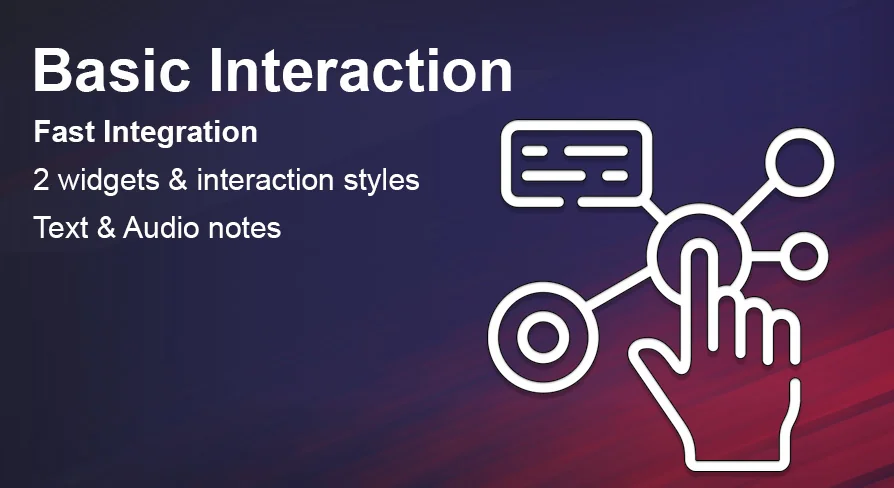
Basic Interaction, Widgets & Notes emphasizes fast integration alongside an included integration example. For small teams or solo creators, this means the path from importing the asset to testing interactions in a running level is intended to be short. The example acts as a reference scene, showing how the interaction component attaches to Actors and how widgets appear and disappear in response to player proximity and input.
The asset is also network-replicated. In a multiplayer context, replication ensures that when one player opens a door or picks up an item, other connected clients see the same state change. A lamp toggled in a co-op session lights up for everyone in the room. A note played over a communicator-style widget can be heard across the network. Without this replication layer, interactions in multiplayer maps tend to desync, leaving some players staring at closed doors that others have already opened. By building replication into the component itself, the system keeps its example Actors usable in online scenarios, not just offline prototypes. This makes the asset particularly relevant for projects that might start as single-player experiences but carry long-term ambitions for shared sessions.
A Component Approach to Interactive Props
Because the entire system is built with 100% Blueprint logic, it remains editable inside the Unreal Editor without requiring a recompile or external development environment. Technical artists can inspect each node, redirect events, and create derivative Actors suited to their project's tone. A small horror puzzle game might take the door example and convert it into a creaking cabinet, while a tactical shooter could derive an ammo crate from the pickup item example. The interaction component sits at the center, processing input, updating the widget, and calling the Actor's response function.
This component-first structure also helps when a project scales up. Instead of duplicating interaction logic across dozens of unique props, developers can rely on the shared component to maintain consistent behavior. A lever in one room and a keypad in another can share the same underlying press-and-hold handling, with only the final executed event differing. This consistency benefits playtesting, since players learn a single interaction grammar—approach, see the prompt, press or hold—and apply it everywhere in the level.
Fitting the System into a Production
Basic Interaction, Widgets & Notes is well-suited for developers who need interactive props quickly and want the flexibility to modify behavior in Blueprints. The combination of two widget styles makes it adaptable across art directions, while the example Actors provide immediate building blocks for common scene elements. Its replication support extends its usefulness beyond solo prototyping into cooperative or competitive online maps, and the fully Blueprint-based architecture means that teams without C++ support can still script, debug, and extend the system as their design demands grow more complex.
 Gameplay Features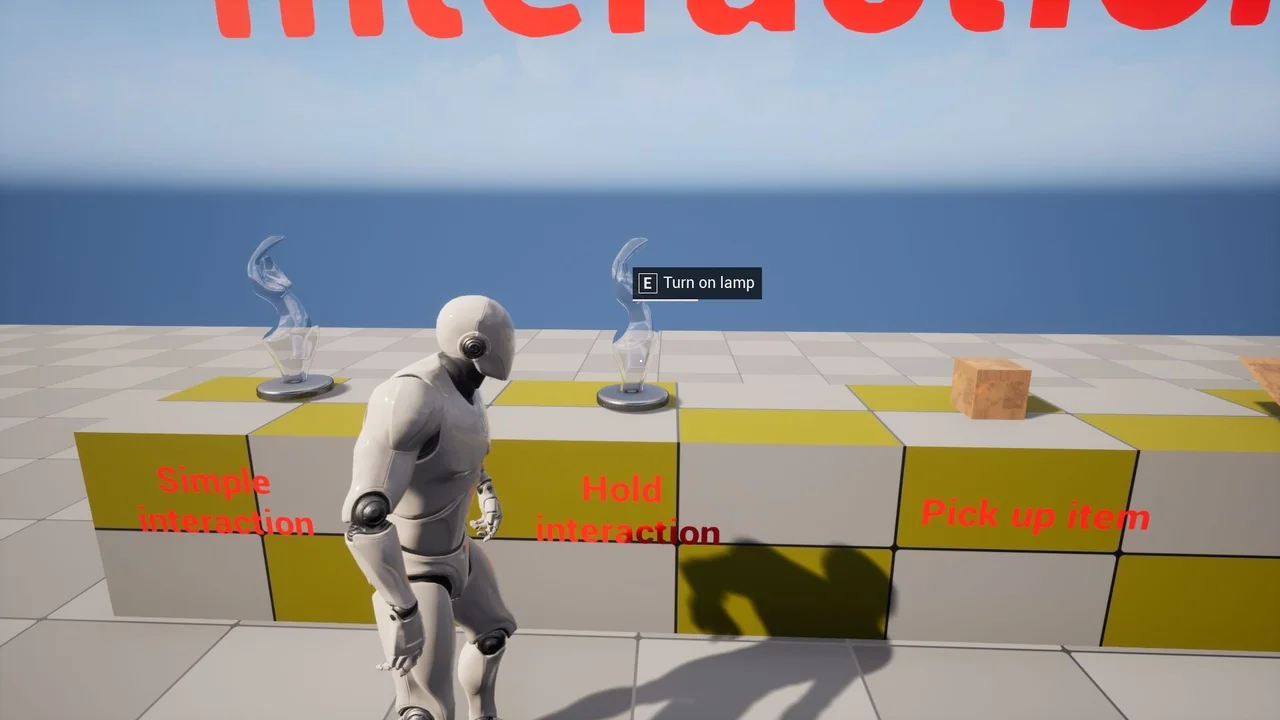
 Gameplay Features
 Gameplay Features
 Gameplay Features