"7066dd76da796369"{"id":"1000727","slug":"bomb-scenario","title":"Bomb Scenario","category":"Shooter","engine":"4.26+,5.0+","assetVersion":"","engineVersion":"Engine Version: 4.26+,5.0+","tag":"Shooter","accent":"blue","visual":"mech","summary":"Component-based Unreal Engine 5.1 bomb defusal multiplayer template with lobby system, configurable round rules, team switching, defuse kits, and spectator mode","platform":"Unreal Engine","publishedAt":"2026-07-26T15:36:41.792Z","updatedAt":"2026-07-26T15:36:41.792Z","sourceNotes":[],"fileContents":[],"compatibility":["Unreal Engine","Engine Version: 4.26+,5.0+"],"featuredImage":{"alt":"Bomb Scenario","src":"/wp-content/uploads/published/2026/07/e680e895efae-9339c92b-90fe-4cee-8b11-05131c3cd2fd-65fb3e0b18.webp"},"hasDownloadLink":true,"downloads":1,"terms":[{"taxonomy":"category","slug":"shooter","name":"Shooter"}],"galleryImages":[{"src":"/wp-content/uploads/published/2026/07/7c1b97315d76-4a52e9bc-c90f-4a53-9395-8570b250faf2-80fecbf5f5.webp","alt":"Bomb Scenario"},{"src":"/wp-content/uploads/published/2026/07/252ce6d872f7-96fc33c6-f48b-4fb5-8ba5-ed0263af2830-ab09e71f28.webp","alt":"Bomb Scenario"},{"src":"/wp-content/uploads/published/2026/07/50b9fe8271bb-49e87242-dc3a-4d5e-b086-9613dacd1668-c6bb2e0b8f.webp","alt":"Bomb Scenario"},{"src":"/wp-content/uploads/published/2026/07/c12ecc86bd10-cd220e27-994b-4e0f-84cc-125b16a7b0c4-4d2a578f46.webp","alt":"Bomb Scenario"},{"src":"/wp-content/uploads/published/2026/07/1d1c8580276d-ac706580-f229-4d01-9489-a8e9ecc03129-342d7c47f0.webp","alt":"Bomb Scenario"}],"accessPanel":{"kind":"resource","title":"Download this resource","eyebrow":"Free Download","message":"Log in or create a free account to start your download.","fileName":"Content.7z","safetyNote":"Resources are manually reviewed before listing to improve quality and reduce obvious risks.","actionLabel":"Download Free","resourceType":"Resource archive"},"contentHtml":"\u003ch2\u003eBuilding a Bomb Defusal Round Flow in Unreal Engine 5.1\u003c/h2\u003e\n\u003cp\u003eImplementing a complete round loop for a team-based game takes time. The flow must handle team selection, round timers, game score, and dynamic camera transitions for eliminated players. Bomb Scenario is a complete system for Unreal Engine 5.1 that provides this structure.\u003c/p\u003e\n\n\u003cp\u003eThe system is shaped by a clash between two teams. Team A carries the offensive role: they must plant a bomb in a designated Bomb Zone and defend it until detonation. They can also win a round by eliminating every member of Team B before the round timer expires. Team B carries the defensive responsibility: they must stop the plant from happening or defuse the bomb before it explodes. These core mechanics are fully implemented and ready to use.\u003c/p\u003e\n\n\u003ch2\u003eLobby, Server Creation, and Pre-Round Handling\u003c/h2\u003e\n\u003cp\u003eBefore a match begins, players enter a lobby where they select their team. Once ready, they can move freely around the map until the host triggers the game start. This pre-round phase resets the environment and disables player movement until a start timer counts down to zero.\u003c/p\u003e\n\n\u003cp\u003eThe package includes a simple Main Menu suited to creating and searching servers. This menu ties directly into the lobby flow, giving developers a starting point for the multiplayer connection process without needing to build one from scratch.\u003c/p\u003e\n\n\u003ch2\u003eConfiguring Bomb Scenario Rules via DataTable\u003c/h2\u003e\n\u003cp\u003eTuning the match requires access to the right variables. Bomb Scenario exposes its configuration through a DataTable, making it simple to adjust the rules of the engagement. Developers can specify the overall round time, the explosion delay after a plant, the number of rounds needed to win, the time it takes to place the bomb, and the time required to defuse it.\u003c/p\u003e\n\n\u003cp\u003eThe system uses this data to manage the competitive progression automatically. When half of the total rounds are played, the teams switch sides to ensure a balanced match. The winning condition is straightforward: the first team to win 50% of the total rounds plus one takes the game.\u003c/p\u003e\n\n\u003ch2\u003eBomb Assignment and Defuse Kit Mechanics\u003c/h2\u003e\n\u003cp\u003eAt the start of each round, the system randomly assigns the bomb to a player on Team A. This dynamic assignment requires specific spawn and delivery logic.\u003c/p\u003e\n\n\u003cp\u003eTeam B has access to a Defuse Kit that they can pick up during the round. Equipping the kit cuts the defusal time in half, adding a strategic layer to the defensive gameplay. The kit creates a time-management decision for Team B players who want to secure a faster defusal.\u003c/p\u003e\n\n\u003ch2\u003eComponent Architecture and Core Classes\u003c/h2\u003e\n\u003cp\u003eIntegration into an existing Unreal Engine project is handled through a component-based design. The system includes the foundational multiplayer classes required for Unreal Engine gameplay: GameMode, GameState, PlayerController, and PlayerCharacter.\u003c/p\u003e\n\n\u003cp\u003eBeyond the core classes, the system is structured with specific functional components:\u003c/p\u003e\n\u003cul\u003e\n \u003cli\u003e\u003cstrong\u003ePlayerStart for Team A \u0026amp; Team B\u003c/strong\u003e — Handles the distinct spawn logic for each side.\u003c/li\u003e\n \u003cli\u003e\u003cstrong\u003eBomb and Bomb Zone\u003c/strong\u003e — Manages the placement, delivery, and detonation logic.\u003c/li\u003e\n \u003cli\u003e\u003cstrong\u003eDefuse Kit\u003c/strong\u003e — Implements the time-reduction pickup for Team B.\u003c/li\u003e\n \u003cli\u003e\u003cstrong\u003eSpectator\u003c/strong\u003e — Enabled when a player dies, restricting their view to their own teammates for the remainder of the round.\u003c/li\u003e\n\u003c/ul\u003e\n\n\u003ch2\u003eHUD Integration and Match Feedback\u003c/h2\u003e\n\u003cp\u003eDuring active gameplay, the HUD serves as the primary communication layer between the match state and the players. It displays critical information needed to track the round.\u003c/p\u003e\n\n\u003cp\u003eThe interface provides updates on the time remaining in the round, alerts when the bomb has been planted, and the current score. The Main Menu handles the pre-game server connection, while the HUD takes over once the match is live, ensuring players have the context they need to make tactical decisions.\u003c/p\u003e\n\n\u003ch2\u003eWhere Bomb Scenario Fits in Production\u003c/h2\u003e\n\u003cp\u003eThis package is a practical fit for developers building a multiplayer shooter prototype in Unreal Engine 5.1. It skips the foundational work of coding round logic, team management, and spectator handling, allowing a project to jump straight into shaping the map and refining the gunplay.\u003c/p\u003e\n\n\u003ch2\u003eContinue Browsing Similar Packs\u003c/h2\u003e\n\u003cul\u003e\n\u003cli\u003e\u003ca href=\"https://3dcghub.com/definitive-fps-kit/\" title=\"DEFINITIVE FPS KIT\"\u003eDEFINITIVE FPS KIT\u003c/a\u003e\u003c/li\u003e\n\u003cli\u003e\u003ca href=\"https://3dcghub.com/multiplayer-zombie-survival-template/\" title=\"Multiplayer Zombie Survival Template\"\u003eMultiplayer Zombie Survival Template\u003c/a\u003e\u003c/li\u003e\n\u003cli\u003e\u003ca href=\"https://3dcghub.com/battle-of-drones-multiplayer/\" title=\"Battle of Drones Multiplayer\"\u003eBattle of Drones Multiplayer\u003c/a\u003e\u003c/li\u003e\n\u003cli\u003e\u003ca href=\"https://3dcghub.com/fps-multiplayer-template-6/\" title=\"FPS Multiplayer Template 6\"\u003eFPS Multiplayer Template 6\u003c/a\u003e\u003c/li\u003e\n\u003cli\u003e\u003ca href=\"https://3dcghub.com/fps-game-starter-kit/\" title=\"FPS Game Starter Kit\"\u003eFPS Game Starter Kit\u003c/a\u003e\u003c/li\u003e\n\u003c/ul\u003e","contentTextLength":4237,"navigation":{"current":1440,"total":4016,"previous":{"id":"1000728","slug":"buildings-vol-12-town-doors-nanite-and-low-poly","title":"Buildings VOL.12 - Town Doors (Nanite \u0026 Low Poly)","category":"Residential Buildings","platform":"Unreal Engine","updatedAt":"2026-07-26T15:48:07.062Z"},"next":{"id":"1000726","slug":"basic-interaction-widgets-and-notes","title":"Basic Interaction, Widgets \u0026 Notes","category":"Gameplay Features","platform":"Unreal Engine","updatedAt":"2026-07-26T15:33:40.078Z"}},"relatedResources":[{"id":"11974","slug":"definitive-fps-kit","title":"DEFINITIVE FPS KIT","category":"Shooter","engine":"5.5+","assetVersion":"Asset Version: 0.0.3","engineVersion":"Engine version: 5.5+","tag":"Shooter","accent":"blue","visual":"luts","summary":"The DEFINITIVE FPS KIT provides a solid foundation for creating professional first-person shooters. It features high-quality animations, customizable loadouts, and diverse game modes like round-based zombies and multiplayer.","platform":"Unreal Engine","publishedAt":"2026-03-06T16:27:47.000Z","updatedAt":"2026-10-16T06:54:06.998Z","sourceNotes":[],"fileContents":[],"compatibility":["Unreal Engine","Asset Version: 0.0.3","Engine version: 5.5+"],"featuredImage":{"alt":"DEFINITIVE FPS KIT","src":"https://3dcghub.com/wp-content/uploads/2026/03/6ad028e1-885c-4980-aa89-7ecea094d867.webp"},"hasDownloadLink":true,"downloads":24},{"id":"1001091","slug":"fps-multiplayer-shooter-v3","title":"FPS Multiplayer shooter v3","category":"Shooter","engine":"5.1+","assetVersion":"Asset Version: v2","engineVersion":"Engine Version: 5.1+","tag":"Shooter","accent":"blue","visual":"mech","summary":"Restore missing plugin folders first, then v3 adds an assault rifle, shotgun, sniper, prone, team chat, and a LAN/Steam team deathmatch loop.","platform":"Unreal Engine","publishedAt":"2026-09-05T18:08:15.901Z","updatedAt":"2026-09-05T18:08:15.901Z","sourceNotes":[],"fileContents":[],"compatibility":["Unreal Engine","Asset Version: v2","Engine Version: 5.1+"],"featuredImage":{"alt":"FPS Multiplayer shooter v3","src":"/wp-content/uploads/published/2026/09/f2dcbef3e7d9-5605e15c-6edf-460f-a056-8f457e7fd1a3-a371fb4696.webp"},"hasDownloadLink":true,"downloads":3},{"id":"1001097","slug":"zombie-shooter-kit-v2-12-unreal-engine-5-starter-pack","title":"Zombie Shooter Kit v2.12 - UNREAL ENGINE 5 Starter Pack","category":"Shooter","engine":"5.7+","assetVersion":"Asset Version: 2.11","engineVersion":"Engine Version: 5.7+","tag":"Shooter","accent":"blue","visual":"mech","summary":"Blueprint-based UE5 starter for survival shooters: replicated multiplayer, zombies and human AI, jigsaw inventory, crafting, vehicles, weather, and G.A.S.P. Loc","platform":"Unreal Engine","publishedAt":"2026-09-06T02:45:34.766Z","updatedAt":"2026-09-06T02:45:34.766Z","sourceNotes":[],"fileContents":[],"compatibility":["Unreal Engine","Asset Version: 2.11","Engine Version: 5.7+"],"featuredImage":{"alt":"Zombie Shooter Kit v2.12 - UNREAL ENGINE 5 Starter Pack","src":"/wp-content/uploads/published/2026/09/1d7d8e00baab-vqwonz-9f5e01b28f.webp"},"hasDownloadLink":true,"downloads":10}]}
Shooter
Bomb Scenario
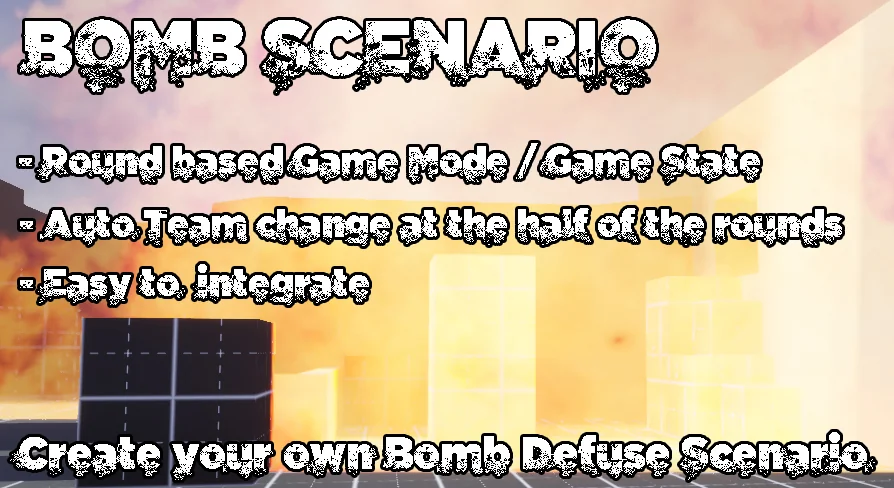
Component-based Unreal Engine 5.1 bomb defusal multiplayer template with lobby system, configurable round rules, team switching, defuse kits, and spectator mode
Building a Bomb Defusal Round Flow in Unreal Engine 5.1
Implementing a complete round loop for a team-based game takes time. The flow must handle team selection, round timers, game score, and dynamic camera transitions for eliminated players. Bomb Scenario is a complete system for Unreal Engine 5.1 that provides this structure.
The system is shaped by a clash between two teams. Team A carries the offensive role: they must plant a bomb in a designated Bomb Zone and defend it until detonation. They can also win a round by eliminating every member of Team B before the round timer expires. Team B carries the defensive responsibility: they must stop the plant from happening or defuse the bomb before it explodes. These core mechanics are fully implemented and ready to use.
Lobby, Server Creation, and Pre-Round Handling
Before a match begins, players enter a lobby where they select their team. Once ready, they can move freely around the map until the host triggers the game start. This pre-round phase resets the environment and disables player movement until a start timer counts down to zero.
The package includes a simple Main Menu suited to creating and searching servers. This menu ties directly into the lobby flow, giving developers a starting point for the multiplayer connection process without needing to build one from scratch.
Configuring Bomb Scenario Rules via DataTable
Tuning the match requires access to the right variables. Bomb Scenario exposes its configuration through a DataTable, making it simple to adjust the rules of the engagement. Developers can specify the overall round time, the explosion delay after a plant, the number of rounds needed to win, the time it takes to place the bomb, and the time required to defuse it.
The system uses this data to manage the competitive progression automatically. When half of the total rounds are played, the teams switch sides to ensure a balanced match. The winning condition is straightforward: the first team to win 50% of the total rounds plus one takes the game.
Bomb Assignment and Defuse Kit Mechanics
At the start of each round, the system randomly assigns the bomb to a player on Team A. This dynamic assignment requires specific spawn and delivery logic.
Team B has access to a Defuse Kit that they can pick up during the round. Equipping the kit cuts the defusal time in half, adding a strategic layer to the defensive gameplay. The kit creates a time-management decision for Team B players who want to secure a faster defusal.
Component Architecture and Core Classes
Integration into an existing Unreal Engine project is handled through a component-based design. The system includes the foundational multiplayer classes required for Unreal Engine gameplay: GameMode, GameState, PlayerController, and PlayerCharacter.
Beyond the core classes, the system is structured with specific functional components:
PlayerStart for Team A & Team B — Handles the distinct spawn logic for each side.
Bomb and Bomb Zone — Manages the placement, delivery, and detonation logic.
Defuse Kit — Implements the time-reduction pickup for Team B.
Spectator — Enabled when a player dies, restricting their view to their own teammates for the remainder of the round.
HUD Integration and Match Feedback
During active gameplay, the HUD serves as the primary communication layer between the match state and the players. It displays critical information needed to track the round.
The interface provides updates on the time remaining in the round, alerts when the bomb has been planted, and the current score. The Main Menu handles the pre-game server connection, while the HUD takes over once the match is live, ensuring players have the context they need to make tactical decisions.
Where Bomb Scenario Fits in Production
This package is a practical fit for developers building a multiplayer shooter prototype in Unreal Engine 5.1. It skips the foundational work of coding round logic, team management, and spectator handling, allowing a project to jump straight into shaping the map and refining the gunplay.
 Shooter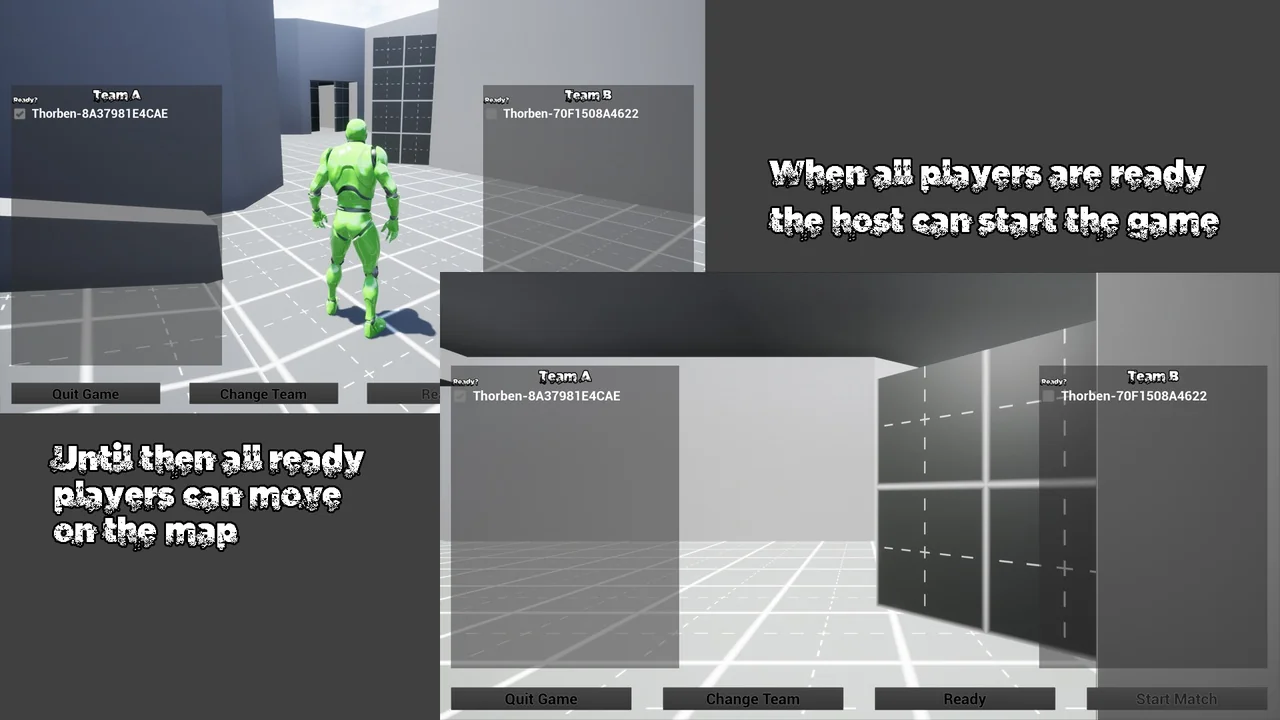
 Shooter
 Shooter
 Shooter