"7066dd76da796369"{"id":"27431","slug":"battle-of-drones-multiplayer","title":"Battle of Drones Multiplayer","category":"Shooter","engine":"5.0+","assetVersion":"Engine version: 5.0+","engineVersion":"","tag":"Shooter","accent":"blue","visual":"audio","summary":"Battle of Drones Multiplayer gives a drone combat project a ready-made multiplayer structure in Blueprints. It combines five drones, team-based deathmatch, pickups, chat, and several player-facing menus and indicators.","platform":"Unreal Engine","publishedAt":"2026-04-25T10:58:11.000Z","updatedAt":"2026-04-25T10:58:13.000Z","sourceNotes":[],"fileContents":[],"compatibility":["Unreal Engine","Engine version: 5.0+"],"featuredImage":{"alt":"Battle of Drones Multiplayer","src":"https://3dcghub.com/wp-content/uploads/2026/04/8de989f6c933_4cc08247-2ec8-4392-ac36-869c8a308d9a.webp"},"hasDownloadLink":true,"downloads":2,"terms":[{"taxonomy":"category","slug":"shooter","name":"Shooter"},{"taxonomy":"post_tag","slug":"templates","name":"Templates"},{"taxonomy":"post_tag","slug":"ui","name":"UI"},{"taxonomy":"post_tag","slug":"unreal-engine-5","name":"Unreal Engine 5"}],"galleryImages":[{"src":"https://3dcghub.com/wp-content/uploads/2026/04/1e1611099994_491856aa-007f-4f1c-b318-9552ceb66087.webp","alt":"Battle of Drones Multiplayer"},{"src":"https://3dcghub.com/wp-content/uploads/2026/04/b1909b1fb2d8_e4205caa-2844-4d13-ac36-81f6fbe64393.webp","alt":"Battle of Drones Multiplayer"},{"src":"https://3dcghub.com/wp-content/uploads/2026/04/5e601c80980d_10893536-4c28-4d7a-8856-77b5fb8c1340.webp","alt":"Battle of Drones Multiplayer"},{"src":"https://3dcghub.com/wp-content/uploads/2026/04/7c6cb62eeee5_96af3693-1edd-4c9f-845d-615d1f4c51d9.webp","alt":"Battle of Drones Multiplayer"},{"src":"https://3dcghub.com/wp-content/uploads/2026/04/0333db5980a8_f99dade5-2582-4b63-8e02-838393fffa32.webp","alt":"Battle of Drones Multiplayer"},{"src":"https://3dcghub.com/wp-content/uploads/2026/04/243922af6ff6_366fb0e4-ffea-46a9-b804-b47221ae928d.webp","alt":"Battle of Drones Multiplayer"},{"src":"https://3dcghub.com/wp-content/uploads/2026/04/f70ffba439d8_5f421dbf-3353-4728-b187-0333069f8c11.webp","alt":"Battle of Drones Multiplayer"},{"src":"https://3dcghub.com/wp-content/uploads/2026/04/523726e167aa_5118b946-433c-4b72-91d9-16d485e1e3ae.webp","alt":"Battle of Drones Multiplayer"},{"src":"https://3dcghub.com/wp-content/uploads/2026/04/b23137da4809_ccb2c417-b85b-400e-aaf2-0afd69855927.webp","alt":"Battle of Drones Multiplayer"},{"src":"https://3dcghub.com/wp-content/uploads/2026/04/31576632a2d1_de97969a-db36-46ce-825e-a848dc4fabcf.webp","alt":"Battle of Drones Multiplayer"}],"accessPanel":{"kind":"resource","title":"Access this resource","eyebrow":"Free Download","message":"Log in or create a free account to start your download.","fileName":"BattleofDronesMultiplayer.7z","safetyNote":"All resources are 100% manually reviewed to eliminate all risks.","actionLabel":"Download Free","resourceType":"Resource archive"},"contentHtml":"\u003ch2\u003eA multiplayer drone match without the setup drag\u003c/h2\u003e\n\u003cp\u003eBattle of Drones Multiplayer gives a drone game a working multiplayer structure centered on team-based combat. The template uses Blueprints only, so the project stays in a visual workflow from start to finish. That makes it a direct fit for developers who want to move from idea to playable drone matches without assembling every system from scratch.\u003c/p\u003e\n\u003cp\u003eThe package focuses on the parts a competitive drone game needs most: drone selection, status feedback, team communication, match notifications, and attribute customization. It also keeps the layout clear, with organized Blueprints and notes that make the structure easier to follow.\u003c/p\u003e \u003ch2\u003eFive drones, each with two abilities\u003c/h2\u003e\n\u003cp\u003eThe playable roster starts with five drones. Each one comes with two unique abilities, giving each option a distinct role inside the match flow. That setup gives the template enough variety to support team-based play without moving away from its compact structure.\u003c/p\u003e\n\u003cp\u003eThere is also room to adjust drone attributes, which adds another layer of control when setting up a match or shaping different drone styles. Team color can be customized as well, so the template includes a simple way to separate players visually and match the team setup to the project’s look.\u003c/p\u003e \u003ch3\u003eWhat the player can choose and change\u003c/h3\u003e\n\u003cul\u003e \u003cli\u003e5 drones with 2 abilities each\u003c/li\u003e \u003cli\u003eDrone selection menu\u003c/li\u003e \u003cli\u003eCustomize drone attributes\u003c/li\u003e \u003cli\u003eCustomize team color\u003c/li\u003e\n\u003c/ul\u003e \u003ch2\u003eMatch flow with clear feedback\u003c/h2\u003e\n\u003cp\u003eThe template does more than place drones into a fight. It adds the feedback systems that help players read the match as it happens. A drone status indicator keeps important state visible, while kill log and notification elements report what is happening during combat.\u003c/p\u003e\n\u003cp\u003eThat kind of feedback is useful in a fast multiplayer match where players need to understand what changed, who was eliminated, and how their current drone is performing. The template also includes a basic team deathmatch mode, so the combat structure is already centered on team play rather than a blank arena.\u003c/p\u003e \u003ch3\u003eSystems that keep the action readable\u003c/h3\u003e\n\u003cul\u003e \u003cli\u003eDrones status indicator\u003c/li\u003e \u003cli\u003eKill log / notification\u003c/li\u003e \u003cli\u003eBasic team deathmatch mode\u003c/li\u003e\n\u003c/ul\u003e \u003ch2\u003ePickups and chat add more room for tactics\u003c/h2\u003e\n\u003cp\u003eFive pickups are included, each with a respawn progress indicator. That detail matters because it helps players track when a pickup is returning to the field instead of leaving the map feeling static after it is collected. Pickups also give the match another strategic layer beyond direct drone-to-drone combat.\u003c/p\u003e\n\u003cp\u003eCommunication is handled through a chat system with team chat on T and all chat on Y. That gives the template a simple way to support coordination between teammates while still leaving room for open match communication when needed. In a competitive drone match, that can help the action feel more organized without adding extra systems from the ground up.\u003c/p\u003e \u003ch2\u003eWhere the template fits in a production workflow\u003c/h2\u003e\n\u003cp\u003eBattle of Drones Multiplayer works as a base for a drone-based game or as a way to learn the development process behind a multiplayer setup. Its clean, organized Blueprints and notes make the structure easier to study, which is useful when a project needs a clear starting point rather than a finished game loop.\u003c/p\u003e\n\u003cp\u003eIt fits best in prototype work, multiplayer experimentation, and early drone combat projects that need team deathmatch, ability-based drones, pickups, and player communication already in place. Developers who want a readable Blueprint foundation for a drone arena can use it as the practical starting layer for that kind of production.\u003c/p\u003e \u003ch3\u003eIncluded feature set at a glance\u003c/h3\u003e\n\u003cul\u003e \u003cli\u003e5 drones with 2 abilities each\u003c/li\u003e \u003cli\u003e5 pickups with respawn progress indicator\u003c/li\u003e \u003cli\u003eDrone selection menu\u003c/li\u003e \u003cli\u003eDrones status indicator\u003c/li\u003e \u003cli\u003eKill log / notification\u003c/li\u003e \u003cli\u003eChat for team and all players\u003c/li\u003e \u003cli\u003eBasic team deathmatch mode\u003c/li\u003e \u003cli\u003eCustomize team color\u003c/li\u003e \u003cli\u003eCustomize drones attributes\u003c/li\u003e \u003cli\u003eClean and organized Blueprints with notes\u003c/li\u003e\n\u003c/ul\u003e\n\u003cp\u003eFor teams building a drone combat prototype, the most useful part is the combination of match flow, player feedback, and Blueprint organization. It gives the project a playable multiplayer base that can be studied, adjusted, and expanded as the game moves forward.\u003c/p\u003e\n\n\u003ch2\u003eMore From The Same Workflow\u003c/h2\u003e\n\u003cul\u003e\n\u003cli\u003e\u003ca href=\"https://3dcghub.com/shootlikeme-unreal-engine-third-person-shooter-template/\" title=\"ShootLikeMe – Unreal Engine Third Person Shooter Template\"\u003eShootLikeMe – Unreal Engine Third Person Shooter Template\u003c/a\u003e\u003c/li\u003e\n\u003cli\u003e\u003ca href=\"https://3dcghub.com/advanced-unreal-engine-5-multiplayer-gameplay-programming/\" title=\"Advanced Unreal Engine 5 Multiplayer Gameplay Programming\"\u003eAdvanced Unreal Engine 5 Multiplayer Gameplay Programming\u003c/a\u003e\u003c/li\u003e\n\u003cli\u003e\u003ca href=\"https://3dcghub.com/niagara-beginners-to-advanced-in-unreal-engine-5/\" title=\"Niagara Beginners to advanced in Unreal Engine 5\"\u003eNiagara Beginners to advanced in Unreal Engine 5\u003c/a\u003e\u003c/li\u003e\n\u003cli\u003e\u003ca href=\"https://3dcghub.com/create-zelda-like-skills-with-c-in-unreal-engine-5-2/\" title=\"Create Zelda-like skills with C++ in unreal engine 5\"\u003eCreate Zelda-like skills with C++ in unreal engine 5\u003c/a\u003e\u003c/li\u003e\n\u003cli\u003e\u003ca href=\"https://3dcghub.com/main-menus-beginner-class-unreal-engine-5/\" title=\"Main Menus Beginner Class – Unreal Engine 5\"\u003eMain Menus Beginner Class – Unreal Engine 5\u003c/a\u003e\u003c/li\u003e\n\u003c/ul\u003e\n\n\u003ch2\u003eAsset Gallery\u003c/h2\u003e","contentTextLength":4462,"navigation":{"current":2260,"total":4016,"previous":{"id":"14982","slug":"auto-mesh-outline","title":"Auto Mesh Outline","category":"Gameplay Features","platform":"Unreal Engine","updatedAt":"2026-04-25T11:35:59.000Z"},"next":{"id":"27418","slug":"artists-attic-studio-environment","title":"Artist’s Attic Studio Environment","category":"Interior","platform":"Unreal Engine","updatedAt":"2026-04-25T08:27:47.000Z"}},"relatedResources":[{"id":"1000017","slug":"multiplayer-top-down-shooter-template","title":"Multiplayer Top Down Shooter Template","category":"Shooter","engine":"5.6+","assetVersion":"","engineVersion":"5.6+","tag":"Shooter","accent":"blue","visual":"mech","summary":"A fully replicated Unreal Engine top-down shooter template with CommonUI menus, Blueprint systems, Data Asset weapons, AI, inventory, and extraction flow.","platform":"Unreal Engine","publishedAt":"2026-05-20T05:15:14.777Z","updatedAt":"2026-05-20T05:16:19.037Z","sourceNotes":[],"fileContents":[],"compatibility":["Unreal Engine","Engine version: 5.6+"],"featuredImage":{"alt":"Multiplayer Top Down Shooter Template","src":"/wp-content/uploads/published/2026/05/628e19ac7f6c-f5f74f7a-553a-4b1b-a68f-c192a9f2c3b9-16d99edf05.webp"},"hasDownloadLink":true,"downloads":4},{"id":"12044","slug":"fps-multiplayer-template-6","title":"FPS Multiplayer Template 6","category":"Shooter","engine":"5.5+","assetVersion":"Engine version: 5.5+","engineVersion":"4.21","tag":"Shooter","accent":"blue","visual":"city","summary":"Accelerate your development with the FPS Multiplayer Template 6. This 100% Blueprint project includes replicated game modes, a deep weapon loadout system, and professional HUD elements.","platform":"Unreal Engine","publishedAt":"2026-03-06T16:43:10.000Z","updatedAt":"2026-04-19T15:48:04.000Z","sourceNotes":[],"fileContents":[],"compatibility":["Unreal Engine","Engine version: 5.5+"],"featuredImage":{"alt":"FPS Multiplayer Template 6","src":"https://3dcghub.com/wp-content/uploads/2026/03/9cca2b10-3e51-4f10-8307-90f55801dd96.webp"},"hasDownloadLink":true,"downloads":8},{"id":"1001127","slug":"ultimate-shooter-kit","title":"Ultimate Shooter Kit","category":"Shooter","engine":"5.3+","assetVersion":"Asset Version: v2","engineVersion":"Engine Version: 5.3+","tag":"Shooter","accent":"blue","visual":"mech","summary":"Ultimate Shooter Kit is a multiplayer-ready shooter template with menu, quest, inventory/weapon systems, and respawn support for Blueprint users.","platform":"Unreal Engine","publishedAt":"2026-09-07T13:39:36.666Z","updatedAt":"2026-09-07T13:39:36.666Z","sourceNotes":[],"fileContents":[],"compatibility":["Unreal Engine","Asset Version: v2","Engine Version: 5.3+"],"featuredImage":{"alt":"Ultimate Shooter Kit","src":"/wp-content/uploads/published/2026/09/f05ddf518181-a408d89b-9e9a-4002-9eec-3901d33e8fc9-157b96f106.webp"},"hasDownloadLink":true,"downloads":3}]}
Shooter
Battle of Drones Multiplayer
Battle of Drones Multiplayer gives a drone combat project a ready-made multiplayer structure in Blueprints. It combines five drones, team-based deathmatch, pickups, chat, and several player-facing menus and indicators.
Battle of Drones Multiplayer gives a drone game a working multiplayer structure centered on team-based combat. The template uses Blueprints only, so the project stays in a visual workflow from start to finish. That makes it a direct fit for developers who want to move from idea to playable drone matches without assembling every system from scratch.
The package focuses on the parts a competitive drone game needs most: drone selection, status feedback, team communication, match notifications, and attribute customization. It also keeps the layout clear, with organized Blueprints and notes that make the structure easier to follow.
Five drones, each with two abilities
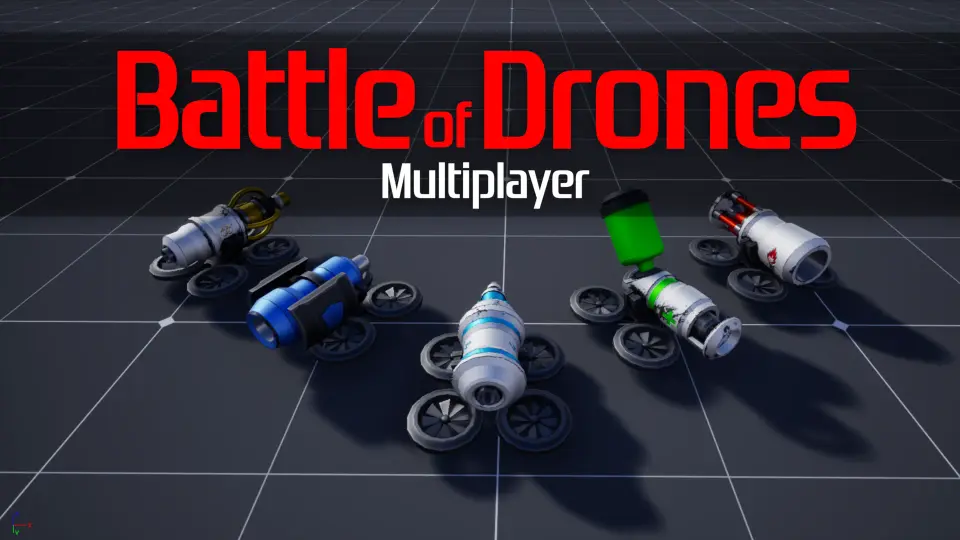
The playable roster starts with five drones. Each one comes with two unique abilities, giving each option a distinct role inside the match flow. That setup gives the template enough variety to support team-based play without moving away from its compact structure.
There is also room to adjust drone attributes, which adds another layer of control when setting up a match or shaping different drone styles. Team color can be customized as well, so the template includes a simple way to separate players visually and match the team setup to the project’s look.
What the player can choose and change
5 drones with 2 abilities each
Drone selection menu
Customize drone attributes
Customize team color
Match flow with clear feedback
The template does more than place drones into a fight. It adds the feedback systems that help players read the match as it happens. A drone status indicator keeps important state visible, while kill log and notification elements report what is happening during combat.
That kind of feedback is useful in a fast multiplayer match where players need to understand what changed, who was eliminated, and how their current drone is performing. The template also includes a basic team deathmatch mode, so the combat structure is already centered on team play rather than a blank arena.
Systems that keep the action readable
Drones status indicator
Kill log / notification
Basic team deathmatch mode
Pickups and chat add more room for tactics
Five pickups are included, each with a respawn progress indicator. That detail matters because it helps players track when a pickup is returning to the field instead of leaving the map feeling static after it is collected. Pickups also give the match another strategic layer beyond direct drone-to-drone combat.
Communication is handled through a chat system with team chat on T and all chat on Y. That gives the template a simple way to support coordination between teammates while still leaving room for open match communication when needed. In a competitive drone match, that can help the action feel more organized without adding extra systems from the ground up.
Where the template fits in a production workflow
Battle of Drones Multiplayer works as a base for a drone-based game or as a way to learn the development process behind a multiplayer setup. Its clean, organized Blueprints and notes make the structure easier to study, which is useful when a project needs a clear starting point rather than a finished game loop.
It fits best in prototype work, multiplayer experimentation, and early drone combat projects that need team deathmatch, ability-based drones, pickups, and player communication already in place. Developers who want a readable Blueprint foundation for a drone arena can use it as the practical starting layer for that kind of production.
Included feature set at a glance
5 drones with 2 abilities each
5 pickups with respawn progress indicator
Drone selection menu
Drones status indicator
Kill log / notification
Chat for team and all players
Basic team deathmatch mode
Customize team color
Customize drones attributes
Clean and organized Blueprints with notes
For teams building a drone combat prototype, the most useful part is the combination of match flow, player feedback, and Blueprint organization. It gives the project a playable multiplayer base that can be studied, adjusted, and expanded as the game moves forward.
 Shooter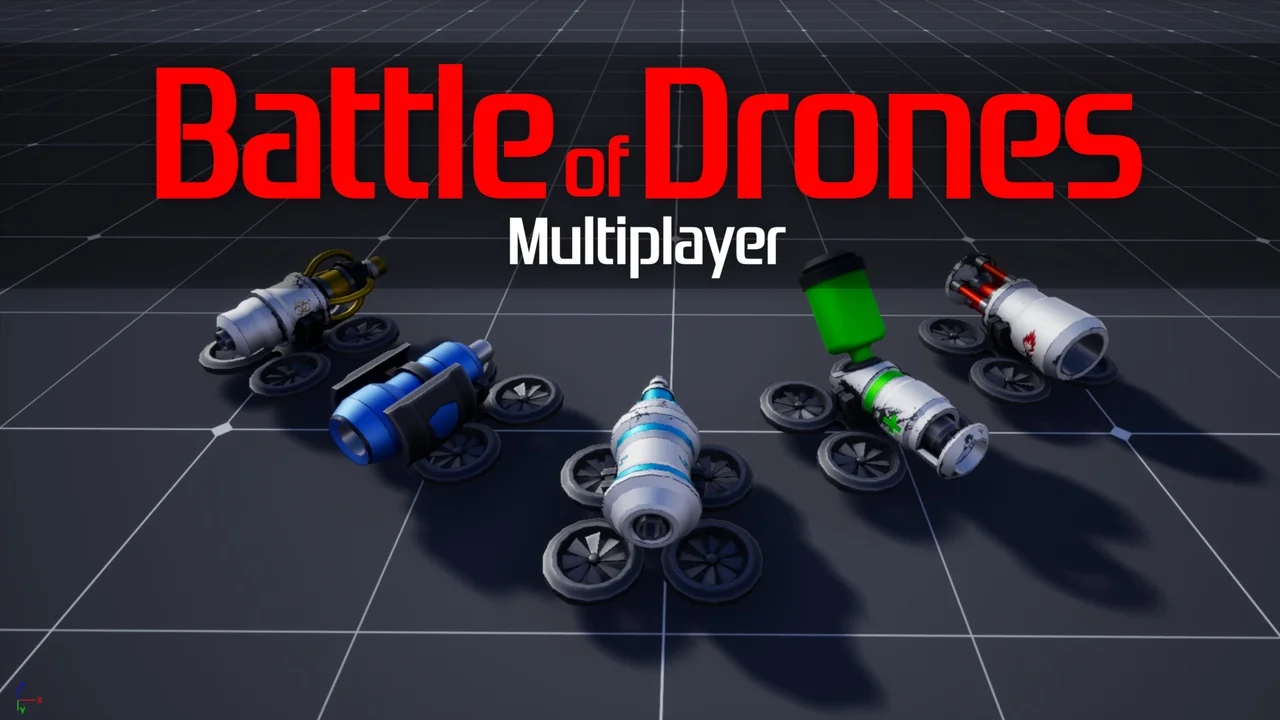
 Shooter
 Shooter
 Shooter