"4481da9c895ef786"{"id":"1001306","slug":"ultimate-interaction-manager","title":"Ultimate Interaction Manager","category":"Gameplay Features","engine":"5.0+","assetVersion":"","engineVersion":"Engine Version: 5.0+","tag":"Gameplay Features","accent":"blue","visual":"mech","summary":"An in-depth look at Ultimate Interaction Manager, covering its component architecture, server replication, dynamic widget pool markers, and UE 5.7 status.","platform":"Unreal Engine","publishedAt":"2026-10-02T06:20:16.462Z","updatedAt":"2026-10-02T06:20:16.462Z","sourceNotes":[],"fileContents":[],"compatibility":["Unreal Engine","Engine Version: 5.0+"],"featuredImage":{"alt":"Ultimate Interaction Manager","src":"/wp-content/uploads/published/2026/10/eb0c915dbe73-3ff46653-0438-44e1-99c8-609e83960f18-3cca55c0f0.webp"},"hasDownloadLink":true,"downloads":0,"terms":[{"taxonomy":"category","slug":"gameplay-features","name":"Gameplay Features"}],"galleryImages":[{"src":"/wp-content/uploads/published/2026/10/e8450016d471-66d2dc24-d070-4f6d-9ee1-20b0e8ed4738-460e497551.webp","alt":"Ultimate Interaction Manager"},{"src":"/wp-content/uploads/published/2026/10/f81e303719e9-3bc385c5-95d2-40fd-8668-af9686863b3b-815df2ab26.webp","alt":"Ultimate Interaction Manager"},{"src":"/wp-content/uploads/published/2026/10/89d82a809722-dff2e6f7-b367-409a-90bd-90aced9f583d-ec0a164d39.webp","alt":"Ultimate Interaction Manager"},{"src":"/wp-content/uploads/published/2026/10/050155a6f473-f7293e3f-2b60-4f51-9944-0b779a868086-0051c78c8d.webp","alt":"Ultimate Interaction Manager"},{"src":"/wp-content/uploads/published/2026/10/b46b6e484133-6388949f-9da9-435c-b6ce-5c64f2a6525b-7329416713.webp","alt":"Ultimate Interaction Manager"}],"accessPanel":{"kind":"resource","title":"Download this resource","eyebrow":"Free Download","message":"Log in or create a free account to start your download.","fileName":"Content.7z","safetyNote":"Resources are manually reviewed before listing to improve quality and reduce obvious risks.","actionLabel":"Download Free","resourceType":"Resource archive"},"contentHtml":"\u003ch2\u003eConverting Actors with the Ultimate Interaction Manager Components\u003c/h2\u003e\n\u003cp\u003eUltimate Interaction Manager establishes a modular framework built on Blueprint components, allowing developers to turn any target actor inside a level into an interactable object. Instead of forcing rigid inheritance structures or requiring specialized base classes, the system relies on attaching components directly to scene actors. This approach decouples interaction logic from specific gameplay classes, meaning doors, pickup items, control panels, or environmental devices can all receive interaction behavior through the same underlying system.\u003c/p\u003e\n\u003cp\u003eThe components are structured with clean organization and comprehensive comments throughout the graphs, making it straightforward to inspect the operational flow and modify variables. A broad selection of settings is exposed across the components, enabling adjustments to interaction distances, registration behaviors, and context criteria. Developers can adapt these configurations to fit tight corridors, open game worlds, or puzzle setups where specific objects require distinct detection parameters.\u003c/p\u003e \u003ch2\u003eDynamic Markers, Customizable Icons, and the Widget Pool\u003c/h2\u003e\n\u003cp\u003eVisual feedback is handled through automated screen indicators paired with an integrated widget pool. When an actor configured with the interaction component enters the player's proximity or detection radius, the system dynamically generates markers without incurring the performance costs of continuous widget creation and destruction. The widget pool reuses visual instances across active interactable targets, keeping user interface overhead low even when dense clusters of interactive objects occupy the same scene space.\u003c/p\u003e\n\u003cp\u003eMarkers can display customizable icons to visually differentiate the nature of an interaction before the player initiates it. A distinct icon can signify physical actions, dialog triggers, or inventory collection, matching the exact visual language of a project. Integrated directly alongside the dynamic marker setup is a dedicated point of interest system. This point of interest layer coordinates where markers anchor relative to target geometry, ensuring that screen badges align accurately with specific sub-elements of complex meshes, such as access keypads or loot compartments.\u003c/p\u003e \u003ch2\u003eServer-Side Replication and Target Execution Callbacks\u003c/h2\u003e\n\u003cp\u003eMultiplayer network logic is integrated directly into the core architecture of Ultimate Interaction Manager. The functional mechanics of an interaction execute entirely on the server side, ensuring authoritative control over game state changes, inventory additions, and world updates. Multiple network handling methods are built into the components, giving developers flexibility over how client requests route to the server and how execution verification is confirmed across the network.\u003c/p\u003e\n\u003cp\u003eThe server manages all critical verification steps before firing off callbacks to the interaction targets. These runtime callbacks notify the target actor of interaction results, passing execution state data back so the object can react dynamically. Because the functional logic remains locked to server authority, the primary responsibility left to the developer is handling visual and audio cosmetics. Cosmetic events—such as mesh animation playback, particle system activation, or local sound cues—are managed on the target actor itself to match the network-replicated state without compromising gameplay security.\u003c/p\u003e \u003ch2\u003eInteraction Handling Types Across Distinct Gameplay Situations\u003c/h2\u003e\n\u003cp\u003eProjects rarely rely on a single interaction method, and the manager accounts for this by providing multiple interaction handling types. These distinct handling options allow creators to tailor input execution to the scenario at hand, whether a situation demands an instantaneous button press, a sustained hold action, or conditional sequences dictated by world state. The system maps these behaviors cleanly to the target actor through component settings.\u003c/p\u003e\n\u003cp\u003eRuntime callback triggers allow target actors to evaluate whether an interaction succeeded, failed, or was interrupted. This structure is particularly relevant when an actor must respond to multiple players attempting an interaction simultaneously, or when an action requires continuous validation while in progress. By routing status results directly back through event callbacks, custom Blueprint logic on the target can cancel animations, reset timers, or transition an object between locked and unlocked gameplay states instantly.\u003c/p\u003e \u003ch2\u003eEngine Compatibility Ceilings and Transitioning to Interaction Framework\u003c/h2\u003e\n\u003cp\u003eUltimate Interaction Manager has transitioned into a maintenance-only status. Under this designation, the asset will no longer receive new feature updates, and technical support will not extend to Unreal Engine versions beyond 5.7. For teams operating on established engine branches up to version 5.7, the system remains a fully functional, replicated Blueprint toolset supported by playable demos, documentation, and showcase materials.\u003c/p\u003e\n\u003cp\u003eFor ongoing development projects that require continuous feature additions, advanced multiplayer-focused workflows, and extended compatibility with future Unreal Engine releases, development has shifted toward Interaction Framework. Teams planning long-term production schedules beyond engine version 5.7 can use Ultimate Interaction Manager as a reference for stable component-based replication while looking to its successor for ongoing technical roadmaps.\u003c/p\u003e\n\n\u003ch2\u003eRelated Resources Worth Checking\u003c/h2\u003e\n\u003cul\u003e\n\u003cli\u003e\u003ca href=\"https://3dcghub.com/ultimate-quest-manager/\" title=\"Ultimate Quest Manager\"\u003eUltimate Quest Manager\u003c/a\u003e\u003c/li\u003e\n\u003cli\u003e\u003ca href=\"https://3dcghub.com/hyper-attribute-manager-v4/\" title=\"Hyper Attribute Manager v4\"\u003eHyper Attribute Manager v4\u003c/a\u003e\u003c/li\u003e\n\u003cli\u003e\u003ca href=\"https://3dcghub.com/character-interaction/\" title=\"Character Interaction\"\u003eCharacter Interaction\u003c/a\u003e\u003c/li\u003e\n\u003cli\u003e\u003ca href=\"https://3dcghub.com/hyper-time-manager-system-v4/\" title=\"Hyper Time Manager System v4\"\u003eHyper Time Manager System v4\u003c/a\u003e\u003c/li\u003e\n\u003cli\u003e\u003ca href=\"https://3dcghub.com/hyper-scalable-interaction-system-v4/\" title=\"Hyper Scalable Interaction System v4\"\u003eHyper Scalable Interaction System v4\u003c/a\u003e\u003c/li\u003e\n\u003c/ul\u003e","contentTextLength":5650,"navigation":{"current":32,"total":3269,"previous":{"id":"1001307","slug":"ultimate-spell-system","title":"Ultimate Spell System","category":"Gameplay Features","platform":"Unreal Engine","updatedAt":"2026-10-02T06:21:12.194Z"},"next":{"id":"1001305","slug":"pawnshop-system","title":"Pawnshop System","category":"Gameplay Features","platform":"Unreal Engine","updatedAt":"2026-10-02T06:19:35.935Z"}},"relatedResources":[{"id":"1001126","slug":"ultimate-quest-manager","title":"Ultimate Quest Manager","category":"Gameplay Features","engine":"5.4+","assetVersion":"","engineVersion":"Engine Version: 5.4+","tag":"Gameplay Features","accent":"blue","visual":"mech","summary":"Unlimited quest sequences, data-table-driven objectives, compass markers, quest log, save/load progress, and World Composition support for Unreal projects.","platform":"Unreal Engine","publishedAt":"2026-09-07T13:28:12.204Z","updatedAt":"2026-09-07T13:28:12.204Z","sourceNotes":[],"fileContents":[],"compatibility":["Unreal Engine","Engine Version: 5.4+"],"featuredImage":{"alt":"Ultimate Quest Manager","src":"/wp-content/uploads/published/2026/09/941b63979a17-934194ee-e1a7-4655-9a66-f57e9dc8b34c-b6ef6e7074.webp"},"hasDownloadLink":true,"downloads":0},{"id":"1001307","slug":"ultimate-spell-system","title":"Ultimate Spell System","category":"Gameplay Features","engine":"5.1+","assetVersion":"","engineVersion":"Engine Version: 5.1+","tag":"Gameplay Features","accent":"blue","visual":"mech","summary":"Explore the Ultimate Spell System, an advanced magic framework featuring Niagara integration, multiplayer support, mana, shields, and spellbook mechanics.","platform":"Unreal Engine","publishedAt":"2026-10-02T06:21:12.194Z","updatedAt":"2026-10-02T06:21:12.194Z","sourceNotes":[],"fileContents":[],"compatibility":["Unreal Engine","Engine Version: 5.1+"],"featuredImage":{"alt":"Ultimate Spell System","src":"/wp-content/uploads/published/2026/10/b765acfa374d-8db4a436-8f55-46de-a8d5-84bd16177dcd-b3cdaaff6f.webp"},"hasDownloadLink":true,"downloads":0},{"id":"1001300","slug":"hyper-attribute-manager-v4","title":"Hyper Attribute Manager v4","category":"Gameplay Features","engine":"5.0+","assetVersion":"","engineVersion":"Engine Version: 5.0+","tag":"Gameplay Features","accent":"blue","visual":"mech","summary":"Hyper Attribute Manager v4 delivers datatable-driven attributes, status effects, replication, and environmental temperature systems for Unreal Engine projects.","platform":"Unreal Engine","publishedAt":"2026-10-02T06:02:21.105Z","updatedAt":"2026-10-02T06:02:21.105Z","sourceNotes":[],"fileContents":[],"compatibility":["Unreal Engine","Engine Version: 5.0+"],"featuredImage":{"alt":"Hyper Attribute Manager v4","src":"/wp-content/uploads/published/2026/10/972a4b879638-0e0fc583-022d-42e5-8bc2-1dfcf595c3f2-651c2fceab.webp"},"hasDownloadLink":true,"downloads":0}]}
Gameplay Features
Ultimate Interaction Manager
An in-depth look at Ultimate Interaction Manager, covering its component architecture, server replication, dynamic widget pool markers, and UE 5.7 status.
Converting Actors with the Ultimate Interaction Manager Components
Ultimate Interaction Manager establishes a modular framework built on Blueprint components, allowing developers to turn any target actor inside a level into an interactable object. Instead of forcing rigid inheritance structures or requiring specialized base classes, the system relies on attaching components directly to scene actors. This approach decouples interaction logic from specific gameplay classes, meaning doors, pickup items, control panels, or environmental devices can all receive interaction behavior through the same underlying system.
The components are structured with clean organization and comprehensive comments throughout the graphs, making it straightforward to inspect the operational flow and modify variables. A broad selection of settings is exposed across the components, enabling adjustments to interaction distances, registration behaviors, and context criteria. Developers can adapt these configurations to fit tight corridors, open game worlds, or puzzle setups where specific objects require distinct detection parameters.
Dynamic Markers, Customizable Icons, and the Widget Pool
Visual feedback is handled through automated screen indicators paired with an integrated widget pool. When an actor configured with the interaction component enters the player's proximity or detection radius, the system dynamically generates markers without incurring the performance costs of continuous widget creation and destruction. The widget pool reuses visual instances across active interactable targets, keeping user interface overhead low even when dense clusters of interactive objects occupy the same scene space.
Markers can display customizable icons to visually differentiate the nature of an interaction before the player initiates it. A distinct icon can signify physical actions, dialog triggers, or inventory collection, matching the exact visual language of a project. Integrated directly alongside the dynamic marker setup is a dedicated point of interest system. This point of interest layer coordinates where markers anchor relative to target geometry, ensuring that screen badges align accurately with specific sub-elements of complex meshes, such as access keypads or loot compartments.
Server-Side Replication and Target Execution Callbacks
Multiplayer network logic is integrated directly into the core architecture of Ultimate Interaction Manager. The functional mechanics of an interaction execute entirely on the server side, ensuring authoritative control over game state changes, inventory additions, and world updates. Multiple network handling methods are built into the components, giving developers flexibility over how client requests route to the server and how execution verification is confirmed across the network.
The server manages all critical verification steps before firing off callbacks to the interaction targets. These runtime callbacks notify the target actor of interaction results, passing execution state data back so the object can react dynamically. Because the functional logic remains locked to server authority, the primary responsibility left to the developer is handling visual and audio cosmetics. Cosmetic events—such as mesh animation playback, particle system activation, or local sound cues—are managed on the target actor itself to match the network-replicated state without compromising gameplay security.
Interaction Handling Types Across Distinct Gameplay Situations
Projects rarely rely on a single interaction method, and the manager accounts for this by providing multiple interaction handling types. These distinct handling options allow creators to tailor input execution to the scenario at hand, whether a situation demands an instantaneous button press, a sustained hold action, or conditional sequences dictated by world state. The system maps these behaviors cleanly to the target actor through component settings.
Runtime callback triggers allow target actors to evaluate whether an interaction succeeded, failed, or was interrupted. This structure is particularly relevant when an actor must respond to multiple players attempting an interaction simultaneously, or when an action requires continuous validation while in progress. By routing status results directly back through event callbacks, custom Blueprint logic on the target can cancel animations, reset timers, or transition an object between locked and unlocked gameplay states instantly.
Engine Compatibility Ceilings and Transitioning to Interaction Framework
Ultimate Interaction Manager has transitioned into a maintenance-only status. Under this designation, the asset will no longer receive new feature updates, and technical support will not extend to Unreal Engine versions beyond 5.7. For teams operating on established engine branches up to version 5.7, the system remains a fully functional, replicated Blueprint toolset supported by playable demos, documentation, and showcase materials.
For ongoing development projects that require continuous feature additions, advanced multiplayer-focused workflows, and extended compatibility with future Unreal Engine releases, development has shifted toward Interaction Framework. Teams planning long-term production schedules beyond engine version 5.7 can use Ultimate Interaction Manager as a reference for stable component-based replication while looking to its successor for ongoing technical roadmaps.
 Gameplay Features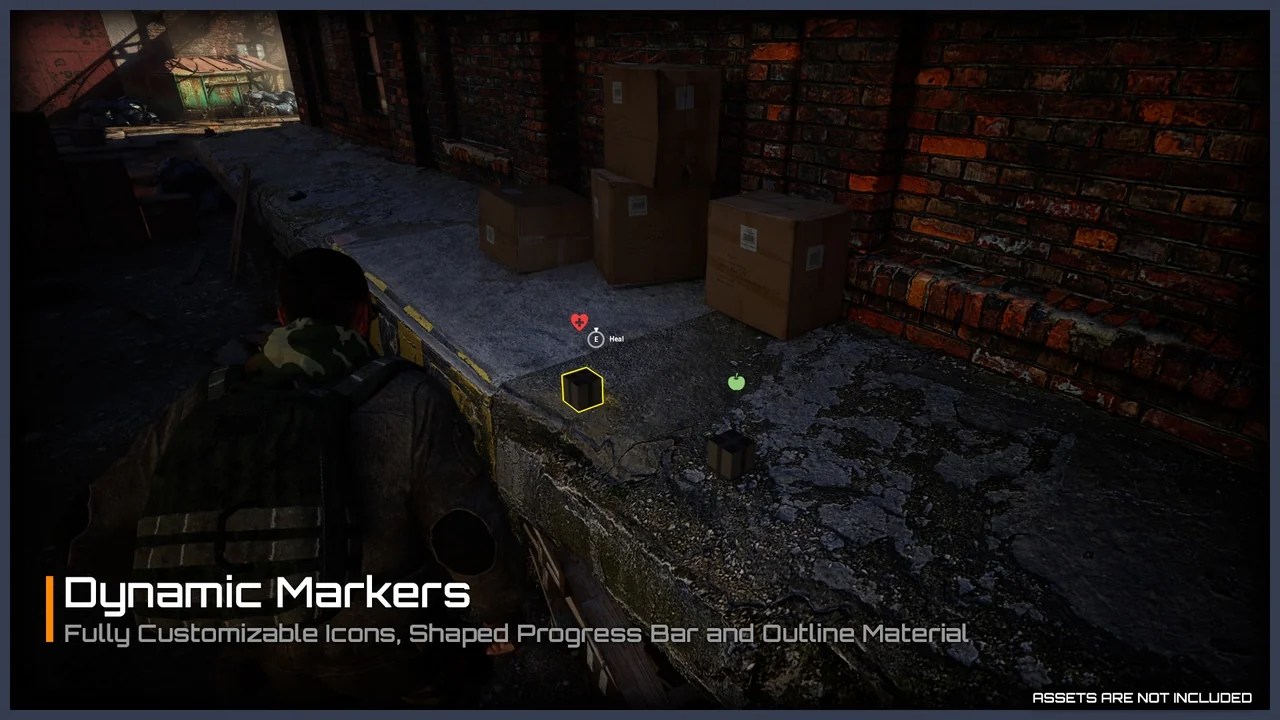
 Gameplay Features
 Gameplay Features
 Gameplay Features