"c68a05d5e51405b3"{"id":"1001126","slug":"ultimate-quest-manager","title":"Ultimate Quest Manager","category":"Gameplay Features","engine":"5.4+","assetVersion":"","engineVersion":"Engine Version: 5.4+","tag":"Gameplay Features","accent":"blue","visual":"mech","summary":"Unlimited quest sequences, data-table-driven objectives, compass markers, quest log, save/load progress, and World Composition support for Unreal projects.","platform":"Unreal Engine","publishedAt":"2026-09-07T13:28:12.204Z","updatedAt":"2026-09-07T13:28:12.204Z","sourceNotes":[],"fileContents":[],"compatibility":["Unreal Engine","Engine Version: 5.4+"],"featuredImage":{"alt":"Ultimate Quest Manager","src":"/wp-content/uploads/published/2026/09/941b63979a17-934194ee-e1a7-4655-9a66-f57e9dc8b34c-b6ef6e7074.webp"},"hasDownloadLink":true,"downloads":0,"terms":[{"taxonomy":"category","slug":"gameplay-features","name":"Gameplay Features"}],"galleryImages":[{"src":"/wp-content/uploads/published/2026/09/9af4486d09eb-87fcc088-b99f-4fe0-b28a-dab0e8490e1e-415ad2fe26.webp","alt":"Ultimate Quest Manager"},{"src":"/wp-content/uploads/published/2026/09/1fa893cc3d07-b6c48a0b-3f3f-47fb-a878-d7f215a24f73-f344db68ed.webp","alt":"Ultimate Quest Manager"},{"src":"/wp-content/uploads/published/2026/09/35cae520e066-bac1fdd7-4e1f-4125-9b11-0f6b6c687e35-9d91d50d27.webp","alt":"Ultimate Quest Manager"},{"src":"/wp-content/uploads/published/2026/09/a211a244d318-fa83903b-ac76-4ce6-bf0b-e11c1cf2b204-673efe168f.webp","alt":"Ultimate Quest Manager"},{"src":"/wp-content/uploads/published/2026/09/b5697a808ee8-57201edf-607e-470d-8451-e745f5325522-dcec4b9a84.webp","alt":"Ultimate Quest Manager"},{"src":"/wp-content/uploads/published/2026/09/82a3358b5fbd-49ae4fdc-f2de-43f3-b1a6-58680882c61f-3ef0e91056.webp","alt":"Ultimate Quest Manager"},{"src":"/wp-content/uploads/published/2026/09/96ccba189f73-ac782f5f-44d0-4e82-ab09-8d3e16cfdb4b-754c70dc99.webp","alt":"Ultimate Quest Manager"},{"src":"/wp-content/uploads/published/2026/09/c881ea505b31-25ccdb6b-cdd2-49f6-b897-32477ecdb3ff-28934c94ab.webp","alt":"Ultimate Quest Manager"}],"accessPanel":{"kind":"resource","title":"Download this resource","eyebrow":"Free Download","message":"Log in or create a free account to start your download.","fileName":"UltimateQuestManager.7z","safetyNote":"Resources are manually reviewed before listing to improve quality and reduce obvious risks.","actionLabel":"Download Free","resourceType":"Resource archive"},"contentHtml":"\u003cp\u003eCompass, dynamic markers, quest log, and a fully Data Table–driven quest system arrive together in Ultimate Quest Manager. The asset offers a structured way to create quests without hard-coding each mission step, and its expandable logic is meant to adapt to whatever gameplay you build around it.\u003c/p\u003e \u003ch2\u003eData Table Quest Creation That Works Dynamically\u003c/h2\u003e\n\u003cp\u003eThe central workflow in Ultimate Quest Manager is based on Data Tables. You create a quest inside a Data Table, and once that entry exists, the rest of the system picks it up dynamically. This removes much of the manual wiring you might expect from a quest framework, letting you focus on content instead of reworking Blueprint logic for each new mission.\u003c/p\u003e\n\u003cp\u003eBecause the quest reads from Data Table data, adding a new quest is largely a matter of defining its rows and fields. The system then understands what needs to happen in-game. This is especially useful for teams that want to tune quests without touching code or complex event graphs every time a designer adjusts a clue, a target count, or an objective destination.\u003c/p\u003e \u003ch2\u003eSequences, Objectives, and Tag-Driven Freedom\u003c/h2\u003e\n\u003cp\u003eUltimate Quest Manager gives each quest room to grow. You can create unlimited sequences for a single quest, and every sequence can contain unlimited objectives. Inside a project, this means a quest can move through several distinct phases, each with its own checklist of goals, without forcing you to duplicate logic across different quest actors.\u003c/p\u003e\n\u003cp\u003eObjective types are also flexible. Instead of being locked to “kill X” or “collect Y,” the system supports multiple objectives with multiple objective types, and tags open the door to even wider possibilities. With tags, you can define custom behaviors or special conditions that suit your own game mechanics. If you need an objective that isn’t covered by a default type, tags give you a path to extend the system rather than replace it.\u003c/p\u003e \u003ch2\u003eCompass, Dynamic Markers, and the Quest Log In-Game\u003c/h2\u003e\n\u003cp\u003eBeyond the backend logic, Ultimate Quest Manager includes UI-facing tools that help players pursue objectives. The compass gives directional feedback, while dynamic markers attach to quest-related locations or targets as they appear. Markers update as the quest state changes, so a marker might point to a new zone after the player completes an early sequence.\u003c/p\u003e\n\u003cp\u003eThe built-in quest log organizes current objectives and progress. Because the log is part of the asset, you don’t need to build a separate menu system just to display active and completed quests. Combined, the compass, markers, and log form a functional navigation loop that works alongside the Data Table–driven quest state.\u003c/p\u003e \u003ch2\u003eSave/Load and World Composition\u003c/h2\u003e\n\u003cp\u003eQuest progress is not meant to vanish when a player closes the game or travels between levels. Ultimate Quest Manager includes a save game feature specifically for quest data, and it handles saving and loading the full progress of a quest. This means completed sequences, active objectives, and other quest state can be restored when the player returns.\u003c/p\u003e\n\u003cp\u003eThe asset also supports World Composition, which matters for open-world or large-level projects. If your game streams persistent levels as part of a World Composition setup, the quest system is built to function in that environment rather than fight against it.\u003c/p\u003e \u003ch2\u003eBuilt With the Ultimate Shooter Kit in Mind\u003c/h2\u003e\n\u003cp\u003eUltimate Quest Manager is part of the Ultimate Shooter Kit, so it aligns naturally with shooter-style gameplay that requires mission structures, navigation goals, and objective tracking. At the same time, the underlying quest logic is generic enough to be dropped into other genres. A demo and documentation accompany the project, making it easier to see how dynamic markers, compass behavior, and Data Table entries are intended to work together before you start customizing them.\u003c/p\u003e\n\u003cp\u003eFor developers who want a quest framework that is both structured and malleable, the combination of unlimited sequence branching, tag-based objective types, and persistent progress gives the asset its versatility. It sets up a clear pipeline from Data Table content to in-game UI and world markers, while leaving space for your own logic whenever a quest needs to break the mold.\u003c/p\u003e\n\n\u003ch2\u003eRelated Resources Worth Checking\u003c/h2\u003e\n\u003cul\u003e\n\u003cli\u003e\u003ca href=\"https://3dcghub.com/hyper-time-manager-system-v4/\" title=\"Hyper Time Manager System v4\"\u003eHyper Time Manager System v4\u003c/a\u003e\u003c/li\u003e\n\u003cli\u003e\u003ca href=\"https://3dcghub.com/ultimate-character-customization/\" title=\"Ultimate Character Customization\"\u003eUltimate Character Customization\u003c/a\u003e\u003c/li\u003e\n\u003cli\u003e\u003ca href=\"https://3dcghub.com/project-sunrise-interaction-dialogue-quest-system/\" title=\"Project Sunrise - Interaction, Dialogue \u0026amp; Quest System\"\u003eProject Sunrise - Interaction, Dialogue \u0026amp; Quest System\u003c/a\u003e\u003c/li\u003e\n\u003cli\u003e\u003ca href=\"https://3dcghub.com/open-world-audio-system/\" title=\"Open World Audio System\"\u003eOpen World Audio System\u003c/a\u003e\u003c/li\u003e\n\u003cli\u003e\u003ca href=\"https://3dcghub.com/hyper-outliner-and-symbol-system-v4/\" title=\"Hyper Outliner and Symbol System v4\"\u003eHyper Outliner and Symbol System v4\u003c/a\u003e\u003c/li\u003e\n\u003c/ul\u003e","contentTextLength":4409,"navigation":{"current":850,"total":3860,"previous":{"id":"1001127","slug":"ultimate-shooter-kit","title":"Ultimate Shooter Kit","category":"Shooter","platform":"Unreal Engine","updatedAt":"2026-09-07T13:39:36.666Z"},"next":{"id":"1001125","slug":"stylized-forest-trees-and-rocks-forest-rocks-trees-stylized-forest","title":"Stylized Forest - Trees \u0026 Rocks (Forest, Rocks, Trees, Stylized Forest)","category":"Forest \u0026 Jungle","platform":"Unreal Engine","updatedAt":"2026-09-07T13:23:58.967Z"}},"relatedResources":[{"id":"1001306","slug":"ultimate-interaction-manager","title":"Ultimate Interaction Manager","category":"Gameplay Features","engine":"5.0+","assetVersion":"","engineVersion":"Engine Version: 5.0+","tag":"Gameplay Features","accent":"blue","visual":"mech","summary":"An in-depth look at Ultimate Interaction Manager, covering its component architecture, server replication, dynamic widget pool markers, and UE 5.7 status.","platform":"Unreal Engine","publishedAt":"2026-10-02T06:20:16.462Z","updatedAt":"2026-10-02T06:20:16.462Z","sourceNotes":[],"fileContents":[],"compatibility":["Unreal Engine","Engine Version: 5.0+"],"featuredImage":{"alt":"Ultimate Interaction Manager","src":"/wp-content/uploads/published/2026/10/eb0c915dbe73-3ff46653-0438-44e1-99c8-609e83960f18-3cca55c0f0.webp"},"hasDownloadLink":true,"downloads":0},{"id":"1001711","slug":"ultimate-horse-system-horse-horse-riding-horse-system-mount-rideable-horse","title":"Ultimate Horse System (Horse, Horse Riding, Horse System, Mount, Rideable Horse)","category":"Gameplay Features","engine":"5.1+","assetVersion":"","engineVersion":"Engine Version: 5.1+","tag":"Gameplay Features","accent":"blue","visual":"mech","summary":"Explore the Ultimate Horse System for Unreal Engine, featuring full network replication, modular saddles, Foot IK, water interaction, and custom rider support.","platform":"Unreal Engine","publishedAt":"2026-10-14T17:15:39.983Z","updatedAt":"2026-10-14T17:15:39.983Z","sourceNotes":[],"fileContents":[],"compatibility":["Unreal Engine","Engine Version: 5.1+"],"featuredImage":{"alt":"Ultimate Horse System (Horse, Horse Riding, Horse System, Mount, Rideable Horse)","src":"/wp-content/uploads/published/2026/10/6dc76c7660f2-d252bb16-9c4e-4df7-8a68-0bb86ab4c882-eca349b4ab.webp"},"hasDownloadLink":true,"downloads":2},{"id":"1001475","slug":"ultimate-hit-reaction-system","title":"Ultimate Hit Reaction System","category":"Gameplay Features","engine":"5.6+","assetVersion":"","engineVersion":"Engine Version: 5.6+","tag":"Gameplay Features","accent":"blue","visual":"mech","summary":"A deep dive into the Ultimate Hit Reaction System for Unreal Engine, covering its 168 mocap animations, Chooser Tables, Motion Warping, and IK integration.","platform":"Unreal Engine","publishedAt":"2026-10-08T08:28:50.048Z","updatedAt":"2026-10-08T08:28:50.048Z","sourceNotes":[],"fileContents":[],"compatibility":["Unreal Engine","Engine Version: 5.6+"],"featuredImage":{"alt":"Ultimate Hit Reaction System","src":"/wp-content/uploads/published/2026/10/8833d5e34c3d-c4d6cc46-3a57-4651-a1d2-e8585976b5ea-a14898b9cd.webp"},"hasDownloadLink":true,"downloads":2}]}
Gameplay Features
Ultimate Quest Manager
Unlimited quest sequences, data-table-driven objectives, compass markers, quest log, save/load progress, and World Composition support for Unreal projects.
Compass, dynamic markers, quest log, and a fully Data Table–driven quest system arrive together in Ultimate Quest Manager. The asset offers a structured way to create quests without hard-coding each mission step, and its expandable logic is meant to adapt to whatever gameplay you build around it.
Data Table Quest Creation That Works Dynamically
The central workflow in Ultimate Quest Manager is based on Data Tables. You create a quest inside a Data Table, and once that entry exists, the rest of the system picks it up dynamically. This removes much of the manual wiring you might expect from a quest framework, letting you focus on content instead of reworking Blueprint logic for each new mission.
Because the quest reads from Data Table data, adding a new quest is largely a matter of defining its rows and fields. The system then understands what needs to happen in-game. This is especially useful for teams that want to tune quests without touching code or complex event graphs every time a designer adjusts a clue, a target count, or an objective destination.
Sequences, Objectives, and Tag-Driven Freedom
Ultimate Quest Manager gives each quest room to grow. You can create unlimited sequences for a single quest, and every sequence can contain unlimited objectives. Inside a project, this means a quest can move through several distinct phases, each with its own checklist of goals, without forcing you to duplicate logic across different quest actors.
Objective types are also flexible. Instead of being locked to “kill X” or “collect Y,” the system supports multiple objectives with multiple objective types, and tags open the door to even wider possibilities. With tags, you can define custom behaviors or special conditions that suit your own game mechanics. If you need an objective that isn’t covered by a default type, tags give you a path to extend the system rather than replace it.
Compass, Dynamic Markers, and the Quest Log In-Game
Beyond the backend logic, Ultimate Quest Manager includes UI-facing tools that help players pursue objectives. The compass gives directional feedback, while dynamic markers attach to quest-related locations or targets as they appear. Markers update as the quest state changes, so a marker might point to a new zone after the player completes an early sequence.
The built-in quest log organizes current objectives and progress. Because the log is part of the asset, you don’t need to build a separate menu system just to display active and completed quests. Combined, the compass, markers, and log form a functional navigation loop that works alongside the Data Table–driven quest state.
Save/Load and World Composition
Quest progress is not meant to vanish when a player closes the game or travels between levels. Ultimate Quest Manager includes a save game feature specifically for quest data, and it handles saving and loading the full progress of a quest. This means completed sequences, active objectives, and other quest state can be restored when the player returns.
The asset also supports World Composition, which matters for open-world or large-level projects. If your game streams persistent levels as part of a World Composition setup, the quest system is built to function in that environment rather than fight against it.
Built With the Ultimate Shooter Kit in Mind
Ultimate Quest Manager is part of the Ultimate Shooter Kit, so it aligns naturally with shooter-style gameplay that requires mission structures, navigation goals, and objective tracking. At the same time, the underlying quest logic is generic enough to be dropped into other genres. A demo and documentation accompany the project, making it easier to see how dynamic markers, compass behavior, and Data Table entries are intended to work together before you start customizing them.
For developers who want a quest framework that is both structured and malleable, the combination of unlimited sequence branching, tag-based objective types, and persistent progress gives the asset its versatility. It sets up a clear pipeline from Data Table content to in-game UI and world markers, while leaving space for your own logic whenever a quest needs to break the mold.
 Gameplay Features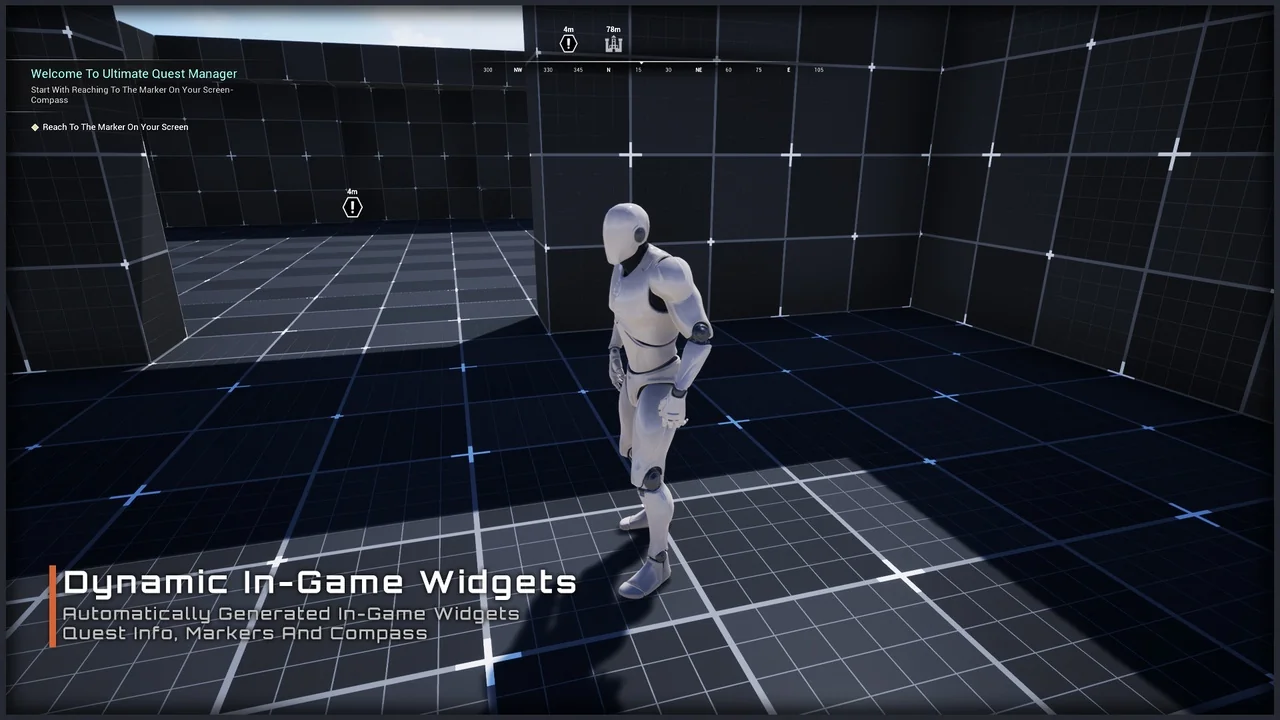
 Gameplay Features
 Gameplay Features
 Gameplay Features