"26aaab8a5d5ed4fc"{"id":"1001023","slug":"ultimate-character-customization","title":"Ultimate Character Customization","category":"Gameplay Features","engine":"5.1+","assetVersion":"","engineVersion":"Engine Version: 5.1+","tag":"Gameplay Features","accent":"blue","visual":"character","summary":"A blueprint-driven character customization system that works with modular and single meshes, uses data tables for widgets, GUID-based saving, and a control rig","platform":"Unreal Engine","publishedAt":"2026-08-23T05:28:06.853Z","updatedAt":"2026-08-23T05:28:06.853Z","sourceNotes":[],"fileContents":[],"compatibility":["Unreal Engine","Engine Version: 5.1+"],"featuredImage":{"alt":"Ultimate Character Customization","src":"/wp-content/uploads/published/2026/08/8b4963c7b4d3-6efa6ff7-2fc9-4699-a6b7-6068455ff61b-cf538c296f.webp"},"hasDownloadLink":true,"downloads":1,"terms":[{"taxonomy":"category","slug":"gameplay-features","name":"Gameplay Features"}],"galleryImages":[{"src":"/wp-content/uploads/published/2026/08/ed7c4156b3f5-eecf77f4-163c-495a-a12d-c2815b96d022-3432c7aed1.webp","alt":"Ultimate Character Customization"},{"src":"/wp-content/uploads/published/2026/08/aa3133692a5b-69f6a613-7479-4f89-9d43-034c95b0b117-dc2307e23b.webp","alt":"Ultimate Character Customization"},{"src":"/wp-content/uploads/published/2026/08/fd0754817714-d7fb70f5-d9eb-4376-a9c7-0b27f32a669e-51e9242de0.webp","alt":"Ultimate Character Customization"},{"src":"/wp-content/uploads/published/2026/08/ec1962819519-bd3923e6-12a8-4a82-bb2b-a0c5321a1a93-532f31f7e6.webp","alt":"Ultimate Character Customization"},{"src":"/wp-content/uploads/published/2026/08/83dbb8a710e4-a8e03d8c-b7cb-4cfc-897c-5faa5beb98b5-7fd9587b1b.webp","alt":"Ultimate Character Customization"},{"src":"/wp-content/uploads/published/2026/08/c7a5ee9ee293-1ed26c73-4fed-42cb-8e8f-770fceed41eb-7adaee46b7.webp","alt":"Ultimate Character Customization"}],"accessPanel":{"kind":"resource","title":"Download this resource","eyebrow":"Free Download","message":"Log in or create a free account to start your download.","fileName":"Ultimate Character Customization.7z","safetyNote":"Resources are manually reviewed before listing to improve quality and reduce obvious risks.","actionLabel":"Download Free","resourceType":"Resource archive"},"contentHtml":"\u003cp\u003eWhen a character creator has to handle modular armor, morph targets, and material swaps at once, the data behind it can get messy. Ultimate Character Customization tackles that from the blueprint side: instead of hardcoding every option into a widget, it derives the player-facing UI from data tables you create. The system is deliberately flexible, supporting both modular characters and single meshes, so the same backend can power a heavy armor set, a subtle face tweak, or a palette swap.\u003c/p\u003e\u003ch2\u003eA Data-Driven Starting Point for Character Builds\u003c/h2\u003e\u003cp\u003eThe core workflow is set up around data tables. You define the options that should appear in the character creator, and the system procedurally generates all of the widgets from that table. That means the UI scale grows with the data rather than requiring a new set of widgets each time you add a hairstyle, a tattoo, or a shoulder pad. Because the widgets are generated, the system also keeps a consistent layout when options are added or removed during development.\u003c/p\u003e\u003cp\u003eThe modular nature of the system is worth calling out. It does not force a specific character topology or a single mesh structure. You can create any type of character, whether that is a single mesh with blendshapes or a fully modular character built from separate pieces. The same data table logic applies to both, which makes the asset adaptable to projects that are still deciding how much modularity they need.\u003c/p\u003e\u003ch2\u003eMorph Targets and Material Parameters in the Option Set\u003c/h2\u003e\u003cp\u003eEach option you add to a data table can be one of several types. The system supports Morph Targets, which are common for face shapes, body sliders, or other deformations. It also supports Material Parameters, broken out into Texture, Scalar, and Color. So a single character creator can offer a muscle slider (morph target), a roughness scalar, a metalness scalar, a color tint for clothing, and a texture swap for a fabric pattern, all from the same generated widget flow.\u003c/p\u003e\u003cp\u003eBecause the widgets are generated from the data table, the player sees a clean list or set of controls without extra blueprint wiring for each property. The developer's job is to structure the data correctly, and the system handles the procedural UI generation from there. That structure is what makes the asset feel like a system rather than a one-off character screen.\u003c/p\u003e\u003ch2\u003eSlot-Based Save \u0026amp; Load With Unique IDs\u003c/h2\u003e\u003cp\u003ePersistence is handled with Global Unique Identifiers. Each option you create is assigned a GUID, and the system saves the selected option based on those IDs. This avoids the common problem of saving an index number that becomes meaningless when the option list is reordered. As long as the GUID stays attached to the same option, the save data points to the right visual result.\u003c/p\u003e\u003cp\u003eThe save system is slot-based, and it is made for runtime management. Players can add a new slot, remove an existing one, or rename a slot from within the running game. That is a practical feature for character creators that let players maintain multiple appearances, try out different looks, or keep separate saves for different playthrough styles. The slot operations do not require leaving the game to an external menu.\u003c/p\u003e\u003ch2\u003eMultiple Genders, Classes, and Unique Setups\u003c/h2\u003e\u003cp\u003eThe data structure also leaves room for multiple genders or multiple character classes. Rather than treating each gender as a separate system, you can use the same customization backend and expand it for different classes of characters when necessary. Each setup you create has its own unique data, so a human fighter and an elven mage could share the same system but pull from different data tables or different option sets.\u003c/p\u003e\u003cp\u003eThis is especially useful for projects that want to keep one character creator screen but change the available options based on the character’s gender or class. The uniqueness of each setup is built into the data, not forced into a branch of blueprint nodes. The practical result is that the system scales from a single character to a roster of classes without a rewrite of the UI generation logic.\u003c/p\u003e\u003ch2\u003eControl Rig, Weight Painting, and Blueprint Expectations\u003c/h2\u003e\u003cp\u003eBeyond morph targets and material parameters, the asset provides a control rig for transforming or modifying bones. This can be used to tweak a character’s posture, adjust proportions, or add subtle animation-driven changes. The rig works in a way similar to what is shown in the asset’s video and screenshots, and it is meant to be used alongside the customization options.\u003c/p\u003e\u003cp\u003eThere is a clear technical requirement here: extra meshes need to be perfectly weight-painted in order to work seamlessly with the control rig. If a mesh is not well weight-painted, bone transformations will not affect it cleanly. So teams planning to use this feature should budget time for skinning and testing.\u003c/p\u003e\u003cp\u003eThe asset also has a learning curve. It is not a plug-and-play system, and the available details states that at least basic knowledge of blueprints is highly recommended. Without that, working with the data tables and generated widgets can be confusing. Think of it as a toolkit that rewards blueprint familiarity rather than a ready-made menu you drop into a project.\u003c/p\u003e\u003cp\u003eThe package includes several ways to explore it: a showcase with MetaHumans, a playable demo, and a playable demo with MetaHumans. The demos help you see the system in motion, but the meshes themselves are not included. That makes sense given the modular nature of the asset; it is built to plug into your own character meshes and materials.\u003c/p\u003e\u003cp\u003eFor teams that already have a set of character meshes and a clear idea of which options they want to expose, Ultimate Character Customization offers a data-driven path that keeps the UI generation consistent and the save logic resilient. The combination of GUID-based saving, slot management, morph targets, material parameters, and control-rig support covers a wide range of character creator needs without forcing a specific art style. Just bring your blueprint basics and your weight-painted meshes, and the system can carry the customization logic from there.\u003c/p\u003e\n\n\u003ch2\u003eRelated Resources Worth Checking\u003c/h2\u003e\n\u003cul\u003e\n\u003cli\u003e\u003ca href=\"https://3dcghub.com/ultimate-gameplay-camera/\" title=\"Ultimate Gameplay Camera\"\u003eUltimate Gameplay Camera\u003c/a\u003e\u003c/li\u003e\n\u003cli\u003e\u003ca href=\"https://3dcghub.com/universal-shooting-game-template-and-framework/\" title=\"Universal Shooting Game Template and Framework\"\u003eUniversal Shooting Game Template and Framework\u003c/a\u003e\u003c/li\u003e\n\u003cli\u003e\u003ca href=\"https://3dcghub.com/anamorphic-depth-of-field-for-cinematics/\" title=\"Anamorphic Depth of Field for Cinematics\"\u003eAnamorphic Depth of Field for Cinematics\u003c/a\u003e\u003c/li\u003e\n\u003cli\u003e\u003ca href=\"https://3dcghub.com/customizable-bodycam-component/\" title=\"Customizable Bodycam Component\"\u003eCustomizable Bodycam Component\u003c/a\u003e\u003c/li\u003e\n\u003cli\u003e\u003ca href=\"https://3dcghub.com/project-sunrise-interaction-dialogue-quest-system/\" title=\"Project Sunrise - Interaction, Dialogue \u0026amp; Quest System\"\u003eProject Sunrise - Interaction, Dialogue \u0026amp; Quest System\u003c/a\u003e\u003c/li\u003e\n\u003c/ul\u003e","contentTextLength":6299,"navigation":{"current":495,"total":3400,"previous":{"id":"1001024","slug":"ultra-camera","title":"Ultra Camera","category":"Humans","platform":"Unreal Engine","updatedAt":"2026-08-23T05:37:06.175Z"},"next":{"id":"1001022","slug":"trying-on-clothes-animation","title":"Trying On Clothes Animation","category":"Gestures","platform":"Unreal Engine","updatedAt":"2026-08-23T05:22:16.582Z"}},"relatedResources":[{"id":"15108","slug":"ultimate-gameplay-camera","title":"Ultimate Gameplay Camera","category":"Gameplay Features","engine":"5.3 - 5.5","assetVersion":"Engine version: 5.3 - 5.5","engineVersion":"Asset Version:1.3","tag":"Gameplay Features","accent":"blue","visual":"audio","summary":"The Ultimate Gameplay Camera provides a professional-grade, dynamic third-person camera system for Unreal Engine. It features smooth movement, multiplayer replication, and extensive customization options without requiring C++ knowledge.","platform":"Unreal Engine","publishedAt":"2026-03-12T07:52:43.000Z","updatedAt":"2026-04-19T15:45:35.000Z","sourceNotes":[],"fileContents":[],"compatibility":["Unreal Engine","Engine version: 5.3 - 5.5","Asset Version: 1.3"],"featuredImage":{"alt":"Ultimate Gameplay Camera","src":"https://3dcghub.com/wp-content/uploads/2026/03/89e2406f-10ab-4f8a-97aa-fa74ad5bc513.webp"},"hasDownloadLink":true,"downloads":0},{"id":"11176","slug":"universal-shooting-game-template-and-framework","title":"Universal Shooting Game Template and Framework","category":"Gameplay Features","engine":"5.1+","assetVersion":"Engine version: 5.1+","engineVersion":"5.1","tag":"Gameplay Features","accent":"blue","visual":"character","summary":"A comprehensive, blueprint-only framework designed for creating shooting games with independent modules and multiplayer support. It features integrated AI, weapon systems, and character customization tools.","platform":"Unreal Engine","publishedAt":"2026-03-03T17:04:56.000Z","updatedAt":"2026-04-19T15:48:15.000Z","sourceNotes":[],"fileContents":[],"compatibility":["Unreal Engine","Engine version: 5.1+"],"featuredImage":{"alt":"Universal Shooting Game Template and Framework","src":"https://3dcghub.com/wp-content/uploads/2026/03/809586c9-06d5-4b25-8d10-adc2975bbd96.webp"},"hasDownloadLink":true,"downloads":0},{"id":"1001307","slug":"ultimate-spell-system","title":"Ultimate Spell System","category":"Gameplay Features","engine":"5.1+","assetVersion":"","engineVersion":"Engine Version: 5.1+","tag":"Gameplay Features","accent":"blue","visual":"mech","summary":"Explore the Ultimate Spell System, an advanced magic framework featuring Niagara integration, multiplayer support, mana, shields, and spellbook mechanics.","platform":"Unreal Engine","publishedAt":"2026-10-02T06:21:12.194Z","updatedAt":"2026-10-02T06:21:12.194Z","sourceNotes":[],"fileContents":[],"compatibility":["Unreal Engine","Engine Version: 5.1+"],"featuredImage":{"alt":"Ultimate Spell System","src":"/wp-content/uploads/published/2026/10/b765acfa374d-8db4a436-8f55-46de-a8d5-84bd16177dcd-b3cdaaff6f.webp"},"hasDownloadLink":true,"downloads":0}]}
Gameplay Features
Ultimate Character Customization
A blueprint-driven character customization system that works with modular and single meshes, uses data tables for widgets, GUID-based saving, and a control rig
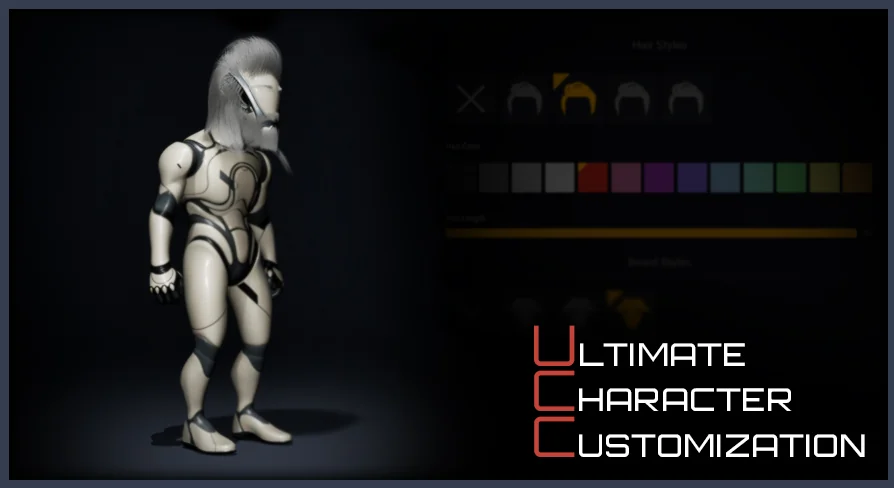
When a character creator has to handle modular armor, morph targets, and material swaps at once, the data behind it can get messy. Ultimate Character Customization tackles that from the blueprint side: instead of hardcoding every option into a widget, it derives the player-facing UI from data tables you create. The system is deliberately flexible, supporting both modular characters and single meshes, so the same backend can power a heavy armor set, a subtle face tweak, or a palette swap.
A Data-Driven Starting Point for Character Builds
The core workflow is set up around data tables. You define the options that should appear in the character creator, and the system procedurally generates all of the widgets from that table. That means the UI scale grows with the data rather than requiring a new set of widgets each time you add a hairstyle, a tattoo, or a shoulder pad. Because the widgets are generated, the system also keeps a consistent layout when options are added or removed during development.
The modular nature of the system is worth calling out. It does not force a specific character topology or a single mesh structure. You can create any type of character, whether that is a single mesh with blendshapes or a fully modular character built from separate pieces. The same data table logic applies to both, which makes the asset adaptable to projects that are still deciding how much modularity they need.
Morph Targets and Material Parameters in the Option Set
Each option you add to a data table can be one of several types. The system supports Morph Targets, which are common for face shapes, body sliders, or other deformations. It also supports Material Parameters, broken out into Texture, Scalar, and Color. So a single character creator can offer a muscle slider (morph target), a roughness scalar, a metalness scalar, a color tint for clothing, and a texture swap for a fabric pattern, all from the same generated widget flow.
Because the widgets are generated from the data table, the player sees a clean list or set of controls without extra blueprint wiring for each property. The developer's job is to structure the data correctly, and the system handles the procedural UI generation from there. That structure is what makes the asset feel like a system rather than a one-off character screen.
Slot-Based Save & Load With Unique IDs
Persistence is handled with Global Unique Identifiers. Each option you create is assigned a GUID, and the system saves the selected option based on those IDs. This avoids the common problem of saving an index number that becomes meaningless when the option list is reordered. As long as the GUID stays attached to the same option, the save data points to the right visual result.
The save system is slot-based, and it is made for runtime management. Players can add a new slot, remove an existing one, or rename a slot from within the running game. That is a practical feature for character creators that let players maintain multiple appearances, try out different looks, or keep separate saves for different playthrough styles. The slot operations do not require leaving the game to an external menu.
Multiple Genders, Classes, and Unique Setups
The data structure also leaves room for multiple genders or multiple character classes. Rather than treating each gender as a separate system, you can use the same customization backend and expand it for different classes of characters when necessary. Each setup you create has its own unique data, so a human fighter and an elven mage could share the same system but pull from different data tables or different option sets.
This is especially useful for projects that want to keep one character creator screen but change the available options based on the character’s gender or class. The uniqueness of each setup is built into the data, not forced into a branch of blueprint nodes. The practical result is that the system scales from a single character to a roster of classes without a rewrite of the UI generation logic.
Control Rig, Weight Painting, and Blueprint Expectations
Beyond morph targets and material parameters, the asset provides a control rig for transforming or modifying bones. This can be used to tweak a character’s posture, adjust proportions, or add subtle animation-driven changes. The rig works in a way similar to what is shown in the asset’s video and screenshots, and it is meant to be used alongside the customization options.
There is a clear technical requirement here: extra meshes need to be perfectly weight-painted in order to work seamlessly with the control rig. If a mesh is not well weight-painted, bone transformations will not affect it cleanly. So teams planning to use this feature should budget time for skinning and testing.
The asset also has a learning curve. It is not a plug-and-play system, and the available details states that at least basic knowledge of blueprints is highly recommended. Without that, working with the data tables and generated widgets can be confusing. Think of it as a toolkit that rewards blueprint familiarity rather than a ready-made menu you drop into a project.
The package includes several ways to explore it: a showcase with MetaHumans, a playable demo, and a playable demo with MetaHumans. The demos help you see the system in motion, but the meshes themselves are not included. That makes sense given the modular nature of the asset; it is built to plug into your own character meshes and materials.
For teams that already have a set of character meshes and a clear idea of which options they want to expose, Ultimate Character Customization offers a data-driven path that keeps the UI generation consistent and the save logic resilient. The combination of GUID-based saving, slot management, morph targets, material parameters, and control-rig support covers a wide range of character creator needs without forcing a specific art style. Just bring your blueprint basics and your weight-painted meshes, and the system can carry the customization logic from there.
 Gameplay Features
 Gameplay Features
 Gameplay Features
 Gameplay Features