"26aaab8a5d5ed4fc"{"id":"1001022","slug":"trying-on-clothes-animation","title":"Trying On Clothes Animation","category":"Gestures","engine":"5.3+","assetVersion":"","engineVersion":"Engine Version: 5.3+","tag":"Gestures","accent":"blue","visual":"animation","summary":"Animation set for character trying on clothes, covering the change and reactions. For inventory and waiting states. Supports UE4 and UE5 skeletons.","platform":"Unreal Engine","publishedAt":"2026-08-23T05:22:16.582Z","updatedAt":"2026-08-23T05:22:16.582Z","sourceNotes":[],"fileContents":[],"compatibility":["Unreal Engine","Engine Version: 5.3+"],"featuredImage":{"alt":"Trying On Clothes Animation","src":"/wp-content/uploads/published/2026/08/119917fd5dcb-8f53430a-5e90-4c6f-a3d8-5bd609592900-0901f0ffbc.webp"},"hasDownloadLink":true,"downloads":0,"terms":[{"taxonomy":"category","slug":"gestures","name":"Gestures"}],"galleryImages":[{"src":"/wp-content/uploads/published/2026/08/d0109d8a5f60-37607985-6862-4e6e-a981-7ad7b11e3917-d5e33ab287.webp","alt":"Trying On Clothes Animation"},{"src":"/wp-content/uploads/published/2026/08/83905fa2c5a8-31e1fa28-bf70-4950-9b73-8adbd99b4e8f-f8f4f3fddc.webp","alt":"Trying On Clothes Animation"},{"src":"/wp-content/uploads/published/2026/08/8e1d676e09c4-55984d89-4246-4b3f-a38f-17b7219d34d2-3c53ddd5c2.webp","alt":"Trying On Clothes Animation"}],"accessPanel":{"kind":"resource","title":"Download this resource","eyebrow":"Free Download","message":"Log in or create a free account to start your download.","fileName":"Content.7z","safetyNote":"Resources are manually reviewed before listing to improve quality and reduce obvious risks.","actionLabel":"Download Free","resourceType":"Resource archive"},"contentHtml":"\u003cp\u003eA character stands in the middle of the screen, ready to swap a piece of clothing. The moment can feel flat if the animation is just a simple fade or a static pose. “Trying On Clothes Animation” gives that moment a body. It is an animation set for a character trying on clothes, and it splits the scene into two layers: the physical act of changing and the character’s reaction to the change.\u003c/p\u003e \u003ch2\u003eChanging Clothes and the Reactions That Follow\u003c/h2\u003e \u003cp\u003eThe set contains animations that cover both sides of the try-on moment. The first side is the changing itself: the character removes or adds clothing, adjusts the fit, and settles into the new outfit. The second side is the reaction: the character looks at themselves and expresses a visible response to the new look. These two groups are separate in the pack, which means they can be paired or played individually depending on the context.\u003c/p\u003e \u003cp\u003eHaving reactions separated from the change is useful for developers who want to reuse the same dressing motion across multiple NPCs or player characters. The change animation is neutral, while the reaction can be swapped to match the character’s personality. A confident character might respond with a nod, while a nervous one might hesitate. Since the set includes both changing clothes and reactions, the raw material for that kind of variation is already there.\u003c/p\u003e \u003cp\u003eBecause the tags include both male and female, the animations are expected to fit a range of body types. That makes the set a general-purpose solution for any humanoid character that needs to interact with a wardrobe.\u003c/p\u003e \u003ch2\u003eInventory and Waiting State Placement\u003c/h2\u003e \u003cp\u003eThe asset description names two clear locations for these animations: the inventory and the waiting state. In an inventory screen, the player might select a new shirt, pants, or armor piece. The character then changes into that item and reacts to it. This turns a menu action into a small performance that communicates the result without relying on text or icons.\u003c/p\u003e \u003cp\u003eIn a waiting state, the character has no immediate task. They might be in a character creation screen, a lobby, or a quiet corner of a hub world. Instead of standing idle with a static pose, the character cycles through a clothes-trying animation. That gives the player something to look at and makes the world feel more alive.\u003c/p\u003e \u003cp\u003eBoth of these contexts share a common trait: they are moments where the player is looking at the character and paying attention to their appearance. That makes the animation choice highly visible. A good animation here sells the fantasy of trying on gear; a bad one breaks it.\u003c/p\u003e \u003ch2\u003eBuilt for UE4 and UE5 Skeletons\u003c/h2\u003e \u003cp\u003eThe pack supports both UE4 and UE5 skeletons. That is a practical detail for any studio in the middle of updating projects or shipping a game across multiple engine branches. Animators do not have to worry about retargeting the set to a different core skeleton when moving between engine versions. The same animation data is available for both.\u003c/p\u003e \u003cp\u003eThere is also a compatibility note for Melee Combo Vol 1. This suggests the clothes-changing animations can be used alongside a melee combat set without breaking. For a game that includes both combat and inventory management, having the same developer cover both animation areas can reduce integration friction.\u003c/p\u003e \u003ch2\u003eA Broader Animation Toolkit\u003c/h2\u003e \u003cp\u003eBehind this pack is a developer who has released other animation projects in a number of gameplay categories. The list includes interactions, car, magic, skills, melee, and more. For a team that needs to cover several animation systems, this is a sign of experience and a potential source of additional assets that share a consistent style.\u003c/p\u003e \u003cp\u003eUsing the clothes-changing animation as a starting point, developers can then look at the same creator’s interaction and skill animation packs. This can shorten the search for compatible motion capture or hand-keyed clips, because the quality and workflow are already familiar. The exact content of those other projects is not covered here, but their existence is a useful reference for planning a broader animation library.\u003c/p\u003e \u003ch3\u003eWhere the Set Fits in a Production\u003c/h3\u003e \u003cp\u003eWhen a character is about to change clothes, the player is watching. This pack gives that moment a clear beginning, middle, and end: an item is swapped, the character adjusts, and the character reacts. In an inventory menu or a waiting screen, that three-beat rhythm makes the interaction feel physical.\u003c/p\u003e \u003cp\u003eFor studios working on a clothing-heavy game or an RPG with a detailed pause menu, this animation set is a practical option. It works on both UE4 and UE5, and it can stand alone or accompany a melee animation pack. Most importantly, it treats the simple act of getting dressed as a performance instead of an afterthought.\u003c/p\u003e\n\n\u003ch2\u003eMore From The Same Workflow\u003c/h2\u003e\n\u003cul\u003e\n\u003cli\u003e\u003ca href=\"https://3dcghub.com/male-emotes/\" title=\"Male Emotes\"\u003eMale Emotes\u003c/a\u003e\u003c/li\u003e\n\u003cli\u003e\u003ca href=\"https://3dcghub.com/91-interaction-mocap-animations/\" title=\"91 Interaction Mocap Animations\"\u003e91 Interaction Mocap Animations\u003c/a\u003e\u003c/li\u003e\n\u003cli\u003e\u003ca href=\"https://3dcghub.com/couples-anim-pack/\" title=\"Couples Anim Pack\"\u003eCouples Anim Pack\u003c/a\u003e\u003c/li\u003e\n\u003cli\u003e\u003ca href=\"https://3dcghub.com/weather-animations/\" title=\"Weather Animations\"\u003eWeather Animations\u003c/a\u003e\u003c/li\u003e\n\u003cli\u003e\u003ca href=\"https://3dcghub.com/scared-mocap-animation-pack/\" title=\"Scared - MoCap Animation Pack\"\u003eScared - MoCap Animation Pack\u003c/a\u003e\u003c/li\u003e\n\u003c/ul\u003e","contentTextLength":4853,"navigation":{"current":496,"total":3400,"previous":{"id":"1001023","slug":"ultimate-character-customization","title":"Ultimate Character Customization","category":"Gameplay Features","platform":"Unreal Engine","updatedAt":"2026-08-23T05:28:06.853Z"},"next":{"id":"1001021","slug":"traffic-lights-animated-14-pack-usa-stop-light-city","title":"Traffic Lights Animated 14 Pack USA Stop light City","category":"Vehicles \u0026 Transportation","platform":"Unreal Engine","updatedAt":"2026-08-23T05:16:10.308Z"}},"relatedResources":[{"id":"1000847","slug":"male-emotes","title":"Male Emotes","category":"Gestures","engine":"5.2+","assetVersion":"","engineVersion":"Engine Version: 5.2+","tag":"Gestures","accent":"blue","visual":"mech","summary":"51 male emote animations spanning happy, sad, social, and hostile gestures for NPC scenes. Motion-only, with no blueprints or character models included.","platform":"Unreal Engine","publishedAt":"2026-08-04T16:08:36.950Z","updatedAt":"2026-08-04T16:08:36.950Z","sourceNotes":[],"fileContents":[],"compatibility":["Unreal Engine","Engine Version: 5.2+"],"featuredImage":{"alt":"Male Emotes","src":"/wp-content/uploads/published/2026/08/aee97f4615f6-32fc0f7c-947f-4ba1-8a4d-8d4581a8e7c7-18165e6f2a.webp"},"hasDownloadLink":true,"downloads":2},{"id":"5993","slug":"91-interaction-mocap-animations","title":"91 Interaction Mocap Animations","category":"Gestures","engine":"5.1+","assetVersion":"Engine version: 5.1+","engineVersion":"4.26","tag":"Gestures","accent":"blue","visual":"animation","summary":"Enhance your Action and RPG games with 91 high-quality MOCAP interaction animations. Includes root motion and in-place motions for UE4 and UE5 skeletons.","platform":"Unreal Engine","publishedAt":"2026-02-18T16:19:43.000Z","updatedAt":"2026-04-19T15:56:34.000Z","sourceNotes":[],"fileContents":[],"compatibility":["Unreal Engine","Engine version: 5.1+"],"featuredImage":{"alt":"91 Interaction Mocap Animations","src":"https://3dcghub.com/wp-content/uploads/2026/02/2696b9ef-4943-4155-8afd-5e38c1bb1d04.webp"},"hasDownloadLink":true,"downloads":3},{"id":"1001330","slug":"105-zombie-animations-mocap-281-bonus-zombie-audio","title":"105 Zombie Animations Mocap + 281 Bonus Zombie Audio","category":"Gestures","engine":"4.26+,5.0+","assetVersion":"","engineVersion":"Engine Version: 4.26+,5.0+","tag":"Gestures","accent":"blue","visual":"animation","summary":"Explore the 105 Zombie Animations Mocap + 281 Bonus Zombie Audio pack, featuring root motion, in-place clips, body and hand data, and dedicated creature sounds.","platform":"Unreal Engine","publishedAt":"2026-10-03T14:12:15.323Z","updatedAt":"2026-10-03T14:12:15.323Z","sourceNotes":[],"fileContents":[],"compatibility":["Unreal Engine","Engine Version: 4.26+,5.0+"],"featuredImage":{"alt":"105 Zombie Animations Mocap + 281 Bonus Zombie Audio","src":"/wp-content/uploads/published/2026/10/481672306d6e-a2d32d1c-40ed-4367-8494-8ce6a781466a-d094331acc.webp"},"hasDownloadLink":true,"downloads":0}]}
Gestures
Trying On Clothes Animation
Animation set for character trying on clothes, covering the change and reactions. For inventory and waiting states. Supports UE4 and UE5 skeletons.
Category:Unreal Engine,GesturesPlatform: Unreal EngineEngine Version: 5.3+Published: Aug 23, 2026
Gestures
Resource overview
A character stands in the middle of the screen, ready to swap a piece of clothing. The moment can feel flat if the animation is just a simple fade or a static pose. “Trying On Clothes Animation” gives that moment a body. It is an animation set for a character trying on clothes, and it splits the scene into two layers: the physical act of changing and the character’s reaction to the change.
Changing Clothes and the Reactions That Follow
The set contains animations that cover both sides of the try-on moment. The first side is the changing itself: the character removes or adds clothing, adjusts the fit, and settles into the new outfit. The second side is the reaction: the character looks at themselves and expresses a visible response to the new look. These two groups are separate in the pack, which means they can be paired or played individually depending on the context.
Having reactions separated from the change is useful for developers who want to reuse the same dressing motion across multiple NPCs or player characters. The change animation is neutral, while the reaction can be swapped to match the character’s personality. A confident character might respond with a nod, while a nervous one might hesitate. Since the set includes both changing clothes and reactions, the raw material for that kind of variation is already there.
Because the tags include both male and female, the animations are expected to fit a range of body types. That makes the set a general-purpose solution for any humanoid character that needs to interact with a wardrobe.
Inventory and Waiting State Placement
The asset description names two clear locations for these animations: the inventory and the waiting state. In an inventory screen, the player might select a new shirt, pants, or armor piece. The character then changes into that item and reacts to it. This turns a menu action into a small performance that communicates the result without relying on text or icons.
In a waiting state, the character has no immediate task. They might be in a character creation screen, a lobby, or a quiet corner of a hub world. Instead of standing idle with a static pose, the character cycles through a clothes-trying animation. That gives the player something to look at and makes the world feel more alive.
Both of these contexts share a common trait: they are moments where the player is looking at the character and paying attention to their appearance. That makes the animation choice highly visible. A good animation here sells the fantasy of trying on gear; a bad one breaks it.
Built for UE4 and UE5 Skeletons
The pack supports both UE4 and UE5 skeletons. That is a practical detail for any studio in the middle of updating projects or shipping a game across multiple engine branches. Animators do not have to worry about retargeting the set to a different core skeleton when moving between engine versions. The same animation data is available for both.
There is also a compatibility note for Melee Combo Vol 1. This suggests the clothes-changing animations can be used alongside a melee combat set without breaking. For a game that includes both combat and inventory management, having the same developer cover both animation areas can reduce integration friction.
A Broader Animation Toolkit
Behind this pack is a developer who has released other animation projects in a number of gameplay categories. The list includes interactions, car, magic, skills, melee, and more. For a team that needs to cover several animation systems, this is a sign of experience and a potential source of additional assets that share a consistent style.
Using the clothes-changing animation as a starting point, developers can then look at the same creator’s interaction and skill animation packs. This can shorten the search for compatible motion capture or hand-keyed clips, because the quality and workflow are already familiar. The exact content of those other projects is not covered here, but their existence is a useful reference for planning a broader animation library.
Where the Set Fits in a Production
When a character is about to change clothes, the player is watching. This pack gives that moment a clear beginning, middle, and end: an item is swapped, the character adjusts, and the character reacts. In an inventory menu or a waiting screen, that three-beat rhythm makes the interaction feel physical.
For studios working on a clothing-heavy game or an RPG with a detailed pause menu, this animation set is a practical option. It works on both UE4 and UE5, and it can stand alone or accompany a melee animation pack. Most importantly, it treats the simple act of getting dressed as a performance instead of an afterthought.
 Gestures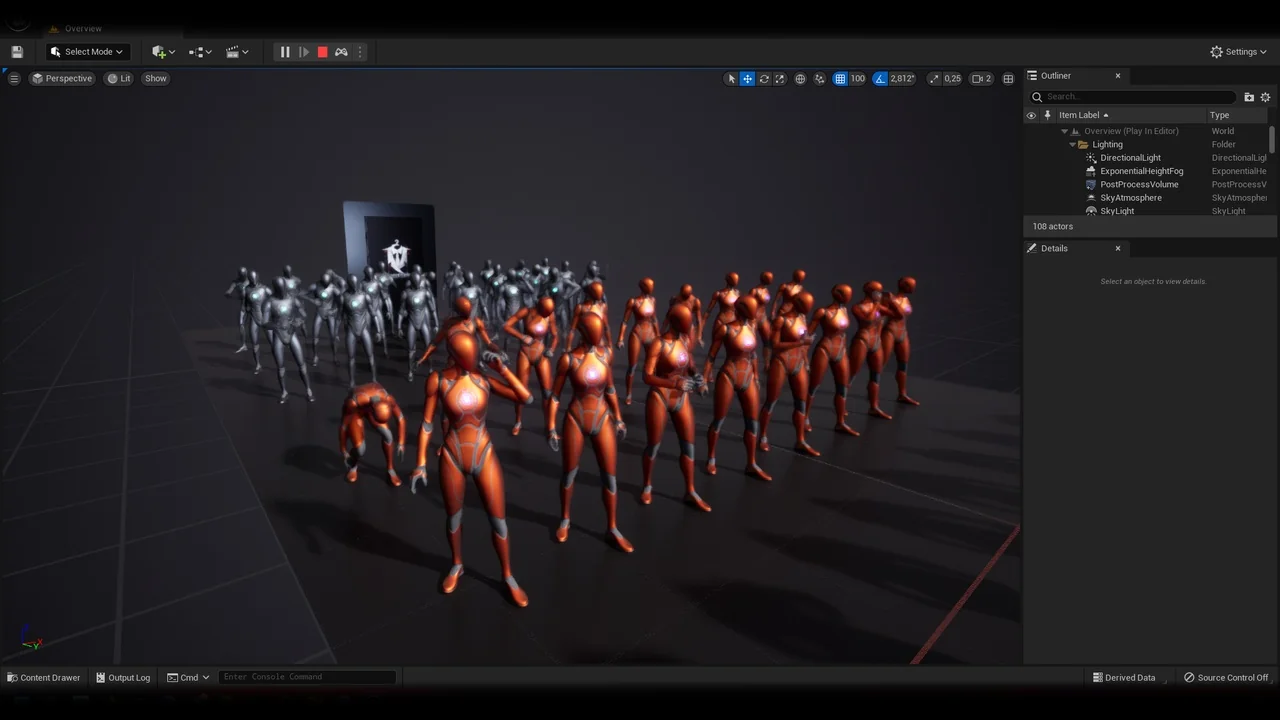
 Gestures
 Gestures
 Gestures