"26aaab8a5d5ed4fc"{"id":"1001024","slug":"ultra-camera","title":"Ultra Camera","category":"Humans","engine":"4.26+,5.0+","assetVersion":"","engineVersion":"Engine Version: 4.26+,5.0+","tag":"Humans","accent":"blue","visual":"mech","summary":"Ultra Camera Mode combines eight camera systems for characters, vehicles, free flight, RTS control, and 360-degree panoramas, built for games and construction w","platform":"Unreal Engine","publishedAt":"2026-08-23T05:37:06.175Z","updatedAt":"2026-08-23T05:37:06.175Z","sourceNotes":[],"fileContents":[],"compatibility":["Unreal Engine","Engine Version: 4.26+,5.0+"],"featuredImage":{"alt":"Ultra Camera","src":"/wp-content/uploads/published/2026/08/5fb45d69e48e-98a580fb-5153-4d1f-bea3-f047af3708f0-069388b7c6.webp"},"hasDownloadLink":true,"downloads":0,"terms":[{"taxonomy":"category","slug":"humans","name":"Humans"}],"galleryImages":[{"src":"/wp-content/uploads/published/2026/08/45583f052668-2e6f53f4-beb0-4772-b368-ef2b03be481d-aa7cb05127.webp","alt":"Ultra Camera"},{"src":"/wp-content/uploads/published/2026/08/56765b96e0d6-20b2fc46-2c64-4bf5-b86e-94108ea20b95-601ad014db.webp","alt":"Ultra Camera"},{"src":"/wp-content/uploads/published/2026/08/0cf81abc51fc-4832335f-5a40-4693-8057-d80e7a2bf7de-1145b49326.webp","alt":"Ultra Camera"},{"src":"/wp-content/uploads/published/2026/08/6c90008047bf-7e4d5f3d-34b9-44bf-9001-6160417203ad-87f870caf0.webp","alt":"Ultra Camera"},{"src":"/wp-content/uploads/published/2026/08/b450aec55657-6a33c217-c693-4ef0-9227-43ba88256cce-7c97fc3696.webp","alt":"Ultra Camera"},{"src":"/wp-content/uploads/published/2026/08/9a9274675979-9040b3c5-6718-45f3-b6ba-95c9eff94e35-5f7faf375c.webp","alt":"Ultra Camera"},{"src":"/wp-content/uploads/published/2026/08/804a6d97aafa-cadd4616-b4c5-4e80-9961-df13d8a92969-784902cb86.webp","alt":"Ultra Camera"},{"src":"/wp-content/uploads/published/2026/08/dde7d79e1b4c-45991345-adcc-489d-9fc5-e6596e643c90-56cdab93da.webp","alt":"Ultra Camera"},{"src":"/wp-content/uploads/published/2026/08/7f94c05c5e16-8fb032f4-7f8a-458d-b097-d5c00453ec83-53994756ac.webp","alt":"Ultra Camera"},{"src":"/wp-content/uploads/published/2026/08/628cf0cb52e8-2e49db0b-f773-4a70-8ab7-2c549d3a26b9-c6f1f47b9e.webp","alt":"Ultra Camera"}],"accessPanel":{"kind":"resource","title":"Download this resource","eyebrow":"Free Download","message":"Log in or create a free account to start your download.","fileName":"Content.7z","safetyNote":"Resources are manually reviewed before listing to improve quality and reduce obvious risks.","actionLabel":"Download Free","resourceType":"Resource archive"},"contentHtml":"\u003cp\u003eSome projects need a camera that can shrink down to a character's eyes, then expand to a slow glide over an entire city block. Ultra Camera Mode was built for exactly those situations. Instead of wiring together separate camera actors, the asset groups eight different control schemes under one system. That covers ground from a first-person walk through a building to a top-down strategy view of the whole map.\u003c/p\u003e \u003cp\u003eThe asset is positioned as a turnkey solution for game developers and construction companies alike. For construction firms, the pitch is direct: show construction sites, residential areas, premises, or an entire city without building a bespoke filming tool. For game teams, the same modes serve gameplay, cutscenes, and traversal.\u003c/p\u003e \u003ch2\u003eWhat the Eight Modes Cover\u003c/h2\u003e\n\u003cp\u003eThe core of Ultra Camera is the set of camera behaviors themselves. Each mode is designed to be switched on and off as needed, so the asset can feel like a character controller in one scene and a drone in the next.\u003c/p\u003e \u003cul\u003e\n\u003cli\u003e\u003cstrong\u003eFirst Person Camera\u003c/strong\u003e — controls the character from the first person, giving the standard immersive view for on-foot exploration.\u003c/li\u003e\n\u003cli\u003e\u003cstrong\u003eThird Person Camera\u003c/strong\u003e — switches to an over-the-shoulder or behind-character view for wider visibility.\u003c/li\u003e\n\u003cli\u003e\u003cstrong\u003eCar Camera\u003c/strong\u003e — treats the camera like a vehicle chase cam, matching the expected feel of driving games.\u003c/li\u003e\n\u003cli\u003e\u003cstrong\u003eFree Fly\u003c/strong\u003e — a smooth flying movement that can be sped up or slowed down with the mouse wheel; the mode is explicitly useful for recording demo videos with flights over a city or indoors.\u003c/li\u003e\n\u003cli\u003e\u003cstrong\u003eRotation Around At Target\u003c/strong\u003e — orbits a selected object so it can be inspected from all sides.\u003c/li\u003e\n\u003cli\u003e\u003cstrong\u003eTarget Tracking\u003c/strong\u003e — follows a moving object by switching between tracking points; planes and cars as examples.\u003c/li\u003e\n\u003cli\u003e\u003cstrong\u003e360 Angles Camera\u003c/strong\u003e — intended for viewing rooms or creating photo-video panoramas in full 360 degrees.\u003c/li\u003e\n\u003cli\u003e\u003cstrong\u003eRTS\u003c/strong\u003e — replicates the camera movement and control familiar from real-time strategy games.\u003c/li\u003e\n\u003c/ul\u003e \u003cp\u003eThree of these modes do more than just position the camera; they directly shape how the user explores a space. Free Fly and RTS both offer high-altitude views, but with different rhythm. Free Fly suits slow cinematic passes, while RTS gives the responsive, pan-and-zoom behavior that strategy players expect. The 360 Angles mode, meanwhile, is a separate tool for room-scale panoramas.\u003c/p\u003e \u003ch2\u003eConstruction Site Walkthroughs and Rooftop Markers\u003c/h2\u003e\n\u003cp\u003eOne of the more specific features is the ability to place markers or icons with names over the rooftops of buildings. That detail points directly at architectural review or site orientation. A construction company could show an aerial view of a development project and label each building without leaving the camera view.\u003c/p\u003e \u003cp\u003eThe combination of interior and exterior inspection also matters. The first and third person modes are practical for walking through a building that's still in the design stage. The 360 Angles Camera covers room-by-room panoramas, which is another way to present a property or a layout. Free Fly then lets the decision maker zoom out from the interior to the whole location.\u003c/p\u003e \u003cp\u003eThe target tracking mode adds a dynamic element. If the project involves moving vehicles, cranes, or other equipment, tracking them across the site can be done by switching between camera points. That keeps the subject in frame without placing a camera on the equipment itself.\u003c/p\u003e \u003ch2\u003eCustomization and Compatibility\u003c/h2\u003e\n\u003cp\u003eThe creators say the asset was made as simple as possible to customize modes and use in the game. The mode switch logic is the kind of thing that can be driven by a single input event, which makes it easier to iterate on camera feel during development.\u003c/p\u003e \u003cp\u003eOn the compatibility side, Ultra Camera lists Population System Full Pack in its notes. That integration suggests the camera system is ready to work with population or crowd-related setups, which is a relevant fit for construction scenes where people are walking through the site or for city-wide RTS views.\u003c/p\u003e \u003ch2\u003eWho Benefits Most\u003c/h2\u003e\n\u003cp\u003eGame developers who need multiple camera perspectives without assembling a toolkit from scattered plugins will find a coherent collection here. The first and third person modes cover standard character play, the car mode handles vehicles, and the RTS mode covers strategy layers.\u003c/p\u003e \u003cp\u003eConstruction companies and their visualization partners have an equally clear use case. The asset was explicitly pitched for demonstrating construction sites, locations, residential areas, premises, and whole cities. With rooftop markers, 360-degree room views, and free flight over the site, it lines up with the typical needs of real estate presentations and pre-construction walkthroughs.\u003c/p\u003e \u003cp\u003eThe simple customization also means a small team can adapt the camera system to a specific project without a lot of extra engineering. For anyone working on an interactive location tour, a city demo, or a game with multiple perspectives, Ultra Camera bundles all the usual camera work into one place.\u003c/p\u003e\n\n\u003ch2\u003eMore From The Same Workflow\u003c/h2\u003e\n\u003cul\u003e\n\u003cli\u003e\u003ca href=\"https://3dcghub.com/xiao-jue-asian-girl/\" title=\"Xiao Jue - Asian Girl\"\u003eXiao Jue - Asian Girl\u003c/a\u003e\u003c/li\u003e\n\u003cli\u003e\u003ca href=\"https://3dcghub.com/camo-sniper/\" title=\"Camo Sniper\"\u003eCamo Sniper\u003c/a\u003e\u003c/li\u003e\n\u003cli\u003e\u003ca href=\"https://3dcghub.com/cosmo-cat-girl/\" title=\"Cosmo Cat Girl\"\u003eCosmo Cat Girl\u003c/a\u003e\u003c/li\u003e\n\u003cli\u003e\u003ca href=\"https://3dcghub.com/g2-wulin-swordman-01/\" title=\"G2: Wulin Swordman 01\"\u003eG2: Wulin Swordman 01\u003c/a\u003e\u003c/li\u003e\n\u003cli\u003e\u003ca href=\"https://3dcghub.com/heroes-tribal-warrior/\" title=\"Heroes - Tribal Warrior\"\u003eHeroes - Tribal Warrior\u003c/a\u003e\u003c/li\u003e\n\u003c/ul\u003e","contentTextLength":5013,"navigation":{"current":494,"total":3400,"previous":{"id":"1001025","slug":"use-phone","title":"Use Phone","category":"Locomotion / Gaits","platform":"Unreal Engine","updatedAt":"2026-08-23T05:48:40.633Z"},"next":{"id":"1001023","slug":"ultimate-character-customization","title":"Ultimate Character Customization","category":"Gameplay Features","platform":"Unreal Engine","updatedAt":"2026-08-23T05:28:06.853Z"}},"relatedResources":[{"id":"1000717","slug":"xiao-jue-asian-girl","title":"Xiao Jue - Asian Girl","category":"Humans","engine":"4.26+,5.0+","assetVersion":"","engineVersion":"Engine Version: 4.26+,5.0+","tag":"Humans","accent":"blue","visual":"mech","summary":"Xiao Jue is a fully rigged, modular Asian girl character for Unity, Unreal, and Substance Painter, featuring 52 ARKit blendshapes, 4K textures, Epic Skeleton ri","platform":"Unreal Engine","publishedAt":"2026-07-24T12:37:39.846Z","updatedAt":"2026-07-24T12:37:39.846Z","sourceNotes":[],"fileContents":[],"compatibility":["Unreal Engine","Engine Version: 4.26+,5.0+"],"featuredImage":{"alt":"Xiao Jue - Asian Girl","src":"/wp-content/uploads/published/2026/07/ffa17768091c-29071cfa-7475-41d7-a8ee-0dae6795a052-b8ba4430a8.webp"},"hasDownloadLink":true,"downloads":6},{"id":"1000423","slug":"camo-sniper","title":"Camo Sniper","category":"Humans","engine":"4.26+,5.0+","assetVersion":"","engineVersion":"Engine Version: 4.26+,5.0+","tag":"Humans","accent":"blue","visual":"mech","summary":"A rigged sniper character with three camouflage variants, animation blueprint, and control rig for Unreal Engine shooter environments.","platform":"Unreal Engine","publishedAt":"2026-07-09T20:24:51.594Z","updatedAt":"2026-07-09T20:24:51.594Z","sourceNotes":[],"fileContents":[],"compatibility":["Unreal Engine","Engine Version: 4.26+,5.0+"],"featuredImage":{"alt":"Camo Sniper","src":"/wp-content/uploads/published/2026/07/7879520b7c0d-b76ac364-8da2-451d-99d1-0ecef6c2e369-6013704236.webp"},"hasDownloadLink":true,"downloads":1},{"id":"1000146","slug":"amaya","title":"Amaya","category":"Humans","engine":"4.26+,5.0+","assetVersion":"","engineVersion":"Engine Version: 4.26+,5.0+","tag":"Humans","accent":"blue","visual":"mech","summary":"A technical breakdown of the Amaya character model, detailing its Animation Blueprint integration, morph target facial controls, and pre-configured physics.","platform":"Unreal Engine","publishedAt":"2026-06-18T05:32:39.353Z","updatedAt":"2026-06-18T05:32:39.353Z","sourceNotes":[],"fileContents":[],"compatibility":["Unreal Engine","Engine Version: 4.26+,5.0+"],"featuredImage":{"alt":"Amaya","src":"/wp-content/uploads/published/2026/06/26fe8ddd942a-a1ade4cc-bf92-4c13-9f55-97b66929ddc7-6733753419.webp"},"hasDownloadLink":true,"downloads":1}]}
Humans
Ultra Camera
Ultra Camera Mode combines eight camera systems for characters, vehicles, free flight, RTS control, and 360-degree panoramas, built for games and construction w
Category:Unreal Engine,HumansPlatform: Unreal EngineEngine Version: 4.26+,5.0+Published: Aug 23, 2026
Humans
Resource overview
Some projects need a camera that can shrink down to a character's eyes, then expand to a slow glide over an entire city block. Ultra Camera Mode was built for exactly those situations. Instead of wiring together separate camera actors, the asset groups eight different control schemes under one system. That covers ground from a first-person walk through a building to a top-down strategy view of the whole map.
The asset is positioned as a turnkey solution for game developers and construction companies alike. For construction firms, the pitch is direct: show construction sites, residential areas, premises, or an entire city without building a bespoke filming tool. For game teams, the same modes serve gameplay, cutscenes, and traversal.
What the Eight Modes Cover
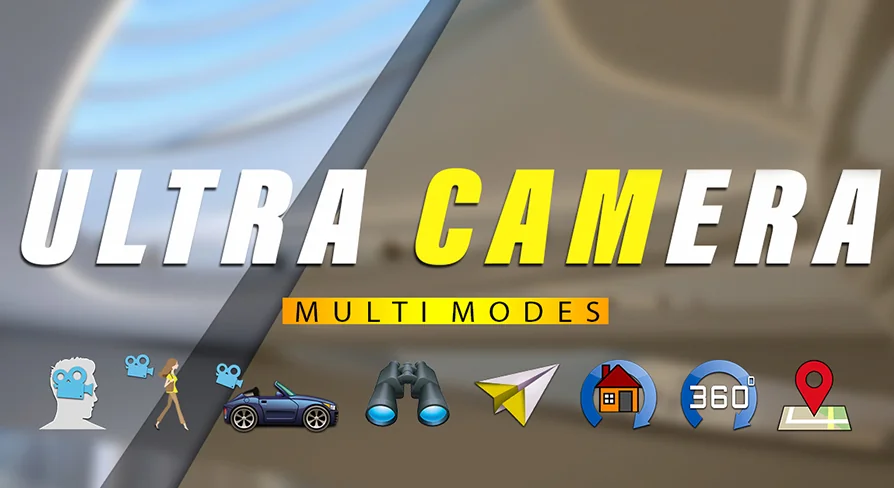
The core of Ultra Camera is the set of camera behaviors themselves. Each mode is designed to be switched on and off as needed, so the asset can feel like a character controller in one scene and a drone in the next.
First Person Camera — controls the character from the first person, giving the standard immersive view for on-foot exploration.
Third Person Camera — switches to an over-the-shoulder or behind-character view for wider visibility.
Car Camera — treats the camera like a vehicle chase cam, matching the expected feel of driving games.
Free Fly — a smooth flying movement that can be sped up or slowed down with the mouse wheel; the mode is explicitly useful for recording demo videos with flights over a city or indoors.
Rotation Around At Target — orbits a selected object so it can be inspected from all sides.
Target Tracking — follows a moving object by switching between tracking points; planes and cars as examples.
360 Angles Camera — intended for viewing rooms or creating photo-video panoramas in full 360 degrees.
RTS — replicates the camera movement and control familiar from real-time strategy games.
Three of these modes do more than just position the camera; they directly shape how the user explores a space. Free Fly and RTS both offer high-altitude views, but with different rhythm. Free Fly suits slow cinematic passes, while RTS gives the responsive, pan-and-zoom behavior that strategy players expect. The 360 Angles mode, meanwhile, is a separate tool for room-scale panoramas.
Construction Site Walkthroughs and Rooftop Markers
One of the more specific features is the ability to place markers or icons with names over the rooftops of buildings. That detail points directly at architectural review or site orientation. A construction company could show an aerial view of a development project and label each building without leaving the camera view.
The combination of interior and exterior inspection also matters. The first and third person modes are practical for walking through a building that's still in the design stage. The 360 Angles Camera covers room-by-room panoramas, which is another way to present a property or a layout. Free Fly then lets the decision maker zoom out from the interior to the whole location.
The target tracking mode adds a dynamic element. If the project involves moving vehicles, cranes, or other equipment, tracking them across the site can be done by switching between camera points. That keeps the subject in frame without placing a camera on the equipment itself.
Customization and Compatibility
The creators say the asset was made as simple as possible to customize modes and use in the game. The mode switch logic is the kind of thing that can be driven by a single input event, which makes it easier to iterate on camera feel during development.
On the compatibility side, Ultra Camera lists Population System Full Pack in its notes. That integration suggests the camera system is ready to work with population or crowd-related setups, which is a relevant fit for construction scenes where people are walking through the site or for city-wide RTS views.
Who Benefits Most
Game developers who need multiple camera perspectives without assembling a toolkit from scattered plugins will find a coherent collection here. The first and third person modes cover standard character play, the car mode handles vehicles, and the RTS mode covers strategy layers.
Construction companies and their visualization partners have an equally clear use case. The asset was explicitly pitched for demonstrating construction sites, locations, residential areas, premises, and whole cities. With rooftop markers, 360-degree room views, and free flight over the site, it lines up with the typical needs of real estate presentations and pre-construction walkthroughs.
The simple customization also means a small team can adapt the camera system to a specific project without a lot of extra engineering. For anyone working on an interactive location tour, a city demo, or a game with multiple perspectives, Ultra Camera bundles all the usual camera work into one place.
 Humans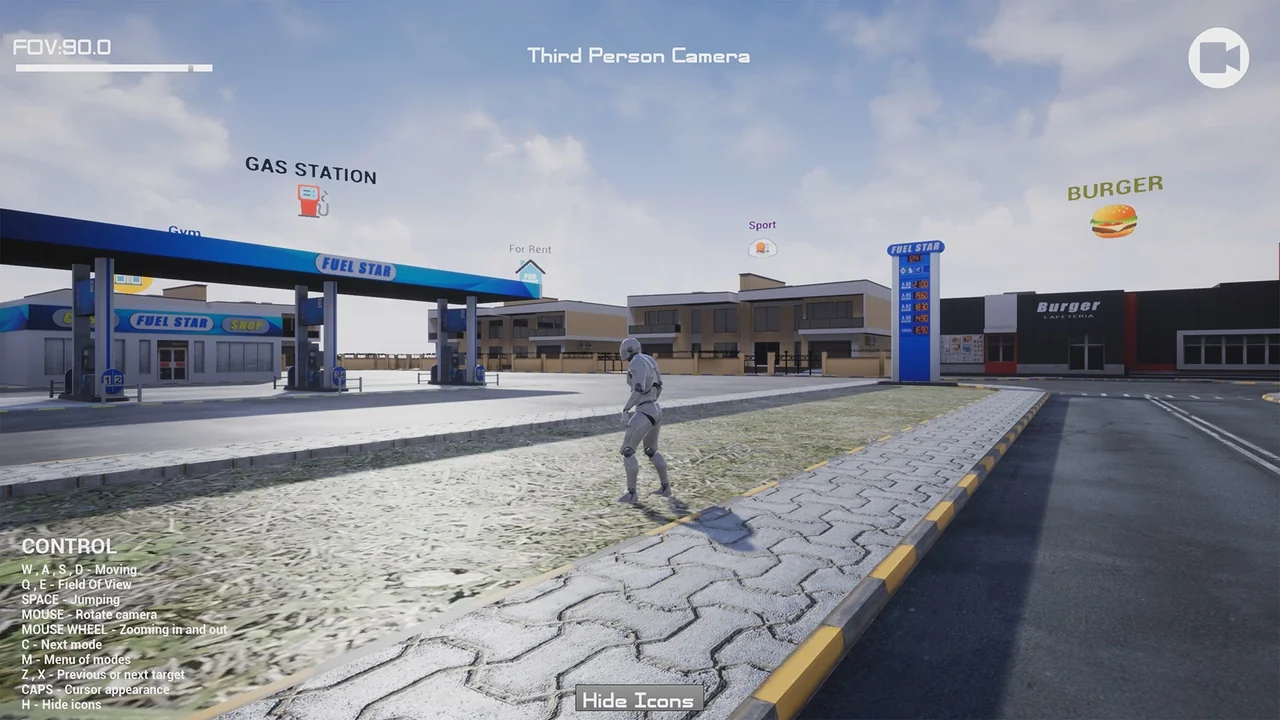
 Humans
 Humans
 Humans