"0341a2901a4ae9aa"{"id":"13888","slug":"dynamic-triangulation","title":"Dynamic Triangulation","category":"Engine Tools","engine":"4.27 - 5.4","assetVersion":"Engine version: 4.27 - 5.4","engineVersion":"4.27","tag":"Engine Tools","accent":"blue","visual":"audio","summary":"Dynamic Triangulation provides a powerful solution for creating polygonal meshes from sets of points. Whether in the editor or during gameplay, this C++ plugin offers the flexibility needed for procedural geometry.","platform":"Unreal Engine","publishedAt":"2026-03-11T10:34:21.000Z","updatedAt":"2026-04-19T15:46:20.000Z","sourceNotes":[],"fileContents":[],"compatibility":["Unreal Engine","Engine version: 4.27 - 5.4"],"featuredImage":{"alt":"Dynamic Triangulation","src":"https://3dcghub.com/wp-content/uploads/2026/03/265ede3a-dd28-43f1-8d45-0903313f5afa.webp"},"hasDownloadLink":true,"downloads":1,"terms":[{"taxonomy":"category","slug":"engine-tools-tools-and-plugins","name":"Engine Tools"},{"taxonomy":"post_tag","slug":"animation","name":"Animation"},{"taxonomy":"post_tag","slug":"environment","name":"Environment"},{"taxonomy":"post_tag","slug":"materials","name":"Materials"},{"taxonomy":"post_tag","slug":"plugins","name":"Plugins"},{"taxonomy":"post_tag","slug":"textures","name":"Textures"},{"taxonomy":"post_tag","slug":"vfx","name":"VFX"}],"galleryImages":[{"src":"https://3dcghub.com/wp-content/uploads/2026/03/2a1df7675d60_8ffdfe46-ae67-4f40-93e0-1203f379535f.webp","alt":"Dynamic Triangulation"},{"src":"https://3dcghub.com/wp-content/uploads/2026/03/ebd52677f9f6_7c123aec-0206-497a-8272-6aefb9d24628.webp","alt":"Dynamic Triangulation"}],"accessPanel":{"kind":"resource","title":"Access this resource","eyebrow":"Free Download","message":"Log in or create a free account to start your download.","fileName":"DynamicTriangulation 4.27 - 5.4.7z","safetyNote":"All resources are 100% manually reviewed to eliminate all risks.","actionLabel":"Download Free","resourceType":"Resource archive"},"contentHtml":"\u003cp\u003e\u003cstrong\u003eDynamic Triangulation\u003c/strong\u003e is a specialized C++ plugin designed to facilitate the creation of polygonal meshes from specific point data. This tool provides developers with the ability to generate geometry both within the editor and during active gameplay. By utilizing sets of consecutive points, such as spline points, users can define specific areas and transform them into functional meshes.\u003c/p\u003e\n\n\u003ch2\u003eEfficient Procedural Workflows\u003c/h2\u003e\n\u003cp\u003eThe plugin is optimized for high performance. This ensures that mesh generation does not hinder the user experience. Developers can edit and generate these meshes at runtime or while working in the editor. Consequently, this flexibility allows for dynamic environment changes or procedural level design.\u003c/p\u003e\n\n\u003cp\u003eOne of the core strengths of \u003cstrong\u003eDynamic Triangulation\u003c/strong\u003e is its ability to handle closed splines. The system can triangulate these shapes while precisely repeating the original spline's geometry. This ensures that the generated mesh remains faithful to the defined boundaries.\u003c/p\u003e\n\n\u003ch2\u003eAdvanced Mesh Customization\u003c/h2\u003e\n\u003cp\u003eBeyond basic generation, the plugin includes several tools for refining geometry. For instance, it features a function for chamfering or rounding corners. This allows for more organic or polished shapes rather than strictly sharp angles. Additionally, a dedicated function exists to remove duplicate points. Cleaning the data before mesh generation helps maintain mesh integrity and performance.\u003c/p\u003e\n\n\u003cp\u003eOnce a mesh is generated, it can be baked into a single static mesh. This feature is particularly useful for developers who want to finalize procedural shapes for better optimization. The plugin also automatically generates UVs for all created meshes, simplifying the texturing process.\u003c/p\u003e\n\n\u003ch2\u003eIntegrated Materials and Visuals\u003c/h2\u003e\n\u003cp\u003eThe package comes with a selection of materials that offer various visual effects. These materials include support for moving animations, texture rotation, and flickering effects. Furthermore, opacity masks are included to provide greater control over transparency.\u003c/p\u003e\n\n\u003cp\u003eThe included materials are versatile in their application. They are designed to work effectively with or without UV coordinates. This ensures that even complex procedural shapes can maintain a high-quality visual appearance regardless of the mapping method used.\u003c/p\u003e\n\n\u003ch2\u003eTechnical Implementation and Source Code\u003c/h2\u003e\n\u003cp\u003e\u003cstrong\u003eDynamic Triangulation\u003c/strong\u003e is built with transparency and customization in mind. Both the Blueprints and the C++ code include detailed comments to help developers understand the underlying logic. Moreover, the full source code is provided with the plugin.\u003c/p\u003e\n\n\u003cp\u003eTo assist with the initial setup, the asset includes an example project. This project features an overview scene and practical examples of how to implement the system at runtime. These resources provide a clear starting point for integrating the plugin into any project.\u003c/p\u003e\n\n\u003ch2\u003eFinal Take\u003c/h2\u003e\n\u003cp\u003eThis C++ plugin offers a robust set of tools for anyone needing to generate geometry from point data. With its focus on performance and flexibility, it serves as a valuable resource for both editor-based construction and runtime procedural generation. The inclusion of source code and commented logic ensures that the developer can easily adapt the tool to their specific needs.\u003c/p\u003e\n\n\u003ch2\u003eExplore Similar Assets\u003c/h2\u003e\n\u003cul\u003e\n\u003cli\u003e\u003ca href=\"https://3dcghub.com/did-it-hit-trace-detection-plugin/\" title=\"Did it hit – Trace Detection Plugin\"\u003eDid it hit – Trace Detection Plugin\u003c/a\u003e\u003c/li\u003e\n\u003cli\u003e\u003ca href=\"https://3dcghub.com/daz-to-unreal/\" title=\"Daz To Unreal\"\u003eDaz To Unreal\u003c/a\u003e\u003c/li\u003e\n\u003cli\u003e\u003ca href=\"https://3dcghub.com/assets-cleaner-project-cleaning-tool/\" title=\"Assets Cleaner – Project Cleaning Tool\"\u003eAssets Cleaner – Project Cleaning Tool\u003c/a\u003e\u003c/li\u003e\n\u003cli\u003e\u003ca href=\"https://3dcghub.com/runtime-metahuman-lip-sync-ai-for-npcs-cc4-genesis-arkit-and-more/\" title=\"Runtime MetaHuman Lip Sync (AI for NPCs) (+ CC4, Genesis, ARKit, and more)\"\u003eRuntime MetaHuman Lip Sync (AI for NPCs) (+ CC4, Genesis, ARKit, and more)\u003c/a\u003e\u003c/li\u003e\n\u003cli\u003e\u003ca href=\"https://3dcghub.com/easy-mapper/\" title=\"Easy Mapper\"\u003eEasy Mapper\u003c/a\u003e\u003c/li\u003e\n\u003c/ul\u003e","contentTextLength":3454,"navigation":{"current":3364,"total":4017,"previous":{"id":"13847","slug":"daz-to-unreal","title":"Daz To Unreal","category":"Engine Tools","platform":"Unreal Engine","updatedAt":"2026-04-19T15:46:21.000Z"},"next":{"id":"13961","slug":"edge-decal-tools-1-2","title":"Edge Decal Tools 1.2","category":"Engine Tools","platform":"Unreal Engine","updatedAt":"2026-04-19T15:46:19.000Z"}},"relatedResources":[{"id":"14724","slug":"uiws-unified-interactive-water-system","title":"UIWS - Unified Interactive Water System","category":"Engine Tools","engine":"4.25 - 4.27,5.0 - 5.7","assetVersion":"Engine version: 4.25 - 4.27,5.0 - 5.7","engineVersion":"Asset Version:1.11 - 1.18","tag":"Engine Tools","accent":"blue","visual":"character","summary":"Enhance your Unreal Engine 4 projects with UIWS - Unified Interactive Water System. This powerful plugin offers real-time fluid interaction, caustic reflections, and easy setup for beautiful, dynamic water bodies.","platform":"Unreal Engine","publishedAt":"2026-03-11T19:07:27.000Z","updatedAt":"2026-04-19T15:45:41.000Z","sourceNotes":[],"fileContents":[],"compatibility":["Unreal Engine","Engine version: 4.25 - 4.27,5.0 - 5.7","Asset Version: 1.11 - 1.18"],"featuredImage":{"alt":"UIWS - Unified Interactive Water System","src":"https://3dcghub.com/wp-content/uploads/2026/03/89d02958-c237-4e09-b3ae-50ccff59c316.webp"},"hasDownloadLink":true,"downloads":1},{"id":"13883","slug":"dynamic-real-water","title":"Dynamic Real Water","category":"Engine Tools","engine":"5.8","assetVersion":"Asset Version: 2.0","engineVersion":"Engine Version: 5.8","tag":"Engine Tools","accent":"blue","visual":"mech","summary":"Enhance your Unreal Engine 5 environments with Dynamic Real Water, a high-performance FFT simulation plugin. It offers realistic wave dynamics, advanced buoyancy physics, and seamless replication for multiplayer projects.","platform":"Unreal Engine","publishedAt":"2026-03-11T10:30:53.000Z","updatedAt":"2026-10-07T10:02:19.555Z","sourceNotes":[],"fileContents":[],"compatibility":["Unreal Engine","Asset Version: 2.0","Engine Version: 5.8"],"featuredImage":{"alt":"Dynamic Real Water","src":"https://3dcghub.com/wp-content/uploads/2026/03/8532c421-bf8f-4903-bbfc-9e94a063892e.webp"},"hasDownloadLink":true,"downloads":4},{"id":"14638","slug":"sky-creator","title":"Sky Creator","category":"Engine Tools","engine":"5.0 -5.3,5.5","assetVersion":"Engine version: 5.0 -5.3,5.5","engineVersion":"Asset Version:1.31 - 1.41","tag":"Engine Tools","accent":"blue","visual":"animation","summary":"Sky Creator is a comprehensive tool for Unreal Engine that enables developers to manage dynamic weather, time of day, and realistic volumetric clouds through a robust preset system.","platform":"Unreal Engine","publishedAt":"2026-03-11T18:46:07.000Z","updatedAt":"2026-04-19T15:45:43.000Z","sourceNotes":[],"fileContents":[],"compatibility":["Unreal Engine","Engine version: 5.0 -5.3,5.5","Asset Version: 1.31 - 1.41"],"featuredImage":{"alt":"Sky Creator","src":"https://3dcghub.com/wp-content/uploads/2026/03/04c19279-88ca-4a50-8026-057300dbf683.webp"},"hasDownloadLink":true,"downloads":5}]}
Engine Tools
Dynamic Triangulation
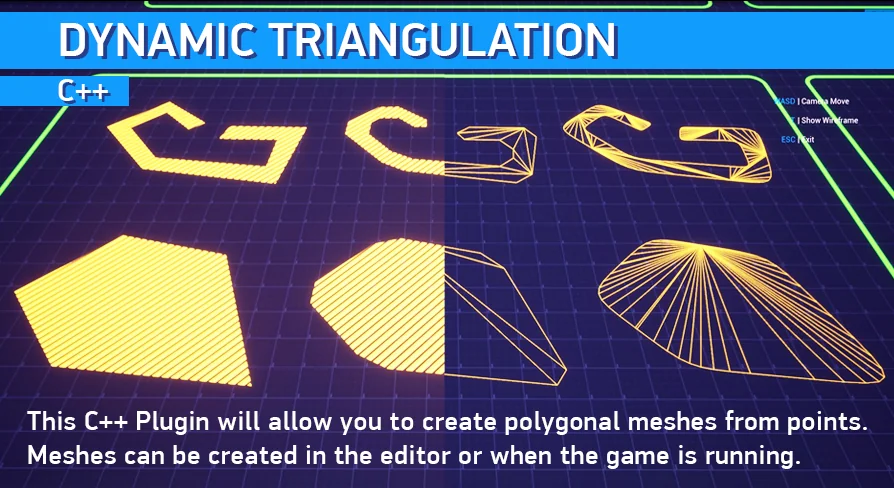
Dynamic Triangulation provides a powerful solution for creating polygonal meshes from sets of points. Whether in the editor or during gameplay, this C++ plugin offers the flexibility needed for procedural geometry.
Dynamic Triangulation is a specialized C++ plugin designed to facilitate the creation of polygonal meshes from specific point data. This tool provides developers with the ability to generate geometry both within the editor and during active gameplay. By utilizing sets of consecutive points, such as spline points, users can define specific areas and transform them into functional meshes.
Efficient Procedural Workflows
The plugin is optimized for high performance. This ensures that mesh generation does not hinder the user experience. Developers can edit and generate these meshes at runtime or while working in the editor. Consequently, this flexibility allows for dynamic environment changes or procedural level design.
One of the core strengths of Dynamic Triangulation is its ability to handle closed splines. The system can triangulate these shapes while precisely repeating the original spline's geometry. This ensures that the generated mesh remains faithful to the defined boundaries.
Advanced Mesh Customization
Beyond basic generation, the plugin includes several tools for refining geometry. For instance, it features a function for chamfering or rounding corners. This allows for more organic or polished shapes rather than strictly sharp angles. Additionally, a dedicated function exists to remove duplicate points. Cleaning the data before mesh generation helps maintain mesh integrity and performance.
Once a mesh is generated, it can be baked into a single static mesh. This feature is particularly useful for developers who want to finalize procedural shapes for better optimization. The plugin also automatically generates UVs for all created meshes, simplifying the texturing process.
Integrated Materials and Visuals
The package comes with a selection of materials that offer various visual effects. These materials include support for moving animations, texture rotation, and flickering effects. Furthermore, opacity masks are included to provide greater control over transparency.
The included materials are versatile in their application. They are designed to work effectively with or without UV coordinates. This ensures that even complex procedural shapes can maintain a high-quality visual appearance regardless of the mapping method used.
Technical Implementation and Source Code
Dynamic Triangulation is built with transparency and customization in mind. Both the Blueprints and the C++ code include detailed comments to help developers understand the underlying logic. Moreover, the full source code is provided with the plugin.
To assist with the initial setup, the asset includes an example project. This project features an overview scene and practical examples of how to implement the system at runtime. These resources provide a clear starting point for integrating the plugin into any project.
Final Take
This C++ plugin offers a robust set of tools for anyone needing to generate geometry from point data. With its focus on performance and flexibility, it serves as a valuable resource for both editor-based construction and runtime procedural generation. The inclusion of source code and commented logic ensures that the developer can easily adapt the tool to their specific needs.
 Engine Tools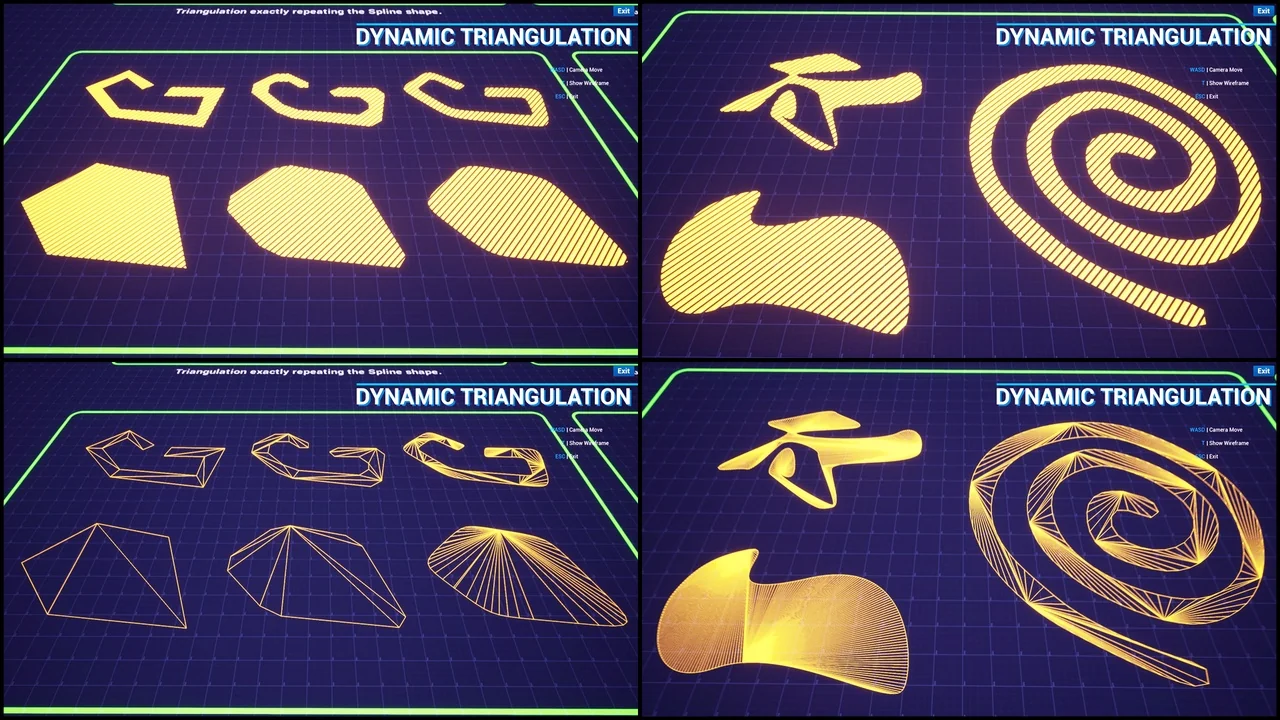
 Engine Tools
 Engine Tools
 Engine Tools