"7066dd76da796369"{"id":"13036","slug":"easy-mapper","title":"Easy Mapper","category":"Organic","engine":"5.3+","assetVersion":"Engine version: 5.3+","engineVersion":"Aseet Version:1.2","tag":"Organic","accent":"blue","visual":"luts","summary":"Easy Mapper simplifies the texturing workflow by offering world-aligned projections and Nanite displacement. It is an essential tool for creators focusing on high-quality cinematic environments.","platform":"Unreal Engine","publishedAt":"2026-03-09T18:17:35.000Z","updatedAt":"2026-04-19T15:46:33.000Z","sourceNotes":[],"fileContents":[],"compatibility":["Unreal Engine","Engine version: 5.3+","Aseet Version:1.2"],"featuredImage":{"alt":"Easy Mapper","src":"https://3dcghub.com/wp-content/uploads/2026/03/86b54325-18bf-4027-9043-fbfc1f0406c1.webp"},"hasDownloadLink":true,"downloads":3,"terms":[{"taxonomy":"category","slug":"organic","name":"Organic"},{"taxonomy":"post_tag","slug":"easy-mapper","name":"Easy Mapper"},{"taxonomy":"post_tag","slug":"environment","name":"Environment"},{"taxonomy":"post_tag","slug":"materials","name":"Materials"},{"taxonomy":"post_tag","slug":"plugins","name":"Plugins"},{"taxonomy":"post_tag","slug":"textures","name":"Textures"},{"taxonomy":"post_tag","slug":"unreal-engine-5","name":"Unreal Engine 5"}],"galleryImages":[{"src":"https://3dcghub.com/wp-content/uploads/2026/03/3f650507e4ed_b7089bd2-2791-4448-a5ab-bab4695d549f.webp","alt":"Easy Mapper"},{"src":"https://3dcghub.com/wp-content/uploads/2026/03/b437b900ecc3_5015bd5a-5029-46fb-94ea-4233396d3582.webp","alt":"Easy Mapper"},{"src":"https://3dcghub.com/wp-content/uploads/2026/03/dc431f1fd420_a566b8b9-d078-4f69-bb1b-5436f2f2d354.webp","alt":"Easy Mapper"},{"src":"https://3dcghub.com/wp-content/uploads/2026/03/f046c41dad56_d55485fc-0005-4a2a-b297-a9494788ccae.webp","alt":"Easy Mapper"},{"src":"https://3dcghub.com/wp-content/uploads/2026/03/b4bb2873422c_4f391776-e825-4d15-a58c-c29b3cc8ccec.webp","alt":"Easy Mapper"},{"src":"https://3dcghub.com/wp-content/uploads/2026/03/e65da27aecee_548a7c64-4ddd-42c6-9f28-1c455c8e7b0c.webp","alt":"Easy Mapper"}],"accessPanel":{"kind":"resource","title":"Access this resource","eyebrow":"Free Download","message":"Log in or create a free account to start your download.","fileName":"EasyMapper 5.3 ;V1.2.7z","safetyNote":"All resources are 100% manually reviewed to eliminate all risks.","actionLabel":"Download Free","resourceType":"Resource archive"},"contentHtml":"\u003ch2\u003eEfficient Texturing with Easy Mapper\u003c/h2\u003e\n\u003cp\u003eEasy Mapper allows you to project tileable, world-aligned textures across any surface without needing UVs on your models. This tool is specifically designed and intended for cinematic usage. It enables artists to texture entire levels in moments with just a few clicks. Consequently, you can give your models high-quality detail without the traditional technical hurdles of mapping.\u003c/p\u003e\n\n\u003cp\u003eThe system provides material instances that are cleanly organized. This organization ensures that art direction remains simple and efficient. By using this tool, you can focus more on the creative aspects of your environment rather than manual UV unwrapping.\u003c/p\u003e\n\n\u003ch2\u003eAdvanced Projection and Nanite Displacement\u003c/h2\u003e\n\u003cp\u003eUsers can toggle between world-aligned (triplanar) texture projection and regular UV mapping. This flexibility gives you full control over the size and scale of your texture projection. Furthermore, the tool utilizes Nanite tessellation and displacement to add depth to your models. By using height or displacement maps, you can achieve highly detailed surfaces that interact realistically with light.\u003c/p\u003e\n\n\u003cp\u003eHowever, it is important to note that Nanite must be enabled for displacement to work. While Nanite is not strictly necessary for the mapping itself, the tessellation features rely on it. Additionally, Nanite displacement currently does not function with Path Tracing, as that rendering mode does not utilize Nanite technology.\u003c/p\u003e\n\n\u003ch2\u003eRealistic Material Blending\u003c/h2\u003e\n\u003cp\u003eTo enhance realism, Easy Mapper supports advanced vertex blending. You can blend up to three different materials on a single surface. The system uses height and displacement data to ensure these blends look natural and realistic. Therefore, you have full control over how different surfaces transition into one another.\u003c/p\u003e\n\n\u003cp\u003eTo use the vertex painting features, specific plugins are required. You must enable the ModelingToolsEditorMode and the StaticMeshEditorModeling plugins within your project settings. These tools facilitate the painting process described in the documentation.\u003c/p\u003e\n\n\u003ch2\u003eUpdates for the FAB Ecosystem\u003c/h2\u003e\n\u003cp\u003eWith the introduction of the FAB platform, the developer has updated the tool to accommodate changes in texture packing. Previously, Megascans used the ARD (Ambient Occlusion, Roughness, Displacement) approach. Now, the standard has shifted to ORM (Occlusion, Roughness, Metallic), with displacement maps provided separately.\u003c/p\u003e\n\n\u003cp\u003eThe latest update includes new Master Materials to address these changes. You can find these in the FAB folder under the following names:\u003c/p\u003e\n\u003cul\u003e\n \u003cli\u003eM_EasyMapper_MASTER_FAB\u003c/li\u003e\n \u003cli\u003eM_EasyMapper_MASTER_FAB_VT (for virtual textures)\u003c/li\u003e\n\u003c/ul\u003e\n\n\u003ch2\u003eTechnical Considerations\u003c/h2\u003e\n\u003cp\u003eWhile Easy Mapper is a robust solution, there are some engine-related limitations to consider. As of Unreal Engine 5.3, Nanite tessellation and displacement may not work on Mac or AMD graphics cards. This is an engine-level issue rather than a limitation of the tool itself. Users on these platforms should verify compatibility before planning their workflow.\u003c/p\u003e\n\n\u003cp\u003eFor teams considering it, Easy Mapper offers a streamlined approach to environment texturing. It combines the ease of world-aligned projection with the power of Nanite displacement and vertex blending. This makes it a valuable asset for any cinematic production workflow.\u003c/p\u003e\n\n\u003ch2\u003eExplore Similar Assets\u003c/h2\u003e\n\u003cul\u003e\n\u003cli\u003e\u003ca href=\"https://3dcghub.com/ultimate-template-unrealengine-2d-dialogue-inventory-system-save/\" title=\"ULTIMATE Template UnrealEngine || 2D + Dialogue + Inventory system + Save | |\"\u003eULTIMATE Template UnrealEngine || 2D + Dialogue + Inventory system + Save | |\u003c/a\u003e\u003c/li\u003e\n\u003cli\u003e\u003ca href=\"https://3dcghub.com/sci-fi-environment-engine-room/\" title=\"Sci-fi Environment Engine Room\"\u003eSci-fi Environment Engine Room\u003c/a\u003e\u003c/li\u003e\n\u003cli\u003e\u003ca href=\"https://3dcghub.com/cartoon-sky-shader/\" title=\"Cartoon Sky Shader\"\u003eCartoon Sky Shader\u003c/a\u003e\u003c/li\u003e\n\u003cli\u003e\u003ca href=\"https://3dcghub.com/stylized-water/\" title=\"Stylized Water\"\u003eStylized Water\u003c/a\u003e\u003c/li\u003e\n\u003cli\u003e\u003ca href=\"https://3dcghub.com/glitter-shader/\" title=\"Glitter Shader\"\u003eGlitter Shader\u003c/a\u003e\u003c/li\u003e\n\u003c/ul\u003e","contentTextLength":3501,"navigation":{"current":3314,"total":4016,"previous":{"id":"13048","slug":"spiderweb-collection","title":"Spiderweb Collection","category":"Organic","platform":"Unreal Engine","updatedAt":"2026-04-19T15:46:33.000Z"},"next":{"id":"13027","slug":"moving-water-material-pack","title":"Moving Water Material Pack","category":"Water","platform":"Unreal Engine","updatedAt":"2026-04-19T15:46:33.000Z"}},"relatedResources":[{"id":"13048","slug":"spiderweb-collection","title":"Spiderweb Collection","category":"Organic","engine":"4.26+,5.0+","assetVersion":"Engine version: 4.26+,5.0+","engineVersion":"4.16","tag":"Organic","accent":"blue","visual":"luts","summary":"Enhance your digital environments with the Spiderweb Collection, featuring 33 high-quality materials. This set includes hand-painted textures with specialized variations for frozen, wet, and torn scenes.","platform":"Unreal Engine","publishedAt":"2026-03-09T18:20:51.000Z","updatedAt":"2026-04-19T15:46:33.000Z","sourceNotes":[],"fileContents":[],"compatibility":["Unreal Engine","Engine version: 4.26+,5.0+"],"featuredImage":{"alt":"Spiderweb Collection","src":"https://3dcghub.com/wp-content/uploads/2026/03/a965276e-500a-44f4-9e01-70f91bc1d584.webp"},"hasDownloadLink":true,"downloads":0},{"id":"13061","slug":"stylised-hair-shader","title":"Stylised Hair Shader","category":"Organic","engine":"4.26+,5.0+","assetVersion":"Engine version: 4.26+,5.0+","engineVersion":"4.19","tag":"Organic","accent":"blue","visual":"luts","summary":"Improve your character designs with this Stylised Hair Shader. It offers a lightweight, convincing approach to hair rendering by focusing on performance and visual quality.","platform":"Unreal Engine","publishedAt":"2026-03-09T18:20:59.000Z","updatedAt":"2026-04-19T15:46:32.000Z","sourceNotes":[],"fileContents":[],"compatibility":["Unreal Engine","Engine version: 4.26+,5.0+"],"featuredImage":{"alt":"Stylised Hair Shader","src":"https://3dcghub.com/wp-content/uploads/2026/03/c1e715b1-d965-4775-b685-88a601681599.webp"},"hasDownloadLink":true,"downloads":0},{"id":"1001438","slug":"horror-collection-blood-1000-textures","title":"Horror Collection: Blood [1000+ textures]","category":"Organic","engine":"4.16+,5.0+","assetVersion":"","engineVersion":"Engine Version: 4.16+,5.0+","tag":"Organic","accent":"blue","visual":"luts","summary":"Explore Horror Collection: Blood, featuring over 1,000 watercolor textures with splatters, trails, spots, and symbols for horror and crime scene assets.","platform":"Unreal Engine","publishedAt":"2026-10-07T08:31:33.371Z","updatedAt":"2026-10-07T08:31:33.371Z","sourceNotes":[],"fileContents":[],"compatibility":["Unreal Engine","Engine Version: 4.16+,5.0+"],"featuredImage":{"alt":"Horror Collection: Blood [1000+ textures]","src":"/wp-content/uploads/published/2026/10/57a5b664f633-9e19bdaf-0940-46b4-8d71-5e299b1117d2-938ddbe8c7.webp"},"hasDownloadLink":true,"downloads":1}]}
Organic
Easy Mapper
Easy Mapper simplifies the texturing workflow by offering world-aligned projections and Nanite displacement. It is an essential tool for creators focusing on high-quality cinematic environments.
Easy Mapper allows you to project tileable, world-aligned textures across any surface without needing UVs on your models. This tool is specifically designed and intended for cinematic usage. It enables artists to texture entire levels in moments with just a few clicks. Consequently, you can give your models high-quality detail without the traditional technical hurdles of mapping.
The system provides material instances that are cleanly organized. This organization ensures that art direction remains simple and efficient. By using this tool, you can focus more on the creative aspects of your environment rather than manual UV unwrapping.
Advanced Projection and Nanite Displacement
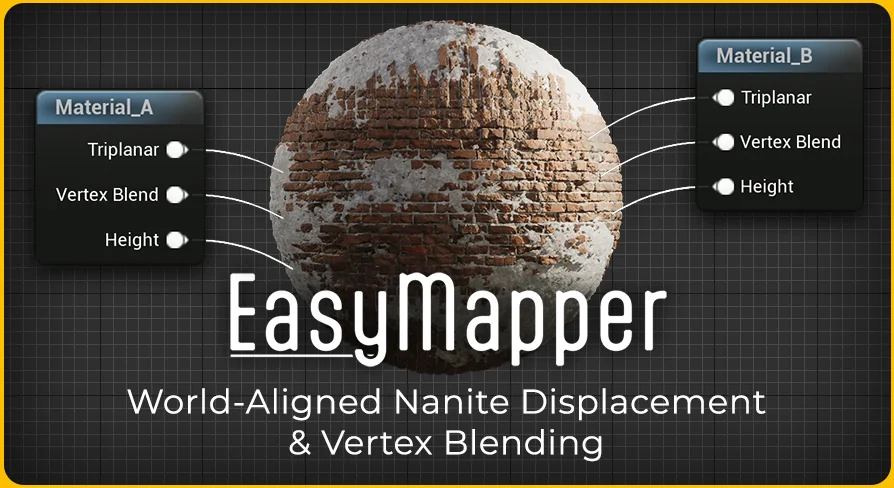
Users can toggle between world-aligned (triplanar) texture projection and regular UV mapping. This flexibility gives you full control over the size and scale of your texture projection. Furthermore, the tool utilizes Nanite tessellation and displacement to add depth to your models. By using height or displacement maps, you can achieve highly detailed surfaces that interact realistically with light.
However, it is important to note that Nanite must be enabled for displacement to work. While Nanite is not strictly necessary for the mapping itself, the tessellation features rely on it. Additionally, Nanite displacement currently does not function with Path Tracing, as that rendering mode does not utilize Nanite technology.
Realistic Material Blending
To enhance realism, Easy Mapper supports advanced vertex blending. You can blend up to three different materials on a single surface. The system uses height and displacement data to ensure these blends look natural and realistic. Therefore, you have full control over how different surfaces transition into one another.
To use the vertex painting features, specific plugins are required. You must enable the ModelingToolsEditorMode and the StaticMeshEditorModeling plugins within your project settings. These tools facilitate the painting process described in the documentation.
Updates for the FAB Ecosystem
With the introduction of the FAB platform, the developer has updated the tool to accommodate changes in texture packing. Previously, Megascans used the ARD (Ambient Occlusion, Roughness, Displacement) approach. Now, the standard has shifted to ORM (Occlusion, Roughness, Metallic), with displacement maps provided separately.
The latest update includes new Master Materials to address these changes. You can find these in the FAB folder under the following names:
M_EasyMapper_MASTER_FAB
M_EasyMapper_MASTER_FAB_VT (for virtual textures)
Technical Considerations
While Easy Mapper is a robust solution, there are some engine-related limitations to consider. As of Unreal Engine 5.3, Nanite tessellation and displacement may not work on Mac or AMD graphics cards. This is an engine-level issue rather than a limitation of the tool itself. Users on these platforms should verify compatibility before planning their workflow.
For teams considering it, Easy Mapper offers a streamlined approach to environment texturing. It combines the ease of world-aligned projection with the power of Nanite displacement and vertex blending. This makes it a valuable asset for any cinematic production workflow.
 Organic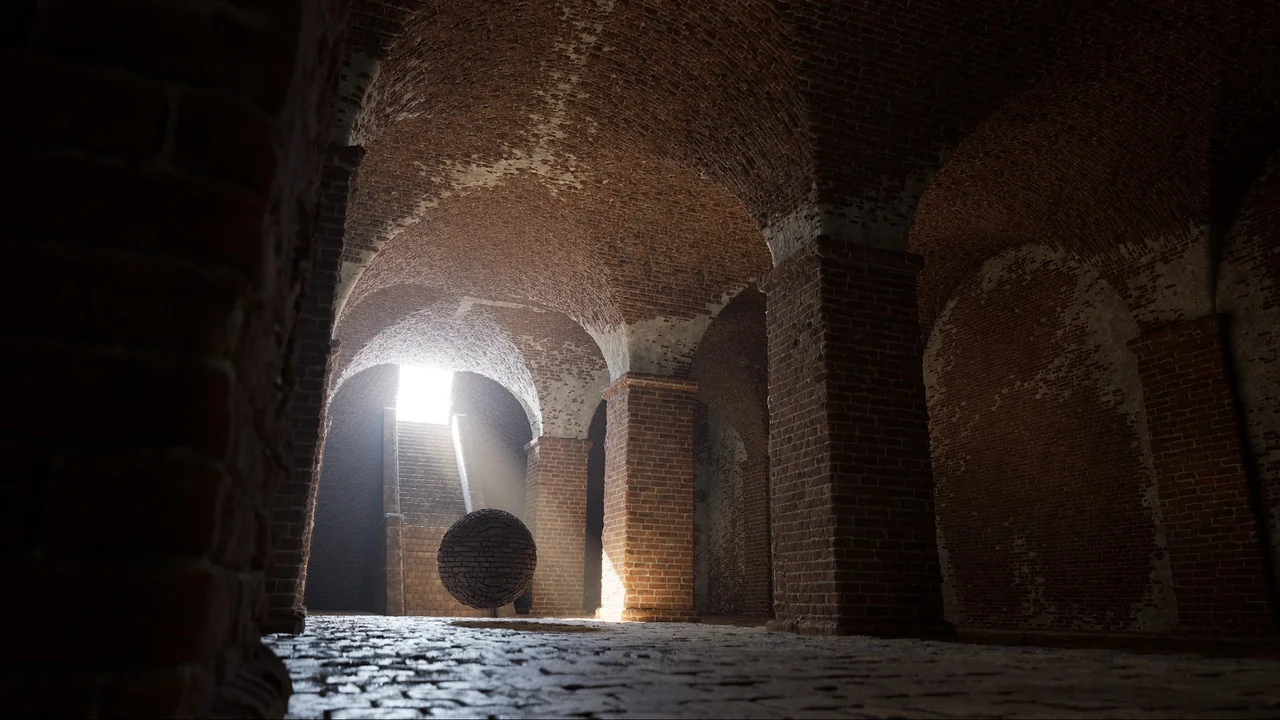
 Organic
 Organic
![Horror Collection: Blood [1000+ textures]](/_img/360/wp-content/uploads/published/2026/10/57a5b664f633-9e19bdaf-0940-46b4-8d71-5e299b1117d2-938ddbe8c7.webp) Organic
Organic