"059e11fbf316ed56"{"id":"1001296","slug":"slash-trail-fx-elemental","title":"Slash Trail FX Elemental","category":"Spells \u0026 Combat","engine":"5.2+","assetVersion":"","engineVersion":"Engine Version: 5.2+","tag":"Spells \u0026 Combat","accent":"blue","visual":"mech","summary":"Explore Slash Trail FX Elemental for Unreal Engine, featuring 16 elemental themes, full combat VFX sets, Niagara adjustments, and UEFN migration workflows.","platform":"Unreal Engine","publishedAt":"2026-10-01T16:47:44.135Z","updatedAt":"2026-10-01T16:47:44.135Z","sourceNotes":[],"fileContents":[],"compatibility":["Unreal Engine","Engine Version: 5.2+"],"featuredImage":{"alt":"Slash Trail FX Elemental","src":"/wp-content/uploads/published/2026/10/0d0aa37b1332-9f8eeab9-236f-4e7e-9907-36f308658eae-1263d925ac.webp"},"hasDownloadLink":true,"downloads":0,"terms":[{"taxonomy":"category","slug":"spells-and-combat","name":"Spells \u0026 Combat"}],"galleryImages":[{"src":"/wp-content/uploads/published/2026/10/ea896a46b32a-80d3ccb9-6f6b-4b48-ad91-c5a500a7bf07-d1d0d35619.webp","alt":"Slash Trail FX Elemental"},{"src":"/wp-content/uploads/published/2026/10/8fe6fbd5109b-b8eb894e-b0a7-4117-80e9-53ecaa105dca-9563d6c094.webp","alt":"Slash Trail FX Elemental"},{"src":"/wp-content/uploads/published/2026/10/c5d936b618e2-7bf8bb8b-64a0-4280-bc04-08b34f05ae2e-952f981c67.webp","alt":"Slash Trail FX Elemental"},{"src":"/wp-content/uploads/published/2026/10/310ef25db434-a77e0179-09bd-4fab-baf9-d6ffb446fc06-e2ec2e05b3.webp","alt":"Slash Trail FX Elemental"},{"src":"/wp-content/uploads/published/2026/10/4b9f2b39e8e1-0bb93cb7-fcf6-428d-afa8-1614d83ca45f-c07a0446c9.webp","alt":"Slash Trail FX Elemental"},{"src":"/wp-content/uploads/published/2026/10/ab1f18a5e75b-10ab0bb0-5ee5-4e3a-8897-af47d07dea6d-6cd182d03e.webp","alt":"Slash Trail FX Elemental"},{"src":"/wp-content/uploads/published/2026/10/1c728301e177-19529ab7-ff6f-4144-835c-37dfac8a4fa6-5a7bf26335.webp","alt":"Slash Trail FX Elemental"},{"src":"/wp-content/uploads/published/2026/10/8d6382606efb-603ac23a-af74-4525-9c5a-e7cc167e76de-ae5a16bc57.webp","alt":"Slash Trail FX Elemental"},{"src":"/wp-content/uploads/published/2026/10/fc4d4bc4119c-6888a3c0-8e02-448b-a2a1-b168e351efd9-342932c8e2.webp","alt":"Slash Trail FX Elemental"},{"src":"/wp-content/uploads/published/2026/10/08b49a793cef-863e4bcd-af7b-4c78-b737-ef7330fc4022-468de393f4.webp","alt":"Slash Trail FX Elemental"}],"accessPanel":{"kind":"resource","title":"Download this resource","eyebrow":"Free Download","message":"Log in or create a free account to start your download.","fileName":"Content.7z","safetyNote":"Resources are manually reviewed before listing to improve quality and reduce obvious risks.","actionLabel":"Download Free","resourceType":"Resource archive"},"contentHtml":"\u003cp\u003eFast-paced melee combat relies heavily on immediate visual communication. When a character swings a blade, releases an energy arc, or lands a strike against an opponent, the player expects clear, readable motion that conveys weight, velocity, and power. Slash Trail FX Elemental targets this dynamic by providing sixteen thematic variations designed to accompany attack animations, weapon enhancements, and ranged strikes across a wide variety of gameplay genres.\u003c/p\u003e \u003ch2\u003eElemental Styles Across Fantasy and Sci-Fi Combat Themes\u003c/h2\u003e\n\u003cp\u003eAction titles frequently rely on distinct visual themes to separate character classes, weapon affinities, and magical spell trees. Rather than limiting combat sweeps to standard white slashes, this collection supplies sixteen elemental types that bridge classic fantasy magic, stylized martial arts, and high-tech combat styles.\u003c/p\u003e \u003cp\u003eFor traditional fantasy, samurai, and ninja archetypes, the library provides Fire, Water, Ice, Lightning, Wind, Nature, Sand, Dark, Mystic, and Basic variations. A water-themed swordsman or an ice-infused dual-wielder can use sweeping aquatic ribbons or crisp, chilling arcs that visually reinforce elemental affinities. Lightning and fire provide high-energy, jagged bursts suitable for aggressive offensive skill sets, while wind and sand yield softer, drifting particulate motions suited for evasive or crowd-control abilities. Dark and mystic themes support necromancers, corrupted warriors, or arcane spell-blades.\u003c/p\u003e \u003cp\u003eFor projects set in futuristic, dystopian, or experimental environments, the package introduces Sci-fi, Cyberpunk, Matrix, LightSaber, Distortion, and Music Bard themes. The Cyberpunk and Matrix styles deliver digital, stylized combat feedback suited for virtual world environments or cyber-enhanced brawlers. The LightSaber theme produces distinct, concentrated luminous arcs, while the Distortion-only variation strips out flat color to rely strictly on refractive visual disturbance across the camera view, giving heavy physical swings an invisible, kinetic shockwave sensation. The Music Bard option offers a distinct thematic variation that blends melodic motifs with offensive blade motion.\u003c/p\u003e \u003ch2\u003eThe Six-Part Elemental FX Toolkit\u003c/h2\u003e\n\u003cp\u003eEach of the sixteen elemental themes is shaped by an identical six-part modular structure. Rather than supplying standalone trail ribbons in isolation, every theme functions as a complete combat visual suite containing:\u003c/p\u003e\n\u003cul\u003e\n\u003cli\u003e\u003cstrong\u003eWeapon Material:\u003c/strong\u003e Applied directly to the blade or weapon mesh to establish the core visual texture and glowing surface properties.\u003c/li\u003e\n\u003cli\u003e\u003cstrong\u003eSword FX:\u003c/strong\u003e Particle elements that cling directly to the weapon, giving it active energy, embers, sparks, or ambient glow while unsheathed.\u003c/li\u003e\n\u003cli\u003e\u003cstrong\u003eAura FX:\u003c/strong\u003e Character- or blade-focused energy surges used to signal charge-up attacks, buffs, or combat stance shifts.\u003c/li\u003e\n\u003cli\u003e\u003cstrong\u003eSlash Trail FX:\u003c/strong\u003e The primary ribbon particle spawned during the swing animation to illustrate the blade's travel arc through the air.\u003c/li\u003e\n\u003cli\u003e\u003cstrong\u003eSlash Rotating Projectile:\u003c/strong\u003e A detached, spinning crescent wave spawned during swing execution to represent ranged blade beams or flying sword attacks.\u003c/li\u003e\n\u003cli\u003e\u003cstrong\u003eHit Particle:\u003c/strong\u003e A burst effect triggered at the location of contact to confirm successful strikes against targets.\u003c/li\u003e\n\u003c/ul\u003e \u003cp\u003eThis uniform six-part structure ensures that an entire combat sequence remains cohesive. When a player activates an ice affinity, the weapon material glazes the sword, the sword FX sheds frost, the aura FX signals an empowered state, the swing releases an ice trail, the follow-up sends a spinning ice crescent across the arena, and the target explodes into icy shards on impact.\u003c/p\u003e \u003ch2\u003eAligning Slash Trail FX to Character Animation Sockets\u003c/h2\u003e\n\u003cp\u003eIntegrating weapon trails into animated characters requires precise placement along the weapon edge. The package is built to work directly alongside character animation files, allowing developers to attach the trail particles to specific skeletal sockets or weapon bone joints.\u003c/p\u003e \u003cp\u003eWithin the animation sequence or montage, the trail location can be shifted and re-timed using animation notifies. Because swing arcs vary across two-handed greatswords, short daggers, and sweeping polearms, adjusting the start and end positions of the slash trail directly inside the animation file ensures that the visual ribbon aligns precisely with the physical edge of the weapon mesh. Customizing the Niagara systems further allows developers to fine-tune particle density, life span, velocity, and color intensity across the slash trail, aura, sword attachment, rotating projectile, and hit reaction.\u003c/p\u003e \u003ch2\u003ePerformance Tuning with Material Blend Modes and Niagara Settings\u003c/h2\u003e\n\u003cp\u003eDense combat sequences featuring multiple enemies swinging elemental weapons can quickly introduce rendering overhead if transparency and particle counts are left unchecked. The package includes dedicated material and particle optimization workflows to maintain stable frame rates across different project targets.\u003c/p\u003e \u003cp\u003eUsing the engine's Shader Complexity view mode, developers can analyze overdraw generated by layered ribbons and aura particles. To balance visual fidelity against performance budgets, the materials support switching between Cheap and Quality material blend modes. Selecting a lighter blend mode strips unnecessary complexity from slash trail and weapon materials, making them suitable for mobile platforms, background combatants, or dense multi-character brawls. Projects focusing on high-fidelity cinematic combat can retain the Quality blend mode to preserve intricate edge blending, refractions, and emissive highlights.\u003c/p\u003e \u003ch2\u003eUEFN Migration and Engine Workarounds\u003c/h2\u003e\n\u003cp\u003eBeyond standard Unreal Engine projects, the package supports migration workflows into UEFN (Unreal Editor for Fortnite), enabling creators to incorporate custom elemental slashes, rotating projectiles, and aura mechanics into custom island experiences.\u003c/p\u003e \u003cp\u003eWhen working within Unreal Engine 5.2 builds, trails may occasionally encounter a stretching artifact depending on particle simulation modes. In these versions, switching the Niagara emitter simulation mode from GPU to CPU resolves the stretching issue, ensuring clean and accurate trail geometry throughout fast combat swings.\u003c/p\u003e \u003cp\u003eWith its structured multi-part setup, expansive range of sixteen elemental types, and built-in optimization settings, Slash Trail FX Elemental serves as a practical, modular foundation for developers seeking cohesive, responsive melee visual feedback across action, fantasy, and futuristic combat games.\u003c/p\u003e\n\n\u003ch2\u003eMore From The Same Workflow\u003c/h2\u003e\n\u003cul\u003e\n\u003cli\u003e\u003ca href=\"https://3dcghub.com/blink-and-dash-vfx/\" title=\"Blink and Dash VFX\"\u003eBlink and Dash VFX\u003c/a\u003e\u003c/li\u003e\n\u003cli\u003e\u003ca href=\"https://3dcghub.com/element-projectile-fx-pack/\" title=\"Element Projectile FX Pack\"\u003eElement Projectile FX Pack\u003c/a\u003e\u003c/li\u003e\n\u003cli\u003e\u003ca href=\"https://3dcghub.com/ultra-fx-warrior/\" title=\"Ultra FX : Warrior\"\u003eUltra FX : Warrior\u003c/a\u003e\u003c/li\u003e\n\u003cli\u003e\u003ca href=\"https://3dcghub.com/slash-aoe-slash-vfx-high-quality/\" title=\"Slash \u0026amp; AOE Slash VFX - High Quality\"\u003eSlash \u0026amp; AOE Slash VFX - High Quality\u003c/a\u003e\u003c/li\u003e\n\u003cli\u003e\u003ca href=\"https://3dcghub.com/mixed-magic-spell-vfx-pack/\" title=\"Mixed Magic - Spell VFX Pack\"\u003eMixed Magic - Spell VFX Pack\u003c/a\u003e\u003c/li\u003e\n\u003c/ul\u003e","contentTextLength":6615,"navigation":{"current":1,"total":3238,"next":{"id":"1001295","slug":"rpg-crafting-and-environment-vfx","title":"RPG - Crafting \u0026 Environment VFX","category":"Variety","platform":"Unreal Engine","updatedAt":"2026-10-01T16:45:54.300Z"}},"relatedResources":[{"id":"1001188","slug":"blink-and-dash-vfx","title":"Blink and Dash VFX","category":"Spells \u0026 Combat","engine":"5.0+","assetVersion":"","engineVersion":"Engine Version: 5.0+","tag":"Spells \u0026 Combat","accent":"blue","visual":"mech","summary":"Explore mesh-based Niagara teleportation and movement effects in Blink and Dash VFX, featuring camera FOV Blueprint macros and Hack And Slash FX compatibility.","platform":"Unreal Engine","publishedAt":"2026-09-17T06:42:29.643Z","updatedAt":"2026-09-17T06:42:29.643Z","sourceNotes":[],"fileContents":[],"compatibility":["Unreal Engine","Engine Version: 5.0+"],"featuredImage":{"alt":"Blink and Dash VFX","src":"/wp-content/uploads/published/2026/09/dffb4ab1bf8c-00274fcc-2e4a-42d2-b0ec-de2d7c3ed9a2-f0fc96a53b.webp"},"hasDownloadLink":true,"downloads":0},{"id":"16260","slug":"element-projectile-fx-pack","title":"Element Projectile FX Pack","category":"Spells \u0026 Combat","engine":"5.2+","assetVersion":"Engine version: 5.2+","engineVersion":"5.2","tag":"Spells \u0026 Combat","accent":"blue","visual":"character","summary":"Enhance your combat systems with the Element Projectile FX Pack. This collection features various elemental projectiles, including fire and lightning, designed for semi-realistic game environments.","platform":"Unreal Engine","publishedAt":"2026-03-12T16:41:27.000Z","updatedAt":"2026-04-19T15:44:35.000Z","sourceNotes":[],"fileContents":[],"compatibility":["Unreal Engine","Engine version: 5.2+"],"featuredImage":{"alt":"Element Projectile FX Pack","src":"https://3dcghub.com/wp-content/uploads/2026/03/f194679d-9732-4397-b77b-a362b419bff2.webp"},"hasDownloadLink":true,"downloads":1},{"id":"16800","slug":"ultra-fx-warrior","title":"Ultra FX : Warrior","category":"Spells \u0026 Combat","engine":"5.0+","assetVersion":"Engine version: 5.0+","engineVersion":"5.0","tag":"Spells \u0026 Combat","accent":"blue","visual":"character","summary":"Ultra FX : Warrior is a comprehensive collection of over 30 Niagara system effects designed for combat-focused characters. This pack includes a wide variety of warrior-themed abilities ranging from heavy strikes to elemental slashes.","platform":"Unreal Engine","publishedAt":"2026-03-12T17:59:08.000Z","updatedAt":"2026-04-19T15:43:42.000Z","sourceNotes":[],"fileContents":[],"compatibility":["Unreal Engine","Engine version: 5.0+"],"featuredImage":{"alt":"Ultra FX : Warrior","src":"https://3dcghub.com/wp-content/uploads/2026/03/8be23208-611f-4139-923c-658494e1e5a7.webp"},"hasDownloadLink":true,"downloads":1}]}
Spells & Combat
Slash Trail FX Elemental
Explore Slash Trail FX Elemental for Unreal Engine, featuring 16 elemental themes, full combat VFX sets, Niagara adjustments, and UEFN migration workflows.
Fast-paced melee combat relies heavily on immediate visual communication. When a character swings a blade, releases an energy arc, or lands a strike against an opponent, the player expects clear, readable motion that conveys weight, velocity, and power. Slash Trail FX Elemental targets this dynamic by providing sixteen thematic variations designed to accompany attack animations, weapon enhancements, and ranged strikes across a wide variety of gameplay genres.
Elemental Styles Across Fantasy and Sci-Fi Combat Themes
Action titles frequently rely on distinct visual themes to separate character classes, weapon affinities, and magical spell trees. Rather than limiting combat sweeps to standard white slashes, this collection supplies sixteen elemental types that bridge classic fantasy magic, stylized martial arts, and high-tech combat styles.
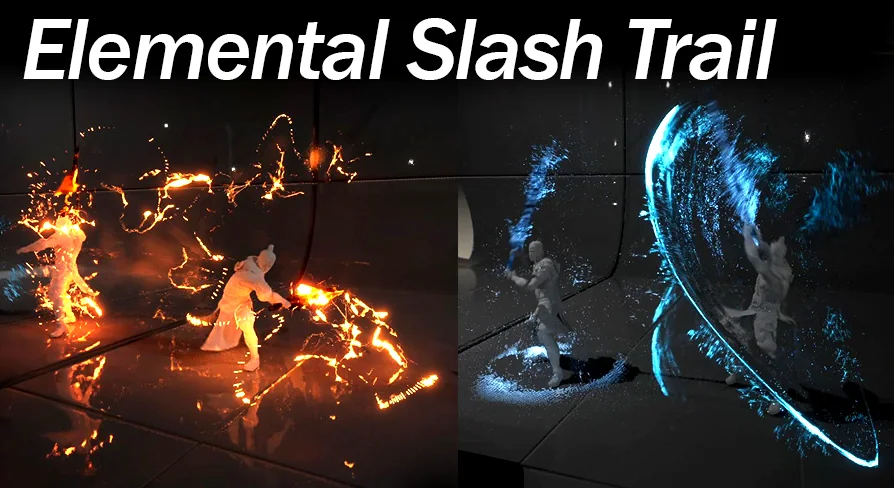
For traditional fantasy, samurai, and ninja archetypes, the library provides Fire, Water, Ice, Lightning, Wind, Nature, Sand, Dark, Mystic, and Basic variations. A water-themed swordsman or an ice-infused dual-wielder can use sweeping aquatic ribbons or crisp, chilling arcs that visually reinforce elemental affinities. Lightning and fire provide high-energy, jagged bursts suitable for aggressive offensive skill sets, while wind and sand yield softer, drifting particulate motions suited for evasive or crowd-control abilities. Dark and mystic themes support necromancers, corrupted warriors, or arcane spell-blades.
For projects set in futuristic, dystopian, or experimental environments, the package introduces Sci-fi, Cyberpunk, Matrix, LightSaber, Distortion, and Music Bard themes. The Cyberpunk and Matrix styles deliver digital, stylized combat feedback suited for virtual world environments or cyber-enhanced brawlers. The LightSaber theme produces distinct, concentrated luminous arcs, while the Distortion-only variation strips out flat color to rely strictly on refractive visual disturbance across the camera view, giving heavy physical swings an invisible, kinetic shockwave sensation. The Music Bard option offers a distinct thematic variation that blends melodic motifs with offensive blade motion.
The Six-Part Elemental FX Toolkit
Each of the sixteen elemental themes is shaped by an identical six-part modular structure. Rather than supplying standalone trail ribbons in isolation, every theme functions as a complete combat visual suite containing:
Weapon Material: Applied directly to the blade or weapon mesh to establish the core visual texture and glowing surface properties.
Sword FX: Particle elements that cling directly to the weapon, giving it active energy, embers, sparks, or ambient glow while unsheathed.
Aura FX: Character- or blade-focused energy surges used to signal charge-up attacks, buffs, or combat stance shifts.
Slash Trail FX: The primary ribbon particle spawned during the swing animation to illustrate the blade's travel arc through the air.
Slash Rotating Projectile: A detached, spinning crescent wave spawned during swing execution to represent ranged blade beams or flying sword attacks.
Hit Particle: A burst effect triggered at the location of contact to confirm successful strikes against targets.
This uniform six-part structure ensures that an entire combat sequence remains cohesive. When a player activates an ice affinity, the weapon material glazes the sword, the sword FX sheds frost, the aura FX signals an empowered state, the swing releases an ice trail, the follow-up sends a spinning ice crescent across the arena, and the target explodes into icy shards on impact.
Aligning Slash Trail FX to Character Animation Sockets
Integrating weapon trails into animated characters requires precise placement along the weapon edge. The package is built to work directly alongside character animation files, allowing developers to attach the trail particles to specific skeletal sockets or weapon bone joints.
Within the animation sequence or montage, the trail location can be shifted and re-timed using animation notifies. Because swing arcs vary across two-handed greatswords, short daggers, and sweeping polearms, adjusting the start and end positions of the slash trail directly inside the animation file ensures that the visual ribbon aligns precisely with the physical edge of the weapon mesh. Customizing the Niagara systems further allows developers to fine-tune particle density, life span, velocity, and color intensity across the slash trail, aura, sword attachment, rotating projectile, and hit reaction.
Performance Tuning with Material Blend Modes and Niagara Settings
Dense combat sequences featuring multiple enemies swinging elemental weapons can quickly introduce rendering overhead if transparency and particle counts are left unchecked. The package includes dedicated material and particle optimization workflows to maintain stable frame rates across different project targets.
Using the engine's Shader Complexity view mode, developers can analyze overdraw generated by layered ribbons and aura particles. To balance visual fidelity against performance budgets, the materials support switching between Cheap and Quality material blend modes. Selecting a lighter blend mode strips unnecessary complexity from slash trail and weapon materials, making them suitable for mobile platforms, background combatants, or dense multi-character brawls. Projects focusing on high-fidelity cinematic combat can retain the Quality blend mode to preserve intricate edge blending, refractions, and emissive highlights.
UEFN Migration and Engine Workarounds
Beyond standard Unreal Engine projects, the package supports migration workflows into UEFN (Unreal Editor for Fortnite), enabling creators to incorporate custom elemental slashes, rotating projectiles, and aura mechanics into custom island experiences.
When working within Unreal Engine 5.2 builds, trails may occasionally encounter a stretching artifact depending on particle simulation modes. In these versions, switching the Niagara emitter simulation mode from GPU to CPU resolves the stretching issue, ensuring clean and accurate trail geometry throughout fast combat swings.
With its structured multi-part setup, expansive range of sixteen elemental types, and built-in optimization settings, Slash Trail FX Elemental serves as a practical, modular foundation for developers seeking cohesive, responsive melee visual feedback across action, fantasy, and futuristic combat games.
 Spells & Combat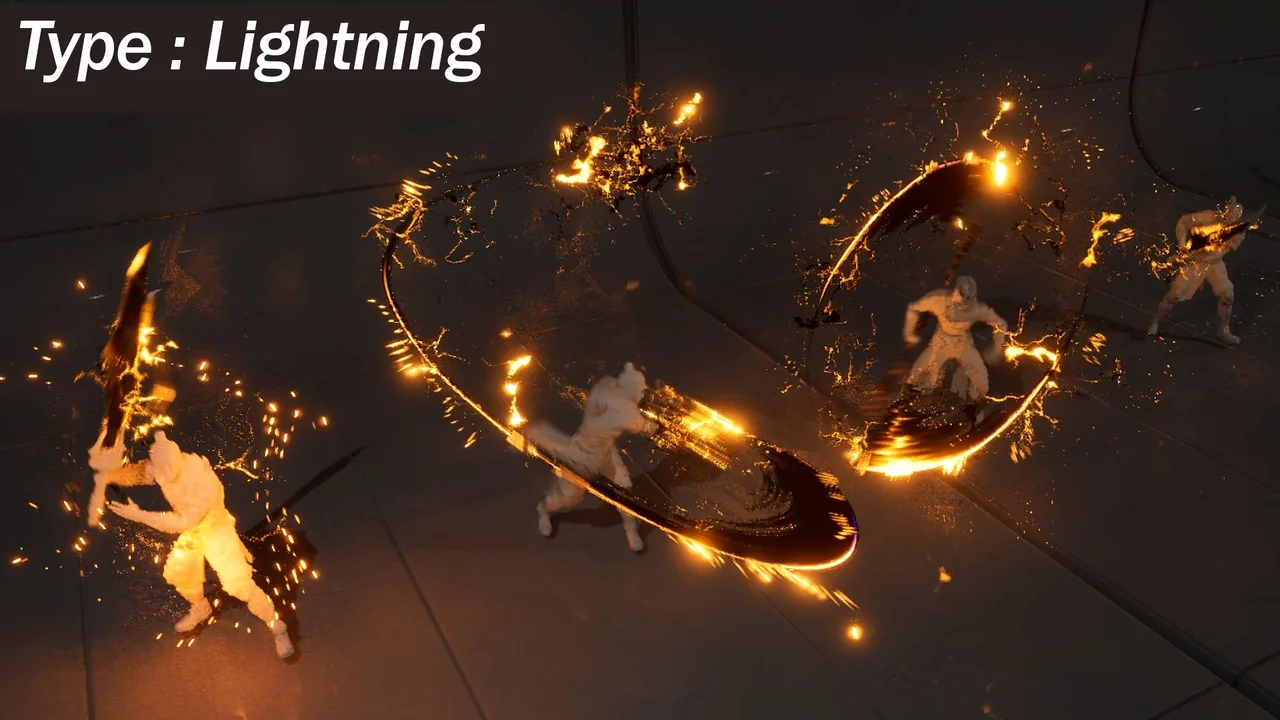
 Spells & Combat
 Spells & Combat
 Spells & Combat