"216a1d817ec3ca8a"{"id":"1000896","slug":"third-person-story-adventure-template","title":"Third Person Story Adventure Template","category":"Gameplay Features","engine":"5.3+","assetVersion":"","engineVersion":"Engine Version: 5.3+","tag":"Gameplay Features","accent":"blue","visual":"mech","summary":"A complex Unreal Engine template for story-based games with inspection, inventory, journal, and branching NPC dialogue. Includes documentation and a Windows dem","platform":"Unreal Engine","indexPolicy":"index","publishedAt":"2026-08-06T04:48:47.283Z","updatedAt":"2026-08-06T04:48:47.283Z","sourceNotes":[],"fileContents":[],"compatibility":["Unreal Engine","Engine Version: 5.3+"],"featuredImage":{"alt":"Third Person Story Adventure Template","src":"/wp-content/uploads/published/2026/08/a51b66106795-192afb08-86c4-4959-be94-66b22dbe4df1-192ba25f38.webp"},"hasDownloadLink":true,"downloads":0,"terms":[{"taxonomy":"category","slug":"gameplay-features","name":"Gameplay Features"}],"galleryImages":[{"src":"/wp-content/uploads/published/2026/08/1f086084f91b-ce2668a6-148f-4e59-8de9-b8efcb157b42-c67133f137.webp","alt":"Third Person Story Adventure Template"},{"src":"/wp-content/uploads/published/2026/08/6f1df71fda79-60a8a5e2-730f-447b-a68a-3cf2e3d2b00a-ed74bccde4.webp","alt":"Third Person Story Adventure Template"},{"src":"/wp-content/uploads/published/2026/08/7f462eaee2aa-784daed1-6ec8-40c4-9942-53b06a69fd7f-50bef44105.webp","alt":"Third Person Story Adventure Template"},{"src":"/wp-content/uploads/published/2026/08/418f579b293f-5f0c84bb-787d-4bd9-b5ad-77d6b8680dc6-4e7c990fcd.webp","alt":"Third Person Story Adventure Template"},{"src":"/wp-content/uploads/published/2026/08/6ca2925cdce3-f6d13303-c8cb-4642-bbc2-d9473435392f-28c4082993.webp","alt":"Third Person Story Adventure Template"},{"src":"/wp-content/uploads/published/2026/08/ad72ac0cf466-ffbd93fc-df82-498a-af67-8a704ed0593c-fcc2cd1a09.webp","alt":"Third Person Story Adventure Template"},{"src":"/wp-content/uploads/published/2026/08/9297b683b38a-b8e6fe94-4a11-4ea0-98f9-7d2928608d8e-e0e6d69eda.webp","alt":"Third Person Story Adventure Template"},{"src":"/wp-content/uploads/published/2026/08/b035f5d170e2-f2e7d6a3-e794-40b9-80d8-b473fd3eadae-69e419b760.webp","alt":"Third Person Story Adventure Template"}],"accessPanel":{"kind":"resource","title":"Get this resource","eyebrow":"Free resource","message":"3DCGHUB is the service provider for this listing. Access is fulfilled through the official publisher channel.","fileName":"ThirdPersonStoryAdventure.7z","safetyNote":"Resources are manually reviewed before listing to improve quality and reduce obvious risks.","actionLabel":"Get this resource","resourceType":"Resource archive","versions":[]},"contentHtml":"\u003cp\u003eThe \u003cem\u003eThird-Person Story Adventure Template\u003c/em\u003e is a core framework for story-based games that lean heavily on environmental interaction. Instead of dropping in 1 single mechanic, it gives you a working structure where the player can touch, inspect, collect, and converse with the world around them. The systems are already wired together, which means an artist or designer can build a narrative scene without waiting on a programmer to handle the basic loops. For a developer who has built similar interaction logic more than once, that same setup short-circuits the repetitive part of the work.\u003c/p\u003e\n\n\u003ch2\u003eThe Master Actor Stack Behind the Template\u003c/h2\u003e\n\n\u003cp\u003eAt the center of the template is a common collection of \u003ccode\u003eMaster Actors\u003c/code\u003e. These are the main building blocks you will place in a Level:\u003c/p\u003e\n\n\u003cul\u003e\n \u003cli\u003e\u003cstrong\u003eSimple Focus Actors\u003c/strong\u003e – for look-and-interact moments\u003c/li\u003e\n \u003cli\u003e\u003cstrong\u003e2D Inspection Actors\u003c/strong\u003e – for flat-view examination\u003c/li\u003e\n \u003cli\u003e\u003cstrong\u003e3D Inspection Actors\u003c/strong\u003e – for full model inspection\u003c/li\u003e\n \u003cli\u003e\u003cstrong\u003eCollectible Items\u003c/strong\u003e – that feed an inventory system\u003c/li\u003e\n \u003cli\u003e\u003cstrong\u003eCollectible Journal Entries\u003c/strong\u003e – that build a written record of the story\u003c/li\u003e\n \u003cli\u003e\u003cstrong\u003eDynamic Sequence Trigger Actors\u003c/strong\u003e – that start scripted events when the player moves into a certain area or does something specific\u003c/li\u003e\n \u003cli\u003e\u003cstrong\u003eInteractive Non-Player Characters (NPCs)\u003c/strong\u003e – with branching dialogue trees and consequences\u003c/li\u003e\n\u003c/ul\u003e\n\n\u003cp\u003eThese \u003ccode\u003eActors\u003c/code\u003e are not independent objects. They are designed to work together. A player might use a simple focus \u003ccode\u003eActor\u003c/code\u003e to look at an object, then collect a journal entry that expands the world's lore, then talk to an NPC with a dialogue choice that references what they just found. The template handles the underlying connections, so the team can focus on what the content says rather than how the interaction system fits together.\u003c/p\u003e\n\n\u003ch2\u003eBranching Dialogue and Consequences\u003c/h2\u003e\n\n\u003cp\u003eThe NPC dialogue in the template is not 1 single chain of lines. Each conversation is built with branching choices, and the player's selections can lead to different outcomes. The consequence layer is what gives the dialogue weight. A decision made early in a conversation can change later dialogue, the state of an objective, or even how the player is allowed to move through a scene. Because consequences are part of the same \u003ccode\u003eActor\u003c/code\u003e system, they can be tied to any of the other \u003ccode\u003eMaster Actors\u003c/code\u003e. A dialogue choice could grant an inventory item, trigger a dynamic sequence, or unlock a new journal entry.\u003c/p\u003e\n\n\u003ch2\u003eLearning Curve, Documentation, and the Windows Demo\u003c/h2\u003e\n\n\u003cp\u003eThis is a complex asset, and the developer makes that clear from the start. Even with detailed documentation and video tutorials, beginners might find the learning curve steep. The documentation walks through the architecture and the intent behind each \u003ccode\u003eMaster Actor\u003c/code\u003e. The video tutorials provide a more direct look at how the systems behave in a live project. Alongside those, a Windows demo is available, giving you a chance to see the template in motion before you commit to setting it up yourself. The help and support page also connects to a helpdesk, and there is a community Discord server, though the Discord is not for product support—it is a place for community discussion.\u003c/p\u003e\n\n\u003ch2\u003eMigration to Existing Projects\u003c/h2\u003e\n\n\u003cp\u003eThe template is not meant to be dropped into a project that has already grown beyond a certain point. The developer states that migration into existing projects is not the intended use case. If you have a fair amount of Unreal Engine knowledge, you can make it work, but it is not a simple copy-and-paste job. The \u003ccode\u003eMaster Actors\u003c/code\u003e are tightly tied to the template's own structure, so pulling them into an unrelated project means reconciling the game's existing systems with those that the template introduces. For a new game that starts with this template as its base, everything aligns from the beginning.\u003c/p\u003e\n\n\u003ch2\u003eWho This Template Is Intended For\u003c/h2\u003e\n\n\u003cp\u003eThe template was made for 2 distinct audiences. On 1 side are artists and designers who want to realize their story ideas without writing extensive programming logic. For them, the \u003ccode\u003eMaster Actors\u003c/code\u003e are ready-made gameplay elements that can be placed and configured with \u003ccode\u003eBlueprint\u003c/code\u003e-supported workflows. On the other side are experienced programmers who do not want to rebuild the same interaction foundation for every narrative project. The template gives them a proven starting point, eliminating the boilerplate and letting them spend their time on custom systems that set their game apart.\u003c/p\u003e\n\n\u003cp\u003eIn both cases, the main features are already in place. The work shifts from building basic functionality to filling the framework with the actual story content: the characters, the dialogue writing, the Level layouts, and the meaningful choices. That is the point of the template—it provides the mechanical spine of a story adventure, and the team's creative effort becomes the flesh around it.\u003c/p\u003e\n\n\u003ch2\u003eExplore Similar Assets\u003c/h2\u003e\n\u003cul\u003e\n\u003cli\u003e\u003ca href=\"https://3dcghub.com/dynamic-flight-with-blueprints/\" rel=\"noopener noreferrer\"\u003eDynamic Flight with Blueprints\u003c/a\u003e\u003c/li\u003e\n\u003cli\u003e\u003ca href=\"https://3dcghub.com/advanced-third-person-camera/\" rel=\"noopener noreferrer\"\u003eAdvanced Third Person Camera\u003c/a\u003e\u003c/li\u003e\n\u003cli\u003e\u003ca href=\"https://3dcghub.com/ultimate-gameplay-camera/\" rel=\"noopener noreferrer\"\u003eUltimate Gameplay Camera\u003c/a\u003e\u003c/li\u003e\n\u003cli\u003e\u003ca href=\"https://3dcghub.com/dynamic-combat-system-archery/\" rel=\"noopener noreferrer\"\u003eDynamic Combat System - Archery\u003c/a\u003e\u003c/li\u003e\n\u003cli\u003e\u003ca href=\"https://3dcghub.com/usk-inventory-and-weapon/\" rel=\"noopener noreferrer\"\u003eUSK: Inventory And Weapon\u003c/a\u003e\u003c/li\u003e\n\u003c/ul\u003e","contentTextLength":4882,"navigation":{"current":1478,"total":4230,"previous":{"id":"1000897","slug":"trumpet-and-sax-animations","title":"Trumpet \u0026 Sax | Animations","category":"Gestures","platform":"Unreal Engine","updatedAt":"2026-08-06T04:51:59.951Z"},"next":{"id":"1000895","slug":"thermodynamic-chart","title":"Thermodynamic Chart","category":"Engine Tools","platform":"Unreal Engine","updatedAt":"2026-08-06T04:45:48.733Z"}},"relatedResources":[{"id":"1000980","slug":"basic-locomotion-system-replicated","title":"Basic Locomotion System (REPLICATED)","category":"Gameplay Features","engine":"5.0+","assetVersion":"","engineVersion":"Engine Version: 5.0+","tag":"Gameplay Features","accent":"blue","visual":"animation","summary":"A ground-up locomotion system for the UE5 Skeleton using Lyra animations, built as a simple third-person template with MetaHuman integration and multiplayer inv","platform":"Unreal Engine","indexPolicy":"index","publishedAt":"2026-08-18T05:57:51.717Z","updatedAt":"2026-08-18T05:57:51.717Z","sourceNotes":[],"fileContents":[],"compatibility":["Unreal Engine","Engine Version: 5.0+"],"featuredImage":{"alt":"Basic Locomotion System (REPLICATED)","src":"/wp-content/uploads/published/2026/08/497370037da8-24315aeb-c8a9-4077-aa37-d1119fdcf17d-0970e54182.webp"},"hasDownloadLink":true,"downloads":4},{"id":"10793","slug":"dynamic-flight-with-blueprints","title":"Dynamic Flight with Blueprints","category":"Gameplay Features","engine":"4.26+,5.0+","assetVersion":"Engine version: 4.26+,5.0+","engineVersion":"4.18","tag":"Gameplay Features","accent":"blue","visual":"audio","summary":"Enhance your project with a comprehensive third-person flight system. This set includes animations, additive poses, and Blueprints designed for dynamic motion and easy integration.","platform":"Unreal Engine","indexPolicy":"index","publishedAt":"2026-03-03T16:14:20.000Z","updatedAt":"2026-04-19T15:49:56.000Z","sourceNotes":[],"fileContents":[],"compatibility":["Unreal Engine","Engine version: 4.26+,5.0+"],"featuredImage":{"alt":"Dynamic Flight with Blueprints","src":"https://3dcghub.com/wp-content/uploads/2026/03/5d459532-5562-4a4a-b3c6-38bdd3793c27.webp"},"hasDownloadLink":true,"downloads":0},{"id":"15108","slug":"ultimate-gameplay-camera","title":"Ultimate Gameplay Camera","category":"Gameplay Features","engine":"5.3 - 5.5","assetVersion":"Engine version: 5.3 - 5.5","engineVersion":"Asset Version:1.3","tag":"Gameplay Features","accent":"blue","visual":"audio","summary":"The Ultimate Gameplay Camera provides a professional-grade, dynamic third-person camera system for Unreal Engine. It features smooth movement, multiplayer replication, and extensive customization options without requiring C++ knowledge.","platform":"Unreal Engine","indexPolicy":"index","publishedAt":"2026-03-12T07:52:43.000Z","updatedAt":"2026-04-19T15:45:35.000Z","sourceNotes":[],"fileContents":[],"compatibility":["Unreal Engine","Engine version: 5.3 - 5.5","Asset Version: 1.3"],"featuredImage":{"alt":"Ultimate Gameplay Camera","src":"https://3dcghub.com/wp-content/uploads/2026/03/89e2406f-10ab-4f8a-97aa-fa74ad5bc513.webp"},"hasDownloadLink":true,"downloads":2}]}
Gameplay Features
Third Person Story Adventure Template
A complex Unreal Engine template for story-based games with inspection, inventory, journal, and branching NPC dialogue. Includes documentation and a Windows dem
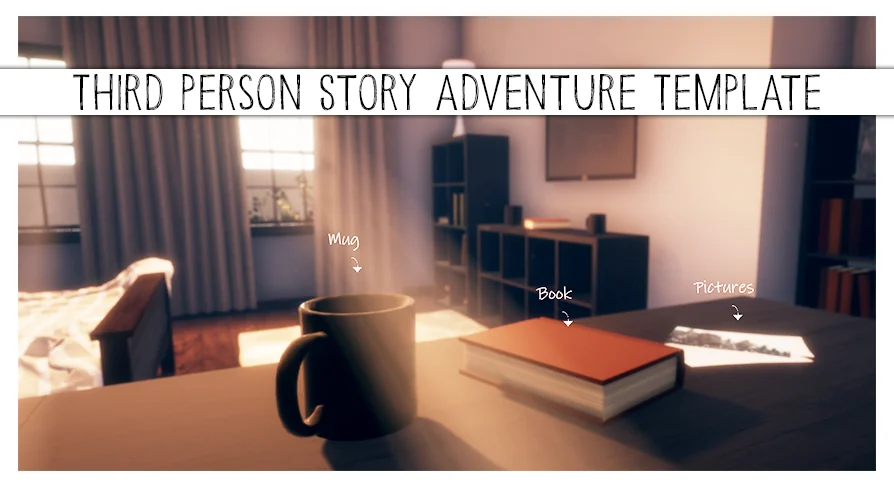
The Third-Person Story Adventure Template is a core framework for story-based games that lean heavily on environmental interaction. Instead of dropping in 1 single mechanic, it gives you a working structure where the player can touch, inspect, collect, and converse with the world around them. The systems are already wired together, which means an artist or designer can build a narrative scene without waiting on a programmer to handle the basic loops. For a developer who has built similar interaction logic more than once, that same setup short-circuits the repetitive part of the work.
The Master Actor Stack Behind the Template
At the center of the template is a common collection of Master Actors. These are the main building blocks you will place in a Level:
Simple Focus Actors – for look-and-interact moments
2D Inspection Actors – for flat-view examination
3D Inspection Actors – for full model inspection
Collectible Items – that feed an inventory system
Collectible Journal Entries – that build a written record of the story
Dynamic Sequence Trigger Actors – that start scripted events when the player moves into a certain area or does something specific
Interactive Non-Player Characters (NPCs) – with branching dialogue trees and consequences
These Actors are not independent objects. They are designed to work together. A player might use a simple focus Actor to look at an object, then collect a journal entry that expands the world's lore, then talk to an NPC with a dialogue choice that references what they just found. The template handles the underlying connections, so the team can focus on what the content says rather than how the interaction system fits together.
Branching Dialogue and Consequences
The NPC dialogue in the template is not 1 single chain of lines. Each conversation is built with branching choices, and the player's selections can lead to different outcomes. The consequence layer is what gives the dialogue weight. A decision made early in a conversation can change later dialogue, the state of an objective, or even how the player is allowed to move through a scene. Because consequences are part of the same Actor system, they can be tied to any of the other Master Actors. A dialogue choice could grant an inventory item, trigger a dynamic sequence, or unlock a new journal entry.
Learning Curve, Documentation, and the Windows Demo
This is a complex asset, and the developer makes that clear from the start. Even with detailed documentation and video tutorials, beginners might find the learning curve steep. The documentation walks through the architecture and the intent behind each Master Actor. The video tutorials provide a more direct look at how the systems behave in a live project. Alongside those, a Windows demo is available, giving you a chance to see the template in motion before you commit to setting it up yourself. The help and support page also connects to a helpdesk, and there is a community Discord server, though the Discord is not for product support—it is a place for community discussion.
Migration to Existing Projects
The template is not meant to be dropped into a project that has already grown beyond a certain point. The developer states that migration into existing projects is not the intended use case. If you have a fair amount of Unreal Engine knowledge, you can make it work, but it is not a simple copy-and-paste job. The Master Actors are tightly tied to the template's own structure, so pulling them into an unrelated project means reconciling the game's existing systems with those that the template introduces. For a new game that starts with this template as its base, everything aligns from the beginning.
Who This Template Is Intended For
The template was made for 2 distinct audiences. On 1 side are artists and designers who want to realize their story ideas without writing extensive programming logic. For them, the Master Actors are ready-made gameplay elements that can be placed and configured with Blueprint-supported workflows. On the other side are experienced programmers who do not want to rebuild the same interaction foundation for every narrative project. The template gives them a proven starting point, eliminating the boilerplate and letting them spend their time on custom systems that set their game apart.
In both cases, the main features are already in place. The work shifts from building basic functionality to filling the framework with the actual story content: the characters, the dialogue writing, the Level layouts, and the meaningful choices. That is the point of the template—it provides the mechanical spine of a story adventure, and the team's creative effort becomes the flesh around it.
 Gameplay Features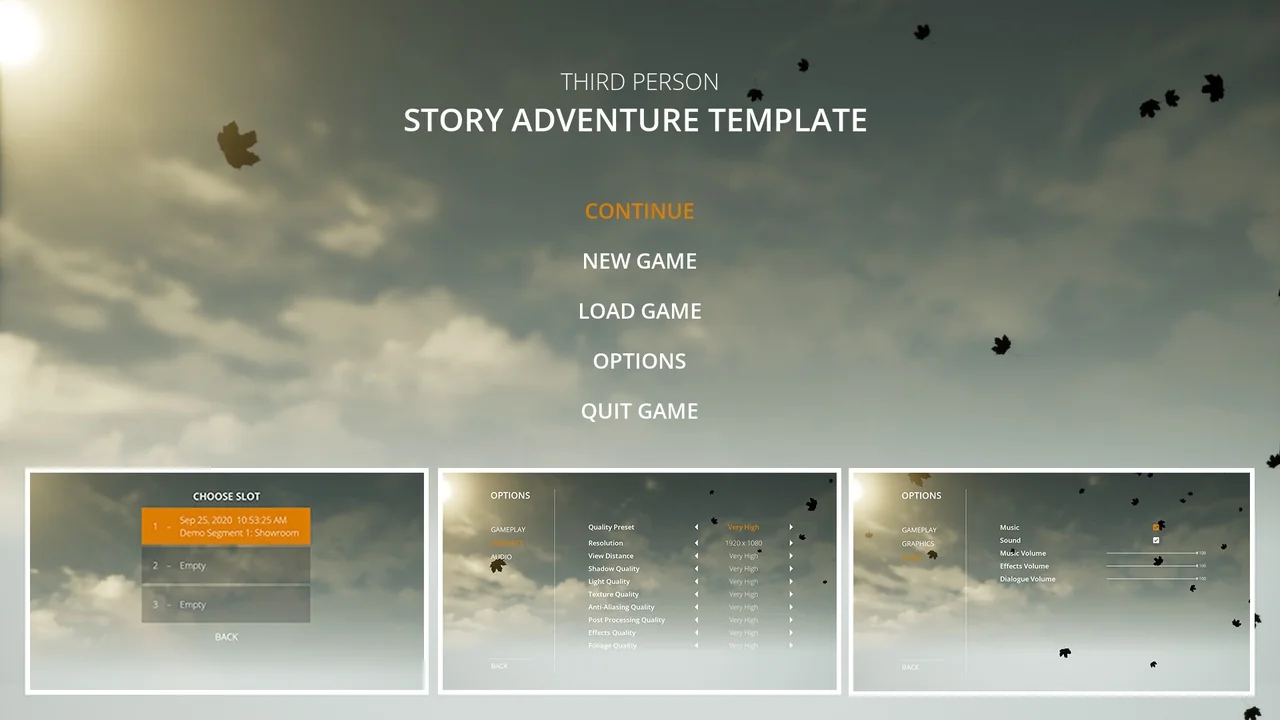
 Gameplay Features
 Gameplay Features
 Gameplay Features