"216a1d817ec3ca8a"{"id":"1000897","slug":"trumpet-and-sax-animations","title":"Trumpet \u0026 Sax | Animations","category":"Gestures","engine":"5.3+","assetVersion":"","engineVersion":"Engine Version: 5.3+","tag":"Gestures","accent":"blue","visual":"animation","summary":"Animation set for saxophone and two trumpets, built for UE5 and UE4 skeletons. Includes Epic-provided meshes and clear socketing notes for left and right hands.","platform":"Unreal Engine","indexPolicy":"index","publishedAt":"2026-08-06T04:51:59.951Z","updatedAt":"2026-08-06T04:51:59.951Z","sourceNotes":[],"fileContents":[],"compatibility":["Unreal Engine","Engine Version: 5.3+"],"featuredImage":{"alt":"Trumpet \u0026 Sax | Animations","src":"/wp-content/uploads/published/2026/08/04f9eac29fe7-35b17911-da10-42f7-90d4-93b2d3ba1f65-dea83a7a63.webp"},"hasDownloadLink":true,"downloads":0,"terms":[{"taxonomy":"category","slug":"gestures","name":"Gestures"}],"galleryImages":[{"src":"/wp-content/uploads/published/2026/08/ddccd6852a50-c834d2cc-b191-4a42-9975-6aa10640a33b-7cebfab435.webp","alt":"Trumpet \u0026 Sax | Animations"},{"src":"/wp-content/uploads/published/2026/08/feb77a6f19d7-8cc8a8d8-d9de-4f5b-9ca9-2ccd7143b7fb-93295adee8.webp","alt":"Trumpet \u0026 Sax | Animations"}],"accessPanel":{"kind":"resource","title":"Get this resource","eyebrow":"Free resource","message":"3DCGHUB is the service provider for this listing. Access is fulfilled through the official publisher channel.","fileName":"Content.7z","safetyNote":"Resources are manually reviewed before listing to improve quality and reduce obvious risks.","actionLabel":"Get this resource","resourceType":"Resource archive","versions":[]},"contentHtml":"\u003cp\u003eBuilding a believable musician Non-Player Character (NPC) in Unreal Engine often comes down to the little details: how the instrument sits in the hands, how the motion reads as performance rather than idle posing, and whether the Rig matches the project's Skeleton. \u003cem\u003eTrumpet \u0026 Sax | Animations\u003c/em\u003e takes a direct path through that setup by offering a set of animation assets for the saxophone and 2 trumpet types, with Skeletons aimed at both Unreal Engine 5 (UE5) and Unreal Engine 4 (UE4).\u003c/p\u003e\n\n\u003ch2\u003e9 Saxophone Animations, 7 per Trumpet Type\u003c/h2\u003e\n\n\u003cp\u003eThe pack is split by instrument. The saxophone side contains 9 animations, while each of the 2 trumpet types gets 7 animations. That means a project can animate a saxophonist or a trumpeter with enough motion to support casual scenes—think a street performer or a background band member—as well as more deliberate performance moments where the NPC is the center of attention.\u003c/p\u003e\n\n\u003cp\u003eThe counts are compact but purposeful. Instead of a sprawling library, the pack focuses on giving each instrument a workable set of gestures. For a game or interactive scene, this keeps the Animation Blueprint manageable while still covering the essential poses and movements a musician would need. The exact actions are not listed in the pack overview, but the intended range is clear from the phrasing: these are performance-ready motions for a saxophone or trumpeter NPC.\u003c/p\u003e\n\n\u003ch2\u003eSocketing Saxophone on the Right, Trumpets on the Left\u003c/h2\u003e\n\n\u003cp\u003eSkeleton compatibility matters, but so does hand placement. The pack includes a specific Socketing requirement: the saxophone should be socketed on the \u003ccode\u003eRight Hand\u003c/code\u003e, while the trumpets should be socketed on the \u003ccode\u003eLeft Hand\u003c/code\u003e. That asymmetry is a practical detail for animators—it prevents the instrument from clipping through the character or floating during playback.\u003c/p\u003e\n\n\u003cp\u003eFor creators who need to build Sockets from scratch, the process is the same as the 1 used for a guitarist setup. The pack points to a guitarist tutorial video as the reference, meaning anyone who has rigged a guitar-playing character already knows the workflow. The key takeaway is to follow that same Socket-creation method, then attach the saxophone to the \u003ccode\u003eRight Hand\u003c/code\u003e and the trumpets to the \u003ccode\u003eLeft Hand\u003c/code\u003e. Getting this placement right before assigning animations will save time during preview and iteration.\u003c/p\u003e\n\n\u003ch2\u003eEpic-Provided Meshes and Textures Included\u003c/h2\u003e\n\n\u003cp\u003e1 of the more convenient aspects of this pack is that the instrument Meshes and Textures are not custom-made extras. They are provided by Epic Games and are already included in the project. This means no separate import of a saxophone or trumpet model is required, and the visual assets are cleared for use inside Unreal Engine projects under Epic's terms.\u003c/p\u003e\n\n\u003cp\u003eBecause the Meshes come from Epic, they fit the engine's standard scale and rendering pipeline without additional conversion. The Textures are also part of the bundle, so the instruments are ready to appear in the scene as soon as the animations are applied. For teams that want to swap in their own instruments later, the Socketing setup still works—the existing Meshes simply serve as the starting point.\u003c/p\u003e\n\n\u003ch2\u003eBuilt for UE5 and UE4 Skeletons\u003c/h2\u003e\n\n\u003cp\u003eThe animation assets are designed to work with both \u003ccode\u003eUE5 Skeleton\u003c/code\u003e and \u003ccode\u003eUE4 Skeleton\u003c/code\u003e setups. That dual support gives developers flexibility depending on the project's engine version. A studio still on UE4 can integrate the pack without worrying about Retargeting from a newer Skeleton, while a UE5 project can take advantage of the same animation set directly.\u003c/p\u003e\n\n\u003cp\u003eThis also makes the pack a practical choice for teams that maintain builds across both engine versions. Since the animations are authored for both Skeletons, the same performance motions can be reused in different branches of a project, or across multiple projects that share a similar NPC setup.\u003c/p\u003e\n\n\u003ch2\u003eA Broader Musical Animation Lineup\u003c/h2\u003e\n\n\u003cp\u003e\u003cem\u003eTrumpet \u0026 Sax | Animations\u003c/em\u003e isn't an isolated purchase. The creator has built a small ecosystem of musical animation packs, including \u003cem\u003eGuitarist\u003c/em\u003e, \u003cem\u003eDrummer\u003c/em\u003e, \u003cem\u003eKeyboardist\u003c/em\u003e, and \u003cem\u003eViolinist \u0026 Double Bassist\u003c/em\u003e. That broader lineup suggests the animations in this pack are meant to align with a matching visual and motion style across different instruments.\u003c/p\u003e\n\n\u003cp\u003eFor someone building a band, a jazz club, or a street performance scene, these packs can be combined to populate the stage with multiple musicians. The saxophone and trumpet pack fills the brass section, while the others cover guitar, drums, keys, and strings. That cohesion is useful when choreographing a group of NPCs that need to look like they are playing together.\u003c/p\u003e\n\n\u003cp\u003eIn practice, the pack's value lies in its straightforward setup: count the animations, socket the instruments correctly, and drop the included Epic Meshes into place. With both UE5 and UE4 Skeleton support, the animations are ready for a variety of production pipelines, and the Socketing note makes it clear where each instrument belongs. For a casual background musician or a featured solo performance, this is a functional starting point for bringing brass instruments to life.\u003c/p\u003e\n\n\u003ch2\u003eRelated Resources Worth Checking\u003c/h2\u003e\n\u003cul\u003e\n\u003cli\u003e\u003ca href=\"https://3dcghub.com/male-emotes/\" rel=\"noopener noreferrer\"\u003eMale Emotes\u003c/a\u003e\u003c/li\u003e\n\u003cli\u003e\u003ca href=\"https://3dcghub.com/shopkeeper-merchant-animation-set/\" rel=\"noopener noreferrer\"\u003eShopkeeper Merchant Animation Set\u003c/a\u003e\u003c/li\u003e\n\u003cli\u003e\u003ca href=\"https://3dcghub.com/91-interaction-mocap-animations/\" rel=\"noopener noreferrer\"\u003e91 Interaction Mocap Animations\u003c/a\u003e\u003c/li\u003e\n\u003cli\u003e\u003ca href=\"https://3dcghub.com/pedestrians/\" rel=\"noopener noreferrer\"\u003ePedestrians\u003c/a\u003e\u003c/li\u003e\n\u003cli\u003e\u003ca href=\"https://3dcghub.com/scared-mocap-animation-pack/\" rel=\"noopener noreferrer\"\u003eScared - MoCap Animation Pack\u003c/a\u003e\u003c/li\u003e\n\u003c/ul\u003e","contentTextLength":5191,"navigation":{"current":1477,"total":4230,"previous":{"id":"1000898","slug":"turn-based-jrpg-template","title":"Turn-Based jRPG Template","category":"RPG","platform":"Unreal Engine","updatedAt":"2026-08-06T04:55:52.266Z"},"next":{"id":"1000896","slug":"third-person-story-adventure-template","title":"Third Person Story Adventure Template","category":"Gameplay Features","platform":"Unreal Engine","updatedAt":"2026-08-06T04:48:47.283Z"}},"relatedResources":[{"id":"1001927","slug":"30-preacher-npc-mocap-animations","title":"30 Preacher NPC Mocap Animations","category":"Gestures","engine":"5.4+","assetVersion":"","engineVersion":"Engine Version: 5.4+","tag":"Gestures","accent":"blue","visual":"animation","summary":"Technical guide to implementing 30 Preacher NPC Mocap Animations across UE4 and UE5 skeletons with In Place, Root Motion, and responsive follower behaviors.","platform":"Unreal Engine","indexPolicy":"index","publishedAt":"2026-10-24T11:05:05.323Z","updatedAt":"2026-10-24T11:05:05.323Z","sourceNotes":[],"fileContents":[],"compatibility":["Unreal Engine","Engine Version: 5.4+"],"featuredImage":{"alt":"30 Preacher NPC Mocap Animations","src":"/wp-content/uploads/published/2026/10/0f164d359392-009467c7-5638-4d45-b5ac-20b5937af00c-21aa32f7a5.webp"},"hasDownloadLink":true,"downloads":1},{"id":"1001022","slug":"trying-on-clothes-animation","title":"Trying On Clothes Animation","category":"Gestures","engine":"5.3+","assetVersion":"","engineVersion":"Engine Version: 5.3+","tag":"Gestures","accent":"blue","visual":"animation","summary":"Animation set for character trying on clothes, covering the change and reactions. For inventory and waiting states. Supports UE4 and UE5 skeletons.","platform":"Unreal Engine","indexPolicy":"index","publishedAt":"2026-08-23T05:22:16.582Z","updatedAt":"2026-08-23T05:22:16.582Z","sourceNotes":[],"fileContents":[],"compatibility":["Unreal Engine","Engine Version: 5.3+"],"featuredImage":{"alt":"Trying On Clothes Animation","src":"/wp-content/uploads/published/2026/08/119917fd5dcb-8f53430a-5e90-4c6f-a3d8-5bd609592900-0901f0ffbc.webp"},"hasDownloadLink":true,"downloads":2},{"id":"1000929","slug":"simple-activations","title":"Simple Activations","category":"Gestures","engine":"5.1+","assetVersion":"","engineVersion":"Engine Version: 5.1+","tag":"Gestures","accent":"blue","visual":"mech","summary":"Animation pack for levers, wall switches, buttons, rope pulls, keys, and more. 25 base animations plus 10 box push/pull additions.","platform":"Unreal Engine","indexPolicy":"index","publishedAt":"2026-08-09T15:28:22.798Z","updatedAt":"2026-08-09T15:28:22.798Z","sourceNotes":[],"fileContents":[],"compatibility":["Unreal Engine","Engine Version: 5.1+"],"featuredImage":{"alt":"Simple Activations","src":"/wp-content/uploads/published/2026/08/038c4214cd89-c93c2707-bcd5-4072-8316-dc94412fdf43-ce161fa875.webp"},"hasDownloadLink":true,"downloads":2}]}
Gestures
Trumpet & Sax | Animations
Animation set for saxophone and two trumpets, built for UE5 and UE4 skeletons. Includes Epic-provided meshes and clear socketing notes for left and right hands.
Category:Unreal Engine,GesturesPlatform: Unreal EngineEngine Version: 5.3+Published: Aug 6, 2026
Gestures
Resource overview
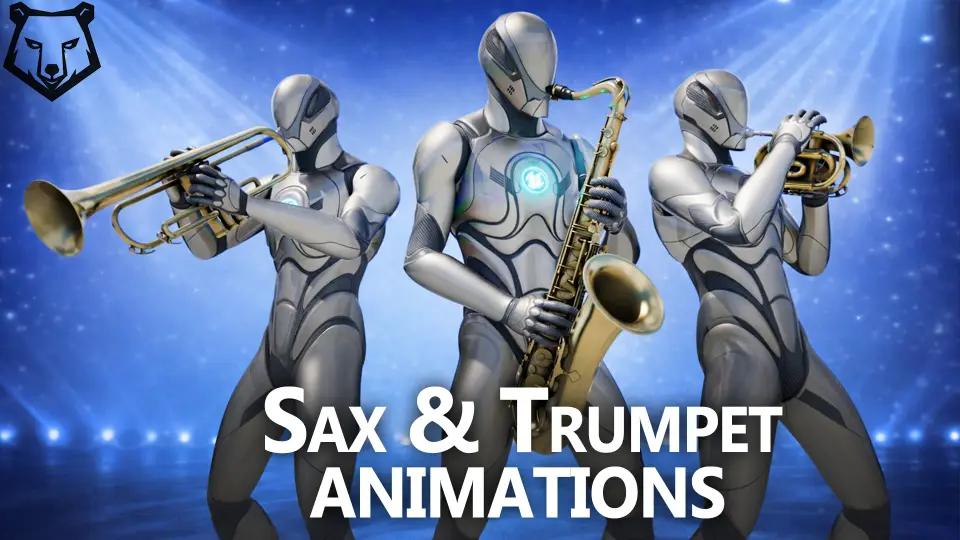
Building a believable musician Non-Player Character (NPC) in Unreal Engine often comes down to the little details: how the instrument sits in the hands, how the motion reads as performance rather than idle posing, and whether the Rig matches the project's Skeleton. Trumpet & Sax | Animations takes a direct path through that setup by offering a set of animation assets for the saxophone and 2 trumpet types, with Skeletons aimed at both Unreal Engine 5 (UE5) and Unreal Engine 4 (UE4).
9 Saxophone Animations, 7 per Trumpet Type
The pack is split by instrument. The saxophone side contains 9 animations, while each of the 2 trumpet types gets 7 animations. That means a project can animate a saxophonist or a trumpeter with enough motion to support casual scenes—think a street performer or a background band member—as well as more deliberate performance moments where the NPC is the center of attention.
The counts are compact but purposeful. Instead of a sprawling library, the pack focuses on giving each instrument a workable set of gestures. For a game or interactive scene, this keeps the Animation Blueprint manageable while still covering the essential poses and movements a musician would need. The exact actions are not listed in the pack overview, but the intended range is clear from the phrasing: these are performance-ready motions for a saxophone or trumpeter NPC.
Socketing Saxophone on the Right, Trumpets on the Left
Skeleton compatibility matters, but so does hand placement. The pack includes a specific Socketing requirement: the saxophone should be socketed on the Right Hand, while the trumpets should be socketed on the Left Hand. That asymmetry is a practical detail for animators—it prevents the instrument from clipping through the character or floating during playback.
For creators who need to build Sockets from scratch, the process is the same as the 1 used for a guitarist setup. The pack points to a guitarist tutorial video as the reference, meaning anyone who has rigged a guitar-playing character already knows the workflow. The key takeaway is to follow that same Socket-creation method, then attach the saxophone to the Right Hand and the trumpets to the Left Hand. Getting this placement right before assigning animations will save time during preview and iteration.
Epic-Provided Meshes and Textures Included
1 of the more convenient aspects of this pack is that the instrument Meshes and Textures are not custom-made extras. They are provided by Epic Games and are already included in the project. This means no separate import of a saxophone or trumpet model is required, and the visual assets are cleared for use inside Unreal Engine projects under Epic's terms.
Because the Meshes come from Epic, they fit the engine's standard scale and rendering pipeline without additional conversion. The Textures are also part of the bundle, so the instruments are ready to appear in the scene as soon as the animations are applied. For teams that want to swap in their own instruments later, the Socketing setup still works—the existing Meshes simply serve as the starting point.
Built for UE5 and UE4 Skeletons
The animation assets are designed to work with both UE5 Skeleton and UE4 Skeleton setups. That dual support gives developers flexibility depending on the project's engine version. A studio still on UE4 can integrate the pack without worrying about Retargeting from a newer Skeleton, while a UE5 project can take advantage of the same animation set directly.
This also makes the pack a practical choice for teams that maintain builds across both engine versions. Since the animations are authored for both Skeletons, the same performance motions can be reused in different branches of a project, or across multiple projects that share a similar NPC setup.
A Broader Musical Animation Lineup
Trumpet & Sax | Animations isn't an isolated purchase. The creator has built a small ecosystem of musical animation packs, including Guitarist, Drummer, Keyboardist, and Violinist & Double Bassist. That broader lineup suggests the animations in this pack are meant to align with a matching visual and motion style across different instruments.
For someone building a band, a jazz club, or a street performance scene, these packs can be combined to populate the stage with multiple musicians. The saxophone and trumpet pack fills the brass section, while the others cover guitar, drums, keys, and strings. That cohesion is useful when choreographing a group of NPCs that need to look like they are playing together.
In practice, the pack's value lies in its straightforward setup: count the animations, socket the instruments correctly, and drop the included Epic Meshes into place. With both UE5 and UE4 Skeleton support, the animations are ready for a variety of production pipelines, and the Socketing note makes it clear where each instrument belongs. For a casual background musician or a featured solo performance, this is a functional starting point for bringing brass instruments to life.
 Gestures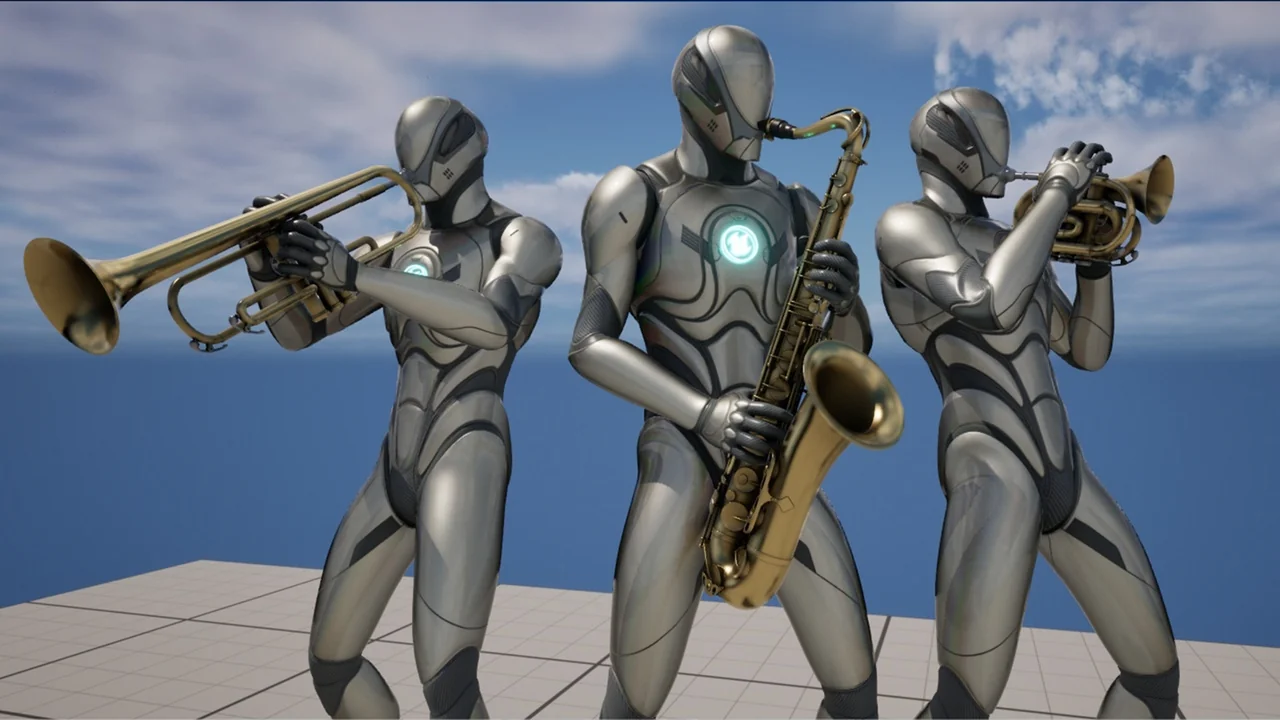
 Gestures
 Gestures
 Gestures