"1f00f67f9253451b"{"id":"1000929","slug":"simple-activations","title":"Simple Activations","category":"Gestures","engine":"5.1+","assetVersion":"","engineVersion":"Engine Version: 5.1+","tag":"Gestures","accent":"blue","visual":"mech","summary":"Animation pack for levers, wall switches, buttons, rope pulls, keys, and more. 25 base animations plus 10 box push/pull additions.","platform":"Unreal Engine","publishedAt":"2026-08-09T15:28:22.798Z","updatedAt":"2026-08-09T15:28:22.798Z","sourceNotes":[],"fileContents":[],"compatibility":["Unreal Engine","Engine Version: 5.1+"],"featuredImage":{"alt":"Simple Activations","src":"/wp-content/uploads/published/2026/08/038c4214cd89-c93c2707-bcd5-4072-8316-dc94412fdf43-ce161fa875.webp"},"hasDownloadLink":true,"downloads":1,"terms":[{"taxonomy":"category","slug":"gestures","name":"Gestures"}],"galleryImages":[{"src":"/wp-content/uploads/published/2026/08/af4a87808ea7-bc6a48aa-8aad-47b2-b077-8d80988347e9-6b0263f6cd.webp","alt":"Simple Activations"},{"src":"/wp-content/uploads/published/2026/08/63f846aedda4-3c842ad7-2295-41be-afe2-22ff2a89912d-9cc4cd16ac.webp","alt":"Simple Activations"},{"src":"/wp-content/uploads/published/2026/08/ffe3309b8250-b1b13aca-b31f-40d3-9ce2-818912a92ff9-8e25548283.webp","alt":"Simple Activations"},{"src":"/wp-content/uploads/published/2026/08/db6b144f1e20-4176c0c3-28ce-4dc3-ab3d-3b4c58a0ee8c-5bb72a22c6.webp","alt":"Simple Activations"},{"src":"/wp-content/uploads/published/2026/08/57d606b1fdb2-8439de14-8769-4f51-879e-4a861d8b1898-ec07d3682e.webp","alt":"Simple Activations"},{"src":"/wp-content/uploads/published/2026/08/ef5ed85831a9-1ec80df6-3cd5-46d2-9cdf-74552fd01f5a-d218807038.webp","alt":"Simple Activations"},{"src":"/wp-content/uploads/published/2026/08/b977b11ff3ba-fc4c6a04-c262-4ac1-b841-2df9a4237ed9-beaebc7260.webp","alt":"Simple Activations"}],"accessPanel":{"kind":"resource","title":"Download this resource","eyebrow":"Free Download","message":"Log in or create a free account to start your download.","fileName":"Simple Activations.7z","safetyNote":"Resources are manually reviewed before listing to improve quality and reduce obvious risks.","actionLabel":"Download Free","resourceType":"Resource archive"},"contentHtml":"\u003cp\u003eIn games where a player has to pull a lever, flip a wall switch, or yank a rope to open a door, the animation of that interaction carries most of the moment. \u003cem\u003eSimple Activations\u003c/em\u003e is a motion pack shaped by exactly those moments: levers, wall switches, buttons, rope pulls, keys, and more. It lands in the kind of project where interactable objects are scattered through dungeons, fortress corridors, and puzzle rooms. The pack exists to give those actions a physical, readable motion without forcing the developer to hand-key each clip from scratch.\u003c/p\u003e\n\n\u003ch2\u003eA Breakdown of the 25-Animation Base\u003c/h2\u003e\n\n\u003cp\u003eThe original set contains 25 animations total, and the split is concrete. Floor actions get 6, rope actions get 5, and wall actions get the largest share at 14. That wall-heavy distribution points toward the kind of reachable Interactables that players encounter at eye level: switches mounted on stone, levers attached to machinery, buttons on panels, and similar hands-on objects. The floor category likely covers lower-placed or ground-level activations, while the rope category handles pulls that require a downward yank or a sustained tug.\u003c/p\u003e\n\n\u003cp\u003eHaving a wall count more than double the floor and rope categories combined suggests a production focus on the most common interactive Prop placement in Level Design. It also means a developer can cover a broad set of wall-mounted puzzles and traversal gates without hunting for additional clips elsewhere.\u003c/p\u003e\n\n\u003ch2\u003eBox Push and Pull Additions\u003c/h2\u003e\n\n\u003cp\u003eAn update brought 10 new animations to the pack. These are \u003ccode\u003estart\u003c/code\u003e, \u003ccode\u003eloop\u003c/code\u003e, \u003ccode\u003elinear loop\u003c/code\u003e, and \u003ccode\u003eend\u003c/code\u003e versions for the box push and pull animations. The distinction between a \u003ccode\u003eloop\u003c/code\u003e and a \u003ccode\u003elinear loop\u003c/code\u003e is useful in practice. A standard \u003ccode\u003eloop\u003c/code\u003e can keep the motion cycling while a player holds the interaction, while a \u003ccode\u003elinear loop\u003c/code\u003e might cover the steady-state movement of a continuous push or pull. Explicit \u003ccode\u003estart\u003c/code\u003e and \u003ccode\u003eend\u003c/code\u003e states let the character transition cleanly into the action and then back out, which is important for Interactables like sliding blocks or draw bridges that have a limited travel distance.\u003c/p\u003e\n\n\u003cp\u003eWith the update, the total animation count becomes 25 base clips plus 10 additions, giving the pack a broader range for physics-based puzzles and object manipulation scenes. The push and pull animations fit a common mechanic type in Adventure and Role-Playing Game (RPG) titles, where a box must be moved onto a pressure plate or a lever must be dragged across a track.\u003c/p\u003e\n\n\u003ch2\u003eWhat the Pack Leaves Out\u003c/h2\u003e\n\n\u003cp\u003e\u003cem\u003eSimple Activations\u003c/em\u003e intentionally stays in the animation lane. No gameplay \u003ccode\u003eBlueprints\u003c/code\u003e are included, so the logic that ties these clips to interactable \u003ccode\u003eActors\u003c/code\u003e is left to the developer. That means the pack does not come with ready-made door mechanisms, \u003ccode\u003eTrigger Volumes\u003c/code\u003e, or inventory hooks. It is strictly an asset pack. The character models shown in the promotional video and images are also not part of the package. Teams bringing their own \u003ccode\u003eCharacter Controllers\u003c/code\u003e and interaction systems will find the clips cleanly drop-in ready, but anyone expecting a full interactive object system will need to build that layer themselves.\u003c/p\u003e\n\n\u003cp\u003eThis separation makes the pack more predictable for Animators and Technical Designers. The focus stays on the motion itself, and the integration is entirely up to the user. If a project already has a gameplay framework, adding these animations is a matter of mapping the clips to the correct \u003ccode\u003eAnimation Montages\u003c/code\u003e, \u003ccode\u003eBlend Spaces\u003c/code\u003e, or \u003ccode\u003eState Machine\u003c/code\u003e states.\u003c/p\u003e\n\n\u003ch2\u003eWhere These Animations Fit\u003c/h2\u003e\n\n\u003cp\u003eThe tags attached to the asset tell a clear story about its intended use: \u003cem\u003eAdventure\u003c/em\u003e, \u003cem\u003eButton\u003c/em\u003e, \u003cem\u003eAction\u003c/em\u003e, \u003cem\u003eUnlock\u003c/em\u003e, \u003cem\u003eLever\u003c/em\u003e, \u003cem\u003ePush\u003c/em\u003e, \u003cem\u003eInteractive\u003c/em\u003e, \u003cem\u003eRope\u003c/em\u003e, \u003cem\u003eRPG\u003c/em\u003e, \u003cem\u003eDoor\u003c/em\u003e, \u003cem\u003eObject\u003c/em\u003e, \u003cem\u003eSwitch\u003c/em\u003e, and \u003cem\u003eCrank\u003c/em\u003e. These are the mechanical verbs of a typical puzzle-driven game. The animations cover the moment a player presses a button, flips a switch, pulls a rope, inserts a key, or turns a crank. Those actions usually gate progression, so the quality of the motion directly affects how weighty and responsive the world feels.\u003c/p\u003e\n\n\u003cp\u003eIn an Adventure game, a lever pull that snaps into place with a clean \u003ccode\u003estart\u003c/code\u003e and \u003ccode\u003eend\u003c/code\u003e animation can make an ancient mechanism feel believable. An RPG might use a rope pull to ring a bell or open a secret passage. Puzzle rooms often combine floor buttons and wall switches, and having dedicated animation sets for each location type keeps the character’s body mechanics appropriate to the interaction. The floor, rope, and wall categories map neatly to different heights and postures, so the character doesn’t reuse the same generic action across all objects.\u003c/p\u003e\n\n\u003ch2\u003ePairing with \u003cem\u003eUltimate Traversal Anims\u003c/em\u003e\u003c/h2\u003e\n\n\u003cp\u003eCompatibility is listed with \u003cem\u003eUltimate Traversal Anims\u003c/em\u003e, which indicates the 2 packs work together in a broader character movement setup. If a project already uses that traversal system, \u003cem\u003eSimple Activations\u003c/em\u003e can serve as the interaction layer on top of the Locomotion, climbing, and mantling motion set. This kind of pairing is common in production, where a developer brings in a movement pack for the character’s base motion and a separate interaction pack for the world-object responses. The 2 assets share a similar design language, so mixing them should not introduce conflicting animation styles.\u003c/p\u003e\n\n\u003cp\u003eFor a developer building a prototype or a full game, the practical takeaway is this: \u003cem\u003eSimple Activations\u003c/em\u003e provides a focused library of interaction clips, clearly organized by floor, rope, and wall placement, plus the box push/pull additions. It avoids the bloat of gameplay systems and keeps the motion work self-contained. If the project already has a character and interaction logic, this pack is a direct fit. If the project needs that logic too, the animations can still be used as a starting point for building custom mechanics on top.\u003c/p\u003e\n\n\u003ch2\u003eContinue Browsing Similar Packs\u003c/h2\u003e\n\u003cul\u003e\n\u003cli\u003e\u003ca href=\"https://3dcghub.com/simple-bump-reactions/\" title=\"Simple Bump Reactions\"\u003eSimple Bump Reactions\u003c/a\u003e\u003c/li\u003e\n\u003cli\u003e\u003ca href=\"https://3dcghub.com/trumpet-and-sax-animations/\" title=\"Trumpet \u0026amp; Sax | Animations\"\u003eTrumpet \u0026amp; Sax | Animations\u003c/a\u003e\u003c/li\u003e\n\u003cli\u003e\u003ca href=\"https://3dcghub.com/male-emotes/\" title=\"Male Emotes\"\u003eMale Emotes\u003c/a\u003e\u003c/li\u003e\n\u003cli\u003e\u003ca href=\"https://3dcghub.com/shopkeeper-merchant-animation-set/\" title=\"Shopkeeper Merchant Animation Set\"\u003eShopkeeper Merchant Animation Set\u003c/a\u003e\u003c/li\u003e\n\u003cli\u003e\u003ca href=\"https://3dcghub.com/91-interaction-mocap-animations/\" title=\"91 Interaction Mocap Animations\"\u003e91 Interaction Mocap Animations\u003c/a\u003e\u003c/li\u003e\n\u003c/ul\u003e","contentTextLength":5866,"navigation":{"current":400,"total":3222,"previous":{"id":"1000930","slug":"third-person-shooter-kit-v2-2","title":"Third Person Shooter Kit v2.2","category":"Shooter","platform":"Unreal Engine","updatedAt":"2026-08-09T16:46:36.929Z"},"next":{"id":"1000928","slug":"pro-icon-pack-survival","title":"Pro Icon Pack: Survival","category":"Icons","platform":"Unreal Engine","updatedAt":"2026-08-09T15:24:13.690Z"}},"relatedResources":[{"id":"6067","slug":"simple-bump-reactions","title":"Simple Bump Reactions","category":"Gestures","engine":"4.26+,5.0+","assetVersion":"Engine version: 4.26+,5.0+","engineVersion":"4.24","tag":"Gestures","accent":"blue","visual":"animation","summary":"Enhance your game's realism with 32 professional bump and collision animations. Ideal for NPCs, crowded environments, and realistic physics interactions.","platform":"Unreal Engine","publishedAt":"2026-02-18T16:42:26.000Z","updatedAt":"2026-04-19T15:56:32.000Z","sourceNotes":[],"fileContents":[],"compatibility":["Unreal Engine","Engine version: 4.26+,5.0+"],"featuredImage":{"alt":"Simple Bump Reactions","src":"https://3dcghub.com/wp-content/uploads/2026/02/4eb6e587-6717-4d03-9c66-0d4b379fc6ea.webp"},"hasDownloadLink":true,"downloads":1},{"id":"1000847","slug":"male-emotes","title":"Male Emotes","category":"Gestures","engine":"5.2+","assetVersion":"","engineVersion":"Engine Version: 5.2+","tag":"Gestures","accent":"blue","visual":"mech","summary":"51 male emote animations spanning happy, sad, social, and hostile gestures for NPC scenes. Motion-only, with no blueprints or character models included.","platform":"Unreal Engine","publishedAt":"2026-08-04T16:08:36.950Z","updatedAt":"2026-08-04T16:08:36.950Z","sourceNotes":[],"fileContents":[],"compatibility":["Unreal Engine","Engine Version: 5.2+"],"featuredImage":{"alt":"Male Emotes","src":"/wp-content/uploads/published/2026/08/aee97f4615f6-32fc0f7c-947f-4ba1-8a4d-8d4581a8e7c7-18165e6f2a.webp"},"hasDownloadLink":true,"downloads":2},{"id":"1001022","slug":"trying-on-clothes-animation","title":"Trying On Clothes Animation","category":"Gestures","engine":"5.3+","assetVersion":"","engineVersion":"Engine Version: 5.3+","tag":"Gestures","accent":"blue","visual":"animation","summary":"Animation set for character trying on clothes, covering the change and reactions. For inventory and waiting states. Supports UE4 and UE5 skeletons.","platform":"Unreal Engine","publishedAt":"2026-08-23T05:22:16.582Z","updatedAt":"2026-08-23T05:22:16.582Z","sourceNotes":[],"fileContents":[],"compatibility":["Unreal Engine","Engine Version: 5.3+"],"featuredImage":{"alt":"Trying On Clothes Animation","src":"/wp-content/uploads/published/2026/08/119917fd5dcb-8f53430a-5e90-4c6f-a3d8-5bd609592900-0901f0ffbc.webp"},"hasDownloadLink":true,"downloads":0}]}
Gestures
Simple Activations
Animation pack for levers, wall switches, buttons, rope pulls, keys, and more. 25 base animations plus 10 box push/pull additions.
Category:Unreal Engine,GesturesPlatform: Unreal EngineEngine Version: 5.1+Published: Aug 9, 2026
Gestures
Resource overview
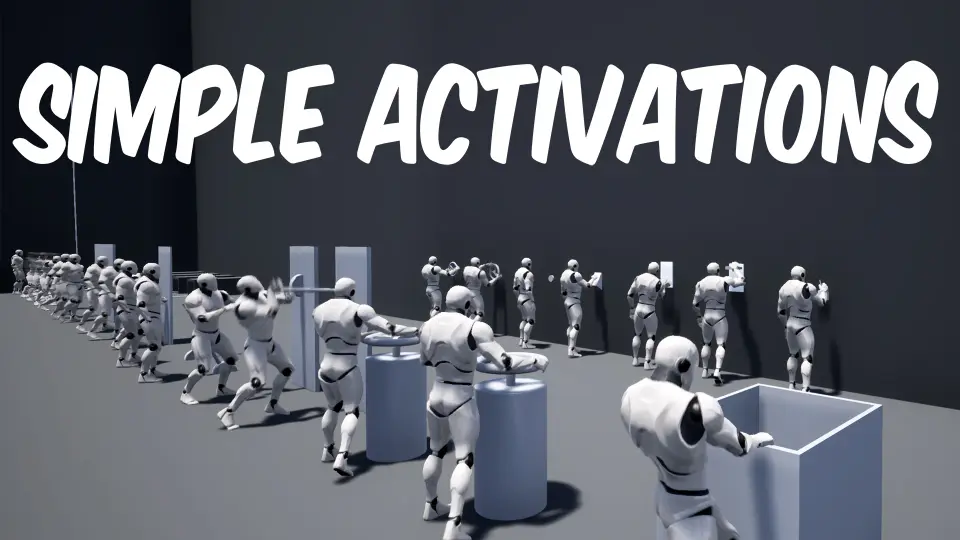
In games where a player has to pull a lever, flip a wall switch, or yank a rope to open a door, the animation of that interaction carries most of the moment. Simple Activations is a motion pack shaped by exactly those moments: levers, wall switches, buttons, rope pulls, keys, and more. It lands in the kind of project where interactable objects are scattered through dungeons, fortress corridors, and puzzle rooms. The pack exists to give those actions a physical, readable motion without forcing the developer to hand-key each clip from scratch.
A Breakdown of the 25-Animation Base
The original set contains 25 animations total, and the split is concrete. Floor actions get 6, rope actions get 5, and wall actions get the largest share at 14. That wall-heavy distribution points toward the kind of reachable Interactables that players encounter at eye level: switches mounted on stone, levers attached to machinery, buttons on panels, and similar hands-on objects. The floor category likely covers lower-placed or ground-level activations, while the rope category handles pulls that require a downward yank or a sustained tug.
Having a wall count more than double the floor and rope categories combined suggests a production focus on the most common interactive Prop placement in Level Design. It also means a developer can cover a broad set of wall-mounted puzzles and traversal gates without hunting for additional clips elsewhere.
Box Push and Pull Additions
An update brought 10 new animations to the pack. These are start, loop, linear loop, and end versions for the box push and pull animations. The distinction between a loop and a linear loop is useful in practice. A standard loop can keep the motion cycling while a player holds the interaction, while a linear loop might cover the steady-state movement of a continuous push or pull. Explicit start and end states let the character transition cleanly into the action and then back out, which is important for Interactables like sliding blocks or draw bridges that have a limited travel distance.
With the update, the total animation count becomes 25 base clips plus 10 additions, giving the pack a broader range for physics-based puzzles and object manipulation scenes. The push and pull animations fit a common mechanic type in Adventure and Role-Playing Game (RPG) titles, where a box must be moved onto a pressure plate or a lever must be dragged across a track.
What the Pack Leaves Out
Simple Activations intentionally stays in the animation lane. No gameplay Blueprints are included, so the logic that ties these clips to interactable Actors is left to the developer. That means the pack does not come with ready-made door mechanisms, Trigger Volumes, or inventory hooks. It is strictly an asset pack. The character models shown in the promotional video and images are also not part of the package. Teams bringing their own Character Controllers and interaction systems will find the clips cleanly drop-in ready, but anyone expecting a full interactive object system will need to build that layer themselves.
This separation makes the pack more predictable for Animators and Technical Designers. The focus stays on the motion itself, and the integration is entirely up to the user. If a project already has a gameplay framework, adding these animations is a matter of mapping the clips to the correct Animation Montages, Blend Spaces, or State Machine states.
Where These Animations Fit
The tags attached to the asset tell a clear story about its intended use: Adventure, Button, Action, Unlock, Lever, Push, Interactive, Rope, RPG, Door, Object, Switch, and Crank. These are the mechanical verbs of a typical puzzle-driven game. The animations cover the moment a player presses a button, flips a switch, pulls a rope, inserts a key, or turns a crank. Those actions usually gate progression, so the quality of the motion directly affects how weighty and responsive the world feels.
In an Adventure game, a lever pull that snaps into place with a clean start and end animation can make an ancient mechanism feel believable. An RPG might use a rope pull to ring a bell or open a secret passage. Puzzle rooms often combine floor buttons and wall switches, and having dedicated animation sets for each location type keeps the character’s body mechanics appropriate to the interaction. The floor, rope, and wall categories map neatly to different heights and postures, so the character doesn’t reuse the same generic action across all objects.
Pairing with Ultimate Traversal Anims
Compatibility is listed with Ultimate Traversal Anims, which indicates the 2 packs work together in a broader character movement setup. If a project already uses that traversal system, Simple Activations can serve as the interaction layer on top of the Locomotion, climbing, and mantling motion set. This kind of pairing is common in production, where a developer brings in a movement pack for the character’s base motion and a separate interaction pack for the world-object responses. The 2 assets share a similar design language, so mixing them should not introduce conflicting animation styles.
For a developer building a prototype or a full game, the practical takeaway is this: Simple Activations provides a focused library of interaction clips, clearly organized by floor, rope, and wall placement, plus the box push/pull additions. It avoids the bloat of gameplay systems and keeps the motion work self-contained. If the project already has a character and interaction logic, this pack is a direct fit. If the project needs that logic too, the animations can still be used as a starting point for building custom mechanics on top.
 Gestures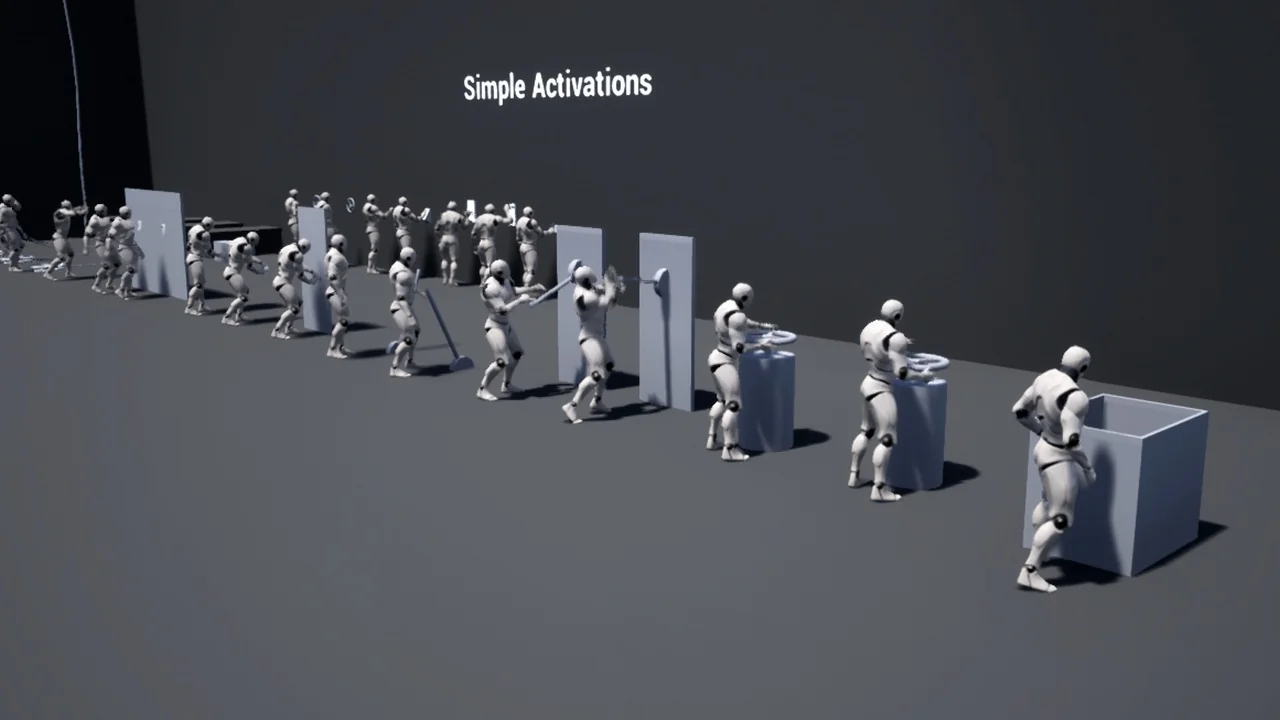
 Gestures
 Gestures
 Gestures