"a19e0535960bd083"{"id":"5178","slug":"real-shape-shifting-mesh-morph-system","title":"Real Shape Shifting - Mesh Morph System","category":"Vehicles \u0026 Transportation","engine":"5.4+","assetVersion":"Engine version: 5.4+","engineVersion":"5.3","tag":"Vehicles","accent":"blue","visual":"character","summary":"Transform characters and vehicles with the Real Shape Shifting Mesh Morph System for Unreal Engine. Easy Blueprint integration for seamless 3D transitions.","platform":"Unreal Engine","publishedAt":"2026-02-14T18:04:42.000Z","updatedAt":"2026-04-19T15:57:00.000Z","sourceNotes":[],"fileContents":[],"compatibility":["Unreal Engine","Engine version: 5.4+"],"featuredImage":{"alt":"Real Shape Shifting - Mesh Morph System","src":"https://3dcghub.com/wp-content/uploads/2026/02/563f6a10-2e7f-4589-af2c-ba380846e28d.webp"},"hasDownloadLink":true,"downloads":1,"terms":[{"taxonomy":"category","slug":"vehicles-and-transportation","name":"Vehicles \u0026 Transportation"},{"taxonomy":"post_tag","slug":"game-development-tools","name":"Game Development Tools"},{"taxonomy":"post_tag","slug":"mesh-morph-system","name":"Mesh Morph System"},{"taxonomy":"post_tag","slug":"shape-shifting-blueprint","name":"Shape Shifting Blueprint"},{"taxonomy":"post_tag","slug":"skeletal-mesh-transformation","name":"Skeletal Mesh Transformation"},{"taxonomy":"post_tag","slug":"unreal-engine-morphing","name":"Unreal Engine Morphing"}],"galleryImages":[{"src":"https://3dcghub.com/wp-content/uploads/2026/02/2e3eeb126e43_554a5d2d-a254-4da8-9b1e-cf0ae052f5d5.webp","alt":"Real Shape Shifting - Mesh Morph System"},{"src":"https://3dcghub.com/wp-content/uploads/2026/02/68d4d357383c_ed10df8b-7364-45d7-904f-147e43de03ca.webp","alt":"Real Shape Shifting - Mesh Morph System"}],"accessPanel":{"kind":"resource","title":"Access this resource","eyebrow":"Free Download","message":"Log in or create a free account to start your download.","fileName":"Real_Shape_Shifting.7z","safetyNote":"All resources are 100% manually reviewed to eliminate all risks.","actionLabel":"Download Free","resourceType":"Resource archive"},"contentHtml":"\u003ch2\u003eIntroduction to Real Shape Shifting\u003c/h2\u003e\n\u003cp\u003eIn modern game development, visual flair often defines the player experience. One of the most impressive effects is seamless shape-shifting. Consequently, the Mesh Morph System provides a robust solution for Unreal Engine developers. This tool allows you to transform one mesh into another with ease. It is designed to be both powerful and user-friendly.\u003c/p\u003e\n\n\u003cp\u003eWhether you are creating a sci-fi adventure or a fantasy epic, transitions matter. This system handles the heavy lifting of mesh interpolation. Therefore, you can focus on the creative aspects of your project. It offers a professional way to handle complex asset changes in real-time.\u003c/p\u003e\n\n\u003ch3\u003eVersatile Mesh Support\u003c/h3\u003e\n\u003cp\u003eThe system supports both Skeletal and Static meshes. Therefore, you can morph a character into a vehicle or a rock into a creature. Furthermore, it integrates perfectly with Animation Blueprints. This ensures that your transitions look fluid and professional. You are not limited to simple shapes.\u003c/p\u003e\n\n\u003cp\u003eIn addition, the system allows for combinations of different mesh types. You can transition from a static prop into a fully animated character. This flexibility opens up many doors for gameplay mechanics. For instance, players could transform to solve environmental puzzles. The system remains stable even during complex transitions.\u003c/p\u003e\n\n\u003ch3\u003eSeamless Blueprint Integration\u003c/h3\u003e\n\u003cp\u003eSetting up the system is remarkably straightforward. You can integrate the effect into your existing player Blueprints. Moreover, the developer designed it to be flexible and extendible. You simply define your \"Morphables\" and call the Morph event in-game. This triggers the transition instantly or over time.\u003c/p\u003e\n\n\u003cp\u003eBecause it is Blueprint-based, you do not need deep C++ knowledge. This makes it accessible for indie developers and small teams. Meanwhile, it remains powerful enough for larger productions. The logic is clean and easy to follow within the Unreal editor.\u003c/p\u003e\n\n\u003ch2\u003eKey Features and Customization\u003c/h2\u003e\n\u003cp\u003eControl is a vital part of any visual effect. This system allows you to adjust the morph point and radius. Additionally, you can tweak the morph tint to match your game's art style. These parameters give you full creative freedom over the final look. You can create subtle shifts or dramatic transformations.\u003c/p\u003e\n\n\u003cul\u003e\n \u003cli\u003eSupport for both Static and Skeletal meshes.\u003c/li\u003e\n \u003cli\u003eFull compatibility with Animation Blueprints.\u003c/li\u003e\n \u003cli\u003eCustomizable morph radius and center points.\u003c/li\u003e\n \u003cli\u003eAdjustable color tints for visual feedback.\u003c/li\u003e\n \u003cli\u003eEasy-to-trigger Blueprint events.\u003c/li\u003e\n\u003c/ul\u003e\n\n\u003ch3\u003eDynamic Control Parameters\u003c/h3\u003e\n\u003cp\u003eFine-tuning your effects is essential for polish. The system provides specific variables to control the morphing behavior. For example, you can change the speed of the transformation. Consequently, you can create fast, snappy shifts or slow, magical transitions. The choice depends entirely on your project needs.\u003c/p\u003e\n\n\u003cp\u003eOn top of that, the morph tint feature adds an extra layer of visual communication. You can use color changes to indicate the progress of a shift. This is particularly useful for gameplay feedback. It helps players understand when a transformation is complete. These small details significantly improve the overall user experience.\u003c/p\u003e\n\n\u003ch3\u003ePractical Use Cases\u003c/h3\u003e\n\u003cp\u003eThe system is perfect for complex transformations. For example, you can create a vehicle that changes from a car into a helicopter. Meanwhile, it also works for bi-pedal characters or simple static objects. The possibilities for gameplay mechanics are nearly endless. It is also well-suited for environmental storytelling.\u003c/p\u003e\n\n\u003cp\u003eImagine a world where the environment reacts to the player. Buildings could shift shape as the player approaches. In addition, weapons could transform into different tools. These dynamic elements keep players engaged and immersed. The system handles these tasks efficiently without heavy performance costs.\u003c/p\u003e\n\n\u003ch2\u003eGetting Started with the Morph System\u003c/h2\u003e\n\u003cp\u003eDevelopers often struggle with complex mesh transitions. However, this system simplifies the entire process. It provides a quick setup for skeletal player meshes. This means you spend less time on technical hurdles and more on creativity. The workflow is designed to be as efficient as possible.\u003c/p\u003e\n\n\u003cp\u003eIn addition to its flexibility, the system is performance-oriented. It is suitable for various platforms, including mobile projects. Therefore, you can achieve high-quality effects without sacrificing frame rates. This balance is crucial for modern multi-platform games. It ensures a smooth experience for all players.\u003c/p\u003e\n\n\u003cp\u003eTo help you get started, the package includes a comprehensive demonstration level. This level showcases a car morphing into a helicopter and then into a boat. Consequently, you can see exactly how the logic is structured. A quick start guide is also included to streamline your learning curve. You can begin implementing your own ideas almost immediately.\u003c/p\u003e\n\n\u003ch2\u003eFinal Take\u003c/h2\u003e\n\u003cp\u003eThe Mesh Morph System is a powerful addition to any developer's toolkit. It combines ease of use with professional-grade features. Finally, the system is highly extendible for advanced users. While the default settings work great, you can customize the underlying Blueprints. This allows you to create unique effects that stand out in a crowded market. Whether you are making an action game or a puzzle platformer, this tool adds significant value to your production workflow.\u003c/p\u003e\n\n\u003ch2\u003eRelated Resources\u003c/h2\u003e\n\u003cul\u003e\n\u003cli\u003e\u003ca href=\"https://3dcghub.com/npc-charaters-kids-pack/\"\u003eNPC Charaters Kids (Pack)\u003c/a\u003e\u003c/li\u003e\n\u003cli\u003e\u003ca href=\"https://3dcghub.com/character-customization-female/\"\u003eCharacter Customization: Female\u003c/a\u003e\u003c/li\u003e\n\u003cli\u003e\u003ca href=\"https://3dcghub.com/eggo-the-talking-egg-face-morphs-epic-skeleton-skins-and-ultimate-material/\"\u003eEggo the Talking Egg, face morphs, epic skeleton, skins and ultimate material\u003c/a\u003e\u003c/li\u003e\n\u003cli\u003e\u003ca href=\"https://3dcghub.com/zombie-army-soldier/\"\u003eZombie – Army Soldier\u003c/a\u003e\u003c/li\u003e\n\u003cli\u003e\u003ca href=\"https://3dcghub.com/vulture/\"\u003eVulture\u003c/a\u003e\u003c/li\u003e\n\u003c/ul\u003e","contentTextLength":5519,"navigation":{"current":2689,"total":4026,"previous":{"id":"5189","slug":"sci-fi-aircraft","title":"Sci Fi Aircraft","category":"Vehicles \u0026 Transportation","platform":"Unreal Engine","updatedAt":"2026-04-19T15:57:00.000Z"},"next":{"id":"5173","slug":"physics-based-helicopter","title":"Physics Based Helicopter","category":"Vehicles \u0026 Transportation","platform":"Unreal Engine","updatedAt":"2026-04-19T15:57:00.000Z"}},"relatedResources":[{"id":"1001967","slug":"boat-and-submarine","title":"Boat and Submarine","category":"Vehicles \u0026 Transportation","engine":"5.0+","assetVersion":"","engineVersion":"Engine Version: 5.0+","tag":"Vehicles","accent":"blue","visual":"mech","summary":"Explore the Boat and Submarine blueprint package, featuring 8 plug-and-play templates, line-trace enter and exit logic, and custom watercraft mesh setup.","platform":"Unreal Engine","publishedAt":"2026-10-24T13:32:06.854Z","updatedAt":"2026-10-24T13:32:06.854Z","sourceNotes":[],"fileContents":[],"compatibility":["Unreal Engine","Engine Version: 5.0+"],"featuredImage":{"alt":"Boat and Submarine","src":"/wp-content/uploads/published/2026/10/070c3131189f-64583866-f203-4779-8a90-ad091f2302eb-81e20c3fb6.webp"},"hasDownloadLink":true,"downloads":0},{"id":"27114","slug":"driveable-steampunk-car-vehicle-steampunk-car-retro-futuristic-victorian","title":"Driveable SteamPunk Car / Vehicle ( SteamPunk Car Retro Futuristic Victorian)","category":"Vehicles \u0026 Transportation","engine":"5.0+","assetVersion":"Engine version: 5.0+","engineVersion":"","tag":"Vehicles","accent":"blue","visual":"audio","summary":"This Victorian steampunk car combines a playable vehicle setup with a retro-futuristic look and AAA-quality presentation. It also includes five custom painted material variations and both single-mesh and 20-piece mesh options for flexible scene work.","platform":"Unreal Engine","publishedAt":"2026-04-21T10:30:10.000Z","updatedAt":"2026-04-21T10:30:11.000Z","sourceNotes":[],"fileContents":[],"compatibility":["Unreal Engine","Engine version: 5.0+"],"featuredImage":{"alt":"Driveable SteamPunk Car / Vehicle ( SteamPunk Car Retro Futuristic Victorian)","src":"https://3dcghub.com/wp-content/uploads/2026/04/5e1c523dde65_c9bf7782-71c6-475a-9bdd-1f70bf92b6af.webp"},"hasDownloadLink":true,"downloads":0},{"id":"5152","slug":"medieval-siege-weapons","title":"Medieval Siege Weapons","category":"Vehicles \u0026 Transportation","engine":"5.1+","assetVersion":"Engine version: 5.1+","engineVersion":"4.26","tag":"Vehicles","accent":"blue","visual":"city","summary":"Enhance your historical projects with 7 animated siege engines and 5 camp props. Features physics-based projectiles, PBR materials, and real-world scaling.","platform":"Unreal Engine","publishedAt":"2026-02-14T17:55:37.000Z","updatedAt":"2026-04-19T15:57:00.000Z","sourceNotes":[],"fileContents":[],"compatibility":["Unreal Engine","Engine version: 5.1+"],"featuredImage":{"alt":"Medieval Siege Weapons","src":"https://3dcghub.com/wp-content/uploads/2026/02/ade8f723-1633-41f4-ae6b-3610aab93cb6.webp"},"hasDownloadLink":true,"downloads":0}]}
Vehicles
Real Shape Shifting - Mesh Morph System
Transform characters and vehicles with the Real Shape Shifting Mesh Morph System for Unreal Engine. Easy Blueprint integration for seamless 3D transitions.
In modern game development, visual flair often defines the player experience. One of the most impressive effects is seamless shape-shifting. Consequently, the Mesh Morph System provides a robust solution for Unreal Engine developers. This tool allows you to transform one mesh into another with ease. It is designed to be both powerful and user-friendly.
Whether you are creating a sci-fi adventure or a fantasy epic, transitions matter. This system handles the heavy lifting of mesh interpolation. Therefore, you can focus on the creative aspects of your project. It offers a professional way to handle complex asset changes in real-time.
Versatile Mesh Support
The system supports both Skeletal and Static meshes. Therefore, you can morph a character into a vehicle or a rock into a creature. Furthermore, it integrates perfectly with Animation Blueprints. This ensures that your transitions look fluid and professional. You are not limited to simple shapes.
In addition, the system allows for combinations of different mesh types. You can transition from a static prop into a fully animated character. This flexibility opens up many doors for gameplay mechanics. For instance, players could transform to solve environmental puzzles. The system remains stable even during complex transitions.
Seamless Blueprint Integration
Setting up the system is remarkably straightforward. You can integrate the effect into your existing player Blueprints. Moreover, the developer designed it to be flexible and extendible. You simply define your "Morphables" and call the Morph event in-game. This triggers the transition instantly or over time.
Because it is Blueprint-based, you do not need deep C++ knowledge. This makes it accessible for indie developers and small teams. Meanwhile, it remains powerful enough for larger productions. The logic is clean and easy to follow within the Unreal editor.
Key Features and Customization
Control is a vital part of any visual effect. This system allows you to adjust the morph point and radius. Additionally, you can tweak the morph tint to match your game's art style. These parameters give you full creative freedom over the final look. You can create subtle shifts or dramatic transformations.
Support for both Static and Skeletal meshes.
Full compatibility with Animation Blueprints.
Customizable morph radius and center points.
Adjustable color tints for visual feedback.
Easy-to-trigger Blueprint events.
Dynamic Control Parameters
Fine-tuning your effects is essential for polish. The system provides specific variables to control the morphing behavior. For example, you can change the speed of the transformation. Consequently, you can create fast, snappy shifts or slow, magical transitions. The choice depends entirely on your project needs.
On top of that, the morph tint feature adds an extra layer of visual communication. You can use color changes to indicate the progress of a shift. This is particularly useful for gameplay feedback. It helps players understand when a transformation is complete. These small details significantly improve the overall user experience.
Practical Use Cases
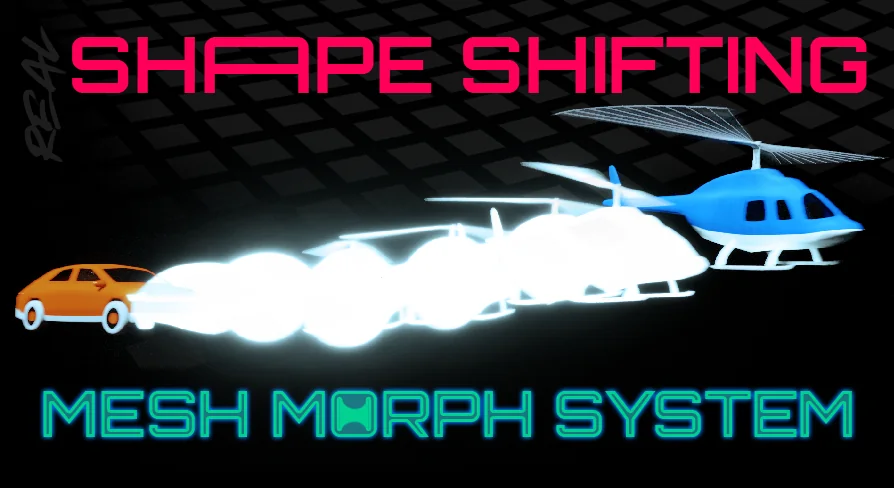
The system is perfect for complex transformations. For example, you can create a vehicle that changes from a car into a helicopter. Meanwhile, it also works for bi-pedal characters or simple static objects. The possibilities for gameplay mechanics are nearly endless. It is also well-suited for environmental storytelling.
Imagine a world where the environment reacts to the player. Buildings could shift shape as the player approaches. In addition, weapons could transform into different tools. These dynamic elements keep players engaged and immersed. The system handles these tasks efficiently without heavy performance costs.
Getting Started with the Morph System
Developers often struggle with complex mesh transitions. However, this system simplifies the entire process. It provides a quick setup for skeletal player meshes. This means you spend less time on technical hurdles and more on creativity. The workflow is designed to be as efficient as possible.
In addition to its flexibility, the system is performance-oriented. It is suitable for various platforms, including mobile projects. Therefore, you can achieve high-quality effects without sacrificing frame rates. This balance is crucial for modern multi-platform games. It ensures a smooth experience for all players.
To help you get started, the package includes a comprehensive demonstration level. This level showcases a car morphing into a helicopter and then into a boat. Consequently, you can see exactly how the logic is structured. A quick start guide is also included to streamline your learning curve. You can begin implementing your own ideas almost immediately.
Final Take
The Mesh Morph System is a powerful addition to any developer's toolkit. It combines ease of use with professional-grade features. Finally, the system is highly extendible for advanced users. While the default settings work great, you can customize the underlying Blueprints. This allows you to create unique effects that stand out in a crowded market. Whether you are making an action game or a puzzle platformer, this tool adds significant value to your production workflow.
 Vehicles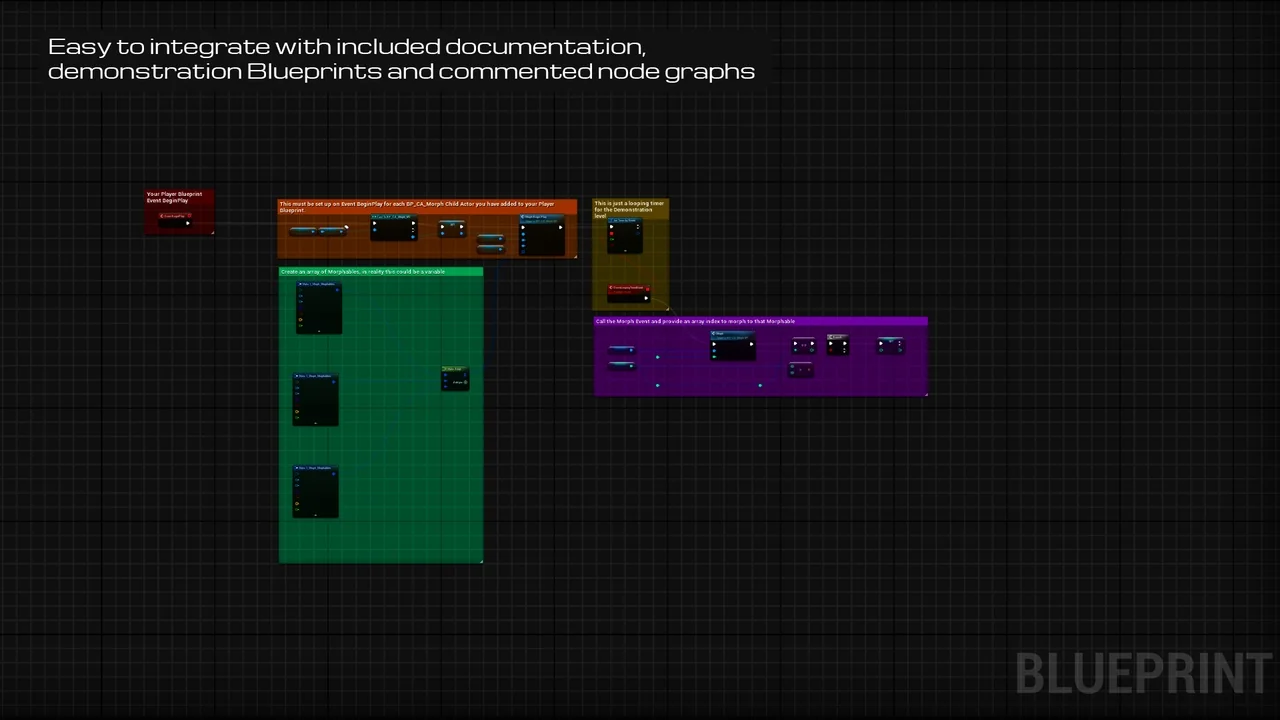
 Vehicles
 Vehicles
 Vehicles