"0341a2901a4ae9aa"{"id":"14814","slug":"web-browser-for-video","title":"Web Browser For Video","category":"Engine Tools","engine":"5.5","assetVersion":"Engine version: 5.5","engineVersion":"Asset Version:1.0","tag":"Engine Tools","accent":"blue","visual":"city","summary":"Web Browser For Video allows developers to render multiple high-frame-rate web windows onto static meshes. This specialized tool is optimized for performance and includes specific compatibility features for Cesium projects.","platform":"Unreal Engine","publishedAt":"2026-03-11T19:27:23.000Z","updatedAt":"2026-04-19T15:45:40.000Z","sourceNotes":[],"fileContents":[],"compatibility":["Unreal Engine","Engine version: 5.5","Asset Version: 1.0"],"featuredImage":{"alt":"Web Browser For Video","src":"https://3dcghub.com/wp-content/uploads/2026/03/87bbb7ef-4349-4802-a3a8-595dafdd4bab.webp"},"hasDownloadLink":true,"downloads":0,"terms":[{"taxonomy":"category","slug":"engine-tools-tools-and-plugins","name":"Engine Tools"},{"taxonomy":"post_tag","slug":"cef-kernel-97","name":"Cef Kernel 97"},{"taxonomy":"post_tag","slug":"high-frame-rate-browser","name":"High Frame Rate Browser"},{"taxonomy":"post_tag","slug":"plugins","name":"Plugins"},{"taxonomy":"post_tag","slug":"static-mesh-rendering","name":"Static Mesh Rendering"},{"taxonomy":"post_tag","slug":"ui","name":"UI"},{"taxonomy":"post_tag","slug":"web-browser-plugin","name":"Web Browser Plugin"}],"galleryImages":[{"src":"https://3dcghub.com/wp-content/uploads/2026/03/2a30e085dd76_6d99bea8-d951-485f-89eb-f828d95c4b11.webp","alt":"Web Browser For Video"},{"src":"https://3dcghub.com/wp-content/uploads/2026/03/e51630cabd2d_cbd93fd4-e269-4d9f-80d0-9641471a9b4e.webp","alt":"Web Browser For Video"},{"src":"https://3dcghub.com/wp-content/uploads/2026/03/8ff126b9dd27_a064732b-3426-4556-ab3c-c0d6966f85e6.webp","alt":"Web Browser For Video"},{"src":"https://3dcghub.com/wp-content/uploads/2026/03/248ff472d8b8_89c2126e-69f9-4151-9e9d-5e777db27435.webp","alt":"Web Browser For Video"},{"src":"https://3dcghub.com/wp-content/uploads/2026/03/9fe8e0197387_270c8ae4-fd12-42a3-aa1b-215390606eb6.webp","alt":"Web Browser For Video"},{"src":"https://3dcghub.com/wp-content/uploads/2026/03/ba0ab6f09c43_5a931090-8b2f-418a-bb6b-5063e1172b26.webp","alt":"Web Browser For Video"},{"src":"https://3dcghub.com/wp-content/uploads/2026/03/083dbda4f3e3_954198cd-b9dc-4434-9616-59c69dfbafdf.webp","alt":"Web Browser For Video"}],"accessPanel":{"kind":"resource","title":"Access this resource","eyebrow":"Free Download","message":"Log in or create a free account to start your download.","fileName":"Web Browser For Video 5.5.7z","safetyNote":"All resources are 100% manually reviewed to eliminate all risks.","actionLabel":"Download Free","resourceType":"Resource archive"},"contentHtml":"\u003ch2\u003eHigh-Performance Web Integration\u003c/h2\u003e\n\u003cp\u003eWeb Browser For Video is a specialized plugin designed to enhance how web content is displayed within a 3D environment. This tool allows developers to open multiple browser windows simultaneously. Furthermore, it offers a significantly higher frame rate compared to many other browser solutions available for development. This makes it an ideal choice for projects where visual fluidity is a priority.\u003c/p\u003e\n\n\u003ch2\u003eOptimized for Static Meshes\u003c/h2\u003e\n\u003cp\u003eThe developer designed this tool specifically for rendering web pages onto static meshes. Consequently, it is highly optimized for this specific use case. However, it is not recommended for rendering web pages to widgets. If your project requires widget-based rendering or specific keyboard and mouse interactions, the creator suggests utilizing a different specialized plugin designed for those functions. Web Browser For Video remains focused on delivering the best performance for 3D object surfaces.\u003c/p\u003e\n\n\u003ch2\u003eTechnical Specifications and Updates\u003c/h2\u003e\n\u003cp\u003eThe plugin has undergone several important updates to ensure stability and modern performance. For instance, the Cef Kernel was updated to version 97 to maintain compatibility with modern web standards. Additionally, a recent update addressed a specific issue where the plugin would crash during resolution changes. These improvements ensure a more reliable experience when using Web Browser For Video in dynamic production environments.\u003c/p\u003e\n\n\u003ch2\u003eIntegration and Compatibility Requirements\u003c/h2\u003e\n\u003cp\u003eTo ensure the best performance and avoid software conflicts, users should follow specific configuration steps. First, it is necessary to disable Bridge and other web browser plugins, such as the standard webbrowserwidget. Therefore, a clean environment is essential for the plugin to function correctly.\u003c/p\u003e\n\n\u003cp\u003eRegarding Cesium compatibility, the process follows a specific workflow:\u003c/p\u003e\n\u003cul\u003e\n\u003cli\u003eRemove any other existing Cesium plugins from the project.\u003c/li\u003e\n\u003cli\u003eDownload the required compatibility file.\u003c/li\u003e\n\u003cli\u003eUnzip the file directly into your project's Plugins directory.\u003c/li\u003e\n\u003c/ul\u003e\n\n\u003ch2\u003eUser Interaction and Input\u003c/h2\u003e\n\u003cp\u003eInteraction within the browser requires a specific method to ensure input is captured correctly. To input text, users must first press the Tab key. Moreover, this functionality is specifically designed to be used while in PIE (Play In Editor) mode. For users in specific regions, the developer also supports the issuance of official invoices for the software.\u003c/p\u003e\n\n\u003ch2\u003eBest Fit\u003c/h2\u003e\n\u003cp\u003eWeb Browser For Video offers a high-performance solution for developers needing to display web content on 3D objects. By focusing on static mesh rendering, it provides a smoother visual experience with higher frame rates. However, users must follow the specific setup instructions regarding plugin conflicts and input methods to achieve optimal results in their projects.\u003c/p\u003e\n\n\u003ch2\u003eExplore Similar Assets\u003c/h2\u003e\n\u003cul\u003e\n\u003cli\u003e\u003ca href=\"https://3dcghub.com/uasset-browser/\" title=\"UAsset Browser\"\u003eUAsset Browser\u003c/a\u003e\u003c/li\u003e\n\u003cli\u003e\u003ca href=\"https://3dcghub.com/object-distribution-tool-objectt-distributed-tooll-objecting-distributing/\" title=\"Object Distribution Tool (Objectt Distributed Tooll Objecting Distributing)\"\u003eObject Distribution Tool (Objectt Distributed Tooll Objecting Distributing)\u003c/a\u003e\u003c/li\u003e\n\u003cli\u003e\u003ca href=\"https://3dcghub.com/multi-window/\" title=\"Multi window\"\u003eMulti window\u003c/a\u003e\u003c/li\u003e\n\u003cli\u003e\u003ca href=\"https://3dcghub.com/daz-to-unreal/\" title=\"Daz To Unreal\"\u003eDaz To Unreal\u003c/a\u003e\u003c/li\u003e\n\u003cli\u003e\u003ca href=\"https://3dcghub.com/combo-graph/\" title=\"Combo Graph\"\u003eCombo Graph\u003c/a\u003e\u003c/li\u003e\n\u003c/ul\u003e\n\n\u003ch2\u003eAsset Gallery\u003c/h2\u003e","contentTextLength":2979,"navigation":{"current":3412,"total":4017,"previous":{"id":"14707","slug":"uipf-unified-interactive-physical-foliage","title":"UIPF - Unified Interactive Physical Foliage","category":"Engine Tools","platform":"Unreal Engine","updatedAt":"2026-04-19T15:45:41.000Z"},"next":{"id":"14804","slug":"voxel-weaver-advanced-voxel-plugin","title":"Voxel Weaver | Advanced Voxel Plugin","category":"Engine Tools","platform":"Unreal Engine","updatedAt":"2026-04-19T15:45:40.000Z"}},"relatedResources":[{"id":"14687","slug":"uasset-browser","title":"UAsset Browser","category":"Engine Tools","engine":"5.6 - 5.7","assetVersion":"Engine version: 5.6 - 5.7","engineVersion":"Asset Version:1.3.4","tag":"Engine Tools","accent":"blue","visual":"luts","summary":"The UAsset Browser provides a streamlined way to manage external content by offering thumbnail previews, dependency graphs, and advanced metadata filtering for project assets.","platform":"Unreal Engine","publishedAt":"2026-03-11T19:00:50.000Z","updatedAt":"2026-04-19T15:45:42.000Z","sourceNotes":[],"fileContents":[],"compatibility":["Unreal Engine","Engine version: 5.6 - 5.7","Asset Version: 1.3.4"],"featuredImage":{"alt":"UAsset Browser","src":"https://3dcghub.com/wp-content/uploads/2026/03/26174904-e233-4509-9bed-c5b7cef34bf9.webp"},"hasDownloadLink":true,"downloads":1},{"id":"1002058","slug":"html-menus-and-pdf-viewer-browser-plugin","title":"HTML Menus and PDF viewer Browser Plugin","category":"Engine Tools","engine":"4.18","assetVersion":"Asset Version: 1.0","engineVersion":"Engine Version: 4.18","tag":"Engine Tools","accent":"blue","visual":"mech","summary":"Build user interfaces, inventory systems, and documents in Unreal Engine using HTML, CSS, JavaScript, and an integrated PDF viewer.","platform":"Unreal Engine","publishedAt":"2026-10-26T15:15:33.420Z","updatedAt":"2026-10-26T15:15:33.420Z","sourceNotes":[],"fileContents":[],"compatibility":["Unreal Engine","Asset Version: 1.0","Engine Version: 4.18"],"featuredImage":{"alt":"HTML Menus and PDF viewer Browser Plugin","src":"/wp-content/uploads/published/2026/10/b545cf92850e-8780ee77-0abf-44d3-b495-291f47de066e-8a6e53dd1a.webp"},"hasDownloadLink":true,"downloads":0},{"id":"13760","slug":"blueprint-generator-ai-kibibyte-labs-engine-assistant","title":"AI Engine Assistant - Kibibyte Labs (Blueprint Generator \u0026 More!)","category":"Engine Tools","engine":"0.1.4","assetVersion":"Engine version: 5.2 - 5.7","engineVersion":"Asset Version: 0.1.4","tag":"Engine Tools","accent":"blue","visual":"character","summary":"Blueprint Generator Ai - Kibibyte Labs (Engine Assistant) is a powerful tool designed to transform natural language into functional Unreal Engine Blueprints. It offers a suite of modules for generating logic, explaining complex nodes, and optimizing the dev...","platform":"Unreal Engine","publishedAt":"2026-03-11T09:58:02.000Z","updatedAt":"2026-07-09T21:24:04.089Z","sourceNotes":[],"fileContents":[],"compatibility":["Unreal Engine","Engine version: 5.2 - 5.7","Asset Version: 0.1.4"],"featuredImage":{"alt":"Blueprint Generator Ai - Kibibyte Labs (Engine Assistant)","src":"https://3dcghub.com/wp-content/uploads/2026/03/ff365004-07a8-4633-90ac-7c9a038cc81d.webp"},"hasDownloadLink":true,"downloads":2}]}
Engine Tools
Web Browser For Video
Web Browser For Video allows developers to render multiple high-frame-rate web windows onto static meshes. This specialized tool is optimized for performance and includes specific compatibility features for Cesium projects.
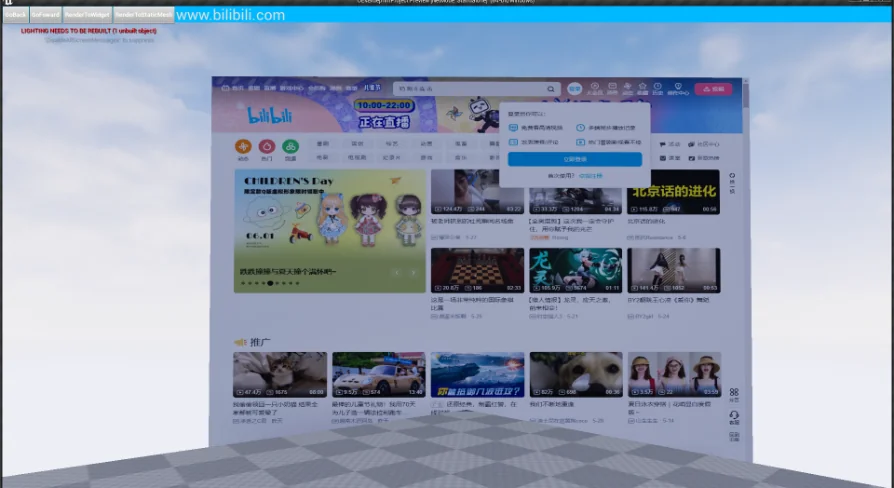
Web Browser For Video is a specialized plugin designed to enhance how web content is displayed within a 3D environment. This tool allows developers to open multiple browser windows simultaneously. Furthermore, it offers a significantly higher frame rate compared to many other browser solutions available for development. This makes it an ideal choice for projects where visual fluidity is a priority.
Optimized for Static Meshes
The developer designed this tool specifically for rendering web pages onto static meshes. Consequently, it is highly optimized for this specific use case. However, it is not recommended for rendering web pages to widgets. If your project requires widget-based rendering or specific keyboard and mouse interactions, the creator suggests utilizing a different specialized plugin designed for those functions. Web Browser For Video remains focused on delivering the best performance for 3D object surfaces.
Technical Specifications and Updates
The plugin has undergone several important updates to ensure stability and modern performance. For instance, the Cef Kernel was updated to version 97 to maintain compatibility with modern web standards. Additionally, a recent update addressed a specific issue where the plugin would crash during resolution changes. These improvements ensure a more reliable experience when using Web Browser For Video in dynamic production environments.
Integration and Compatibility Requirements
To ensure the best performance and avoid software conflicts, users should follow specific configuration steps. First, it is necessary to disable Bridge and other web browser plugins, such as the standard webbrowserwidget. Therefore, a clean environment is essential for the plugin to function correctly.
Regarding Cesium compatibility, the process follows a specific workflow:
Remove any other existing Cesium plugins from the project.
Download the required compatibility file.
Unzip the file directly into your project's Plugins directory.
User Interaction and Input
Interaction within the browser requires a specific method to ensure input is captured correctly. To input text, users must first press the Tab key. Moreover, this functionality is specifically designed to be used while in PIE (Play In Editor) mode. For users in specific regions, the developer also supports the issuance of official invoices for the software.
Best Fit
Web Browser For Video offers a high-performance solution for developers needing to display web content on 3D objects. By focusing on static mesh rendering, it provides a smoother visual experience with higher frame rates. However, users must follow the specific setup instructions regarding plugin conflicts and input methods to achieve optimal results in their projects.
 Engine Tools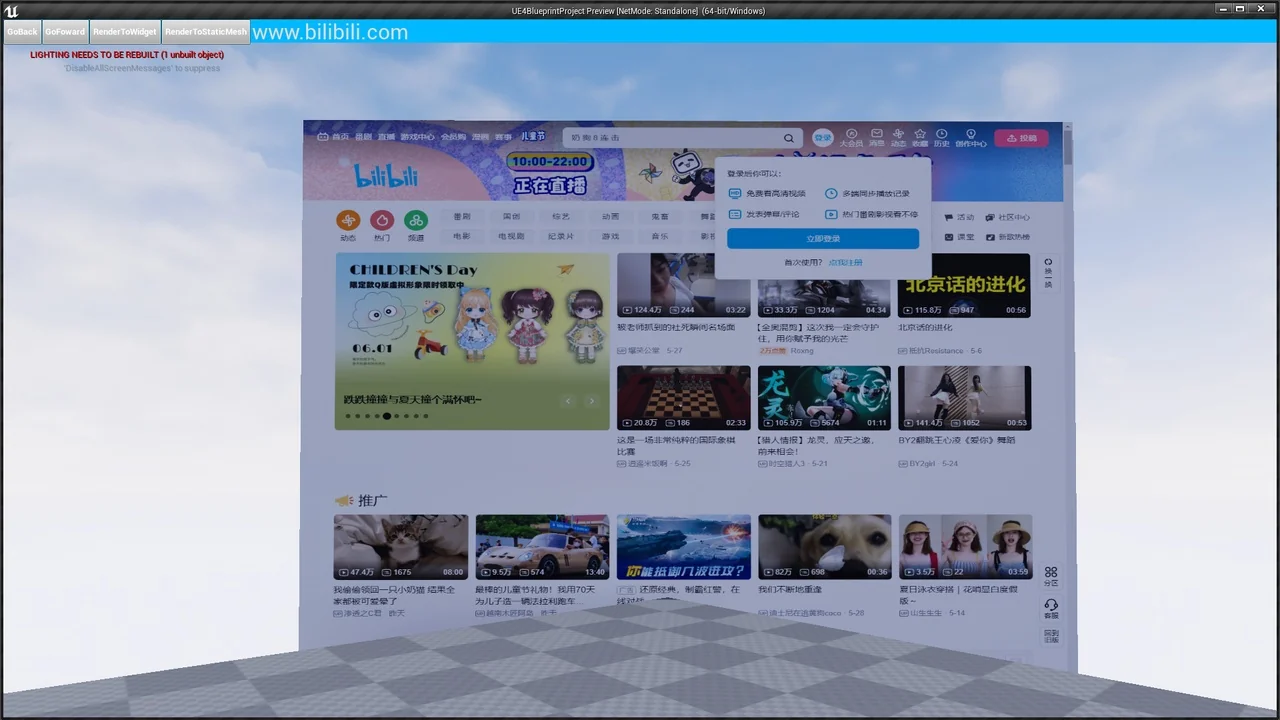
 Engine Tools
 Engine Tools
 Engine Tools