"e9c335e082208b17"{"id":"1002877","slug":"actor-pool-manager-plugin","title":"Actor Pool Manager Plugin","category":"Engine Tools","engine":"4.26 - 5.4","assetVersion":"Asset Version: 1.2 - 1.7","engineVersion":"Engine Version: 4.26 - 5.4","tag":"Engine Tools","accent":"blue","visual":"mech","summary":"Optimize engine performance and framerates by recycling C++ and Blueprint actors using the Actor Pool Manager Plugin and its PoolActorInterface.","platform":"Unreal Engine","indexPolicy":"index","publishedAt":"2026-11-21T01:35:40.505Z","updatedAt":"2026-11-21T01:35:40.505Z","sourceNotes":[],"fileContents":[],"compatibility":["Unreal Engine","Asset Version: 1.2 - 1.7","Engine Version: 4.26 - 5.4"],"featuredImage":{"alt":"Actor Pool Manager Plugin","src":"/wp-content/uploads/published/2026/11/c158887cfeaf-b01dfcab-c4bf-46d3-a358-b31ad7d2ec05-805c656ecb.webp"},"fileSizeBytes":107749035,"hasDownloadLink":true,"downloads":0,"terms":[{"taxonomy":"category","slug":"engine-tools-tools-and-plugins","name":"Engine Tools"}],"galleryImages":[{"src":"/wp-content/uploads/published/2026/11/6df1bdd6d42c-91480e27-8bc7-4730-9dec-d330c562ed71-9c47e9b965.webp","alt":"Actor Pool Manager Plugin"},{"src":"/wp-content/uploads/published/2026/11/6ecd1356f050-85a9b6e2-7667-4749-94b3-ae8eff09cb06-ce9415dfc8.webp","alt":"Actor Pool Manager Plugin"},{"src":"/wp-content/uploads/published/2026/11/4b1fc92284de-308e0bbf-ef63-4d1b-92da-99ecf69a4dd0-0691286e97.webp","alt":"Actor Pool Manager Plugin"},{"src":"/wp-content/uploads/published/2026/11/58055dd44afe-8edb39e2-d50d-42cc-bcd9-1fcc6709cbf0-857103a2ab.webp","alt":"Actor Pool Manager Plugin"},{"src":"/wp-content/uploads/published/2026/11/1382a9c1207a-a1b2fae7-32c0-44fd-897b-d5298f21f214-b918273e57.webp","alt":"Actor Pool Manager Plugin"},{"src":"/wp-content/uploads/published/2026/11/bbc5f76083b8-dae4de6c-f62f-476f-9ea4-99c73fe14877-b38d652db4.webp","alt":"Actor Pool Manager Plugin"}],"accessPanel":{"kind":"resource","title":"Get this resource","safetyNote":"Resources are manually reviewed before listing to improve quality and reduce obvious risks.","fileName":"Actor Pool Manager Plugin.7z","resourceType":"Resource archive","versions":[]},"contentHtml":"\u003ch2\u003eThe Mechanics of the Actor Pool Manager Plugin\u003c/h2\u003e\u003cp\u003eFrequent instantiation and removal of entities within a real-time environment introduces substantial runtime costs. Spawning actors en masse degrades project performance across multiple hardware profiles. Rather than allowing the engine to repeatedly construct and tear down identical objects, the Actor Pool Manager Plugin introduces a centralized recycling framework designed to optimize and simplify actor spawning routines. Operating as both a code library and a blueprint utility, it preserves instances in memory so they can be reactivated on demand rather than rebuilt from scratch.\u003c/p\u003e\u003cp\u003eThe core objective of pooling is the mitigation of persistent memory allocations and deallocations. When an application requests an actor, invoking the standard spawn pipeline causes fresh memory to be requested from the operating system or engine allocators. Once the actor finishes its task, standard destruction triggers cleanup routines, freeing that memory only for the cycle to repeat seconds or frames later. By capturing instances within a managed pool, this plugin ensures that existing instances are returned to an inactive state instead of facing immediate destruction, yielding far more stable framerates when handling dense scenes.\u003c/p\u003e\u003ch2\u003eLifecycle Overheads in Repeated Spawning and Destruction\u003c/h2\u003e\u003cp\u003eThe standard actor creation sequence incurs hidden computational penalties that go well beyond raw memory reservation. Every time an actor class spawns, the engine executes constructor calls, sets up component hierarchies, registers transforms, and initializes internal state machines. When many actors of the exact same class continuously churn through creation and removal passes, these constructor calls rapidly accumulate into noticeable CPU spikes.\u003c/p\u003e\u003cp\u003eInitialization overhead becomes even more severe when developers attach asset-heavy routines to initial startup events. If an actor class references materials, skeletal mesh animations, or particle effects within its BeginPlay methods, spawning a fresh instance forces the system to prepare and initialize those sub-resources repeatedly. This activity drains processor time and increases power consumption, creating bottlenecks that quickly undermine application responsiveness. By keeping actors alive in an inactive repository, the plugin eliminates redundant constructor passes and bypasses unnecessary re-initialization passes during gameplay loops.\u003c/p\u003e\u003ch2\u003eIntegrating the PoolActorInterface Across Actor Hierarchies\u003c/h2\u003e\u003cp\u003eA key structural advantage of the Actor Pool Manager Plugin lies in its decoupled architecture. Instead of forcing developers to reparent existing assets beneath an intrusive custom base class, the system supplies a dedicated interface: the PoolActorInterface. This interface functions across both native C++ classes and Blueprint graphs, making adoption straightforward even deep into an active production cycle.\u003c/p\u003e\u003cp\u003eComplex projects frequently rely on elaborate inheritance structures where altering the root class is impractical or outright prohibited by engine architecture. Because Unreal Engine does not allow modifications to foundational native classes such as the core Actor or APawn definitions, monolithic pooling frameworks often fail to accommodate diverse object types. The interface pattern circumvents this limitation entirely. Implementing the PoolActorInterface on an actor informs the manager that the object supports recycling workflows, establishing a standard contract for activation, deactivation, and reset logic without disturbing the underlying code base.\u003c/p\u003e\u003ch2\u003ePawn and Character Management via Interface Inheritance\u003c/h2\u003e\u003cp\u003eManaging specialized actor derivatives such as Pawns and Characters presents unique architectural hurdles due to their deep native dependencies. The APawn class, for instance, houses extensive functionality for possession, controller mapping, and movement components, making its inheritance chain rigid. Developers cannot simply replace the engine-level pawn class with an arbitrary actor pool root.\u003c/p\u003e\u003cp\u003eTo bring advanced classes into the recycling pipeline, the Actor Pool Manager Plugin relies on targeted subclassing combined with the PoolActorInterface:\u003c/p\u003e\u003cul\u003e\u003cli\u003eCreate a custom, empty Pawn class derived directly from the engine's default APawn.\u003c/li\u003e\u003cli\u003eAttach the PoolActorInterface directly to this newly derived class.\u003c/li\u003e\u003cli\u003eImplement the necessary interface events or functions to govern how the pawn prepares for pooling and reactivation.\u003c/li\u003e\u003cli\u003eDerive project-specific pawns or characters from this newly interfaced parent.\u003c/li\u003e\u003c/ul\u003e\u003cp\u003eThis approach gives characters, pawns, and complex interactive actors access to recycling benefits without modifying engine source code or breaking existing class hierarchies. Whether an entity is controlled by player input or automated logic, the pooling system handles its retention and redeployment smoothly.\u003c/p\u003e\u003ch2\u003eBlueprint and C++ Execution for Stable Framerates\u003c/h2\u003e\u003cp\u003eFlexibility across programming paradigms ensures that both technical artists working in visual script and software engineers developing native systems can manage pooled entities seamlessly. The plugin exposes its management functions to C++ and Blueprints alike, allowing respawn calls, interface checks, and pool queries to be dispatched from whichever environment best fits the task.\u003c/p\u003e\u003cp\u003eDeploying pooling logic through code allows high-frequency systems—such as combat encounters, background entity swarms, or continuous gameplay mechanics—to run at consistent tick rates. When an actor completes its lifecycle, the managing system receives the object, conceals or deactivates its components, and places it in standby. When the game requires an actor of that same class, the pool immediately retrieves the dormant instance, restores its active parameters, and places it into the world. By replacing repeated destruction and recreation with structured state switching, projects retain predictable frame times and avoid memory fragmentation over extended play sessions.\u003c/p\u003e\n\n\u003ch2\u003eMore From The Same Workflow\u003c/h2\u003e\n\u003cul\u003e\n\u003cli\u003e\u003ca href=\"https://3dcghub.com/modular-snap-system/\" rel=\"noopener noreferrer\"\u003eModular Snap System\u003c/a\u003e\u003c/li\u003e\n\u003cli\u003e\u003ca href=\"https://3dcghub.com/align-tool/\" rel=\"noopener noreferrer\"\u003eAlign Tool\u003c/a\u003e\u003c/li\u003e\n\u003cli\u003e\u003ca href=\"https://3dcghub.com/object-pool-plugin/\" rel=\"noopener noreferrer\"\u003eObject Pool Plugin\u003c/a\u003e\u003c/li\u003e\n\u003cli\u003e\u003ca href=\"https://3dcghub.com/multiscreen/\" rel=\"noopener noreferrer\"\u003eMultiScreen\u003c/a\u003e\u003c/li\u003e\n\u003cli\u003e\u003ca href=\"https://3dcghub.com/proinstance-tools-plugin/\" rel=\"noopener noreferrer\"\u003eProInstance Tools Plugin\u003c/a\u003e\u003c/li\u003e\n\u003c/ul\u003e","contentTextLength":6085,"navigation":{"current":58,"total":4839,"previous":{"id":"1002878","slug":"ai-turret-component","title":"AI Turret Component","category":"Weapons \u0026 Combat","platform":"Unreal Engine","updatedAt":"2026-11-21T01:40:08.769Z"},"next":{"id":"1002876","slug":"action-rpg-multiplayer-starter-template","title":"Action RPG Multiplayer Starter Template","category":"RPG","platform":"Unreal Engine","updatedAt":"2026-11-21T01:05:41.691Z"}},"relatedResources":[{"id":"14215","slug":"modular-snap-system","title":"Modular Snap System","category":"Engine Tools","engine":"4.26 - 5.8","assetVersion":"Asset Version: 1.5.1 - 1.5.3","engineVersion":"Engine version: 4.26 - 5.8","tag":"Engine Tools","accent":"blue","visual":"animation","summary":"Simplify your level design workflow with the Modular Snap System. This Editor Plugin uses a socket-to-socket concept to align meshes, splines, and actors instantly without manual grid adjustments.","platform":"Unreal Engine","indexPolicy":"noindex","publishedAt":"2026-03-11T16:17:51.000Z","updatedAt":"2026-10-21T17:02:25.901Z","sourceNotes":[],"fileContents":[],"compatibility":["Unreal Engine","Asset Version: 1.5.1 - 1.5.3","Engine version: 4.26 - 5.8"],"featuredImage":{"alt":"Modular Snap System","src":"https://3dcghub.com/wp-content/uploads/2026/03/70a3c32f-f27e-4e90-93ea-0cadd2355ae2.webp"},"fileSizeBytes":93382478,"hasDownloadLink":true,"downloads":1},{"id":"14314","slug":"object-pool-plugin","title":"Object Pool Plugin","category":"Engine Tools","engine":"4.25 - 4.27,5.0 - 5.3,5. 6 - 5.7","assetVersion":"Engine version: 4.25 - 4.27,5.0 - 5.3,5. 6 - 5.7","engineVersion":"Asset Version:2.4.0","tag":"Engine Tools","accent":"blue","visual":"city","summary":"Improve your game's efficiency with the Object Pool Plugin, a tool designed to handle thousands of actors while maintaining physics and unique materials.","platform":"Unreal Engine","indexPolicy":"noindex","publishedAt":"2026-03-11T17:32:30.000Z","updatedAt":"2026-04-19T15:45:49.000Z","sourceNotes":[],"fileContents":[],"compatibility":["Unreal Engine","Engine version: 4.25 - 4.27,5.0 - 5.3,5. 6 - 5.7","Asset Version: 2.4.0"],"featuredImage":{"alt":"Object Pool Plugin","src":"https://3dcghub.com/wp-content/uploads/2026/03/46b63e34-82ad-4cd0-8801-0e63ab3bcade.webp"},"fileSizeBytes":301939143,"hasDownloadLink":true,"downloads":2},{"id":"14251","slug":"multiscreen","title":"MultiScreen","category":"Engine Tools","engine":"4.27,5.0 - 5.3","assetVersion":"Engine version: 4.27,5.0 - 5.3","engineVersion":"4.23","tag":"Engine Tools","accent":"blue","visual":"animation","summary":"MultiScreen is a versatile tool for managing multiple visual outputs. It converts camera feeds and actor data into customizable widgets during runtime.","platform":"Unreal Engine","indexPolicy":"noindex","publishedAt":"2026-03-11T17:09:50.000Z","updatedAt":"2026-04-19T15:45:50.000Z","sourceNotes":[],"fileContents":[],"compatibility":["Unreal Engine","Engine version: 4.27,5.0 - 5.3"],"featuredImage":{"alt":"MultiScreen","src":"https://3dcghub.com/wp-content/uploads/2026/03/f25398ca-a0ed-4f56-bb29-3d7b1e153051.webp"},"fileSizeBytes":65638106,"hasDownloadLink":true,"downloads":1}]}
Resource screenshots
1 / 6
Join our channel
Follow 3DCGHUB on Telegram for new resource drops, migration updates, and community notices.
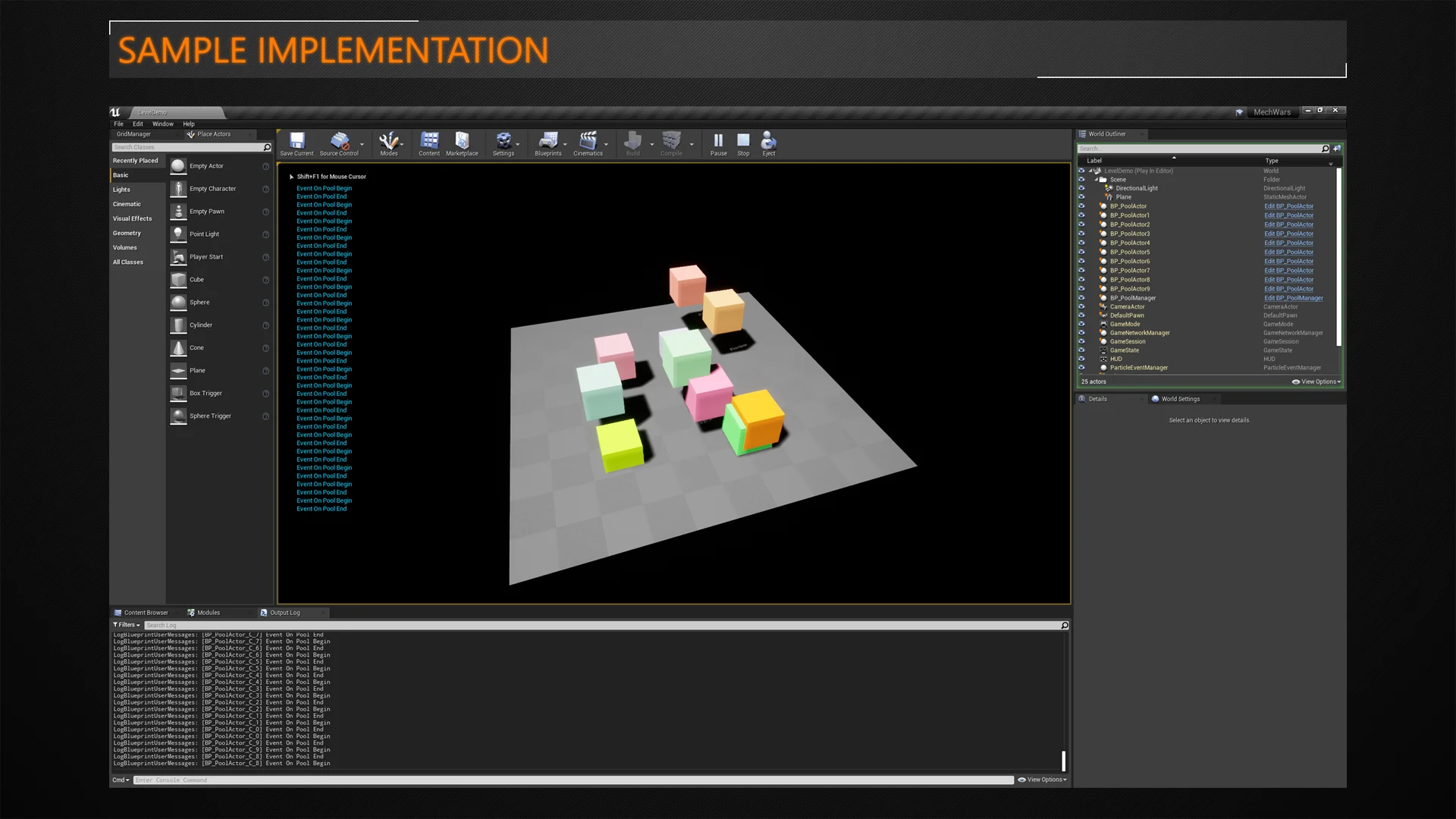
Frequent instantiation and removal of entities within a real-time environment introduces substantial runtime costs. Spawning actors en masse degrades project performance across multiple hardware profiles. Rather than allowing the engine to repeatedly construct and tear down identical objects, the Actor Pool Manager Plugin introduces a centralized recycling framework designed to optimize and simplify actor spawning routines. Operating as both a code library and a blueprint utility, it preserves instances in memory so they can be reactivated on demand rather than rebuilt from scratch.
The core objective of pooling is the mitigation of persistent memory allocations and deallocations. When an application requests an actor, invoking the standard spawn pipeline causes fresh memory to be requested from the operating system or engine allocators. Once the actor finishes its task, standard destruction triggers cleanup routines, freeing that memory only for the cycle to repeat seconds or frames later. By capturing instances within a managed pool, this plugin ensures that existing instances are returned to an inactive state instead of facing immediate destruction, yielding far more stable framerates when handling dense scenes.
Lifecycle Overheads in Repeated Spawning and Destruction
The standard actor creation sequence incurs hidden computational penalties that go well beyond raw memory reservation. Every time an actor class spawns, the engine executes constructor calls, sets up component hierarchies, registers transforms, and initializes internal state machines. When many actors of the exact same class continuously churn through creation and removal passes, these constructor calls rapidly accumulate into noticeable CPU spikes.
Initialization overhead becomes even more severe when developers attach asset-heavy routines to initial startup events. If an actor class references materials, skeletal mesh animations, or particle effects within its BeginPlay methods, spawning a fresh instance forces the system to prepare and initialize those sub-resources repeatedly. This activity drains processor time and increases power consumption, creating bottlenecks that quickly undermine application responsiveness. By keeping actors alive in an inactive repository, the plugin eliminates redundant constructor passes and bypasses unnecessary re-initialization passes during gameplay loops.
Integrating the PoolActorInterface Across Actor Hierarchies
A key structural advantage of the Actor Pool Manager Plugin lies in its decoupled architecture. Instead of forcing developers to reparent existing assets beneath an intrusive custom base class, the system supplies a dedicated interface: the PoolActorInterface. This interface functions across both native C++ classes and Blueprint graphs, making adoption straightforward even deep into an active production cycle.
Complex projects frequently rely on elaborate inheritance structures where altering the root class is impractical or outright prohibited by engine architecture. Because Unreal Engine does not allow modifications to foundational native classes such as the core Actor or APawn definitions, monolithic pooling frameworks often fail to accommodate diverse object types. The interface pattern circumvents this limitation entirely. Implementing the PoolActorInterface on an actor informs the manager that the object supports recycling workflows, establishing a standard contract for activation, deactivation, and reset logic without disturbing the underlying code base.
Pawn and Character Management via Interface Inheritance
Managing specialized actor derivatives such as Pawns and Characters presents unique architectural hurdles due to their deep native dependencies. The APawn class, for instance, houses extensive functionality for possession, controller mapping, and movement components, making its inheritance chain rigid. Developers cannot simply replace the engine-level pawn class with an arbitrary actor pool root.
To bring advanced classes into the recycling pipeline, the Actor Pool Manager Plugin relies on targeted subclassing combined with the PoolActorInterface:
Create a custom, empty Pawn class derived directly from the engine's default APawn.
Attach the PoolActorInterface directly to this newly derived class.
Implement the necessary interface events or functions to govern how the pawn prepares for pooling and reactivation.
Derive project-specific pawns or characters from this newly interfaced parent.
This approach gives characters, pawns, and complex interactive actors access to recycling benefits without modifying engine source code or breaking existing class hierarchies. Whether an entity is controlled by player input or automated logic, the pooling system handles its retention and redeployment smoothly.
Blueprint and C++ Execution for Stable Framerates
Flexibility across programming paradigms ensures that both technical artists working in visual script and software engineers developing native systems can manage pooled entities seamlessly. The plugin exposes its management functions to C++ and Blueprints alike, allowing respawn calls, interface checks, and pool queries to be dispatched from whichever environment best fits the task.
Deploying pooling logic through code allows high-frequency systems—such as combat encounters, background entity swarms, or continuous gameplay mechanics—to run at consistent tick rates. When an actor completes its lifecycle, the managing system receives the object, conceals or deactivates its components, and places it in standby. When the game requires an actor of that same class, the pool immediately retrieves the dormant instance, restores its active parameters, and places it into the world. By replacing repeated destruction and recreation with structured state switching, projects retain predictable frame times and avoid memory fragmentation over extended play sessions.
 Engine Tools
 Engine Tools
 Engine Tools