"6f9bd6df1f44a86f"{"id":"1002293","slug":"align-tool","title":"Align Tool","category":"Engine Tools","engine":"4.25","assetVersion":"Asset Version: 1.1","engineVersion":"Engine Version: 4.25","tag":"Engine Tools","accent":"blue","visual":"mech","summary":"Align Tool aligns and snaps actors using bounding-box alignment, helping modular and architecture projects avoid grid, pivot, and preparation steps.","platform":"Unreal Engine","indexPolicy":"index","publishedAt":"2026-11-04T05:21:40.897Z","updatedAt":"2026-11-04T05:21:40.897Z","sourceNotes":[],"fileContents":[],"compatibility":["Unreal Engine","Asset Version: 1.1","Engine Version: 4.25"],"featuredImage":{"alt":"Align Tool","src":"/wp-content/uploads/published/2026/11/77c00f0d09eb-f9ef1fc8-b534-4d0d-95ca-630e32cfd9d2-38c2f9e8f9.webp"},"hasDownloadLink":true,"downloads":0,"terms":[{"taxonomy":"category","slug":"engine-tools-tools-and-plugins","name":"Engine Tools"}],"galleryImages":[{"src":"/wp-content/uploads/published/2026/11/f16ef588ba93-11bddadc-e419-41dd-bb23-3f9292f2c3d5-ad7e6451b4.webp","alt":"Align Tool"},{"src":"/wp-content/uploads/published/2026/11/62d30d809367-d20bddb2-a402-4117-8002-50366d8e1de0-9ed4eb7a2f.webp","alt":"Align Tool"},{"src":"/wp-content/uploads/published/2026/11/8fb24f441a30-0a1e5d1e-8cea-4355-9a9f-adc15be6f37e-c33b19ce61.webp","alt":"Align Tool"}],"accessPanel":{"kind":"resource","title":"Download this resource","eyebrow":"Free Download","message":"Log in or create a free account to start your download.","fileName":"Align Tool.7z","safetyNote":"Resources are manually reviewed before listing to improve quality and reduce obvious risks.","actionLabel":"Download Free","resourceType":"Resource archive"},"contentHtml":"\u003cp\u003eAlign Tool is an editor utility for aligning and snapping actors together. Its toolset stays simple, following the kind of alignment workflow found in Maya rather than introducing a separate placement system. The tool is part of the larger AssetBuilder Tools pack, and it is compatible with the AssetBuilder Tools Free Demo. Its focus is narrow: make actors line up and snap without first resolving grid, pivot, or alignment issues.\u003c/p\u003e\u003ch2\u003eActor Alignment and Snapping in the Editor\u003c/h2\u003e\u003cp\u003eThe two core actions are alignment and snapping. Actors can be brought into line with one another and snapped together, which addresses the placement step directly in the editor. That makes the tool relevant at scene assembly time, when actors already exist and need to occupy a shared arrangement.\u003c/p\u003e\u003cp\u003eSimple alignment tools are the reference point. Align Tool stays within that compact editor-tool model instead of expanding into a broad scene-management suite. Alignment and snapping work on actors, so the tool operates on scene objects after they have been placed. The value is in refining that placement: bringing separate actors into a shared alignment and snapping relationship.\u003c/p\u003e\u003cp\u003eBecause both actions sit in the same tool, alignment does not have to be handled separately from snapping. The user can align actors and then snap them as part of the same placement flow. That is a practical distinction for scene work, where an actor may need to line up with others and then lock into a tighter relationship through snapping.\u003c/p\u003e\u003ch2\u003eBounding-Box Alignment and the Pivot Question\u003c/h2\u003e\u003cp\u003eThe alignment reference is the object's bounding box. That is a concrete difference from workflows where the pivot determines how an object responds to alignment. Because the bounding box is the basis, an object does not need preparation before it can be aligned. You do not have to reposition its pivot or make the actor conform to a grid before using the tool.\u003c/p\u003e\u003cp\u003ePivot placement still matters for other operations, but Align Tool removes it from the alignment step. The same applies to grid: grid can remain a separate scene concern rather than a precondition for actor alignment. The bounding box gives the tool a boundary to work from, so alignment is tied to the object's occupied volume rather than to a manually prepared anchor point.\u003c/p\u003e\u003cp\u003eFor production work, this shortens setup. An actor can be used as-is when it is brought into an alignment operation. The tool does not require a pivot-first or grid-first pass, and it does not ask for object preparation before alignment begins. That keeps the placement action focused on the actors themselves and on the alignment relationship between them.\u003c/p\u003e\u003ch2\u003eModular Assets Without Grid, Pivot, and Alignment Friction\u003c/h2\u003e\u003cp\u003eModular assets are the clearest match. Assembling a scene from modular pieces usually puts pressure on grid, pivot, and alignment choices. Align Tool addresses that pressure by allowing actors to be aligned and snapped together without those concerns dominating the workflow.\u003c/p\u003e\u003cp\u003eFor modular construction, the important point is that alignment is handled on the actors themselves. A piece can be aligned to another piece through the tool rather than through a grid-based placement method. Snapping is part of the same operation, so the placement can move from alignment into a snapped relationship without switching to a different workflow.\u003c/p\u003e\u003cp\u003eModular work also benefits from the no-preparation approach. Because objects do not need pivot or alignment prep, a modular set can be brought into the editor and aligned as actors. The tool does not require the modular pieces to be rebuilt around a shared grid or a common pivot convention before they can be placed. That makes the alignment step adaptable to the actors at hand.\u003c/p\u003e\u003ch2\u003eArchitecture Projects and Actor-Based Scene Assembly\u003c/h2\u003e\u003cp\u003eArchitecture projects are the other explicit fit. In an architectural scene, actors need to share alignment, and the same grid, pivot, and alignment concerns appear in that context. Align Tool provides bounding-box-based alignment and snapping for actors in that setting.\u003c/p\u003e\u003cp\u003eAlignment can be set by object bounds, so architectural actors do not need special preparation before alignment. That keeps the tool inside the placement stage, where actors are assembled into a scene. Because snapping is part of the same tool, architectural actors can be aligned and snapped in one workflow rather than through separate placement steps.\u003c/p\u003e\u003cp\u003eThe architecture use case also shows why bounding-box alignment is useful beyond modular kits. An architectural project can involve many separate actors that need to sit together cleanly. Align Tool approaches that problem through actor alignment and snapping, with the object's bounding box as the reference. The tool does not depend on a grid-first layout or on pivots being placed in advance.\u003c/p\u003e\u003ch2\u003eAlign Tool Within AssetBuilder Tools\u003c/h2\u003e\u003cp\u003eAlign Tool is one part of the larger AssetBuilder Tools pack. It is compatible with the AssetBuilder Tools Free Demo, which places the same tool workflow in that demo context. The pack relationship is useful context: Align Tool is a component within AssetBuilder Tools, not an isolated placement application.\u003c/p\u003e\u003cp\u003eThe pack context does not change the tool's core behavior. Alignment and snapping remain actor-level operations driven by bounding boxes, and the modular and architecture use cases remain the same. The compatibility note with AssetBuilder Tools Free Demo simply names the demo environment where the tool is set up to work.\u003c/p\u003e\u003ch2\u003eWhat the Tool Is Set Up to Handle\u003c/h2\u003e\u003cp\u003eAlign Tool is set up for alignment and snapping of actors, with bounding-box alignment as the basis and no object preparation required. It is especially useful for modular assets and architecture projects where grid, pivot, and alignment would otherwise slow placement. As part of AssetBuilder Tools, it stays a focused editor tool rather than a full scene assembly system.\u003c/p\u003e\u003cp\u003eIts scope is the alignment step: actors come together, snap into place, and the surrounding project can use that placement without a grid-first or pivot-first setup. That is the package's practical shape: a compact way to align and snap actors while working with modular assets or actor-based architecture scenes.\u003c/p\u003e\n\n\u003ch2\u003eMore From The Same Workflow\u003c/h2\u003e\n\u003cul\u003e\n\u003cli\u003e\u003ca href=\"https://3dcghub.com/modular-snap-system/\" rel=\"noopener noreferrer\"\u003eModular Snap System\u003c/a\u003e\u003c/li\u003e\n\u003cli\u003e\u003ca href=\"https://3dcghub.com/npc-optimizator-automatic-optimize-npc-for-you-game/\" rel=\"noopener noreferrer\"\u003eNPC Optimizator - automatic optimize NPC for you game\u003c/a\u003e\u003c/li\u003e\n\u003cli\u003e\u003ca href=\"https://3dcghub.com/multi-window/\" rel=\"noopener noreferrer\"\u003eMulti window\u003c/a\u003e\u003c/li\u003e\n\u003cli\u003e\u003ca href=\"https://3dcghub.com/did-it-hit-trace-detection-plugin/\" rel=\"noopener noreferrer\"\u003eDid it hit - Trace Detection Plugin\u003c/a\u003e\u003c/li\u003e\n\u003cli\u003e\u003ca href=\"https://3dcghub.com/object-pool-plugin/\" rel=\"noopener noreferrer\"\u003eObject Pool Plugin\u003c/a\u003e\u003c/li\u003e\n\u003c/ul\u003e","contentTextLength":6359,"navigation":{"current":3,"total":4218,"previous":{"id":"1002294","slug":"auto-instance","title":"Auto Instance","category":"Gameplay Features","platform":"Unreal Engine","updatedAt":"2026-11-04T05:22:04.042Z"},"next":{"id":"1002292","slug":"ak-47-fpsk-ready","title":"AK-47 (FPSK Ready)","category":"Guns","platform":"Unreal Engine","updatedAt":"2026-11-04T05:21:02.045Z"}},"relatedResources":[{"id":"14215","slug":"modular-snap-system","title":"Modular Snap System","category":"Engine Tools","engine":"4.26 - 5.8","assetVersion":"Asset Version: 1.5.1 - 1.5.3","engineVersion":"Engine version: 4.26 - 5.8","tag":"Engine Tools","accent":"blue","visual":"animation","summary":"Simplify your level design workflow with the Modular Snap System. This Editor Plugin uses a socket-to-socket concept to align meshes, splines, and actors instantly without manual grid adjustments.","platform":"Unreal Engine","indexPolicy":"index","publishedAt":"2026-03-11T16:17:51.000Z","updatedAt":"2026-10-21T17:02:25.901Z","sourceNotes":[],"fileContents":[],"compatibility":["Unreal Engine","Asset Version: 1.5.1 - 1.5.3","Engine version: 4.26 - 5.8"],"featuredImage":{"alt":"Modular Snap System","src":"https://3dcghub.com/wp-content/uploads/2026/03/70a3c32f-f27e-4e90-93ea-0cadd2355ae2.webp"},"hasDownloadLink":true,"downloads":1},{"id":"14293","slug":"npc-optimizator-automatic-optimize-npc-for-you-game","title":"NPC Optimizator - automatic optimize NPC for you game","category":"Engine Tools","engine":"4.25 - 5.7","assetVersion":"Version: 1.5.7 - 1.6.6","engineVersion":"Engine version: 4.25 - 5.7","tag":"Engine Tools","accent":"blue","visual":"luts","summary":"Boost your game's performance with NPC Optimizator, a flexible plugin designed to handle large numbers of NPCs automatically. Learn how to balance quality and speed using customizable optimization components.","platform":"Unreal Engine","indexPolicy":"index","publishedAt":"2026-03-11T17:23:11.000Z","updatedAt":"2026-09-29T09:33:30.254Z","sourceNotes":[],"fileContents":[],"compatibility":["Unreal Engine","Version: 1.5.7 - 1.6.6","Engine version: 4.25 - 5.7"],"featuredImage":{"alt":"NPC Optimizator - automatic optimize NPC for you game","src":"https://3dcghub.com/wp-content/uploads/2026/03/c3aeaac7-93f3-4396-abb7-320b16f85363.webp"},"hasDownloadLink":true,"downloads":0},{"id":"14243","slug":"multi-window","title":"Multi window","category":"Engine Tools","engine":"4.25 - 5.7","assetVersion":"Asset Version: 1.0","engineVersion":"Engine version: 4.25 - 5.7","tag":"Engine Tools","accent":"blue","visual":"character","summary":"The Multi window plugin enables developers to display multiple views simultaneously across different windows using simple Blueprint nodes. With support for advanced rendering and persistent cross-level windows, it is a versatile tool for complex UI and disp...","platform":"Unreal Engine","indexPolicy":"index","publishedAt":"2026-03-11T17:07:21.000Z","updatedAt":"2026-08-06T12:55:43.741Z","sourceNotes":[],"fileContents":[],"compatibility":["Unreal Engine","Asset Version: 1.0","Engine version: 4.25 - 5.7"],"featuredImage":{"alt":"Multi window","src":"https://3dcghub.com/wp-content/uploads/2026/03/2e68fe3f-2dca-47bc-80cc-c4bc96fea474.webp"},"hasDownloadLink":true,"downloads":0}]}
Engine Tools
Align Tool
Align Tool aligns and snaps actors using bounding-box alignment, helping modular and architecture projects avoid grid, pivot, and preparation steps.
Align Tool is an editor utility for aligning and snapping actors together. Its toolset stays simple, following the kind of alignment workflow found in Maya rather than introducing a separate placement system. The tool is part of the larger AssetBuilder Tools pack, and it is compatible with the AssetBuilder Tools Free Demo. Its focus is narrow: make actors line up and snap without first resolving grid, pivot, or alignment issues.
Actor Alignment and Snapping in the Editor
The two core actions are alignment and snapping. Actors can be brought into line with one another and snapped together, which addresses the placement step directly in the editor. That makes the tool relevant at scene assembly time, when actors already exist and need to occupy a shared arrangement.
Simple alignment tools are the reference point. Align Tool stays within that compact editor-tool model instead of expanding into a broad scene-management suite. Alignment and snapping work on actors, so the tool operates on scene objects after they have been placed. The value is in refining that placement: bringing separate actors into a shared alignment and snapping relationship.
Because both actions sit in the same tool, alignment does not have to be handled separately from snapping. The user can align actors and then snap them as part of the same placement flow. That is a practical distinction for scene work, where an actor may need to line up with others and then lock into a tighter relationship through snapping.
Bounding-Box Alignment and the Pivot Question
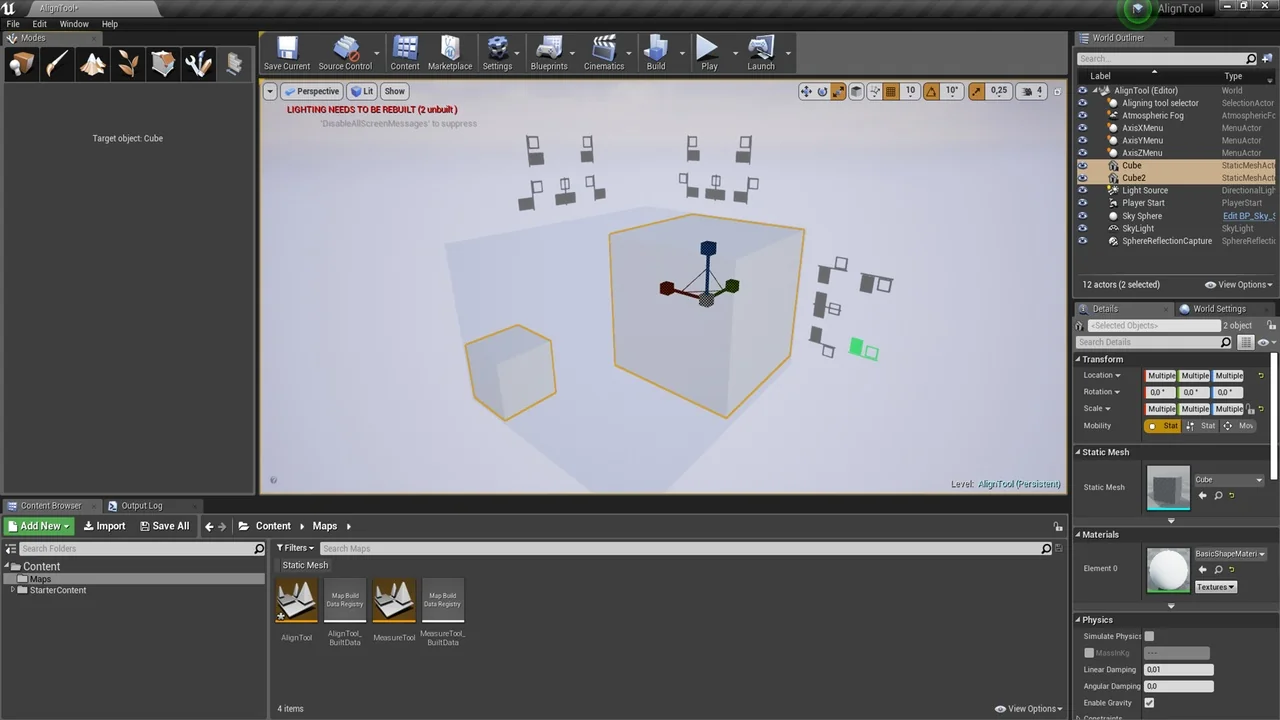
The alignment reference is the object's bounding box. That is a concrete difference from workflows where the pivot determines how an object responds to alignment. Because the bounding box is the basis, an object does not need preparation before it can be aligned. You do not have to reposition its pivot or make the actor conform to a grid before using the tool.
Pivot placement still matters for other operations, but Align Tool removes it from the alignment step. The same applies to grid: grid can remain a separate scene concern rather than a precondition for actor alignment. The bounding box gives the tool a boundary to work from, so alignment is tied to the object's occupied volume rather than to a manually prepared anchor point.
For production work, this shortens setup. An actor can be used as-is when it is brought into an alignment operation. The tool does not require a pivot-first or grid-first pass, and it does not ask for object preparation before alignment begins. That keeps the placement action focused on the actors themselves and on the alignment relationship between them.
Modular Assets Without Grid, Pivot, and Alignment Friction
Modular assets are the clearest match. Assembling a scene from modular pieces usually puts pressure on grid, pivot, and alignment choices. Align Tool addresses that pressure by allowing actors to be aligned and snapped together without those concerns dominating the workflow.
For modular construction, the important point is that alignment is handled on the actors themselves. A piece can be aligned to another piece through the tool rather than through a grid-based placement method. Snapping is part of the same operation, so the placement can move from alignment into a snapped relationship without switching to a different workflow.
Modular work also benefits from the no-preparation approach. Because objects do not need pivot or alignment prep, a modular set can be brought into the editor and aligned as actors. The tool does not require the modular pieces to be rebuilt around a shared grid or a common pivot convention before they can be placed. That makes the alignment step adaptable to the actors at hand.
Architecture Projects and Actor-Based Scene Assembly
Architecture projects are the other explicit fit. In an architectural scene, actors need to share alignment, and the same grid, pivot, and alignment concerns appear in that context. Align Tool provides bounding-box-based alignment and snapping for actors in that setting.
Alignment can be set by object bounds, so architectural actors do not need special preparation before alignment. That keeps the tool inside the placement stage, where actors are assembled into a scene. Because snapping is part of the same tool, architectural actors can be aligned and snapped in one workflow rather than through separate placement steps.
The architecture use case also shows why bounding-box alignment is useful beyond modular kits. An architectural project can involve many separate actors that need to sit together cleanly. Align Tool approaches that problem through actor alignment and snapping, with the object's bounding box as the reference. The tool does not depend on a grid-first layout or on pivots being placed in advance.
Align Tool Within AssetBuilder Tools
Align Tool is one part of the larger AssetBuilder Tools pack. It is compatible with the AssetBuilder Tools Free Demo, which places the same tool workflow in that demo context. The pack relationship is useful context: Align Tool is a component within AssetBuilder Tools, not an isolated placement application.
The pack context does not change the tool's core behavior. Alignment and snapping remain actor-level operations driven by bounding boxes, and the modular and architecture use cases remain the same. The compatibility note with AssetBuilder Tools Free Demo simply names the demo environment where the tool is set up to work.
What the Tool Is Set Up to Handle
Align Tool is set up for alignment and snapping of actors, with bounding-box alignment as the basis and no object preparation required. It is especially useful for modular assets and architecture projects where grid, pivot, and alignment would otherwise slow placement. As part of AssetBuilder Tools, it stays a focused editor tool rather than a full scene assembly system.
Its scope is the alignment step: actors come together, snap into place, and the surrounding project can use that placement without a grid-first or pivot-first setup. That is the package's practical shape: a compact way to align and snap actors while working with modular assets or actor-based architecture scenes.
 Engine Tools
 Engine Tools
 Engine Tools
 Engine Tools