"e9c335e082208b17"{"id":"1002878","slug":"ai-turret-component","title":"AI Turret Component","category":"Weapons \u0026 Combat","engine":"4.21+,5.0+","assetVersion":"","engineVersion":"Engine Version: 4.21+,5.0+","tag":"Weapons \u0026 Combat","accent":"blue","visual":"mech","summary":"Configure automated defenses with the AI Turret Component. Adjust rotation speeds, fire modes, mesh setups, and anti-missile targeting in multiplayer.","platform":"Unreal Engine","indexPolicy":"index","publishedAt":"2026-11-21T01:40:08.769Z","updatedAt":"2026-11-21T01:40:08.769Z","sourceNotes":[],"fileContents":[],"compatibility":["Unreal Engine","Engine Version: 4.21+,5.0+"],"featuredImage":{"alt":"AI Turret Component","src":"/wp-content/uploads/published/2026/11/e1697f6d08ab-7f004902-d4d0-4998-9b90-ccb945b28a1b-fd6ca348e9.webp"},"fileSizeBytes":38371545,"hasDownloadLink":true,"downloads":0,"terms":[{"taxonomy":"category","slug":"weapons-and-combat","name":"Weapons \u0026 Combat"}],"galleryImages":[{"src":"/wp-content/uploads/published/2026/11/d50ef82ea8af-4be323b3-27d4-45d2-b5f3-a8c31ffb46d0-95ce441e40.webp","alt":"AI Turret Component"},{"src":"/wp-content/uploads/published/2026/11/16d51517f4a3-8fcade1d-d561-4f8a-8ab6-37923d69d6da-3aed376988.webp","alt":"AI Turret Component"},{"src":"/wp-content/uploads/published/2026/11/a44e32139333-1fd94f58-cc58-4bce-8d85-ec512f6ef94d-b23a5123af.webp","alt":"AI Turret Component"},{"src":"/wp-content/uploads/published/2026/11/36fef17f2988-07d543df-72d1-4e7c-9aee-c8ca545d70c4-e56b139297.webp","alt":"AI Turret Component"},{"src":"/wp-content/uploads/published/2026/11/c76dab5fb6c4-0dbea740-bf25-46f5-8fb0-1fbc9741ec1e-d45a67177f.webp","alt":"AI Turret Component"},{"src":"/wp-content/uploads/published/2026/11/9bb87e534740-ddc119b7-a90c-4676-97a0-9022264b889d-906b7a8205.webp","alt":"AI Turret Component"},{"src":"/wp-content/uploads/published/2026/11/77b154ffe62c-e8d429a2-4114-4c2e-bdc9-f4751c505e35-7a8b5d1ab1.webp","alt":"AI Turret Component"}],"contentHtml":"\u003cp\u003eStationary defenses in combat scenarios need to detect threats, calculate aim arcs, and engage opposing targets without requiring manual character control. Automated turret emplacements act as persistent area denial points, swinging their barrels across designated sectors, locking onto hostile intruders, and opening fire with bullets or rockets. When enemy projectiles enter defensive perimeters, automated targeting routines must distinguish between ground threats and airborne ordnances, intercepting incoming missiles to prevent destructive explosions before they hit critical structures.\u003c/p\u003e \u003ch2\u003eAI Turret Component Integration within Actor Blueprints\u003c/h2\u003e\n\u003cp\u003eIntegrating autonomous targeting into game assets relies on a streamlined setup procedure directly inside the Blueprint editor. The entire tracking and combat system is packaged as an individual component, keeping base Actor hierarchies clean and modular.\u003c/p\u003e \u003cp\u003eImplementation follows a precise sequence to initialize targeting logic properly:\u003c/p\u003e\n\u003cul\u003e \u003cli\u003eAdd the component directly to the target Actor hierarchy.\u003c/li\u003e \u003cli\u003eCall the Init function within the BeginPlay execution graph.\u003c/li\u003e \u003cli\u003eSelect the specific visual meshes to represent the turret base, swivel, and barrel assemblies.\u003c/li\u003e \u003cli\u003eAdjust the behavioral settings and combat variables to match project requirements.\u003c/li\u003e\n\u003c/ul\u003e \u003cp\u003eCalling the Init function upon the BeginPlay event hooks the internal calculations into the game loop, linking the underlying script to the visual components. Because mesh selection is handled cleanly during configuration, technical artists can swap between high-tech energy cannons, vintage mechanical artillery, or naval guns without re-authoring the scanning logic. By decoupling the mechanical meshes from the underlying script, a single Blueprint class can generate dozens of distinct emplacements simply by feeding different 3D assets into the initialization routine.\u003c/p\u003e \u003ch2\u003eKinematic Controls and Turret Mesh Swapping\u003c/h2\u003e\n\u003cp\u003eDefensive weapon stations must move with convincing weight and physical limitation. The script allows creators to tailor the kinematic properties of every placement, ensuring that heavy fortress cannons turn slowly while lightweight anti-personnel sensors rotate swiftly to track fast-moving targets.\u003c/p\u003e \u003cp\u003eRotational speeds can be tuned along horizontal and vertical axes to reflect the mechanical scale of the emplacement. In addition to raw velocity, motion angles can be constrained to enforce realistic firing arcs. Setting precise minimum and maximum traverse angles prevents turrets from swinging through adjacent walls, clipping into terrain, or aiming back into friendly installations. These rotation limits allow level designers to place turrets inside bunker slits, along parapets, or across restricted vehicle mountings where only forward-facing firing cones are logical.\u003c/p\u003e \u003cp\u003eRange settings define the spherical or conical perimeter where the internal AI actively searches for targets. Confining target acquisition to calibrated ranges prevents defensive structures from wasting ammunition on distant entities behind cover or outside effective gameplay zones. Once an enemy Actor steps past this detection threshold, the tracking script aligns the designated barrel mesh with the target coordinates, adhering strictly to the preset speed limits and rotation boundaries.\u003c/p\u003e \u003ch2\u003eTurret Fire Rates, Projectile Properties, and Explosion Damage\u003c/h2\u003e\n\u003cp\u003eEngagements require distinct ballistic behaviors depending on whether an installation is armed with rapid-fire kinetic guns, heavy single-shot howitzers, or explosive rocket pods. The component exposes comprehensive parameters to govern weapon type selection, cadence, and ballistic output.\u003c/p\u003e \u003cp\u003eFiring routines can be toggled across three primary modes:\u003c/p\u003e\n\u003cul\u003e \u003cli\u003eSingle fire, providing deliberate, spaced discharges suitable for precision anti-tank weapons or heavy railguns.\u003c/li\u003e \u003cli\u003eBurst fire, releasing grouped salvos at high velocities before entering a cooling or cycle interval.\u003c/li\u003e \u003cli\u003eRandom fire, introducing variance into cycle times to mimic unpredictable human gunners or erratic automated bursts.\u003c/li\u003e\n\u003c/ul\u003e \u003cp\u003eBeyond cyclic rates, the weapon type and projectile properties are fully customizable. Developers can dictate whether the system expels high-velocity bullets that trigger localized damage on impact, or physical rockets that track incoming paths and detonate on collision. Modifying projectile settings directly influences flight speeds, payload damage profiles, and explosive radius fields, allowing smooth transitions between light perimeter suppression and catastrophic area bombardment.\u003c/p\u003e \u003ch2\u003eAnti-Missile Targeting and Enemy Defense Mechanics\u003c/h2\u003e\n\u003cp\u003eDefensive combat systems often fail when heavy artillery is overwhelmed by incoming ordnance. To counter this vulnerability, the component includes an explicit setting to target and engage enemy missiles. When activated, the AI prioritizes fast-moving aerial rockets and incoming explosive threats within its operational range, redirecting its barrels away from standard enemy pawns to shoot down projectiles mid-flight.\u003c/p\u003e \u003cp\u003eNeutralizing missiles before they strike structures or friendly units creates an active interception network. Because the system calculates intercept trajectories within its rotation limits, positioning anti-missile emplacements becomes an important tactical element in base defense. Setting multiple turrets with overlapping sectors of fire creates defense clusters where secondary batteries protect main artillery pieces from rocket barrages while the primary guns concentrate on armored adversaries.\u003c/p\u003e \u003ch2\u003eDeploying Multiple Turrets in Multiplayer Sessions\u003c/h2\u003e\n\u003cp\u003eScaling automated defenses across large levels requires efficiency, especially when games feature network environments. The component is architected to allow designers to quickly and easily set up many turrets across an environment without manual per-instance scripting. Whether guarding a single doorway or populating an expansive battle zone with automated defenses, instances function reliably in multiplayer sessions.\u003c/p\u003e \u003cp\u003eReplicating targeting states, rotation vectors, and projectile spawns across network clients demands consistent state tracking between the server and remote players. The component operates within this multiplayer framework, keeping turret tracking states synchronized so that players on all connections observe accurate barrel directions, continuous fire, and synchronized explosion effects. When defending territory against opposing teams, the automated AI evaluates valid hostile targets according to multiplayer team designations, directing lethal attacks without desyncing or misfiring across network boundaries.\u003c/p\u003e \u003ch2\u003eComponent Setup and Field Deployment\u003c/h2\u003e\n\u003cp\u003eBy bringing together customizable projectile traits, selectable meshes, angle constraints, and dedicated anti-missile scanning into a self-contained Actor component, production teams can assemble functional defense systems in minutes. Attaching the component, linking the Init node at BeginPlay, selecting the structural meshes, and dialing in firing rates yields fully autonomous combat emplacements ready for solo arenas or networked multiplayer battlegrounds.\u003c/p\u003e\n\n\u003ch2\u003eRelated Resources Worth Checking\u003c/h2\u003e\n\u003cul\u003e\n\u003cli\u003e\u003ca href=\"https://3dcghub.com/multiplayer-shooter-template-with-ai/\" rel=\"noopener noreferrer\"\u003eMultiplayer Shooter Template With AI\u003c/a\u003e\u003c/li\u003e\n\u003cli\u003e\u003ca href=\"https://3dcghub.com/spaceship-colony-cruiser/\" rel=\"noopener noreferrer\"\u003eSpaceship Colony Cruiser\u003c/a\u003e\u003c/li\u003e\n\u003cli\u003e\u003ca href=\"https://3dcghub.com/weapon-kit/\" rel=\"noopener noreferrer\"\u003eWeapon Kit\u003c/a\u003e\u003c/li\u003e\n\u003cli\u003e\u003ca href=\"https://3dcghub.com/dodge-it-component/\" rel=\"noopener noreferrer\"\u003eDodge It Component\u003c/a\u003e\u003c/li\u003e\n\u003cli\u003e\u003ca href=\"https://3dcghub.com/shooter-simplified-ai/\" rel=\"noopener noreferrer\"\u003eShooter Simplified AI\u003c/a\u003e\u003c/li\u003e\n\u003c/ul\u003e","contentTextLength":7220,"navigation":{"current":57,"total":4839,"previous":{"id":"1002879","slug":"advance-female-customization","title":"Advance Female Customization","category":"Characters \u0026 Creatures","platform":"Unreal Engine","updatedAt":"2026-11-21T01:41:07.470Z"},"next":{"id":"1002877","slug":"actor-pool-manager-plugin","title":"Actor Pool Manager Plugin","category":"Engine Tools","platform":"Unreal Engine","updatedAt":"2026-11-21T01:35:40.505Z"}},"relatedResources":[{"id":"1001143","slug":"multiplayer-shooter-template-with-ai","title":"Multiplayer Shooter Template With AI","category":"Weapons \u0026 Combat","engine":"5.0+","assetVersion":"","engineVersion":"Engine Version: 5.0+","tag":"Weapons \u0026 Combat","accent":"blue","visual":"mech","summary":"Multiplayer Shooter Template With AI delivers full network replication, custom sensory AI, dynamic radar capture, and direct MetaHuman skeleton compatibility.","platform":"Unreal Engine","indexPolicy":"index","publishedAt":"2026-09-09T05:42:58.481Z","updatedAt":"2026-09-09T05:42:58.481Z","sourceNotes":[],"fileContents":[],"compatibility":["Unreal Engine","Engine Version: 5.0+"],"featuredImage":{"alt":"Multiplayer Shooter Template With AI","src":"/wp-content/uploads/published/2026/09/f9ce64bcb73f-d891bb99-f96d-4bc3-b423-edb9bcc0bf46-4cce92b723.webp"},"fileSizeBytes":1745262792,"hasDownloadLink":true,"downloads":0},{"id":"1001837","slug":"spaceship-colony-cruiser","title":"Spaceship Colony Cruiser","category":"Weapons \u0026 Combat","engine":"4.26+,5.0+","assetVersion":"","engineVersion":"Engine Version: 4.26+,5.0+","tag":"Weapons \u0026 Combat","accent":"blue","visual":"mech","summary":"Spaceship Colony Cruiser provides the Davis3D flight system, dynamic shields, customizable lasers, physics asteroids, automated turrets, and optimized shaders.","platform":"Unreal Engine","indexPolicy":"index","publishedAt":"2026-10-21T08:28:03.709Z","updatedAt":"2026-10-21T08:28:03.709Z","sourceNotes":[],"fileContents":[],"compatibility":["Unreal Engine","Engine Version: 4.26+,5.0+"],"featuredImage":{"alt":"Spaceship Colony Cruiser","src":"/wp-content/uploads/published/2026/10/54c024b5cf11-fe8acb37-eb2c-4562-8197-b28a3f0134a3-887ce93b16.webp"},"fileSizeBytes":125150135,"hasDownloadLink":true,"downloads":0},{"id":"1000242","slug":"weapon-kit","title":"Weapon Kit","category":"Weapons \u0026 Combat","engine":"4.26+,5.0+","assetVersion":"","engineVersion":"Engine Version: 4.26+,5.0+","tag":"Weapons \u0026 Combat","accent":"blue","visual":"mech","summary":"A comprehensive framework for skeletal weapons featuring modular attachments, Blueprint ballistics, network replication, and VR hand tracking mechanics.","platform":"Unreal Engine","indexPolicy":"index","publishedAt":"2026-06-30T19:31:45.576Z","updatedAt":"2026-06-30T19:31:45.576Z","sourceNotes":[],"fileContents":[],"compatibility":["Unreal Engine","Engine Version: 4.26+,5.0+"],"featuredImage":{"alt":"Weapon Kit","src":"https://media.fab.com/image_previews/gallery_images/a00056a4-8cb5-4df3-86c2-6f7c4271afde/917a1d81-34e6-4783-b8b4-85cc010db98a.png"},"fileSizeBytes":733225686,"hasDownloadLink":true,"downloads":1}]}
Resource screenshots
1 / 7
Join our channel
Follow 3DCGHUB on Telegram for new resource drops, migration updates, and community notices.
Stationary defenses in combat scenarios need to detect threats, calculate aim arcs, and engage opposing targets without requiring manual character control. Automated turret emplacements act as persistent area denial points, swinging their barrels across designated sectors, locking onto hostile intruders, and opening fire with bullets or rockets. When enemy projectiles enter defensive perimeters, automated targeting routines must distinguish between ground threats and airborne ordnances, intercepting incoming missiles to prevent destructive explosions before they hit critical structures.
AI Turret Component Integration within Actor Blueprints
Integrating autonomous targeting into game assets relies on a streamlined setup procedure directly inside the Blueprint editor. The entire tracking and combat system is packaged as an individual component, keeping base Actor hierarchies clean and modular.
Implementation follows a precise sequence to initialize targeting logic properly:
Add the component directly to the target Actor hierarchy.
Call the Init function within the BeginPlay execution graph.
Select the specific visual meshes to represent the turret base, swivel, and barrel assemblies.
Adjust the behavioral settings and combat variables to match project requirements.
Calling the Init function upon the BeginPlay event hooks the internal calculations into the game loop, linking the underlying script to the visual components. Because mesh selection is handled cleanly during configuration, technical artists can swap between high-tech energy cannons, vintage mechanical artillery, or naval guns without re-authoring the scanning logic. By decoupling the mechanical meshes from the underlying script, a single Blueprint class can generate dozens of distinct emplacements simply by feeding different 3D assets into the initialization routine.
Kinematic Controls and Turret Mesh Swapping
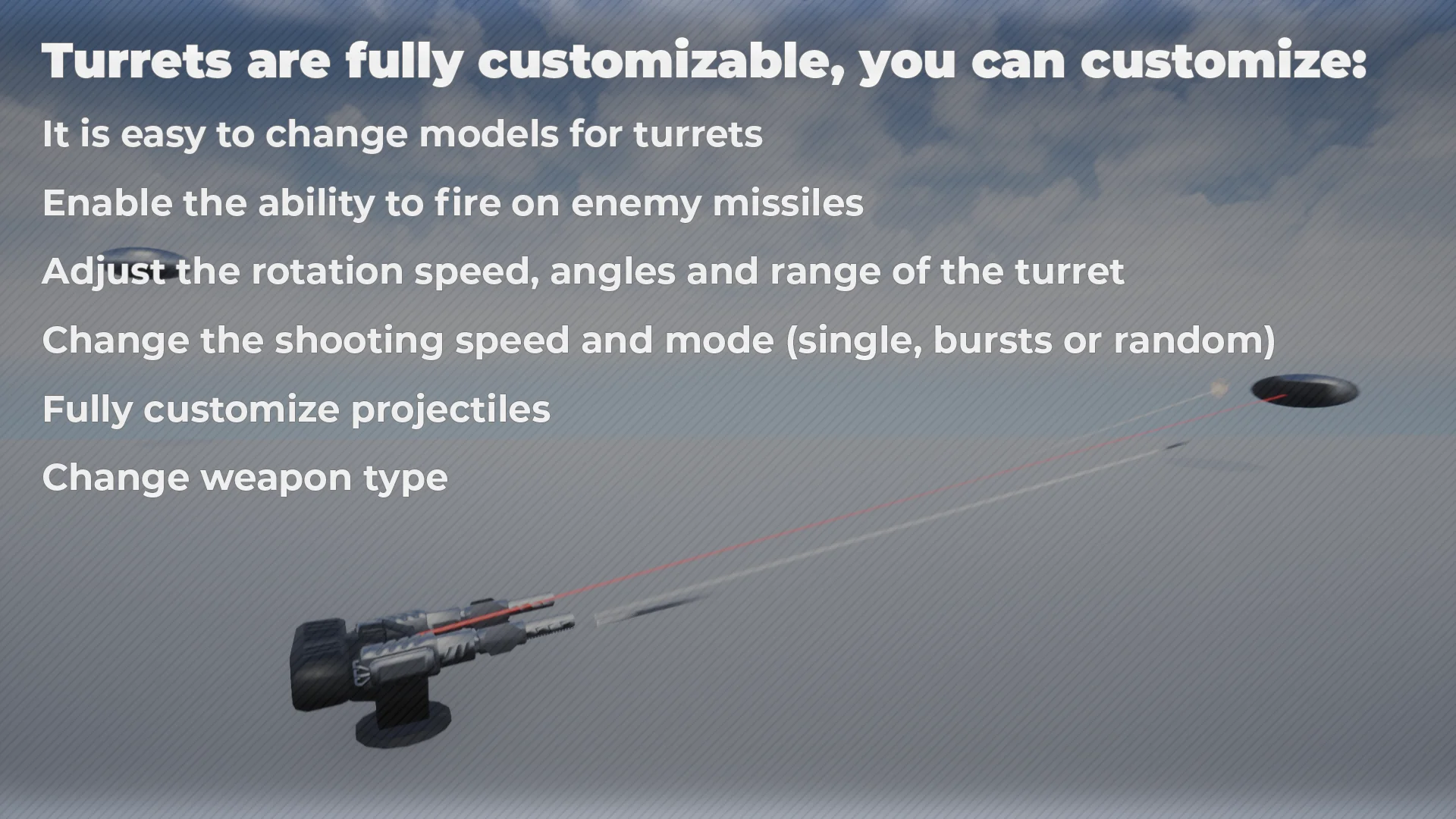
Defensive weapon stations must move with convincing weight and physical limitation. The script allows creators to tailor the kinematic properties of every placement, ensuring that heavy fortress cannons turn slowly while lightweight anti-personnel sensors rotate swiftly to track fast-moving targets.
Rotational speeds can be tuned along horizontal and vertical axes to reflect the mechanical scale of the emplacement. In addition to raw velocity, motion angles can be constrained to enforce realistic firing arcs. Setting precise minimum and maximum traverse angles prevents turrets from swinging through adjacent walls, clipping into terrain, or aiming back into friendly installations. These rotation limits allow level designers to place turrets inside bunker slits, along parapets, or across restricted vehicle mountings where only forward-facing firing cones are logical.
Range settings define the spherical or conical perimeter where the internal AI actively searches for targets. Confining target acquisition to calibrated ranges prevents defensive structures from wasting ammunition on distant entities behind cover or outside effective gameplay zones. Once an enemy Actor steps past this detection threshold, the tracking script aligns the designated barrel mesh with the target coordinates, adhering strictly to the preset speed limits and rotation boundaries.
Turret Fire Rates, Projectile Properties, and Explosion Damage
Engagements require distinct ballistic behaviors depending on whether an installation is armed with rapid-fire kinetic guns, heavy single-shot howitzers, or explosive rocket pods. The component exposes comprehensive parameters to govern weapon type selection, cadence, and ballistic output.
Firing routines can be toggled across three primary modes:
Single fire, providing deliberate, spaced discharges suitable for precision anti-tank weapons or heavy railguns.
Burst fire, releasing grouped salvos at high velocities before entering a cooling or cycle interval.
Random fire, introducing variance into cycle times to mimic unpredictable human gunners or erratic automated bursts.
Beyond cyclic rates, the weapon type and projectile properties are fully customizable. Developers can dictate whether the system expels high-velocity bullets that trigger localized damage on impact, or physical rockets that track incoming paths and detonate on collision. Modifying projectile settings directly influences flight speeds, payload damage profiles, and explosive radius fields, allowing smooth transitions between light perimeter suppression and catastrophic area bombardment.
Anti-Missile Targeting and Enemy Defense Mechanics
Defensive combat systems often fail when heavy artillery is overwhelmed by incoming ordnance. To counter this vulnerability, the component includes an explicit setting to target and engage enemy missiles. When activated, the AI prioritizes fast-moving aerial rockets and incoming explosive threats within its operational range, redirecting its barrels away from standard enemy pawns to shoot down projectiles mid-flight.
Neutralizing missiles before they strike structures or friendly units creates an active interception network. Because the system calculates intercept trajectories within its rotation limits, positioning anti-missile emplacements becomes an important tactical element in base defense. Setting multiple turrets with overlapping sectors of fire creates defense clusters where secondary batteries protect main artillery pieces from rocket barrages while the primary guns concentrate on armored adversaries.
Deploying Multiple Turrets in Multiplayer Sessions
Scaling automated defenses across large levels requires efficiency, especially when games feature network environments. The component is architected to allow designers to quickly and easily set up many turrets across an environment without manual per-instance scripting. Whether guarding a single doorway or populating an expansive battle zone with automated defenses, instances function reliably in multiplayer sessions.
Replicating targeting states, rotation vectors, and projectile spawns across network clients demands consistent state tracking between the server and remote players. The component operates within this multiplayer framework, keeping turret tracking states synchronized so that players on all connections observe accurate barrel directions, continuous fire, and synchronized explosion effects. When defending territory against opposing teams, the automated AI evaluates valid hostile targets according to multiplayer team designations, directing lethal attacks without desyncing or misfiring across network boundaries.
Component Setup and Field Deployment
By bringing together customizable projectile traits, selectable meshes, angle constraints, and dedicated anti-missile scanning into a self-contained Actor component, production teams can assemble functional defense systems in minutes. Attaching the component, linking the Init node at BeginPlay, selecting the structural meshes, and dialing in firing rates yields fully autonomous combat emplacements ready for solo arenas or networked multiplayer battlegrounds.
 Weapons & Combat
 Weapons & Combat
 Weapons & Combat