"7066dd76da796369"{"id":"14251","slug":"multiscreen","title":"MultiScreen","category":"Engine Tools","engine":"4.27,5.0 - 5.3","assetVersion":"Engine version: 4.27,5.0 - 5.3","engineVersion":"4.23","tag":"Engine Tools","accent":"blue","visual":"animation","summary":"MultiScreen is a versatile tool for managing multiple visual outputs. It converts camera feeds and actor data into customizable widgets during runtime.","platform":"Unreal Engine","publishedAt":"2026-03-11T17:09:50.000Z","updatedAt":"2026-04-19T15:45:50.000Z","sourceNotes":[],"fileContents":[],"compatibility":["Unreal Engine","Engine version: 4.27,5.0 - 5.3"],"featuredImage":{"alt":"MultiScreen","src":"https://3dcghub.com/wp-content/uploads/2026/03/f25398ca-a0ed-4f56-bb29-3d7b1e153051.webp"},"hasDownloadLink":true,"downloads":1,"terms":[{"taxonomy":"category","slug":"engine-tools-tools-and-plugins","name":"Engine Tools"},{"taxonomy":"post_tag","slug":"camera-widget","name":"Camera Widget"},{"taxonomy":"post_tag","slug":"multiscreen","name":"Multiscreen"},{"taxonomy":"post_tag","slug":"plugins","name":"Plugins"},{"taxonomy":"post_tag","slug":"tools","name":"Tools"},{"taxonomy":"post_tag","slug":"ui","name":"UI"},{"taxonomy":"post_tag","slug":"utilities","name":"Utilities"}],"galleryImages":[{"src":"https://3dcghub.com/wp-content/uploads/2026/03/41a052974605_2e9ee8af-f512-418a-bd36-bc0cef122eb3.webp","alt":"MultiScreen"},{"src":"https://3dcghub.com/wp-content/uploads/2026/03/8107be5d1363_2d76d8d3-c872-4bb5-b6d6-7a89e4e613b6.webp","alt":"MultiScreen"},{"src":"https://3dcghub.com/wp-content/uploads/2026/03/cf0c94a5bd49_90a02c34-4df9-439c-b3df-37764cc75f7c.webp","alt":"MultiScreen"},{"src":"https://3dcghub.com/wp-content/uploads/2026/03/c2df2b48be7e_89e0a922-ede0-4b0e-afab-70a73b579611.webp","alt":"MultiScreen"},{"src":"https://3dcghub.com/wp-content/uploads/2026/03/180e4bf3b85b_244a4e3e-bc2a-4e25-91d9-bca82224e180.webp","alt":"MultiScreen"}],"accessPanel":{"kind":"resource","title":"Access this resource","eyebrow":"Free Download","message":"Log in or create a free account to start your download.","fileName":"MultiScreen 4.27 - 5.3.7z","safetyNote":"All resources are 100% manually reviewed to eliminate all risks.","actionLabel":"Download Free","resourceType":"Resource archive"},"contentHtml":"\u003ch2\u003eIntroduction to MultiScreen\u003c/h2\u003e\n\u003cp\u003eMultiScreen is a specialized plugin designed to enhance how developers manage visual outputs in games and applications. By integrating this tool, creators can efficiently handle multiple perspectives within a single interface. Specifically, the plugin focuses on converting camera data into interactive elements that are easy to manipulate and display.\u003c/p\u003e\n\n\u003ch2\u003eDynamic Camera and Actor Integration\u003c/h2\u003e\n\u003cp\u003eOne of the primary functions of MultiScreen is its ability to convert up to eight cameras into customizable widget displays. Additionally, the plugin can process actor outputs, allowing for a wide range of visual sources to be utilized. These conversions occur during runtime, which means the displays are active and responsive while the application is running. Consequently, developers can create complex user interfaces that require live feeds from different points in the world.\u003c/p\u003e\n\n\u003ch2\u003eCustomizable Display Options\u003c/h2\u003e\n\u003cp\u003eFlexibility is a core component of this tool. Users can adjust the position and size of each screen according to their specific layout requirements. Therefore, the visual interface can be tailored to match the aesthetic or functional needs of any project. Whether you need a small security monitor or a large secondary view, the plugin provides the necessary controls to achieve the desired look.\u003c/p\u003e\n\n\u003ch2\u003eRuntime Performance and Workflow\u003c/h2\u003e\n\u003cp\u003eBecause the plugin functions during runtime, it offers immediate feedback for developers and users alike. This allows for dynamic changes to the UI without needing to restart the application. This efficiency is vital for projects that require real-time monitoring or complex multi-view setups. Moreover, the ability to adjust screen parameters on the fly ensures that the user experience remains seamless and interactive.\u003c/p\u003e\n\n\u003ch2\u003eDevelopment and Support Status\u003c/h2\u003e\n\u003cp\u003eIt is important to note that the developer released this product some time ago. While it is no longer receiving new feature updates, the creator is actively updating it to maintain compatibility with current engine versions. However, for those seeking the latest advancements in this technology, the developer recommends looking into the MultiViewProjectionTools plugin. This ensures that users have access to the most modern solutions for their development needs.\u003c/p\u003e\n\n\u003ch2\u003eFinal Take\u003c/h2\u003e\n\u003cp\u003eMultiScreen remains a practical choice for projects requiring multiple camera views and actor-based displays. By providing customizable widgets and runtime flexibility, it simplifies the process of creating complex visual layouts. Even as an older tool, its ongoing compatibility updates ensure it remains a functional asset for modern development workflows. Developers can rely on its core features to deliver dynamic multi-screen experiences.\u003c/p\u003e\n\n\u003ch2\u003eRelated Resources Worth Checking\u003c/h2\u003e\n\u003cul\u003e\n\u003cli\u003e\u003ca href=\"https://3dcghub.com/hand-painted-weapon-equipment-icons-weapon-icons-equipment-icons-rpg-icons/\" title=\"Hand Painted Weapon \u0026amp;amp; Equipment Icons (Weapon Icons, Equipment Icons, RPG Icons)\"\u003eHand Painted Weapon \u0026amp; Equipment Icons (Weapon Icons, Equipment Icons, RPG Icons)\u003c/a\u003e\u003c/li\u003e\n\u003cli\u003e\u003ca href=\"https://3dcghub.com/motionui/\" title=\"MotionUI\"\u003eMotionUI\u003c/a\u003e\u003c/li\u003e\n\u003cli\u003e\u003ca href=\"https://3dcghub.com/ue4-mannequin-dynamic-suit-pack-pbr/\" title=\"UE4 Mannequin Dynamic Suit Pack (PBR)\"\u003eUE4 Mannequin Dynamic Suit Pack (PBR)\u003c/a\u003e\u003c/li\u003e\n\u003cli\u003e\u003ca href=\"https://3dcghub.com/building-interior-cubemap-material-function/\" title=\"Building Interior Cubemap Material Function\"\u003eBuilding Interior Cubemap Material Function\u003c/a\u003e\u003c/li\u003e\n\u003cli\u003e\u003ca href=\"https://3dcghub.com/procedural-building-lot/\" title=\"Procedural Building Lot\"\u003eProcedural Building Lot\u003c/a\u003e\u003c/li\u003e\n\u003c/ul\u003e\n\n\u003ch2\u003eAsset Gallery\u003c/h2\u003e","contentTextLength":2998,"navigation":{"current":3382,"total":4016,"previous":{"id":"14259","slug":"narrative-navigator-maps-compasses-waypoints","title":"Narrative Navigator - Maps, Compasses, Waypoints","category":"Engine Tools","platform":"Unreal Engine","updatedAt":"2026-04-19T15:45:50.000Z"},"next":{"id":"14234","slug":"multi-channel-media-player-by-opencv-high-performance-webcamera","title":"Multi Channel Media Player By OpenCV High Performance WebCamera","category":"Engine Tools","platform":"Unreal Engine","updatedAt":"2026-04-19T15:45:50.000Z"}},"relatedResources":[{"id":"14084","slug":"journeymans-minimap","title":"Journeyman's Minimap","category":"Engine Tools","engine":"4.15 - 5.8","assetVersion":"Asset Version: 1.2","engineVersion":"Engine version: 4.15 - 5.8","tag":"Engine Tools","accent":"blue","visual":"luts","summary":"Journeyman's Minimap offers a robust and flexible solution for creating professional navigation systems in Unreal Engine. It features deep icon customization, dynamic background rendering, and a versatile Fog of War system.","platform":"Unreal Engine","publishedAt":"2026-03-11T15:41:11.000Z","updatedAt":"2026-09-29T09:16:18.015Z","sourceNotes":[],"fileContents":[],"compatibility":["Unreal Engine","Asset Version: 1.2","Engine version: 4.15 - 5.8"],"featuredImage":{"alt":"Journeyman's Minimap","src":"https://3dcghub.com/wp-content/uploads/2026/03/15004687-fa86-47a7-8b1e-a6b4374fbeec.webp"},"hasDownloadLink":true,"downloads":2},{"id":"13834","slug":"darker-nodes","title":"Darker Nodes","category":"Engine Tools","engine":"4.26 - 5.8","assetVersion":"Asset Version:2.6 - 3.6","engineVersion":"Engine version: 4.26 - 5.8","tag":"Engine Tools","accent":"blue","visual":"city","summary":"Enhance your development environment with Darker Nodes, a comprehensive theme for the Unreal Editor. This tool optimizes interface brightness and simplifies complex layouts to improve your daily workflow.","platform":"Unreal Engine","publishedAt":"2026-03-11T10:16:04.000Z","updatedAt":"2026-08-27T11:17:12.825Z","sourceNotes":[],"fileContents":[],"compatibility":["Unreal Engine","Asset Version:2.6 - 3.6","Engine version: 4.26 - 5.8"],"featuredImage":{"alt":"Darker Nodes","src":"https://3dcghub.com/wp-content/uploads/2026/03/18fa5af4-6fba-42db-9e00-28fe14d01c2b.webp"},"hasDownloadLink":true,"downloads":2},{"id":"14467","slug":"rdtextools-rd-tools-pro","title":"rdTexTools (rd Tools Pro)","category":"Engine Tools","engine":"4.26 - 5.8","assetVersion":"Asset Version: 1.0.3 - 1.4.0","engineVersion":"Engine version: 4.26 - 5.8","tag":"Engine Tools","accent":"blue","visual":"mech","summary":"rdTexTools (rd Tools Pro) is a powerful C++ plugin for Unreal Engine that simplifies texture analysis and optimization through a streamlined, integrated interface.","platform":"Unreal Engine","publishedAt":"2026-03-11T18:07:25.000Z","updatedAt":"2026-08-05T17:10:19.438Z","sourceNotes":[],"fileContents":[],"compatibility":["Unreal Engine","Asset Version: 1.0.3 - 1.4.0","Engine version: 4.26 - 5.8"],"featuredImage":{"alt":"rdTexTools (rd Tools Pro)","src":"https://3dcghub.com/wp-content/uploads/2026/03/ce4c6b29-272d-46de-b3e4-9f7b6457de50.webp"},"hasDownloadLink":true,"downloads":2}]}
Engine Tools
MultiScreen
MultiScreen is a versatile tool for managing multiple visual outputs. It converts camera feeds and actor data into customizable widgets during runtime.
MultiScreen is a specialized plugin designed to enhance how developers manage visual outputs in games and applications. By integrating this tool, creators can efficiently handle multiple perspectives within a single interface. Specifically, the plugin focuses on converting camera data into interactive elements that are easy to manipulate and display.
Dynamic Camera and Actor Integration
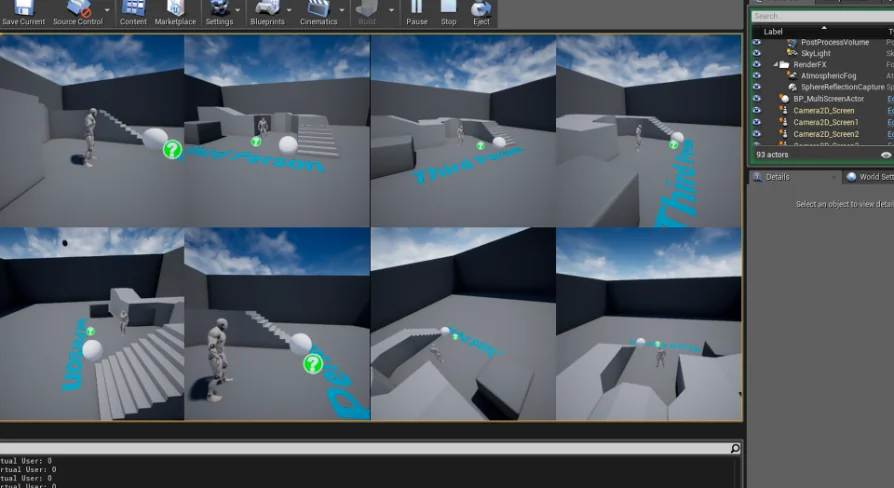
One of the primary functions of MultiScreen is its ability to convert up to eight cameras into customizable widget displays. Additionally, the plugin can process actor outputs, allowing for a wide range of visual sources to be utilized. These conversions occur during runtime, which means the displays are active and responsive while the application is running. Consequently, developers can create complex user interfaces that require live feeds from different points in the world.
Customizable Display Options
Flexibility is a core component of this tool. Users can adjust the position and size of each screen according to their specific layout requirements. Therefore, the visual interface can be tailored to match the aesthetic or functional needs of any project. Whether you need a small security monitor or a large secondary view, the plugin provides the necessary controls to achieve the desired look.
Runtime Performance and Workflow
Because the plugin functions during runtime, it offers immediate feedback for developers and users alike. This allows for dynamic changes to the UI without needing to restart the application. This efficiency is vital for projects that require real-time monitoring or complex multi-view setups. Moreover, the ability to adjust screen parameters on the fly ensures that the user experience remains seamless and interactive.
Development and Support Status
It is important to note that the developer released this product some time ago. While it is no longer receiving new feature updates, the creator is actively updating it to maintain compatibility with current engine versions. However, for those seeking the latest advancements in this technology, the developer recommends looking into the MultiViewProjectionTools plugin. This ensures that users have access to the most modern solutions for their development needs.
Final Take
MultiScreen remains a practical choice for projects requiring multiple camera views and actor-based displays. By providing customizable widgets and runtime flexibility, it simplifies the process of creating complex visual layouts. Even as an older tool, its ongoing compatibility updates ensure it remains a functional asset for modern development workflows. Developers can rely on its core features to deliver dynamic multi-screen experiences.
 Engine Tools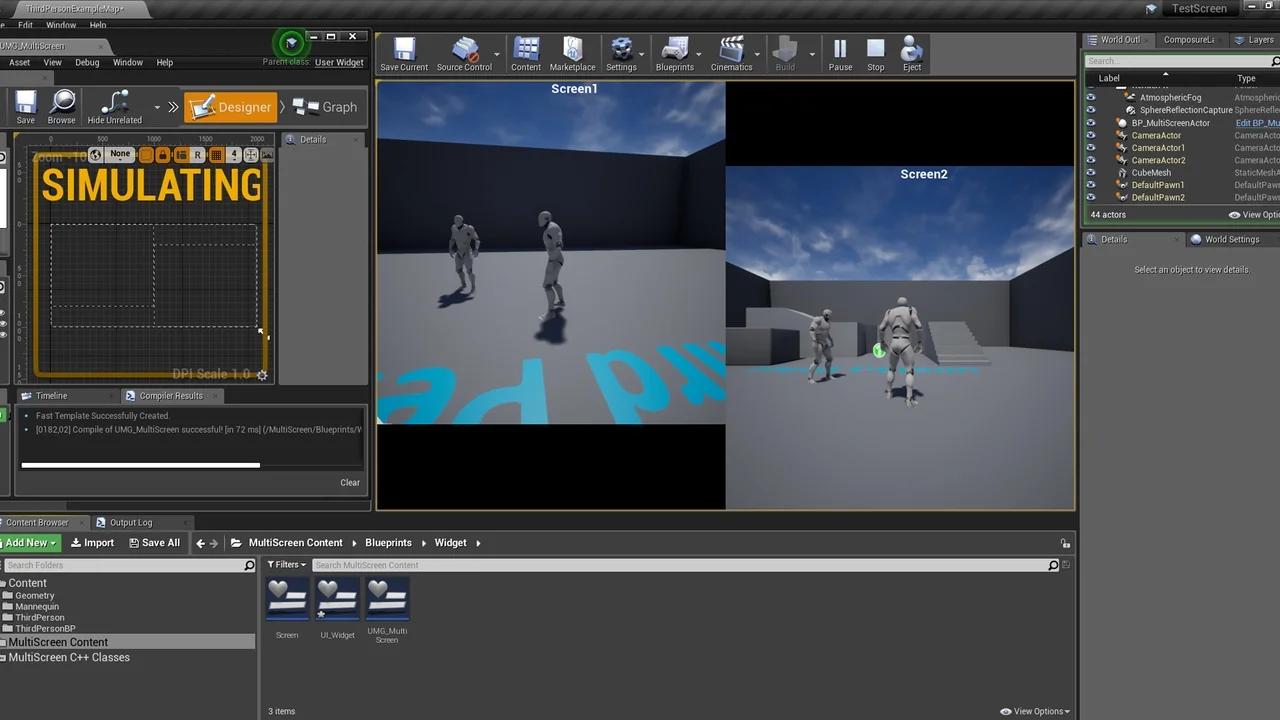
 Engine Tools
 Engine Tools
 Engine Tools