"0341a2901a4ae9aa"{"id":"12279","slug":"building-interior-cubemap-material-function","title":"Building Interior Cubemap Material Function","category":"Building \u0026 Human-made","engine":"4.27,5.0+","assetVersion":"Engine version: 4.27,5.0+","engineVersion":"4.27","tag":"Building","accent":"blue","visual":"luts","summary":"Easily create realistic commercial office windows using this parallax-based material function. It automates interior randomization and nighttime lighting for efficient cityscape development.","platform":"Unreal Engine","publishedAt":"2026-03-07T12:07:33.000Z","updatedAt":"2026-04-19T15:48:00.000Z","sourceNotes":[],"fileContents":[],"compatibility":["Unreal Engine","Engine version: 4.27,5.0+"],"featuredImage":{"alt":"Building Interior Cubemap Material Function","src":"https://3dcghub.com/wp-content/uploads/2026/03/0476f170-5d1d-4d80-9bfd-4dd730fc539a.webp"},"hasDownloadLink":true,"downloads":1,"terms":[{"taxonomy":"category","slug":"building-and-human-made","name":"Building \u0026 Human-made"},{"taxonomy":"post_tag","slug":"building-interior-cubemap-material-function","name":"Building Interior Cubemap Material Function"},{"taxonomy":"post_tag","slug":"nighttime-cityscape","name":"Nighttime Cityscape"},{"taxonomy":"post_tag","slug":"parallax-texture","name":"Parallax Texture"},{"taxonomy":"post_tag","slug":"unreal-engine-windows","name":"Unreal Engine Windows"},{"taxonomy":"post_tag","slug":"world-aligned-texture","name":"World Aligned Texture"}],"galleryImages":[{"src":"https://3dcghub.com/wp-content/uploads/2026/03/00fe23237cf5_b2a033a9-4cee-4bec-acc2-3f5124c2d937.webp","alt":"Building Interior Cubemap Material Function"},{"src":"https://3dcghub.com/wp-content/uploads/2026/03/e83df35c46e9_86de90e8-0295-4d27-b7aa-24cbbc7d59cf.webp","alt":"Building Interior Cubemap Material Function"},{"src":"https://3dcghub.com/wp-content/uploads/2026/03/e2c6aa6c798d_59f1982b-6906-4c16-8558-0b2c516dedf6.webp","alt":"Building Interior Cubemap Material Function"},{"src":"https://3dcghub.com/wp-content/uploads/2026/03/60fc29ddb6bf_e7c2499d-8023-43fc-a2a6-2af871ae4a2a.webp","alt":"Building Interior Cubemap Material Function"},{"src":"https://3dcghub.com/wp-content/uploads/2026/03/e1ae9898160c_612c5c70-2505-4147-ba17-811b6e1492b7.webp","alt":"Building Interior Cubemap Material Function"},{"src":"https://3dcghub.com/wp-content/uploads/2026/03/11e5f36ad3ea_7d5be0fb-6242-4cab-add2-5352c5d005a5.webp","alt":"Building Interior Cubemap Material Function"},{"src":"https://3dcghub.com/wp-content/uploads/2026/03/c0a2a004e3d9_509fd6aa-67c7-440e-b079-2547cba22b3a.webp","alt":"Building Interior Cubemap Material Function"},{"src":"https://3dcghub.com/wp-content/uploads/2026/03/edd2d4683426_57e45f49-b716-4207-9cea-99d7695b74a0.webp","alt":"Building Interior Cubemap Material Function"},{"src":"https://3dcghub.com/wp-content/uploads/2026/03/5a7dd4eba3d0_f8a8e74d-fb67-4799-9e06-7ff99a6a1b3b.webp","alt":"Building Interior Cubemap Material Function"},{"src":"https://3dcghub.com/wp-content/uploads/2026/03/db0a73c8f7c9_f9f142d2-4366-4a0c-b47b-84c4a7114e3b.webp","alt":"Building Interior Cubemap Material Function"},{"src":"https://3dcghub.com/wp-content/uploads/2026/03/b7ccbfdda502_876a86a3-8e38-44a5-a2b9-3adcfe13a96d.webp","alt":"Building Interior Cubemap Material Function"},{"src":"https://3dcghub.com/wp-content/uploads/2026/03/860fe3112a84_a0232b4f-c668-4f44-a332-1d0016b89cca.webp","alt":"Building Interior Cubemap Material Function"},{"src":"https://3dcghub.com/wp-content/uploads/2026/03/a6af267afad1_d7e2d6c3-f1ad-41ac-8b05-e6e993f754eb.webp","alt":"Building Interior Cubemap Material Function"},{"src":"https://3dcghub.com/wp-content/uploads/2026/03/978158f5c8dc_6c479444-bff9-4f71-9a9c-20b29cdf546b.webp","alt":"Building Interior Cubemap Material Function"}],"accessPanel":{"kind":"free-resource","title":"Access this resource","eyebrow":"Free Download","message":"Log in or create a free account to start your download.","fileName":"Content.7z","safetyNote":"All resources are 100% manually reviewed to eliminate all risks.","actionLabel":"Download Free","resourceType":"Resource archive"},"contentHtml":"\u003ch2\u003eOverview of the Building Interior Cubemap Material Function\u003c/h2\u003e\n\u003cp\u003eThe \u003cstrong\u003eBuilding Interior Cubemap Material Function\u003c/strong\u003e is a specialized tool for creating realistic commercial office building window materials. By using just one building window mask, the function automatically generates a complete parallax architectural window effect. This system is based on World Aligned Texture technology. Consequently, it matches building UVs directly within Unreal Engine. This eliminates the need to create separate UVs in external DDC software. Therefore, the workflow is significantly faster for environment artists.\u003c/p\u003e\n\n\u003ch2\u003eAutomated Interior Randomization\u003c/h2\u003e\n\u003cp\u003eCreating large-scale urban environments is more efficient with the \u003cstrong\u003eBuilding Interior Cubemap Material Function\u003c/strong\u003e. It automatically randomizes the arrangement of interior scenes. Moreover, it handles the distribution of nighttime lighting across the building. This allows developers to quickly achieve extensive nighttime architectural scenes. The randomization ensures that buildings do not look repetitive. Furthermore, it maintains a high level of visual variety across cityscapes.\u003c/p\u003e\n\n\u003ch2\u003eCustomization and Parameter Settings\u003c/h2\u003e\n\u003cp\u003eThe developer has included a wide range of parameter settings for precise control. Users can quickly adjust window colors and lighting brightness to suit their project needs. Additionally, these parameters allow for various other visual effects to be modified. This flexibility helps the material fit into different lighting conditions. As a result, the transition between day and night scenes is seamless.\u003c/p\u003e\n\n\u003ch2\u003eTechnical Features and Compatibility\u003c/h2\u003e\n\u003cp\u003eRecent updates have enhanced the \u003cstrong\u003eBuilding Interior Cubemap Material Function\u003c/strong\u003e for modern workflows. For instance, the creator fixed deformation issues caused by model scaling. There is also specific support for Nanite models within Unreal Engine 5. The function now includes manual UV channel parameters for better asset compatibility. Furthermore, the developer addressed errors regarding missing Window Mask UVs input. These improvements ensure the material remains stable across different model types.\u003c/p\u003e\n\n\u003ch2\u003eClosing Notes\u003c/h2\u003e\n\u003cp\u003eThe clearest takeaway is that the \u003cstrong\u003eBuilding Interior Cubemap Material Function\u003c/strong\u003e provides an efficient way to handle complex architectural windows. It simplifies the development process by automating UV matching and scene randomization. Thus, it is a valuable asset for creating believable modern environments. Whether building a single skyscraper or an entire city, this tool provides the necessary features for high-quality results.\u003c/p\u003e\n\n\u003ch2\u003eMore From The Same Workflow\u003c/h2\u003e\n\u003cul\u003e\n\u003cli\u003e\u003ca href=\"https://3dcghub.com/parallax-card-material/\" title=\"Parallax Card Material\"\u003eParallax Card Material\u003c/a\u003e\u003c/li\u003e\n\u003cli\u003e\u003ca href=\"https://3dcghub.com/realistic-moon/\" title=\"Realistic Moon\"\u003eRealistic Moon\u003c/a\u003e\u003c/li\u003e\n\u003cli\u003e\u003ca href=\"https://3dcghub.com/infinity-weather/\" title=\"Infinity Weather\"\u003eInfinity Weather\u003c/a\u003e\u003c/li\u003e\n\u003cli\u003e\u003ca href=\"https://3dcghub.com/brushify-natural-roads-pack/\" title=\"Brushify – Natural Roads Pack\"\u003eBrushify – Natural Roads Pack\u003c/a\u003e\u003c/li\u003e\n\u003cli\u003e\u003ca href=\"https://3dcghub.com/brushify-moon-pack/\" title=\"Brushify – Moon Pack\"\u003eBrushify – Moon Pack\u003c/a\u003e\u003c/li\u003e\n\u003c/ul\u003e\n\n\u003ch2\u003eAsset Gallery\u003c/h2\u003e","contentTextLength":2709,"navigation":{"current":3267,"total":4017,"previous":{"id":"12288","slug":"car-paint","title":"Car Paint","category":"Building \u0026 Human-made","platform":"Unreal Engine","updatedAt":"2026-04-19T15:48:00.000Z"},"next":{"id":"12262","slug":"speed-lines","title":"Speed Lines","category":"Art \u0026 Traditional","platform":"Unreal Engine","updatedAt":"2026-04-19T15:48:00.000Z"}},"relatedResources":[{"id":"12339","slug":"marble-materials-pack-03","title":"Marble Materials Pack 03","category":"Building \u0026 Human-made","engine":"4.27,5.0+","assetVersion":"Engine version: 4.27,5.0+","engineVersion":"4.27","tag":"Building","accent":"blue","visual":"luts","summary":"Enhance your 3D environments with the Marble Materials Pack 03. This collection features 20 realistic marble and stone materials designed for modern interior design and architectural visualization projects.","platform":"Unreal Engine","publishedAt":"2026-03-07T12:17:37.000Z","updatedAt":"2026-04-19T15:47:59.000Z","sourceNotes":[],"fileContents":[],"compatibility":["Unreal Engine","Engine version: 4.27,5.0+"],"featuredImage":{"alt":"Marble Materials Pack 03","src":"https://3dcghub.com/wp-content/uploads/2026/03/030df623-74d2-4ce6-b568-488cedf753ec.webp"},"hasDownloadLink":true,"downloads":0},{"id":"12348","slug":"realistic-windows-with-fake-interiors","title":"Realistic Windows with Fake interiors","category":"Building \u0026 Human-made","engine":"4.26+,5.0+","assetVersion":"Engine version: 4.26+,5.0+","engineVersion":"4.26","tag":"Building","accent":"blue","visual":"luts","summary":"Enhance your urban environments with Realistic Windows with Fake interiors. This optimized system uses custom shaders to create the illusion of depth without the high performance cost of modeled rooms.","platform":"Unreal Engine","publishedAt":"2026-03-07T12:19:51.000Z","updatedAt":"2026-04-19T15:47:59.000Z","sourceNotes":[],"fileContents":[],"compatibility":["Unreal Engine","Engine version: 4.26+,5.0+"],"featuredImage":{"alt":"Realistic Windows with Fake interiors","src":"https://3dcghub.com/wp-content/uploads/2026/03/e7c3f1d2-8e45-48e2-92d4-44a6ff4707ba.webp"},"hasDownloadLink":true,"downloads":0},{"id":"12415","slug":"wparallax-rooms-2-bedrooms","title":"wParallax Rooms 2 Bedrooms","category":"Building \u0026 Human-made","engine":"5.3+","assetVersion":"Engine version: 5.3+","engineVersion":"4.27","tag":"Building","accent":"blue","visual":"luts","summary":"Enhance your 3D environments with wParallax Rooms 2 Bedrooms. This collection features high-quality EXR maps and a custom shader setup for realistic interior mapping in Unreal Engine.","platform":"Unreal Engine","publishedAt":"2026-03-07T12:24:51.000Z","updatedAt":"2026-04-19T15:47:57.000Z","sourceNotes":[],"fileContents":[],"compatibility":["Unreal Engine","Engine version: 5.3+"],"featuredImage":{"alt":"wParallax Rooms 2 Bedrooms","src":"https://3dcghub.com/wp-content/uploads/2026/03/d5df8e5b-a410-491d-8648-04e867f3e894.webp"},"hasDownloadLink":true,"downloads":1}]}
Building
Building Interior Cubemap Material Function
Easily create realistic commercial office windows using this parallax-based material function. It automates interior randomization and nighttime lighting for efficient cityscape development.
Overview of the Building Interior Cubemap Material Function
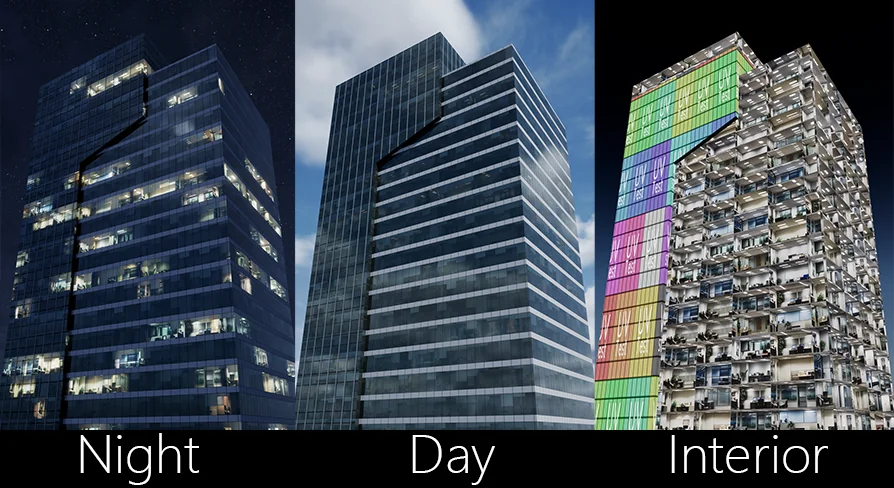
The Building Interior Cubemap Material Function is a specialized tool for creating realistic commercial office building window materials. By using just one building window mask, the function automatically generates a complete parallax architectural window effect. This system is based on World Aligned Texture technology. Consequently, it matches building UVs directly within Unreal Engine. This eliminates the need to create separate UVs in external DDC software. Therefore, the workflow is significantly faster for environment artists.
Automated Interior Randomization
Creating large-scale urban environments is more efficient with the Building Interior Cubemap Material Function. It automatically randomizes the arrangement of interior scenes. Moreover, it handles the distribution of nighttime lighting across the building. This allows developers to quickly achieve extensive nighttime architectural scenes. The randomization ensures that buildings do not look repetitive. Furthermore, it maintains a high level of visual variety across cityscapes.
Customization and Parameter Settings
The developer has included a wide range of parameter settings for precise control. Users can quickly adjust window colors and lighting brightness to suit their project needs. Additionally, these parameters allow for various other visual effects to be modified. This flexibility helps the material fit into different lighting conditions. As a result, the transition between day and night scenes is seamless.
Technical Features and Compatibility
Recent updates have enhanced the Building Interior Cubemap Material Function for modern workflows. For instance, the creator fixed deformation issues caused by model scaling. There is also specific support for Nanite models within Unreal Engine 5. The function now includes manual UV channel parameters for better asset compatibility. Furthermore, the developer addressed errors regarding missing Window Mask UVs input. These improvements ensure the material remains stable across different model types.
Closing Notes
The clearest takeaway is that the Building Interior Cubemap Material Function provides an efficient way to handle complex architectural windows. It simplifies the development process by automating UV matching and scene randomization. Thus, it is a valuable asset for creating believable modern environments. Whether building a single skyscraper or an entire city, this tool provides the necessary features for high-quality results.
 Building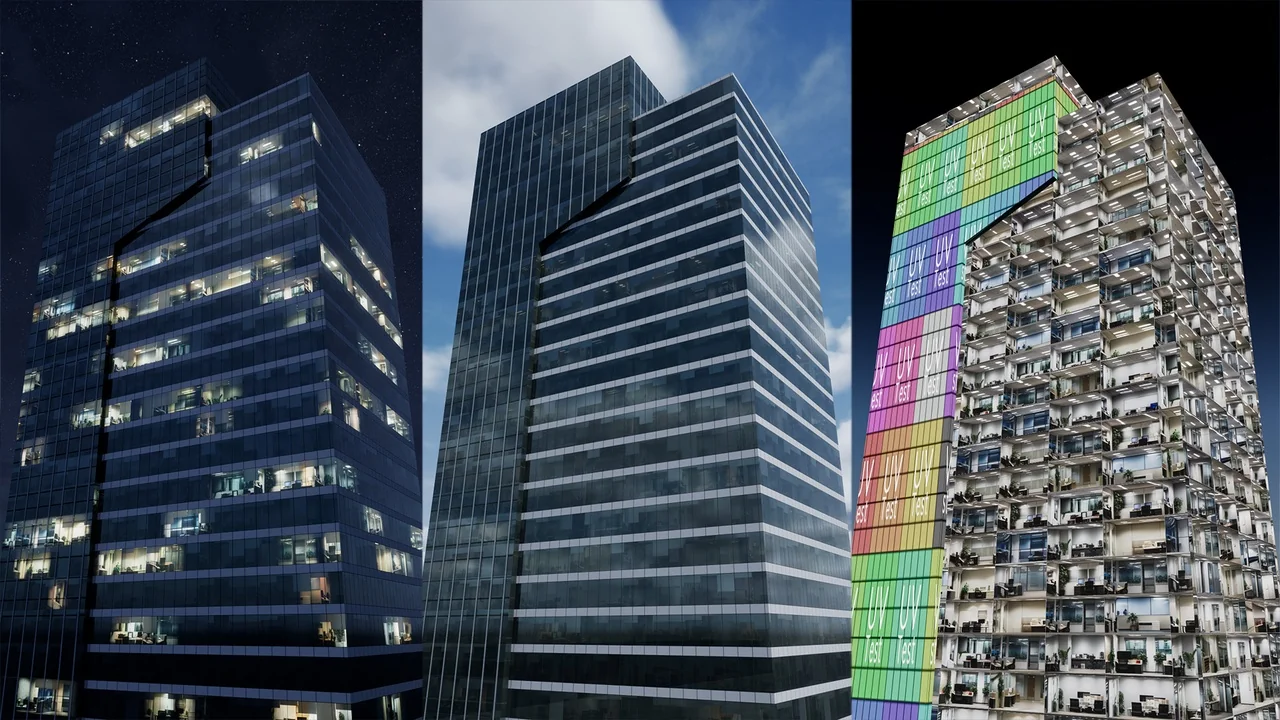
 Building
 Building
 Building