"4481da9c895ef786"{"id":"1001323","slug":"custom-details-sections","title":"Custom Details Sections","category":"Engine Tools","engine":"5.2 - 5.4","assetVersion":"Asset Version: 1.0.2","engineVersion":"Engine Version: 5.2 - 5.4","tag":"Engine Tools","accent":"blue","visual":"mech","summary":"Organize Unreal Engine actor details panels with Custom Details Sections, adding filtering buttons across Blueprint and code classes to cut errors.","platform":"Unreal Engine","publishedAt":"2026-10-02T09:50:11.134Z","updatedAt":"2026-10-02T09:50:11.134Z","sourceNotes":[],"fileContents":[],"compatibility":["Unreal Engine","Asset Version: 1.0.2","Engine Version: 5.2 - 5.4"],"featuredImage":{"alt":"Custom Details Sections","src":"/wp-content/uploads/published/2026/10/fbdd5327640d-e6a32522-b79d-4846-8a5b-2907c26f9eef-255b65c707.webp"},"hasDownloadLink":true,"downloads":0,"terms":[{"taxonomy":"category","slug":"engine-tools-tools-and-plugins","name":"Engine Tools"}],"galleryImages":[{"src":"/wp-content/uploads/published/2026/10/fce0f5b27b7d-2bb583ff-3966-4fb6-842c-fb57455772e8-2aeb48dabb.webp","alt":"Custom Details Sections"},{"src":"/wp-content/uploads/published/2026/10/ae216585d9ec-643b56fa-14db-4b33-9247-d3c48c4cfb6d-fb58a7f180.webp","alt":"Custom Details Sections"},{"src":"/wp-content/uploads/published/2026/10/f59a17b0cc6b-e06f4fee-0748-43f3-8e8c-e1f8b6d51513-8c5608293e.webp","alt":"Custom Details Sections"}],"accessPanel":{"kind":"resource","title":"Download this resource","eyebrow":"Free Download","message":"Log in or create a free account to start your download.","fileName":"Custom Details Sections.7z","safetyNote":"Resources are manually reviewed before listing to improve quality and reduce obvious risks.","actionLabel":"Download Free","resourceType":"Resource archive"},"contentHtml":"\u003cp\u003eNavigating the Unreal Engine interface during active level design and asset configuration centers heavily on the actor details panel. Whenever an actor is placed in a level or opened in an editor viewport, its exposed variables, component parameters, and transform data populate this primary panel. Custom Details Sections directly restructures this central workspace by adding dedicated custom section buttons to the actor details panel, transforming how designers locate, inspect, and tweak properties.\u003c/p\u003e \u003ch2\u003eCustom Section Buttons for the Actor Details Panel\u003c/h2\u003e\n\u003cp\u003eIn standard production environments, complex actors gather dozens or hundreds of exposed parameters. Scrolling through dense category trees to find a single variable consumes time and disrupts concentration. Custom Details Sections introduces interactive buttons positioned within the details interface itself. Instead of forcing users to rely solely on manual text searches or default rollouts, these custom buttons serve as active filters.\u003c/p\u003e \u003cp\u003eSelecting a section button immediately filters the visible properties to reflect only the data relevant to that specific task. A designer tasked with tuning specific behaviors can isolate those exact properties with a single click. By grouping and presenting parameters through distinct section buttons, the actor interface remains uncluttered, presenting a clean layout that keeps critical controls readily visible rather than buried beneath inactive menus.\u003c/p\u003e \u003ch2\u003eProperty Filtering to Minimize Design Errors\u003c/h2\u003e\n\u003cp\u003eComplex actor hierarchies often invite configuration mistakes. When numerical inputs, object references, and boolean flags sit tightly grouped without intuitive filtering, team members risk altering unrelated settings by mistake. An accidental adjustment to an offset vector or an unintended toggle on a gameplay flag can introduce subtle bugs that take hours to track down across a project.\u003c/p\u003e \u003cp\u003eSimplifying property filtering directly targets this issue. By partitioning actor attributes behind dedicated section buttons, Custom Details Sections reduces accidental edits. Users work inside an isolated, relevant set of parameters tailored to the current adjustment task. This focused view prevents accidental scrolling past intended fields and ensures game designers interact solely with the properties meant for their immediate workflow phase.\u003c/p\u003e \u003ch2\u003eUnified Handling Across Code and Blueprint Classes\u003c/h2\u003e\n\u003cp\u003eUnreal Engine projects routinely bridge native C++ architecture and visual Blueprint scripting. Technical teams frequently build base functionality in code classes before extending or instancing those objects inside Blueprint assets for designers. Tooling that only functions on one side of this divide creates fragmentation across a team.\u003c/p\u003e \u003cp\u003eCustom Details Sections avoids this friction by providing complete compatibility with both code and Blueprint classes. Programmers implementing foundational classes can establish custom sections that carry forward seamlessly into downstream assets. Designers setting up gameplay logic or aesthetic parameters entirely within Blueprints enjoy the exact same button-driven filtering. This cross-paradigm support ensures that actor properties remain structured consistently, regardless of how a particular asset was authored under the hood.\u003c/p\u003e \u003ch2\u003eAccessible Property Customization for Game Designers\u003c/h2\u003e\n\u003cp\u003eTooling within game development must prioritize accessibility to keep creative iteration fast. Custom Details Sections emphasizes a user-friendly interface that does not require deep technical overhead to configure or navigate. Making actor properties effortless to customize enables team members of varied technical backgrounds to focus on gameplay tuning and scene composition rather than wrestling with UI navigation.\u003c/p\u003e \u003cp\u003eThe visual clarity created by section buttons allows game designers to approach unfamiliar actors with greater confidence. When an actor clearly defines its properties into discrete sections, discovering how to tune that entity becomes immediate. This accessibility lowers onboarding friction for new team members and expedites daily iteration passes across active production scenes.\u003c/p\u003e \u003ch2\u003eOpen-Source Editor Architecture and Integration\u003c/h2\u003e\n\u003cp\u003eOperating as an open-source editor plugin, Custom Details Sections gives development teams full visibility into its implementation. Studios can inspect the underlying mechanics, evaluate how it hooks into the Unreal Engine editor interface, and adapt the functionality to meet custom studio conventions if necessary. The open nature of the project ensures transparency and long-term maintainability for teams that require deep ownership of their production pipeline.\u003c/p\u003e \u003cp\u003eThe plugin also maintains compatibility alongside specialized editor workflows, including setups running Network Clock systems. Because it focuses strictly on improving how the actor details panel processes and displays properties in the editor, it fits cleanly into existing production pipelines without demanding alterations to game runtime architecture or asset serialization standards.\u003c/p\u003e \u003ch2\u003ePractical Takeaway for Development Teams\u003c/h2\u003e\n\u003cp\u003eCustom Details Sections provides an effective, low-friction solution to one of the most persistent bottlenecks in Unreal Engine level and actor design: cluttered details panels. By empowering teams to establish custom section buttons that filter properties across both C++ code and Blueprint classes, the plugin cleans up editor workspaces and actively prevents costly setup errors during daily development.\u003c/p\u003e\n\n\u003ch2\u003eExplore Similar Assets\u003c/h2\u003e\n\u003cul\u003e\n\u003cli\u003e\u003ca href=\"https://3dcghub.com/logic-driver-pro-blueprint-editor-for-dialogue-quest-combat-and-fsm-systems/\" title=\"Logic Driver Pro - Blueprint Editor for Dialogue, Quest, Combat \u0026amp; FSM Systems\"\u003eLogic Driver Pro - Blueprint Editor for Dialogue, Quest, Combat \u0026amp; FSM Systems\u003c/a\u003e\u003c/li\u003e\n\u003cli\u003e\u003ca href=\"https://3dcghub.com/archvis-tools/\" title=\"ArchVis Tools\"\u003eArchVis Tools\u003c/a\u003e\u003c/li\u003e\n\u003cli\u003e\u003ca href=\"https://3dcghub.com/fgear-vehicle-physics/\" title=\"FGear Vehicle Physics\"\u003eFGear Vehicle Physics\u003c/a\u003e\u003c/li\u003e\n\u003cli\u003e\u003ca href=\"https://3dcghub.com/hypergrid/\" title=\"HyperGrid\"\u003eHyperGrid\u003c/a\u003e\u003c/li\u003e\n\u003cli\u003e\u003ca href=\"https://3dcghub.com/roadmap-navigation/\" title=\"Roadmap Navigation\"\u003eRoadmap Navigation\u003c/a\u003e\u003c/li\u003e\n\u003c/ul\u003e","contentTextLength":5654,"navigation":{"current":17,"total":3269,"previous":{"id":"1001324","slug":"flipwidget","title":"FlipWidget","category":"Engine Tools","platform":"Unreal Engine","updatedAt":"2026-10-02T09:52:09.334Z"},"next":{"id":"1001322","slug":"collision-settings-debugger-2","title":"Collision Settings Debugger","category":"Engine Tools","platform":"Unreal Engine","updatedAt":"2026-10-02T09:47:46.569Z"}},"relatedResources":[{"id":"1000276","slug":"archvis-tools","title":"ArchVis Tools","category":"Engine Tools","engine":"5.4 - 5.7","assetVersion":"Asset Version: 1.6.0 - 1.6.6","engineVersion":"Engine Version: 5.4 - 5.7","tag":"Engine Tools","accent":"blue","visual":"mech","summary":"An Unreal Engine plugin featuring the ArchVisCineCamera for 2-point perspective correction, custom Movie Render Queue passes, and Dataprep operations.","platform":"Unreal Engine","publishedAt":"2026-07-02T18:05:33.151Z","updatedAt":"2026-10-03T17:43:32.771Z","sourceNotes":[],"fileContents":[],"compatibility":["Unreal Engine","Asset Version: 1.6.0 - 1.6.6","Engine Version: 5.4 - 5.7"],"featuredImage":{"alt":"ArchVis Tools","src":"/wp-content/uploads/published/2026/07/575ae2bd9d17-51fe82c5-872c-4b3c-8a56-5032ba205671-80d2a452df.webp"},"hasDownloadLink":true,"downloads":0},{"id":"1001056","slug":"logic-driver-pro-blueprint-editor-for-dialogue-quest-combat-and-fsm-systems","title":"Logic Driver Pro - Blueprint Editor for Dialogue, Quest, Combat \u0026 FSM Systems","category":"Engine Tools","engine":"5.3","assetVersion":"Asset Version: 2.8.1","engineVersion":"Engine Version: 5.3","tag":"Engine Tools","accent":"blue","visual":"mech","summary":"Logic Driver Pro is a node-based state machine editor for Unreal Engine. Build custom nodes in blueprints or C++, then author AI, dialogue, quests, and combat f","platform":"Unreal Engine","publishedAt":"2026-08-30T14:36:58.563Z","updatedAt":"2026-08-30T14:36:58.563Z","sourceNotes":[],"fileContents":[],"compatibility":["Unreal Engine","Asset Version: 2.8.1","Engine Version: 5.3"],"featuredImage":{"alt":"Logic Driver Pro - Blueprint Editor for Dialogue, Quest, Combat \u0026 FSM Systems","src":"/wp-content/uploads/published/2026/08/9c80a1e57566-a7733abf-eb2c-4a09-9e80-e6485475e449-f947997ebc.webp"},"hasDownloadLink":true,"downloads":1},{"id":"1000000","slug":"fgear-vehicle-physics","title":"FGear Vehicle Physics","category":"Engine Tools","engine":"5.1, 5.3 - 5.6","assetVersion":"1.6.1 - 1.8.3","engineVersion":"5.1, 5.3 - 5.6","tag":"Engine Tools","accent":"blue","visual":"mech","summary":"FGear Vehicle Physics is a custom vehicle physics solution for arcade and semi-arcade racing games, balancing realism, control, demos, docs, and example use.","platform":"Unreal Engine","publishedAt":"2026-05-19T08:25:16.034Z","updatedAt":"2026-05-19T14:42:25.560Z","sourceNotes":[],"fileContents":[],"compatibility":["Unreal Engine","Asset Version: 1.6.1 - 1.8.3","Engine version: 5.1, 5.3 - 5.6"],"featuredImage":{"alt":"FGear Vehicle Physics","src":"/wp-content/uploads/published/2026/05/5158990cfbe4-d351fdd6-e983-4b6d-b3d9-50ebc7959814-61b2dd7e26.webp"},"hasDownloadLink":true,"downloads":1}]}
Engine Tools
Custom Details Sections
Organize Unreal Engine actor details panels with Custom Details Sections, adding filtering buttons across Blueprint and code classes to cut errors.
Navigating the Unreal Engine interface during active level design and asset configuration centers heavily on the actor details panel. Whenever an actor is placed in a level or opened in an editor viewport, its exposed variables, component parameters, and transform data populate this primary panel. Custom Details Sections directly restructures this central workspace by adding dedicated custom section buttons to the actor details panel, transforming how designers locate, inspect, and tweak properties.
Custom Section Buttons for the Actor Details Panel
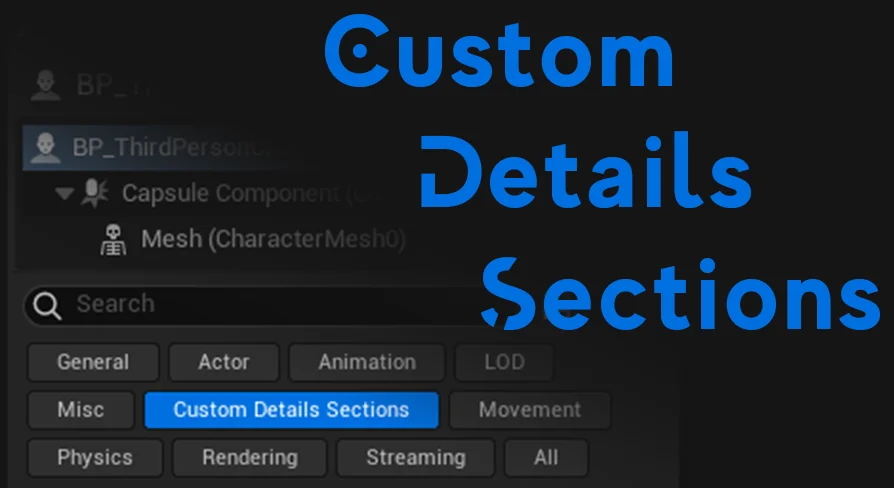
In standard production environments, complex actors gather dozens or hundreds of exposed parameters. Scrolling through dense category trees to find a single variable consumes time and disrupts concentration. Custom Details Sections introduces interactive buttons positioned within the details interface itself. Instead of forcing users to rely solely on manual text searches or default rollouts, these custom buttons serve as active filters.
Selecting a section button immediately filters the visible properties to reflect only the data relevant to that specific task. A designer tasked with tuning specific behaviors can isolate those exact properties with a single click. By grouping and presenting parameters through distinct section buttons, the actor interface remains uncluttered, presenting a clean layout that keeps critical controls readily visible rather than buried beneath inactive menus.
Property Filtering to Minimize Design Errors
Complex actor hierarchies often invite configuration mistakes. When numerical inputs, object references, and boolean flags sit tightly grouped without intuitive filtering, team members risk altering unrelated settings by mistake. An accidental adjustment to an offset vector or an unintended toggle on a gameplay flag can introduce subtle bugs that take hours to track down across a project.
Simplifying property filtering directly targets this issue. By partitioning actor attributes behind dedicated section buttons, Custom Details Sections reduces accidental edits. Users work inside an isolated, relevant set of parameters tailored to the current adjustment task. This focused view prevents accidental scrolling past intended fields and ensures game designers interact solely with the properties meant for their immediate workflow phase.
Unified Handling Across Code and Blueprint Classes
Unreal Engine projects routinely bridge native C++ architecture and visual Blueprint scripting. Technical teams frequently build base functionality in code classes before extending or instancing those objects inside Blueprint assets for designers. Tooling that only functions on one side of this divide creates fragmentation across a team.
Custom Details Sections avoids this friction by providing complete compatibility with both code and Blueprint classes. Programmers implementing foundational classes can establish custom sections that carry forward seamlessly into downstream assets. Designers setting up gameplay logic or aesthetic parameters entirely within Blueprints enjoy the exact same button-driven filtering. This cross-paradigm support ensures that actor properties remain structured consistently, regardless of how a particular asset was authored under the hood.
Accessible Property Customization for Game Designers
Tooling within game development must prioritize accessibility to keep creative iteration fast. Custom Details Sections emphasizes a user-friendly interface that does not require deep technical overhead to configure or navigate. Making actor properties effortless to customize enables team members of varied technical backgrounds to focus on gameplay tuning and scene composition rather than wrestling with UI navigation.
The visual clarity created by section buttons allows game designers to approach unfamiliar actors with greater confidence. When an actor clearly defines its properties into discrete sections, discovering how to tune that entity becomes immediate. This accessibility lowers onboarding friction for new team members and expedites daily iteration passes across active production scenes.
Open-Source Editor Architecture and Integration
Operating as an open-source editor plugin, Custom Details Sections gives development teams full visibility into its implementation. Studios can inspect the underlying mechanics, evaluate how it hooks into the Unreal Engine editor interface, and adapt the functionality to meet custom studio conventions if necessary. The open nature of the project ensures transparency and long-term maintainability for teams that require deep ownership of their production pipeline.
The plugin also maintains compatibility alongside specialized editor workflows, including setups running Network Clock systems. Because it focuses strictly on improving how the actor details panel processes and displays properties in the editor, it fits cleanly into existing production pipelines without demanding alterations to game runtime architecture or asset serialization standards.
Practical Takeaway for Development Teams
Custom Details Sections provides an effective, low-friction solution to one of the most persistent bottlenecks in Unreal Engine level and actor design: cluttered details panels. By empowering teams to establish custom section buttons that filter properties across both C++ code and Blueprint classes, the plugin cleans up editor workspaces and actively prevents costly setup errors during daily development.
 Engine Tools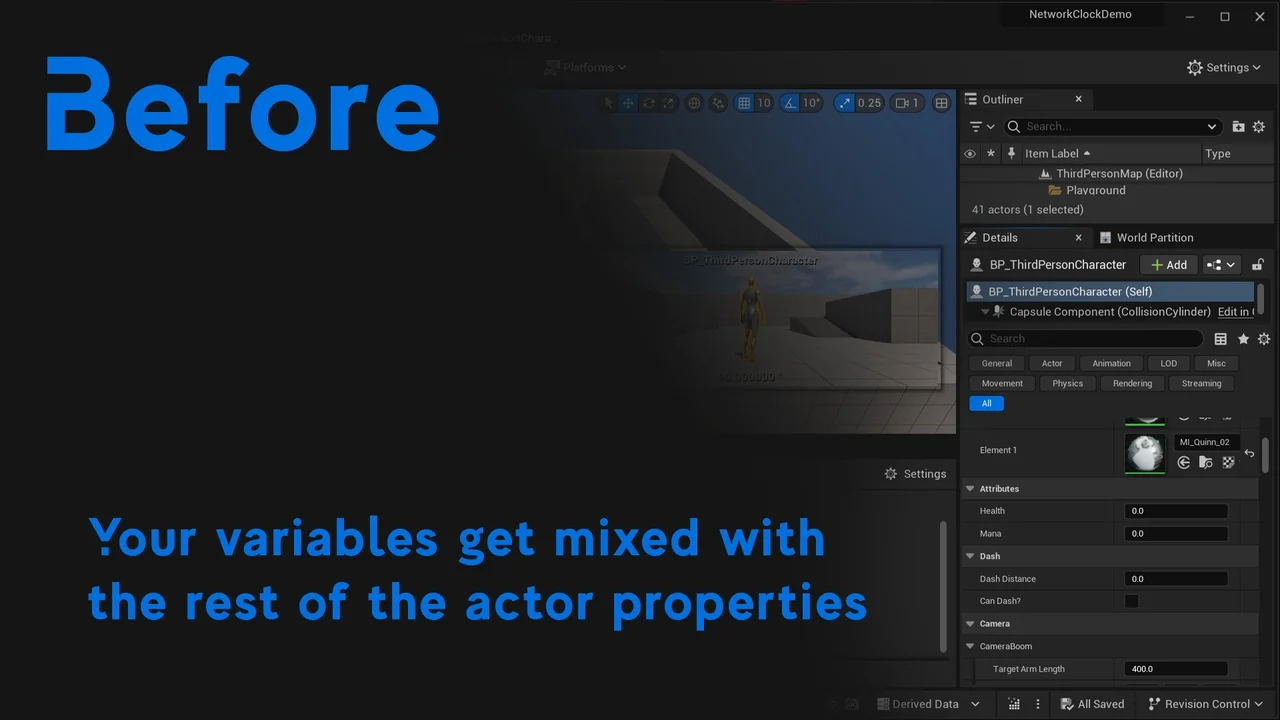
 Engine Tools
 Engine Tools
 Engine Tools