"031373f479d9561a"{"id":"28564","slug":"art-of-shader-film-and-special-effects","title":"Art of Shader - Film And Special Effects","category":"Variety","engine":"5.1+","assetVersion":"Engine version: 5.1+","engineVersion":"","tag":"Variety","accent":"blue","visual":"luts","summary":"Art of Shader - Film And Special Effects focuses on cinematic image treatment through advanced post-process materials. Its Blueprint-driven workflow makes it easier to combine, blend, and group effects while keeping each look highly adjustable.","platform":"Unreal Engine","publishedAt":"2026-05-17T13:13:44.000Z","updatedAt":"2026-05-17T13:13:54.000Z","sourceNotes":[],"fileContents":[],"compatibility":["Unreal Engine","Engine version: 5.1+"],"featuredImage":{"alt":"Art of Shader - Film And Special Effects","src":"https://3dcghub.com/wp-content/uploads/2026/05/0d2392df6753_a14b78aa-9364-4758-b087-a9276d782faf.webp"},"hasDownloadLink":true,"downloads":0,"terms":[{"taxonomy":"category","slug":"variety","name":"Variety"},{"taxonomy":"post_tag","slug":"materials","name":"Materials"},{"taxonomy":"post_tag","slug":"unreal-engine-5","name":"Unreal Engine 5"},{"taxonomy":"post_tag","slug":"vfx","name":"VFX"}],"galleryImages":[{"src":"https://3dcghub.com/wp-content/uploads/2026/05/a9293f58e3f0_f09a5bd3-6f40-4d0a-bfe4-32caf36f460d.webp","alt":"Art of Shader - Film And Special Effects"},{"src":"https://3dcghub.com/wp-content/uploads/2026/05/676847ecaee1_4273c7e8-e27a-44d7-9bef-c14991b7c24c.webp","alt":"Art of Shader - Film And Special Effects"},{"src":"https://3dcghub.com/wp-content/uploads/2026/05/46dcb4dc744d_579d456b-d316-4bc8-b725-cd7d7d0c7f47.webp","alt":"Art of Shader - Film And Special Effects"},{"src":"https://3dcghub.com/wp-content/uploads/2026/05/aa1e1094a549_de5fadc3-4dd6-4974-ad37-e058dc454250.webp","alt":"Art of Shader - Film And Special Effects"},{"src":"https://3dcghub.com/wp-content/uploads/2026/05/8e77a55be232_04eec398-6c13-485b-b749-24cd4792a2d0.webp","alt":"Art of Shader - Film And Special Effects"},{"src":"https://3dcghub.com/wp-content/uploads/2026/05/7fecb9e16ec5_62ca3930-882d-4f72-85e7-833420424246.webp","alt":"Art of Shader - Film And Special Effects"},{"src":"https://3dcghub.com/wp-content/uploads/2026/05/f9dd722ea582_8de61549-70b3-43c6-b16e-671a4bc59417.webp","alt":"Art of Shader - Film And Special Effects"},{"src":"https://3dcghub.com/wp-content/uploads/2026/05/bcbae4ad1825_f8e5d766-fc77-4ae4-aac8-53ebf33fb495.webp","alt":"Art of Shader - Film And Special Effects"}],"accessPanel":{"kind":"resource","title":"Access this resource","eyebrow":"Free Download","message":"Log in or create a free account to start your download.","fileName":"Content.7z","safetyNote":"All resources are 100% manually reviewed to eliminate all risks.","actionLabel":"Download Free","resourceType":"Resource archive"},"contentHtml":"\u003cp\u003eSome scenes need more than solid lighting and strong environment work. They need image treatment that pushes the frame toward a stylized film mood, a damaged or textured screen feel, or a more deliberately cinematic presentation. \u003cstrong\u003eArt of Shader - Film And Special Effects\u003c/strong\u003e Is driven by that layer of visual control, offering advanced Post Process Blendable Materials that can be applied to a scene to shift its tone and finish through film-inspired effects.\u003c/p\u003e \u003cp\u003eThe pack sits comfortably in projects that want the final image to feel authored rather than neutral. It targets the look and feel of cinema through post-processing, giving artists and developers a collection of effects that can shape a scene after the core environment, materials, and lighting are already in place. That makes it relevant not only for games, but also for film work and other digital projects where mood, texture, and screen-space styling matter.\u003c/p\u003e \u003ch2\u003eFilm-inspired post processing that changes the character of a scene\u003c/h2\u003e\n\u003cp\u003eThe identity of this pack starts with its set of advanced Post Process Blendable Materials. These materials provide a range of high-quality, film-inspired post-processing effects that can be applied directly to the scene. Instead of changing the scene through object-level material replacement or environment reconstruction, the pack works at the post-process stage, where the image can be pushed toward a stronger cinematic look and feel.\u003c/p\u003e \u003cp\u003eThat gives the resource a very specific creative role. It is useful when the environment already communicates place and form, but the project still needs a more curated screen image. A scene can move closer to a film treatment, a stylized dramatic pass, or a more expressive visual finish through post-process layering. The emphasis on film and special effects suggests a toolkit for shaping presentation rather than rebuilding content.\u003c/p\u003e \u003cp\u003eBecause the effects are described as high quality and film-inspired, the pack fits projects that want to control mood in a polished way. It can support scenes that need atmosphere, visual intensity, or a more deliberate editorial style. In practical use, that means the pack is less about one fixed preset and more about giving the image a range of possible screen-space identities.\u003c/p\u003e \u003ch2\u003eBlueprint Actors make combining and grouping effects easier\u003c/h2\u003e\n\u003cp\u003eA major part of the workflow comes from the included Blueprint Actors. These are there to make it easier to combine, blend, and group materials based on common properties. This is relevant because post-process work often becomes more useful when multiple treatments are working together instead of being used in isolation. A single effect can establish a tone, but a combined stack can define the full language of a sequence, level, or project.\u003c/p\u003e \u003cp\u003eIn this pack, the Blueprint Actors support that kind of layered approach. Artists or developers can blend materials together, organize them around shared properties, and build a look that feels intentional instead of improvised. Grouping by common properties also points to a cleaner way of managing related effects, which can help when a project needs consistency across several scenes or when a team wants repeatable visual setups.\u003c/p\u003e \u003cp\u003eThat workflow is especially useful for creators who want to experiment without getting trapped in a rigid one-effect-at-a-time process. A cinematic look is rarely the result of just one adjustment. It usually comes from how multiple visual treatments interact. By making those combinations and blends easier to manage through Blueprint Actors, the pack supports a more flexible and creative approach to image finishing.\u003c/p\u003e \u003ch2\u003eArt of Shader - Film And Special Effects as a look-building tool\u003c/h2\u003e\n\u003cp\u003eThe strongest creative use for this pack is in look development. Each effect is highly customizable, with settings and parameters that can be tweaked to reach the desired result. That level of control means the resource is not limited to a narrow visual outcome. It can be adapted to different tones, intensities, and scene requirements depending on what the project needs.\u003c/p\u003e \u003cp\u003eCustomization changes the pack from a simple effect collection into a more practical visual toolset. If a scene needs only a subtle film treatment, the parameters can be adjusted to keep the result restrained. If the goal is a more assertive special-effects finish, those same controls allow the look to be pushed further. The important point is that the pack is structured through adjustment rather than fixed output.\u003c/p\u003e \u003cp\u003eFor artists, this makes the resource useful during iterative visual development. A project can move through several different versions of its final image without abandoning the same underlying toolkit. For developers, it offers a way to shape the tone of gameplay scenes, cutscenes, or other in-engine moments while keeping the process controllable. The pack is equally relevant when the work is aimed at film, video games, or other digital projects, which broadens its fit without changing its core purpose.\u003c/p\u003e \u003cp\u003eThis gives a pack that can be used creatively at several scales. It can help define the signature look of an entire project, establish the mood of a specific sequence, or refine the screen treatment of selected scenes that need a stronger cinematic identity. Since the effects are adjustable, the same toolkit can support both consistency and variation depending on how those parameters are used.\u003c/p\u003e \u003ch2\u003eFrom cinematic mood to special effects in film, games, and digital projects\u003c/h2\u003e\n\u003cp\u003eThe pack is described as powerful and versatile, and its stated project range reflects that. It is intended for film work, video games, and other digital projects, which signals a workflow that is not locked to one narrow production context. In all three cases, the underlying value is the same: the ability to alter the visual character of the rendered scene through post-processing.\u003c/p\u003e \u003cp\u003eIn a film-oriented context, that can mean treating shots with a more cinematic finish and tuning how the final image feels emotionally. In a game context, it can help define the tone of playable spaces or support moments that need a stronger visual push. In broader digital work, it can act as a look-development layer that raises the impact of the scene through screen-space styling. The common thread is not the project category, but the need for visual direction after the base scene already exists.\u003c/p\u003e \u003cp\u003eThe tags connected to the pack also help clarify its character. Shader, Effect, Material, Film, Texture, VisualEffect, Cinematic, Grain, and Blueprint all point toward a screen-treatment workflow rather than a content library of models or environments. This is about image response, visual finish, and adjustable effect behavior. It is not about supplying the scene assets themselves.\u003c/p\u003e \u003ch2\u003eWhat is and is not part of the pack\u003c/h2\u003e\n\u003cp\u003eOne practical note is important when planning around this resource: the assets shown in promotional images are for demonstration purposes only and are not included in the pack. That keeps expectations clear. The focus here is on the post-process materials and the Blueprint-based systems that help control them, not on the sample scene content used to show the effects in action.\u003c/p\u003e \u003cp\u003eThis distinction also reinforces what the pack is best at. It is meant to be applied to existing scenes so their visual finish can be shaped, blended, and customized. Teams or solo creators who already have environments, characters, or cinematic setups in place can use it as the layer that refines the final presentation.\u003c/p\u003e \u003cp\u003eIt is also part of \u003cstrong\u003eThe Art of Shader Megapack\u003c/strong\u003e, which places it within a broader shader-focused collection while still functioning as a distinct set of film and special effects tools.\u003c/p\u003e \u003ch2\u003eWhere this pack fits best\u003c/h2\u003e\n\u003cp\u003e\u003cstrong\u003eArt of Shader - Film And Special Effects\u003c/strong\u003e Fits projects that need control over the final image rather than projects looking for scene content. Its value comes from advanced Post Process Blendable Materials, Blueprint Actors for combining and grouping effects, and highly customizable settings that let creators tune the result to suit a particular mood. For artists and developers shaping cinematic visuals, it works best as a dedicated look-building layer applied to scenes that are ready for a stronger screen presence.\u003c/p\u003e\n\n\u003ch2\u003eRelated Resources Worth Checking\u003c/h2\u003e\n\u003cul\u003e\n\u003cli\u003e\u003ca href=\"https://3dcghub.com/unreal-engine-5-one-course-solution-for-niagara-vfx/\" title=\"Unreal Engine 5: One Course Solution For Niagara VFX\"\u003eUnreal Engine 5: One Course Solution For Niagara VFX\u003c/a\u003e\u003c/li\u003e\n\u003cli\u003e\u003ca href=\"https://3dcghub.com/ue5-character-absorb-vfx/\" title=\"UE5 Character Absorb VFX\"\u003eUE5 Character Absorb VFX\u003c/a\u003e\u003c/li\u003e\n\u003cli\u003e\u003ca href=\"https://3dcghub.com/ue5-spawn-character-mesh-vfx/\" title=\"UE5 Spawn Character/Mesh VFX\"\u003eUE5 Spawn Character/Mesh VFX\u003c/a\u003e\u003c/li\u003e\n\u003cli\u003e\u003ca href=\"https://3dcghub.com/advanced-road-materials/\" title=\"Advanced road materials\"\u003eAdvanced road materials\u003c/a\u003e\u003c/li\u003e\n\u003cli\u003e\u003ca href=\"https://3dcghub.com/hologram-vfx-with-niagara-2/\" title=\"HOLOGRAM VFX With Niagara 2\"\u003eHOLOGRAM VFX With Niagara 2\u003c/a\u003e\u003c/li\u003e\n\u003c/ul\u003e\n\n\u003ch2\u003eAsset Gallery\u003c/h2\u003e","contentTextLength":8414,"navigation":{"current":1360,"total":3223,"previous":{"id":"28590","slug":"buildings-vol-3-attachments-nanite-and-low-poly","title":"Buildings VOL.3 - Attachments (Nanite and Low Poly)","category":"Packs","platform":"Unreal Engine","updatedAt":"2026-05-17T13:14:05.000Z"},"next":{"id":"28553","slug":"american-classic-v8-engine-sound","title":"American Classic V8 Engine Sound","category":"Sound Effects","platform":"Unreal Engine","updatedAt":"2026-05-17T12:50:37.000Z"}},"relatedResources":[{"id":"13126","slug":"fantastical-resource-shader","title":"Fantastical Resource Shader","category":"Variety","engine":"4.26+,5.0+","assetVersion":"Engine version: 4.26+,5.0+","engineVersion":"4.18","tag":"Variety","accent":"blue","visual":"luts","summary":"Enhance your game's interface with the Fantastical Resource Shader. This versatile tool allows for deep customization of resource orbs, potions, and magical effects using over 45 parameters.","platform":"Unreal Engine","publishedAt":"2026-03-10T15:54:25.000Z","updatedAt":"2026-04-19T15:46:31.000Z","sourceNotes":[],"fileContents":[],"compatibility":["Unreal Engine","Engine version: 4.26+,5.0+"],"featuredImage":{"alt":"Fantastical Resource Shader","src":"https://3dcghub.com/wp-content/uploads/2026/03/8dab64b5-a820-4d69-b557-63fd42ff3760.webp"},"hasDownloadLink":true,"downloads":0},{"id":"15832","slug":"energy-ball-vfx-pack","title":"Energy Ball VFX Pack","category":"Shaders","engine":"5.0+","assetVersion":"Engine version: 5.0+","engineVersion":"5.0","tag":"Shaders","accent":"blue","visual":"audio","summary":"Enhance your project with the Energy Ball VFX Pack, a comprehensive collection of over 25 customizable Niagara systems. This pack offers a wide variety of styles, including fantasy, realistic, and stylized effects.","platform":"Unreal Engine","publishedAt":"2026-03-12T13:21:49.000Z","updatedAt":"2026-04-19T15:44:40.000Z","sourceNotes":[],"fileContents":[],"compatibility":["Unreal Engine","Engine version: 5.0+"],"featuredImage":{"alt":"Energy Ball VFX Pack","src":"https://3dcghub.com/wp-content/uploads/2026/03/c8c405b3-fb98-49a7-a221-1e3e95334d7a.webp"},"hasDownloadLink":true,"downloads":2},{"id":"13136","slug":"fog-of-war-material","title":"Fog Of War Material","category":"Variety","engine":"5.3+","assetVersion":"Engine version: 5.3+","engineVersion":"5.3","tag":"Variety","accent":"blue","visual":"luts","summary":"The Fog Of War Material is a specialized post-process asset that generates visibility effects based on camera position. It is part of the Material Mix 2 collection.","platform":"Unreal Engine","publishedAt":"2026-03-10T15:57:16.000Z","updatedAt":"2026-04-19T15:46:31.000Z","sourceNotes":[],"fileContents":[],"compatibility":["Unreal Engine","Engine version: 5.3+"],"featuredImage":{"alt":"Fog Of War Material","src":"https://3dcghub.com/wp-content/uploads/2026/03/d95f21cf-23e2-494d-9a38-ed8709f3cd98.webp"},"hasDownloadLink":true,"downloads":1}]}
Variety
Art of Shader - Film And Special Effects
Art of Shader - Film And Special Effects focuses on cinematic image treatment through advanced post-process materials. Its Blueprint-driven workflow makes it easier to combine, blend, and group effects while keeping each look highly adjustable.
Category:Unreal Engine,VarietyPlatform: Unreal EngineEngine version: 5.1+Published: May 17, 2026
Variety
Resource overview
Some scenes need more than solid lighting and strong environment work. They need image treatment that pushes the frame toward a stylized film mood, a damaged or textured screen feel, or a more deliberately cinematic presentation. Art of Shader - Film And Special Effects Is driven by that layer of visual control, offering advanced Post Process Blendable Materials that can be applied to a scene to shift its tone and finish through film-inspired effects.
The pack sits comfortably in projects that want the final image to feel authored rather than neutral. It targets the look and feel of cinema through post-processing, giving artists and developers a collection of effects that can shape a scene after the core environment, materials, and lighting are already in place. That makes it relevant not only for games, but also for film work and other digital projects where mood, texture, and screen-space styling matter.
Film-inspired post processing that changes the character of a scene
The identity of this pack starts with its set of advanced Post Process Blendable Materials. These materials provide a range of high-quality, film-inspired post-processing effects that can be applied directly to the scene. Instead of changing the scene through object-level material replacement or environment reconstruction, the pack works at the post-process stage, where the image can be pushed toward a stronger cinematic look and feel.
That gives the resource a very specific creative role. It is useful when the environment already communicates place and form, but the project still needs a more curated screen image. A scene can move closer to a film treatment, a stylized dramatic pass, or a more expressive visual finish through post-process layering. The emphasis on film and special effects suggests a toolkit for shaping presentation rather than rebuilding content.
Because the effects are described as high quality and film-inspired, the pack fits projects that want to control mood in a polished way. It can support scenes that need atmosphere, visual intensity, or a more deliberate editorial style. In practical use, that means the pack is less about one fixed preset and more about giving the image a range of possible screen-space identities.
Blueprint Actors make combining and grouping effects easier
A major part of the workflow comes from the included Blueprint Actors. These are there to make it easier to combine, blend, and group materials based on common properties. This is relevant because post-process work often becomes more useful when multiple treatments are working together instead of being used in isolation. A single effect can establish a tone, but a combined stack can define the full language of a sequence, level, or project.
In this pack, the Blueprint Actors support that kind of layered approach. Artists or developers can blend materials together, organize them around shared properties, and build a look that feels intentional instead of improvised. Grouping by common properties also points to a cleaner way of managing related effects, which can help when a project needs consistency across several scenes or when a team wants repeatable visual setups.
That workflow is especially useful for creators who want to experiment without getting trapped in a rigid one-effect-at-a-time process. A cinematic look is rarely the result of just one adjustment. It usually comes from how multiple visual treatments interact. By making those combinations and blends easier to manage through Blueprint Actors, the pack supports a more flexible and creative approach to image finishing.
Art of Shader - Film And Special Effects as a look-building tool
The strongest creative use for this pack is in look development. Each effect is highly customizable, with settings and parameters that can be tweaked to reach the desired result. That level of control means the resource is not limited to a narrow visual outcome. It can be adapted to different tones, intensities, and scene requirements depending on what the project needs.
Customization changes the pack from a simple effect collection into a more practical visual toolset. If a scene needs only a subtle film treatment, the parameters can be adjusted to keep the result restrained. If the goal is a more assertive special-effects finish, those same controls allow the look to be pushed further. The important point is that the pack is structured through adjustment rather than fixed output.
For artists, this makes the resource useful during iterative visual development. A project can move through several different versions of its final image without abandoning the same underlying toolkit. For developers, it offers a way to shape the tone of gameplay scenes, cutscenes, or other in-engine moments while keeping the process controllable. The pack is equally relevant when the work is aimed at film, video games, or other digital projects, which broadens its fit without changing its core purpose.
This gives a pack that can be used creatively at several scales. It can help define the signature look of an entire project, establish the mood of a specific sequence, or refine the screen treatment of selected scenes that need a stronger cinematic identity. Since the effects are adjustable, the same toolkit can support both consistency and variation depending on how those parameters are used.
From cinematic mood to special effects in film, games, and digital projects
The pack is described as powerful and versatile, and its stated project range reflects that. It is intended for film work, video games, and other digital projects, which signals a workflow that is not locked to one narrow production context. In all three cases, the underlying value is the same: the ability to alter the visual character of the rendered scene through post-processing.
In a film-oriented context, that can mean treating shots with a more cinematic finish and tuning how the final image feels emotionally. In a game context, it can help define the tone of playable spaces or support moments that need a stronger visual push. In broader digital work, it can act as a look-development layer that raises the impact of the scene through screen-space styling. The common thread is not the project category, but the need for visual direction after the base scene already exists.
The tags connected to the pack also help clarify its character. Shader, Effect, Material, Film, Texture, VisualEffect, Cinematic, Grain, and Blueprint all point toward a screen-treatment workflow rather than a content library of models or environments. This is about image response, visual finish, and adjustable effect behavior. It is not about supplying the scene assets themselves.
What is and is not part of the pack
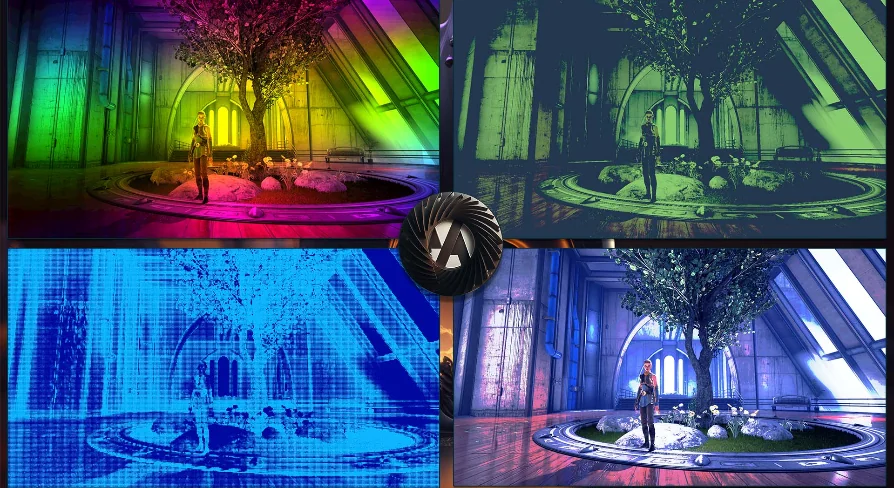
One practical note is important when planning around this resource: the assets shown in promotional images are for demonstration purposes only and are not included in the pack. That keeps expectations clear. The focus here is on the post-process materials and the Blueprint-based systems that help control them, not on the sample scene content used to show the effects in action.
This distinction also reinforces what the pack is best at. It is meant to be applied to existing scenes so their visual finish can be shaped, blended, and customized. Teams or solo creators who already have environments, characters, or cinematic setups in place can use it as the layer that refines the final presentation.
It is also part of The Art of Shader Megapack, which places it within a broader shader-focused collection while still functioning as a distinct set of film and special effects tools.
Where this pack fits best
Art of Shader - Film And Special Effects Fits projects that need control over the final image rather than projects looking for scene content. Its value comes from advanced Post Process Blendable Materials, Blueprint Actors for combining and grouping effects, and highly customizable settings that let creators tune the result to suit a particular mood. For artists and developers shaping cinematic visuals, it works best as a dedicated look-building layer applied to scenes that are ready for a stronger screen presence.
 Variety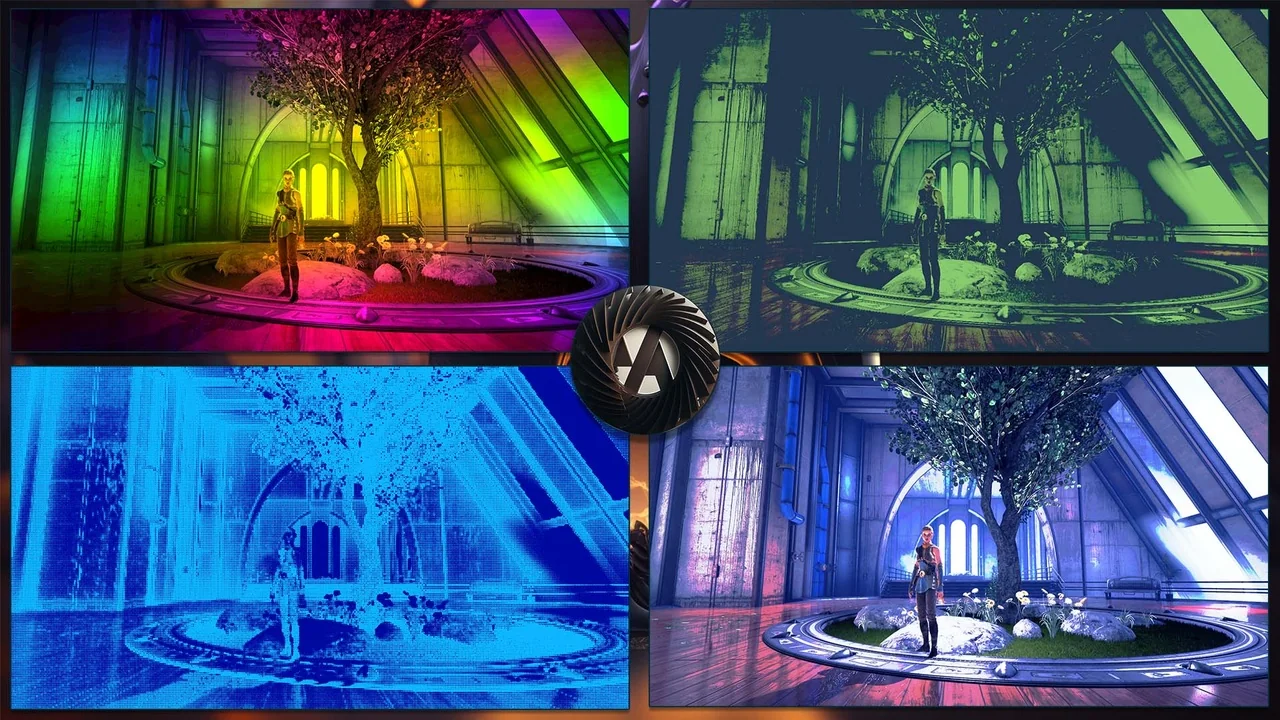
 Variety
 Shaders
 Variety