"6ac84fdb0bd06614"{"id":"28235","slug":"grid-material","title":"Grid material","category":"Variety","engine":"5.0+","assetVersion":"Engine version: 5.0+","engineVersion":"","tag":"Variety","accent":"blue","visual":"luts","summary":"Grid Material Preview Pack focuses on one job: helping game environments read clearly before final assets are in place. Its 14 stylized grid materials support lighting tests, color palette checks, scale validation, and faster iteration during blockouts and...","platform":"Unreal Engine","publishedAt":"2026-05-06T15:32:01.000Z","updatedAt":"2026-05-06T15:32:02.000Z","sourceNotes":[],"fileContents":[],"compatibility":["Unreal Engine","Engine version: 5.0+"],"featuredImage":{"alt":"Grid material","src":"https://3dcghub.com/wp-content/uploads/2026/05/6141b6da334e_291611a5-2bf7-4a6e-87aa-8d9a7a2945f2.webp"},"hasDownloadLink":true,"downloads":0,"terms":[{"taxonomy":"category","slug":"variety","name":"Variety"},{"taxonomy":"post_tag","slug":"environment","name":"Environment"},{"taxonomy":"post_tag","slug":"materials","name":"Materials"},{"taxonomy":"post_tag","slug":"textures","name":"Textures"}],"galleryImages":[{"src":"https://3dcghub.com/wp-content/uploads/2026/05/ed00bf054c4a_264ddc17-7d66-4019-96f8-f71ff680d6e9.webp","alt":"Grid material"},{"src":"https://3dcghub.com/wp-content/uploads/2026/05/668578d1d47a_82645cf0-193f-49ba-97d7-61f0e15e5c46.webp","alt":"Grid material"},{"src":"https://3dcghub.com/wp-content/uploads/2026/05/70928148ac50_76ba4735-2b5f-4f7a-bbe9-57c32ede5da5.webp","alt":"Grid material"},{"src":"https://3dcghub.com/wp-content/uploads/2026/05/3bcb539ea817_65ca666c-2dda-40e2-bdaa-bab49de423ed.webp","alt":"Grid material"},{"src":"https://3dcghub.com/wp-content/uploads/2026/05/586b2dcd0c6a_e4824907-7f17-4e2f-8167-955b35f8ba16.webp","alt":"Grid material"},{"src":"https://3dcghub.com/wp-content/uploads/2026/05/660c9e52a98e_24758a58-b683-4875-baf1-6f57b680ec6a.webp","alt":"Grid material"},{"src":"https://3dcghub.com/wp-content/uploads/2026/05/c717c82569fb_e6a030c3-0c6b-4388-bc3b-77bc2b120833.webp","alt":"Grid material"},{"src":"https://3dcghub.com/wp-content/uploads/2026/05/7b68eb285072_c699422f-74c0-4f3a-9b55-2972888802b3.webp","alt":"Grid material"},{"src":"https://3dcghub.com/wp-content/uploads/2026/05/2ecf8fe781ec_716db068-0305-487c-8bf1-a319225ce097.webp","alt":"Grid material"},{"src":"https://3dcghub.com/wp-content/uploads/2026/05/5f8c0895b443_ee9defb7-e79e-479c-8cec-b801449754d5.webp","alt":"Grid material"}],"accessPanel":{"kind":"resource","title":"Access this resource","eyebrow":"Free Download","message":"Log in or create a free account to start your download.","fileName":"Content.7z","safetyNote":"All resources are 100% manually reviewed to eliminate all risks.","actionLabel":"Download Free","resourceType":"Resource archive"},"contentHtml":"\u003cp\u003eEarly environment work often needs surfaces that are readable, clean, and fast to place across a scene. Grid Material Preview Pack targets that stage directly with stylized grid-based materials that help a level or environment communicate shape, scale, and atmosphere before final art is locked in.\u003c/p\u003e\u003cp\u003eRather than acting as finished environment art, the pack is aimed at preview work. It gives developers and artists a quick way to judge how a space feels, how lighting behaves across surfaces, and whether a color direction is working. That makes it useful when the goal is not detail for its own sake, but clarity during decision-making.\u003c/p\u003e\u003ch2\u003eGrid Material Preview Pack in blockouts and environment tests\u003c/h2\u003e\u003cp\u003eThe strongest use for this collection is in scenes that are still being evaluated. Prototyping and blockouts are both called out clearly, and that lines up with the type of materials included here: clean, stylized surfaces with a grid structure that makes forms easier to read. In a rough environment pass, that kind of visual treatment can do several jobs at once.\u003c/p\u003e\u003cp\u003eIt can help test lighting across floors, walls, and larger structures without the distraction of final textures. It can also help artists read scale more quickly, since a visible grid gives instant cues about proportion and spacing. Color palette testing is another practical use. If the scene is still searching for its overall look, applying controlled preview materials makes it easier to compare different directions and see which atmosphere is coming through.\u003c/p\u003e\u003cp\u003eThis is also where the pack’s focus on atmosphere matters. The materials are not just placeholders in the most basic sense. They are meant to help communicate the look and feel of a game environment while that environment is still being shaped. For teams or solo creators who move through many iterations, that can support faster changes and clearer reviews.\u003c/p\u003e\u003ch2\u003e14 grid materials with three resolution options\u003c/h2\u003e\u003cp\u003eThe pack includes 14 materials. That gives users a small but defined collection to work with when laying out scenes or checking variation across an environment. The emphasis stays on consistency and preview value rather than on a huge library of unrelated looks.\u003c/p\u003e\u003cp\u003eEach material is available in three resolutions:\u003c/p\u003e\u003cul\u003e\u003cli\u003e256×256\u003c/li\u003e\u003cli\u003e1024×1024\u003c/li\u003e\u003cli\u003e2048×2048\u003c/li\u003e\u003c/ul\u003e\u003cp\u003eThose options matter because preview work does not always need the same texture density. A lower resolution can be useful when performance is the priority during fast scene assembly or broader testing. Higher resolutions are available when a more detailed preview is needed, especially in scenes where material readability needs to hold up more closely. The pack presents those choices as a way to balance performance optimization with higher-detail previews across different project needs.\u003c/p\u003e\u003cp\u003eThat flexibility keeps the collection practical across more than one stage of environment work. A creator can stay in a lighter preview mode when moving quickly, then shift to a sharper presentation when the scene needs a more polished validation pass.\u003c/p\u003e\u003ch2\u003eLighting, color palettes, scale, and overall atmosphere\u003c/h2\u003e\u003cp\u003eThe pack is centered on a set of very specific checks that happen constantly in environment production. Lighting is one of them. Applying a controlled material set makes it easier to judge how bright or dark an area feels, where contrast is landing, and whether the scene’s forms are reading properly.\u003c/p\u003e\u003cp\u003eColor palettes are another major use. Because these materials provide a clean visual foundation, they can support broader art-direction decisions before final assets commit the scene to a more complex look. That is useful in environments where mood is still being tuned and where multiple palette directions might still be on the table.\u003c/p\u003e\u003cp\u003eScale testing is equally important. Grid-based surfaces naturally help with proportion checks, especially in level work where hallway widths, room sizes, platform spacing, and object placement all need to make sense visually. Even when geometry is simple, a readable grid can reveal whether an environment feels believable or whether dimensions need another pass.\u003c/p\u003e\u003cp\u003eThe last piece is overall atmosphere. That may sound broad, but in practice it comes from the combination of lighting, color, and spatial readability. This pack supports that stage by letting creators assess the scene’s mood without waiting for final materials. It gives the environment a more deliberate visual state during evaluation, which can lead to more confident creative decisions.\u003c/p\u003e\u003ch2\u003eWhere Grid Material Preview Pack fits best\u003c/h2\u003e\u003cp\u003eThis collection makes the most sense in workflows where environments are still evolving. Prototyping is an obvious match, especially when a team needs to establish a space quickly and check how it plays visually. Blockouts are another strong fit, since the pack can turn plain early geometry into something more readable without shifting focus away from layout and structure.\u003c/p\u003e\u003cp\u003eIt also suits artistic validation. When an environment artist wants to test whether a scene direction is holding together, these materials provide a clear base for that check. The same applies to creators who want better visual consistency during iteration. A set of coordinated preview materials can keep scenes from becoming visually messy while major decisions are still in progress.\u003c/p\u003e\u003cp\u003eFor developers and artists who regularly move between rough layouts, lighting passes, and art-direction tests, Grid Material Preview Pack is most useful as a working surface library. Its 14 materials and three resolution options give enough range for practical scene testing while keeping the focus on readable, stylized grid presentation.\u003c/p\u003e\n\n\u003ch2\u003eExplore Similar Assets\u003c/h2\u003e\n\u003cul\u003e\n\u003cli\u003e\u003ca href=\"https://3dcghub.com/advanced-road-materials/\" title=\"Advanced road materials\"\u003eAdvanced road materials\u003c/a\u003e\u003c/li\u003e\n\u003cli\u003e\u003ca href=\"https://3dcghub.com/galaxy-materials-skybox-update/\" title=\"Galaxy Materials (Skybox Update)\"\u003eGalaxy Materials (Skybox Update)\u003c/a\u003e\u003c/li\u003e\n\u003cli\u003e\u003ca href=\"https://3dcghub.com/master-materials-and-layer-system-for-daz3d-imports/\" title=\"Master Materials and Layer System for Daz3D Imports\"\u003eMaster Materials and Layer System for Daz3D Imports\u003c/a\u003e\u003c/li\u003e\n\u003cli\u003e\u003ca href=\"https://3dcghub.com/realistic-materials-vol-7-water-ice-25-materials/\" title=\"Realistic Materials Vol. 7 – Water \u0026amp;amp; Ice (25+ Materials)\"\u003eRealistic Materials Vol. 7 – Water \u0026amp; Ice (25+ Materials)\u003c/a\u003e\u003c/li\u003e\n\u003cli\u003e\u003ca href=\"https://3dcghub.com/tiles-vol-54-hand-painted-textures/\" title=\"Tiles Vol.54 – Hand Painted Textures\"\u003eTiles Vol.54 – Hand Painted Textures\u003c/a\u003e\u003c/li\u003e\n\u003c/ul\u003e","contentTextLength":5881,"navigation":{"current":1320,"total":3181,"previous":{"id":"28248","slug":"holidays-vol-1-halloween-decor-nanite-and-low-poly","title":"Holidays VOL.1 - Halloween Decor (Nanite and Low Poly)","category":"Holiday","platform":"Unreal Engine","updatedAt":"2026-05-06T15:39:52.000Z"},"next":{"id":"28222","slug":"musical-instruments-vol-1-nanite-and-low-poly","title":"Musical Instruments VOL.1 (Nanite and Low Poly)","category":"Musical","platform":"Unreal Engine","updatedAt":"2026-05-06T15:31:54.000Z"}},"relatedResources":[{"id":"13277","slug":"stylized-animated-lava-material-pack-85-pcs","title":"Stylized Animated Lava Material Pack 85 Pcs","category":"Variety","engine":"5.0+","assetVersion":"Engine version: 5.0+","engineVersion":"5.0","tag":"Variety","accent":"blue","visual":"luts","summary":"Discover a comprehensive collection of 85 high-quality, animated lava materials. These 4K tilable textures are perfect for environmental and character design in games and movies.","platform":"Unreal Engine","publishedAt":"2026-03-10T16:38:40.000Z","updatedAt":"2026-04-19T15:46:30.000Z","sourceNotes":[],"fileContents":[],"compatibility":["Unreal Engine","Engine version: 5.0+"],"featuredImage":{"alt":"Stylized Animated Lava Material Pack 85 Pcs","src":"https://3dcghub.com/wp-content/uploads/2026/03/e021cdf5-7000-4c8d-befc-b88f953326ae.webp"},"hasDownloadLink":true,"downloads":0},{"id":"13116","slug":"extile-plus-ultimate-non-tiling-material-toolkit-for-unreal-engine-environments","title":"EXTILE PLUS -Ultimate Non-Tiling Material Toolkit for Unreal Engine Environments","category":"Variety","engine":"5.0+","assetVersion":"Engine version: 5.0+","engineVersion":"4.24","tag":"Variety","accent":"blue","visual":"luts","summary":"Eliminate repetitive tiling artifacts in your Unreal Engine projects with EXTILE PLUS. This professional toolkit offers a modular, layered system for creating high-quality, non-destructive environments and props.","platform":"Unreal Engine","publishedAt":"2026-03-10T15:51:00.000Z","updatedAt":"2026-04-19T15:46:32.000Z","sourceNotes":[],"fileContents":[],"compatibility":["Unreal Engine","Engine version: 5.0+"],"featuredImage":{"alt":"EXTILE PLUS -Ultimate Non-Tiling Material Toolkit for Unreal Engine Environments","src":"https://3dcghub.com/wp-content/uploads/2026/03/4ca170a6-3cb8-420d-9800-96f78664f282.webp"},"hasDownloadLink":true,"downloads":0},{"id":"13212","slug":"preload-materials","title":"Preload materials","category":"Variety","engine":"5.1+","assetVersion":"Engine version: 5.1+","engineVersion":"5.1","tag":"Variety","accent":"blue","visual":"luts","summary":"Enhance your project's visual feedback with Preload materials. This resource uses RGBA channel textures to offer infinite combinations for meshes, planes, and interactive widgets.","platform":"Unreal Engine","publishedAt":"2026-03-10T16:31:25.000Z","updatedAt":"2026-04-19T15:46:30.000Z","sourceNotes":[],"fileContents":[],"compatibility":["Unreal Engine","Engine version: 5.1+"],"featuredImage":{"alt":"Preload materials","src":"https://3dcghub.com/wp-content/uploads/2026/03/234a073c-165b-4f01-bbdb-7ff37c112468.webp"},"hasDownloadLink":true,"downloads":0}]}
Variety
Grid material
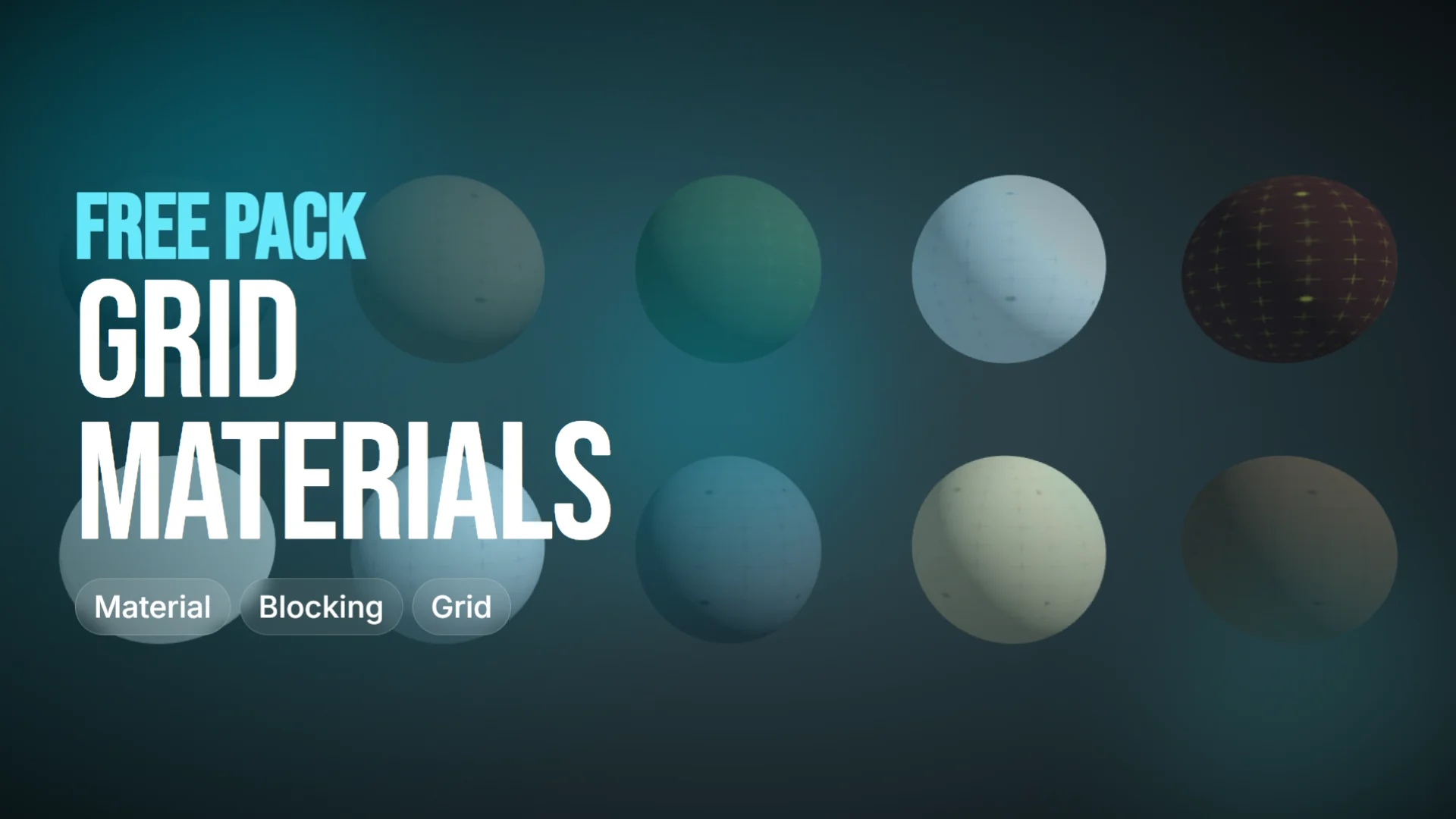
Grid Material Preview Pack focuses on one job: helping game environments read clearly before final assets are in place. Its 14 stylized grid materials support lighting tests, color palette checks, scale validation, and faster iteration during blockouts and...
Category:Unreal Engine, VarietyPlatform: Unreal EngineEngine version: 5.0+Published: May 6, 2026
Variety
Resource overview
Early environment work often needs surfaces that are readable, clean, and fast to place across a scene. Grid Material Preview Pack targets that stage directly with stylized grid-based materials that help a level or environment communicate shape, scale, and atmosphere before final art is locked in.
Rather than acting as finished environment art, the pack is aimed at preview work. It gives developers and artists a quick way to judge how a space feels, how lighting behaves across surfaces, and whether a color direction is working. That makes it useful when the goal is not detail for its own sake, but clarity during decision-making.
Grid Material Preview Pack in blockouts and environment tests
The strongest use for this collection is in scenes that are still being evaluated. Prototyping and blockouts are both called out clearly, and that lines up with the type of materials included here: clean, stylized surfaces with a grid structure that makes forms easier to read. In a rough environment pass, that kind of visual treatment can do several jobs at once.
It can help test lighting across floors, walls, and larger structures without the distraction of final textures. It can also help artists read scale more quickly, since a visible grid gives instant cues about proportion and spacing. Color palette testing is another practical use. If the scene is still searching for its overall look, applying controlled preview materials makes it easier to compare different directions and see which atmosphere is coming through.
This is also where the pack’s focus on atmosphere matters. The materials are not just placeholders in the most basic sense. They are meant to help communicate the look and feel of a game environment while that environment is still being shaped. For teams or solo creators who move through many iterations, that can support faster changes and clearer reviews.
14 grid materials with three resolution options
The pack includes 14 materials. That gives users a small but defined collection to work with when laying out scenes or checking variation across an environment. The emphasis stays on consistency and preview value rather than on a huge library of unrelated looks.
Each material is available in three resolutions:
256×256
1024×1024
2048×2048
Those options matter because preview work does not always need the same texture density. A lower resolution can be useful when performance is the priority during fast scene assembly or broader testing. Higher resolutions are available when a more detailed preview is needed, especially in scenes where material readability needs to hold up more closely. The pack presents those choices as a way to balance performance optimization with higher-detail previews across different project needs.
That flexibility keeps the collection practical across more than one stage of environment work. A creator can stay in a lighter preview mode when moving quickly, then shift to a sharper presentation when the scene needs a more polished validation pass.
Lighting, color palettes, scale, and overall atmosphere
The pack is centered on a set of very specific checks that happen constantly in environment production. Lighting is one of them. Applying a controlled material set makes it easier to judge how bright or dark an area feels, where contrast is landing, and whether the scene’s forms are reading properly.
Color palettes are another major use. Because these materials provide a clean visual foundation, they can support broader art-direction decisions before final assets commit the scene to a more complex look. That is useful in environments where mood is still being tuned and where multiple palette directions might still be on the table.
Scale testing is equally important. Grid-based surfaces naturally help with proportion checks, especially in level work where hallway widths, room sizes, platform spacing, and object placement all need to make sense visually. Even when geometry is simple, a readable grid can reveal whether an environment feels believable or whether dimensions need another pass.
The last piece is overall atmosphere. That may sound broad, but in practice it comes from the combination of lighting, color, and spatial readability. This pack supports that stage by letting creators assess the scene’s mood without waiting for final materials. It gives the environment a more deliberate visual state during evaluation, which can lead to more confident creative decisions.
Where Grid Material Preview Pack fits best
This collection makes the most sense in workflows where environments are still evolving. Prototyping is an obvious match, especially when a team needs to establish a space quickly and check how it plays visually. Blockouts are another strong fit, since the pack can turn plain early geometry into something more readable without shifting focus away from layout and structure.
It also suits artistic validation. When an environment artist wants to test whether a scene direction is holding together, these materials provide a clear base for that check. The same applies to creators who want better visual consistency during iteration. A set of coordinated preview materials can keep scenes from becoming visually messy while major decisions are still in progress.
For developers and artists who regularly move between rough layouts, lighting passes, and art-direction tests, Grid Material Preview Pack is most useful as a working surface library. Its 14 materials and three resolution options give enough range for practical scene testing while keeping the focus on readable, stylized grid presentation.
 Variety
 Variety
 Variety
 Variety