"fa182e0cd0a6ea73"{"id":"1000573","slug":"cmaa2-anti-aliasing","title":"CMAA2 (Anti-Aliasing)","category":"Engine Tools","engine":"5.6","assetVersion":"Asset Version: 1.0","engineVersion":"Engine Version: 5.6","tag":"Engine Tools","accent":"blue","visual":"mech","summary":"CMAA2 by Intel is a lightweight, single-frame anti-aliasing solution for Unreal Engine, prioritizing image sharpness without ghosting across DX11, DX12, and Vul","platform":"Unreal Engine","publishedAt":"2026-07-16T22:23:38.784Z","updatedAt":"2026-07-16T22:23:38.784Z","sourceNotes":[],"fileContents":[],"compatibility":["Unreal Engine","Asset Version: 1.0","Engine Version: 5.6"],"featuredImage":{"alt":"CMAA2 (Anti-Aliasing)","src":"/wp-content/uploads/published/2026/07/51b55f8c3ce5-f1b54b67-88d7-4858-bd0d-690c2124dc9d-80f511f8e4.webp"},"hasDownloadLink":true,"downloads":0,"terms":[{"taxonomy":"category","slug":"engine-tools-tools-and-plugins","name":"Engine Tools"}],"galleryImages":[{"src":"/wp-content/uploads/published/2026/07/e2e509cf86fb-fbd6681b-c965-41f5-a526-49838e644232-36fa89fe7a.webp","alt":"CMAA2 (Anti-Aliasing)"},{"src":"/wp-content/uploads/published/2026/07/8e696cab3f34-6ec01625-9a88-465f-a4cc-b4994242ba9f-b2de3c8f57.webp","alt":"CMAA2 (Anti-Aliasing)"},{"src":"/wp-content/uploads/published/2026/07/cc01e4674519-3be74e59-2a86-48cc-8023-992a089ec7f4-7733d06b28.webp","alt":"CMAA2 (Anti-Aliasing)"},{"src":"/wp-content/uploads/published/2026/07/63f2c2655103-82b44639-e273-4223-912b-1810be5dacdf-8d499ee6c8.webp","alt":"CMAA2 (Anti-Aliasing)"},{"src":"/wp-content/uploads/published/2026/07/be501c0919eb-4cf060ab-5f16-4712-b601-89acf79c8f2e-4cdf556ac7.webp","alt":"CMAA2 (Anti-Aliasing)"}],"accessPanel":{"kind":"resource","title":"Download this resource","eyebrow":"Free Download","message":"Log in or create a free account to start your download.","fileName":"Plugins.7z","safetyNote":"Resources are manually reviewed before listing to improve quality and reduce obvious risks.","actionLabel":"Download Free","resourceType":"Resource archive"},"contentHtml":"\u003cp\u003eScenes that rely on crisp edges and high-frequency texture detail often struggle with temporal anti-aliasing artifacts. When a camera pans across dense foliage or highly structured architecture, traditional temporal solutions can introduce pixel jittering or ghosting trails that linger behind moving objects. CMAA2 (Anti-Aliasing) provides a direct alternative for projects where these temporal artifacts degrade the visual fidelity of the environment. Originally developed by Intel, this solution is built to provide solid anti-aliasing results while aggressively retaining the original sharpness of the image at a minimal execution cost.\u003c/p\u003e\u003ch2\u003eSingle-Frame Processing and Visual Style\u003c/h2\u003e\u003cp\u003eThe core distinction of CMAA2 lies in its operational scope. The algorithm works strictly on the current frame, meaning it does not rely on historical frame data to reconstruct the image. This architectural choice immediately resolves two common issues found in temporal anti-aliasing implementations: pixel jittering and ghosting. Because there is no reliance on previous frames, moving objects do not leave trailing afterimages, and the final rendered frame remains stable during rapid camera translations.\u003c/p\u003e\u003cp\u003eThe resulting visual style is described as sharp and reminiscent of an old-school look, sharing visual similarities with Subpixel Morphological Anti-Aliasing (SMAA). For art directors and technical artists, this means the final output retains the distinct faceted edges and texture clarity of the raw render rather than softening the image to achieve a clean boundary. To further push this clarity, an extra sharpness mode is available for projects that demand an even more defined visual profile.\u003c/p\u003e\u003ch2\u003eEngine Integration and Compatibility\u003c/h2\u003e\u003ch3\u003eIntegrating CMAA2 Across Renderers and APIs\u003c/h3\u003e\u003cp\u003eTechnical implementation of CMAA2 spans multiple rendering pipelines. The solution supports both Deferred and Forward renderers, allowing teams to integrate it regardless of their chosen lighting and shading architecture. This flexibility extends to the graphics APIs the system recognizes. Projects running on DX11, DX12, or Vulkan can implement the anti-aliasing pass without needing API-specific workarounds.\u003c/p\u003e\u003cp\u003eCompatibility covers Unreal Engine versions 4.27 through the 5.3 to 5.8 range. Engine integration is further streamlined by the inclusion of quality presets. Technical artists can map these presets to different hardware tiers or graphical settings menus, scaling the execution of the anti-aliasing pass to match the performance budget of the target machine. The system is classified as lightweight, keeping the computational footprint small enough for demanding real-time applications.\u003c/p\u003e\u003ch2\u003ePerformance Footprint and Specialized Displays\u003c/h2\u003e\u003cp\u003eDespite operating strictly on a single frame without temporal accumulation, CMAA2 maintains a performance profile comparable to native Temporal Anti-Aliasing (TAA). The execution cost is deliberately kept small, making it a viable candidate for projects running on tight frame budgets. This efficiency is particularly relevant for specialized rendering targets.\u003c/p\u003e\u003cp\u003eThe solution natively accommodates split-screen rendering scenarios, where the engine draws multiple viewpoints simultaneously within a single frame. Split-screen implementations often compound the overhead of post-processing passes, making the lightweight nature of CMAA2 a practical fit for local multiplayer titles. The system also explicitly supports PC-based virtual reality rendering. In VR applications, maintaining high frame rates is critical to player comfort, and avoiding temporal ghosting is necessary to prevent visual nausea during head movement.\u003c/p\u003e\u003ch2\u003eLimitations and Pipeline Constraints\u003c/h2\u003e\u003cp\u003eNo single anti-aliasing method suits every project. Understanding the specific constraints of CMAA2 is necessary before integrating it into a rendering pipeline. Because the algorithm operates without temporal history, it does not smooth out undersampled effects. Noise generated by systems such as Global Illumination or Reflections will pass through the anti-aliasing pass without the temporal accumulation needed to soften or resolve that noise. Teams utilizing noisy tracing effects must rely on separate denoising passes rather than the anti-aliasing stage to clean up those specific artifacts.\u003c/p\u003e\u003ch3\u003eSubpixel Shimmer and Screen Percentage\u003c/h3\u003e\u003cp\u003eA second limitation involves highly detailed geometry. The single-frame approach means that small subpixel details can still create some shimmer during movement. This behavior is particularly noticeable in Nanite meshes or dense foliage, where minute geometric or structural changes shift rapidly from frame to frame. The lack of temporal stabilization allows this shimmer to remain visible.\u003c/p\u003e\u003cp\u003eFinally, the system is not designed to be upsampled from a Screen Percentage lower than 100%. Unlike temporal solutions that can reconstruct detail from lower internal resolutions, CMAA2 expects a full-resolution input to function correctly. Attempting to use it as part of an upscaling pipeline will not yield the intended results, meaning teams must hit their target resolution natively or pair CMAA2 with a dedicated upscaling technology suited to sub-100% screen percentage inputs.\u003c/p\u003e\n\n\u003ch2\u003eExplore Similar Assets\u003c/h2\u003e\n\u003cul\u003e\n\u003cli\u003e\u003ca href=\"https://3dcghub.com/quick-merge-skeletal-mesh/\" title=\"Quick Merge Skeletal Mesh\"\u003eQuick Merge Skeletal Mesh\u003c/a\u003e\u003c/li\u003e\n\u003cli\u003e\u003ca href=\"https://3dcghub.com/json4ue-json-for-ue/\" title=\"JSON4UE(JSON For UE)\"\u003eJSON4UE(JSON For UE)\u003c/a\u003e\u003c/li\u003e\n\u003cli\u003e\u003ca href=\"https://3dcghub.com/advanced-control-flow/\" title=\"Advanced Control Flow\"\u003eAdvanced Control Flow\u003c/a\u003e\u003c/li\u003e\n\u003cli\u003e\u003ca href=\"https://3dcghub.com/r-tune-vehicle-physics-2-0-vehicle-system-for-games-animation/\" title=\"R-Tune Vehicle Physics 2.0 - Vehicle System for Games \u0026amp; Animation\"\u003eR-Tune Vehicle Physics 2.0 - Vehicle System for Games \u0026amp; Animation\u003c/a\u003e\u003c/li\u003e\n\u003cli\u003e\u003ca href=\"https://3dcghub.com/overcrowd-massive-crowd-simulation/\" title=\"OverCrowd - Massive Crowd Simulation\"\u003eOverCrowd - Massive Crowd Simulation\u003c/a\u003e\u003c/li\u003e\n\u003c/ul\u003e","contentTextLength":5391,"navigation":{"current":1363,"total":3789,"previous":{"id":"1000574","slug":"combat-drone","title":"Combat Drone","category":"Gameplay Features","platform":"Unreal Engine","updatedAt":"2026-07-16T22:28:44.557Z"},"next":{"id":"1000572","slug":"cloud-forge-vdb-cloud-pack-volume-2","title":"Cloud Forge - VDB Cloud Pack Volume 2","category":"Procedural Systems","platform":"Unreal Engine","updatedAt":"2026-07-16T22:15:54.739Z"}},"relatedResources":[{"id":"1000758","slug":"voxy-a-voxel-plugin","title":"Voxy - A Voxel Plugin","category":"Engine Tools","engine":"5.6","assetVersion":"Asset Version: 0.9.2","engineVersion":"Engine Version: 5.6","tag":"Engine Tools","accent":"blue","visual":"mech","summary":"Voxy is an Unreal Engine voxel toolkit for building characters and environments using brushes, mesh and image voxelization, frame animation, and Nanite conversi","platform":"Unreal Engine","publishedAt":"2026-07-27T15:51:03.349Z","updatedAt":"2026-07-27T15:51:03.349Z","sourceNotes":[],"fileContents":[],"compatibility":["Unreal Engine","Asset Version: 0.9.2","Engine Version: 5.6"],"featuredImage":{"alt":"Voxy - A Voxel Plugin","src":"/wp-content/uploads/published/2026/07/b33530580b25-5d0478a3-464e-4b26-aaaa-a74f31ee6e17-230df632d6.webp"},"hasDownloadLink":true,"downloads":0},{"id":"1000305","slug":"json4ue-json-for-ue","title":"JSON4UE(JSON For UE)","category":"Engine Tools","engine":"5.6 - 5.7","assetVersion":"Asset Version: 1.2.4","engineVersion":"Engine Version: 5.6 - 5.7","tag":"Engine Tools","accent":"blue","visual":"mech","summary":"A lightweight, dependency-free UE4 plugin that provides 18 Blueprint nodes and 4 C++ classes for fast JSON string and file parsing across all platforms.","platform":"Unreal Engine","publishedAt":"2026-07-04T09:12:37.041Z","updatedAt":"2026-07-04T09:12:37.041Z","sourceNotes":[],"fileContents":[],"compatibility":["Unreal Engine","Asset Version: 1.2.4","Engine Version: 5.6 - 5.7"],"featuredImage":{"alt":"JSON4UE(JSON For UE)","src":"/wp-content/uploads/published/2026/07/a8b13b531e8c-f664d4e4-64b1-47da-86cc-351d892f1d6e-ca45898d7c.webp"},"hasDownloadLink":true,"downloads":1},{"id":"1000857","slug":"neo-kinect","title":"Neo Kinect","category":"Engine Tools","engine":"5.6","assetVersion":"Asset Version: 1.2","engineVersion":"Engine Version: 5.6","tag":"Engine Tools","accent":"blue","visual":"mech","summary":"Neo Kinect adds Kinect v2 support to Unreal Engine with commented Blueprint nodes, C++ methods, DX12 compatibility, and six-user tracking for UE4 and UE5.","platform":"Unreal Engine","publishedAt":"2026-08-05T06:13:01.313Z","updatedAt":"2026-08-05T06:13:01.313Z","sourceNotes":[],"fileContents":[],"compatibility":["Unreal Engine","Asset Version: 1.2","Engine Version: 5.6"],"featuredImage":{"alt":"Neo Kinect","src":"/wp-content/uploads/published/2026/08/4fa1c9b9d816-550a1299-dd6b-4dc9-a66a-32e8bcb2c0a4-7b5dfb9c5f.webp"},"hasDownloadLink":true,"downloads":0}]}
Engine Tools
CMAA2 (Anti-Aliasing)
CMAA2 by Intel is a lightweight, single-frame anti-aliasing solution for Unreal Engine, prioritizing image sharpness without ghosting across DX11, DX12, and Vul
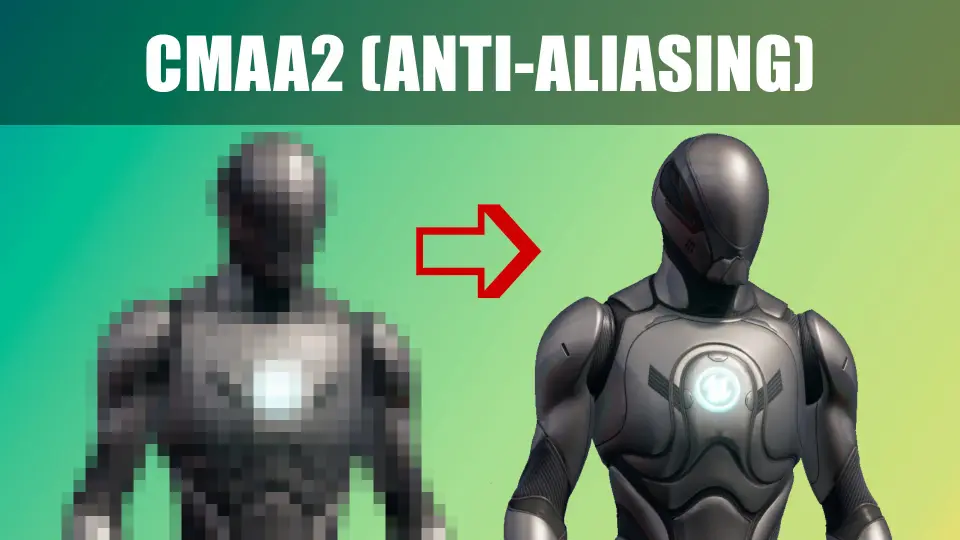
Scenes that rely on crisp edges and high-frequency texture detail often struggle with temporal anti-aliasing artifacts. When a camera pans across dense foliage or highly structured architecture, traditional temporal solutions can introduce pixel jittering or ghosting trails that linger behind moving objects. CMAA2 (Anti-Aliasing) provides a direct alternative for projects where these temporal artifacts degrade the visual fidelity of the environment. Originally developed by Intel, this solution is built to provide solid anti-aliasing results while aggressively retaining the original sharpness of the image at a minimal execution cost.
Single-Frame Processing and Visual Style
The core distinction of CMAA2 lies in its operational scope. The algorithm works strictly on the current frame, meaning it does not rely on historical frame data to reconstruct the image. This architectural choice immediately resolves two common issues found in temporal anti-aliasing implementations: pixel jittering and ghosting. Because there is no reliance on previous frames, moving objects do not leave trailing afterimages, and the final rendered frame remains stable during rapid camera translations.
The resulting visual style is described as sharp and reminiscent of an old-school look, sharing visual similarities with Subpixel Morphological Anti-Aliasing (SMAA). For art directors and technical artists, this means the final output retains the distinct faceted edges and texture clarity of the raw render rather than softening the image to achieve a clean boundary. To further push this clarity, an extra sharpness mode is available for projects that demand an even more defined visual profile.
Engine Integration and Compatibility
Integrating CMAA2 Across Renderers and APIs
Technical implementation of CMAA2 spans multiple rendering pipelines. The solution supports both Deferred and Forward renderers, allowing teams to integrate it regardless of their chosen lighting and shading architecture. This flexibility extends to the graphics APIs the system recognizes. Projects running on DX11, DX12, or Vulkan can implement the anti-aliasing pass without needing API-specific workarounds.
Compatibility covers Unreal Engine versions 4.27 through the 5.3 to 5.8 range. Engine integration is further streamlined by the inclusion of quality presets. Technical artists can map these presets to different hardware tiers or graphical settings menus, scaling the execution of the anti-aliasing pass to match the performance budget of the target machine. The system is classified as lightweight, keeping the computational footprint small enough for demanding real-time applications.
Performance Footprint and Specialized Displays
Despite operating strictly on a single frame without temporal accumulation, CMAA2 maintains a performance profile comparable to native Temporal Anti-Aliasing (TAA). The execution cost is deliberately kept small, making it a viable candidate for projects running on tight frame budgets. This efficiency is particularly relevant for specialized rendering targets.
The solution natively accommodates split-screen rendering scenarios, where the engine draws multiple viewpoints simultaneously within a single frame. Split-screen implementations often compound the overhead of post-processing passes, making the lightweight nature of CMAA2 a practical fit for local multiplayer titles. The system also explicitly supports PC-based virtual reality rendering. In VR applications, maintaining high frame rates is critical to player comfort, and avoiding temporal ghosting is necessary to prevent visual nausea during head movement.
Limitations and Pipeline Constraints
No single anti-aliasing method suits every project. Understanding the specific constraints of CMAA2 is necessary before integrating it into a rendering pipeline. Because the algorithm operates without temporal history, it does not smooth out undersampled effects. Noise generated by systems such as Global Illumination or Reflections will pass through the anti-aliasing pass without the temporal accumulation needed to soften or resolve that noise. Teams utilizing noisy tracing effects must rely on separate denoising passes rather than the anti-aliasing stage to clean up those specific artifacts.
Subpixel Shimmer and Screen Percentage
A second limitation involves highly detailed geometry. The single-frame approach means that small subpixel details can still create some shimmer during movement. This behavior is particularly noticeable in Nanite meshes or dense foliage, where minute geometric or structural changes shift rapidly from frame to frame. The lack of temporal stabilization allows this shimmer to remain visible.
Finally, the system is not designed to be upsampled from a Screen Percentage lower than 100%. Unlike temporal solutions that can reconstruct detail from lower internal resolutions, CMAA2 expects a full-resolution input to function correctly. Attempting to use it as part of an upscaling pipeline will not yield the intended results, meaning teams must hit their target resolution natively or pair CMAA2 with a dedicated upscaling technology suited to sub-100% screen percentage inputs.
 Engine Tools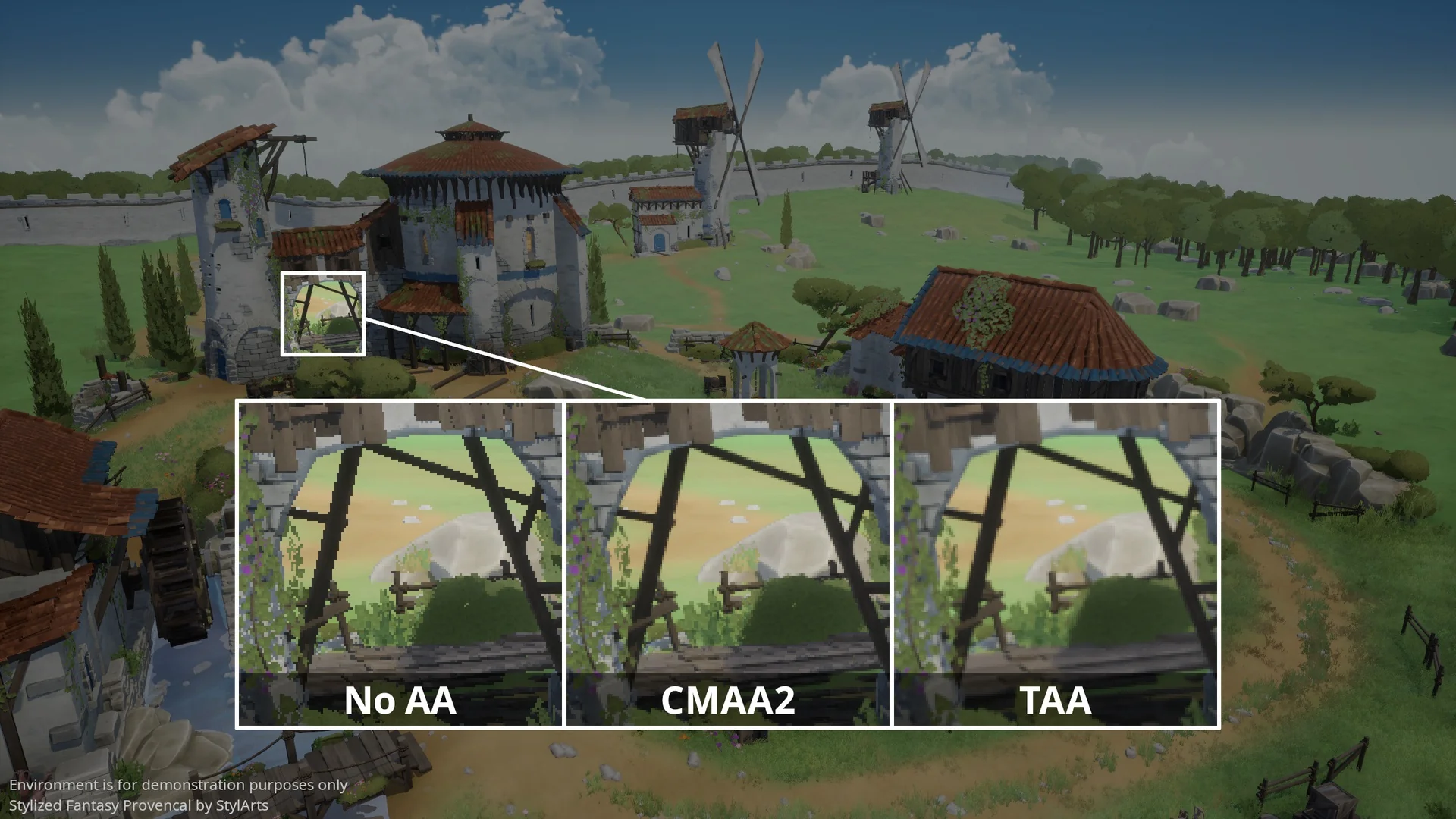
 Engine Tools
 Engine Tools
 Engine Tools